
I’ve been using the internet for over 30 years – using “gopher” before web browsers were invented, and I assumed I knew how web pages worked. I’ve had a steep learning curve to get a simple html application talking which talks to a back end server, to work. I also want to invoke the back end service from a REST API request. I thought this should not take me more than an hour or two. Ha Ha – I never learn that these simple things, always takes longer than you thought.
- The easy bit – the anchor tag
- The almost easy bit – using a form
- Using forms – still pretty easy
- I want the back-end to update my front end page – this suddenly gets hard!
- My back-end application wants to report a parameter error to the requester – how do I do it?
- The magic to trap the response from the back-end – the advanced topic
If there is an easier way to update my page from the back-end, please tell me.
My expectations
Having worked with CICS BMS maps, ISPF panels and IOS3270, I was expecting the application model where the layout and the data are separate. You send down the boiler plate layout of the data, and then send down the data in the format of label = data. The display manager then merges the data into the correct field in the boiler plate. This allows you to use different boiler plates, without changing your application, and helps preserver data isolation.
If seems that the HTML model is that you build up the data stream as you go along, (merging boiler plate and data at generation time) so you use
print('<Label for="name">Name<label>')
print('<input type="readonly" value="%s">' %"Colin")
print('<p>....')
to put “Colin” in the field. At a naive level it looks very simple, but it merges display with data, and makes it harder to maintain and update.
What I wanted
I want the front end display to look like
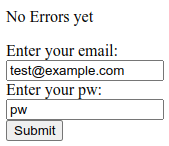
to display (after the submit button is pressed)
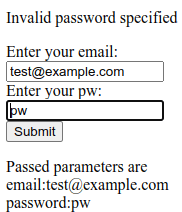
Some useful information.
When you give a URL such as http://mysite/mypage?parm1=abc&parm2=zyz&parm3=99, the page or program can process the keyword=value pairs after the ? and delimited by &. You can write a page and pass these parameters, so the page can display these values. This can provide the application model of “here is the boilerplate of the layout, and here are the data to go in the fields”.
HTML options
The easy bit – the anchor tag
Within an HTML page you can have code like <a href=”colin.html”>colins link</a. This displays the text colins_link, and if you click on the text it goes off and displays page “colin.html” from the same directory as the current page. This tends to be used when displaying information, with no input from the end user.
The almost easy bit – using a form
If you want the end user to provide information, you can use the <input>…</input> tag for example
<input id=email name="email" value="test@example.com">
where
- id can be used to reference this field from a script within the page
- name – is passed with the data to the back end server
- value – you can preset a value.
You typically have a “submit” button or similar to send the data in the input fields to the next stage.
Typically you put these input fields in a form. You can set up event handlers, so when the user presses the “submit” button, scripts are run in the page to validate data before it is sent off.
Using forms – still pretty easy
Using forms is more complex than a simple anchor page and link to another page.
A form can have
- action=url. The request is sent to the given url. This may just be another html page, or it may be a script which processes data in the request.
- method=post|method=get. Method=post is used for transactional type work (make a database update) . Method=get tends to be used for non transactional request, (no changes made in the backend).
method=get
With method=get, the input data is appended to the action URL ,so a request may be colin.html?userid=colin&password=passw0rd. This can be seen in URLs.
method=post
With method=post, the data is read from stdin in the backend application. It is not in the URL.
In the HTTP section of a wireshark trace,
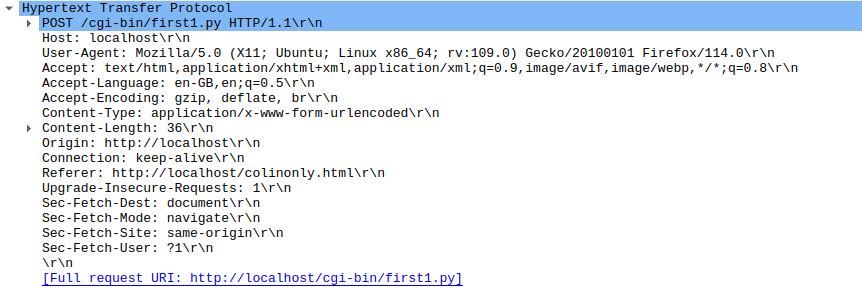
and followed by
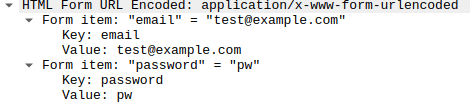
I want the back-end to update my front end page – this suddenly gets hard!
My application scenario is
The end user is presented with an HTML page, the data is sent to the back-end server. Some validation is done, and a response is sent back to the requester.
The back end can return
- Headers which say redirect (status 303); display a specified URL, and pass it some parameters. The web browser can then go and get the page , display it, and used the passed field values to update the display.
- Display HTML. You could build the html, and include any variable data as you build it, and send the whole stream of data.
- Other data, such as a JSON object, eg {“rc”:”ok”,”field”:”password”,”msg”:”this is the problem”}
- A file or other data to download – rather than display
- You can also return headers giving security information or meta data about the payload.
My back-end application wants to report a parameter error to the requester – how do I do it?
I want to report an error the the end user, and have the cursor in the field with the problem. The front end and back end are isolated from each other which makes this hard.
I cannot just return some html data, as it will replace what is currently displayed. I know the link which called my back end (the “referer” header), but do not know the field names, or what other processing was done before my back end was called, I cannot just say redisplay it.
The only way I could find was to pass back some JSON data, for example in the format {“rc”:”error”,”field”:”password”,”msg”:”there is the problem”} and have some complex logic in the front end to process this.
I’ll skip over some magic, for a moment, for getting the data back to the front end page. The request gets sent, and the front page waits for the response. The front page extracts the JSON response and processes it…
- Check the status code is OK, and that there were no errors reported by the back-end (for example file not found, or logic problem in the script).
- Update the error message field
- The returned JSON has a field “msg:…..” which can be referenced as json.msg .
- Have a field in the front end page like <p id=”errorMessage“>No error messages yet</p> .
- Update the error message field (with id “errormessage”) in the document from a field in the JSON using JavaScript document.getElementById(‘errorMessage‘).innerHtml = json.msg. The id=.. field links these up.
- The data passed to the back end was a series of ?fieldname1=value1&fieldname2=value2&fieldnam3=value3... . The back-end puts the field-name in error into the JSON “field” attributes. The script in the front page:
- Extracts the “field:…” from the JSON.
- Gives focus to the field name taken from the JSON.field and uses document.getElementById(json.field).focus(); to give the field the focus, and so position the cursor in the field.
The magic to trap the response from the back-end – the advanced topic.
The only way I found find of capturing the json data passed back from my server application was some complex coding.
Within the code below is the use of Promises, a way of handling asynchronous requests. Rather than a deeply nested set of if-then-else, it uses a sequence of .then(itworks_callback, error_callback). The returned value of the itworks_callback is passed to the next .then(…,…).
We then have
fetch(...)
.then((aobject) => {... return(aobject.json) } )
.then((b) => {... return("a returned value"})
The .then((aobject) => ... is passed an object (aobject) which is passed into an inline function which extracts the json payload and passes it to the next .then statement. In the second “.then” , “b” gets the aobject.json data.
Within the <body..</body> of my html page I had displayable fields
<p id="errorField">No Errors yet</p>

<form id="target"
      action="cgi-bin/first.py"
      enctype="multipart/form-data"  >
  <label for="email">Enter your email: </label>
  <input id=email
      name="email"
      value="test@example.com"
  >
  <label for="password">Enter your pw: </label>
  <input id=password name="password" value="pw">
  <input type="submit">
  <input type="text" onblur = "check(this)" >
</form>
<p id="passed"></p>
Within the <body>…</body> I had
<script>
  document.forms["target"].addEventListener('submit', (event) => {
  event.preventDefault();
  fetch("cgi-bin/first.py", {
      method: 'POST',
      body: new URLSearchParams(new FormData(event.target)) // event.target is the form
  }).then((response) => {
      if (!response.ok) {
        throw new Error(`HTTP error! Status: ${response.status}`);
      }
      // for (var pair of response.headers.entries()) {
      //    console.log("31:"+ pair[0]+ ': '+ pair[1]);
      // }
      return (response.json();
    })
    .then(function(result)
    {
      // set the focus to the value returned
      document.getElementById(result.field).focus();
      // update the fields on the page
      document.getElementById('errorField').innerHTML = result.msg
      document.getElementById('passed').innerHTML = result.passed;

  }).catch((error) => {
       errorField.innerHTML = error;
      console.log(error);// TODO handle error
      return(error);
  });
});
</script>
The script does
- document.forms[“target”].addEventListener(‘submit’, (event) => set up a handler for the form with id “target”, for when the form is submitted, and set the variable “event” to the parameter object.
- event.preventDefault(); Do not do the default – I want to process it.
- Send the data off to the url cgi-bin/first.py and wait for the response
- fetch(“cgi-bin/first.py”, {
- method: ‘POST’,
- body: new URLSearchParams(new FormData(event.target)) // event.target is the form
- }).
- then((response) => { the result of the fetch is passed to an inline function, with object called response.
- Handle any errors
- if (!response.ok) {
- throw new Error(`HTTP error! Status: ${response.status}`);
- }
- Display the header records from the response … commented out
- // for (var pair of response.headers.entries()) {
- // console.log(“31:”+ pair[0]+ ‘: ‘+ pair[1]);
- // }
- return (response.json(); Pass on the json payload to the next .then statement
- })
- .then(function(result) This is passed the json data and stored in result.
- {
- // set the focus to the value returned
- document.getElementById(result.field).focus(); Extract the field name from the json and set the focus to the field
- // update the fields on the page
- document.getElementById(‘errorField’).innerHTML = result.msg This is the error message field.
- document.getElementById(‘passed’).innerHTML = result.passed; And provide some feedback information , which is the parameters passed to the backend.
- }).catch((error) => {
- errorField.innerHTML = error;
- console.log(error);// TODO handle error
- return(error);
- });
- });
Phew! What a lot you need to understand to just pass back the return code, and error message! I could not find an easier method. It may exist… but it is not well documented.
 ColinPaice