Follow the instructions to install Java on z/OS and screw up production.

I downloaded an update to Java on z/OS, and noticed that the instructions would cause problems!

Java is in a directory like

/usr/lpp/java/J7.1        
/usr/lpp/java/J7.1_64     
/usr/lpp/java/J8.0        
/usr/lpp/java/J8.0_64     

I have Java V7 and V8 and 31 and 64 versions

The installation instruction say

cd to /usr/lpp/java and unpax the uploaded SDK8_64bit_SR8_FP6.PAX.Z file.

This will unpack the file into

/usr/lpp/java/J8.0_64

Overwriting your production system with the new version, so it goes live without any testing, and for a few minutes you have a mixture of files from different fixpacks!

What I would suggest is

  • Unzip the file gzip -l -d ibm-semeru-open-jre_x64_linux_11.0.20_8_openj9-0.40.0.tar.gz this upacks the file into a .tar – and delete the .gz
  • FTP it to z/OS in binary
  • Create a ZFS for the new Java.
  • mkdir  /usr/lpp/java/new
  • mount the ZFS in /usr/lpp/java/new
  • cd /usr/lpp/java/new
  • pax -ppx -rvzf SDK8_64bit_SR8_FP6.PAX.Z

This will create files under

/usr/lpp/java/new/J8.0_64

Test this by setting

export JAVA_HOME="/usr/lpp/java/new/J8.0_64"

and using it.

When you have finished your testing, you can mount the new ZFS on /usr/lpp/java/J8.0_64 .

You may want to do this as part of an IPL, because an unmount of a ZFS will terminate any thing using the file system – such as z/OSMF.

You could set up /usr/lpp/java/old/J8.0_64 and /usr/lpp/java/new/J8.0_64 and use /usr/lpp/java/J8.0_64 as an alias to one or the other.

What do HTML elements send to the back end server.

As part of my trying to understand how HTML front end pages interact with a back-end server, I found it was hard to understand what input field information is sent to the back-end.

The information was not quite what I expected, but it does make perfect sense when you consider separating the data from the formatting. I’ll describe what is sent to the server from different input HTML elements.

A simple input field.

<label for="email1">Enter your email: </label> 
<input id="email1"  
       type="email"  
       name="email" 
       value="test@example.com" 
       title="colins email address"> 

This looks like

The parameters are

  • <label for… give a label to the field with the matching id. When using “for”, if you click on the label, it makes the input field active.
  • <input id=… this ties up with the label, and is used in JavaScript to identify this element
  • type=”email” HTML does some checking to ensure a valid email address is specified (something@somewhere)
  • name=… is passed to the back-end server
  • value=… this initialises the field
  • title=… provides some hover text.

At the server the data was

email=test%40example.com

Where the @ was converted to ASCII %40, and blanks are converted to + signs.

A select item

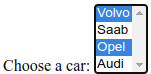
<label for="cars">Choose a car:</label> 
<select name="cars" id="carsid" multiple> 
  <option value="volvo">Volvo</option> 
  <option value="saab">Saab</option> 
  <option value="opel">Opel</option> 
  <option value="audi">Audi</option> 
</select> 

The multiple option allows more than item to be selected. The default is just one. I use ctrl+space or ctlr+left mouse to select additional items.

This displays

The parameter are

  • <Label for… give a label to the field with the matching id. When using “for”, if you click on the label, it makes the input active.
  • <select
    • name= this is passed to the back-end server,
    • id= is used in JavaScript to identify this element. This is pointed to from the <label for…
    • “multiple” more than one element can be selected. By default only one can be selected. With multiple you can ctrl+click to select more than one element.
  • <option
    • value= this gets passed to the server
    • <option>xvalue</option> the xvalue is what is displayed

This produces at the server.

  • cars=volvo
  • cars=opel

Where the value is taken from the value= attribute.

When the “multiple” option is not specified the select element looks like

The pull-down expands as you select it.

A radio button

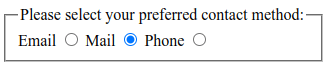
This displays all of the options and you select one.

<fieldset> 
  <legend>Please select your preferred contact method:</legend> 
  <div> 
    <label for="contactChoice1">Email</label> 
    <input type="radio" id="contactChoice1" name="contact" value="email" /> 
                                                                                          
    <label for="contactChoice3">Mail</label> 
    <input type="radio" id="contactChoice2" name="contact" value="phone" checked  /> 
                                                                                          
    <label for="contactChoice2">Phone</label> 
    <input type="radio" id="contactChoice3" name="contact" value="mail" /> 
  </div> 
                                                                                          
</fieldset> 

This displays as

The parameters are

  • <fieldset defines a set of options
  • <legend displays at the top of the box
  • <div.. I copied this from an example, it seems to work just as well without it
  • <label .. the label for the field.
    • for matches up with the <input id
  • <input
    • type=radio defines the type
    • id= matches the <label for, and can be referred to in JavaScript
    • name= is keyword sent to the server
    • value= is the value sent to the server
    • checked this is pre selected
  • name=, all elements with the same name= are part of the same radio group.

Note:

  • <label..> <input..> puts the text before the radio button
  • <input>..<label> puts the text after the radio button.

The content sent to the server is

contact=phone

Date field

<label for="dateb>date</label> 
<input type="date" id="dateb" name="dateBox"> 

This displays as

You can type a date in or select a date.

The content sent to the server, if no date is specified is

dateBox=

This is one of the cases when the name is sent down with no data.

if a date is specified

dateBox=2023-07-22

Check Box

<label for="check">CheckBox</label> 
<input type="checkbox" id="check" name="checkBox"> 

This displays as

If the box is selected the output is

checkBox=on

If the checkbox is not selected, no data is send down.

Use of labels

With

 <label for="contactChoice1">Email</label> 
 <input type="radio" id="contactChoice1" name="contact" value="email" />d

The <label..> does not have to be near to the <input>. You would normally place them adjacent to each other. The <label for …makes the input field with the matching value become active. If you click on the label text, it selects the radio button. You have freedom to format the radio buttons however you wish; horizontally, vertically, in a wrapping paragraph.

Elements with the same id

This can happen because you have created two fields with the same name, or you are using tables. With two rows of a table

<tr   id="trow1"> 
   <td id="col" name="serial"> 
    <label for="password">Enter your pw: </label> 
    <input id="password" name="rowpassword" value="pw2"> 
    </td> 
                                                                                        
</tr> 
<tr   id="trow2"> 
   <td id="col" name="serial"> 
    <label for="password">Enter your pw: </label> 
    <input id="password" name="rowpassword" value="pw3"> 
    </td> 
                                                                                        
</tr> 

this produced

  • rowpassword=pw2
  • rowpassword=pw3

you cannot tell which data came from which row.

You cannot tell if there were two input areas with the same name, or a select with the multiple option.

How to debug a bash script when the easy way does not work.

I was trying to debug a program product, and to specify a Java override. The configuration used bash scripts. My problem was which script should I put my fix in?

How to debug bash scripts

From searching in the internet, the way of debugging a simple self contained bash scripts is either

  • edit the file and add the -x as in #!/bin/sh -x this give output for just this file.
  • or use sh -x … command line option to enable trace

The sh -x … command applies to the specified program name. You cannot enable the trace this way for any programs it calls.

There is no way of saying trace this command …and any others programs it calls.

Editing the script may not easy

Editing the file was a challenge, as it was on a read only file system. I had to unmount it, and mount it read/write. Easy on my one person z/OS ; not so easy on a typical z/OS image with many users. You do not want to make a change and break someone else.

I used the Unix command

df -P /usr/lpp/IBM/... 

on the file to find which file system it was on, then used the TSO commands

unmount filesystem('ABC100.ZFS') Immediate
mount filesystem('ABC100.ZFS') mode(RDWR)                   
  type(HFS) mountpoint('/usr/lpp/IBM/abcdef')

Or change the BPX* parmlib member and re-ipl which seems overkill.

I did not really want to have to edit the production scripts – but this was only at the server startup. Only one instance was affected.

The chicken and the egg problem

How do I know which file to edit to add the “-x”? After lots of investigation I found one file deep down, but I could not see who called it.

I used two commands

ps -o pid,ppid,args -p $PPID   
ps -o pid,ppid,args -u $LOGNAME 

The first says give me information about the threads parent PID.

The second says gave information about threads running with the userid of the thread

The first gave

      PID       PPID COMMAND                                                                         
 33620145   67174575 /bin/sh -c /Z24C/usr/lpp/IBM/..../bin/envvars.sh -F/parameter  

Which shows the thread was called from the envvars.sh script with the parameter -F/parameter. This was a start, but who called envvars.sh?

The second command gave

         PID       PPID COMMAND  
(1) 83951745          1 BPXBATCH    
(2) 83951791   83951745 /bin/sh /usr/lpp/IBM/.../start.sh                                     
(7) 50397360   33619999 oedit /usr/lpp/IBM/.../bin/config.final.env                           
(3) 83951836   s83951791 /bin/sh /Z24C/usr/lpp/IBM/.../bin/abcmain.sh run -config /Z24C       
(5) 67174622   33620191 /bin/sh -x /Z24C/usr/lpp/IBM/.../bin/envvars.sh -F/tmp/RSEAPI_e       
(4) 33620191   83951836 /bin/sh -c /Z24C/usr/lpp/IBM/.../bin/envvars.sh -F/tmp/RSEAPI_e       
(6) 83951881   67174622 ps -o pid,ppid,args -u STCRSE 

You have to start at the top of the process tree, and find the children of each process. The parent and child have the same colour process ids above.

  1. I know the script was started from BPXBATCH. This has a process id of 83951745 (first column of data) in red.
  2. The process with this process id as a parent (PPID) (second column of data) in red. is /bin/sh /usr/lpp/IBM/…/start.sh This is what BPXBATCH executes. If you have a system with lots of BPXBATCH instances running, you can locate the command to find which thread is of interest. This process has a process id of 83951791
  3. This process invokes /bin/sh /Z24C/usr/lpp/IBM/…/bin/abcmain.sh run -config /Z24C with a PID of 83951836.
  4. This process invokes /bin/sh -c /Z24C/usr/lpp/IBM/…/bin/envvars.sh -F/tmp/RSEAPI_e with a PID of 33620191
  5. This invokes /bin/sh -x /Z24C/usr/lpp/IBM/…/bin/envvars.sh -F/tmp/RSEAPI_e (again!)
  6. This issues the command ps -o pid,ppid,args -u STCRSE which displays the thread information. We have got to the end.
  7. Was from me editing a file in an Unix Services session, so not relevant to the investigation

Who am I ?

You can use

echo "path to me ->  ${0}     "

which gave me

path to me -> /home/colinpaice/Downloads/test.sh

What would I do to make it easier to debug?

In each shell script have code like

#if the symbol myprog_text exists
if [ -z ${myprog_test+x} ]; 
then 
   # echo "myprog_test is not set"; 
else
  # echo "specified "${myprog_test}
  # if it has a value > 0 then write the path
  if [ $myprog_test -gt 0 ]
  then 
     echo "# path to me --------------->  ${0}     "
  fi
  #if the value is 2 or more then start the trace
  if [ $myprog_test -gt 1 ]
  then 
     set -x 
  fi
fi

This checks to see if global variable myprog_test is set, if it set to a 1 or larger, it displays the path name, if it is set to 2 or larger it turns trace on, using set -x.

With this each script checks a variable product_myscript (where myscript is the name of the script), and takes the appropriate action.

To turn the traces you list all of the scripts in the directory, then use

export myprod_myscript=1

for each script (of interest). This will then give you a trace of which scripts were invoked. You can then set

Some scripts use a variable $SHLVL which give you the call depth. This would be useful,but his is not supported in shell in z/OS.

Is it as easy(!) as this?

No quite. Many services are started as a started task, where the JCL is like

//ABCAPI   EXEC PGM=BPXBATCH,REGION=0M,TIME=NOLIMIT, 
//            PARM='PGM &HOME./tomcat.base/start.sh' 

You can put your global variables in STDENV. Note: this is a list of variables, not a shell script, so you cannot do

xxx=1
yyy=$xxx

Some implementations of TLS are good, some are not so good.

Ive been struggling to get an application running on z/OS to use TLS with certificate authentication.

Now it is working, I despair at how the TLS has been implemented, and it feels that the development did not understand how the product would be used; or may be TLS has moved on since the product was initially written. Java on the other hand seems to have all the facilities for a good implementation, but they are not always used, resulting in a poor end user experience. It feels that the designers only expected one, or only a few users.

Experience shows…

The first time you do a journey, you are pleased if you get to the destination with no major problems. Once you have done the journey a couple of times you know the best options and what to avoid. For example when your plane arrives at an airport, and there is shuttle train to get you to the main terminal and immigration, if the escalator at the main terminal is near the front of the train – then get on at the front of the train, and you will be ahead of the hundreds of people from the train.

I learned when in a performance role, that it takes three attempts to write a performance report. After the first attempt you understand the real question you should be asking. The second attempt you get answers to these questions. The third attempt you try to add value and explanation. Many a time I’ve looked at someone else’s performance report and asked myself “what does this mean, how do I use this information?”. I spent a week doing some tests, and the outcome was a sentence “This performance tuning option has very little effect. Just leave it as the default”. This is so much more useful than a chart showing a flat line.

In the same way, a developer designing a program which uses TLS may be very happy having got one client to talk to the server using TLS. You need the experience to understand that there are different certificate types (Elliptic Curve, RSA), and different key sizes. It is easier to administer the CA certificates, if you have one enterprise wide keyring for them, and every one uses the same keyring; rather than one keyring for each server instance.

Where are certificate stored?

There can be two types of store for certificates:

  • Keystore – this contains the certificates each with its private key. Each group of servers may have its own keystore, with just the private keys it needs. So one key store for production CICS regions, one for test CICS regions, another key store for internal web servers.
  • Trust store. This contains the public keys of Certificate Authority certificate authorities, and any self-signed certificate from clients. The trust store is used to validate certificates which have been sent to the application. You could have one trust store for the whole LPAR, and every one uses it.

In many TLS implementations only one store is used, called the keystore, and has both the Key store and Trust store keys in it. This is easy to implement, but not a good design.

High level overview of the TLS handshake

The handshake

  • The client initiates the handshake, passing up information like I understand the following cipher specs…; I understand certificates created using Elliptic Curves (or RSA) (or both).
  • The server responds with ,
    • use this cipher spec…,
    • optionally (usually) here is my certificate which matches your criteria (Elliptic Curve or RSA)
    • optionally – please send your certificate which matches these criteria… here are the CA’s I know about
  • The client checks the server’s certificate is valid either because the certificate is in the trust store , or the certificate for the Certificate Authority is in the trust store, and can be used to validate the certificate.
  • If asked, the client picks a certificate from the key store and sends it. It should pick a certificate with a CA from the list which was sent down.
  • The server checks the client’s certificate is valid either because the certificate is in the trust store or the certificate for the Certificate Authority is in the trust store which validates the certificate.

Which certificate does the server send?

There are several implementations used in different products:

  • Take the first valid certificate in the ring. Easy to code, but causes problems. If I replace the certificate, by removing and readding it, then a different certificate may be used, as what was the second certificate in the keyring, will now be the first in the keyring, and this will be used instead. This may have a different type of certificate (Elliptic Curve or RSA), and clients may then fail to connect.
    • If the certificate has expired it will not be used, even though it looks the first.
  • Specify the default. There is one default. If you remove and add a certificate you can specify which certificate becomes the default. Not all clients may like the certificate type, so you may have to change the client certificate to match.
  • Pick the best option. Java has an function which says give me the list of certificate in the keyring which match the following, this might be EC or RSA or some other option. With this, different clients can get a different server certificate.

You could have one keystore for all your servers, or a keystore for CICS, and other for a Liberty web server, another for MQ web server.

I think that the keystore should contain only the keys for the certificates it needs to use. Do not have the CICS, Liberty, MQ certificate all in the same keystore if the certificates are all different. It would allow CICS to use the MQ certificate.

For added security certificates can have the name of the server, or the IP address of the server, and the client can check it matches the server’s host. You might not want to share a keyring between different z/OS images, because they may have a different IP address.

Client – picking the private certificate from the keystore

What should I use for my trust store?

The trust store has the certificates for all CAs you expect to use. If you start working with a different company you might need to add their CA to your trust store.
If you have one trust store for all users across the z/OS image, you add the certificate to it, and every one has access to it – easy.

If you have multiple trust stores, you’ll need to add the certificate to all the trust stores that need it. This may be a small number, for example, production and test.

If you use your keystore as a trust store then you will have to add the new CA to every trust store.

As certificate expire you will need to replace them. The amount of work depends on how many stores you have to update. Having one trust store makes this easier.

Why have I told you this?

I had a client server working using the DEFAULT certificate on z/OS. I wanted to use this keyring for a different application, which used the FIRST certificate in the keyring. This was a special-case certificate, and not to be used by most clients. I had to remove and re-add certificates in the keyring so the default certificate became the first certificate. It took over a day to identify the problem and fix it!

How to change the java.security file on a read only file system.

I had a problem getting Java to read a keyring, and one suggestion was to change the security providers in the /usr/lpp/java/current_64/lib/security/java.security. This is the system wide default definition file for Java.

Unfortunately this is on a read only file system.

I had the choice of changing this file – not a good idea or overriding it.

Overriding which file to use

In the file, there are comments about overriding the file

  • -Djava.security.properties=url (one equals), to append to the system java.security file
  • -Djava.security.properties== url (two equals), to replace the system.security file used.

In my Java program startup I used the over-ride to replace the default file –

-Djava.security.properties==/etc/zexpl/java.security"

and copied /usr/lpp/java/current_64/lib/security/java.security to /etc/zexpl/java.security. I could edit this as I pleased, as any changes only affect this application.

Updating the production file system.

I’m lucky I work on a single user z/OS system. I do not have to worry about change control and disrupting other users.

I used the df command to display which file system the file was on, then I unmounted and remounted the file system.

df -P /usr/lpp/java/current_64/lib/security/java.security to /etc/zexpl/java.security.
unmount filesystem('ABC100.ZFS') Immediate 
mount filesystem('ABC100.ZFS') mode(RDWR)type(HFS) mountpoint('/usr/lpp/IBM/abcdef')

so children of all ages – do not do this at home or at the office!