One minute mvs: catalogs and datasets.

In days of old, when 64KB was a lot of real storage, to reference a data set you had to specify the data set name and the DASD volume the data set was on. DSN=MY.JCL,VOL=SER=USER00

After this, the idea of a catalog was developed. Just like the catalog in a library, it told you where things were stored. When you created a data set, and specified DISP=(NEW,CATLG), the data set name and volume were stored in the catalog. When you wanted to use a data set, and did not specify the volume, then the catalog was used to find the volume for the data set.

As systems grew and the number of data sets grew, the catalog grew and quickly became difficult to manage. For example if you deleted data sets, the entry was logically removed from the catalog, resulting in gaps in the catalog.

After this a multi level catalog was developed. You have one master catalog. You can have many user catalogs. You define an alias in the master catalog saying for data sets starting with a specific high level qualifier, use that user catalog.

When a userid was created, most system programmers would also create an alias pointing to a user catalog. They may define a user catalog for each user, or a user catalog could be shared by many aliases.

The catalogs are managed by the VSAM component of z/OS.

Entity naming

PDS and sequential files are referred to as datasets. VSAM provides simple database objects,

  • Relative Record ( where you say get me the n’th record)
  • Key sequence. You define a primary index, and you can an index on different columns using an ALTERNATIVE INDEX. 

VSAM uses the term cluster to what you use in you JCL or application. A cluster has a data component, and zero or more index components.

Moving systems.

I have been running on a self contained ADCD system at z/OS level 2.4. I have recently installed a self contained system at z/OS 2.5. How do I get my data sets into the new system?
You can import connect a user catalog into a new (master) catalog, and define an alias in the new master catalog pointing to the user catalog.

When I did this I could then see my COLIN.* data sets. To be able to use the data sets, I need the volumes to be attached to the z/OS system.

Useful IDCAMS commands

In batch you use the IDCAMS program (IDC = prefix for VSAM, AMS is for Access Management Services!)

If you do not specify a catalog, it defaults to the master catalog.

Create a user catalog

//IBMDF  JOB 1,MSGCLASS=H                                   
//S1 EXEC PGM=IDCAMS
//SYSPRINT DD SYSOUT=*
//SYSIN DD *
DEFINE USERCATALOG -
( NAME('A4USR1.ICFCAT') -
MEGABYTES(15 15) -
VOLUME(A4USR1) -
ICFCATALOG -
FREESPACE(10 10) -
STRNO(3 ) ) -
DATA( CONTROLINTERVALSIZE(4096) -
BUFND(4) ) -
INDEX(BUFNI(4) )
/*

Creating an alias to use the catalog

The JCL below creates two aliases in the master catalog. They both point to a catalog called A4USR1.ICFCAT (which is in the master catalog)

//IBMUSERT JOB 1,MSGCLASS=H                                     
//S1 EXEC PGM=IDCAMS,REGION=0M
//SYSPRINT DD SYSOUT=*
//SYSIN DD *
DEFINE ALIAS (NAME(BACKUP) RELATE('A4USR1.ICFCAT') )
DEFINE ALIAS (NAME(COLIN ) RELATE('A4USR1.ICFCAT') )
/*

To import an existing user catalog into a master catalog

//IBMUSERT JOB 1,MSGCLASS=H                                   
//S1 EXEC PGM=IDCAMS,REGION=0M
//SYSPRINT DD SYSOUT=*
//SYSIN DD *
IMPORT CONNECT -
OBJECTS -
(('A4USR1.ICFCAT' VOLUME(A4USR1) DEVICETYPE(3390) -
))
/*

From the information provided, the master catalog knows the name, and location of the user catalog.

List an entry

You can list information about an entry, such as a data set, or a catalog using the LISTCAT command

LISTCAT ENT(COLIN.USERS) ALL

Listing aliases

You can use the IDCAMS command LISTCAT with alias

LISTCAT ALIAS

which gives a one line per entry list of all of the aliases

ALIAS --------- ADCDA       
ALIAS --------- ADCDB
ALIAS --------- ADCDC
ALIAS --------- ADCDD
...

LISTCAT ALIAS ALL

gives

ALIAS --------- ADCDA                                                       
...
ENCRYPTIONDATA
DATA SET ENCRYPTION-----(NO)
ASSOCIATIONS
USERCAT--USERCAT.Z24C.USER
ALIAS --------- ADCDB
...
ENCRYPTIONDATA
DATA SET ENCRYPTION-----(NO)
ASSOCIATIONS
USERCAT--USERCAT.Z24C.USER

So we can see that the the alias ADCDA maps to user catalog USERCAT.Z24C.USER

Listing a catalog

The command

LISTCAT CATALOG(USERCAT.Z24C.USER)

gives

CLUSTER ------- 00000000000000000000000000000000000000000000       
DATA ------- USERCAT.Z24C.USER
INDEX ------ USERCAT.Z24C.USER.CATINDEX
NONVSAM ------- ADCDA.S0W1.ISPF.ISPPROF
NONVSAM ------- ADCDA.S0W1.SPFLOG1.LIST
NONVSAM ------- ADCDB.S0W1.ISPF.ISPPROF
...
CLUSTER ------- SYS1.VVDS.VC4CFG1
DATA ------- SYS1.VVDS.VC4CFG1

Which shows there is a data component of the catalog called USERCAT.Z24C.USER, and there is index component called USERCAT.Z24C.USER.CATINDEX.

The catalog has a data component (USERCAT.Z24C.USER) and an index component USERCAT.Z24C.USER.CATINDEX.

Within the catalog are entries for data sets such as ADCDA.S0W1.ISPF.ISPPROF, and system (DFDSS) dataset SYS1.VVDS.VC4CFG1 - which contains information what is on the SMS DASD volume C4CFG1.
One minute networking: TCP buffer sizes

When data flows over a TCPIP connection there are several factors which control the rate at which data can be sent. You can influence some of these factors.

Data is sent as packets typically of size about 1440 bytes – because old hardware could only support this. You could use larger packets, but you may hit a router which chops it into smaller blocks.

The basic TCPIP flow

Consider a Client Server connection. The client application wants to send some data to a server application

  • The client uses send() to put some data into a TCPIP buffer and returns.
  • TCPIP sends some data (a packet) from this buffer, sets a timer and waits.
  • The server receives the data, end sends back an ACK saying so far I have received this many bytes from you.
  • The application on the server does a receive (if there is no data, the application is suspended until data arrives). If there is enough data to satisfy the receive, the application returns, otherwise it is suspended.
  • At the client end, when TCPIP has received the ACK. It no longer needs the data which has just been acknowledged. It can send more data.
  • If no ACK was received and the timer has timed out, TCPIP resend the data.

There are several parts to this:

  • Putting things into the pipe – the send buffer
  • The pipe
  • Getting things from the pipe, the receive buffer

The send buffer

  • TCPIP has a buffer for its use.
  • The application
    • An application does a send() and passes data to TCPIP.
    • If there is space in the TCPIP buffer, the data is moved into the buffer, and the application returns.
    • If there is not enough space for all of the data, enough data is moved to fill the buffer, and the application waits until more space is available in the buffer.
    • When all of the data has been passed to the TCPIP buffer, the application returns, and can do more application work.
  • TCPIP
    • TCPIP takes a chunk of the buffer (a packet) , sends it over the network, and sets a timer.
    • It can then process another chunk of data, and send it over the network, so there are multiple packets in flight.
    • When the far end has passed the data to the application, it sends the ACK back.
    • The local end, when it has received the ACK for a chunk of data, knows the data has been received by TCPIP at the remote end, it no longer needs to keep a copy of the data, and frees up the space on the buffer.

How big a buffer is needed to get good throughput?

The data is held in the TCPIP buffers; waiting to be sent plus the round trip time; from when the data was put into the TCPIP buffer, to getting the ACK back. This could be 10s of milliseconds. Multiple packets can be in-flight (perhaps 10s or 100s) which improves the throughput. So send 10 packets; wait, when the first ACK is received, send another packet etc., so there are always 10 packets in flight.

If the buffer is too small the application has to wait. Increasing the send buffer size will increase throughput up to a point (when the application does not have to wait) after this point making it larger may make no difference.

As more data is in flight, the connection needs a bigger send buffer.

An application can set the send buffer size using the SETSOCKOPT call. If this is not used, then there will be a TCPIP default send buffer size. On z/OS this is the system wide TCPCONFIG TCPSENDBFRSIZE …. parameter.

The default used to default to 16KB, and currently is typically 64KB. There is a TCPIP enhancement which says if the send buffer size is larger than 64KB, then TCPIP can dynamically increase it if it will improve performance. See Outbound Right Sizing(ORS).

Note: If you change the system wide send buffer size (TCPCONFIG TCPSENDBFRSIZE on z/OS), this will affect all applications that do not set the size using SETSOCKOPT. You should test this before putting it into production because it may affect many applications.

The receive buffer

At the receiving end, TCPIP has a buffer. Data from the network is put into this buffer. After the data has been put into the buffer, TCPIP sends back an ACK with three fields saying

  • so far I’ve received this many bytes from you
  • I’ve sent you this many bytes
  • my buffer has space for this many bytes

An application does a receive to get the data, if there is insufficient data to satisfy the receive, the application can wait, or return just the data in the buffers, depending on the options.

If the receive buffer is full, any incoming data will be thrown away. If the application does receive the data, then does lots of processing on the data, followed by receive more data etc, the receive buffer may fill up. Some applications receive the data, give the data to a subtask to process, immediately do another receive, and so try to keep the receive buffer empty.

If the amount of arriving data is larger than the free space in the buffer, TCPIP will return “no space left in the buffer” as part of an ACK. The sender then knows to wait. When the application receives the data, and makes space, “x bytes are available in the buffer” is sent as part of the ACK, and the sender can start sending data again. This “space available” is known as the Window Size, and helps regulate the flow of data.

If you think about this for several minutes, you will realise that there is a time lag between the receive available buffer size going to zero, and the sender receiving the ACK saying no space in receive buffer. Any in-flight packets may get thrown away, or the end application may get all the data from the buffer. The “no space left in receive buffer” tells the sender to stop sending data until there is space in the buffer, and the sender may then reduce the amount of in-flight data.

Having a zero sized window means there is a problem that the application is not getting the data from the buffer fast enough.

How big a receive buffer is needed to get good throughput?

If the buffer is too small the application has to wait, and packets may be thrown away.

An application can set the receive buffer size using the SETSOCKOPT call. If this is not used, then there will be a TCPIP default receive buffer size. On z/OS this is the TCPCONFIG TCPRCVBFRSIZE …. parameter.

The maximum receive buffer size is specified in TCPMAXRCVBUFRSIZE.

If the receive buffer size is greater than 64B, then a performance enhancement called Dynamic Right Sizing(DRS) can come into action which automatically increases the buffer size up to 2MB.

Inside the pipe

I have described the sender side filling the send buffer for the connection, and the application on the receiver side taking data from the connection’s receive buffer. I’ll look at the pipe in between.

Data is send across the network in packets. The packets are usually small – for example 1500 bytes for Ethernet. Some protocols support larger packet sizes. Data send within a z/OS can have 56KB packet sizes. The Maximum Segment Size (mss) is the maximum size of the user data in a packet.

If a packet is too large for a device, it may be cut into smaller chunks and then passed on – or the packet may just be dropped.

The simplest and slowest transmission is send one packet and wait for the ACK, then send another packet.

It is much more efficient to send multiple packets. For example send 10 packets, when the first ACK comes back (saying the first packet has been received), send the next packet and so on, so there are always 10 packets (or less) in the pipe.

The amount of data on the network is limited by the smaller of the send buffer size and the receive window size. This means you need both a big send buffer, and a big receive buffer to get maximum throughput.

The TCP window is the maximum number of bytes that can be sent before the ACK must be received. If the network is unreliable it is better to keep the window small to reduce the amount of data that needs to be resent after a missing ACK.

Where can I get more information?

I wrote a blog post about tuning MQ channels which gives additional information.

How do I display this buffer information?

On z/OS you can use

  • TSO NETSTAT CONFIG command reports the default receive buffer size, the default send buffer size, and the default maximum receive buffer size
  • TSO NETSTAT ALL (IPPORT nnnn where nnnn is the port number.
  • TCPMON on GITHUB to monitor the buffer and window sizes in near real time.

On Linux

You can use the command

  • ss -im -at ‘( dport = :21 )’ which displays information about connections with destination port of 21.
  • ss -im -at ‘( dst = 10.1.1.2 )’ which displays information about connections with destination ip address of 10.1.1.2

Is there more information available about buffers and windows?

There is a lot of information on the web, but it is not usually easy to digest.

I thought this article was clear about the different buffers and windows.

How do I change the buffer sizes?

An application can change them using the SETSOCKOPT call see here options SO_RCVBUF and SO_SNDBUF

With some applications, they have a specific way of setting the buffer sizes

  • MQ for midrange RcvBuffSize etc
  • MQ on z/OS use +cpf RECOVER QMGR(TUNE CHINTCPRBDYNSZ nnnnn)
    +cpf RECOVER QMGR(TUNE CHINTCPSBDYNSZ nnnnn)
  • FTP on Linux -x option

Otherwise the system defaults are used.

Other information provided with display commands

Commands like netstat provide other information

For example

  • round trip time – this is average time in millisecond taken for a packet to be sent over the network, and the ACK is received
  • RoundTripVariance – this gives the spread of the response times. It is the sum of the square of each response time. A measure of the spread of the response times is the standard deviation = sqrt((the variance – average round trip time ** 2) /N) where N is the number (of packets sent). If all the packets have the same round trip time, this will be close to zero.
  • Local 0 window count – the number of times there was 0 space in the receive buffer
  • Remote – window count – the number of times the remote end had 0 space in its receive buffer.

Configuring frr on Linux

frr is a network router for Linux systems.

It works well, and has a lot of good documentation about all of the commands and options, but it does doesn’t have a “getting started” section. It is a bit like getting the wiring diagram for a car, when all you to do is get in and drive the car.

Below are some of the things I stumbled across lessons I learned.

Some later definitions override earlier definitions.

With

router ospf6
ospf6 router-id 6.6.6.6
ospf6 router-id 6.6.6.7

The definition used is 6.6.6.7 because it overrides the earlier 6.6.6.6

interface AB
description colins AB first
ip ospf area 0.0.0.0
ip ospf area 20.0.0.0

In this case the area 0.0.0.0 is used – so the order does not look consistent.

interface eno1 
ipv6 nd prefix 2001:db8:6099::/64
ipv6 nd prefix 2008::/64


interface eno1
description server2 ospf6
ipv6 ospf6 instance-id 2

The description is description server2 ospf6 because it was the only one specified.

Both of the nd prefix values are used.

What is used where?

If you want to configure a daemon, you needs to specify parameters in different places.

For example, the ospf6 daemon

router ospf6
ospf6 router-id 6.6.6.6
...

interface enp0s31f6
ipv6 ospf6 area 0.0.0.0

The router ospf6 configuration is for the daemon thread.

The information on the interface…. statement is for each interface. This means all of the configuration information for an interface is under the interface…. section.

To display the ospf6 configuration use

show running-config ospf6

It extracts the ospf6 interesting information from the configuration

Current configuration:
!
frr version 8.1
...
hostname Server
!
debug ospf6 zebra
debug ospf6 interface
!
interface eno1
description server2 ospzz
ipv6 ospf6 area 0.0.0.0
ipv6 ospf6 instance-id 2
ipv6 ospf6 network point-to-point
exit
!

router ospf6
ospf6 router-id 6.6.1.1
redistribute static
redistribute ripng
exit
!
end

and ignored other information like

debug ospf zebra
debug ospf interface

interface eno1
ipv6 nd prefix 2001:db8:6099::/64
ipv6 nd prefix 2008::/64

The debug ospf… is ignored because this relates to ospf not to ospf6.

The ipv6 nd is ignored because this is not ospf6 related.

Configuring using vtysh

You can use vtysh to configure your /etc/frr/frr.cntl for example

  • vtysh
  • configure
  • interface vl100
  • ipv6 address 3000::1/64
  • do write
  • quit
  • quite
  • quit

it is a good idea to make a copy of the /etc/frr/frr.conf before you do this.

Show doesn’t always show

You can use the command

show running-config

and that shows you most of what is configured and running.

Note that default values may not be displayed.

When my definitions had

interface eno1 
ip ospf hello-interval 11

the show running-configuration gave

interface eno1
description server ospzz
ip address 10.1.0.3 peer 10.1.0.2/24
ip ospf area 0.0.0.0
ip ospf dead-interval 40
ip ospf hello-interval 11

When I had ip ospf hello-interval 10 the output did not include ip ospf hello-interval 10 because it was the default value.

You can use sudo vtysh

show running config
write file

to rewrite the /etc/frr/frr.conf control file with the defaults removed, and the frr version line updated.

If you use the command

show ip ospf interface

it gives you the values for each interface such as

Timer intervals configured, Hello 10s, Dead 40s, Wait 40s, Retransmit 5

OSPF defaults

these were in the file lib/libospf.h in the frr source.

 OSPF_MIN_LS_INTERVAL                  5000     /* msec */
OSPF_MIN_LS_ARRIVAL 1000 /* in milliseconds */
OSPF_LSA_INITIAL_AGE 0 /* useful for debug */
OSPF_LSA_MAXAGE 3600
OSPF_CHECK_AGE 300
OSPF_LSA_MAXAGE_DIFF 900
OSPF_LS_INFINITY 0xffffff
OSPF_DEFAULT_DESTINATION 0x00000000 /* 0.0.0.0 */
OSPF_INITIAL_SEQUENCE_NUMBER 0x80000001U
OSPF_MAX_SEQUENCE_NUMBER 0x7fffffffU


/* OSPF interface default values. */
OSPF_OUTPUT_COST_DEFAULT 10
OSPF_OUTPUT_COST_INFINITE UINT16_MAX
OSPF_ROUTER_DEAD_INTERVAL_DEFAULT 40

OSPF_ROUTER_DEAD_INTERVAL_MINIMAL 1
OSPF_HELLO_INTERVAL_DEFAULT 10
OSPF_ROUTER_PRIORITY_DEFAULT 1
OSPF_RETRANSMIT_INTERVAL_DEFAULT 5
OSPF_TRANSMIT_DELAY_DEFAULT 1
OSPF_DEFAULT_BANDWIDTH 10000 /* Mbps */

OSPF_DEFAULT_REF_BANDWIDTH 100000 /* Mbps */

OSPF_POLL_INTERVAL_DEFAULT 60
OSPF_NEIGHBOR_PRIORITY_DEFAULT 0

OSPF_MTU_IGNORE_DEFAULT 0
OSPF_FAST_HELLO_DEFAULT 0

OSPF_AREA_BACKBONE 0x00000000 /* 0.0.0.0 */
OSPF_AREA_RANGE_COST_UNSPEC -1U

OSPF_AREA_DEFAULT 0
OSPF_AREA_STUB 1
OSPF_AREA_NSSA 2
OSPF_AREA_TYPE_MAX 3

/* SPF Throttling timer values. */
OSPF_SPF_DELAY_DEFAULT 0
OSPF_SPF_HOLDTIME_DEFAULT 50
OSPF_SPF_MAX_HOLDTIME_DEFAULT 5000

OSPF_LSA_MAXAGE_CHECK_INTERVAL 30
OSPF_LSA_MAXAGE_REMOVE_DELAY_DEFAULT 60

One minute networks: MAC address

A MAC address is a Media Access Control address. It has two parts, the manufacturer, and the manufacturer’s unique number. For example on my laptop I have an Ethernet socket. I can see from a wireshark trace that a packet is being broadcast with Ethernet address MicroStarInt_e9:31:2a, or 00 d8 61 e9 31 2a in hex. This was created by Micro Start international.

On a different machine the address is LCFCHeFE 36:f4:8a or 8c 16 45 36 f4 8a. This Ethernet adapter has been provided by LCFC Electronics technology, with serial number 36f48a.

Within an Ethernet switch, there are various broadcasts to devices on the switch, such as

ff02::1all nodes
ff02::2all routers
ff02::5all OSPF (Open Shortest Path First) routers

Using wireshark I can see a broadcast with code ff02::2 which is an IPV6 router Solicitation request from 8c:16:45:36:f4:8a. This is basically saying “have any routers been configured on this Ethernet network, if so, please tell me”. I can map the 8c:16:45:36:f4:8a back to the Ethernet adapter LCFCHeFE 36:f4:8a.

Wireshark has logic to map the Ethernet address prefix to the manufacturer, and convert 8c:16:45 to LCFCHeFE.

One minute networks: Switches, routers, hubs and IP addresses

This blog post is similar to my posts under “One Minute MVS” which aim to provide basic knowledge to understand a topic.

I struggled to understand some of the networking concepts. There is a lot of documentation on the internet, but it did not cover the basics.

The concepts below are based on Ethernet and physical connections. Other connection types such as wireless can be used just as well, but I find the Ethernet picture simple to understand.

What is a router?

A router is used

  • to convert from one network protocol to another protocol
  • to connect bits of network together.

Broadband router

I have broadband to my house, it comes from my telecom’s provider.

  • There is a broadband protocol for the connection to the telephone exchange, for example it connects using my house phone number, not IP address.
  • It converts from broadband to wireless and Ethernet protocols for my various devices around the house.
  • I can connect my laptop to the router, and connect to other devices around the house, on a different network.

What is a switch?

Think of a self contained office. An Ethernet switch is a box with physical sockets for plugging Ethernet cables into. Each person’s computer has a unique address (known as a MAC). Each computer is connected by an Ethernet cable to a physical port on the Ethernet switch. If your computer wants to send information to another computer in the office it sends a request to the Ethernet switch, saying send this information to this MAC address. The switch knows which physical port matches the MAC, and sends the data down the cable plugged into the physical port.

With the configuration described so far, a computer cannot get to the outside internet.

What is hub?

A hub is a very dumb switch, it sends the incoming data to all devices, it is not smart enough to work out which devices to send the data to. It is used when there are a small number of connections.

Does each device need a unique IP address?

Within a network or sub network, each device needs a unique IP address. My laptop has IP address 192.168.1.1 within my network. My neighbour’s laptop has the same IP address within her network. They are on totally separate networks and do not interact, and so they can each have the same IP address.

Each device connected to the internet needs a unique IP address, so the back-end systems can send the data to your device.

A router can be clever and make each device attached to the internet look like a unique device

  • A server has a fixed IP and port, so client applications can find it.
  • Each time a client machine starts, it can be given a different IP address, and when it connects to a server it can use a different port.
  • The server usually does not care what IP address and port the client uses.

If the IP the address of my laptop is 192.168.1.1, this is an internal address and cannot be used on the internet. My router has external address 7.7.7.1.

The router can do some clever mapping

  • If I try to connect from my laptop source address 192.168.1.1 port 100 to the outside world, the router can change the source address to 7.7.7.1 port 206, so looking like a port on the router.
  • If I try to connect from my laptop address 192.168.1.1 with a different port, 200, to the outside world, the router can change this address to 7.7.7.1 port 209
  • If I try to connect from my server with a different address 192.168.1.16 port 100 to the outside world, the router can change this address to 7.7.7.1 port 208.

As far as the internet is concerned requests have come from address 7.7.7.1 with three different ports. When the replies come back, the router maps them back to the internal addresses and ports. The ports numbers 206, 209 and 208 could have been any free port on the router. Tomorrow I may get different numbers.

What is a router – routing

In my house the broadband is on a cable. This is plugged into a router. My red Ethernet switch is also plugged into the router, and my blue Ethernet switch is plugged into another physical socket on the router.

When data from the internet arrives, there are routing rules which say

  • If the traffic is destined for the red switch, then send it to the red switch.
  • If the traffic is destined for the blue switch, then send it to the blue switch.
  • If the traffic is destined for any of the following list of addresses, send it on the broadband cable.
  • Otherwise send it on the broadband cable.

At the far end of the broadband cable is a telephone exchange. This is different sort of router which says if the traffic is for the phone number 01856…. then send to to my house.

The next level of detail

Each computer in the switch is given an IP address, such as 192.168.22.5, another might be 192.168.22.6, where the last number changes with the different computers.

The router has configuration information saying data for 192.168.22.* send it to the red switch.
The blue Ethernet switch has addresses 10.1.1.*

My router has 3 connections, one for broadband, one for the red switch, and one for the blue switch.

If you physically pick up my switch. All of the Ethernet cables coming out of it are part of a subnet. They all have a similar IP address (192.168.1.*), they are in the same subnet.

My router has the following definitions

  • The physical port to the router, has address 192.168.22.25
  • The physical port to the blue router has address 10.1.1.6
  • The physical port to my broadband router is address 192.168.1.222

The top part of these addresses are all different. They are different subnets.

Router routing

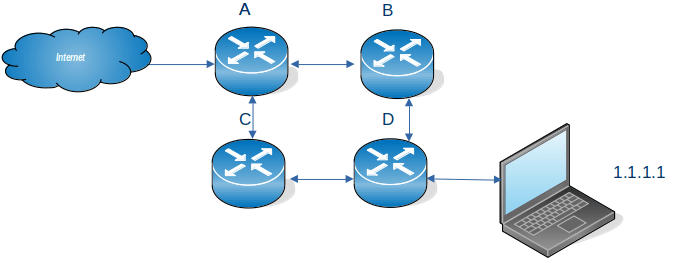
If we have a configuration like

Where internet traffic comes into A for the laptop

For sending data to the laptop with IP address 1.1.1.1, you can configure the network

  • On router A. Send traffic for 1.1.1.* to router B. If B is not available send traffic for 1.1.1.* to router C. This provides dual path, or a backup route.
  • On router B. Send traffic for 1.1.1.* to router D.
  • On router C. Send traffic for 1.1.1.* to router D.

Similarly you can configure router D to say to get to the internet you can go via B or C.

Addresses

You could have a configuration like

Where …

  • the red circle has a laptop connected directly to the router. All of the addresses begin with B. The router end of the connection has an address B.2, where B could be 10.1.1, or 192.168.1 etc
  • the blue circle has an Ethernet switch (SW1) attached to the router. All of the elements have an address A…. where A is different to B. The numbers after A are all different; a laptop with address A.3, a laptop with address A.6, the connection to the router has address A.2, and the router end of the connection has address A.8
  • the green circle is is similar to the blue circle, it uses switch SW2. The value of C is different to A and to B.
  • the yellow circle has the connection to the internet. I is the external address of the router and may be something like 9.8.7.23

Let A be 10.1.1 B be 10.2.2 and C be 10.3.3. I could pick any values as long as A, B and C are different, and different to any addresses on the internet.

Within the routing tables in the router I could have

  • All traffic for the address 10.2.2.9 (B.9), send down 10.2.2.2 (B.2). I could also say any traffic for address starting 10.2.2.* send down 10.2.2.2 (B2).
  • All traffic for the address 10.1.1.* , send down 10.1.1.2 (A.2). This is a range of addresses.
  • All traffic for the address 10.3.3.* , send down 10.3.3.8 (C.2). This is a range of addresses.

If I decide to change 10.2.2.* to 11.2.2.* I have to change all of the laptops and the switch within the blue subnet, and the router’s routing tables to reflect the change.

Technological advances

It used to be that a router and switch were hardware devices. These days many routers are just computers running Linux with lots of Ethernet ports.

One minute Networking: Networking subnets.

I’ve understood and used subnets, (in a hand waving way), but found it hard to write down what they are good for, and why we have them. There are many explanations on the web but they all seemed to describe how to use subnets, and not why we need them. Some of what I say below, may be strictly not true, but I hope it gives the right concepts.

  • You can use an Ethernet cable to join two machines. This is not very interesting.
  • You can have an Ethernet router. You plug the Ethernet cable from your machine to one of the ports on the Ethernet router.
  • The Ethernet router has devices attached to it with addresses such as 192.168.1.160, 192.168.1.24, 192.168.1.74. The router handles traffic for 192.168.1.* The IP address is 32 bits long, and the router is configured so that if the top 24 bits of an address are 192.168.1, then pass the traffic to the router. This is written as 192.168.1.0/24. The remaining 8 bits can be used for devices attached to the router, so almost 256 devices. (192.168.1.0 and 192.168.1.255 are reserved).
  • If you had a large building you could configure a router with address 192.169/16 and have 65,000+ devices attached to it. This may not be a good idea.
    • The router sends out management packets to all devices in the subnet saying, for example “does anyone have this IP address”. With many devices the router could spend all its time processing these management packets, and not handling user data
    • You may want to segregate different areas, so addresses 192.168.1.* is for the first floor, and 192.168.2.* is for the second floor. If you want to have a firewall for the first floor it is much easier configuring all traffic going to 192.168.1.* rather than for some machines within 192.168.* and so all users are using the firewall – which may not be what you want.
    • Each floor has a confidential printer. It is easier to configure the printer so that only machines with the same subnet address, IP address 192.168.1.* can send print files to the printer on 192.168.1.22, rather than filter out users on the second floor.
  • With IP V6 there are 128 bits available for subnetting. Mostly a subnet of /64 is used. I have an address 2a00:9999:8888:7777:a0cd:ec92:bceb:91ab/64 so 2a00:9999:8888:7777 is the address of my router (64 bits), and the device on the router is currently a0cd:ec92:bceb:91ab (64 bits).

Basic connectivity

Single point to point cable

My laptop is connected to my server by an Ethernet cable.

I’ve defined the address at each end 10.1.0.2/24 at the laptop and 10.1.0.3/24 at the server. I can ping between the two machines. When I changed the server to have 12.1.0.3/24 there was no connectivity – because they were in different subnets.

Wireless connection – IPV4

My system was configured automatically to have the laptop 192.168.1.222/24 and the server 192.168.1.222/24. These are the same subnet, so traffic goes from my laptop up the wireless connection to the wireless router, and to the server over the wireless connection.

Wireless connection – IPV6

My system was configured automatically to have the laptop a prefix (subnet) of fe80 and specific address c82d:b94c:21fa:3d1c with this this subnet. The server had prefix (subnet) fe80 and specific address c82d:b94c:21fa:3d1c.

The default routing is via device (the wireless router) with prefix (subnet) fe80 and address c82d:b94c:21fa:3d1. These are both “internal to the router” addresses.

Today my laptop also has IP address 2a00:9999:8888:7777:a0cd:ec92:bceb:91ab/64 and my server has address2a00:9999:8888:7777:605a:2d22:5daf:53d7/64. These can be used to contact sites on the internet, because they are external addresses.

Getting out of the subnet.

My server has a connection over virtual Ethernet to z/OS. The server end of this link has address 10.1.3.1/24. If I use wireless connection from my laptop to the server, I cannot easily access this link, because the wireless router does not know about 10.1.3.1 – and I have no way of configuring it.

On Linux I can configure the server to be a software router (radvd), and have a physical Ethernet cable to the it from my laptop. This way I can control the IP routing to and from the server.

You can also use a bridge … but that is an advanced topic.

How does my network interface get an IP address, and is a generated address ok to use?

This article has some good concepts about IP V6 addresses.

What addresses does an interface have?

An interface (think end of an Ethernet cable) typically has one IP V4 address which is usually manually assigned to it, and/or multiple IPV6 addresses.

An interface can have multiple IPV6 addresses – why?

You can explicitly define it

You can assign your own IP address(es) to the interface. You can do this so it has a global address, reachable from other networks.

Dynamic Host Configuration Protocol (DHCP)

If you are using a DHCP client, it communicates with a DHCP server which gives it configuration information, such as an IP address, and subnet, the client then configures the interface.

There has been a shortage of IP V4 addresses for many years. Consider an office which has a “drop-in area”. Rather than give each of the potential uses an IP address, the office is given as many IP addresses as there are desks in the drop-in area. This means perhaps 10 ip addresses are needed instead of 100. This is the advantage of DHCP.

For client devices this is fine. Your machine connects to the server and passes its IP address. The server does some work and sends the response back to the requester.

Tomorrow you may get a different IP address. It works. This means no IP address information is saved across different days. It is stateless.

A server needs either

  • a fixed IP address so clients can contact it,
  • a dynamic address, and an update to the DNS router to say “today megabank.com is on IP address 9.99.99.1”. It can take time to propagate an IP address across the worldwide DNS network.

IPv6 Stateless Address Auto-configuration (SLAAC)

The ideas behind DHCP have been extended in IPV6, the concepts are similar. Stateless Address Auto-configuration is well documented here

Within a network or router domain the system can generate an address, and it is only used within this domain, it could have a different address every time the interface is started. This is known as Stateless Address Autoconfiguration.

When an interface is started it generates an “internal use” address composed of FE00 + a mangled MAC address.

The interface then asks all devices on the local network, does anyone have this address FE00… This is for Duplicate Address Detection (DAD). There should be no reply. If there is a reply, then there is a duplicate address on the network (and the interface generates another address and repeats the process).

The interface then sends out a Router Solicitation request asking “Are there any routers out there?”. A router will then reply giving information. It will contain the “global IP prefix” such as 2001:db8::. which means to the outside world, my the address of the router is 2001:db8::/64. From this information plus the MAC address the interface can generate its IP address. The router also contains the address of the gateway (the address of the router with connections to the outside world) so traffic can now be routed externally.

This means you configure the router, and not the individual devices. If you have many devices this can save you a lot of work. If you change the router configuration, it is propagated to all the devices attached to it.

IPV6 privacy extensions will generate a “random address” (within the subnet). This is to prevent bad actors from monitoring traffic and using your IP address to monitor what sites you visit. By having a different IP address every day means they cannot correlate the traffic for a user.

Does it matter if my address is auto generated?

This is another of the “it depends” answers.

For machines that initiate work, it may not matter that the allocated IP address is different everyday or the same every day. Your IP address is passed with the request to the server. The server does the work, and sends the response back through the network. Assuming the network is configured properly the response will get back to you.

If your machine is a server machine, clients need to know the server’s address. If this changes your clients may need to use DNS to find the new address, and not use the dotted IP address. You may want to allocate a permanent IP address (within the router’s subnet).

Routers, firewalls and filters.

If your machines address is within the router’s subnet, traffic should be able to get to your router and so to your machine. If you change the subnet, traffic may not get to your router.

A firewall can be configured to allow traffic to and from specified addresses (and ports). If you use a different address, either at client or the server, the firewall may not let your packets through. Similarly with a network filter.

I was playing around with configuring IP V6 on my laptop, and the connection to z/OS failed. This was because I had been using one IP address, which I could see flowing to the back-end. When I tried some other configuration, there were more IP addresses allocated to the client, and a different IP address was used as the originator’s IP address in the ping request. The back-end server did not know how to route traffic back to this address, and so the return packets were thrown away and the ping timed out.

You need to be aware which addresses are used for your work. With some IP programs you can bind to a specific local IP address, and force the application to use a particular IP address. For example the Linux Ping command -I interface option.