
SlickEdit is an IDE (Interactive Development Environment). As well as editing code, for some programs you can execute and debug the programs. At the top of the display is a tool bar which has “…Build Debug…”. You can use these to send commands to z/OS and retrieve the output. This includes running commands in the Unix shell, for example the make command, and running commands which submit JCL and retrieve the output.
Configuring SlickEdit
Project-> Project Properties allows you to configure the tool bar. Under Tools, Tool name: Build I have
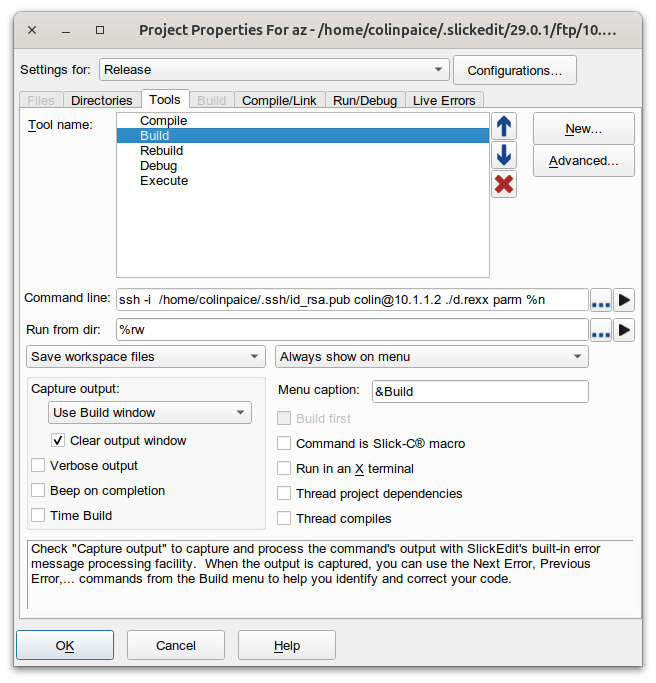
The key fields are the “Command Line”. This is the command to issue… the command has the following
- ssh issue this command
- -i /home/colinpaice/.ssh/id_rsa.pub When setting up password-less logon, the SSH keys are stored here.
- colin@10.1.1.2 the userid and system where the command is to execute
- ./d.rexx parm the command to execute. See Submitting jobs from Rexx in Unix Services.
- %n pass the name of the file being edited
Save workspace files save the current data, and uploads it before issuing the build command.
Clear output window. If this is unticked, the build window grows in size, and shows your history. If this is ticked, you just see the output from the active command.
Having configured the Build, If you click on Build on the tool bar it gives you
- Compile shift + F10
- Build Ctrl+M
- Rebuild
- Debug
- Add new build tool
- …
- Build automatically on save
Having edited your source, you can use Ctrl+M to save the file being edited (and upload it to z/OS), submit the command to z/OS, and watch the output returned.
You can choose where the output of the build command is displayed, for example in the build window or “terminal 1”. You can drag this window away from the main SlickEdit window, so keep an eye on it as you edit other files.
Getting it working
See
- Submitting jobs from Rexx in Unix Services for details of writing a Rexx exec on z/OS for processing commands.
- Using SSH to get to z/OS for getting from distributed to z/OS without having to specify a password.
 ColinPaice