
I could find no z/OSMF documentation on how to turn on traces. The documentation says “Contact IBM”. Someone pointed out the z/OSMF Diagnostic Assistant. This is an icon on the z/OSMF main screen (https://10.1.1.2:10443/zosmf/ for me).
You need to click on “Add Service” to list the components, before you can change the log level.
Fill in the details, use the Tick box at the start of the line, and the Log Level pull down. Once you have chose them, click on the “Set” button.
You can issue an operator command.
f server-name,logging='trace_specification'
Below is a list of the trace commands from the diagnostic Assistant . The granularity of the trace is warning, info, fine, finer, finest
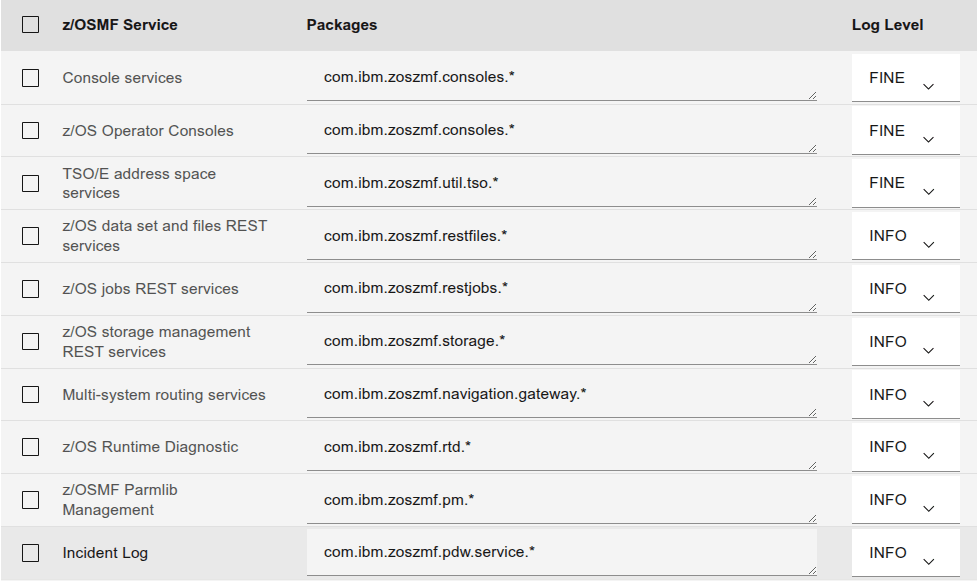
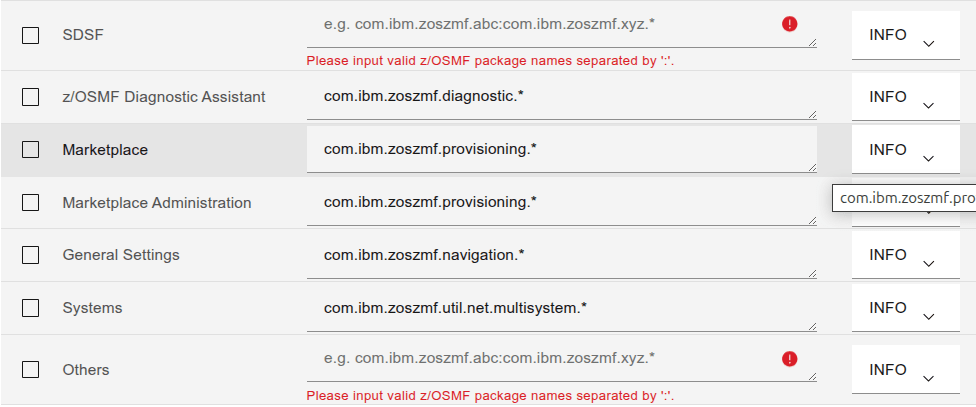
For SAF security calls use zos.native=finest.
Ive seen this as zos.native.03=…
I also found these – but I dont know what they mean!
- com.ibm.ccc.=ALL:
- com.ibm.crypto.=all:
- com.ibm.websphere.security.*=all:
- com.ibm.ws.security.=ALL:
- com.ibm.ws.webcontainer.=all:
- com.ibm.wsspi.webcontainer.*=all:
- HTTPChannel=all:
- GenericBNF=all:
- zos.native.03=all – this give information about a subset of z/OS calls
- com.ibm.websphere.security.jwt=all
SAF security calls: zos.native=finest
Produces output like (formatted for display)
6/23/25, 16:39:20:192 GMT?] 00000028 id=00000000 zos.native.03.001
 Trace: 6/23/25, 16:39:20:192 GMT? t=8c8140 key=S2 (300100f)
  Description: RACROUTE REQUEST=FASTAUTH call
  racrouteArea_p: 000000007e4b0c10
6/23/25, 16:39:20:193 GMT?] 00000028 id=00000000 zos.native.03.001
 Trace: 6/23/25, 16:39:20:193 GMT? t=8c8140 key=S2 (3001010)
  Description: RACROUTE REQUEST=FASTAUTH return
  returnCode: 0
  safReturnCode: 0
  racfReturnCode: 0
  racfReasonCode: 4
6/23/25, 16:39:20:194 GMT?] 00000028 id=00000000 zos.native.03.001
 Trace: 6/23/25, 16:39:20:194 GMT? t=8c8140 key=S2 (3001012)
  Description: Exit: checkAuthorizationFast
  returnCode: 0
6/23/25, 16:39:20:195 GMT?] 00000028 id=00000000 zos.native.02.008
 Trace: 6/23/25, 16:39:20:195 GMT? t=8c8140 key=S2 (2008005)
  Description: Entry: registrySetUnused
  alreadyVerified: true
  token:   data_address=00000051_2a6103b8, data_length=64
 +--------------------------------------------------------------------------+
 |OSet| A=000000512a6103b8 Length=0000040 |     EBCDIC     |     ASCII      |
 +----+-----------------------------------+----------------+----------------+
 |0000|C2C2C7E9 D9C5C7E3 00000001 00000040|BBGZREGT....... |...............@|
 |0010|00000000 7DC72100 00000007 00000000|....'G..........|....}.!.........|
 |0020|01000000 00000000 00000000 00000000|................|................|
 |0030|00000000 00000000 00000000 00000000|................|................|
 +--------------------------------------------------------------------------+
It is not very well written, because there are “safReturnCode:”, “SAF return code:”,”return code:” and “returnCode:”, and “rc:”. I found it easiest to use the following in an edit session to find non zero return codes.
- x all
- f ‘code: 0’ all
- del all x
- f ‘code:’ all
The trace entry ” token: data_address=00000051_2a6103b8, data_length=64 ” shows the value with name “token” at the specified address, and length. It is displayed in hex, EBCDIC and ASCII.
Trace points.
Taken from a trace file
- zos.native.02.002 getConsoleCommand
- zos.native.02.006 CommandProcessor.ntv_issueCommandResponse
- zos.native.02.00d DeleteWorkUnit*
- zos.native.02.00e wlm_enclave_*
- zos.native.02.00e wlm_enclave_create leave
- zos.native.03.001 RACROUTE REQUEST=FASTAUTH
- zos.native.03.003 CertificateCredential…
- zos.native.03.004 ntv_createCertificateCredential
- zos.native.03.005 checkAccess
- zos.native.03.006 ntv_checkAccess
- zos.native.03.007 invokeIRRSIA00 createACEE
- zos.native.03.008 PenaltyBox
- zos.native.03.00b getGroupsForUser
- zos.native.04.002 write_to_operator_response
- zos.native.04.004 Latch
- zos.native.04.007 getStck
 ColinPaice