How do I configure my new laptop to run my work?

This is an aid to help me when I had a new laptop, and the things I had to do. Some people may find some of the things I use, useful in their work. Because I made some big mistakes, it was worth writing things down.

If people have other good Ubuntu tools which they consider essential, please let me know


Note: It is a list of things to do – not a set of instructions.

Windows

  • mangage bitlocker – disable so you can resize the partition
  • set fast boot off so you can resize the partition

Lenovo bios change

  • F1-F12 as primary function -> On. Without this ISPF P9 gives print screen.
  • Enable trackpoint
  • Disable trackpad
  • Swap Ctrl FN

Prepare the laptop

  • Create Linux bootable image for the correct architecture
  • Boot the Linux USB
  • Change partitions, shrink Windows allocate Linux partition, allocate user partition
  • Install Linux
  • Check Windows still starts

Boot the installed Linux

  • Connect to Wifi
  • Sudo apt update
  • Sudo apt install ssh
  • Sudo apt install sshfs
  • Sudo snap install vivaldi
  • Use disks to create a user parition on the SSD.
    • Format it
    • Edit mount options
    • Unselect User session defaults
    • Display Name: colins
    • Mount point /mnt/Colin
    • Identify as LABEL=Colin
    • Reboot and check disk is mounted
  • Add backup userid
    • sudo adduser ColinPaice
    • sudo passwd ColinPaice
    • sudo adduser ColinPaice sudo
    • sudo mkdir /home/ColinPaice
    • sudo chwon ColinPaice:users /home/ColinPaice
    • su – ColinPaice Check it works
  • Change userid to its parition on /mnt/Colin
    • logon as the backup userid ColinPaice
    • usermod --home /mnt/colin colin
    • su – colin to check it works
  • sudo apt install x3270 do this before installing openssh-server because of font problems
  • sudo apt install openssl-server
  • sudo apt install traceroute
  • set up sshd
    • sudo ufw allow ssh
    • sudo ufw enable
    • sudo systemctl enable ssh
    • sudo systemctl start ssh
    • sudo systemctl status ssh
  • use system to change Ethernet network to
    • Manual 10.1.0.4 255.255.255.0
  • From old laptop ssh colin@10.1.0.4
  • sudo snap install discord
  • sudo apt install wmctrl so I can use hot keys to switch ispf windows
  • Set up networking
    • sudo ip -4 addr add 10.1.0.2/24 dev enp1s0f0
  • save/restore keyboard mappings
    • dconf dump /org/gnome/settings-daemon/plugins/media-keys/custom-keybindings/ > custom.txt
    • cat custom.txt | dconf load /org/gnome/settings-daemon/plugins/media-keys/custom-keybindings/
    • all: dconf dump / > dconf-backup.conf
    • all: cat dconf-backup.conf | dconf load /
  • Move window buttons to the top left sudo apt install gnome-tweaks; gnome-tweaks; windows-: Placement left
  • Set dash icon size. Settings-> Ubuntu desktop -> Dock -> Icon size
  • Add my hot directories to the Gnome file manager side bar.
    • Display the directory and its contents, click on ⋮ select “add to bookmarks”.
  • sudo apt install dconf-editor
  • sudo apt install gnome-shell-extension-manager
    • super – extension manager browse clipboard-history – install
      • Shift super sudo apt install gnome-screenshot
  • For backups sudo apt install deja-dup duplicity
  • Setting icon size for file manager.
    • dconf /org/gnome/nautilus/list-view
    • use default value off
    • custom value ‘small’

Setting up applications to use z/OS on a remote Linux machines

  • For hot key to ISPF sessions sudo apt install wmctrl . system -> keyboard -> keyboard short cuts -> custom
    • Name: colin@ wmctrl -a colin@ shortcut ctrl + 3
    • Name: mst cons wmctrl -a mstcon shortcut ctrl + 1
    • Name: tso@ wmctrl -a tso@ shortcut ctrl + 2
  • sudo apt install wireshark

Why can’t I change the colour of my Gnome terminals on my new Linux image?

I’ve got a new laptop, and I’ve spent quite a lot of time migrating stuff from my old one.

It all seemed to be working, except I could not change the colour of my Gnome terminals.

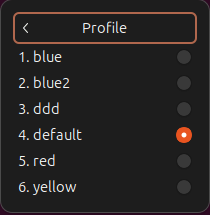
The documentation (and many comments on the internet) say hamburge(≡) -> Profile -> pick your favourite colour from the options. Unfortunately I did not have “Profile” as an option.

Gnome configuration information is stored in a directory tree format under /org/gnome/terminal/legacy/profiles:

This can be see by using:

  • dconf-editor is a GUI tool to allow direct editing of the dconf configuration database.
  • dconf is a simple tool for manipulating a dconf database.
  • gsettings offers a simple command line interface to GSettings. It lets you get, set or monitor an individual key for changes.

From these I could see that for the userid with problems (another userid was OK) I was missing some configuration information.

On my old system I exported the part of the configuration tree using the command

dconf dump /org/gnome/terminal/legacy/profiles:/ > dconf.dump

I sent this file across to my new system, backed up .config/dconf/user and used

dconf load /org/gnome/terminal/legacy/profiles:/ < dconf.dump

I immediately had access to the hamburger icon; it had “Profile >”; and I could pick a colour.

What is in the dumped configuration file?

The dconf.dump file user above contained

[/]
default='f8084ff0-88c6-43ad-b674-d901f5f818a5'
list=['b1dcc9dd-5262-4d8d-a863-c897e6d979b9', '2e126889-4012-485a-a363-057135d6b038', 'f8084ff0-88c6-43ad-b674-d901f5f818a5', '990b09a4-8a20-4ba5-aab6-ad88fdc531dd', 'd963eefc-9bf1-4ae1-8653-e8d36bd6127a', '110cf44a-82fd-454c-bc12-b3918b987cde']

[:110cf44a-82fd-454c-bc12-b3918b987cde]
background-color='rgb(56,111,67)'
use-theme-colors=false
visible-name='ddd'

[:2e126889-4012-485a-a363-057135d6b038]
background-color='rgb(238,238,236)'
foreground-color='rgb(46,52,54)'
use-theme-colors=false
visible-name='blue'
...
[:f8084ff0-88c6-43ad-b674-d901f5f818a5]
default-size-columns=100
use-theme-colors=true
visible-name='default'

There is a definition (at the bottom)

  • id :[:f8084ff0-88c6-43ad-b674-d901f5f818a5]
  • default-size-columns=100
  • use-theme-colors=true
  • visible-name=’default’

I refer to this as default (the visible name) using the system theme colours.

There is a definition called ‘blue’.

  • use-theme-colors=false says do not use the standard theme colour; the colours are overridden
  • the background colours are specified
  • the foreground colours are specified
  • it has an id of 2e126889-4012-485a-a363-057135d6b038

At the top of the file is

  • default=’f8084ff0-88c6-43ad-b674-d901f5f818a5′ this refers to the section which I’ve called default.
  • the list of possible values includes those for default and blue.

Creating a ZFS – which way should I do it? IDCAMS LINEAR or IDCAMS ZFS?

When I looked into creating a ZFS (so I could run use it in the Unix environment) I found there were two ways of doing it both have the same end result.

The “old” way – a three step process

You use DEFINE CLUSTER …LINEAR to create the data set, then use PGM=IOEAGFMT to format it, then mount it.

//IBMUZFS  JOB ,' ',COND=(4,LE) RESTART=MOUNT 
//DEFINE EXEC PGM=IDCAMS
//SYSPRINT DD SYSOUT=*
//SYSIN DD *
DELETE COLIN.ZOPEN.ZFS CLUSTER
SET MAXCC=0
DEFINE -
CLUSTER -
(NAME(COLIN.ZOPEN.ZFS)-
LINEAR -
VOLUMES(USER10 ) -
STORCLAS(SGBASE ) -
MEGABYTES(6000 1000) -
SHAREOPTIONS(3 3))
/* -
//FORMATFS EXEC PGM=IOEAGFMT,REGION=0M,COND=(0,NE,DEFINE),
// PARM=('-aggregate COLIN.ZOPEN.ZFS ')
//* PARM=('-aggregate COLIN.ZOPEN.ZFS -compat')
//SYSPRINT DD SYSOUT=*
//STDOUT DD SYSOUT=*
//STDERR DD SYSOUT=*
//*
//*
//MOUNT EXEC PGM=IKJEFT1A,COND=((0,NE,DEFINE),(0,NE,FORMATFS))
//SYSTSPRT DD SYSOUT=*
//SYSTSIN DD *
MOUNT FILESYSTEM('COLIN.ZOPEN.ZFS') TYPE(ZFS) +
MOUNTPOINT('/u/zopen') +
MODE(RDWR) PARM('AGGRGROW') AUTOMOVE
/*

The define took less than a second, the format took about 16 seconds, and the mount took less than one second

The Two step (sounds like a dance for system administrators)

You create the dataset with type ZFS, you then mount it, and the mount formats it.

//IBMUZFS  JOB ,' ',COND=(4,LE) RESTART=MOUNT 
//DEFINE EXEC PGM=IDCAMS
//SYSPRINT DD SYSOUT=*
//SYSIN DD *
DELETE COLIN.ZOPEN.ZFS CLUSTER
SET MAXCC=0
DEFINE -
CLUSTER -
(NAME(COLIN.ZOPEN.ZFS)-
ZFS -
VOLUMES(USER10 ) -
STORCLAS(SGBASE ) -
MEGABYTES(6000 1000) -
SHAREOPTIONS(3 3))
/*
//MOUNT EXEC PGM=IKJEFT1A,COND=((0,NE,DEFINE))
//SYSTSPRT DD SYSOUT=*
//SYSTSIN DD *
MOUNT FILESYSTEM('COLIN.ZOPEN.ZFS') TYPE(ZFS) +
MOUNTPOINT('/u/zopen') +
MODE(RDWR) PARM('AGGRGROW') AUTOMOVE
/*

The define took less than a second – the mount took 17 seconds, because it had to do the format.

What’s the difference?

Overall the time to execute the job was the same.

I think I prefer the first way of doing it, as I have more control, and can check the format was as I expected.

If you used the second way of doing it, defined the ZFS in parmlib, I don’t know if the formatting would hold up OMVS startup.

And don’t forget

And do not forget to update your parmlib member so the ZFS is mounted automatically at IPL.

How do I securely send you a present when bad guys are intercepting our mail?

Following on from some stuff I was doing about TLS, I remembered some concept examples of security.

How do I securely send you a present when bad guys are intercepting our mail?

I want to send you a present, but I do not have a padlock from you to lock the box. If you send me a padlock – that would solve the problem – except for the bad guys intercepting the mail and replacing your padlock with theirs. I put something in the box, and lock it using the padlock I received. The bad guys open the box with their key, take out the gold bar, and put in a one pence coin – and then put your padlock on it. You open the box and are disappointed.

One way of doing it is as follows

  • I put the present in the box and put my padlock on it, and send it to you
  • You receive the box, put your padlock on it – and send the box back to me
  • I take my padlock off – and send the box to you again
  • You open the box and love the present.

The bad guys cannot get into the box (well, in real life they could).

How do we lock/unlock this gate

The traditional way is to put a chain around the gate, and put a padlock on it. You give a copy of the key to all those who need access. Every one having the same key is not a good idea. You could copy the key 100 times and give it to all your friends, and we quickly lose control of the access.

Another way is for each person to provide their own padlock. We chain the padlocks together, so we have chain, chain, my padlock, your padlock, someone else’s padlock – chain – chain.

This way we are all able to open our padlock and individually we can manage the keys (so you can make 100 copies).

How do I encrypt for multiple recipients?

If I have a 1GB record I want to send to you, I can encrypt it with your public key and send it to you. You need your private key to decrypt it. This is well known.
I want to send the 1GB record to 100 people. I could encrypt it 100 times, once per public key. This would be 100GB. The costs of this soon mounts up.

One solution is to encrypt it with a key. You then encrypt the decryption key with each person’s public key, and stick them on the front of the data. So you have 100 short blocks, followed by a 1GB encrypted block of data.

When you receive it, you iterate over the short blocks until you find one where your private key matches. You decrypt it, then used the decrypted value to decrypt the main 1GB data.

Warning brain ache ahead: Homomorpic encryption

You have been asked to create a voting system. People press one of two buttons, and your code increments the counter for each button. The requirement is that the totals for each button cannot be displayed until the voting period has finished.

Easy you think.

Store the count in an field. When you need to increment the value, decrypt it, add one, and re-encrypt it. Easy; except for the tiny weeny problem that someone with a debugger can step through the code and display the unencrypted value.

Enter Homomorphic encryption. You can do calculations on encrypted numbers.

  • You generate a special private/public key pair priv, pub = generate_keypair(128)
  • You lock the private key in a safe – with a time lock on it
  • You store the public value in your voting machine
  • You code has
    • button1 = encrypt(pub, 0)
    • button2 = encrypt(pub, 0)
    • Loop…
      • if button1 is pressed then button1 = button1 + encrypt(pub,1)
      • if button2 is pressed then button2 = button2 + encrypt(pub,1)
  • After voting has finished you do
    • print(decrypt(priv, pub, button1))
    • print(decrypt(priv, pub, button2))

Multiplication based on RSA encryption technique.

To encrypt data using RSA. You have calculate (x**public_key) Modulo N. Where N is a very large number. You can only decrypt it with the private key

  • (x **A) * (y **A) = (x*y) **A

Using RSA techniques

  • [(x **PublicKey) * (y **PublicKey)] Modulo N = [(x*y) **PublicKey ] Modulo N

To decrypt this you need the private key.

This is the “easy” case for multiplication. There are more complex schemes using Group theory and very large lattices, for addition and subtraction.

It is much more complex than I’ve explained.

How do I get my client talking to the server with a signed certificate

Signed certificates are very common, but I was asked how I connected my laptop to my server, in the scenario “one up” from a trivial example.

Basic concepts

  • A private/public key pair are generated on a machine. The private stays on the machine (securely). The public key can be sent anywhere.
  • A certificate has ( amongst other stuff)
    • Your name
    • Address
    • Public key
    • Validity dates

Getting a signed certificate

When you create a certificate: it does a checksum of the contents of the certificate, encrypts the checksum with your private key, and attaches this encrypted value to the certificate.

Conceptually, you go to your favourite Certificate Authority (UKCA) building and they Sign it

  • They check your passport and gas bill with the details of your certificate.
  • They attach the UKCA public key to your certificate.
  • They do a checksum of the combined documents.
  • They encrypt the checksum with the the UKCA private key, and stick this on the combined document.

You now have a signed certificate, which you can send it to anyone who cares.

Using it

When I receive it, and use it

  • my system compares my copy of the UKCA public certificate with the one in your certificate – it matches!
  • Using (either) UKCA public certificate – decrypt the encrypted checksum
  • Do the same checksum calculation – and the two values should match.
  • If they match I know I can trust the information in the certificate.

This means the checking of the certificate requires the CA certificate that signed it.

To use a (Linux) certificate on z/OS you either need to

  • issue the RACF GENCERT command on the Linux .csr file, export it, then download it to Linux. The certificate will contain the z/OS CA’s certificate.
  • import the Linux CA certificate into RACF (This is the easy, do once solution.)

then

  • connect the CA certificate to your keyring, and usually restart your server.

Setting up my system

If the CA certificate is not on your system, you need to import it from a dataset.

You can use FTP, or use cut and paste to the dataset.

Once you have the CA certificate in your RACF database you can connect it to your keyring.

Create my Linux CA and copy it to z/OS

CA="docca256"
casubj=" -subj /C=GB/O=DOC/OU=CA/CN=LINUXDOCCA2564"
days="-days 1095"
rm $CA.pem $CA.key.pem

openssl ecparam -name prime256v1 -genkey -noout -out $CA.key.pem

openssl req -x509 -sha384 -config caca.config -key $CA.key.pem -keyform pem -nodes $casubj -out $CA.pem -outform PEM $days

openssl x509 -in $CA.pem -text -noout|less

Where my caca.config has

####################################################################
[ req ]
distinguished_name = ca_distinguished_name
x509_extensions = ca_extensions
prompt = no

authorityKeyIdentifier = keyid:always,issuer:always

[ca_distinguished_name ]
[ ca_extensions ]

subjectKeyIdentifier = hash
authorityKeyIdentifier = keyid:always
basicConstraints = critical,CA:TRUE, pathlen:0
keyUsage = keyCertSign, digitalSignature,cRLSign

Running the command gave

Certificate:
Data:
...
Issuer: C = GB, O = DOC, OU = CA, CN = LINUXDOCCA256
...
Subject: C = GB, O = DOC, OU = CA, CN = LINUXDOCCA256
...
X509v3 extensions:
...
X509v3 Basic Constraints: critical
CA:TRUE, pathlen:0
X509v3 Key Usage:
Digital Signature, Certificate Sign, CRL Sign
...

Where it has CA:TRUE and X509v3 Key Usage:Certificate Sign

Which allows this to be used to sign certificates.

Installing the CA certificate on z/OS

You need to copy the docca256.pem file from Linux to a z/OS dataset (Fixed block, lrecl 80, blksize 80) you can use FTP or cut and paste. I used dataset COLIN.DOCCA256.PEM.

Import it into z/OS, and connect it to the START1.MYRING keyring as a CERTAUTH.

//COLRACF  JOB 1,MSGCLASS=H 
//S1 EXEC PGM=IKJEFT01,REGION=0M
//SYSPRINT DD SYSOUT=*
//SYSTSPRT DD SYSOUT=*
//SYSTSIN DD *
RACDCERT CHECKCERT('COLIN.DOCCA256.PEM')

*RACDCERT DELETE (LABEL('LINUXDOCA256')) CERTAUTH
RACDCERT ADD('COLIN.DOCCA256.PEM') -
CERTAUTH WITHLABEL('LINUXDOCA256') TRUST

RACDCERT CONNECT(CERTAUTH LABEL('LINUXDOCA256') -
RING(MYRING) USAGE(CERTAUTH)) ID(START1)

SETROPTS RACLIST(DIGTCERT,DIGTRING ) refresh
/*

Once you have connected the CA to the keyring, you need to get the server to reread the keyring, or restart the server.

Getting my Linux certificate signed by z/OS

This works, but is a bit tedious for a large number of certificates.

I created a certificate request file using

timeout="--connect-timeout 10"
enddate="-enddate 20290130164600Z"

ext="-extensions end_user"

name="docec384Pass2"
key="$name.key.pem"
cert="$name.pem"
p12="$name.p12"
subj="-subj /C=GB/O=Doc3/CN="$name
rm $name.key.pem
rm $name.csr
rm $name.pem
passin="-passin file:password.file"
passout="-passout file:password.file"
md="-md sha384"
policy="-policy signing_policy"
caconfig="-config ca2.config"
caextensions="-extensions clientServer"


openssl ecparam -name secp384r1 -genkey -noout -out $name.key.pem
openssl req -config openssl.config -new -key $key -out $name.csr -outform PEM -$subj $passin $passout

The certificate request file docec384Pass2.csr looks like

-----BEGIN CERTIFICATE REQUEST----- 
MIIBpzCCAS0CAQAwNDELMAkGA1UEBhMCR0IxDTALBgNVBAoMBERvYzMxFjAUBgNV
...
Tmmvu/nqe0wTc/jJuC4c/QJt+BQ1SYMxz9LiYjBXZuOZkpDdUieZDbbEew==
-----END CERTIFICATE REQUEST-----

With words CERTIFICATE REQUEST in the header and trailer records.

Create a dataset(COLIN.DOCLCERT.CSR) with the contents. It needs to be a sequential FB, LRECL 80 dataset.

  • Delete the old one
  • Generate the certificate using the information in the .csr. Sign it with the z/OS CA certificate
  • Export it to a dataset.
//IBMRACF2 JOB 1,MSGCLASS=H 
//S1 EXEC PGM=IKJEFT01,REGION=0M
//SYSPRINT DD SYSOUT=*
//SYSTSPRT DD SYSOUT=*
//SYSTSIN DD *

RACDCERT ID(COLIN ) DELETE(LABEL('LINUXCERT'))

RACDCERT ID(COLIN) GENCERT('COLIN.DOCLCERT.CSR') -
SIGNWITH (CERTAUTH LABEL('DOCZOSCA')) -
WITHLABEL('LINUXCERT')

RACDCERT ID(COLIN) LIST(label('LINUXCERT'))
RACDCERT EXPORT(label('LINUXCERT')) -
id(COLIN) -
format(CERTB64 ) -
password('password') -
DSN('COLIN.DOCLCERT.PEM' )

SETROPTS RACLIST(DIGTCERT,DIGTRING ) refresh

Then you can download COLIN.DOCLCERT.PEM to a file on Linux and use it. I used cut and paste to create a file docec384Pass2.zpem

I used it like

set -x 
name="colinpaice"
name="colinpaice"
name="docec384Pass2"
insecure=" "
insecure="--insecure"
timeout="--connect-timeout 100"
url="https://10.1.1.2:10443"
trace="--trace curl.trace.txt"

cert="--cert ./$name.zpem:password"
key="--key $name.key.pem"

curl -v $cert $key $url --verbose $timeout $insecure --tlsv1.2 $trace

Using wireshark I can see CA certificates being send from z/OS, and the docec384Pass2.lpem used; signed by a z/OS CA certificate.

Using the certificate in the Chrome browser.

  • In Chrome settings, search for cert.
  • Click security
  • Scroll down to Manage certificates, and select it
  • Select customised
  • Select import, and then select the file.
    • When I generated the file with the Linux CA it had a file type of .pem
    • When I signed it on z/OS, then downloaded it with a type of.zpem, I had to select all files (because the defaults are *.pem,*.csr,*.der..)

Wow3 ISPF cut and paste can do so much more

You can use the ISPF cut command

EDIT       COLIN.PDSE2(AA) - 01.07
Command ===> cut
****** ********************************* Top of D
000100 ddd
000200 bbbb
cc0300 44444
000400 5555
cc0500 666
000600 777

and this copies the lines into a working area, then use the paste command to insert the text, in the same or a different file.

What is in the clipboard?

The command cut display gave me

┌────────────────────────────────────────────────────────────────┐
│ Clipboard manager │
│ │
│ B - Browse C - Clear O - Toggle Read-only │
│ E - Edit R - Rename D - Delete │
│ │
│ Name Lines User Comment │
│ │
│ _ DEFAULT 3 ISPF Default Clipboard │
│ │

You can now enter B into the line command before DEFAULT to display the contents. This gave me

 BROWSE    CLIPBOARD:DEFAULT
Command ===>
********************************
44444
5555
666

Multiple clipboards

The command cut AAAA followed by CUT DISPLAY showed all the clipboards I have. This shows the clip board AAA I just created

 ┌────────────────────────────────────────────────────────────────┐
│ Clipboard manager │
│ │
│ B - Browse C - Clear O - Toggle Read-only │
│ E - Edit R - Rename D - Delete │
│ │
│ Name Lines User Comment │
│ │
│ _ DEFAULT 3 ISPF Default Clipboard │
│ _ AAA 2 │
│ │

You can have up to 11 clip boards.

Other clever things

  • You can append or replace the data.
  • You can have the data converted to ASCII, EBCDIC or UTF8 as part of the copy.
  • You can select eXcluded or Not eXcluded (x or NX) lines.

Paste

You can use the PASTE , or the PASTE AA command to put the value from the specified (or defaulted) clipboard into your data.

You could use

paste AA After .zlast

to paste the data after the end of the file.

Wow I can have member generations

We have had the capability of having multiple generations of data sets on z/OS for years.
For example with three generations you can have

  • the current data set
  • the one before that
  • and the one before that.

If you create a new data set the oldest gets deleted, and they all move along one.

This has been around for years.
What I found recently was you can have this with members within a V2 PDSE (not a PDS) since 2015.

System wide set up

When you create the data set, the number of generations is limited by MAXGENS_LIMIT in the IGDSMSxx member of PARMLIB.

Use the command

D SMS,OPTIONS

This displays information like

ACDS     = SYS1.S0W1.ACDS               
COMMDS = SYS1.S0W1.COMMDS
ACDS LEVEL = z/OS V3.1
SMS PARMLIB MEMBER NAME = IGDSMS00
...
HONOR_DSNTYPE_PDSE = NO PDSE_VERSION = 2
USER_ACSVAR = ( , , ) BYPASS_CLUSTER_PREFERENCING = NO
USE_MOST_FREE_SPACE = NO MAXGENS_LIMIT = 0

To change the value of MAXGENS_LIMIT you need to change the parmlib member and use T SMS=nn (or just wait till the next IPL).

I used Which parmlib/proclib library has my member? to find the member and added

 MAXGENS_LIMIT(3)        

I then used

set sms=00

to activate it

Using the support

For example to allocate a dataset to support this.

Example JCL

//SAM00001 DD DISP=(NEW,CATLG),DSN=IBMUSER.TEST1.PDSE00,
// DSNTYPE=(LIBRARY,2),LRECL=80,BLKSIZE=8000,RECFM=FB,
// MAXGENS=3

Where

  • dsntype=(LIBRARY,2) says this a LIBRARY ( also known as PDSE) type 2
  • MAXGENS=3 this will support up to 3 generation

Using ISPF

This works in z/OS 3.1, I do not know if earlier releases have the ISPF support.

I used ISPF 3.2 and specified

──────────────────────────────────────────────────────────────────────────────
Allocate New Data Set
Command ===>

Data Set Name . . . : COLIN.PDSE2

Management class . . . (Blank for default management class)
...
Data set name type LIBRARY (LIBRARY, PDS, LARGE, BASIC, *
EXTREQ, EXTPREF or blank)
Data set version . : 2
Num of generations : 3
Extended Attributes (NO, OPT or blank)
Expiration date . . . (YY/MM/DD, YYYY/MM/DD
YY.DDD, YYYY.DDD in Julian form
DDDD for retention period in days
or blank)

I then edited a member, saved it, and then reedited it several times.

ISPF 3;4 member list gave

DSLIST            COLIN.PDSE2                           Row 0000001 of 0000001
Command ===> Scroll ===> CSR
Name Prompt Size Created Changed ID
_________ AA 2 2025/11/09 2025/11/09 09:22:35 COLIN

Using the line command b to browse the data set showed the latest content.

Using the line command N gave me

GENLIST           (AA)COLIN.PDSE2                       Row 0000001 of 0000004
Command ===> Scroll ===> CSR
RGEN Prompt Size Created Changed ID
_ 00000000 5 2025/11/09 2025/11/09 09:31:44 COLIN
_ 00000001 4 2025/11/09 2025/11/09 09:31:32 COLIN
_ 00000002 3 2025/11/09 2025/11/09 09:31:17 COLIN
_ 00000003 2 2025/11/09 2025/11/09 09:22:35 COLIN

There is

  • (AA)COLIN.PDSE2 showing member AA of data set ( library) COLIN.PDSE2
  • RGEN showing the generations
  • Generation 3 is the oldest

In the line command you can type / which lists all of the valid commands

           Action for Generation 0              

Generation Action
1. Edit
2. View
3. Browse
4. Delete
5. Info
6. Print

Prompt Action . . (For prompt field)

Select a choice and press ENTER to continue

Info gave me

   Menu  Functions  Confirm  Utilities  Help  
─────────────────────────────────────────────
EDIT USER.Z31B.PARMLIB
. . . . . . . . . . . . . . .
Member Informat
Command ===>

Data Set Name . . . : COLIN.PDSE2

General Data
Member name . . . . . . . . : AA
Concatenation number . . . . : 1
Version . Modification . . . : 01.07
...

Non-current Generations
Maximum . . . . : 3
Saved . . . . . : 3
Newest Absolute : 7
Oldest Absolute : 5

See Version and modification level numbers. You can use the commands

To set these values

Deleting a member

Using the D line command against the oldest member gave the prompt

           Confirm Member Generation Delete          

Data Set Name:
COLIN.PDSE2

Member Name:
AA

Generation to be Deleted:
-3

__Set member generation delete confirmation off

Only the specified generation will be deleted.

Press ENTER to confirm delete.
Press CANCEL or EXIT to cancel delete.

Editing a member

When you edit a member the screen is like

   File  Edit  Edit_Settings  Menu  Utilities  Compilers  Test  Help
────────────────────────────────────────────────────────────────────
EDIT COLIN.PDSE2(AA) - 01.04
Command ===>
****** ********************************* Top of Data ***************
000100 ddd
000200 bbbb
000300 44444

with the version. release at the top.

Which parmlib/proclib library has my member?

I wanted to find which IGDSMS00 member in parmlib was being used.

You can use SDSF (where I use “s” in ispf to get to sdsf)

s;parm

(You can do the same with s;proc)

This lists the parmlib concatenation

COMMAND INPUT ===>                                      CROLL ===> CSR
NP DSNAME Seq VolSer BlkSize Extent SMS LRecL DSOrg RecFm
__ USER.Z31B.PARMLIB 1 B3CFG1 6160 1 NO 80 PO FB
__ FEU.Z31B.PARMLIB 2 B3CFG1 6160 1 NO 80 PO FB
__ ADCD.Z31B.PARMLIB 3 B3SYS1 6160 1 NO 80 PO FB
__ SYS1.PARMLIB 4 B3RES1 27920 1 NO 80 PO FB

You can use the line command sv or se (for view or edit) on the data set to list the members of the data set.

I then used the edit comand s IGDSMS00 to edit the member directly, or loc IGDSMS to find the first member matching the string.

Search for the member

When you’ve displayed the list of data sets in parmlib you can issue a command like

SRCH CONSOLCP

If the member is found the data set will be displayed in white,if it is not found, it will be displayed in blue.

You can also use

SRCH CONSOL*

and get output like

  Display  Filter  View  Print  Options  Search  Help                                                                   

SDSF DATA SET SEARCH CONS* ALL LINE 1-4 (4)
COMMAND INPUT ===> SCROLL ===> CSR
NP DSNAME Seq ... SysName Member
__ USER.Z31B.PARMLIB 1 ... S0W1 CONS*
__ FEU.Z31B.PARMLIB 2 ... S0W1 CONS*
__ ADCD.Z31B.PARMLIB 3 ... S0W1 CONS*
__ SYS1.PARMLIB 4 ... S0W1 CONS*

Where it has colour coded the data sets, and the searched for member name is on the right end of the line. (Blue not found

The future is already here. GS UK 2025

I was at the GS UK conference recently (which was bigger than ever) and learned so many new things.

I’ll give some short descriptions of what I learned. There is no order to these topics. Some items come in more than one area.

  • Python is very popular and widely used.
    • pyracf for issuing RACF commands from OMVS
    • pysdsf accessing SDSF from OMVS (z/OS 3.2)
  • Use ssh to access z/OS instead of ISPF
    • Many Unixy commands ported to z/OS through zopen project
    • /dfds to access data sets
    • Possibly faster than through ISPF
  • vscode is the most commonly used IDE with lots of plugins. Can edit z/OS data sets, files, submit jobs and look at spool – via Zowe
    • Git is the standard repository
    • Edit in vscode
    • check-in to Git
    • on z/os pull from Git
    • compile and run from ssh window
    • can edit on your workstation and process on z/OS
    • use Zowe/vscode to edit datasets and files in vscode, submit JCL and look at the spool. Can use zowe command line interface for issuing stuff to z/OS ( eg list files, issue operator commands)
  • People like my blog posts – Wow ! I never really knew. If you like/use anyone’s post please “like it” so the author knows. If it has been really helpful make a comment “I found this very useful”. Steven P. pointed out that you need o be logged on to a WordPress account to be able to “like” or raise a comment – this would explain why I got so few likes!
  • Lots of capturing data and displaying it in tools like grafana.
    • Python used to capture data
  • Monitoring dashboards are so last year.
    • Now have modern tools (AI) to detect changes from historical data, then alert people to differences, who then use the dashboards.
  • SDSF version 3.2 can intercept RACF writes to SMF and can display the activity, so if RACF is configured you can display OK access to resources. You just get the failures reported on syslog
  • You’ve been hacked
    • Often there is evidence months before hack – you just need to spot it
      • Pat is a z/OS sysprog who comes to work, has a coffee and starts working at 0930. Today there were two password validation failures at 0430. Is this unusual – yes. Do something
      • The password failures occurred at 0925 and 0926 – is this unusual.. you might want to check
      • You had a connection from an IP address you’ve never seen before – what do you do? Slow down their traffic and notify someone
    • Prepare for this
      • Have an integrated playbook.
        • Populate panels with the suspicious userid, and have a pull down to disable. It takes longer to type data into a RACF command than use from pre populated fields. (Eg userid COLIN Click here to disable it. )
        • Have people use the play book so they know what to do when an incident occurs. You do not have time to learn as you go along.
      • You have minutes to act. Getting someone out of bed is too long.
    • What software is running where? File Integrity Monitoring
      • I thought this was module ABC CSECT CS123 PTF level UK987654. No. If someone has zapped the module how do you know? And when did they do it? This helps you know how far you need to restore from,
      • Take each module and CSECT and create an encrypted checksum for each component. Store the information system id/library/module/CSECT/hash code. Check it weekly If someone has zapped the module – it will have a different hash. You can also see which systems are back level.
      • Do the same for configuration files eg parmlib.
      • If it has changed there should be a matching change request.
  • Regulations are in. If you have hacker insurance you will have to comply with regulation standards- such as
    • have you implemented File Integrity Monitoring (above).
    • Do you follow the standards for isolation of responsibilities.
    • “Yes” is the wrong answer. You need to demonstrate proof.
      • eg password strength. You need tests to validate it
      • prove this TCPIP connection is encrypted
  • Certificates should be reissued every 30-60 days. Not the n years it used to be.
  • OpenTelemetry tracing system. Configure applications and subsystems, to emit “here I am” to central monitoring to show path transaction took. Eg MQ client, into CICS transaction… to another CICS and back. Can do it for all – or just a sample of some requests.

  • Lots of youngster involved with z/OS.
  • Lots of old familiar faces who love working with z/OS, and should have retired years ago . This includes me (grin).

The Like box below only works if you are logged on to wordPress.

You should be able to click on the stars and give a score without logging on

Go back

Your message has been sent

Rating(required)
Warning

Performance: My works run slower on pre-production than in test – why?

I was at the 2025 GSUK, and someone asked me this (amongst other questions). I had a think about it and came up with….

The unhelpful answer

Well it is obvious; what did you expect?

A better answer.

There are many reasons…. and some are not obvious.

General performance concepts

  • A piece of work is either using CPU or waiting.

CPU

  • Work can use CPU
  • A transaction may be delayed from starting. For example WLM says other work is more important that yours.
  • Once your transaction has started, and has issued a requests, such as an I/O request. When the request has finished – your task may not be re-dispatched immediately because other work has a higher priority – other work is dispatched to keep to the WLM system goals.

I remember going to a presentation about WLM when it was first available. Customers were “complaining” because batch work was going through faster when WLM was enabled. CICS transactions used to complete in half a second, but the requirement was 1 second. The transactions now take 1 second (no one noticed) – and batch is doing more work.

Your transaction may be doing more work.

For example in Pre Production, you only read one record from the (small) database. The Production database may be much larger, and the data is not in memory. This means it takes longer to get a record. In production, you may have to process more records – which adds to the amount of work done.

Your database may not be optimally configured. In one customer incident, a table was (mis) configured so it did a sequential scan of up to 100 records to find the required record. In production there were 1000’s of records to scan to find the required record; increasing the processing time by a factor of 10. They defined an index and cured the problem. The problem only showed up in production.

Waiting

There are many reason for an application to wait. For example

For CPU

See above.

Latches

A latch is a serialisation mechanism for very short duration activities (microseconds). For example if a thread wants to GETMAIN a block of storage, the system gets the address space latch (lock), updates the few storage pointers, and releases the latch. The more thread running in the address space, and the more storage requests they issue the more chance of two threads trying to get the latch at the same time and so tasks may have to wait. At the deep hardware level the storage may have to be accessed from different CPUs… and so data moves 1 meter or so, and so this is a slow access.

Application IO

An application can read/write a record from a data set, a file, or the spool. There may be serialisation to the resource to ensure only one thread can use the record.

Also if there are a limited number of connections from the processor to the disk controller, higher priority work may be scheduled before your work.

Database logging delays

If your application is using DB2, IMS, or MQ, these subsystems process requests from many address spaces and multiple threads.

As part of transactional work, data is written to the log buffers.

At commit time, the data for the thread is written out to disk. Once the data is written successfully the commit can return.

There are several situations.

  • If the data has already been written – do not wait; just return “OK”
  • There is no log I/O active in the subsystem. Start the I/O and wait for completion. The duration is one I/O.
  • There is currently an I/O in progress. Keep writing data to a buffer. When the I/O completes, start the next I/O with data from the buffer. On average your task waits half an I/O time while the previous I/O completes, then the I/O time. The duration (on average) is 1.5 I/O time
  • As the system gets busier more data is written in each I/O. This means each I/O takes longer – and the previous wait takes longer.
  • There is so much data in the log buffer, that several log writes are needed before the last of your data is successfully written. The duration is multiple long I/O rquests.

This means that other jobs running on the system, using the same DB2, IMS or MQ will impact the time to write the data to the subsystem log, and so impact your job.

Database record delays

If you have two threads wanting to update the same database record, then there will be a data lock from the time gets the record for update, to the end of the commit time. Another task wanting that record will have to wait for the first task to finish. Of course on a busy system, the commits will take longer, as described above.

What can make it worse is when a transactions gets a record for update (so locking it) and then issues a remote request, for example over TCPIP, to another server. The record lock is held for the duration of this request, and the commit etc. The time depends on the network and back end system.

Network traffic

If your transaction is using remote servers, this can take a significant time

  • Establishing a connection to the remote server.
  • Establishing the TLS session. This can take 3 flows to establish a secure session.
  • Transferring the data. This may involve several blocks of data sent, and several blocks received.
  • Big blocks of data can take longer to process. You can configure the network to use big buffers.
  • The network traffic depends on all users of the network, so you may have production data going to the remote site. On the Pre Production you may have a local, closer, server.

Waiting for the human input.

For example prompting for account number and name.

Yes, but the pre-production is not busy!

This is where you have to step back and look at the bigger picture.

Typically the physical CPU is partitioned into many LPARS. You may have 2 production LPARS, and one pre-production LPARs.
The box has been configured so that production gets priority over Pre Production.

CPU

Although your work is top of the queue for execution on your LPAR , the LPAR is not given any CPU because the production LPARs have priority. When the production LPARs do not need CPU, the Pre Production gets to use the CPU and your work runs (or not depending on other work)

IO

There may be no other task on your LPAR using the device, so there is no delays in the LPAR issuing the I/O request to the disk controller. However other work may be running on other LPARs, and so there is contention from the storage controller down to the storage.

Overall

So not such an obvious answer after all!

Please give a rating.

Go back

Your message has been sent

Please give rating for the blog post(optional – no logon required)
Warning