
I’ve got a new laptop, and I’ve spent quite a lot of time migrating stuff from my old one.
It all seemed to be working, except I could not change the colour of my Gnome terminals.
The documentation (and many comments on the internet) say hamburge(≡) -> Profile -> pick your favourite colour from the options. Unfortunately I did not have “Profile” as an option.
Gnome configuration information is stored in a directory tree format under /org/gnome/terminal/legacy/profiles:
This can be see by using:
- dconf-editor is a GUI tool to allow direct editing of the dconf configuration database.
- dconf is a simple tool for manipulating a dconf database.
- gsettings offers a simple command line interface to GSettings. It lets you get, set or monitor an individual key for changes.
From these I could see that for the userid with problems (another userid was OK) I was missing some configuration information.
On my old system I exported the part of the configuration tree using the command
dconf dump /org/gnome/terminal/legacy/profiles:/ > dconf.dump
I sent this file across to my new system, backed up .config/dconf/user and used
dconf load /org/gnome/terminal/legacy/profiles:/ < dconf.dump
I immediately had access to the hamburger icon; it had “Profile >”; and I could pick a colour.
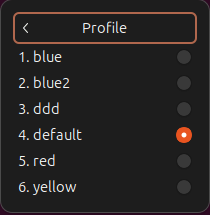
What is in the dumped configuration file?
The dconf.dump file user above contained
[/]
default='f8084ff0-88c6-43ad-b674-d901f5f818a5'
list=['b1dcc9dd-5262-4d8d-a863-c897e6d979b9', '2e126889-4012-485a-a363-057135d6b038', 'f8084ff0-88c6-43ad-b674-d901f5f818a5', '990b09a4-8a20-4ba5-aab6-ad88fdc531dd', 'd963eefc-9bf1-4ae1-8653-e8d36bd6127a', '110cf44a-82fd-454c-bc12-b3918b987cde']

[:110cf44a-82fd-454c-bc12-b3918b987cde]
background-color='rgb(56,111,67)'
use-theme-colors=false
visible-name='ddd'

[:2e126889-4012-485a-a363-057135d6b038]
background-color='rgb(238,238,236)'
foreground-color='rgb(46,52,54)'
use-theme-colors=false
visible-name='blue'
...
[:f8084ff0-88c6-43ad-b674-d901f5f818a5]
default-size-columns=100
use-theme-colors=true
visible-name='default'
There is a definition (at the bottom)
- id :[:f8084ff0-88c6-43ad-b674-d901f5f818a5]
- default-size-columns=100
- use-theme-colors=true
- visible-name=’default’
I refer to this as default (the visible name) using the system theme colours.
There is a definition called ‘blue’.
- use-theme-colors=false says do not use the standard theme colour; the colours are overridden
- the background colours are specified
- the foreground colours are specified
- it has an id of 2e126889-4012-485a-a363-057135d6b038
At the top of the file is
- default=’f8084ff0-88c6-43ad-b674-d901f5f818a5′ this refers to the section which I’ve called default.
- the list of possible values includes those for default and blue.

 ColinPaice