What’s happening with my Java shared classes?

When your Java application ends it prints information like

JVMSHRC168I Total shared class bytes read=78435794. Total bytes stored=522418
JVMSHRC818I Total unstored bytes due to the setting of shared cache soft max is 0. Unstored AOT bytes due to the setting of -Xscmaxaot is o.
Unstored JIT bytes due to the setting of -Xscmaxjitdata is 0.

So you can see what amount of space is used.

Displaying activity as Java starts

-Xshareclasses:verboseIO,…

For example

 -Xshareclasses:verboseIO,verbose,name=zoweGW,cacheDirPerm=0777,cacheDir=/u/tmp/zowec/" 

This produces output like

Entries which were found and used

Found class java/lang/Object in shared cache for class-loader id 0. 
Found class java/lang/J9VMInternals in shared cache for class-loader id 0.

Entries which were not found…but added.

The following shows that the entry was not found in the share classes cache, but was added successfully. Next time this would give ” found and used” above.

Failed to find class java/security/Guard in shared cache for class-loader id 0. 
Stored class java/security/Guard in shared cache for class-loader id 0 with
URL /Z31B/usr/lpp/java/J8.0_64/J21.0_64/lib/modules (index 0).

What classes were not found and not added?

Failed to find class org/yaml/snakeyaml/constructor/Construct in shared cache for class-loader id 0. 
Failed to find class org/yaml/snakeyaml/constructor/Construct in shared cache for class-loader id 2.

When Java option -verbose:class was enabled, there was additional information

class load: org.yaml.snakeyaml.constructor.Construct from: 
jar:nested:/u/tmp/zowep/components/gateway/bin/gateway-service.jar/!BOOT-INF/lib/snakeyaml-2.2.jar!/

The jar:nested means it is a jar within a bigger jar. The shared class support does not support this.

To exploit the shared classes function it seems to be better to have individual .jar files rather than one large jar file with lots of jar files within it.

The loader id 2 is from the spring framework loaded. This loads the nested jar files.

What classes were loaded from where?

With the Java option -verbose:class (not a shared classes cache option) this reports on classes used.

 class load: java/net/URLClassLoader$SharedClassMetaDataCache from: jrt:/java.base 
class load: java/net/URLClassLoader$SharedClassMetaData from: jrt:/java.base

What’s in the shared cache?

-Xshareclasses:…,printStats

Use the printStats command

/usr/lpp/java/J21.0_64/bin/java -Xshareclasses:cacheDir=/u/tmp/zowec,name=zoweGW,printStats,

to display a summary of the cache

cache layer                          = 0                       
cache size = 83885520
softmx bytes = 83885520
free bytes = 31274608
Reserved space for AOT bytes = -1
Maximum space for AOT bytes = -1
Reserved space for JIT data bytes = -1
Maximum space for JIT data bytes = 31457280
Metadata bytes = 752058
Metadata % used = 1%
Class debug area size = 6680576
Class debug area used bytes = 5576890
Class debug area % used = 83%

ROMClass bytes = 35210448
AOT bytes = 8456750
JIT data bytes = 1150472
Zip cache bytes = 0
Startup hint bytes = 240
Data bytes = 360368

# ROMClasses = 14554
# AOT Methods = 3510
# Classpaths = 2
# URLs = 0
# Tokens = 0
# Zip caches = 0
# Startup hints = 2
# Stale classes = 0
% Stale classes = 0%


Cache is 62% full

Cache is accessible to current user = true

Class debug area % used. If this is close to 100% your cache is too small, you will need to destroy the cache, and make it bigger.

-Xshareclasses:…,printAllStats

The printAllStats command provides the information in printStats, and detailed information like

1: 0x000002003ADA0DB4 CLASSPATH 
/Z31B/usr/lpp/java/J8.0_64/J21.0_64/lib/modules
1: 0x000002003ADA0D80 ROMCLASS: java/lang/Object at 0x00000200364581E0.
Index 0 in classpath 0x000002003ADA0DB4
ROMMETHOD: <init> Signature: ()V Address: 0x00000200364583D8
ROMMETHOD: clone Signature: ()Ljava/lang/Object; Address: 0x00000200364583F4
ROMMETHOD: equals Signature: (Ljava/lang/Object;)Z Address: 0x000002003645841C
ROMMETHOD: finalize Signature: ()V Address: 0x000002003645844C
ROMMETHOD: getClass Signature: ()Ljava/lang/Class; Address: 0x0000020036458484
ROMMETHOD: hashCode Signature: ()I Address: 0x00000200364584A0
ROMMETHOD: notify Signature: ()V Address: 0x00000200364584C0
ROMMETHOD: notifyAll Signature: ()V Address: 0x00000200364584D8
ROMMETHOD: toString Signature: ()Ljava/lang/String; Address: 0x00000200364584F0
ROMMETHOD: wait Signature: ()V Address: 0x000002003645852C
ROMMETHOD: wait Signature: (J)V Address: 0x0000020036458554
ROMMETHOD: wait Signature: (JI)V

This shows for class java/lang/Object coming from /Z31B/usr/lpp/java/J8.0_64/J21.0_64/lib/modules there were several methods.
Not for humans, but for search engines – Java messages and codes

I hit these messages when doing some Java work. Ive added more information to the messages. I expect people will only get to this page from a web search.

EDC messages

EDC5129I No such file or directory.

Also ENOENT error code 129.

This is not strictly true. When using semget() this code means the userid does not have access to it. Perhaps EACCESS code would have been better.

Java shared classes.

JVMSHRC336E Port layer error code = …

For example JVMSHRC336E Port layer error code = -197360. -197360 is 0xfffC FD10

From the first half word you can tell the external function which caused the problem

FTOK   FFFD
SEMGET FFFC
SEMCTL FFFB
SEMOP FFFA
SHMGET FFF9
SHMCTL FFF8
SHMAT FFF7
SHMDT FFF6
GETIPC FFF5

See here for the code saying…

  • EACCESS FD12 -Permission is denied.
  • EEXIST FD11 -The file exists.
  • ENOENT FD10 – No such file, directory, or IPC member exists.
  • EINVAL FD0F – The parameter is incorrect.
  • ENOMEM FD0E – Not enough space is available (I think this means virtual storage).
  • ENOSPC FD0D -No space is left on the device, or no space is available to create the IPC member ID.
  • ELOOP FD0C – A loop is encountered in symbolic links.
  • ENAMETOOLONG FD0B – The file name is too long.
  • ENOTDIR FD0A – Not a directory.
  • EPERM FD09 -The operation is not permitted.
  • ERANGE FD08 -Result is too large.
  • E2BIG FD07 – The parameter list is too long, or the message to receive was too large for the buffer.
  • EAGAIN FD06 – The resource is temporarily unavailable.
  • EFBIG FD05 – The file is too large.
  • EIDRM FD04 – Identifier removed.
  • EINTR FD03 – A function call is interrupted.
  • EMFILE FD02 – Too many files are open for this process.

So JVMSHRC336E Port layer error code = -197360 is 0xfffC FD10 which is SEMGET ENOENT .

One’s I have hit

  • -197359 is 0xfffC FD11 which is SEMGET EEXIST -The file exists.
  • -197360 is 0xfffC FD10 which is SEMGET ENOENT – No such file, directory, or IPC member exists.
  • –262894 is 0xfffb FD12 which is SEMCTL EACCESS – Permission denied.
  • -328433 is 0fffa FD0F which is SEMOP – The parameter is incorrect.
  • -393968 is 0xfff9 fd10 which is SHMGET EPERM -The operation is not permitted.
  • -459502 is 0xfff8 FD12 which SHMCTL EACCESS -Permission is denied.

JVMSHRC337E Platform error message: EDC5132I Not enough memory. (errno2=0x072B06AB)

The errno 072b06ab says


JRMmapMaxShareFail: A map request is attempted but the total share pages exceeds the MAXSHARE limit
Action: Ensure mmap usage does not exceed MAXSHARE limits.

You need to ensure that your system has the SMFLIMxx parmlib updates. This is a requirement for the ibmjava:8 container image in order to support caches mapped above the 2 GB address range. The maximum size of these caches are limited by the MAXSHARE value within the SMFLIMxx PARMLIB member.

Issue

D SMFLIM

to see what limits you have defined.

I had NO SMF LIMITS ARE IN EFFECT.

JVMSHRC020E An error has occurred while opening semaphore
JVMSHRC336E Port layer error code = -262894

JVMSHRC337E Platform error message: semctl : EDC5111I Permission denied. (errno2=0x070E0303)
JVMSHRC028E Permission Denied
JVMSHRC840E Failed to start up the shared cache.
JVMJ9VM015W Initialization error for library j9shr29(11): JVMJ9VM009E J9VMDllMain failed
Error: Could not create the Java Virtual Machine

-262894 is SEMCTL EACCESS – Permission denied.

The owner of the shared file cache was not the userid trying to use it.

chown ZWESVUSR:SYS1 *

Changed the files, such as

ZWESVUSR SYS1     314572800 Feb  9 08:43 C290M17F1A64S_zoweGW_G43L00                   
ZWESVUSR SYS1 32 Feb 10 06:35 C290M17F1A64_semaphore_zoweGW_G43L00
ZWESVUSR SYS1 40 Feb 10 06:35 C290M17F1A64_memory_zoweGW_G43L00

JVMSHRC020E An error has occurred while opening semaphore
JVMSHRC336E Port layer error code = -197360

JVMSHRC337E Platform error message: semget : EDC5129I No such file or directory.

-197360 is SEMGET ENOENT – No such file, directory, or IPC member exists.

I got these trying to restore a sharedclasses cache, when I did not have access to the file.

/usr/lpp/java/J17.0_64/bin/java -Xshareclasses:cacheDir=/u/tmp/zowec,name=zoweGW,restoreFromSnapshot

I gave the userid access and it worked

chmod 777 /u/tmp/zowec/javasharedresources/*

JVMSHRC659E An error has occurred while opening shared memory
JVMSHRC336E Port layer error code = -459502


JVMSHRC337E Platform error message: shmctl : EDC5111I Permission denied.
JVMSHRC028E Permission Denied
JVMSHRC626I The stats of the shared cache cannot be obtained since a valid shared cache does not exist.
JVMJ9VM015W Initialization error for library j9shr29(11): JVMJ9VM009E J9VMDllMain failed

-459502 is SHMCTL EACCESS -Permission is denied.

The userid issuing the command does not have access to the resource.

The documentation says the shared class cache is created with ONLY USER read/write access by default unless the groupAccess command-line suboption is used, in which case the access is read/write for user and groups.

Note: Users with super user authority gid=0(SYS1) can issue the command with no additional authority.

To find the group list the directories containing the cache, for example if /var/zosmf/data/logs/.classCache/ was specified use ls -ltr /var/zosmf/data/logs/.classCache/javasharedresources.

For me it had owner IZUSVR group IZUADMIN.

I used the RACF command connect COLIN group(IZUADMIN) to connect the userid to the group. Even then the command failed, because groupAccess had not been defined on the -Xshareclasses… parameter. I had to delete the cache so it was recreated next time theJVM started. Then the java -Xshareclasses:cacheDir=/var/zosmf/data/logs/.classCache,name=liberty-IZUSVR,verbose,printStats worked.

JVMSHRC023E   Cache does not exist

I had

-Xshareclasses:cacheDir=/javasc,name=izusvr1cache,printStats

I had to remove the printStats.

JVMSHRC364E SH_OSCachesysv::acquireWriteLock() call to j9shsem_wait on semid … has failed with error -328433.

-328433 is SEMOP – The parameter is incorrect.

You can use the ipcs Unix commands to display the semaphore ids.

JVMSHRC005I No shared class caches available

I was using

/usr/lpp/java/J11.0_64/bin/java -Xshareclasses:cacheDir=/global/zosmf/data/logs/.classCache/,verbose,listAllCaches

to display information about shared cache usage, and kept getting the JVMSHRC005I No shared class caches available message. I experienced two reasons for this.

  1. The information in the file, was for last week’s IPL, and the the information in today’s memory was invalid.
  2. I was using the wrong level of Java. Once I used the right level of Java it worked!

restoreFromSnapshot

IBMUSER:/u/ibmuser: >cd /u/tmp/zowec
IBMUSER:/u/tmp/zowec: >/usr/lpp/java/J17.0_64/bin/java -Xshareclasses:cacheDir=/u/tmp/zowec,name=zoweGW,restoreFromSnapshot
JVMSHRC020E An error has occurred while opening semaphore
JVMSHRC336E Port layer error code = -197360
JVMSHRC337E Platform error message: semget : EDC5129I No such file or directory.
JVMSHRC727E An error has occurred in creating the new non-persistent shared cache

JVMSHRC808I Compressed references shared cache “zoweGW” is destroyed. Use option -Xnocompressedrefs if you want to destroy a non-com pressed references cache.
JVMSHRC699E Failed to restore the non-persistent shared cache “zoweGW” from the snapshot

This may be connected to the the following

The following files were in the directory

-rw-r--r-- 1 ZWESVUSR ZWEADMIN ... C290M17F1A64_semaphore_zoweGW_G43L00
-rw-r--r-- 1 ZWESVUSR ZWEADMIN ... C290M17F1A64_memory_zoweGW_G43L00

For example the above files were had owner: ZWESVUSR group: ZWEADMIN.

The userid was in group ZWEADMIN, and so does not get R/W access to the files.

Errno2

  • 0x071D0303: JRIpcDenied: Access was denied because the caller does not have the correct permission.
  • 0x053b006c: JRFileNotThere: The requested file does not exist
  • 0x0594003d: JRDirNotFound: A directory in the pathname was not found

Java Health center messages

Health center Non IBM version of Java Health Center client

I got this when connecting the Health Center on Eclipse to a Liberty server. I think the message really means, unable to connect to the port.

The TSO command tso netstat allconn did not show it was active.

Setting up Java shared cache support on z/OS

With Java shared cache support, Java stores classes and JIT information in shared memory, so it can be reused by other Java applications, or it the application is restarted.

Some other shared classes blog posts

You can use the Java command snapshotCache to save the shared buffer to disk, and restoreSnapshot to restore from disk to recreate the shared memory.

For my Zowe startup I use Java start-up option

-Xshareclasses:verboseIO,verbose,name=zoweGW,cacheDirPerm=0777,cacheDir=/u/tmp/zowec/

Before you start you need to consider

  • Sharing the shared classes cache
  • Which directory to use
  • What name to use
  • How big
  • Processes to save the cache to disk
  • Read only?

Sharing the shared classes cache

Java uses a semaphore when updating the shared classes cache. I believe that multiple Java instances can share the cache, so products which have multiple address spaces can share the same cache if they are using the same level of Java.

I believe you could use one shared classes directory for all your Java applications, Liberty, z/OSMF, zOS Connect, Zowe etc. I haven’t found any documentation to say you cannot share it, but the application’s userid needs access to the cache, and so may need the same userid, or be in the correct group to be able to access the cache, and ipc memory and semaphores. The Zowe address spaces all use the same userid, so all have access to the cache.

To further complicate it…

You can run more than one JVM within a CICS address space, they can all use the same cache.

To be able to destroy and recreate a cache (for example to make it larger ), the cache cannot be in use. For availability you may want multiple caches so you do not need to shutdown all CICS regions to be able to recreate it. As all Zowe address spaces start and stop together, they can use a shared classes cache.

Which directory to use?

If you do not specify a cachDir, it defaults to /tmp. This is OK – but some on some z/OS systems, the /tmp directory is emptied on a regular basis. This means your cache is deleted, and it needs to be recreated next time your application starts.
For Zowe I used /u/tmp/zowec.

What name to use?

If you do not specify a name it takes the userid of the application, as part of the file name.

Within my cacheDir, it creates a directory javasharedresources. Within this directory I have files

  • C290M21F1A64S_zoweGW_G43L00 with size 83886080 (84MB) this is the hardened copy of the cache
  • C290M21F1A64_semaphore_zoweGW_G43L00 with size 32
  • C290M21F1A64_memory_zoweGW_G43L00 with size 40

Where the …M21F… is the level ofJava.

When I use the printStats command, it gives the cache size as 84MB.

How big?

I specified
-Xscmx80m
-Xscmaxaot180m
-Xscmaxjitdata30m

Once you have specified the size, you cannot change it unless you delete and recreate the cache, so you need to get it right before you start. Make it too large, rather than too small. Restoring it from a snapshot will use the size when the snapshot was taken.

Processes to save the cache to disk.

As part of your application shutdown you could snapshot the cache to a file. See here (tba).

Processes to save the cache to disk.

You might want to restore the cache from disk as part of your IPL processing, or as part of application start up. If the cache already exists it is not overwritten. It takes a few seconds to snapshot or restore. See here(tba).

Clean up the shared classes

If you delete the ipc shared memory, and the ipc semaphore before you start your Java application, will rebuild the shared classes – though this will take longer as all of the classes need to be read and processed.

Read only

If Java detects that the shared classes cache is out of date, it will updates the shared classes cache.

Once you created and populated a shared classes cache, you can specify readOnly, to prevent updates to it

Introduction to Java Shared classes on z/OS

Java shared classes provides the facility for Java to store classes, and JITted classes in shared memory which persists across the restart of a Java application. You can harden this shared memory to disk, and reload it after an IPL.

If shared classes are being used, then as the JVM starts it looks for the classes in the shared cache, and if not found, loads them from the file system, processes them and stores them in the shared classes memory. With this scheme, the second start of the JVM gains from the shared classes.

See the introduction documentation and some practical documentation.

Background

To support the use of the shared memory, Java uses standard facilities for shared memory, and for semaphores (to ensure single threading of updates).

I have my shared classes in directory /u/tmp/zowec. When the shared classes are used, two files are created.

  • javasharedresources/C290M17F1A64_semaphore_zoweGW_G43L00
  • javasharedresources/C290M17F1A64_memory_zoweGW_G43L00

Listing them gives

672 -rw-r--r--   1 ZWESVUSR ZWEADMIN ... C290M17F1A64_semaphore_zoweGW_G43L00  
673 -rw-r--r-- 1 ZWESVUSR ZWEADMIN ... C290M17F1A64_memory_zoweGW_G43L00

The files are owned by userid ZWESVUSR and group ZAWADMIN from my started task userid. The semaphore file has an inode of 672 (0x2a0), and the shared memory file has an inode of 673(0x2a1).

The shared memory and semaphores use InterProcess Communication (ipc) facilities.

The id in hex of the files is used as part of the ipc key.

The command ipcs gave

Shared Memory:                                                
T ID KEY MODE OWNER GROUP
m 204805 0x6102a131 --rw------- ZWESVUSR ZWEADMIN

Semaphores:
T ID KEY MODE OWNER GROUP
s 200708 0x8102a031 --ra------- ZWESVUSR ZWEADMIN

These resources are owned by userid:ZWESVUSR, and group:ZWEADMIN. The userid and group comes from the userid that created the shared classes cache.

If you need to “clean up” you can delete these using the ipcrm command.

Why can’t Java find my class?

I had specified a classpath to load a class loading program, but my program could not be found.

I specified the Java options -XshowSettings.

The value of java.class.path had just one .jar, and did not include my classpath!

I found in some Oracle documentation

When you use -jar, the specified JAR file is the source of all user classes, and other class path settings are ignored. If you’re using JAR files, then see jar.

Simple – once you know…

How to fix it

I added my class to the Jar

/usr/lpp/javaJ21.0_64/bin/jar uf /u/tmp/zowep/components/gateway/bin/gateway-service.jar -C /u/tmp/java CCLoader.class

My class was found – and it worked!

Finding the needle in a field of hay.

As part of a debugging a problem I collected some traces. One was over 22 million lines of code! How do you extract information from it?

My trace file was trace.txt and I was looking for entries with java/lang/Object in them.

How big is the field?

The command (wc – lower case l)

wc -l trace.txt

gave me

22662732 trace.txt

22.6 million lines of output

Which part of the field?

grep -n java/lang/Object trace.txt |less

The -n option numbers the source lines.

The grep command gave me output starting with

601428:13:39:41.475442621 0x000000002174c200 j9vm.351 Entry >loader 0x0 class java/lang/Object attemptDynamicClassLoad entry

The first number is the position in the file, 601428.

Searching for “exit” (/exit) gave me

904914:13:39:44.830209269 0x000000002174c200 j9vm.319

line number 904919 in the file.

Extract some of the records

I want to ignore the first 601428-1 lines – then take up to and including line 904914 is a line count of 303486.

tail -n +601428 trace.txt |head -n 303487 |less -N

The plus sign in tail -n + says -ignore the given number of lines.

This extracts the lines of interest and displays them with line numbers ( -N option). You can use >file1 to pipe it into a file, and then use less -N file.

I then iterated, now searching for j9shr – the Java Share Classes component, until I found the couple of interesting lines.

Extract data from a record.

You can extract field, or substrings using awk. For example piping data into

awk '{print substr($0,1,100)}'

Will display only the first 100 characters in a line.

awk '{print substr($0,7,6 )    substr($0,39,140)}'

Displays part of the time stamp – start column 7 for 6 characters, and from column 39 to 140.

You can also use cut to cut give specific fields, or field ranges, or column ranges. For example

cut --fields 1,3-5 -d " "
cut --bytes 1-8,60-100

Where -d is the delimiter.

Clever stuff

The Java trace formatting gives you the option to indent the descriptions, if function p calls function q, function q is indented by 2 additional characters.

I used this, and a bit of Python code to calculate how long each request was active for and display this on the “exit” line of the function. I also saved how many times a function was used, and total time in the function.

The results were interesting – what I thought would be “slow” functions, were actually not slow.

Using a cuckoo function

I was trying to track down a problem in Java where shared memory was not being accessed as it should. This was too early in the JVM startup for trace – so how to debug it?

One option I tried was using a cuckoo function. A cuckoo is well know for laying an egg in another bird’s nest; the nest owner then treats the cuckoo’s egg as its own. I inserted some code between Java and a C function, and Java called my code.

The Java code uses the C run time function shmget() — Get a shared memory segment. I wanted to write a stub function to display parameters, and then call the system version of shmget.

To do this I had to get the Java program to use my cuckoo version of shmget.

My program

void wto( char * msg) { 
// time_t ltime;
// time(&ltime);
//printf(" the time is %s", ctime(&ltime));
struct __cons_msg cmsg;
int rc;
int cmsg_cmd = 0;
/* fill in the __cons_msg structure */
cmsg.__format.__f1.__msg = msg;
cmsg.__format.__f1.__msg_length = strlen(msg);
rc = __console(&cmsg,NULL,&cmsg_cmd);
}
// this has the same signature as the run time code
cpshmget(
key_t key, size_t size, int shmflg)

{
char buffer[200];
int i, j;
j = sprintf(buffer, ">shmget key %8.8x sz %i flg 0x%8.8x\0", key,size,shmflg);
wto(buffer);
int myresult = shmget(key,size,shmflg);
//sprintf(buffer,"<shmget1 r %i e %i e2 0x%8.8x\0",myresult, errno, __errno2());
//wto(buffer);
//myresult = shmget(key,size,shmflg);
return myresult;
}

I compiled it using a shell script (I found it easier than a make file)

name2=cp 
p1=" -DNDEBUG -O3 -qarch=10 -qlanglvl=extc99 -q64"
p2="-Wc,DLL -D_XOPEN_SOURCE_EXTENDED -D_POSIX_THREADS"
p2="-D_XOPEN_SOURCE_EXTENDED -D_POSIX_THREADS"
p3="-D_OPEN_SYS_FILE_EXT -qstrict "
p4="-Wa,asa,goff -qgonumber -qenum=int"
p5="-I."
p6=""
p7="-Wc,ASM,SHOWINC,ASMLIB(//'SYS1.MACLIB') "
p8="-Wc,LIST(c.lst),SOURCE,NOWARN64,XREF -Wa,LIST,RENT"
/bin/xlc $p1 $p2 $p3 $p4 $p5 $p6 $p7 $p8 -c $name2.c -o $name2.o

It is used as an object .o code – not as an executable module.

Bind it to the Java code

I wanted to cuckoo the module libj9prt29.so .

I saved a copy of the original module libj9prt29.so as libj9prt29.so.orig. I could then include this into the binder, and not worry about any of my old code staying around.

When I needed “a clean run”, without any of my code, I copied libj9prt29.so.orig over libj9prt29.so .

The bind job

//IBMBIND JOB 1,MSGCLASS=H 
// SET BPARM='CASE=MIXED,SIZE=(900K,124K),XREF,RMODE=ANY,CALL=YES'
// SET CPARM='MAP,DYNAM=DLL,LIST=ALL,AMODE=64,TERM=YES'
//BIND EXEC PGM=IEWL,REGION=0M,PARM='&CPARM,&BPARM'
//SYSLIB DD DSN=CEE.SCEEBND2,DISP=SHR
// DD DSN=CBC.SCCNOBJ,DISP=SHR
// DD DSN=SYS1.CSSLIB,DISP=SHR
//Z8921 DD DSN=CEE.SCEELIB(CELQS003),DISP=SHR
//SYSLMOD DD PATH='/usr/lpp/java/J17.0_64/lib/default/',
// PATHDISP=(KEEP,KEEP)
//SYSPRINT DD SYSOUT=*
//SYSLIN DD *
ORDER CELQSTRT
ENTRY CELQSTRT
INCLUDE /u/tmp/java/cp.o
change shmget(cpshmget)
INCLUDE /usr/lpp/java/J17.0_64/lib/default/libj9prt29.so.orig
include Z8921
name libj9prt29.so
//

Notes:

  • You specify SYSLMOD as a directory and specify the “name” later. This was not obvious from the documentation
  • INCLUDE /u/tmp/java/cp.o copies in my code
  • change shmget(cpshmget) says any code which is included after this, cuckoo the entry point shmget to point to cpshmget
  • INCLUDE /usr/lpp/java/J17.0_64/lib/default/libj9prt29.so.orig include the original module
  • include Z8921 = CEE.SCEELIB(CELQS003) contains statements like IMPORT CODE64,CELQV003,’shmget’,280 which defines where shmget is really defined
  • name libj9prt29.so save it as this name in //SYSLMOD

This worked well – but…

I originally had

  wto(buffer); 
int myresult = shmget(key,size,shmflg);
sprintf(buffer,"<shmget1 r %i e %i e2 0x%8.8x\0",myresult, errno, __errno2());
wto(buffer);
//myresult = shmget(key,size,shmflg);

But the wto function, which invokes __console(), sets errno and __errno2. The values passed back to Java were the values from the __console function, not the shmget function.

Issuing the myresult = shmget(key,size,shmflg); a second time set the errno and __errno2 – but if the request was to create, or delete, issuing it a second time gave a different error code. For example if “delete” was specified – the first time worked, the second time gave “not found”, and this confused the Java program calling this function.

What’s going on inside my Java program?

You can use the IBM healthcenter to get information from what is running within Java.

I used Java startup option

-Xhealthcenter
-Dcom.ibm.diagnostics.healthcenter.headless=on
-Dcom.ibm.java.diagnostics.healthcenter.data.collection.level=headless
-Dcom.ibm.java.diagnostics.healthcenter.headless.files.max.size=50000000
-Dcom.ibm.java.diagnostics.healthcenter.headless.delay.start=1
-Dcom.ibm.java.diagnostics.healthcenter.headless.output.directory=/u/tmp/zowe
-Dcom.ibm.diagnostics.healthcenter.readonly=on
-Dcom.ibm.diagnostics.healthcenter.logging.level=fine
-Dcom.ibm.diagnostics.healthcenter.jmx=off
-Dcom.ibm.java.diagnostics.healthcenter.agent.transport=jrmp
-Xtrace:buffers={2m,dynamic}

which are described here.

I used -Dcom.ibm.java.diagnostics.healthcenter.headless.delay.start=1 to wait for a minute before recording, so I didn’t get the Java startup information.

When I started the Java program I got out messages

com.ibm.diagnostics.healthcenter.headless INFO: Headless data collection has started 
com.ibm.diagnostics.healthcenter.headless INFO: Agent will keep last 5 hcd files
com.ibm.diagnostics.healthcenter.headless INFO: Headless collection output directory is /u/tmp/zowec

Shutdown the Java program.

I got a file healthcenter080225_160620_33620365_1.hcd in /u/tmp/zowec.

Download this in binary to your workstation.

Start Eclipse. Window-> Perspective-> Open Perspective-> Other-> Health center profiling

File-> Load Data… Select your downloaded file.

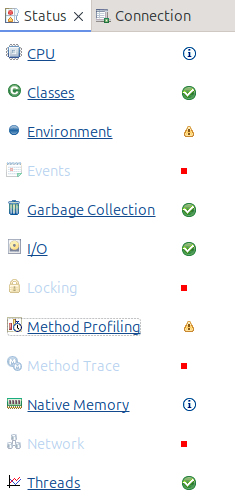
From the status window you can select different views of the data

Method profiling

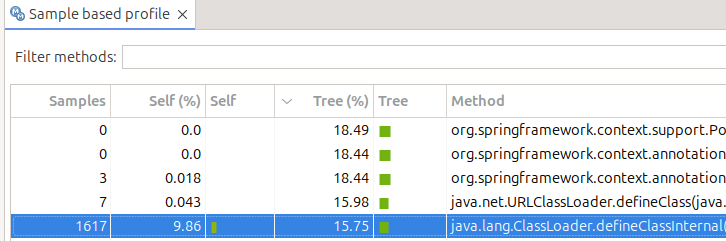
This display information like

  • Under Tree%this says 18.49 of the time was spent in this class…. including other classes it called
  • Under Self% this is the amount of time spent within just this class. 9.86 of the total time was spent within this class. 15.75 of the total time was spent in just this class. It was recorded in 1617 sample
  • If you select a line, in another part of the display it shows you what called it, and what it called.

CPU

Shows the amount of CPU used over time

Classes

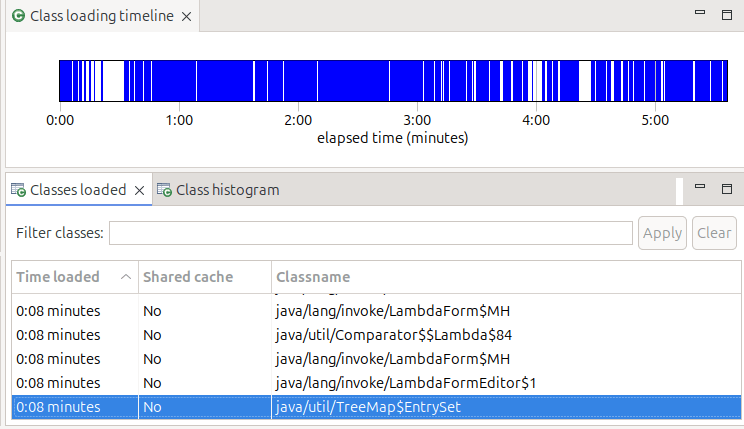
Shows time from start when classes were loaded, and if they were shared classes or not,

Environment

Give you the start option, and information about the JVM

Garbage collection

Gives you a profile and other information on garbage collection

IO

Gives you information about IO. My display said “Your application has opened 45 files and closed 39 files.” It did not tell me which files were opened – it just showed the 6 which were still open, so not very useful!

Using Elliptic Curves is better than RSA – but not as easy

I’ve spent a few days down some rabbit holes trying to solve a problem with an Elliptic Curve, and when I found the answer, I remember I had hit this problem before.

Using an Elliptic Curve generated with

RACDCERT ID( IZUSVR ) GENCERT + 
SUBJECTSDN(CN('CONN2') O('IBM') OU('C2PDFLT')) +
ALTNAME(IP(10.1.1.2))-
WITHLABEL('CONN2.IZUDFLT'), +
NISTECC +
SIZE(521) +

SIGNWITH(CERTAUTH LABEL('DOCZOSCAEC' )) NOTAFTER(DATE(2026/01/01))

I was getting in a Zowe trace

javax.net.ssl.SSLException: No supported CertificateVerify signature algorithm for EC key

This was with TLSv1.3.

In the TLS handshake from Chrome I could see

Supported Groups (5 groups)
Supported Group: Reserved (GREASE) (0x9a9a)
Supported Group: Unknown (0x11ec)
Supported Group: x25519 (0x001d)
Supported Group: secp256r1 (0x0017)
Supported Group: secp384r1 (0x0018)

I’m sure you spotted the problem immediately. The NISTECC SIZE(521) Elliptic Curve has a name of secp521r1, and this is not in the list. At the server, the logic checks that it’s certificate is supported by the groups sent from the client, and so reports

No supported CertificateVerify signature algorithm for EC key

I found Why is secp521r1 no longer supported in Chrome, others?. The article says that the keysize (256) is a strong as keysize(384) – so why bother with keysize(384).

I changed my certificate to keysize(256) and it worked.

What’s C.E.E.1 and which function is this address in?

I had an abend in a module created from C programs, and wanted to know which function had the problem.

In the old days, each function had an eye-catcher and a compile date at the top of each function, so it was easy to scroll upwards towards the start of the dump until you came across the eye-catcher.

And then we had XPLINK… I think the XP link stands for eXtra Performance. The output of the C compiler changed to make it the code more efficient, especially with Java functions. For example:

  • before XPLINK, a call to a function would save all of the registers, update the save area chain – call the module… return and restore the registers afterwards. Some functions were as simple as set this value to 0 – and the overhead of the call was many times the cost of the instructions. The overhead was reduced by only saving what needed to be saved, and passing more parameters in registers.
  • by moving constant data, such as character strings, out of the mainline instructions, meant that sometimes fewer pages were needed for instructions – and so fewer pages were needed in the hardware instruction cache, and so may be faster. Moving the function name and compile time into the “data page” and so into the data cache, was part of this.

The function name etc is available – just not in an obvious place.

What does the code look like?

Meta data is stored in Program Prolog Areas (PPAs)

In the listing, at the start of each XPLINK function is “C.E.E.1”

00000E70    00C300C5 00C500F1 00000080 000000A0a *.C.E.E.1.....

At offset 00000080 from 00000E70 is a block of storage (PPA1) which identifies this function.

0006D8  02           =AL1(2)            Version 
0006D9 CE =AL1(206) CEL signature
...
0006F0 0003 AL2(3),C'pit'
0006F8 FFFFF9C0 =F'-1600' Offset to Entry Point Marker
  • At offset 0 is 0x02… so you know you are in the right control block
  • At offset 2 is 0xCE
  • At offset 10 is the code length
  • At offset 18 is 2 bytes of length, followed by the function name, possibly with up to 3 bytes of padding to align the next field on a 4 byte work boundary.
  • (Sometimes,) after this, the offset will vary because the name length is variable, is a field like 0XFF… such as FFFFFA60. This is – 0x5a0 (-1440). The address of this section (the 0x02) minus this value gets you to the C.E.E.1. This does not always seem to work!

The start of the function “pit” is at x6d8 – 1600 = x6d8 -x640 = x98

At this address in the listing was

                                *  void pit() 
000098 00C300C5 DC =F'12779717' XPLink entrypoint marker
00009C 00C500F1 DC =F'12910833'
0000A0 00000640 DC =F'1600'
0000A4 00000080 DC =F'128'
0000A8 pit DS 0D
* Start of executable code
0000A8 9049 4780 STM r4,r9,1920(r4) .....

Note the value’s 1600 and -1600 tie up.

So not too difficult to find the name of the function.