Strong keys may be bad for your blood pressure.

I’ve just spent a couple of days trying to get a web server to use an Elliptic key with size 521. It works on Firefox, Curl, and OpenSSL, but not on Chrome. Weaker keys work of size 256 and 384 work fine, except in some cases a key size of 256 gave did not work on z/OS.

I’ve since found a page going back to 2015 discussing the dropping of several EC cipher specs. There is also discussion “NSA Suite B says that NSA uses curves P-256 and P-384” which (to some people) implied that other elliptic curves should not be used, and so were removed. There is another discussion that P256 is as strong as P521, but requires less CPU, and so P521 should not be used.

So the short answer is use Elliptic curves with key size 256 or 256, and do not use the others.

I was trying to get the Apache HTTPD server on z/OS to use a certificate, and it failed. I tried using a similar certificate from the openssl Simple server on Linux and it failed, so I’m guessing that my Chrome version (Version 114.0.5735.198 (Official Build) (64-bit)) does not support it.

The problem

In Chrome I got

This site can’t provide a secure connection 10.1.1.2 sent an invalid response.
ERR_SSL_PROTOCOL_ERROR

This is not entirely true, as the browser sent the Alert response to the server and it was not an ERR_SSL_PROTOCOL_ERROR. After this the browser code returned its caller saying “failed” . Using Wireshark, capturing encrypted data showed the data flowing from the browser to the server to port 443),

Transmission Control Protocol, Src Port: 38188, Dst Port: 443

Transport Layer Security
  TLSv1.3 Record Layer: Change Cipher Spec Protocol: Change Cipher Spec
    Content Type: Change Cipher Spec (20)
    Change Cipher Spec Message
  TLSv1.3 Record Layer: Alert (Level: Fatal, Description: Decrypt Error)
    Opaque Type: Application Data (23)
    Alert Message
      Level: Fatal (2)
      Description: Decrypt Error (51)

In the Apache HTTPD error.log it had

SSL0209E: SSL Handshake Failed, ERROR processing cryptography. [10.1.0.2:38188 -> 10.1.1.2:443] 

Which is not very helpful. The problem occurred on the browser; all the server sees is Alert code 51.

Taking a system SSL trace on z/OS(GSK Server) gave me

Job HTTPCP8   Process 0501003C  Thread 00000032  read_tls13_alert 
  TLS 1.3 alert 51 received from ::ffff:10.1.0.2.38188. 

Diagnostics

Using tools like gsktrace on z/OS, and Wireshark to see the flow over the network. I could see that an alert was sent from the Chrome browser to server with type Decrypt Error(51). This meant it was a problem at the browser end, not the server end.

Wireshark capturing encrypted data.

If you use TLS 1.3 once the “change cipher spec” has been issued, all traffic is encrypted, and by default Wireshark cannot read it. For example

Transport Layer Security
 TLSv1.3 Record Layer: Change Cipher Spec Protocol: Change Cipher Spec
   Content Type: Change Cipher Spec (20)
     Change Cipher Spec Message
 TLSv1.3 Record Layer: Application Data Protocol: http-over-tls
   Opaque Type: Application Data (23)
     Version: TLS 1.2 (0x0303)
       Encrypted Application Data: 489be8a0976798290766c9ee158c24f5863d18
      [Application Data Protocol: http-over-tls]d

and you cannot tell this is reporting an error.

Wireshark can decrypt this. You need to set an environment variable, and start the application from the terminal window, to pickup the environment variable.

export SSLKEYLOGFILE=$HOME/sslkeylog.log
google-chrome

This will cause the application( the google-chrome browser) to start and to write the TLS key data to the file.

Configure Wireshark to use this file:

  • Edit
  • Preferences
  • Expand the Protocols twistie
  • Scroll down to TLS ( typing T gets you near it)
  • Enter the Master-Secret log file name mine is /home/colinpaice/sslkeylog.log

Now, if you run the test you should get the data decrypted

Transport Layer Security
 TLSv1.3 Record Layer: Change Cipher Spec Protocol: Change Cipher Spec
   Content Type: Change Cipher Spec (20)
   Change Cipher Spec Message
 TLSv1.3 Record Layer: Alert (Level: Fatal, Description: Decrypt Error)
  Opaque Type: Application Data (23)
    [Content Type: Alert (21)]
    Alert Message
      Level: Fatal (2)
      Description: Decrypt Error (51)

Diagnostics that were not helpful.

Chrome trace

Starting Chrome from a terminal session

google-chrome --enable-logging --v=1

The output was in ./.config/google-chrome/chrome_debug.log.

Using grep ERROR ./.config/google-chrome/chrome_debug.log gave me

...:ERROR:nss_util.cc(357)] After loading Root Certs, loaded==false: NSS error code: -8018
...:ERROR:ssl_client_socket_impl.cc(978)] handshake failed; returned -1, SSL error code 1, net_error -107

and no other useful information besides net_error -107. For these codes see here. 107 is an unhelpful message NET_ERROR SSL_PROTOCOL_ERROR.

Wireshark gave me decrypt error.

z/OS system SSL trace

Using GSKSRVR and CTRACE on z/OS. See here. This gave me

S0W1      MESSAGE   00000004  17:20:47.690772  SSL_ERROR 
  Job HTTPCP8   Process 0501003C  Thread 00000032  read_tls13_alert 
  TLS 1.3 alert 51 received from ::ffff:10.1.0.2.60830. 

Which shows the alert came from the browser.

Another way of getting system SSL trace.

The documentation says you can collect trace by changing the configuration. This allows you to trace just the pages/scripts that you want.

Creating a certificate on z/OS

On z/OS I used

RACDCERT ID(START1) GENCERT -                            
  SUBJECTSDN(CN('10.1.1.2') - 
             O('NISTECCTEST') - 
             OU('SSS')) -                                
   ALTNAME(IP(10.1.1.2))-                                
   NISTECC - 
   KEYUSAGE(   HANDSHAKE     )  - 
   SIZE(384) - 
   SIGNWITH (CERTAUTH LABEL('DOCZOSCA')) -               
   WITHLABEL('NISTECCTEST')     - 
                                                         

With different sizes 256,284, and 521. The IBM documentation says For NISTECC keys, valid key sizes are 192, 224, 256, 384, and 521 bits. I had problems with key size 521 bits.

On Linux I used

timeout="--connect-timeout 10"
enddate="-enddate 20240130164600Z" 
ext="-extensions end_user"
name="docec384"
key="$name.key.pem"
cert="$name.pem"

subj="-subj /C=GB/O=Doc2/CN="$name 
CA="docca256"
cafiles="-cert $CA.pem -keyfile $CA.key.pem "
rm $name.key.pem
rm $name.csr
rm $name.pem
passin="-passin file:password.file"
passout="-passout file:password.file"
md="-md sha384"
policy="-policy signing_policy"
caconfig="-config ca2.config"
caextensions="-extensions clientServer"
config="-config openssl.config"

openssl ecparam -name secp384r1 -genkey -noout -out $name.key.pem 
openssl req $config -new -key $key -out $name.csr -outform PEM -$subj $passin $passout 
openssl ca $caconfig $policy $ext $md $cafiles -out $cert -in $name.csr $enddate $caextensions 

openssl x509 -in $name.pem -text -noout|lessf

I used this as a template with different flavours of -name secp384r1

  • -name secp384r1
  • -name prime256v1 which worked
  • -name secp521r1 which did not work

You can get a list of valid names from the command openssl ecparam -list_curves.

Running a Linux web server

I tried using the openssl s_server, and could also reproduce this problem (with a much faster turnaround). I used

tls="-tls1_3  "
#cert=" -cert ./docec256.pem -key ./docec256.key.pem"
#cert=" -cert ./docecgen.pem -certform pem -key docecgen.key.pem -keyform pem" 
#cert=" -cert ./docec521.pem -certform pem -key docec521.key.pem -keyform pem"
cert=" -cert ./docec384.pem -certform pem -key docec384.key.pem -keyform pem" 
CA="-chainCAfile ./docca256.pem"
cipher1="-cipher TLS_AES_256_GCM_SHA384:TLS_CHACHA20_POLY1305_SHA256:TLS_AES_128_GCM_SHA256:ECDHE-ECDSA-AES256-GCM-SHA384"

cipher=$cipher1
port="-port 4433 "

strict="-x509_strict -strict"
debug="-trace"

#  ca="-CAfile ./zpdt.ca.pem "
openssl s_server $port $tls  $cert $cipher $CA $debug $strict -www  

Chrome startup options

You can start chrome from a terminal with many startup options. See here

IKJ56500I COMMAND … NOT FOUND. Macro does not exist

Due to some random typing, when I try to edit a member I keep getting

  • IKJ56500I COMMAND M NOT FOUND
  • Macro does not exist

After some playing around, I found this was caused by having a list of PDS members, using the prefix command E, and putting something(M) in the Prompt column.

To fix it, use E and put / in the Prompt column. This gives the EDIT Entry Panel and shows Initial Macro..M . Blank out the M, and press PF3 to clear it.

Easy when you know how.

I expected this to show up under ISPF 2 (Edit) but the initial Macro field was blank.

One minute – debugging an HTML page

I had an HTML page with javascript and wanted to debug it and see what was going on. It was all pretty easy, but some things took a while to understand. I’ll describe some of the things I did using Chrome browser. Firefox has similar capabilities.

I found JavaScript debugging reference which looks pretty good.

Using the Chrome Debugger Tools, part 3: The Sources Tab is pretty comprehensive.

Getting started

  • Display an html page.
  • To get into developer tools use Ctrl+Shift+I

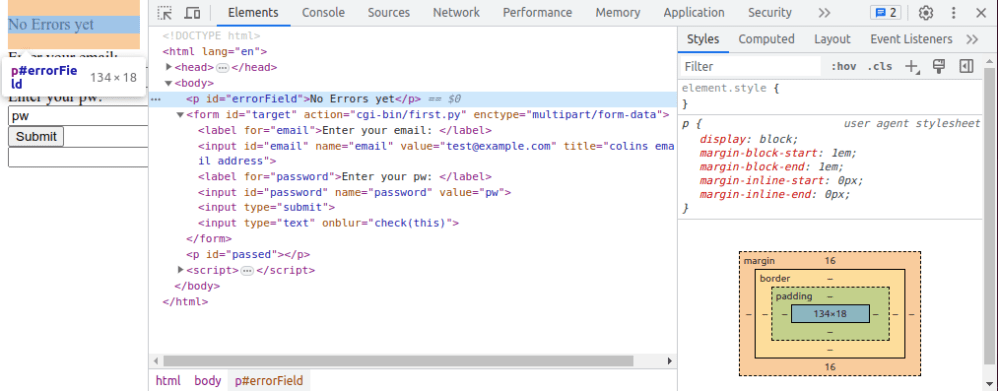
You get a display like

  1. The web page (squashed up) to a narrow column
  2. Elements – you can see the HTML components. As you move your mouse over the elements in the list, the fields in the web page are highlighted
  3. Sources – you can see the source of the program with the javascript etc. Errors in the file will get flagged on this page
  4. Debug” switch. The icon next to it is the “step over”
  5. Watch” – You can specify which variables you want displayed permanently
  6. “Scope” you can list and display all the variables available to you at that point in the web page
  7. An example of the source

Display and edit the HTML

Clock on the Elements tab (2 in the above picture) to display the source.

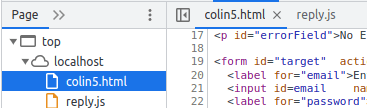
You may have your javaScript within the page, or referenced by http://./reply.js. You can see these under the page sub tab, or as a tab in the source (7). You may have to click on the name on the “Page” tab, to get it displayed in the source pane.

This shows sssserver.html is the main one, and checkCipher.js has been included. Some of these may be displayed as tabs above the sourc

  • It gives a good high level view of the program for example it may have <head>…</head>. The … show there is omitted content. Click on the … to display the content.
  • As you move your mouse over the HTML the web page elements will be highlighted. Moving over the <body> shows the whole web page, moving over a <p> shows just the paragraph.
  • As you click on some html, it displays the CSS on the right had side.
    • It tells you what CSS is being used for example the “p” tag with option “display”:block
    • As you move your mouse over the CSS picture it highlights the data on the html page
  • You can edit the HTML, add elements, delete elements etc

Set breakpoint

  • Click on the Sources (3) tab
  • Click on the line number of interest – it toggles blue.
  • Run the page

Step through the code

  • Click on the Sources (3) tab.
  • Click on the pause button (4); it gets grayed out
  • Run your script. I clicked the submit button.
  • The display changes and it shows “Debugger paused”.
    • Open the “watch” twistie and click “+”. You can now enter a variable name to display the object.
      • Open the object’s twistie to display the attributes of the object
      • Open the “Scope” twistie. Open the “Local” twistie. This will display all of the local variables. Open the variable’s twistie to see all its attributes. I do not think you can change the data. Use ctrl+alt+left mouse to expand or compress the twistie.
  • Open the “Breakpoint” twistie and select “Pause on uncaught exception” and “Pause on caught exception“. This will stop when it detects a problem
  • If you click the icon next to the Pause Icon (or F10) it will step through the code.
  • If you click on a line of javascript and use right-click you select “Continue to here”.
  • Within an active code segment, hovering over a variable will display the attributes. (You can also go to “Scope” and display from that window. Clicking on the window object( for example) gives all the operations you can do on that object (for example all of the on…. method names) .
  • If your code has console.log(“something”) this will appear in the console tab.

To get out of the current debug press the browser’s stop (X) and browser’s “reload/refresh” button.

Where did it spend its time?

If you click on the “Network” tab it shows where time was spent on the network. For example which files were got, and how long it took to get the data. It gives information on

  • Which file was loaded.
  • Status – 200 is OK.
  • Type eg .gif.
  • Initiator – which page did the request come from.
  • Size ( if it was downloaded) or “cache” if it was already in the browser cache.
  • Time in milliseconds.
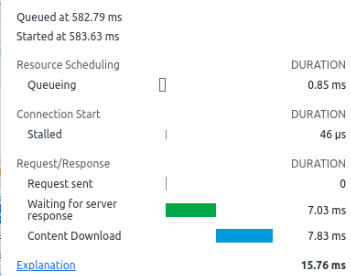
  • “Waterfall” breaks down the time spent

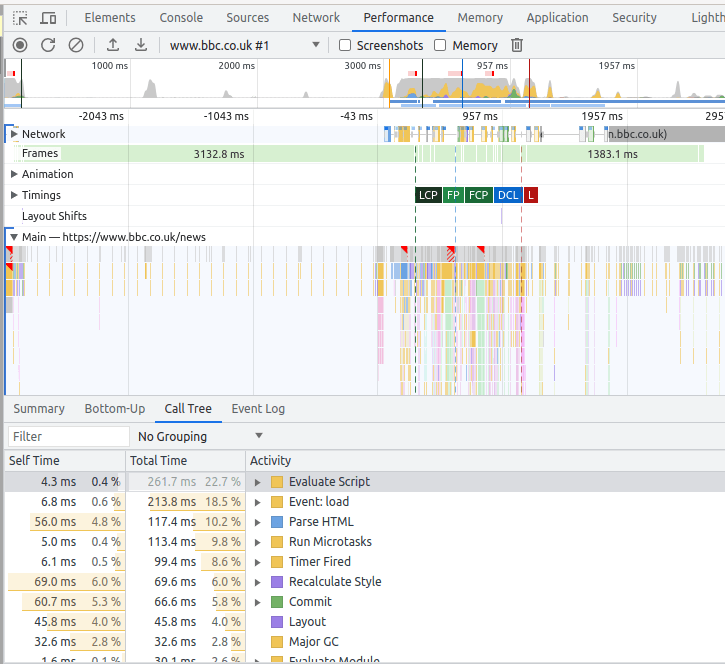
Under the “Performance” tab you can record the activity, and display it.

Use Control+E to start, then Ctrl+E to stop it.

It displays information like

What do all of the keys do?

If you click on the settings wheel, and select Shortcuts, it displays all the options and key combinations.

Debugging a java script file?

Chrome caches these. Disable this by going to the Network table and click on “disable cache”

Html field validation and back-end checking

When writing HTML pages which include fields where users can enter data, you usually want to validate the input. Having checks in your html may be good – but someone could use a REST API url and send data directly to the back-end, and bypass your checks. This means that as well as field checking in your panels, you also need field checking in the back-end before doing any data updates.

The flow of logic for a web server application is

  • display an html page with input fields for user to complete. There may be input fields(possibly read only) with defaults pre-supplied, there may also be ‘input’ fields which have a value, are read only ,and not displayed. This allows you to pass “constant” data to the server, via the URL.
  • The back-end request is submitted.
  • The back-end application:
    • Validates the parameters. These checks may be more stringent that the HTML validate, for example it may lookup a value in a database rather than just checking it is numeric . If a request, such as a REST API request, arrives, the parameters will not have been checked.
    • Augments any data, for example add constant values, or system wide data.
    • Transforms any data, for example change a string option to a numeric option as needed by the service.
    • Calls the service, such as database insert
    • Passes a response back to the caller, possibly in JSON format, giving
      • Return code
      • Any error message
      • Any field in error
  • The front end displays any error messages, and positions the cursor in the first field with a problem.

The easy field validation.

You can have an input field like

<input … required pattern=”…” minlength=”4″ maxlength=”8″ type=”number”

value=”colin paice” readonly=”readonly” title=”colins email address”>

where you can have

  • required – the user must enter value.
  • pattern – you can specify a standard regular expression, such as a string must start with a capital letter.
  • minlength and maxlength – allows you to specify limits to the size.
  • type – can be number, text, password, file, etc..
  • value – you can preset a value.
  • readonly – the user can see it, but cannot change it. You can preset this with value=… .
  • type=hidden, can be used with value to pass a value to the back end that the user cannot see it on the page.
  • title – produces hover over the field so you can provide a description of the expected format.
  • you can define radio buttons, pull down lists, or multi choice selection.

Javascript validation

When the user takes an action, for example pressing a submit button, or changing the value of a field, you can drive a Javascript script.

This can do more complex checking of values. The onfocus=focusfunction(this) invokes the focusfunction when field gets focus (you put your cursor into the input box) (not very useful). The onblur=blurfunction(this) gets control when you move away into another field (much more useful)

<script>
  function check(a){
    alert(a.value)
  }
</script>
<input type="text" onblur = "check(this)" >

After a value is entered into the input field, and you move to another field, it will pop up an alert window with the value you entered.

You can get the the values of several fields and check they are mutually consistent.

You can use the <form onsubmit=…> to invoke a script when submitting a form, to check that all parameters have been specified and are consistent.

Checking parameters passed to an html page

An action such as submitting a form, can display another page. Parameters can be passed as part of the URL. For example

file:///home/colinpaice/tmp/c2.html?name=colin+paice&email=Colin%40sss.com&organisation=Stromness+Software+Solutions&Country=GB&OU=test

  • The invoked page was file:///home/colinpaice/tmp/c2.html
  • The parameters start after the ?
  • Parameters are split at the & sign
  • Some characters are converted to their hex value; for example & and blanks. This is done so the string can be unambiguously parsed.

I have a useful page which processes any parameters and displays them within the page

<!DOCTYPE html PUBLIC "-//W3C//DTD HTML 4.01 Transitional//EN"
"http://www.w3.org/TR/html4/loose.dtd">
<HTML lang="en">
<HEAD>
<script>
  function js_onload_code (e){
    var url = document.location.href;
    alert("colin:"+url);
    var p = url.split('?')[1]; // any parms
    if (p)  // there is a parameter
    {
       var params = p.split('&');
       if (params) // we have at least one parameter.
       {
         var l = params.length;  // number of them
         for (var i = 0 ; i < l; i++) {
            tmp = params[i].split('=');
            document.write(tmp[0] + "=" + tmp[1] +  "<br>");
         }  // for
      } // if params    
  } // function
 window.onload= js_onload_code ();
</script>

<TITLE> Invoked page</TITLE>

</HEAD>
<BODY  >
<p>Parameters passed in</p>

</BODY>
</HTML>

When this page is executed,

  • window.onload= js_onload_code (); says when this page is loaded execute the script. Within the script..
    • var url = document.location.href; gets the URL string
    • var p = url.split(‘?’)[1]; split to get any parameters. Take the URL, split it at ? and take the second value (for zero based, 0 is the first element, 1 is the second element)
    • ...split(‘&’); split the keyword string at the “&”
    • var params = p.split(‘&’); create an array of strings split at the &
    • var l = params.length; count the number of strings produced by split(‘&’)
    • for (var i = 0 ; i < l; i++) { tmp = params[i].split(‘=’); document.write(tmp[0] + “=” + tmp[1] + “<br>”); } for each string – split keyword=value, and insert it into the page.

Server side checking

For a table using method=”get” the parameters are passed in the URL as show above.

For method=”post” data is passed via stdin, and the server application has to read the data. Depending your backend application you may have to write special code. Python handles post and get with no difference in code. You have to write code for Rexx to handle POST.

The server processing is

  • Validates the parameters. These checks may be more stringent that the HTML validate, for example it may lookup a value in a database. If a request, such as a REST API request, arrives, the parameters will not have been checked.
  • Augments any data, for example add site wide data value, or system specific data
  • Calls the service, such as database insert
  • Passes a response back to the caller, possibly in JSON format, giving
    • Return code
    • Any error message
    • Any field in error

Python program can pass data such as lists, and dictionary to external routine.

Rexx program communication is done using a command string. You can separate fields by a delimiter, and then parse the input string. As the URL passed in as a format url?kw1=v1&kw2=v2&… you could pass that string through to external routines.

You may want to have common routines for checking values. These would need to be outside of the server program, so they can be shared. You might parse the url passed to the server program into Rexx variables

  • kw.1=”userid, value.1=”colin”,
  • kw.2=”password”,value.2=”passw0rd”

then have logic like

do I = 1 to number_of_inputs
  if kw.i = "userid" then rc  =checkuid(value.i)
  else if kw.i="password" then rc = "checkpw(value.i)
  ...
end 

You might have to have multiple passes of the data so you get userid, and password, and then issue

userid = ""
password = ""
do I = 1 to number_of_inputs
  if kw.i = "userid" then userid = value.i
  else if kw.i="password" then password= value.i 
  ...
end
rc = checkpw(userid,password)

Where rc could be in a string of format “rc value”

and

  • rc =0 – use the returned value
  • rc!=0 – error detected. The value is an error message. Pass it, and the field name, back to the caller

If you want to add “constant” data

create

number_of_inputs =number_of_input + 1
n = number_of_inputs 
kw.n="zos"
value.n="ZOS1" 

You can then build a string similar to the original input from the kw… and value… values.

There is a lot to consider for a simple little application!

Writing a simple html page and service was not as simple as it looks.

I’ve been using the internet for over 30 years – using “gopher” before web browsers were invented, and I assumed I knew how web pages worked. I’ve had a steep learning curve to get a simple html application talking which talks to a back end server, to work. I also want to invoke the back end service from a REST API request. I thought this should not take me more than an hour or two. Ha Ha – I never learn that these simple things, always takes longer than you thought.

If there is an easier way to update my page from the back-end, please tell me.

My expectations

Having worked with CICS BMS maps, ISPF panels and IOS3270, I was expecting the application model where the layout and the data are separate. You send down the boiler plate layout of the data, and then send down the data in the format of label = data. The display manager then merges the data into the correct field in the boiler plate. This allows you to use different boiler plates, without changing your application, and helps preserver data isolation.

If seems that the HTML model is that you build up the data stream as you go along, (merging boiler plate and data at generation time) so you use

print('<Label for="name">Name<label>')
print('<input type="readonly" value="%s">' %"Colin")
print('<p>....')

to put “Colin” in the field. At a naive level it looks very simple, but it merges display with data, and makes it harder to maintain and update.

What I wanted

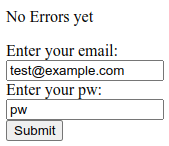
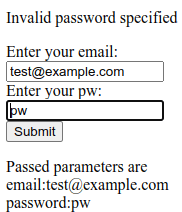
I want the front end display to look like

to display (after the submit button is pressed)

Some useful information.

When you give a URL such as http://mysite/mypage?parm1=abc&parm2=zyz&parm3=99, the page or program can process the keyword=value pairs after the ? and delimited by &. You can write a page and pass these parameters, so the page can display these values. This can provide the application model of “here is the boilerplate of the layout, and here are the data to go in the fields”.

HTML options

The easy bit – the anchor tag

Within an HTML page you can have code like <a href=”colin.html”>colins link</a. This displays the text colins_link, and if you click on the text it goes off and displays page “colin.html” from the same directory as the current page. This tends to be used when displaying information, with no input from the end user.

The almost easy bit – using a form

If you want the end user to provide information, you can use the <input>…</input> tag for example

<input id=email name="email" value="test@example.com">

where

  • id can be used to reference this field from a script within the page
  • name – is passed with the data to the back end server
  • value – you can preset a value.

You typically have a “submit” button or similar to send the data in the input fields to the next stage.

Typically you put these input fields in a form. You can set up event handlers, so when the user presses the “submit” button, scripts are run in the page to validate data before it is sent off.

Using forms – still pretty easy

Using forms is more complex than a simple anchor page and link to another page.

A form can have

  • action=url. The request is sent to the given url. This may just be another html page, or it may be a script which processes data in the request.
  • method=post|method=get. Method=post is used for transactional type work (make a database update) . Method=get tends to be used for non transactional request, (no changes made in the backend).

method=get

With method=get, the input data is appended to the action URL ,so a request may be colin.html?userid=colin&password=passw0rd. This can be seen in URLs.

method=post

With method=post, the data is read from stdin in the backend application. It is not in the URL.

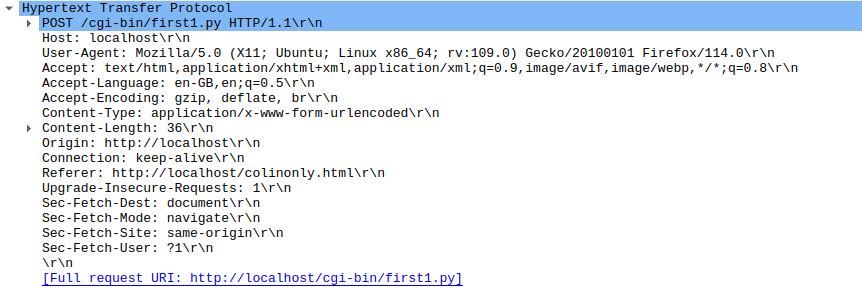
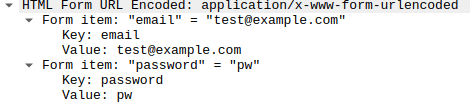
In the HTTP section of a wireshark trace,

and followed by

I want the back-end to update my front end page – this suddenly gets hard!

My application scenario is

The end user is presented with an HTML page, the data is sent to the back-end server. Some validation is done, and a response is sent back to the requester.

The back end can return

  • Headers which say redirect (status 303); display a specified URL, and pass it some parameters. The web browser can then go and get the page , display it, and used the passed field values to update the display.
  • Display HTML. You could build the html, and include any variable data as you build it, and send the whole stream of data.
  • Other data, such as a JSON object, eg {“rc”:”ok”,”field”:”password”,”msg”:”this is the problem”}
  • A file or other data to download – rather than display
  • You can also return headers giving security information or meta data about the payload.

My back-end application wants to report a parameter error to the requester – how do I do it?

I want to report an error the the end user, and have the cursor in the field with the problem. The front end and back end are isolated from each other which makes this hard.

I cannot just return some html data, as it will replace what is currently displayed. I know the link which called my back end (the “referer” header), but do not know the field names, or what other processing was done before my back end was called, I cannot just say redisplay it.

The only way I could find was to pass back some JSON data, for example in the format {“rc”:”error”,”field”:”password”,”msg”:”there is the problem”} and have some complex logic in the front end to process this.

I’ll skip over some magic, for a moment, for getting the data back to the front end page. The request gets sent, and the front page waits for the response. The front page extracts the JSON response and processes it…

  • Check the status code is OK, and that there were no errors reported by the back-end (for example file not found, or logic problem in the script).
  • Update the error message field
    • The returned JSON has a field “msg:…..” which can be referenced as json.msg .
    • Have a field in the front end page like <p id=”errorMessage“>No error messages yet</p> .
    • Update the error message field (with id “errormessage”) in the document from a field in the JSON using JavaScript document.getElementById(‘errorMessage‘).innerHtml = json.msg. The id=.. field links these up.
  • The data passed to the back end was a series of ?fieldname1=value1&fieldname2=value2&fieldnam3=value3... . The back-end puts the field-name in error into the JSON “field” attributes. The script in the front page:
    • Extracts the “field:…” from the JSON.
    • Gives focus to the field name taken from the JSON.field and uses document.getElementById(json.field).focus(); to give the field the focus, and so position the cursor in the field.

The magic to trap the response from the back-end – the advanced topic.

The only way I found find of capturing the json data passed back from my server application was some complex coding.

Within the code below is the use of Promises, a way of handling asynchronous requests. Rather than a deeply nested set of if-then-else, it uses a sequence of .then(itworks_callback, error_callback). The returned value of the itworks_callback is passed to the next .then(…,…).

We then have

fetch(...)
.then((aobject) => {... return(aobject.json) } )
.then((b) => {... return("a returned value"}) 

The .then((aobject) => ... is passed an object (aobject) which is passed into an inline function which extracts the json payload and passes it to the next .then statement. In the second “.then” , “b” gets the aobject.json data.

Within the <body..</body> of my html page I had displayable fields

<p id="errorField">No Errors yet</p>

<form id="target"  
      action="cgi-bin/first.py" 
      enctype="multipart/form-data"  >
  <label for="email">Enter your email: </label>
  <input id=email 
      name="email" 
      value="test@example.com" 
  >
  <label for="password">Enter your pw: </label>
  <input id=password name="password" value="pw">
  <input type="submit">
  <input type="text" onblur = "check(this)" >
</form>
<p id="passed"></p>

Within the <body>…</body> I had

<script>
  document.forms["target"].addEventListener('submit', (event) => {
  event.preventDefault();
  fetch("cgi-bin/first.py", {
      method: 'POST',
      body: new URLSearchParams(new FormData(event.target)) // event.target is the form
  }).then((response) => { 
      if (!response.ok) {
        throw new Error(`HTTP error! Status: ${response.status}`);
      }
      // for (var pair of response.headers.entries()) {
      //    console.log("31:"+ pair[0]+ ': '+ pair[1]);
      // }    
      return (response.json();
    })
    .then(function(result) 
    {
      // set the focus to the value returned
      document.getElementById(result.field).focus(); 
      // update the fields on the page
      document.getElementById('errorField').innerHTML = result.msg
      document.getElementById('passed').innerHTML = result.passed;

  }).catch((error) => {
       errorField.innerHTML = error;
      console.log(error);// TODO handle error
      return(error);
  });
});
</script>

The script does

  • document.forms[“target”].addEventListener(‘submit’, (event) => set up a handler for the form with id “target”, for when the form is submitted, and set the variable “event” to the parameter object.
  • event.preventDefault(); Do not do the default – I want to process it.
  • Send the data off to the url cgi-bin/first.py and wait for the response
    • fetch(“cgi-bin/first.py”, {
    • method: ‘POST’,
    • body: new URLSearchParams(new FormData(event.target)) // event.target is the form
    • }).
  • then((response) => { the result of the fetch is passed to an inline function, with object called response.
  • Handle any errors
    • if (!response.ok) {
    • throw new Error(`HTTP error! Status: ${response.status}`);
    • }
  • Display the header records from the response … commented out
    • // for (var pair of response.headers.entries()) {
    • // console.log(“31:”+ pair[0]+ ‘: ‘+ pair[1]);
    • // }
  • return (response.json(); Pass on the json payload to the next .then statement
  • })
  • .then(function(result) This is passed the json data and stored in result.
  • {
  • // set the focus to the value returned
  • document.getElementById(result.field).focus(); Extract the field name from the json and set the focus to the field
  • // update the fields on the page
  • document.getElementById(‘errorField’).innerHTML = result.msg This is the error message field.
  • document.getElementById(‘passed’).innerHTML = result.passed; And provide some feedback information , which is the parameters passed to the backend.
  • }).catch((error) => {
  • errorField.innerHTML = error;
  • console.log(error);// TODO handle error
  • return(error);
  • });
  • });

Phew! What a lot you need to understand to just pass back the return code, and error message! I could not find an easier method. It may exist… but it is not well documented.

Useful Linux ufw commands

I had just install Apache Httpd server, and found the documentation had some useful Useful FireWall (ufw) commands, which makes it even easier to configure ufw.

ufw app list

The ufw documentation says

ufw supports application integration by reading profiles located in

/etc/ufw/applications.d. To list the names of application profiles known to ufw, use:

ufw app list

Users can specify an application name when adding a rule (quoting any profile names with spaces). For example, when using the simple syntax, users can use:

ufw allow <name>

Or for the extended syntax:
ufw allow from 192.168.0.0/16 to any app <name>

My commands

ufw app list

gave me

Available applications:
  Apache
  Apache Full
  Apache Secure
  CUPS
  OpenSSH
  Postfix
  Postfix SMTPS
  Postfix Submission

sudo ufw allow ‘Apache’

gave me

Rule added
Rule added (v6)

sudo ufw status gave me

Status: active

To                         Action      From
--                         ------      ----
Anywhere                   ALLOW       10.1.1.2                  
...                  
Apache                     ALLOW       Anywhere                  
...             
Apache (v6)                ALLOW       Anywhere (v6)    

Really useful functions!

The hidden startup options for httd on z/OS

I had clearly configured http on z/OS, as when it started it printed Colins startup, but I could not find where this was being executed from.

I eventually found it was in the home directory for httpd. My http server starts with PARM=’SH /usr/lpp/ihsa_zos/bin/apachectl…’. In /usr/lpp/ihsa_zos/bin/envvars are the magic startup parameters, including some gsktrace settings.

I have

#!/bin/sh 
.  /usr/lpp/ihsa_zos/bin/cleanup.sh 
IHS=/usr/lpp/ihsa_zos 
LIBPATH=$IHS/lib:$IHS/modules:$IHS 
PATH=$IHS/bin 
_EDC_ADD_ERRNO2=1 
_BPX_SHAREAS=NO 
_BPX_BATCH_SPAWN=YES 
GSK_SSL_HW_DETECT_MESSAGE=1 
LC_ALL=En_US.IBM-1047 
#rm /u/mqweb3/conf/*.log 

export GSK_TRACE=0x00 
export GSK_TRACE=0xff 
export GSK_TRACE_FILE=/u/mqweb3/conf/httpd.gsktrace 
#xport GSK_SERVER_TLS_KEY_SHARES=00300029002500240023 
#export GSK_TLS_SIG_ALG_PAIRS=0601050104010301080608050804050304030603 
#export GSK_TLS_CERT_SIG_ALG_PAIRS=0601050104010301080608050804050304030603 f

and /usr/lpp/ihsa_zos/bin/cleanup.sh has

#!/bin/sh 
# 
echo 'colins cleanup' 
rm /u/mqweb3/conf/*.log 
rm /u/mqweb3/conf/httpd.gsktrace 

It is always easy when you know the answer.

Putting the GSK_TRACE information in this file is not recommended as it will trace every system SSL call, and to turn it off, you have to stop http, edit the file to say GSK_TRACE=0x00 and restart the server. This article describes how to collect a trace using CTRACE. You can turn trace on and off without restarting the HTTP server.

To format this gsk trace I had to use the following command in Unix Services

gsktrace /u/mqweb3/conf/httpd.gsktrace > gsktrace.txt

Getting a system ssl trace for httpd server on z/OS

I had a problem getting the httpd server to work on z/OS. It did not like my certificate – but reported messages about ICSF security not being set up. I got to learn a lot about traces, but could not find how to trace System SSL (GSK) and httpd.

I specified SSLTRACE in my vhost*.conf file which gave me a little information – but not at the System SSL Level.

Other applications using System SSL, can set environment variables

GSK_TRACE=0xff 
GSK_TRACE_FILE=/tmp/gskssl.%.trc 

but this does not work with http. (I think the environment variables are not passed on to any spawned thread).

You have to use the gsksrvr task, and collect the trace through CTRACE.

Set up gsk trace.

I have used gsk trace before, and described setting it up.

I had to create a parmlib member

TRACEOPTS 
          WTRSTART(ctwtr) 
          on 
          wtr(ctwtr) 
jobname(httpcp) 
          OPTIONS('LEVEL=255,JOBSUFFIX=ANY') 

I start my http server with the S HTTPCP command, and specified httpcp in the jobname of the parmlib.

I got out no trace. I tried the various jobnames until it produced a trace. My trace was produced from jobname httpcp8! I could not find a way of displaying which of my httpcp* job was used, so I had to try them all.

If I had had a long name eg httpcpxx then specifying jobname(httpcpxx) should have worked.

Starting the trace

I used

TRACE CT,ON,COMP=GSKSRVR,PARM=CTGSKON

where my parmlib member was CTGSKOK

It produced

TRACE CT,ON,COMP=GSKSRVR,PARM=CTGSKON
IEE252I MEMBER CTGSKON FOUND IN USER.Z24C.PARMLIB
GSK01040I SSL component trace started.
ITT038I ALL OF THE TRANSACTIONS REQUESTED VIA THE TRACE CT COMMAND WERE
SUCCESSFULLY EXECUTED.

and the CTWTR started up.

What is the status of the trace?

d trace,comp=gsksrvr

gave me

IEE843I 08.32.25  TRACE DISPLAY       
  COMPONENT     MODE BUFFER HEAD SUBS                                  
 --------------------------------------------------------------        
  GSKSRVR       ON   0064K                                             
     ASIDS      *NOT SUPPORTED*                                        
     JOBNAMES   HTTPCP8 ,HTTPCP1 ,HTTPCP2 ,HTTPCP3 ,HTTPCP4 ,          
                HTTPCP5 ,HTTPCP6 ,HTTPCP7                              
     OPTIONS    LEVEL=255                                              
     WRITER     CTWTR                                                  

Run my test

When I ran my test, some System SSL messages were produced on the console from the gsksrvr address space

GSK01047I SSL component trace started for HTTPCP8/STC01000.
GSK01050I SSL component trace started for HTTPCP8/STC01000/05010022.

Stop the trace

TRACE CT,OFF,COMP=GSKSRVR

Wait until you get

GSK01041I SSL component trace ended.

from the gsksrvr address space, and stop the trace writer.

D TRACE,WTR=ALL
TRACE CT,WTRSTOP=CTWTR

This seems to take a few seconds to run. It outputs

IEF196I AHL904I THE FOLLOWING TRACE DATASETS CONTAIN TRACE DATA : 
IEF196I           IBMUSER.CTRACE1 
ITT111I CTRACE WRITER CTWTR TERMINATED BECAUSE OF A WTRSTOP REQUEST.  
IEF404I CTWTR - ENDED - TIME=08.40.21                                                                 

Format the trace

You need to use IPCS to format it

  • =0 – and enter the data set name (IBMUSER.CTRACE1)
  • =6 – to get to the ipcs command screen
  • dropd – to tell IPCS to forget any historical information it may know about for the dataset
  • CTRACE COMP(GSKSRVR) full – this displays any System SSL CTRACE data
  • m PF8 – go to the bottom of the data
  • report view – to go into ISPF View mode on the data set
  • X ALL – to hide all of the data
  • f SSL_ERROR ALL – this shows any error codes
  • if you get any lines displayed, you can tab down to the hidden command and use the line prefix command f4 to display the first 4 hidden lines.

The errors I got were

 S0W1      MESSAGE   00000004  08:35:55.049451  SSL_ERROR 
   Job HTTPCP8   Process 05010022  Thread 00000005  crypto_ec_token_private_key_sign 
   ICSF service failure: CSFPPKS retCode = 0x8, rsnCode = 0x2b00 
                                                                                                              
 S0W1      MESSAGE   00000004  08:35:55.049733  SSL_ERROR 
   Job HTTPCP8   Process 05010022  Thread 00000005  crypto_sign_data 
   crypto_ec_sign_data() failed: Error 0x03353084 
                                                                                                              
 S0W1      MESSAGE   00000004  08:35:55.050012  SSL_ERROR 
   Job HTTPCP8   Process 05010022  Thread 00000005  construct_tls13_certificate_verify_message 
   Unable to generate certificate verify message: Error 0x03353084 
                                                                                                              
 S0W1      MESSAGE   00000004  08:35:55.050393  SSL_ERROR 
   Job HTTPCP8   Process 05010022  Thread 00000005  send_tls13_alert 
   Sent TLS 1.3 alert 51 to ::ffff:10.1.0.2.45432. 
                                                                                                              

The Alert 51 matches what my browser received.

File /usr/include/gskcms.h had #define CMSERR_ICSF_SERVICE_FAILURE 0x03353084

CSFPPKS is PKCS #11 Private Key Sign.

The return code 0x2b00 (from here) gives:

User action: You might need to re-create the token by using the PKA key token build or PKA key import callable service or regenerate the key values on another platform.

or in other words, it did not like my certificate created with NISTECC SIZE(256) but did like NISTECC SIZE(521).

Getting a trace from ICSF using CTRACE

I had a problem with a certificate and as part of trying to track down the problem, I traced all of the components. I found the documentation for tracing ICSF was not complete – it assumed you were going to take a dump.

You can collect a CTRACE from ICSF, and have it go to a CTRACE dataset.

Create the CTICSFxx member in parmlib

I copied CTICSF00, added the writer statement, and said collect ALL

TRACEOPTS 
          ON 
          BUFSIZE(2M) 
          wtr(ctwtr) 
          OPTIONS('ALL') 

Turn off the ICSF trace

TRACE CT,OFF,COMP=CSF   

Start the trace writing started task

See Create a procedure to collect the trace. The same trace writer can be used for all ctrace record.

TRACE CT,WTRSTART=CTWTR  

Start CTRACE

You need a parmlib member to contain the definitions I called mine CTICSF01

TRACEOPTS 
/*-----------------------------------------------------------------*/
/* ON OR OFF: PICK 1 */
/*-----------------------------------------------------------------*/
ON
/* OFF */
BUFSIZE(2M)
wtr(ctwtr)
/*-----------------------------------------------------------------*/
/* OPTIONS: NAMES OF FUNCTIONS TO BE TRACED, OR "ALL", OR "MIN" */
/*-----------------------------------------------------------------*/
/* OPTIONS( */
/* 'ALL' */
/* ,'KDSIO' */
/* ,'CARDIO' */
/* ,'SYSCALL' */
/* ,'DEBUG' */
/* ,'RDIO' */
/* ,'RDDATA' */
/* ,'MIN' */
/* ) */
OPTIONS('KDSIO','CARDIO','SYSCALL','RDIO','ALL')

Start the trace

TRACE CT,ON,COMP=CSF,PARM=CTICSF01

This gave me

TRACE CT,ON,COMP=CSF,PARM=CTICSF01
IEE252I MEMBER CTICSF01 FOUND IN USER.Z24C.PARMLIB
ITT038I ALL OF THE TRANSACTIONS REQUESTED VIA THE TRACE CT COMMAND WERE SUCCESSFULLY EXECUTED.

Run your failing transaction

Stop ctrace

TRACE CT,OFF,COMP=CSF 

This gave

ITT038I ALL OF THE TRANSACTIONS REQUESTED VIA THE TRACE CT COMMAND WERE SUCCESSFULLY EXECUTED.

Stop the trace writer

TRACE CT,WTRSTOP=CTWTR

This gave messages

ITT111I CTRACE WRITER CTWTR TERMINATED BECAUSE OF A WTRSTOP REQUEST.
IEF404I CTWTR – ENDED – TIME=07.54.33
IEF196I IEF142I CTWTR CTWTR – STEP WAS EXECUTED – COND CODE 0000
IEF196I IGD104I IBMUSER.CTRACE1 RETAINED

Any data is in the dataset.

Go into IPCS.

The instructions below show how to find statements with a non zero return code.

  • =0 – and enter the data set name
  • =6 – to get to the ipcs command screen
  • dropd – to tell IPCS to forget any information it may know about for the dataset
  • CTRACE COMP(CSF) full – this displays any ICSF CTRACE data
  • m PF8 – go to the bottom of the data
  • report view – to go into ISPF View mode on the data set
  • X ALL – to hide all of the data
  • f code all – this shows any error codes
  • c ‘Return code = 00000000 ‘Return ZZZZ = 00000000’ all – use cut and paste of the string, as blanks are lost in this post
  • c ‘Condition code = 00000000’ ‘Condition ZZZZ = 00000000’ all
  • x all
  • f code all – this will show you are statements with a non zero return code.

One minute… what is a digital certificate?

This blog post covers

Why use certificates?

Certificates can be used as an authentication mechanism. It allows identity information to be sent over a network, and the remote end to validate the information before using it. For this to work, we need a “Certificate Authority” who can validate the certificate. When the remote end gets the “certified certificate” it checks the certification and validity and if successful can use this. Checking can involve sending an electronic request to the Certificate Authority asking if the certificate is still valid.

What is a certificate?

A certificate has several components (conceptually I think of a certificate as an envelope with several bits of paper within it).

  • A public key. See One minute explanation of public keys and private keys.
  • Information about the owner, such as name and address or organization
  • Meta information – such as it can be used for document signing (but not certificate signing), and validity dates.
  • Signing information.

Information about the owner

A certificate has information about the “owner”. Common attributes include

  • Common Name CN=Colin Paice
  • Organisation O=My Org
  • Organisational Unit OU=TEST
  • Country C=GB

Meta information.

The certificate contains information on how it should be used. For example

  • This certificate can be used as a server’s certificate – but not as a client certificate.
  • This certificate can be used for signature but not encryption.
  • This certificate can be used to sign other certificate (see below).

A server (or client) could decide to ignore some of these attributes. A proper server will honour the information, and if the client’s certificate does not have the “can be used by a client” attribute set, it will reject the certificate.

How do you trust a certificate?

If you have been sent a certificate – how do you tell if it is genuine? This was one of the problems in the early days of secure communications.

This problem was solved by having an organisation we both trust, and having this organisation “sign” a certificate.

Imagine there is a UK Certificate Authority (UKCA). To get your certificate approved…

  • you take your certificate, your passport, and proof of address to the Certificate Authority (UKCA).
  • A clerk in the CA, checks that the name in your certificate matches your passport, and the address in the certificate matches the proof of address your provided.
  • The clerk can check “the permissions” within your certificate, such as this certificate can/cannot be used as a certificate authority, or can/cannot be used as a server. The CA may not care!
  • The CA take an electronic copy of your certificate and perform a checksum calculation on the contents. If the certificate is changed in any way, the checksum calculation will be a different number.
  • The CA then encrypts the checksum calculation, prints it out, and staples the encrypted value and a copy of the CA’s public certificate to the back of your certificate.
  • The certificate has now been signed by the CA.

You send me a copy of your certificate and attachement created by the CA.

When I get a copy of your certificate (and attachment),

  • I check the CA’s public certificate that you sent me is the same as the copy I already have.
  • I do the same check sum calculation as the CA authority did.
  • I use the CA’s public certificate to decrypt the CA’s encrypted checksum.
  • The two checksum values should match!

If the checksum values match, then I can trust that the information in the certificate is the same as the information you showed to the CA when getting you certificate “signed”. Of course if you provided a fake passport, all I know is that what I see is what the CA saw.

Intermediate CAs and certificate chains

Of course it costs you money to get your certificate signed by a CA. To reduce this cost you can set up your own enterprise Certificate Authority. You create a certificate called CN=MYORGCA, and set the attribute set to allow it to sign other certificates. You take this the the UKCA and get it signed.

When Joe wants his personal certificate signed, he come to you,

  • you check Joe’s corporate ID badge has the same name as in Joe’s certificate
  • you check any other data fits within your enterprise standards, such as expiry date.
  • you use your enterprise CA certificate(CN=MYORGCA) to sign Joe’ certificate.
  • Joe get a package with
    • Joe’s certificate,
    • the checksum from the enterprise signing, and the enterprise public certificate.
    • a copy of the UKCA’s certificate and encrypted checksum for your enterprise’s CA.

When I get Joe’s certificate and attachments.

  • I can see if I have a copy of your enterprise public certificate.
  • No I do not, but I do have a copy of the UKCA public certificate,
  • I validate the your enterprise’s public certificate, using the UKCA certificate
  • If your enterprises public certificate validates successfully, I can then use it to validate Joe’s certificate.

This means I can validate certificates sent to me, as long as I have at least one of the certificates in the chain.

You could take this further and have a departmental CA authority.

Is the certificate still valid?

If someone leaves your organisation you want to ensure that any certificates issued to that person cannot be used.

You can have an expiry date in the certificate, so within a year or two the certificate will expire. This is not good enough, and you want to make the invalidate the certificate as soon as possible. This can be done through an Online Certificate Status Protocol (OCSP) attribute in the certificate. Basically this says go and ask the URL if this certificate if it is still valid.
How do you know who to ask? A certificate has url information within in it Authority Information Access: OCSP – URI:http://ColinsCert.Checker.com/ . The back end serving the URL is typically an LDAP server.

If you think about this for a few minutes this may not seem a good idea. For every secure connection handshake, you have to issue a query to a remote server somewhere to see if the certificate is still valid. This will seriously affect performance. This was solved by having a “OCSP response valid time”, sent as part of the response from the OCSP server. This known as stapling (I picture this as stapling a valid-until ticket to a certificate). The OCSP server can say “This certificate is valid, and assume it is valid for n hours”. The first time the client uses the certificate it may take longer because of the OCSP checks. For successive requests , the client can then use the certificate without doing any OCSP checks – until the time period has expired.

Do I trust the sender?

A bad actor could have copied the certificate from a valid server, and presented it to the client. The client checks it, and it looks ok, but in reality it came from a bad server.

You can include Subject Alternate Name (or SAN) in the certificate. This is the URL or IP address of the server. When the certificate is sent from the server, the client checks that the IP address of the server is in the list of SANs in the certificate. If it does not match then the certificate is rejected. Example SANs DNS:www.example.com, IP:10.1.1.2

If the DNS:name is used, this will also require a connection to a DNS to get back the IP address, which will add time to TLS hand shake to the server.

You should use SAN for the server, but not for the client. A Server will have a fixed, or limited choice of values. A client can get a random IP address and so is unlikely to match a value in the certificate.