Zowe: Installing and configuring z/OS system definitions

Installing Zowe – getting the libraries to z/OS

You can install Zowe using SMP/E or using a PAX file.

Follow the instructions.

  • From SMP/E
  • From a .pax file Where it says pax -ppx -rf .pax
    • cd to the product library for example cd /usr/lpp/zowe
    • within the directory, unpax using pax -ppx -rf path-to-pax/.pax such as pax -ppx -rf /tmp/zowe3.0.pax
    • you can remove the pax file if you no longer need it. Once you have the libraries installed, you edit a zowe.yaml file to define Zowe parameters, then you run a step to create data sets and other objects.

General comment

In the following sections, it refers to configuration keys by using the concatenation of key names and dots.
For example, if you want to update the configuration key zowe.certificate.keystore.type with the value PKCS12, you should set the value for this entry in the zowe.yaml:

zowe:
# Specify the certificate keystore type
certificate:
keystore:
type: PKCS12

where each level is indented two more spaces than the preceding level

If you search for “zowe.certificate.keystore.type”, you will not find it in the file.

Within the configuration is a data set prefix ZWEV3. You may want to use a name like PP.ZWE3 which fits with your data set naming convention.

My set up

/u/tmp/zowep contains my installed libraries

/u/tmp/zowec contains my configuration

Configuring Zowe

The Zowe documentation on the customisation process is here.

  • You should have Zowe and the prereqs installed, for example Zowe
    installed in /u/tmp/zowep.
  • Create the directory for the Zowe instance configuration file,
    for example /u/tmp/zowec

The instructions below configure the minimal function Zowe instance. This makes it quicker to resolve set up issues, such as certificate and keyring problems.
The instructions then add more function, until it is fully configured.

How to configure Zowe

The Zowe documentation takes the approach of using a large .yaml file for all configuration information. I found this unwieldy, and hard to use.
The customising information has logically separate sections covering

  • Creating the PDS
  • Creating proclib and parmlib members
    • APF definitions
  • Creating security definitions
  • Creating certificates
  • Configuring what runs when Zowe is started.

I found it easier to have a configuration file for each

Creating the PDS

The Zowe documentation describes the official way.

Use /u/tmp/zowep/bin/zwe install –ds-prefix value

Note: That is – – ds-prefix with two dashes.

Where value is the high level qualifier to use. For example PP.ZOWE31

If you use –ds-prefix you do not need to use a zowe.yaml configuration file.

This creates some data sets with the specified High Level Qualifier.

If you are rerunning the step, or upgrading use

/u/tmp/zowep/bin/zwe install –ds-prefix value –allow-overwrite

Create instance specific data sets and members

See the Zowe documentation .

DescriptionParameterDefault value
Where Zowe MVS data sets will be installedprefix:IBMUSER.ZWEV3A
PROCLIB where Zowe STCs will be copied overproclib:USER.PROCLIB
Zowe PARMLIBparmlib:IBMUSER.ZWEV3A.CUST.PARMLIB
PARMLIB members for pluginsparmlibMembers: zisZWESIP00
JCL library where Zowe will store temporary JCLs during initializationjcllib:IBMUSER.ZWEV3A.CUST.JCLLIB
Utilities for use by Zowe and extensionsloadlib:IBMUSER.ZWEV3A.SZWELOAD
APF authorized LOADLIB for ZoweauthLoadlib:IBMUSER.ZWEV3A.SZWEAUTH
APF authorized LOADLIB for Zowe ZIS PluginsauthPluginLib:IBMUSER.ZWEV3A.CUST.ZWESAPL

I created a ins.yaml file with

zowe: 
setup:
dataset:
prefix: COLIN.ZOWE
parmlib: COLIN.ZOWE.CUST.PARMLIB
proclib: COLIN.ZOWE.CUST.PROCLIB
jcllib: COLIN.ZOWE.CUST.JCLLIB
authLoadlib: COLIN.ZOWE.SZWEAUTH
authPluginLib: COLIN.ZOWE.CUST.ZWESAPL

and use the command

/u/tmp/zowep/bin/zwe init mvs -c ins.yaml

APF authorise the data sets

The official way of APF defining the Zowe data sets is to use the command

/u/colin/zowep/bin/zwe init apfauth -c in.yaml

This issues some operator commands to dynamically APF authorise two data sets.

SETPROG APF,ADD,DSNAME=COLIN.ZOWE.SZWEAUTH,VOLUME=CBTU07                    
...
SETPROG APF,ADD,DSNAME=COLIN.ZOWE.CUST.ZWESAPL,VOLUME=CBTU01
...

This does not save definitions across IPL, so you might just as well as define the parameters manually

You can create or update a PROGXX member in the parmlib concatentation, such as PROGZW

APF ADD DSNAME(COLIN.ZOWE.SZWEAUTH) VOLUME(CBTU07)
APF ADD DSNAME(COLIN.ZOWE.CUST.ZWESAPL) VOLUME(CBTU07)

You can the set prog=ZW to activate it.

Once this works, you will need to put the PROGZW in the IPL startup list.

Create the security definitions needed by Zowe.

See Zowe:Create the security definitions .

Create the Started Task JCL procedures

The Zowe command

zwe init stc -c in.yaml            

copies 3 members (ZWESISCH, ZWESISTC, ZWESLSTC) from COLIN.ZOWE.SZWESAMP into the user specified PROCLIB, and does a small amount of configuration. For example

...
//********************************************************************/
//ZWELNCH EXEC PGM=ZWELNCH,REGION=&RGN,TIME=NOLIMIT,
// PARM='ENVAR(_CEE_ENVFILE=DD:STDENV),POSIX(ON)/&HAINST.'
//STEPLIB DD DSNAME={zowe.setup.dataset.authLoadlib},
//STEPLIB DD DSNAME=COLIN.ZOWE.SZWEAUTH,
// DISP=SHR
//SYSIN DD DUMMY
...
//STDENV DD *
_CEE_ENVFILE_CONTINUATION=
_CEE_RUNOPTS=HEAPPOOLS(OFF),HEAPPOOLS64(OFF)
_EDC_UMASK_DFLT=0002
CONFIG={ZWE_CLI_PARAMETER_CONFIG}
CONFIG=/u/colin/zowec/in.yaml
/*
...

The bold lines are substituted with the configuration values.

For the ZWESLSTC member, check the correct yaml file is being used.

Once you have checked the JCL, and made any site specific changes, you need to copy them to the SYS1.PROCLIB concatenation.

You should use a started task procedure name of 7 characters or less. Zowe creates BPXAS jobs with the zowe procedure name as a prefix. If the name is 7 characters or less, these jobs are like ZWESTC1, ZWESTC2, ZWESTC3 etc.

If you use a procedure name of 8 characters, then the BPXAS jobs all have the same name, so when you issue an operator command such as F ZWESLSTC,APPL=DISPLAY, all the jobs will be passed the request, and you will get IEE342I MODIFY REJECTED-TASK BUSY from each of the BPXAS tasks.

Creating certificates

You can use existing certificate, key stores and trust stores. You will need to specify the names of them in the run time configuration.

Create the SCHED member definitions

Two modules have to be defined as KEY(4) NOSWAP. Either add them to an existing SCHEDxx member, or create a SCHEDZW member,

The source is in .SZWESAMP(ZWESISCH)

PPT PGMNAME(ZWESIS01) KEY(4) NOSWAP      
PPT PGMNAME(ZWESAUX) KEY(4) NOSWAP
Zowe:Set-up messages on z/OS

I experienced the messages below when using Zowe. I’ve included additional text to further explain the messages

BPXP005I A FORK OR SPAWN ERROR WAS ENCOUNTERED. RETURN CODE 00000070 REASON CODE 0B250012

Unix return code  00000070 maps to EAGAIN (the resource is temporarily unavailable)

Unix reason code 0B250012 maps to JRMaxChild (the maximum number of processes for this user ID has been exceeded)

Increase the appropriate value MAXPROCSYS or MAXPROCUSER. This can be done dynamically using the SETOMVS command.

Use

  • D OMVS,O to display maxprocuser
  • setomvs MAXPROCUSER=40

BPXI039I SYSTEM LIMIT SHRLIBRGNSIZE HAS REACHED 90% OF ITS CURRENT CAPACITY OF 83886080

See Tuning the z/OS shared library region.

JVMSHRC020E An error has occurred while opening semaphore
JVMSHRC336E Port layer error code = -262894

JVMSHRC337E Platform error message: semctl : EDC5111I Permission denied. (errno2=0x070E0303)
JVMSHRC028E Permission Denied
JVMSHRC840E Failed to start up the shared cache.
JVMJ9VM015W Initialization error for library j9shr29(11): JVMJ9VM009E J9VMDllMain failed
Error: Could not create the Java Virtual Machine

-262894 is SEMCTL EACCESS – Permission denied.

The owner of the shared file cache was not the userid trying to use it.

chown ZWESVUSR:SYS1 *

Changed the files, such as

ZWESVUSR SYS1     314572800 Feb  9 08:43 C290M17F1A64S_zoweGW_G43L00                   
ZWESVUSR SYS1 32 Feb 10 06:35 C290M17F1A64_semaphore_zoweGW_G43L00
ZWESVUSR SYS1 40 Feb 10 06:35 C290M17F1A64_memory_zoweGW_G43L00

JVMSHRC020E An error has occurred while opening semaphore
JVMSHRC336E Port layer error code = -197360

JVMSHRC337E Platform error message: semget : EDC5129I No such file or directory.

-197360 is SEMGET ENOENT – No such file, directory, or IPC member exists.

I got these trying to restore a sharedclasses cache, when I did not have access to the file.

/usr/lpp/java/J17.0_64/bin/java -Xshareclasses:cacheDir=/u/tmp/zowec,name=zoweGW,restoreFromSnapshot

I gave the userid access and it worked

chmod 777 /u/tmp/zowec/javasharedresources/*

JVMSHRC659E An error has occurred while opening shared memory
JVMSHRC336E Port layer error code = -459502


JVMSHRC337E Platform error message: shmctl : EDC5111I Permission denied.
JVMSHRC028E Permission Denied
JVMSHRC626I The stats of the shared cache cannot be obtained since a valid shared cache does not exist.
JVMJ9VM015W Initialization error for library j9shr29(11): JVMJ9VM009E J9VMDllMain failed

-459502 is SHMCTL EACCESS -Permission is denied.

The userid issuing the command does not have access to the resource.

The documentation says the shared class cache is created with ONLY USER read/write access by default unless the groupAccess command-line suboption is used, in which case the access is read/write for user and groups.

Note: Users with super user authority gid=0(SYS1) can issue the command with no additional authority.

To find the group list the directories containing the cache, for example if /var/zosmf/data/logs/.classCache/ was specified use ls -ltr /var/zosmf/data/logs/.classCache/javasharedresources.

For me it had owner IZUSVR group IZUADMIN.

I used the RACF command connect COLIN group(IZUADMIN) to connect the userid to the group. Even then the command failed, because groupAccess had not been defined on the -Xshareclasses… parameter. I had to delete the cache so it was recreated next time theJVM started. Then the java -Xshareclasses:cacheDir=/var/zosmf/data/logs/.classCache,name=liberty-IZUSVR,verbose,printStats worked.

JVMSHRC023E   Cache does not exist

I had

-Xshareclasses:cacheDir=/javasc,name=izusvr1cache,printStats

I had to remove the printStats.

JVMSHRC364E SH_OSCachesysv::acquireWriteLock() call to j9shsem_wait on semid … has failed with error -328433.

-328433 is SEMOP – The parameter is incorrect.

You can use the ipcs Unix commands to display the semaphore ids.

JVMSHRC005I No shared class caches available

I was using

/usr/lpp/java/J11.0_64/bin/java -Xshareclasses:cacheDir=/global/zosmf/data/logs/.classCache/,verbose,listAllCaches

to display information about shared cache usage, and kept getting the JVMSHRC005I No shared class caches available message. I experienced two reasons for this.

  1. The information in the file, was for last week’s IPL, and the the information in today’s memory was invalid.
  2. I was using the wrong level of Java. Once I used the right level of Java it worked!

restoreFromSnapshot

IBMUSER:/u/ibmuser: >cd /u/tmp/zowec
IBMUSER:/u/tmp/zowec: >/usr/lpp/java/J17.0_64/bin/java -Xshareclasses:cacheDir=/u/tmp/zowec,name=zoweGW,restoreFromSnapshot
JVMSHRC020E An error has occurred while opening semaphore
JVMSHRC336E Port layer error code = -197360
JVMSHRC337E Platform error message: semget : EDC5129I No such file or directory.
JVMSHRC727E An error has occurred in creating the new non-persistent shared cache

JVMSHRC808I Compressed references shared cache “zoweGW” is destroyed. Use option -Xnocompressedrefs if you want to destroy a non-com pressed references cache.
JVMSHRC699E Failed to restore the non-persistent shared cache “zoweGW” from the snapshot

This may be connected to the the following

The following files were in the directory

-rw-r--r-- 1 ZWESVUSR ZWEADMIN ... C290M17F1A64_semaphore_zoweGW_G43L00
-rw-r--r-- 1 ZWESVUSR ZWEADMIN ... C290M17F1A64_memory_zoweGW_G43L00

For example the above files were had owner: ZWESVUSR group: ZWEADMIN.

The userid was in group ZWEADMIN, and so does not get R/W access to the files.

Errno2

  • 0x071D0303: JRIpcDenied: Access was denied because the caller does not have the correct permission.
  • 0x053b006c: JRFileNotThere: The requested file does not exist
  • 0x0594003d: JRDirNotFound: A directory in the pathname was not found

Zowe:Starting Zowe on z/OS

This post will guide you starting a minimal Zowe instance and extending it.

You need to have configured the z/OS system ( started tasks, security, APF, SCHEDxx ) and configured the Zowe instance file, zowe.yaml.

In the zowe.yaml file find “components:” in column 1, and change the enabled value of the components to “false”.

  • gateway
  • discovery
  • caching-services
  • app-server
  • explorer-jes
  • explorer-mvs

but keep zss enabled.

Start the common services started task

Start the common services task. The default is ZWESISTC, but you may have changed the name of it.

s ZWESISTC

This displays output like

IEF403I ZWESISTC - STARTED - TIME=08.19.08                                                           
ZWES0001I ZSS Cross-Memory Server starting, version is 3.1.0+20250108
IEF761I ZWESISTC ZWESISTC PARMLIB ZWESIS DD IS ALREADY ALLOCATED AND WILL BE USED BY THIS TASK.
IEE252I MEMBER ZWESIP00 FOUND IN COLIN.ZOWE.CUST.PARMLIB
ZWES0105I Core server initialization started
ZWES0109I Core server ready
ZWES0200I Modify commands:
...

Resolve any problems.

Start the main task.

Once the cross memory server has started successfully, start the main task

The default started task name is ZWESLSTC, but you may have changed it.

s ZWESLSTC

It generates messages like

$HASP373 ZWESLSTC  STARTED                                              
IEF403I ZWESLSTC - STARTED - TIME=10.02.38
+ZWEL0021I Zowe Launcher starting
+ZWEL0018I Zowe instance prepared successfully
+ZWEL0006I starting components
+ZWEL0001I component gateway started
+ZWEL0001I component zss started
+ZWES1013I ZSS Server has started. Version '3.1.0+20250108' 64-bit

You stop it using using

 P ZWESLSTC                                  
+ZWEL0008I stopping components
+ZWEL0002I component gateway stopped

It it fails to start, check the job output.

There is a log of activities SYSPRINT, and problems may be reported in SYS0001, for example

ZWEL0318E – Couldn’t scan file ‘/u/colin/zowec/zowe31.yaml’: mapping values are not allowed in this context at line 146, column 17.

Connecting to the gateway

Once you Zowe, with zss and the gateway, starts successfully, you can try to connect to it.

Before you can do this your web server, curl or other tool needs access to the Certificate Authority certificate.

I exported it using

//COLINEXP JOB 1,MSGCLASS=H 
//S1 EXEC PGM=IKJEFT01,REGION=0M
//STEPLIB DD DISP=SHR,DSN=SYS1.MIGLIB
//SYSPRINT DD SYSOUT=*
//SYSTSPRT DD SYSOUT=*
//SYSTSIN DD *
RACDCERT CERTAUTH EXPORT(LABEL('DOCZOSCA')) -
DSN('COLIN.CERT.DOC.CA.PEM') -
FORMAT(CERTB64) -
PASSWORD('PASSWORD')
//

It creates a data set like

-----BEGIN CERTIFICATE----- 
MIIDYDCCAkigAwIBAgIBADANBgkqhkiG9w0BAQsFADAwMQ4wDAYDVQQKEwVDT0xJ
...
wL6XUA==
-----END CERTIFICATE-----

I created a file on Linux/Uss called cacert.pem, and pasted the contents into it.

I used curl (from z/OS) to access the gateway

trace="--trace trace.txt1" 
ca="--cacert /u/colin/zowec/cacert.pem"
curl -v $trace $ca https://127.0.0.1:7557/plugins

This gave data like

{"pluginDefinitions":[{"identifier":"org.zowe.explorer-jes","apiVersion":"2.0.0"....

if you get this then you successfully connected to the gateway.

The trace.txt1 file has the TLS handshake and the data content. For example it contained

== Info: SSL connection using TLSv1.3 / TLS_AES_256_GCM_SHA384 / x25519 / id-ecPublicKey 
== Info: ALPN: server did not agree on a protocol. Uses default.
== Info: Server certificate:
== Info: subject: O=MYORG; OU=COLIN; CN=127.0.0.1
== Info: start date: May 2 05:00:00 2025 GMT
== Info: expire date: Jul 3 04:59:59 2029 GMT
== Info: subjectAltName: host "127.0.0.1" matched cert's IP address!
== Info: issuer: O=COLIN; OU=CA; CN=DOCZOSCA
== Info: SSL certificate verify ok.
== Info: Certificate level 0: Public key type EC/prime256v1 (256/128 Bits/secBits), signed using sha256WithRSAEncryption
== Info: Certificate level 1: Public key type RSA (2048/112 Bits/secBits), signed using sha256WithRSAEncryption
== Info: Connected to 127.0.0.1 (127.0.0.1) port 7557

When you start Zowe it spawns threads into BPXAS address spaces, which show up as jobs with the same name (ZWESLSTC) but you cannot look at their output in the spool.

Problem determination

  • Check for messages on the system log.
  • Check within ZWESLSTC started task output for error messages.
  • You can enable debug trace in the zowe.yaml file with the launchScript: logLevel set to debug. Reset it to info once the problem is resolved.
  • You can set debug: true for the component with problems.

If the zss fails to start, check in the logs directory of the instance directory for the zss… log file, such as

*/u/tmp/zowec/logs/zssServer-2025-02-03-08-15.log*

If the system starts, but you cannot connect from a web browser,

change the yaml file and uncomment the https: trace statement

  zss: 
enabled: true
port: 7557
crossMemoryServerName: ZWESIS_STD
agent:
jwt:
fallback: true
64bit: true
https:
trace: true

When you start Zowe it will produce a trace file like

logs/zssServer-2025-02-03-17-36.log.tlstrace

which you can format with

gsktrace logs/zssServer-2025-02-03-17-36.log.tlstrace >gsk.txt

I got

No supported CertificateVerify signature algorithm for EC key

Which means then the specified server key is not acceptable. For example Elliptic Curves with length 521 are not supported in all client environments, and key size 256 should be used.

Start the API Server

The API server needs to authenticate the user.

You can use

  • 1. SAF interface
  • 2. Another interface

To use the SAF interface you need to start the zss server

Zowe:Configuring a run time instance

You need to configure the z/OS system before you can start Zowe. This work can be done in parallel to configuring the Zowe instance.

Create the run time configuration file

Copy the yaml file from product directory to the instance directory

See detailed instructions

for example

cd /u/tmp/zowep
cp example-zowe.yaml /u/tmp/zowec/zowe.yaml
cd /u/tmp/zowec
oedit zowe.yaml

Basic editing of the zowe.yaml file

The example-zowe.yaml file composes of the definitions used above to set up the MVS definitions, and the configuration of the run time.

Once you have configured the started tasks, APF, security, and security, you do not need the definitions in the run time configuration.

Edit the zowe.yaml file, and delete from the start of the file down to just before

# >>>>>>>>>>>>>>>>>>>>>>>>>>>>>>>>>>>>> 
# **COMMONLY_CUSTOMIZED**

Insert

zowe: 

starting in column 1 at the start of the file.

Run time parameters

The run time directory

This is the directory with the product code.

   runtimeDirectory: /u/colin/zowep

Note. The runtime… is indented by two characters. You will have used this, either in your PATH statement, or in /u/colin/zowep/bin/zwe above.

Where to store runtime logs.

This is machine and instance dependant.

You need to decide which directory is used. Should it be available across all systems, or only available on one system, and if the LPAR and Zowe instance name is part of the directory structure. See High level directory structures.

The default value of logDirectory: is /global/zowe/logs.

Where to place the workspace directory.

This directory is used to store Zowe internal configuration information. See the discussion above in Where to store runtime logs.

The default value of workspaceDirectory: is /global/zowe/workspace

Where extensions are installed

See Where to store extensions, for a discussion about wanting to shared extension files between instances.

The default value of extensionDirectory: is

/global/zowe/extensions

What job names to use?

You can specify

job: 
# Zowe JES job name
# name: ZWE1SV
# Prefix of component address space
prefix: ZWE1

When the Java instances are started, the BPXAS address spaces are given names like ZWE1GW. You can use this in the WLM definitions.

Set two variables to default values

Role Based Access Control(rbac) is an advanced topic.

cookieIdentifier is used when there are multiple Zowe instances. You can specify a value so each instance gets its own cookies.

 rbacProfileIdentifier: "1"                                                  
cookieIdentifier: "1"

Initially set these values to “1” and review them when you have multiple Zowe instances.

Quit on error or give warning and continue

You can specify

  configmgr:
# STRICT=quit on any error, including missing schema
# COMPONENT-COMPAT=if component missing schema, skip it with warning instead of quit
validation: "STRICT"

Specify the TCP/IP domain name

  externalDomains: 
# this should be the domain name to access Zowe APIML Gateway
- sample-domain.com

Specify the TCP/IP port needed for the gateway

  externalPort: 7554 

Configure the TLS definitions

 network: 
server:
tls:
attls: false
# TLS settings only apply when attls=false
# Else you must use AT-TLS configuration for TLS customization.
minTls: "TLSv1.2"
maxTls: "TLSv1.3"
client:
tls:
attls: false

Depending on whether you use TLS 1.2 and/or TLS 1.2, you might want to start with minTls: Tlsv1.2 and migrate to TLS 1.3 later.

Which messages go to syslog?

You can configure which messages are written to the syslog, in addition to the internal message logs. The supplied list is

  sysMessages: 
# # Zowe starting
- "ZWEL0021I"
# # Zowe started
- "ZWEL0018I"
- "ZWEL0006I"
# # Zowe ready to use
- "ZWES1601I"
# # Zowe stopping
- "ZWEL0008I"
# # Zowe stopped
- "ZWEL0022I"
# # Zowe components starting
- "ZWEL0001I"
# # Zowe components stopped
- "ZWEL0002I"
# # API ML components ready
- "ZWEAM000I"
# # App server ready
- "ZWED0031I"
# # ZSS ready
- "ZWES1013I"

You may want to configure your automation to respond to these messages, so your status displays can show the status of the Zowe instance.

Enable debug at startup

  launchScript: 
logLevel: "warn"
onComponentConfigureFail: "warn"

If you have problems starting Zowe, set this to debug.

Once Zowe has been configured and is working satisfactory, you can reset this to warn.

Specify the names of the certificate and keyrings

                                                                                   
certificate:
keystore:
type: JCERACFKS
file: safkeyring:////IZUSVR/CCPKeyring.IZUDFLT
alias: CONN2.IZUDFLT
truststore:
type: JCERACFKS
file: safkeyring:////IZUSVR/CCPKeyring.IZUDFLT

verifyCertificates: STRICT

The directories for Java and NodeJS

java: 
home: /usr/lpp/java/J17.0_64


node:
home: /usr/lpp/IBM/cnj/IBM/node-v20.11.0-os390-s390x-202402131732

Specify some z/OSMF value

You can use z/OSMF for authentication. You need to specify some values even though you are not initially using z/OSMF.

zOSMF: 
host: 127.0.0.1
port: 10443
applId: IZUDFLT

Define the components

The gateway component

When setting up Zowe for the first time, define just one component, and get that working. Once it is working you can add more components

components: 

gateway:
enabled: true
port: 7554
debug: true
apiml:
security:
auth:
provider: saf
# zosmf:
# jwtAutoconfiguration: jwt
# serviceId: ibmzosmf
authorization:
endpoint:
enabled: false
provider: "native"
x509:
enabled: false

Initially set these to enabled: false

  zaas: 
enabled: false # was true
port: 7558
debug: false

api-catalog:
enabled: false # was true
port: 7552
debug: true

discovery:
enabled: false # was true
port: 7553
debug: true

app-server:
enabled: false
port: 7556
debug: true

caching-service:
enabled: false
port: 7555
storage:
evictionStrategy: reject
mode: imMemory
size: 10000

For zss set enabled: true so it starts when Zowe starts.

  zss: 
enabled: true
port: 7557
crossMemoryServerName: ZWESIS_STD
agent:
jwt:
fallback: true
64bit: true
# https:
# trace: true

Now what?

The Zowe started task procedure needs to point to this configuration file.

Zowe: What is Zowe

At one level Zowe allows people running on their works stations to access z/OS without having to logon to TSO and use ISPF. This can be done using

  • A browser
  • A scriptable command level interface(s)
  • Plug in to VSCode, so you can do all your work using the IDE.
  • You own code using a REST API using URLs and data in JSON format.

What is unique about Zowe?

There are other products which provide similar function. For example z/OSMF (z/OS Management Facility) provides many of the same facilities. Zowe uses z/OSMF for a lot of the function.

I’ll give a bit of history to show how Zowe and z/OSMF fit in today’s environment.

The 1970’s

In the the 1970’s a client machine would connect to z/OS quite likely using a proprietary interface. There may be one or just a few (for availability) back end servers . A typical client might connect to the server in the morning, and stay connected all day until the client machine was shutdown. The cost of using the networks was high, and a typical transaction had several flows to and from the server, sending updates (rather than the whole transaction data – see below).

One of the problems with this model is if you start another server mid-morning, it may get very few connections because the client connected to the server first thing, and might only go to the new server if they had to restart.

Another problem is that the client only signed on once a day, and if a userid was revoked it would still be in use till the client shut down.

Both of these problems can be solved by having the clients periodically disconnect at the end of a transaction and reconnect.

Today…

The architecture has matured. The web browser is used as a front end for much of the transactions. A typical request is now a url like

https://bigshop.co.uk:5555/sales?part=123456,name=ColinPaice


Where

  • https: is the protocol, another protocol could be ftp
  • bigshop.co.uk: is the IP address (or the name which maps to an IP address)
  • 5555: the port on the server
  • sales: this is the transaction
  • ?: splits the transaction from the data
  • part=123456,name=ColinPaice: this is the data passed to the transaction.

When this request flows to the server there may be a software router in z/OS which says “if this is a new session request – then send it to the lightest used server”. This gives load balancing. If you issue the same request multiple times it may go to different servers each time.

The request gets to a server machine. Several instances of an application can be running listening on the port 5555. Again this provides workload balancing.

One shot request

A request can be one-shot – start a session, authenticate, do something, get a response back – end. This provides a highly available scalable solution. You can take servers in and out of commission and work will execute.

Conversation request

A session can be long lived, where there are many flows within a session. For example list all data set, display this member etc. This does: start a session, authenticate, have a conversation end.

When the server responds to the request it sends back the IP address for future traffic in the session, and the session specific port. When the client sends data within the session, it goes to this partner session.

Authentication

Authentication can be expensive. For example using TLS to provide secure network flows, requires several network flows. Using a certificate or userid and password can be expensive. TLS has a Session resumption or fast reconnect. If you disconnect and reconnect again the client can send a token, the server can validate it, and if it is valid bypass some of the set up.

To reduce the costs at the application to application level, you can use an authentication token. Once you have authenticated, you are given an encrypted token. This token contains your userid and other information, and is valid for a time period ranging from minutes to hours. If the token expires you have to re-authenticate to get a new token. This token may be valid across server instances on one machine, and may be valid on servers on different systems.

How do you issue a request?

You can write your own program to establish a TCP/IP session to the server and send and receive data. There are several tools to help you, including cURL, openssl client, Python, Java and the Zowe client.

Many services are REST services, where the server has no saved information, and all requried information is passed in the request data.

For example using cURL to logon, using a certificate, and not using a userid/password

curl --cookie-jar zowe.cookie.jar --cookie zowe.cookie.jar --key ./colinpaice.key.pem  --cert ./colinpaice.pem:password   --cacert ./doczosca.pem -c - -X POST https://10.1.1.2:7554/gateway/api/v1/auth/login

Where

  • –cookie-jar … is where tokens (http tokens) are saved across invocations.
  • –key…. contains the user’s private key, used to encrypt data
  • -cert … is the public certificate sent to the server as part of the TLS handshake. It is used to decrypt ( and so validate the encrypted data sent to the server)
  • -cacert …. is the TLS certificate used to validate the TLS cerificate sent from the server
  • -X POST which http protocol to use
  • https://10.1.1.2:7554/gateway/api/v1/auth/login
    • It is http using tls ( hence the https)
    • The IP address is 10.1.1.2
    • The port is 7554
    • The application within the server is gateway/api/v1/auth/login.

The back end looks up the id from the certificate and finds the associated userid. This look up can be for a specific distinguish name, or part of the distinguished name, such as all those with o=bigbank.co.uk in the DN.

Curl has options so you can have the network traffic displayed (in clear text) so you can validate what certificates etc are being used.

I use curl to check out the backend before using Zowe.

You can specify a userid and password using the cURL options “–basic –user colin:passw0rd”.

TLS can validate the certificate, and then use the specified userid and password for authentication.

How to define an application

You can configure the back end server for Zowe and z/OSMF in different ways

So what does Zowe do?

The Zowe Command Level Interface implements the REST API and hides some of the complexity, of what headers are needed. You can provide a system wide configuration file containing the default parameters for all users, a team/project wide for the defaults specific to a team, and a person file of parameters just for you.

Zowe has been designed to work with The VSCode Interactive Development Environment, and so you can edit files on your workstation, and have them copied back to z/OS when you save the file. You can look at spool files, and issue operator commands. All this in a familiar development environment.

z/OS curl headers not always working.

I had problems using cURL trying to get to a back end server (z/OSMF). Once it did work, I realised it should not have worked – because I had not defined a security profile!

My basic bash script was

set -x 
trace=" "
ca="--cacert /u/colin/ssl/zosmfca.pem"
key="--cert key.pem:12345678 "
insecure="--insecure"
cert=" "
header='-H "X-CSRF-ZOSMF-HEADER: Dummy "'
userid="--basic --user colin2:password"
url="https://127.0.0.1:10443/zosmf/rest/mvssubs"

If I hard coded the header statement it worked

curl -v  -H "X-CSRF-ZOSMF-HEADER: dummy" $trace $cert $key $insecure $userid $ca  $url 

If I used the bash variable in $header it did not work, even though it looked as if was identical to the case above.

curl  -v  -H  $header $trace $cert $key $insecure  $userid $ca  $url 

{ “errorID”:”IZUG846W”,”errorMsg”:”IZUG846W: An HTTP request for a z/OSMF REST service was received from a remote site. The request was rejected, however, because the remote site “” is not permitted to z/OSMF server “IZUSVR” on target system “127.0.0.1:10443″ .”}

If I put the parameter in a config file (curl.config below) it worked

-H "X-CSRF-ZOSMF-HEADER: Dummy" 

and I used

curl -v --config ./curl.config $trace $cert $key $insecure $userid $ca $url 

I think it is all to do with an interaction between curl, bash and double quotes.

It worked – when it should not have worked!

The documentation says you need a security profile set up see Enabling cross-origin resource sharing (CORS) for REST services.

On my system, there was no profile IZUDFLT.REST…. so I do not understand how it works, as the documentation implies I need an allow list!

Using SlickEdit to edit your source on z/OS and submit JCL to process it

SlickEdit is an IDE (Interactive Development Environment). As well as editing code, for some programs you can execute and debug the programs. At the top of the display is a tool bar which has “…Build Debug…”. You can use these to send commands to z/OS and retrieve the output. This includes running commands in the Unix shell, for example the make command, and running commands which submit JCL and retrieve the output.

Configuring SlickEdit

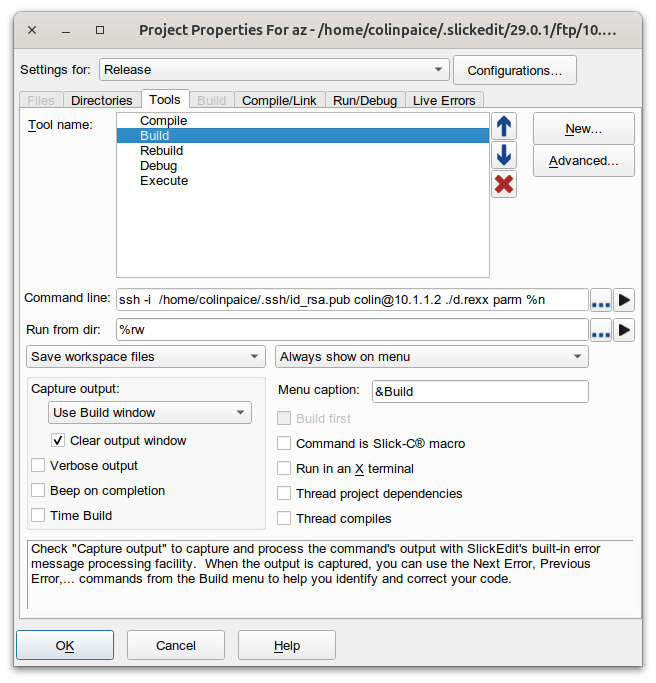
Project-> Project Properties allows you to configure the tool bar. Under Tools, Tool name: Build I have

The key fields are the “Command Line”. This is the command to issue… the command has the following

  • ssh issue this command
  • -i /home/colinpaice/.ssh/id_rsa.pub When setting up password-less logon, the SSH keys are stored here.
  • colin@10.1.1.2 the userid and system where the command is to execute
  • ./d.rexx parm the command to execute. See Submitting jobs from Rexx in Unix Services.
  • %n pass the name of the file being edited

Save workspace files save the current data, and uploads it before issuing the build command.

Clear output window. If this is unticked, the build window grows in size, and shows your history. If this is ticked, you just see the output from the active command.

Having configured the Build, If you click on Build on the tool bar it gives you

  • Compile shift + F10
  • Build Ctrl+M
  • Rebuild
  • Debug
  • Add new build tool
  • Build automatically on save

Having edited your source, you can use Ctrl+M to save the file being edited (and upload it to z/OS), submit the command to z/OS, and watch the output returned.

You can choose where the output of the build command is displayed, for example in the build window or “terminal 1”. You can drag this window away from the main SlickEdit window, so keep an eye on it as you edit other files.

Getting it working

See

Submitting jobs from Rexx in Unix Services

As part of using Slickedit and VScode to work on z/OS I wanted to be able to submit JCL from these tools and look at the output. With a bit of glue code it was pretty easy.

SlickEdit and VScode can use SSH to issue commands in Unix on z/OS.

Submitting the JCL

There are several ways of doing it

  • Using TSO SUBMIT to submit a file. It was not easy to tailor the file. Also you do not get back the Jobid, so you cannot easily retrieve the output.
  • Submitting from Rexx variables to the internal reader. This was OK.You do not get back the Jobid.
  • Using the Rexx submit command.

Submit to the internal reader

You do not get back the job id, so you do not know which is your job in the spool.

/* REXX */
"ALLOC FI(INTRDR) SYSOUT(A) WRITER(INTRDR) REUSE"
JOB.1="//COLIN JOB CLASS=A"
JOB.2="//TEST1 EXEC PGM=IEFBR14,REGION=0M"
JOB.3="//"
"EXECIO * DISKW INTRDR (FINIS STEM JOB."
"FREE FI(INTRDR)"
EXIT

Using the Rexx submit

This worked, and was easy. See the documentation.

For example

mysub.rexx

/* rexx */ 
parse arg input
say "*************************"input
rc=isfcalls('ON')
rc= syscalls('ON')
JOB.0=4
JOB.1="//COLINJ2 JOB "
JOB.2="//S1 EXEC PGM=IEFBR14"
JOB.3="//*"
JOB.4="//"
jobid = submit("JOB.")
say "submitted " jobid

You can tailor the JCL depending on your input parameter. For example invoke a JCL procedure, or explicitly build the JCL. For example pass the name of a member of C code in a PDS, and compile that member.

Retrieving the output

SDSF has some great facilities to retrieve the output. SDSF “owns” the prefix ISF. It uses the isf prefix to identify its variables.

If you use SDSF from a terminal you would use:

  • the STatus command to display the jobs you are interested in
    • You can filter what jobs you want displayed, for example COLIN*, or JOB98765,
  • Select the specific jobid
  • Use the ? line command to display the job output
  • Select the output file and browse it.

I use the Jobid because this should be unique. If you use job name, it is not unique (I have 20 jobs in the spool for the COLINCC job to compile a C program).

Selecting the ST display

isffilter = "JOBID = "jobid  /* isf filter=... */                                                               

/* Access the ST panel */
Address SDSF "ISFEXEC 'ST' ()"
lrc=rc

if lrc<>0 then do error handling.

The above code says filter on the specified jobid. You could specify ISFOWNER, and ISFPREFIX. See the documentation.

If you have filtered by jobname, for example COLINCC, there could be multiple instances, so you need to select the one(s) you are interested in, so you might just a well use the JobId from the start.

If the ISFEXEC ST command was successful, it returns variables: The count of rows, and details on each row. See the list of available columns/field names.

  • isfrows the number of rows
  • JobId.n is the job at the nth row
  • RETCODE.n this could be a number such as 0000 or JCL ERROR
  • PhaseName.n such as “AWAITING OUTPUT” or “EXECUTING”
  • Token.n uniquely identifies the job, file or spool output.
do i=1 to isfrows  /* Loop for all rows */ 
if ( JobId.i = jobid) then /* pick the ones of interest */
do 5 /* loop up to 5 times - while executing */
say "PhaseName" PhaseName.i
say "RETCODE" RETCODE.i
if RETCODE.i ="JCL ERROR" then
do
call "./readspool" TOKEN.i "JESYSMSG.JES2. JESMSGLG.JES2. JESJCL.JES2 "
leave
end
if PhaseName.i ="AWAITING OUTPUT" then /* it completed */
do
call "./readspool" TOKEN.i rest /* Rest is the list of output files */
leave
end
/* if PhaseName.i ="EXECUTING" then */
call sleep 5 /* wait 5 seconds before retry */
end /* do 5 */
end /* For all rows */


To display files of interest… call the external Rexx readspool ( the Rexx program is called readspool without a suffix).

readspool – display the contents of the spool file

Process each data set, if it matches the passed names, then display the contents. In my program a names is DDNAME, StepName and ProcStep concatenation with ‘.’.

SDSD Job Dataset Display panel has columns

COMMAND INPUT ===>              
NP DDNAME StepName ProcStep
JESJCL JES2
JESMSGLG JES2
JESYSMSG JES2
SYSCPRT COMPILE COMPILE
SYSOUT COMPILE COMPILE
SYSPRINT COMPILE BIND
SYSPRINT RUN

To display the JESYSMSG output use “JESYSMSG.JES2.” to look at the output from the C bind use “SYSOUT.COMPILE.BIND”

The token to uniquely identify the job is passed. Use the SDSF parm “?” to get access to the data sets.

/* rexx */ 
rc=isfcalls('ON')
rc= syscalls('ON')
parse arg token rest
Address SDSF "ISFACT ST TOKEN('"token"') PARM(NP ?)( prefix jds_)"
lrc=rc
if lrc<>0 then do error handling.

This gets you into the Job Data Set panel. There are many fields you can use relating to each data set. The (prefix jds_) puts jds_ before each variable so it does not overwrite existing symbols. So to reference the DDNAME.n you specify jds_DDNAME.n

Each data set will have

  • TOKEN.n a token to uniquely identify it.
  • STEPN.n the job step name
  • PROCS.n the procedure step name
/* go through each spool record and see if it in the list we were passed */ 
do jx=1 to jds_DDNAME.0
/* build up the list of matching names */
which = jds_DDNAME.jx||"."||jds_STEPN.jx ||"."||jds_PROCS.jx
if wordpos(which,rest) > 0 then /* was it passed in ? */
do
Address SDSF "ISFACT ST TOKEN('"jds_TOKEN.jx"') PARM(NP SA)"
lrc=rc
if lrc<>0 then do error handling.

/* Read the records from the data set and list them. */
/* The ddname for each allocated data set will be in */
/* the isfddname stem. Since the SA action was done */
/* from JDS, only one data set will be allocated. */
do kx=1 to isfddname.0
ADDRESS MVS "EXECIO * DISKR" isfddname.kx "(STEM line. FINIS"
Say "==="Which"===="
do lx = 1 to line.0
say line.lx
end
Say " "
end
end
return 0

The EXECIO reads from the DDName, into the stem variable line., and the data is then written to the terminal.

Note: When running the script in Unix, it needed ADDRESS MVS “EXECIO * DISKR”. Without it I got

FSUM7332 syntax error: got (, expecting Newline

Which usually indicates a code page problem.

Example output

The command

./mysub.rexx

submitted a simple IEFBR14 job. It produced

*************************                                                                                    
submitted JOB07229
PhaseName AWAITING OUTPUT
RETCODE CC 0000
===JESMSGLG.JES2.====
1 J E S 2 J O B L O G -- S Y S T E M S 0 W 1 -- N O D E
0
07.24.52 JOB07229 ---- FRIDAY, 25 APR 2025 ----
07.24.52 JOB07229 IRR010I USERID COLIN IS ASSIGNED TO THIS JOB.
07.24.52 JOB07229 ICH70001I COLIN LAST ACCESS AT 07:24:13 ON FRIDAY, APRIL 25, 2025
07.24.52 JOB07229 $HASP373 COLINJ2 STARTED - INIT 1 - CLASS A - SYS S0W1
07.24.52 JOB07229 IEF403I COLINJ2 - STARTED - TIME=07.24.52
07.24.52 JOB07229 - -----TIMINGS (MINS.)----
-
07.24.52 JOB07229 -STEPNAME PROCSTEP RC EXCP CONN TCB SRB
S
07.24.52 JOB07229 -S1 00 6 0 .00 .00 .0
0
07.24.52 JOB07229 IEF404I COLINJ2 - ENDED - TIME=07.24.52
07.24.52 JOB07229 -COLINJ2 ENDED. NAME- TOTAL TCB CPU TIME= .00
07.24.52 JOB07229 $HASP395 COLINJ2 ENDED - RC=0000
0------ JES2 JOB STATISTICS ------
- 25 APR 2025 JOB EXECUTION DATE
- 4 CARDS READ
- 41 SYSOUT PRINT RECORDS
- 0 SYSOUT PUNCH RECORDS
- 6 SYSOUT SPOOL KBYTES
- 0.00 MINUTES EXECUTION TIME

With thanks to Rob Scott and Dave Crayford for opening my eyes as to how easy it is, and for help in the basics. A lot of code was generated from SDSF using the RGEN facility.

What now?

Having displayed the job output, you could include a step to delete the job.

How to get a file from z/OS to a different z/OS without using FTP

I have a userid on a z/OS production system, which does not support FTP. To run my tests, I needed to get some files on to this system. Getting the files there was a challange.

The 3270 emulator has support for transferring files. It uses the IND$FILE TSO command to send data packaged as 3270 datastream As far as I can tell, this only works with data sets, not Unix files.

Creating a portable file from a data set.

You can package a data set into a FB Lrecl 80 dataset using the TSO XMIT (TRANSMIT) command.

Create a portable dataset from a Unix file.

On my home system I created a PAX dataset from a file in a Unix directory.

Use cd to get into the directory you want to package. If you specify a file name like /tmp/mypackage, the unpax will store the output in /tmp/mypackage which may not be where you want to store the data.

If you use relative directories such as ‘.’ it will unpax into a relative directory. I used the cd command to get into my working directory

pax -W "seqparms='space=(cyl,(10,10))'" -wzvf  "//'COLIN.ZOWE.PAX'" -x os390  myfile

You need both the single and double quotes around the data set name.

This created a data set with record format FB, and Lrecl 80.

A 360 MB file became a 426 CYL data set.

If you run out of space ( B37-04 abend). Delete the dataset before you reissue the pax command, otherwise the space parameters on the pax command are ignored; and increase the amount of space in the pax command.

I FTPed this down to my Linux machine in binary mode.

Send the file to the remote z/OS over 3270 emulator

Because FTP was not available I had to use the TSO facility IND$FILE. One of the options from the “file” menu was “File Transfer”.

You fill in details of the local file name, the remote data set name, and data set attributes.

In theory you need to be in TSO option 6 – where you can enter TSO commands, but when I tried this I kept getting “input field too small”. I had to exit ISPF and get into native TSO before the command worked.

The transfer rate is very slow. It sends one block at a time, and waits for the acknowledgement. With TCP/IP you can send multiple blocks before waiting for the ack, and use big blocks. For a 300MB file, I achieved 47KB per second with a 16000 block size – so not very high.

With IND$FILE, pick the biggest block size you can. I think it supports a maximum size of 32767. I got 86 KB/second with a 32767 block size with DFT mode.

For a dataset packaged with TSO XMIT

Use the TSO command RECEIVE INDSN(…) to restore the data set.

Un PAX the file to recreate it

On the production system, I use went into Unix, and used the cd command to get to the destination directory.

pax -ppx -rf  "//'COLIN.ZOWE.PAX'"      

Tailoring ISPF on a guest machine

I’ve got access to a “production” z/OS machine, and I want to customise ISPF to include my clists, and ISPF panels. How do I do this?

I covered some of the details in Configuring ISPF for new applications.

The first step

The most useful command is ALTLIB

"altlib activate application(exec) dataset ('COLIN.CLIST')" 

This allows you to insert your data set ‘COLIN.CLIST’ at the front of the search chain for EXEC (REXX) commands.

You can use the command ALTLIB DISPLAY. This gave me

Current search order (by DDNAME) is:
Application-level EXEC DDNAME=SYS00053
System-level EXEC DDNAME=SYSEXEC
System-level CLIST DDNAME=SYSPROC

You can now issue commands from the specified dataset.

Note: The ALTLIB only applies to the current ISPF session. If you have multiple ISPF sessions, you will need to do it in each session.
If you create new sessions ( START ) it will inherit from the the current session.

Can I do this automatically?

I can manually issue the ALTLIB command. If the systems programmer adds the following to the TSO logon procedure

/* REXX */ 
trace r
/* your userid is prefixed to any data set unless you double quote it */
if (sysdsn('CLIST') = 'OK')
then
do
"altlib activate application(exec) dataset (CLIST)"
if (sysdsn("CLIST(USERPROF)") = 'OK' )
then "USERPROF"
end
return 0

It will automatically issue the ALTLIB command, if the userid.CLIST data set exists, and it there is a member USERPROF in the data set, it will execute that.

To configure ISPF applications you can use the LIBDEF command. See Configuring ISPF for new applications.