Wow3 ISPF cut and paste can do so much more

You can use the ISPF cut command

EDIT       COLIN.PDSE2(AA) - 01.07
Command ===> cut
****** ********************************* Top of D
000100 ddd
000200 bbbb
cc0300 44444
000400 5555
cc0500 666
000600 777

and this copies the lines into a working area, then use the paste command to insert the text, in the same or a different file.

What is in the clipboard?

The command cut display gave me

┌────────────────────────────────────────────────────────────────┐
│ Clipboard manager │
│ │
│ B - Browse C - Clear O - Toggle Read-only │
│ E - Edit R - Rename D - Delete │
│ │
│ Name Lines User Comment │
│ │
│ _ DEFAULT 3 ISPF Default Clipboard │
│ │

You can now enter B into the line command before DEFAULT to display the contents. This gave me

 BROWSE    CLIPBOARD:DEFAULT
Command ===>
********************************
44444
5555
666

Multiple clipboards

The command cut AAAA followed by CUT DISPLAY showed all the clipboards I have. This shows the clip board AAA I just created

 ┌────────────────────────────────────────────────────────────────┐
│ Clipboard manager │
│ │
│ B - Browse C - Clear O - Toggle Read-only │
│ E - Edit R - Rename D - Delete │
│ │
│ Name Lines User Comment │
│ │
│ _ DEFAULT 3 ISPF Default Clipboard │
│ _ AAA 2 │
│ │

You can have up to 11 clip boards.

Other clever things

  • You can append or replace the data.
  • You can have the data converted to ASCII, EBCDIC or UTF8 as part of the copy.
  • You can select eXcluded or Not eXcluded (x or NX) lines.

Paste

You can use the PASTE , or the PASTE AA command to put the value from the specified (or defaulted) clipboard into your data.

You could use

paste AA After .zlast

to paste the data after the end of the file.

Wow I can have member generations

We have had the capability of having multiple generations of data sets on z/OS for years.
For example with three generations you can have

  • the current data set
  • the one before that
  • and the one before that.

If you create a new data set the oldest gets deleted, and they all move along one.

This has been around for years.
What I found recently was you can have this with members within a V2 PDSE (not a PDS) since 2015.

System wide set up

When you create the data set, the number of generations is limited by MAXGENS_LIMIT in the IGDSMSxx member of PARMLIB.

Use the command

D SMS,OPTIONS

This displays information like

ACDS     = SYS1.S0W1.ACDS               
COMMDS = SYS1.S0W1.COMMDS
ACDS LEVEL = z/OS V3.1
SMS PARMLIB MEMBER NAME = IGDSMS00
...
HONOR_DSNTYPE_PDSE = NO PDSE_VERSION = 2
USER_ACSVAR = ( , , ) BYPASS_CLUSTER_PREFERENCING = NO
USE_MOST_FREE_SPACE = NO MAXGENS_LIMIT = 0

To change the value of MAXGENS_LIMIT you need to change the parmlib member and use T SMS=nn (or just wait till the next IPL).

I used Which parmlib/proclib library has my member? to find the member and added

 MAXGENS_LIMIT(3)        

I then used

set sms=00

to activate it

Using the support

For example to allocate a dataset to support this.

Example JCL

//SAM00001 DD DISP=(NEW,CATLG),DSN=IBMUSER.TEST1.PDSE00,
// DSNTYPE=(LIBRARY,2),LRECL=80,BLKSIZE=8000,RECFM=FB,
// MAXGENS=3

Where

  • dsntype=(LIBRARY,2) says this a LIBRARY ( also known as PDSE) type 2
  • MAXGENS=3 this will support up to 3 generation

Using ISPF

This works in z/OS 3.1, I do not know if earlier releases have the ISPF support.

I used ISPF 3.2 and specified

──────────────────────────────────────────────────────────────────────────────
Allocate New Data Set
Command ===>

Data Set Name . . . : COLIN.PDSE2

Management class . . . (Blank for default management class)
...
Data set name type LIBRARY (LIBRARY, PDS, LARGE, BASIC, *
EXTREQ, EXTPREF or blank)
Data set version . : 2
Num of generations : 3
Extended Attributes (NO, OPT or blank)
Expiration date . . . (YY/MM/DD, YYYY/MM/DD
YY.DDD, YYYY.DDD in Julian form
DDDD for retention period in days
or blank)

I then edited a member, saved it, and then reedited it several times.

ISPF 3;4 member list gave

DSLIST            COLIN.PDSE2                           Row 0000001 of 0000001
Command ===> Scroll ===> CSR
Name Prompt Size Created Changed ID
_________ AA 2 2025/11/09 2025/11/09 09:22:35 COLIN

Using the line command b to browse the data set showed the latest content.

Using the line command N gave me

GENLIST           (AA)COLIN.PDSE2                       Row 0000001 of 0000004
Command ===> Scroll ===> CSR
RGEN Prompt Size Created Changed ID
_ 00000000 5 2025/11/09 2025/11/09 09:31:44 COLIN
_ 00000001 4 2025/11/09 2025/11/09 09:31:32 COLIN
_ 00000002 3 2025/11/09 2025/11/09 09:31:17 COLIN
_ 00000003 2 2025/11/09 2025/11/09 09:22:35 COLIN

There is

  • (AA)COLIN.PDSE2 showing member AA of data set ( library) COLIN.PDSE2
  • RGEN showing the generations
  • Generation 3 is the oldest

In the line command you can type / which lists all of the valid commands

           Action for Generation 0              

Generation Action
1. Edit
2. View
3. Browse
4. Delete
5. Info
6. Print

Prompt Action . . (For prompt field)

Select a choice and press ENTER to continue

Info gave me

   Menu  Functions  Confirm  Utilities  Help  
─────────────────────────────────────────────
EDIT USER.Z31B.PARMLIB
. . . . . . . . . . . . . . .
Member Informat
Command ===>

Data Set Name . . . : COLIN.PDSE2

General Data
Member name . . . . . . . . : AA
Concatenation number . . . . : 1
Version . Modification . . . : 01.07
...

Non-current Generations
Maximum . . . . : 3
Saved . . . . . : 3
Newest Absolute : 7
Oldest Absolute : 5

See Version and modification level numbers. You can use the commands

To set these values

Deleting a member

Using the D line command against the oldest member gave the prompt

           Confirm Member Generation Delete          

Data Set Name:
COLIN.PDSE2

Member Name:
AA

Generation to be Deleted:
-3

__Set member generation delete confirmation off

Only the specified generation will be deleted.

Press ENTER to confirm delete.
Press CANCEL or EXIT to cancel delete.

Editing a member

When you edit a member the screen is like

   File  Edit  Edit_Settings  Menu  Utilities  Compilers  Test  Help
────────────────────────────────────────────────────────────────────
EDIT COLIN.PDSE2(AA) - 01.04
Command ===>
****** ********************************* Top of Data ***************
000100 ddd
000200 bbbb
000300 44444

with the version. release at the top.

How do I logon to ISPF and allocate my data sets?

Yes, I know you do not logon to ISPF, but the title is shorter than how do I logon to TSO, and start ISPF so my data sets are allocated as I want them.
I wrote this blog post because I was trying to use ISMF and save information into ISPF tables, but I could not use the information in the tables because my table data set was not in the ISPTLIB concatenation.

When I used TSO ISRDDN to display the data sets allocated to my TSO session I had

ISPTABL -> COLIN.S0W1.ISPF.ISPPROF
ISPTLIB -> ISP.SISPTENU
-> SYS1.DGTTLIB
-> SYS1.SBLSTBL0
...

COLIN.S0W1.ISPF.ISPPROF was not in the list of data sets in the ISPTLIB concatenation.

This lead me to the question – how do I add COLIN.S0W1.ISPF.ISPPROF to the ISPTLIB concatenation?

How do I allocate my datasets to ISPF

When I logon to ISPF I get

------------------------------- TSO/E LOGON -----------------------------------


Enter LOGON parameters below: RACF LOGON parameters:
Userid ===> COLIN
Password ===>
Procedure ===> ISPFPROC Group Ident ===>
Acct Nmbr ===> ACCT#
Size ===> 2096128
Perform ===>
Command ===> ex 'colin.zlogon.clist'

You can influence what happens by specifying a different Procedure, or specifying a command in Command.

The PROCEDURE ===> ISPFPROC is JCL to start a TSO address space and allocate system wide datasets.

Once ISPF has started, you can issue the command TSO ISRDDN to display all of the datasets allocated to TSO.
The ISRDDN command member ISPFPROC will find and show you which of the allocated data sets contain the member.
it gave me

                           Current Data Set Allocation         Member was found
Command ===> Scroll ===> PAGE

Message Act DDname Data Set Name Actions: B E V M F C I Q
Member: ISPFPROC >_ SYSPROC ADCD.Z31B.PROCLIB

You can enter the B command in the >_ field to browse the member directly

Aside:

The Actions: B E V M F C I Q are commands for

  • B Browse the first sixteen data sets or a single data set.
  • E Edit the first sixteen data sets or a single data set.
  • V View the first sixteen data sets or a single data set.
  • M Show an enhanced member list for the first sixteen data sets or a single data set.
  • F Free the entire DDNAME.
  • C Compress a PDS using the existing allocation.
  • I Provide additional data set information.
  • Q Display list of users or jobs using a data set.

Browse the member

This member has

//********************************************************************    
//*
//* ISPF FULL-FUNCTION LOGON PROC
//*
//*********************************************************************
//ISPFPROC PROC ROOT='/usr/lpp/zosmf' /* ZOSMF INSTALL ROOT */
// EXPORT SYMLIST=(XX)
// SET QT=''''
// SET XX=&QT.&ROOT.&QT.
//ISPFPROC EXEC PGM=IKJEFT01,REGION=0M,DYNAMNBR=200,
// PARM='%ISPFCL'
//CEEOPTS DD *,SYMBOLS=JCLONLY
ENVAR("PATH=/bin:&XX./bin")
//SYSUADS DD DISP=SHR,DSN=SYS1.UADS
//SYSLBC DD DISP=SHR,DSN=SYS1.BRODCAST
//SYSPROC DD DISP=SHR,DSN=USER.&SYSVER..CLIST
// DD DISP=SHR,DSN=FEU.&SYSVER..CLIST
// DD DISP=SHR,DSN=ADCD.&SYSVER..CLIST
// DD DISP=SHR,DSN=ISP.SISPCLIB
...
//ISPTLIB DD DISP=SHR,DSN=ISP.SISPTENU
// DD DISP=SHR,DSN=SYS1.DGTTLIB
...
//SDSFMENU DD DSN=ISF.SISFPLIB,DISP=SHR
//ISPTABL DD DSN=SYS1.SMP.OTABLES,DISP=SHR

This JCL

  • creates the environment PATH=/bin/:/usr/lpp/zosmf/bin
  • Allocates lots of data sets, for example SYSPROC has USER…..CLIST depending on the value of the global symbol &SYSVER (Z31B at the moment). If I IPL a different level of z/OS it may have a different level, such as Z24C
  • Allocates fixed name data sets such as ISP.SISPCLIB
  • Allocates lots of ISPF tables for input
  • Allocates an SDSF menu data set
  • Allocates a table ISPTABL for ISPF
  • But does not allocate an ISPTABL for my personal tables.

In the JCL it has

//ISPFPROC EXEC PGM=IKJEFT01,REGION=0M,DYNAMNBR=200,          
// PARM='%ISPFCL'

Which says invoke TSO (IKJEFT01) and execute the %ISPFCL Clist (or REXX).

Use PF3 to return from ISRDDN.

Where is ISPFCL?

The above JCL uses CLIST/REXX ISPFCL as a profile to do additional processing, such as allocating additional data sets.

You could allocate datasets in the ISPF JCL instead of through the CLIST – but the CLIST allows conditional processing, such as if the ISPFPROF data set does not exist, then allocate it.

You can use TSO ISRDDN again and specify member ISPFCL . The member was found, in four places (see the Member: below)

                           Current Data Set Allocations           Row 98 of 118
Command ===> _____________________ Scroll ===> PAGE

Message Act DDname Data Set Name Actions: B E V M F C I Q
Member: ISPFCL >_ SYSPROC USER.Z31B.CLIST
>_ FEU.Z31B.CLIST
Member: ISPFCL >_ ADCD.Z31B.CLIST
>_ ISP.SISPCLIB
Member: ISPFCL >_ USER.Z31B.PROCLIB
>_ FEU.Z31B.PROCLIB
Member: ISPFPROC >_ ADCD.Z31B.PROCLIB
>_ ISM403.SFMNEXEC
>_ AUT430.SINGREXX
>_ SYSUADS SYS1.UADS
>_ SYSUDUMP ---------- JES2 Subsystem file -------------

The member is found in 4 places. You can browse a member by entering B in the >_

The first ISPFCL member has

PROC 0 VOL(B3SYS1)                                                       
CONTROL NOMSG NOFLUSH ASIS
PROFILE NOMODE MSGID PROMPT INTERCOM WTPMSG
WRITE *****************************************************************
...
FREE FILE(ISPPROF ISPTABL)
SET &SDSFTAB= &STR(&SYSUID..SDSF.ISFTABL)
ALLOC DA('&SDSFTAB') SHR FILE(ISFTABL)

SET &DSNAME = &STR(&SYSUID..&SYSNAME..ISPF.ISPPROF)
ALLOC DA('&DSNAME') SHR FILE(ISPPROF)
ALLOC DA('&DSNAME') SHR FILE(ISPTABL)
IF &LASTCC ¬= 0 THEN DO
/* Allocate the ISPF Prof dataset */
...
END
  • The FREE FILE(ISPPROF ISPTABL) says drop (ignore) the existing definitions for ISPPROF and ISPTABL. The CLIST will reallocate them.
  • The ALLOC DA(‘&DSNAME’) SHR FILE(ISPTABL) allocates my dataset to the ISPTABL ddname.
  • The problem is that you cannot easily concatenate my data sets to the ISPTLIB concatenation. You can use the TSO ALLOCate command to allocate a list of data sets to a DDNAME, but not just to add one data set to an existing allocated DDNAME. See Adding a data set to an existing DDNAME in TSO.

Starting ISPF

When you logon to the TSO Logon panel it has

Command   ===> ex 'colin.zlogon.clist'       

The command (if specified) will be processed after any command found in the PARM field of the EXEC JCL statement in your logon procedure.

You can specify ISPF, a clist, or other command.
If you want to invoke ISPF from your clist you will need to invoke the ISPF command for example

/* Rexx */                                                        
trace r
say "in colin.zlogon.clist"
address TSO

"alloc fi(ISPTLIB) DA('COLIN.S0W1.ISPF.ISPPROF') SHR "
zl =userid.SDSF.isftabl /* so we get colin.zlogon.clist */
if SYSDSN(zl) = OK then
do
"alloc fi(isftabl) da('"zl"') shr reus"
end
req = "ALLOC FI(tmp) DA('COLIN.S0W1.ISPF.ISPPROF') SHR "
if bpxwdyn(req ) =0 then
call bpxwdyn "concat ddlist(ISPTLIB,tmp) "
"ispf"

With this, ISPF starts with my data sets allocated as I want them!

Adding a data set to an existing DDNAME in TSO.

I wanted to add a data set to the already allocated ISPTLIB concatenation. You can use the TSO ALLOCate command to allocate a list of data sets, but not to add a data set to an existing definition.

Lionel B. Dyck pointed me to the TSO function bpxwdyn.

When I logon to TSO I invoke a userid.ZLOGON.REXX data set

/* Rexx */                                                              

address TSO
userid = userid()
dsn= userid".S0W1.ISPF.ISPPROF"
req = "ALLOC FI(tmp) DA('"dsn"') SHR "
if bpxwdyn(req ) =0 then
call bpxwdyn "concat ddlist(ISPTLIB,tmp) "

"ispf"
  • The bpxwdyn(req ) allocates the dataset to the DDNAME TMP.
  • The call bpxwdyn “concat ddlist(ISPTLIB,tmp) copies the data set(s) in the tmp DDNAME to the end of the ISPTLIB DDNAME
  • ispf starts ISPF.

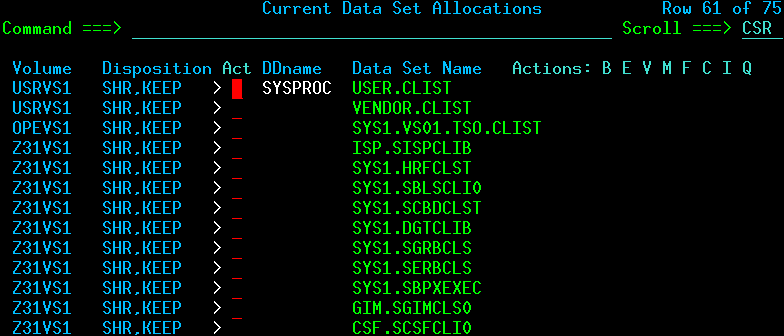
The TSO ISRDDN command gave me

                          Current Data Set Allocations           Row 68 of 122
Command ===> Scroll ===> CSR

Volume Disposition Act DDname Data Set Name Actions: B E V M F C I Q
B3RES1 SHR,KEEP > ISPTLIB ISP.SISPTENU
...
A4USR1 SHR,KEEP > COLIN.S0W1.ISPF.ISPPROF

Easy once you know how.

On the CBTAPE are KONCAT and CONCAT which do a similar function.

Tailoring ISPF on a guest machine

I’ve got access to a “production” z/OS machine, and I want to customise ISPF to include my clists, and ISPF panels. How do I do this?

I covered some of the details in Configuring ISPF for new applications.

The first step

The most useful command is ALTLIB

"altlib activate application(exec) dataset ('COLIN.CLIST')" 

This allows you to insert your data set ‘COLIN.CLIST’ at the front of the search chain for EXEC (REXX) commands.

You can use the command ALTLIB DISPLAY. This gave me

Current search order (by DDNAME) is:
Application-level EXEC DDNAME=SYS00053
System-level EXEC DDNAME=SYSEXEC
System-level CLIST DDNAME=SYSPROC

You can now issue commands from the specified dataset.

Note: The ALTLIB only applies to the current ISPF session. If you have multiple ISPF sessions, you will need to do it in each session.
If you create new sessions ( START ) it will inherit from the the current session.

Can I do this automatically?

I can manually issue the ALTLIB command. If the systems programmer adds the following to the TSO logon procedure

/* REXX */ 
trace r
/* your userid is prefixed to any data set unless you double quote it */
if (sysdsn('CLIST') = 'OK')
then
do
"altlib activate application(exec) dataset (CLIST)"
if (sysdsn("CLIST(USERPROF)") = 'OK' )
then "USERPROF"
end
return 0

It will automatically issue the ALTLIB command, if the userid.CLIST data set exists, and it there is a member USERPROF in the data set, it will execute that.

To configure ISPF applications you can use the LIBDEF command. See Configuring ISPF for new applications.

How do I change all members of a PDS? Easy – use an edit macro

I looked on the internet, to find something that would allow me to make the same change to all members of a PDS, and there seemed to be several options, IPOUPDTE, CPPUPDTE, PDSUPDTE, written in assembler many years ago.

I had written an equivalent program in C, but I no longer have the source. I found it as quick to write a solution using Rexx and an ISPF edit, than to find a solution on the internet. The solution is much more flexible, and can do so much more.

The processing has two stages

  • Code to iterate over each member of the PDS, and invoke ISPF EDIT on each member
  • An edit macro to make the changes.

Code to iterate over each member

ISPF 3.4 DSLIST displays data sets

DSLIST - Data Sets Matching COLIN.J*       
Command ===>

Command - Enter "/" to select action
-------------------------------------------
AA COLIN.JCL
COLIN.JCL.DCOLLECT.OUTPUT

You can enter local commands at the front of each line. The commands can be ISPF special (D for Delete, C for Catalog, R for Rename), or TSO commands, where a TSO command can be a Rexx exec in the ISPEXEC concatenation. (You can use the TSO ISRDDN command to display the data sets allocated to your session)

I have a Rexx exec called AA.

Access the parameters passed to the rexx

/* rexx */                                           
ADDRESS ISPEXEC "VGET (ZDLDSN) SHARED"
ADDRESS ISPEXEC "VGET (ZDLCMD) SHARED"
ADDRESS ISPEXEC "VGET (ZDLLCMD) SHARED"
say "ZDLDSN " ZDLDSN
say "ZDLCMD " ZDLCMD
say "ZDLLCMD " ZDLLCMD

With the line command

Command - Enter "/" to select action  
--------------------------------------
AA 99 COLIN.JCL

The Rexx produces

ZDLDSN    COLIN.JCL
ZDLCMD AA 99
ZDLLCMD AA 99 'COLIN.JCL'
  • ZDLDSN is the data set name
  • ZDLCMD is the line command and any data
  • ZDLLCMD is the (Long) combined command and the data set

With the line command

aa 99 / Zyx

The dataset name is substituted for /, and the output is

ZDLDSN    COLIN.JCL
ZDLCMD AA 99 / Z
ZDLLCMD AA 99 'COLIN.JCL' Zyx

This means you can pass parameters to your Rexx.

Process every member

The data set name is in variable ZDLDSN. When you use it, you should quote it because your userid may/may not have prefix on, which puts your userid on the front of every data set you use. Without quotes, it could not find dataset COLIN.COLIN.JCL

  • The LMINIT command returns a handle in the DATAID(handle) variable, to refer to the data set. My handle is called data1.
  • The LMOPEN command opens the dataset associated with the handle.
  • The LMMLIST command iterates through the list, starting with a blank member name which indicates start with the first.
  • The EDIT command invokes ISPF edit on the member, and passes the name of an ISPF EDIT macro to use. In my case the macro is called FOREACH.
Address ispexec "LMINIT DATAID(data1) dataset('"ZDLDSN"')" 
if rc <> 0 then
do /* report the errors */
say ZERRSM ZERRLM
return 8
end
Address ispexec 'LMOPEN DATAID('data1') OPTION(INPUT)'
member = ' '
lmrc = 0
/*********************************************************************/
/* Loop through all members in the PDS, issuing the EDIT service for */
/* each. */
/*********************************************************************/
Do i = 1 by 1
Address ispexec 'LMMLIST DATAID('data1') OPTION(LIST),
MEMBER(MEMBER) STATS(NO)'
If rc = 8 then leave /* not found */
If rc <> 0 Then
do
say ZERRSM ZERRLM
leave
end
else
do
Address ispexec 'EDIT DATAID('data1') MEMBER('member')
MACRO(FOREACH)'
end
End
/*********************************************************************/
/* Free the member list and close the dataid for the PDS. */
/*********************************************************************/
Address ispexec 'LMMLIST DATAID('data1') OPTION(FREE)'
Address ispexec 'LMCLOSE DATAID('data1')'
Exit 0

From the information passed to the Rexx exec, you could pass the edit macro as a parameter, such as

AA / MYMAC 

I was just lazy and hard coded the macro name.

An edit macro to make the changes

My basic macro just reports the member name, and the size of the file

ADDRESS ISPEXEC 'ISREDIT MACRO' 
"ISREDIT (last) = LINENUM .ZLAST"
"ISREDIT (member ) = MEMBER"
"ISREDIT (curr,orig,concat)= DATASET"
say "foreach " member last curr
"ISREDIT END"
  • The LINENUM command returns the line number of the specified line. You can create your own line labels. ISPF provides .ZFIRST and .ZLAST .ZCSR (the line where the cursor is currently.
  • The MEMBER command returns the member name
  • The DATASET command returns the current name of the dataset (and other information)

You can now do conditional processing, if the data set name starts with… then change…; if the member name starts with… then change…

You can use standard ISPF commands for example

/* */ 
/* trace e */
ADDRESS ISPEXEC 'ISREDIT MACRO'

"ISREDIT X ALL "
"ISREDIT FIND '//' ALL"
"ISREDIT CHANGE 'IBMUSER' 'COLIN' 1 10 ALL NX"
return
"ISREDIT END"

Without the return statement in the code, the code makes the changes and exits, it invisibly edits all of the members. With the return statement this gives you the opportunity to review the changes and to use end or cancel to leave the edit session.

Whoops – what happened there

To test the macros I use ‘view’ of the member, to edit it, but not save any changes. I then executed the macro.
I was trying to change a VOLSER to a symbol.

/* */ 
ADDRESS ISPEXEC 'ISREDIT MACRO'
"ISREDIT (member ) = MEMBER"
say member
"ISREDIT SCAN OFF"
if substr(member,1,6) <> "IEASYM" then
do
"ISREDIT CHANGE 'A3PRD1' '&&SYSP1.' ALL "
"ISREDIT CHANGE 'A3PRD2' '&&SYSP2.' ALL "
"ISREDIT CHANGE 'A3PRD3' '&&SYSP3.' ALL "
"ISREDIT CHANGE 'A3PRD4' '&&SYSP4.' ALL "
"ISREDIT CHANGE 'A3PRD5' '&&SYSP5.' ALL "
"ISREDIT CHANGE 'A3RES2' '&&SYSR2.' ALL "
"ISREDIT CHANGE 'A3SYS1' '&&SYSS1.' ALL "
"ISREDIT CHANGE 'A3CFG1' '&&SYSC1.' ALL "
end
return
"ISREDIT END"f

I wanted to change A3PRD1 to the symbol &SYSP1. I had use use &&, and SCAN OFF. Without these, ISPF treats &SYSP1 as an ISPF symbol, cannot find it, so replaces it with a null.

What is my ISPF screen size and other attributes?

I was trying to use a very large screen in ISPF, but I could only get 132 * 43.
You can display information about your screen using

  • ISPF option 0 Settings
  • top line, tab to environ
  • option 1 Environ settings…
  • tab down to Terminal Status (TERMSTAT)
  • option 2 Query terminal information

If gives information like

ISPF TERMINAL CHARACTERISTICS
14 BIT ADDRESSING = ON
16 BIT ADDRESSING = OFF
EXTENDED COLOR = ON
EXTENDED HIGHLITING = ON
DBCS = OFF
PRIMARY SCREEN SIZE - PARTITIONED MODE
SCREEN SIZE = 1,920 - x'00000780'
SCREEN DEPTH = 24 - x'00000018'
SCREEN WIDTH = 80 - x'00000050'

ALTERNATE SCREEN SIZE - PARTITIONED MODE
SCREEN SIZE = 3,564 - x'00000DEC'
SCREEN DEPTH = 27 - x'0000001B'
SCREEN WIDTH = 132 - x'00000084'

PARTITION SCREEN SIZE - PARTITIONED MODE
SCREEN SIZE = 0 - x'00000000'
SCREEN DEPTH = 0 - x'00000000'
SCREEN WIDTH = 0 - x'00000000'
PRIMARY SCREEN SIZE - NON-PARTITIONED MODE
SCREEN SIZE = 1,920 - x'00000780'
SCREEN DEPTH = 24 - x'00000018'
SCREEN WIDTH = 80 - x'00000050'
ALTERNATE SCREEN SIZE - NON-PARTITIONED MODE
SCREEN SIZE = 3,564 - x'00000DEC'
SCREEN DEPTH = 27 - x'0000001B'
SCREEN WIDTH = 132 - x'00000084'
ISPF TERMINAL BUFFER INFORMATION
TERMINAL BUFFER ADDR = x'000326A8'
TERMINAL BUFFER SIZE = 4,989 - x'0000137D'
PHYSICAL SCREEN SIZE = 3,564 - x'00000DEC'
PARTITION ARRAY ADDR = x'0001DAA0'
GTTERM INFORMATION
RETURN CODE = x'00000000'
PRIMARY ROW = 24 - x'00000018'
PRIMARY COL = 80 - x'00000050'
ALTERNATE ROW = 27 - x'0000001B'
ALTERNATE COL = 132 - x'00000084'
ATTRIBUTE BYTE = x'000000C9'
EBCDIC TERMINAL
EDS TERMINAL
GTSIZE INFORMATION
RETURN CODE = x'00000000'
ROWS = 27 - x'0000001B'
COLUMNS = 132 - x'00000084'

VTAM ACCESS METHOD

All the information says the screen is 27 rows and 132 columns.

Customising ISPF appearance

Screen size: using bigger screens.

  • Use x3270 -model 3279-5-E   to get 132*27 screen size.  It works for the console and ISPF terminal.
  • I could not get the -oversize 160*45 working. When I edited the .3270.pro file and added x3270.oversize: 160×45 it worked.
  • Logon and use ISPF =0  to set defaults.  Scroll down
    • To have command line at the top / Command line at bottom  remove the /
    •  Scroll down.  Screen format 3 1. Data 2. Std 3. Max 4. Part
    • Terminal Type 4 1. 3277 2. 3277A 3. 3278 4. 3278A though I think this field is ignored.

Other ISPF personalisation

  • Options
    _ Command line at bottom  remove the / to have the command line at the top
    / Tab to point-and-shoot fields so you can tap to column headers, press enter and sort by the column
  • Member list options
    / Scroll member list
    / Allow empty member list
    / Allow empty member list (nomatch)
    / Empty member list for edit only
  • pfshow off remove the PFKEYS at the bottom
  • ISPF  keys set PF12 to retrieve not cancel
  • ISPF set scroll to CSR not PAGE. You will need to do this in all applications
  • ISPF 3.4 use reflists list of the last 30 data sets used, or your own list
  • Setting the ISPF main panel.
    • Copy ADCD.Z24A.ISPPLIB(ISR@PRIM)  to USER.Z24A.ISPPLIB(MYMAIN).
    • Add extra content and comparisons at the bottom for example ISMF,’PGM(DGTFMD01) NEWAPPL(DGT)’ .
    • The following are already defined
      •  RACF,’PANEL(ICHP00)’
      • ISMF,’PGM(DGTFMD01) NEWAPPL(DGT)’
      • SMPE,’PGM(GIMSTART) PARM(&ZCMD) NOCHECK’
      • WLM,’CMD(%IWMARIN0)’
    • When you use the TSO Logon panel specify Command ===> ispf panel(MYMAIN)