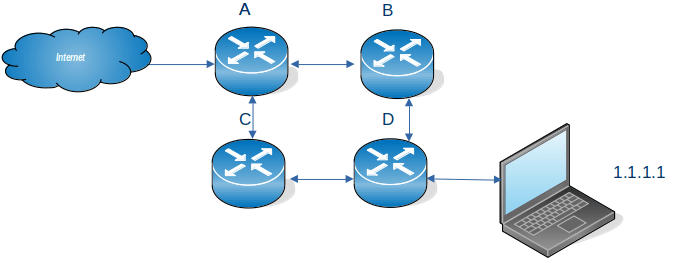
One minute Networking: Networking subnets.

I’ve understood and used subnets, (in a hand waving way), but found it hard to write down what they are good for, and why we have them. There are many explanations on the web but they all seemed to describe how to use subnets, and not why we need them. Some of what I say below, may be strictly not true, but I hope it gives the right concepts.

  • You can use an Ethernet cable to join two machines. This is not very interesting.
  • You can have an Ethernet router. You plug the Ethernet cable from your machine to one of the ports on the Ethernet router.
  • The Ethernet router has devices attached to it with addresses such as 192.168.1.160, 192.168.1.24, 192.168.1.74. The router handles traffic for 192.168.1.* The IP address is 32 bits long, and the router is configured so that if the top 24 bits of an address are 192.168.1, then pass the traffic to the router. This is written as 192.168.1.0/24. The remaining 8 bits can be used for devices attached to the router, so almost 256 devices. (192.168.1.0 and 192.168.1.255 are reserved).
  • If you had a large building you could configure a router with address 192.169/16 and have 65,000+ devices attached to it. This may not be a good idea.
    • The router sends out management packets to all devices in the subnet saying, for example “does anyone have this IP address”. With many devices the router could spend all its time processing these management packets, and not handling user data
    • You may want to segregate different areas, so addresses 192.168.1.* is for the first floor, and 192.168.2.* is for the second floor. If you want to have a firewall for the first floor it is much easier configuring all traffic going to 192.168.1.* rather than for some machines within 192.168.* and so all users are using the firewall – which may not be what you want.
    • Each floor has a confidential printer. It is easier to configure the printer so that only machines with the same subnet address, IP address 192.168.1.* can send print files to the printer on 192.168.1.22, rather than filter out users on the second floor.
  • With IP V6 there are 128 bits available for subnetting. Mostly a subnet of /64 is used. I have an address 2a00:9999:8888:7777:a0cd:ec92:bceb:91ab/64 so 2a00:9999:8888:7777 is the address of my router (64 bits), and the device on the router is currently a0cd:ec92:bceb:91ab (64 bits).

Basic connectivity

Single point to point cable

My laptop is connected to my server by an Ethernet cable.

I’ve defined the address at each end 10.1.0.2/24 at the laptop and 10.1.0.3/24 at the server. I can ping between the two machines. When I changed the server to have 12.1.0.3/24 there was no connectivity – because they were in different subnets.

Wireless connection – IPV4

My system was configured automatically to have the laptop 192.168.1.222/24 and the server 192.168.1.222/24. These are the same subnet, so traffic goes from my laptop up the wireless connection to the wireless router, and to the server over the wireless connection.

Wireless connection – IPV6

My system was configured automatically to have the laptop a prefix (subnet) of fe80 and specific address c82d:b94c:21fa:3d1c with this this subnet. The server had prefix (subnet) fe80 and specific address c82d:b94c:21fa:3d1c.

The default routing is via device (the wireless router) with prefix (subnet) fe80 and address c82d:b94c:21fa:3d1. These are both “internal to the router” addresses.

Today my laptop also has IP address 2a00:9999:8888:7777:a0cd:ec92:bceb:91ab/64 and my server has address2a00:9999:8888:7777:605a:2d22:5daf:53d7/64. These can be used to contact sites on the internet, because they are external addresses.

Getting out of the subnet.

My server has a connection over virtual Ethernet to z/OS. The server end of this link has address 10.1.3.1/24. If I use wireless connection from my laptop to the server, I cannot easily access this link, because the wireless router does not know about 10.1.3.1 – and I have no way of configuring it.

On Linux I can configure the server to be a software router (radvd), and have a physical Ethernet cable to the it from my laptop. This way I can control the IP routing to and from the server.

You can also use a bridge … but that is an advanced topic.

How does my network interface get an IP address, and is a generated address ok to use?

This article has some good concepts about IP V6 addresses.

What addresses does an interface have?

An interface (think end of an Ethernet cable) typically has one IP V4 address which is usually manually assigned to it, and/or multiple IPV6 addresses.

An interface can have multiple IPV6 addresses – why?

You can explicitly define it

You can assign your own IP address(es) to the interface. You can do this so it has a global address, reachable from other networks.

Dynamic Host Configuration Protocol (DHCP)

If you are using a DHCP client, it communicates with a DHCP server which gives it configuration information, such as an IP address, and subnet, the client then configures the interface.

There has been a shortage of IP V4 addresses for many years. Consider an office which has a “drop-in area”. Rather than give each of the potential uses an IP address, the office is given as many IP addresses as there are desks in the drop-in area. This means perhaps 10 ip addresses are needed instead of 100. This is the advantage of DHCP.

For client devices this is fine. Your machine connects to the server and passes its IP address. The server does some work and sends the response back to the requester.

Tomorrow you may get a different IP address. It works. This means no IP address information is saved across different days. It is stateless.

A server needs either

  • a fixed IP address so clients can contact it,
  • a dynamic address, and an update to the DNS router to say “today megabank.com is on IP address 9.99.99.1”. It can take time to propagate an IP address across the worldwide DNS network.

IPv6 Stateless Address Auto-configuration (SLAAC)

The ideas behind DHCP have been extended in IPV6, the concepts are similar. Stateless Address Auto-configuration is well documented here

Within a network or router domain the system can generate an address, and it is only used within this domain, it could have a different address every time the interface is started. This is known as Stateless Address Autoconfiguration.

When an interface is started it generates an “internal use” address composed of FE00 + a mangled MAC address.

The interface then asks all devices on the local network, does anyone have this address FE00… This is for Duplicate Address Detection (DAD). There should be no reply. If there is a reply, then there is a duplicate address on the network (and the interface generates another address and repeats the process).

The interface then sends out a Router Solicitation request asking “Are there any routers out there?”. A router will then reply giving information. It will contain the “global IP prefix” such as 2001:db8::. which means to the outside world, my the address of the router is 2001:db8::/64. From this information plus the MAC address the interface can generate its IP address. The router also contains the address of the gateway (the address of the router with connections to the outside world) so traffic can now be routed externally.

This means you configure the router, and not the individual devices. If you have many devices this can save you a lot of work. If you change the router configuration, it is propagated to all the devices attached to it.

IPV6 privacy extensions will generate a “random address” (within the subnet). This is to prevent bad actors from monitoring traffic and using your IP address to monitor what sites you visit. By having a different IP address every day means they cannot correlate the traffic for a user.

Does it matter if my address is auto generated?

This is another of the “it depends” answers.

For machines that initiate work, it may not matter that the allocated IP address is different everyday or the same every day. Your IP address is passed with the request to the server. The server does the work, and sends the response back through the network. Assuming the network is configured properly the response will get back to you.

If your machine is a server machine, clients need to know the server’s address. If this changes your clients may need to use DNS to find the new address, and not use the dotted IP address. You may want to allocate a permanent IP address (within the router’s subnet).

Routers, firewalls and filters.

If your machines address is within the router’s subnet, traffic should be able to get to your router and so to your machine. If you change the subnet, traffic may not get to your router.

A firewall can be configured to allow traffic to and from specified addresses (and ports). If you use a different address, either at client or the server, the firewall may not let your packets through. Similarly with a network filter.

I was playing around with configuring IP V6 on my laptop, and the connection to z/OS failed. This was because I had been using one IP address, which I could see flowing to the back-end. When I tried some other configuration, there were more IP addresses allocated to the client, and a different IP address was used as the originator’s IP address in the ping request. The back-end server did not know how to route traffic back to this address, and so the return packets were thrown away and the ping timed out.

You need to be aware which addresses are used for your work. With some IP programs you can bind to a specific local IP address, and force the application to use a particular IP address. For example the Linux Ping command -I interface option.

Setting up for PING can be difficult!

  • Setting up ping within one machine is trivial
  • Setting up ping between two machines is relatively easy
  • Setting up ping with 3 machines can be hard to get right and to get working.

Most documentation describes how to set up PING between two machines, and does not mention anything more complex.

Ancient history (well 1980’s)

To understand modern TCPIP networks, it helps to know about the origins of Ethernet.

Originally with Ethernet there was a bus; a very long cable. You plugged your computer into this bus. Each computer on the bus had a unique 48 bit MAC address. You could send a request to another computer on this bus using their Ethernet address. You could send a request to ALL computers on this bus. These days this might be, send to all computers:”does anyone have this IP address…?”

An Ethernet bus is connected to an Ethernet router which can route packets to other routers.

Ethernet has evolved and instead of a long bus shared by all users, you have a switch device, and you plug the Ethernet cable from your computer to the switch. Conceptually it is the same, but with the switch you get much better performance and usability. You still have routers to get between different Ethernet environments. The request send to all computers:”does anyone have this IP address…?” goes to the switch, and the switch sends it to all plugged in computers.

When you start TCPIP, it configures the Ethernet hardware adapter with the addresses is should listen for.

Other terminology and concepts

  • A router is a networking device which forwards packets between different networks. Packets of data get sent from the originator through zero or more routers to the final destination.
  • A gateway has several meanings
    • It can connect different network types, for example act as a protocol translator, it can have a built-in firewall
    • It can route IP traffic between different IP subnets
    • It can loosely mean a router

Usually a router or gateway is a dedicated device or hardware.

You can have a computer act as a router or gateway; it takes data from one interface and routes it to a different interface. The computer can pass the data through a fire wall, or transform it, for example converting internal IP addresses to external IP addresses (NAT translation).

At a concept level, a computer’s network adapter is configured only to listen for packets which match the IP addresses of the interface, and ignore the rest.

If you want a computer to act as a router or gateway, you need to configure the network adapter to listen to all traffic, and to process the traffic. This is important when routing traffic from computer A through computer B to computer C.

A simple one hop ping, first time

I have set up my laptop to talk to a server over Ethernet.

I have configured my laptop using

sudo ip -6 addr add 2001:7::/64 dev enp0s31f6

This says for any IP V6 address starting with 2001:0007:0000:0000 then try sending it down the Ethernet cable with interface name enp0s31f6.

Ping a non existing address

If I try to ping an address say 2001:7::99 a packet is sent to all computers on the Ethernet bus

from myipAddress to everyone on the Ethernet bus, does anyone have IP address 2001:7::99?

There is no reply because no computer on the bus, has the address.

Ping the adjacent box

On the server, the IP address of the Ethernet cable is 2001:7::2.

If I ping this address, there are the following flows

From myipAddress (and myMAC) to everyone on the Ethernet bus, does anyone have IP address 2001:7::2?
From 2001:7::2 to myipAddress (MAC), yes I have that IP address. My Ethernet MAC address is …

My laptop puts the remote IP address and its MAC address into its neighbour cache, then issues the ping request.

The ping request looks in the neighbour cache find the IP address and MAC address and issues.

From myipAddress to 2001:7::2 at macAddress .. ping request.

The second and later times I issue a ping

The ping request looks in the neighbour cache find the IP address and MAC address and issues the ping

From myipAddress to 2001:7::2 at macAddress .. ping request.

So while the neighbour cache still has the IP of the target, and it’s MAC address, the ping can be routed to the next hop.

Setting up a multi hop ping

I have my laptop connected via a physical Ethernet cable to my server. The server is connected to z/OS via a virtual Ethernet connection. The IP address of the z/OS end of the virtual Ethernet cable is 2001:7::4.

The ping 2001:7::4 request on my laptop, does not work (as we saw above), because TCP asked everyone on the Ethernet bus if it has address 2001:7::4 – and no machine replies.

You need to define the link to the server machine as a gateway or router-like device which can handle IP addresses which are not on the Ethernet bus. You define it like

sudo ip -6 route add 2001:7::/64 via 2001:7::2

This says for any traffic with IP address 2001:0007:0000:0000:* send it via address 2001:7::2.

This requires 2001:7::2 to be known about, and so needs the following to be configured first

sudo ip -6 route add 2001:7::2 dev enp0s31f6

for TCPIP to know where to send the traffic to.

The route add 2001:7::2 dev enp0s31f6 command sends a broadcast on the Ethernet bus asking – does anyone have 2001:7::2. My server replies saying yes I have it. This is the same as for the ping above.

In summary

To send traffic on the same Ethernet bus you use

sudo ip -6 route add 2001:7::2 dev enp0s31f6

To route it via a router, switch, or computer acting as a router or switch you need.

sudo ip -6 route add 2001:7::/64 via 2001:7::2 or
sudo ip -6 route add 2001:7::/64 via 2001:7::2 <dev enp0s31f6>

The computer acting as a router or switch may need additional configuration. For example to allow it to route traffic from one Ethernet bus to another Ethernet bus you need to enable packet forwarding. On Linux to enable forwarding for all interfaces use

sysctl -w net.ipv6.conf.all.forwarding=1

On z/OS you use a static route such as

ROUTE 2001:7::/64 2001:7::3 JFPORTCP6

Where 2001:7::/64 is the range of addresses 2001:7::3 is (one of) the addresses of the interface at the remote end of the cabl, and JFPORTCP6 is the interface name. This is similar to the Linux route statement above.

You might need to set up the firewall. On my server I needed

sudo ufw route allow in on eno1 out on tap2

What IP Address does the sender have?

This is where is starts to get more complex.

Every network connection has at least one IP address.

With IP V6

  • Each interface gets an “internal” IP address such as fe80::9b07:33a1:aa30:e272
  • You can allocate an external address using the Linux command sudo ip -6 addr add 2001:7::1 dev enp0s31f6
  • If the interface has one external IP address configured, then this will be used.
  • If the interface has more than one external address configured then the first in the list may be used (not always).
  • If the interface does not have an external IP address, then TCPIP will find one from another interface, or allocate one for the duration of the request, such as 2a00:23c5:978f:9999:210a:1e9b:94a4:c8e. This address comes from my wireless connection

When my laptop is started, only the wireless connection has an IPV6 address. A ping request to 2001:7::4 had the origin IP address of 2a00:23c5:978f:9999:210a:1e9b:94a4:c8e which is the first address in the list for the wireless connection.

You can tell ping which address to use, for example

ping -I 2a00:23c5:978f:9999:cff1:dc13:4fc6:f21b 2007:1::4 (this fails because the server does now know to send the response to the requester)

I defined a new address for the interface using

sudo ip -6 addr rep 2002:7::1 dev enp0s31f6

I could issue ping -I 2002:7::1 2001:7::4, but this failed to get a response, because the back-end and intermediate nodes, did not know how to get the response back to 2002:7::1

Does this sender address matter?

Yes, because the remote end needs to have a definition to be able to send the response back.

I had my laptop connected to a Linux server over Ethernet, which in turn was connected to z/OS over a virtual Ethernet.

On z/OS I could see the ping request arrive, but it could not send the response back because it did not know how to get to 2a00:23c5:978f:9999….

I configured the laptop end of the Ethernet to give it an IP address 2001:7::1

sudo ip -6 addr add 2001:7::1/64 dev enp0s31f6

I configured the server to laptop to have an IP address of 2001:7::2

sudo ip -6 route add 2001:7::1/128 dev eno1

I configured the server to z/OS with an IP address and a route

sudo ip -6 addr add 2001:7::3/128 dev tap2
sudo ip -6 route add 2001:7::4/128 dev tap2

Now when I did the ping, the originator was 2001:7::1.

I configured the z/OS interface to send stuff back

INTERFACE JFPORTCP6 
DEFINE IPAQENET6
CHPIDTYPE OSD
PORTNAME PORTC

INTERFACE JFPORTCP6
ADDADDR 2001:DB8:8::9
INTERFACE JFPORTCP6
ADDADDR 2001:DB8::9
INTERFACE JFPORTCP6
ADDADDR 2001:7::4

START JFPORTCP6

and the routing

BEGINRoutes 
; Destination Gateway LinkName Size
ROUTE 2001:7::/64 2001:7::3 JFPORTCP6 MTU 5000
...
ENDRoutes

This says that all traffic with destination address 2001:0007:0000:000…. send to interface JFPORTCP6. This interface is connected to a gateway with the address of the remote end of the Ethernet (so on the server) of 2001:7::3.

The server machine needs to act as a router between the different Ethernet buses. You can display and configure this using

sysctl -a |grep forwarding
sudo sysctl -w net.ipv6.conf.all.forwarding=1

Packet forwarding on z/OS

By default the z/OS interface only listens for packets with one of the IP addresses of the interface. For z/OS to be able to be a router; accept all packets, and route them to other interfaces you need:

  • IPCONFIG DATAGRAMFWD in the TCP/IP Profile
  • PRIROUTER on the Interface definition . This configures the Ethernet adapter (hardware) so If a datagram is received at this device for an unknown IP address, the datagram is routed to this TCP/IP instance.

But normally if you are running z/OS you use a cheaper, physical router, rather than use the z/OS to do your routing. It might only be people like me who run z/OS on their laptop who want to try routing through z/OS.

Real time monitor for z/OS TCPIP interface statistics

Ive put up on Github a program which provides real time statistics for z/OS TCPIP interfaces.  For example

Interface       ,HH:MM:SS,IBytes,OBytes,IB/sec,OB/sec,,IUP   ,OUP   ,,...
TAP0 ,09:11:12, 0, 0, , ,, 0, 0,,...
TAP0 ,09:11:22, 0, 0, 0, 0,, 0, 0,,
TAP0 ,09:11:32, 0, 0, 0, 0,, 0, 0,,
TAP0 ,09:11:42, 348, 348, 34, 34,, 3, 3,,
TAP0 ,09:11:52, 0, 0, 0, 0,, 0, 0,,
TAP0 ,09:12:02, 0, 0, 0, 0,, 0, 0,,
TAP0 ,09:12:12, 0, 0, 0, 0,, 0, 0,,
TAP0 ,09:12:22, 0, 0, 0, 0,, 0, 0,,
TAP0 ,09:12:32, 0, 0, 0, 0,, 0, 0,,
TAP0 ,09:12:42, 0, 0, 0, 0,, 0, 0,,

Where the values are deltas from the previous time interval

  • IBytes is input bytes during that interval
  • OBytes is output bytes
  • IB/Sec is rate of input bytes
  • OB/Sec is rate of output byte
  • IUP is count of Input Unicast packets
  • OUP is count of Output Unicast packets.

You get one output file per interface.

The output file can be downloaded and used as input to a spread sheet, to graphically display the data.

I’m working on some code to display the global TCPIP stats, but I do not think they are very interesting.  If they are interesting to you, please let me know and I’ll add my code.

Where’s my packet gone? How can I see it being discarded.

I was testing out tracing TCP/IP on z/OS and wondered why I was not seeing packets with a bad destination address in the trace. I’ve now found out WHY I cannot see them, it’s just a little extra complexity of TCP/IP.

I had configured my z/OS to have an IP address of 7.1.168.74, and I could trace the packet. When I defined a route to z/OS for 7.168.1.>75< it did not appear in my trace even as an undeliverable packet.

My configuration was

  INTERFACE TAP1 
DEFINE IPAQENET
CHPIDTYPE OSD
IPADDR 7.168.1.74
; PRIROUTER
PORTNAME PORTB
START TAP1

If you add the PRIROUTER option, my packet appeared in the trace. The documentation says

The primary router stack is the only stack to which OSA forwards packets when the destination IP address has not been previously registered with OSA. If no active TCP/IP instance using this device is defined as the primary router (PRIROUTER) or secondary router (SECROUTER), the device discards the datagram.

I think of an OSA as a clever hardware socket where you plug your Ethernet cable into the side of the z/OS box. Amongst other things, it drops traffic not destined for the z/OS image(s).

The quoted text means the OSA is doing some of the network work, and dropping packets not destined for the z/OS image(s), and so less work for z/OS.

With PRIROUTER I had a trace record, and the drop reason code was 4167, IP_NO_FWD: the packet cannot be forwarded, as expected.

Can I see this in NETSTAT output?

When I use NETSTAT STATS, it now has

Received Address Errors = 5

When I use NETSTAT DEVLINKS, the interface now has

Inbound Packets In Error = 5

When PRIROUTE is not specified, these values are 0.

traceroute and “port unreachable”

I was trying to connect two systems using IP V6, and was despairing when I kept getting flows with errors like

This one seemed OK (from laptop to z/OS)

Internet Protocol Version 6, Src: 2001:db8:3::3, Dst: 2001:db8:8::9
Hop Limit: 1
Source Address: 2001:db8:3::3
Destination Address: 2001:db8:8::9
User Datagram Protocol, Src Port: 45239, Dst Port: 33435
Source Port: 45239
Destination Port: 33435
[Expert Info (Chat/Sequence): Possible traceroute: hop #1, attempt #1]

This one looked like a problem (from z/OS to laptop)


Internet Control Message Protocol v6
Type: Destination Unreachable (1)
Code: 4 (Port unreachable)

Internet Protocol Version 6, Src: 2001:db8:3::3, Dst: 2001:db8:8::9
Next Header: UDP (17)
Hop Limit: 1
Source Address: 2001:db8:3::3
Destination Address: 2001:db8:8::9
User Datagram Protocol, Src Port: 45239, Dst Port: 33435
Source Port: 45239
Destination Port: 33435
[Expert Info (Chat/Sequence): Possible traceroute: hop #1, attempt #1]

Is this a problem?

No – this is how traceroute works

Ive explained about traceroute.

From laptop to z/OS

  • Internet Protocol Version 6, Src: 2001:db8:3::3, Dst: 2001:db8:8::9
    • Hop Limit: 1 The hop count is decremented on each top
    • Source Address: 2001:db8:3::3
    • Destination Address: 2001:db8:8::9
  • User Datagram Protocol, Src Port: 45239, Dst Port: 33435
    • Source Port: 45239
    • Destination Port: 33435
    • [Expert Info (Chat/Sequence): Possible traceroute: hop #1, attempt #1] This is Wireshark’s interpretation of the request.

From z/OS to laptop

  • Internet Control Message Protocol v6
    • Type: Destination Unreachable (1)
    • Code: 4 (Port unreachable)
    • Internet Protocol Version 6, Src: 2001:db8:3::3, Dst: 2001:db8:8::9
    • Hop Limit: 1
    • Source Address: 2001:db8:3::3
    • Destination Address: 2001:db8:8::9
  • User Datagram Protocol, Src Port: 45239, Dst Port: 33435
    • Source Port: 45239 This matches the original request
    • Destination Port: 33435 This matches the original request
    • [Expert Info (Chat/Sequence): Possible traceroute: hop #1, attempt #1] This is Wireshark’s interpretation of the data

In this case the “problem flows” are expected as a result of the way the traceroute command works.

CS IP filtering: writing a program to use Network management interfaces

You can write a program to get network management information from TCPIP by using the Network Management Interface API interface. It may be just as easy to use the IPSEC -f display command, and post process the output.

The Network Management Interface (nmi) is documented here (and links from this page) but it is not very easy to follow and get working. Some of the facts are there, but a lot is left to poor end user to determine how it works.

Overall the program is pretty simple

  • Connect to the server
  • Receive the init flow (the header) from the server
  • Send a request to the server
  • Receive the data from the server – this is where it gets a little tricker.

The make file

It took me a while to get my program to compile. Here is the make file I used

# Our first Makefile 
cparmsa= -Wc,"SSCOM,DEBUG,DEF(MVS,_ALL_SOURCE),UNDEF(_OPEN_DEFAULT,_NO_PROTO)
cparmsb= ,SO,SHOW,LIST(client.lst),XREF,ILP32,DLL,SKIPS(HIDE),LANGLVL(EXTENDED)"
syslib= -I'/usr/include' -I'/usr/include/sys'
all: main
parts = client.o
main: $(parts)
cc -o client $(parts)

%.o: %.c
cc -c -o $@ $(syslib) $(cparmsa)$(cparmsb) -V $<
clean:
rm *.o

It took time to find I needed UNDEF(_OPEN_DEFAULT,_NO_PROTO) . _NO_PROTO prevents function prototypes from being generated. As I wanted function prototypes, I had to UNDEF it!

My C program is was in file client.c

Include files

#define _OPEN_SYS_SOCK_IPV6 
#define _XOPEN_SOURCE_EXTENDED 1
#define _OPEN_SYS_SOCK_EXT
#include <stdio.h>
#include <sys/socket.h>
#include <sys/types.h>
#include <netdb.h>
#include <ezbnmsec.h>
#include <sys/un.h>
#include <stdarg.h>
#include <iconv.h>
#include <netdb.h>
#include <errno.h>
#include <string.h>
#include <stdlib.h>
#include <netinet/in.h>
#include <netinet/tcp.h>
#include <unistd.h>
#include <//'COLIN.C.SOURCE(PRINTHEX)'> 

Connect to the server

This is a standard TCP/IP send/receive application using AF_UNIX and a socket stream.

int    sd=-1, rc; 
struct sockaddr_un serveraddr;
sd = socket(AF_UNIX, SOCK_STREAM, 0);
if (sd < 0)
{
perror("socket() failed");
break;
}
memset(&serveraddr, 0, sizeof(serveraddr));
serveraddr.sun_family = AF_UNIX;
#define SERVER_PATH "/var/sock/ipsecmgmt"
strcpy(serveraddr.sun_path, SERVER_PATH);

/********************************************************************/
/* Use the connect() function to establish a connection to the */
/* server. */
/********************************************************************/
rc = connect(sd, (struct sockaddr *)&serveraddr, SUN_LEN(&serveraddr));
if (rc < 0)
{

perror("connect() failed");
break;
}

My nmi request structure

I used

struct     { 
struct _NMsecMessageHdr header;
struct _NMsecRecordHdr record;
struct _NMsecSecDesc section;
struct _NMsecInFilter filter ;
} nmi;

I could use this to send a request to IKED, to receive data from the response to the initial connect.

Get the initial data from the server

After the connect request, the server sends back an init data stream into the nmi structure.

if (recv(sd,&nmi.header, sizeof(nmi.header), 0) < 0) 
{
tcperror("Recv()");
exit(6);
}
printf("Return code:%d\n",nmi.header.NMsMRc);
if (nmi.header.NMsMRc != 0)
{
printf("Reason code:%d\n",nmi.header.NMsMRsn);
printf("Message type:%hd\n",nmi.header.NMsMType);
printf("NMI version :%hd\n",nmi.header.NMsMVersion);
}
printf("==============\n");

Setting up input structure

I initialised the nmi structure using

      memset(&nmi.filter,0,sizeof(nmi.filter));       
      nmi.header.NMsMIdent = NMsec_MSGIDENT ;
nmi.header.NMsMHdrLength = sizeof(nmi.header);
nmi.header.NMsMVersion = NMsec_VERSION2;
nmi.header.NMsMMsgLength = sizeof(nmi);

// output record descriptor
memset(&nmi.header.NMsMOutRec ,0,sizeof(nmi.header.NMsMOutRec));

// input record descriptor
nmi.header.NMsMInRec.NMsIROffset = offsetof(nmi,record) ;
nmi.header.NMsMInRec.NMsIRRsvd1 = 0;
nmi.header.NMsMInRec.NMsIRNumber = 0; // start with none

      // need tcpip address space padded with blanks
  memset(&nmi.header.NMsMTarget,' ',sizeof(nmi.header.NMsMTarget));
  memcpy(&nmi.header.NMsMTarget,"TCPIP",5);

// clear the record
memset(&nmi.record,0,sizeof(nmi.record));

// record definition
nmi.record.NMsRIdent = NMsec_RECIDENT;
nmi.record.NMsRLength= sizeof(nmi.record) + sizeof(nmi.section) + sizeof(nmi.spare);
nmi.record.NMsRNumCascadeSecDesc = 0;
nmi.record.NMsRNumSecDesc = 1; // 1 section

// section
nmi.section.NMsSOffset = sizeof(nmi.spare ); // offset from start of record
nmi.section.NMsSLength = sizeof(nmi.spare);
nmi.section.NMsSNumber = 0;
//
// specify the request
//
// nmi.header.NMsMType = NMsec_GET_IPFLTCURR;
// nmi.header.NMsMType = NMsec_GET_SUMMARY;
// nmi.header.NMsMType = NMsec_GET_STACKINFO;
// nmi.header.NMsMType = NMsec_GET_IPFLTDEFAULT ;
// nmi.header.NMsMType = NMsec_GET_IPFLTCURR ;
// nmi.header.NMsMType = NMsec_GET_IPFLTPOLICY ;

Build the request

We were passed in the request type ( option 1 to 6) and an optional filter name in pFilterName;

If we have a filter name, we need to set the number of headers, number of sections, and number of filters – they were all set to 0.


// process the input parameters
int type = NMsec_GET_SUMMARY ;// preset this
char * pFilterValue = "";   // no filter

if (argc >= 2 ) type = atoi(argv[1]);
if (argc >= 3 ) pFilterValue = argv[2];


nmi.header.NMsMType = type;
// we can have an optional filter for these requests
if ((nmi.header.NMsMType == NMsec_GET_IPFLTCURR
||nmi.header.NMsMType == NMsec_GET_IPFLTDEFAULT
||nmi.header.NMsMType == NMsec_GET_IPFLTDEFAULT )
&& strlen(pFilterValue) > 0
)
{
if ( strlen(pFilterValue) > sizeof(nmi.filter.NMsFltObjName))
printf("Filter name %s is too long \n",pFilterValue);
else
{
// set up the filter
memset(&nmi.filter.NMsFltObjName,' ',sizeof(nmi.filter.NMsFltObjName));
memcpy(&nmi.filter.NMsFltObjName,pFilterValue,strlen(pFilterValue));
nmi.header.NMsMInRec.NMsIRNumber = 1; // one header record
nmi.record.NMsRNumSecDesc = 1; // 1 section
nmi.filter.NMsFltFlagObjNam = 1; // one filter
}
}

and send it

if (send(sd,&nmi       , sizeof(nmi       ), 0) < 0) 
{
printf("send failed\n");
tcperror("Send()");
exit(5);
}
printf("send done\n");

Receiving the response

This gets a little more complex. You cannot send an nmi structure larger than about 10KB, but the data returned can be much larger than this!

You need to peek at the data in the buffer, and allocate a buffer big enough for the returned data, then receive the data

Initial set up for receive

struct inData  { 
struct _NMsecMessageHdr header;
struct _NMsecRecordHdr record;
struct _NMsecSecDesc section;
char spare[1024 ];
} ;


struct inData * pInData;
char * pInBuffer;
int lInBuffer =1024;
pInBuffer = malloc(lInBuffer);
if (pInBuffer == 0)
{
printf("Malloc failed\n");
exit(12);
}
pInData = (struct inData * ) pInBuffer;

Use the MSG_PEEK option of recv.

int lRecv = 0; 
lRecv = recv(sd,pInBuffer,lInBuffer, MSG_PEEK);
if (lRecv < 0) // there was a problem
{
printf("recv failed\n");
tcperror("Recv()");
exit(6);
}
// look at the length of the data from the peek buffer
// if it is larger than our buffer reallocate buffer
if (pInData -> header. NMsMMsgLength > lInBuffer)
{
printf("Buffer not big enough - making it %d\n",pInData -> header. NMsMMsgLength);
lInBuffer = pInData -> header. NMsMMsgLength; // use the received length
free(pInBuffer);
pInBuffer = malloc(lInBuffer);
if (pInBuffer == 0)
{
printf("Malloc failed\n");
exit(12);
}
pInData = (struct inData * ) pInBuffer;
}

and now the real receive

// now do the real receive 
lRecv = recv(sd,pInBuffer,lInBuffer , 0 );
if (lRecv < 0)
{
printf("rec failed\n");
tcperror("Recv()");
exit(6);
}
printf("Length received %d\n",lRecv);
// set up defensive programming
char * pEnd;
pEnd = pInBuffer + lRecv ;

Check it worked

printf("Return code:%d\n",pInData->header.NMsMRc); 
printf("Reason code:%d\n",pInData->header.NMsMRsn);
printf("Message type:%hd\n",pInData->header.NMsMType);

if (InData->header.NMsMRc > 0)
{
// error handling
}

Process the data

printf("Output total  %d actual %d\n",pInData->header.NMsMOutRec.NMsORTotal 
  , pInData->header.NMsMOutRec.NMsORNumber);

char * pCurr; // current position in the output buffer.
struct _NMsecRecordHdr * pRecord ;
struct _NMsecSecDesc * pSection;
int nRecords = pInData->header.NMsMOutRec.NMsORNumber;
printf("nRecords %d\n",nRecords);
// output record descriptor locates the first output record
pRecord = (struct _NMsecRecordHdr *)
(pInBuffer + pInData->header.NMsMOutRec.NMsOROffset);
for (int rLoop = 0;rLoop <nRecords;rLoop ++)
{
pCurr = (char *) pRecord;
// defensive programming
if ( pCurr > pEnd)
{
    printf(" Record ran off the end of the buffer \n");
  leave = 1;
  break;
}
printf("Record number %d\n",rLoop);
  // section follows the header
  pCurr += sizeof(pInData->record); // size of header
  pSection = (struct _NMsecSecDesc * ) pCurr;
  // for number of sections defined in the record header
 for (unsigned short sLoop = 0; sLoop < pRecord -> NMsRNumSecDesc ; sLoop ++)
 {
char * pData = (char *) pRecord + pSection-> NMsSOffset;
int lData = pSection-> NMsSLength;
// each section can have multiple data items
for (int sdLoop = 0; sdLoop < pSection-> NMsSNumber; sdLoop ++)
{
.... process the data
pData += lData;
} // for (int sdLoop = 0; sdLoop < pSection-> NMsSNumber; sdLoop ++)
pSection ++; // move to the next section
} // for (unsigned short sLoop = 0; sLoop < pRecord -> NMsRNumSecDesc ; sLoop ++)
 // move to the next record by jumping the length of the record
pRecord = (struct _NMsecRecordHdr *)((char *) pRecord + pRecord -> NMsRLength);
} // for (int rLoop = 0;rLoop <nRecords;rLoop ++)

Process the data

printf("Record:%d Section:%d part %d \n",rLoop,sLoop,sdLoop); 
if( pInData->header.NMsMType == NMsec_GET_IPFLTCURR )
{
printFilter(pData);
// printHex(stdout,pData,lData);
}
else
if( pInData->header.NMsMType == NMsec_GET_IPFLTDEFAULT) printFilter(pData);
else
if( pInData->header.NMsMType == NMsec_GET_IPFLTPOLICY ) printFilter(pData);
else
if( pInData->header.NMsMType == NMsec_GET_IPFLTCURR ) printFilter(pData);
else

if( pInData->header.NMsMType == NMsec_GET_SUMMARY ) printStatistics(pData);
else
if( pInData->header.NMsMType == NMsec_GET_STACKINFO ) printStackInfo(pData);
else
printHex(stdout,pData,lData);

Display the data

Process the data for example

void printStackInfo(char * pData) 
{
struct _NMsecStack * pStack = (struct _NMsecStack *) pData ;
printf(" Stack name %24.24s\n",pStack -> NMsStackName);
printf(" Configured filters %n",pStack -> NMsStackFilterCount ) ;
printf(" Defensive filters %d\n",pStack -> NMsStackDefFltCount ) ;
}

In

void printStatistics(char * pData) 
{
struct _NMsecStatistics * pStats = (struct _NMsecStatistics *) pData ;
printf(" filter packets denied %lld\n",pStats -> NMsStatFilterDeny);
printf(" filter packets discarded mismatch %lld\n",pStats -> NMsStatFilterMismatch) ;
printf(" filter packets discarded match %lld\n",pStats -> NMsStatFilterMatch ) ;
}

You need to use %lld – as the numbers are 64 bit integers.

These numbers are reset if the rule is altered.

Using TCPIP Port with SAF

I had configured my TCPIP to have

PORT 
...
3023 TCP * SAF VERIFY ; COLIN PAICE

This says

  • 3023 is the port number
  • TCP for when the request is TCP ( and not UDP)
  • * Any job
  • SAF check with the SAF interface
  • VERIFY. This is part of the RACF resource name.

I used X3270 to provide TLS sessions into z/OS. When TN3270 started (or was refreshed), I got

EZZ6035I TN3270 DEBUG CONFIG EXCEPTION
 LINE: N/A MOD: EZBTMCVU
 RCODE: 8020-00 Initialization of the Telnet Port failed.
 PARM1: 0000102B PARM2: 3023 PARM3: 00000000
EZZ6038I TN3270 COMMAND OBEYFILE COMPLETE
EZZ6035I TN3270 DEBUG TASK EXCEPTION 766
 TASK: MAIN MOD: EZBTZMST
 RCODE: 1018-01 The Port task has ended in error.
 PARM1: 0000102B PARM2: 00000BCF PARM3: 00000000

I could not find parm1 (0000102B) defined anywhere.

I defined the SERVAUTH profile EZB.PORTACCESS.*.*.* with fail WARN, and I got a message

ICH408I USER(TCPIP ) GROUP(OMVSGRP ) NAME(TCPIP
EZB.PORTACCESS.S0W1.TCPIP.VERIFY CL(SERVAUTH)
 WARNING: INSUFFICIENT AUTHORITY – TEMPORARY ACCESS ALLOWED
 FROM EZB.PORTACCESS...* (G)
 ACCESS INTENT(READ ) ACCESS ALLOWED(NONE )

Where

  • SOW1 is my z/OS system
  • TCPIP is my TCPIP image name
  • VERIFY – is the value in the TCPIP configuration file

With the RACF definition I did not get the error message.

I then defined a proper profile for it.

CS IP Filtering: Trying to use FTP

With my FTP, the initial connection worked on port 21, then it switched to use a different port for the file transfer. These were not set up on my system. 

On my FTP client, I received

229 Entering Extended Passive Mode (|||1028|)

which means it was trying to use port 1028. This was not configured, and so the transfer failed.

You have to configure FTP to use a range of ports, and then configure the Policy Agent with these ports.

In the FTPD JCL I have

//FTPD   PROC MODULE='FTPD',PARMS='' 
//FTPD EXEC PGM=&MODULE,REGION=4096K,TIME=NOLIMIT,
// PARM='POSIX(ON) ALL31(ON)/&PARMS'
//CEEDUMP DD SYSOUT=*
//SYSFTPD DD DISP=SHR,DSN=TCPIP.FTP.DATA
//* SYSTCPD explicitly identifieS which file iS to be
//* uSed to obtain the parameterS defined by TCPIP.DATA.
//* The SYSTCPD DD Statement Should be placed in the JCL of
//* the Server. The file can be any Sequential data Set,
//*SYSTCPD DD DISP=SHR,DSN=TCPIP.SEZAINST(TCPDATA)
//SYSTCPD DD DISP=SHR,DSN=ADCD.&SYSVER..TCPPARMS(TCPDATA)

Within the SYSFTPD dataset you need to configure the PASSIVEDATAPORTS statement.

See setting up FTP Daemon on z/OS.

Setting up FTP Server on z/OS

I had problems using the FTP server on z/OS once I had configured IP Filtering (any IP addresses and ports which are not in the configuration are dropped).

Once an FTP client has established contact using port 21, the transfer switches to a different port. You can control which port range is used.

Setting up the FTP server.

If you start the FTP Daemon (S FTPD) it starts up another procedure (FTPD1) and the initial job ends.

You need to configure the SYSLOGD daemon to capture any output from the FTP task.

In /etc/syslog.conf I set up

*.FTPD*.*.*         /var/log/FTPD.%Y.%m.%d 

so any output from jobs with a name FTPD* will go into the specified file.

In my file I had

EZYFT46E Error in dd:SYSFTPD=TCPIP.SEZAINST(FTPSDATA) file: line 1283 near column 1.
EZY2642E Unknown keyword: PASSIVEDATAPORTS(8000,8100)

Configuring ports

To limit which ports FTP uses you need to specify PASSIVEDATAPORTS

PASSIVEDATAPORTS (8000,8100)

with a blank between the keyword and the (.

You also need to tell TCPIP that the port range is reserved for TCPIP’s use for example

PORTRANGE
... 50000 100 TCP AUTHPORT

Where AUTHPORT Indicates that all ports in the port range are not available for use by any user except FTP, and only when FTP is configured to use PASSIVEDATAPORTS. AUTHPORT is valid only with the TCP protocol.

When you try to transfer a file you get a message

ftp> get ‘…’ … local: …: ‘…’
229 Entering Extended Passive Mode (|||8061|)

where 8061 is the port which was used.

IPSEC definitons for IP Filtering

For my very restrictive access from my laptop to z/OS (and no other devices) I used

IpFilterRule FTPnI21 
{
IpSourceAddrGroupRef zGroup
IpSourceAddr 10.1.0.2
IpDestAddr 10.1.1.2
IpGenericFilterActionRef permitlog
IpService
{
Protocol Tcp
DestinationPortRange 21
Direction inbound
Routing local
}
IpService
{
Protocol Tcp
DestinationPortRange 8000-8100
Direction inbound
Routing local
}
}

and

IpFilterRule FTPO21 
{
IpSourceAddr 10.1.1.2
IpDestAddr 10.1.0.2
IpGenericFilterActionRef permitlog
IpService
{
Protocol Tcp
SourcePortRange 21
Direction outbound
Routing local
}
IpService
{
Protocol Tcp
SourcePortRange 8000-8100
Direction outbound
Routing local
}
}