Problems getting out of z/OS to the outside world, unknown host

I was in OMVS trying to install some software, but it could not find and use the IP address of the server. My current /etc/hosts file is here.

What’s the problem?

I issued

ping pypi.org      

and got

EZZ3111I Unknown host 'pypi.org'                     

There are two solutions

Capture an (IP address) resolver trace

I issued the command

export RESOLVER_TRACE=~/trace 

and reran the command.
This gave

 Resolver Trace Initialization Complete -> 2025/11/26 10:53:47.591994 

res_init Resolver values:
Setup file warning messages = No
CTRACE TRACERES option = No
Global Tcp/Ip Dataset = ADCD.Z31B.TCPPARMS(GBLTDATA)
Default Tcp/Ip Dataset = ADCD.Z31B.TCPPARMS(GBLTDATA)
Local Tcp/Ip Dataset = /etc/resolv.conf
Translation Table = TCPIP.STANDARD.TCPXLBIN
UserId/JobName = COLIN
...
res_init Succeeded
res_init Started: 2025/11/26 10:53:47.650509
res_init Ended: 2025/11/26 10:53:47.650537
***************************************************************************
GetAddrInfo Started: 2025/11/26 10:53:47.650677
GetAddrinfo Invoked with following inputs:
Host Name: pypi.org
No Service operand specified
Hints parameter supplied with settings:
ai_family = 0, ai_flags = 0x00000062
ai_protocol = 0, ai_socktype = 0
No NameServers specified, no DNS activity
GetAddrInfo Opening Socket for IOCTLs
BPX1SOC: RetVal = 0, RC = 0, Reason = 0x00000000, Type=IPv4
BPX1IOC: RetVal = 0, RC = 0, Reason = 0x00000000
GetAddrInfo Opened Socket 0x00000004
GetAddrInfo Only IPv4 Interfaces Exist
GetAddrInfo Searching Local Tables for IPv4 Address
Global IpNodes Dataset = ADCD.Z31B.TCPPARMS(ZPDTIPN1)
Default IpNodes Dataset = ADCD.Z31B.TCPPARMS(ZPDTIPN1)
Search order = CommonSearch
SITETABLE from globalipnodes ADCD.Z31B.TCPPARMS(ZPDTIPN1)
- Lookup for pypi.org
GetAddrInfo Closing IOCTL Socket 0x00000004
BPX1CLO: RetVal = 0, RC = 0, Reason = 0x00000000
GetAddrInfo Failed: RetVal = -1, RC = 1, Reason = 0x78AE1004
GetAddrInfo Ended: 2025/11/26 10:53:47.664992

Where 0x78AE1004 is The GETADDRINFO call failed because the host name cannot be found in DNS, or in the z/OS host configuration files (/etc/hosts or hlq.HOSTS.ADDRINFO).

I think this message is not very helpful. It was not found in sitetable

Default IpNodes Dataset = ADCD.Z31B.TCPPARMS(ZPDTIPN1) 

Use a Dynamic Name Server

You can tell TCPIP to go to a Name Server to look up the address in the internet.

The JCL for my RESOLVER started task has

//* 
//* TCPIP RESOLVER - COLINS
//*
//RESOLVER PROC PARMS=CTRACE(CTIRES00)
//*
//EZBREINI EXEC PGM=EZBREINI,REGION=0M,TIME=1440,
// PARM=('&PARMS',
// 'ENVAR("RESOLVER_TRACE=/var/log/resolver"/')
//SETUP DD DISP=SHR,DSN=COLIN.TCPPARMS(GBLRESOL),FREE=CLOSE
//SYSTCPT DD SYSOUT=*
//SYSPRINT DD SYSOUT=*
//SYSOUT DD SYSOUT=*
//*

The //SETUP member GBLRESOL has

  DEFAULTTCPIPDATA('COLIN.TCPPARMS(GBLTDATA)') 
GLOBALTCPIPDATA(/etc/resolv.conf)
;
...

File /etc/resolv.conf has

nameserver 8.8.8.8 
nameserver 1.1.1.1

I enabled a resolver trace and pinged a new website.

The trace includes

**************************************************************************
GetAddrInfo Started: 2025/12/16 17:00:54.153989
GetAddrinfo Invoked with following inputs:
Host Name: hmrc.co.uk
...
res_search(hmrc.co.uk, C_IN, T_A)
res_search Host Alias Search found no alias
res_querydomain(hmrc.co.uk., , C_IN, T_A)
res_querydomain resolving name: hmrc.co.uk.
res_query(hmrc.co.uk., C_IN, T_A)
Querying resolver cache for hmrc.co.uk.
EZBRECFR: RetVal = 0, RC = 0, Reason = 0x00000000
No cache information was available
...
* * * * * Beginning of Message * * * * *
...
Number of Question RRs: 1
Question 1:
hmrc.co.uk
...
* * * * * End of Message * * * * *
res_send Name Server Capabilities
Monitoring intervals used = 5
Name server 8.8.8.8
...
Name server 1.1.1.1
...
res_send Sending query to Name Server 8.8.8.8
...
res_send received data via UDP. Message received:
* * * * * Beginning of Message * * * * *
...
Question 1:
hmrc.co.uk
...
Number of Answer RRs: 1
Answer 1:
hmrc.co.uk
...
TTL: 3600 (0 days, 1 hours, 0 minutes, 0 seconds)
195.171.114.178
* * * * * End of Message * * * * *
...
Attempting to cache results for hmrc.co.uk.
EZBRECAR: RetVal = 0, RC = 0, Reason = 0x00000000
Cache information was saved

The TTL from the DNS server says

 TTL:  3600 (0 days, 1 hours, 0 minutes, 0 seconds) 

When there was another request to the site within this time, the trace had

GetAddrInfo Started: 2025/12/16 17:01:09.426161 
GetAddrinfo Invoked with following inputs:
Host Name: hmrc.co.uk
...
Querying resolver cache for hmrc.co.uk.
EZBRECFR: RetVal = 0, RC = 0, Reason = 0x00000000
Cache data from 8.8.8.8 was retrieved
...
GetAddrInfo Succeeded: IP Address(es) found:
IP Address(1) is 195.171.114.178

showing the value from the DNS was retrieved from the local cache.

Explicitly specify the name to IP address mapping

If you do not want to use the DNS you can specify your own name to IP address mapping.

I reconfigured my RESOLVER started task to have

Global IpNodes Dataset  = /etc/hosts 
Default IpNodes Dataset = COLIN.TCPPARMS(ZPDTIPN1) 

and edited /etc/hosts to include

#IPAddress             Hostname   alias 
151.101.128.223        pypi.org    pip 

and the ping pypi.org worked

The trace file now had

 Global IpNodes Dataset  = /etc/hosts 
Default IpNodes Dataset = COLIN.TCPPARMS(ZPDTIPN1)
Search order = CommonSearch
SITETABLE from globalipnodes /etc/hosts
- Lookup for pypi.org
ADDRTABLE from globalipnodes /etc/hosts
- Lookup for 151.101.128.223
GetAddrInfo Returning Zero as Port Number
GetAddrInfo Built 1 Addrinfos
GetAddrInfo Closing IOCTL Socket 0x00000004
BPX1CLO: RetVal = 0, RC = 0, Reason = 0x00000000
GetAddrInfo Succeeded: IP Address(es) found:

When I changed this file to have multiple examples for the pypi.org

#IPAddress             Hostname   alias 
151.101.128.223 pypi.org pip
151.101.192.223 pypi.org pip

the trace file had

GetAddrinfo Invoked with following inputs: 
Host Name: pypi.org
...
SITETABLE from globalipnodes /etc/hosts
- Lookup for pypi.org
ADDRTABLE from globalipnodes /etc/hosts
- Lookup for 151.101.128.223
GetAddrInfo Returning Zero as Port Number
GetAddrInfo Built 2 Addrinfos
GetAddrInfo Closing IOCTL Socket 0x00000004
BPX1CLO: RetVal = 0, RC = 0, Reason = 0x00000000
GetAddrInfo Succeeded: IP Address(es) found:
IP Address(1) is 151.101.128.223
IP Address(2) is 151.101.192.223

and it returned both of them to the caller

My current /etc/hosts

After doing some Pip work to install products, my /etc/hosts file is now

#IPAddress             Hostname   alias 
151.101.128.223        pypi.org    pip 
151.101.192.223        pypi.org    pip 
151.101.192.223        files.pythonhosted.org   pipfiles 
20.26.156.215          github.com 
151.101.128.81         bbc.co.uk 
151.101.1.91           curl.se 
185.199.110.133        raw.githubusercontent.com 
185.199.110.133        release-assets.githubusercontent.com 
169.63.188.167         downloads.pyaitoolkit.ibm.net 

I created this list by resolver_trace to find the hostnames which failed, then adding them to the file along with their addresses using nslookup name.

Why does one ping work, and the same ping doesn’t?

I was trying to check connectivity from z/OS running on my laptop. For some remote sites I could issue ping and get a response back. For some other sites I issue the ping and did not get a response back.

When I issued the pings from Linux – they both worked.

I noticed that for the pings from z/OS the field Timestamp from icmp data (relative): was 27 seconds behind. This was caused by z/OS adding leap seconds. It was not the problem.

By comparing all the fields in a successful and an unsuccessful ping, I could see that z/OS send 256 bytes of data, and Linux sent only 40 bytes of data.

On Linux, when I used

ping …. -s 256

it failed. When I used

ping …. -s 20

it worked.

Similarly on z/OS.

ping .... (length 20

The defaults lengths are different between z/OS and Linux.

The moral of this tale is

If ping does not return any data – try a very short ping.

How does my network interface get an IP address, and is a generated address ok to use?

This article has some good concepts about IP V6 addresses.

What addresses does an interface have?

An interface (think end of an Ethernet cable) typically has one IP V4 address which is usually manually assigned to it, and/or multiple IPV6 addresses.

An interface can have multiple IPV6 addresses – why?

You can explicitly define it

You can assign your own IP address(es) to the interface. You can do this so it has a global address, reachable from other networks.

Dynamic Host Configuration Protocol (DHCP)

If you are using a DHCP client, it communicates with a DHCP server which gives it configuration information, such as an IP address, and subnet, the client then configures the interface.

There has been a shortage of IP V4 addresses for many years. Consider an office which has a “drop-in area”. Rather than give each of the potential uses an IP address, the office is given as many IP addresses as there are desks in the drop-in area. This means perhaps 10 ip addresses are needed instead of 100. This is the advantage of DHCP.

For client devices this is fine. Your machine connects to the server and passes its IP address. The server does some work and sends the response back to the requester.

Tomorrow you may get a different IP address. It works. This means no IP address information is saved across different days. It is stateless.

A server needs either

  • a fixed IP address so clients can contact it,
  • a dynamic address, and an update to the DNS router to say “today megabank.com is on IP address 9.99.99.1”. It can take time to propagate an IP address across the worldwide DNS network.

IPv6 Stateless Address Auto-configuration (SLAAC)

The ideas behind DHCP have been extended in IPV6, the concepts are similar. Stateless Address Auto-configuration is well documented here

Within a network or router domain the system can generate an address, and it is only used within this domain, it could have a different address every time the interface is started. This is known as Stateless Address Autoconfiguration.

When an interface is started it generates an “internal use” address composed of FE00 + a mangled MAC address.

The interface then asks all devices on the local network, does anyone have this address FE00… This is for Duplicate Address Detection (DAD). There should be no reply. If there is a reply, then there is a duplicate address on the network (and the interface generates another address and repeats the process).

The interface then sends out a Router Solicitation request asking “Are there any routers out there?”. A router will then reply giving information. It will contain the “global IP prefix” such as 2001:db8::. which means to the outside world, my the address of the router is 2001:db8::/64. From this information plus the MAC address the interface can generate its IP address. The router also contains the address of the gateway (the address of the router with connections to the outside world) so traffic can now be routed externally.

This means you configure the router, and not the individual devices. If you have many devices this can save you a lot of work. If you change the router configuration, it is propagated to all the devices attached to it.

IPV6 privacy extensions will generate a “random address” (within the subnet). This is to prevent bad actors from monitoring traffic and using your IP address to monitor what sites you visit. By having a different IP address every day means they cannot correlate the traffic for a user.

Does it matter if my address is auto generated?

This is another of the “it depends” answers.

For machines that initiate work, it may not matter that the allocated IP address is different everyday or the same every day. Your IP address is passed with the request to the server. The server does the work, and sends the response back through the network. Assuming the network is configured properly the response will get back to you.

If your machine is a server machine, clients need to know the server’s address. If this changes your clients may need to use DNS to find the new address, and not use the dotted IP address. You may want to allocate a permanent IP address (within the router’s subnet).

Routers, firewalls and filters.

If your machines address is within the router’s subnet, traffic should be able to get to your router and so to your machine. If you change the subnet, traffic may not get to your router.

A firewall can be configured to allow traffic to and from specified addresses (and ports). If you use a different address, either at client or the server, the firewall may not let your packets through. Similarly with a network filter.

I was playing around with configuring IP V6 on my laptop, and the connection to z/OS failed. This was because I had been using one IP address, which I could see flowing to the back-end. When I tried some other configuration, there were more IP addresses allocated to the client, and a different IP address was used as the originator’s IP address in the ping request. The back-end server did not know how to route traffic back to this address, and so the return packets were thrown away and the ping timed out.

You need to be aware which addresses are used for your work. With some IP programs you can bind to a specific local IP address, and force the application to use a particular IP address. For example the Linux Ping command -I interface option.

Setting up for PING can be difficult!

  • Setting up ping within one machine is trivial
  • Setting up ping between two machines is relatively easy
  • Setting up ping with 3 machines can be hard to get right and to get working.

Most documentation describes how to set up PING between two machines, and does not mention anything more complex.

Ancient history (well 1980’s)

To understand modern TCPIP networks, it helps to know about the origins of Ethernet.

Originally with Ethernet there was a bus; a very long cable. You plugged your computer into this bus. Each computer on the bus had a unique 48 bit MAC address. You could send a request to another computer on this bus using their Ethernet address. You could send a request to ALL computers on this bus. These days this might be, send to all computers:”does anyone have this IP address…?”

An Ethernet bus is connected to an Ethernet router which can route packets to other routers.

Ethernet has evolved and instead of a long bus shared by all users, you have a switch device, and you plug the Ethernet cable from your computer to the switch. Conceptually it is the same, but with the switch you get much better performance and usability. You still have routers to get between different Ethernet environments. The request send to all computers:”does anyone have this IP address…?” goes to the switch, and the switch sends it to all plugged in computers.

When you start TCPIP, it configures the Ethernet hardware adapter with the addresses is should listen for.

Other terminology and concepts

  • A router is a networking device which forwards packets between different networks. Packets of data get sent from the originator through zero or more routers to the final destination.
  • A gateway has several meanings
    • It can connect different network types, for example act as a protocol translator, it can have a built-in firewall
    • It can route IP traffic between different IP subnets
    • It can loosely mean a router

Usually a router or gateway is a dedicated device or hardware.

You can have a computer act as a router or gateway; it takes data from one interface and routes it to a different interface. The computer can pass the data through a fire wall, or transform it, for example converting internal IP addresses to external IP addresses (NAT translation).

At a concept level, a computer’s network adapter is configured only to listen for packets which match the IP addresses of the interface, and ignore the rest.

If you want a computer to act as a router or gateway, you need to configure the network adapter to listen to all traffic, and to process the traffic. This is important when routing traffic from computer A through computer B to computer C.

A simple one hop ping, first time

I have set up my laptop to talk to a server over Ethernet.

I have configured my laptop using

sudo ip -6 addr add 2001:7::/64 dev enp0s31f6

This says for any IP V6 address starting with 2001:0007:0000:0000 then try sending it down the Ethernet cable with interface name enp0s31f6.

Ping a non existing address

If I try to ping an address say 2001:7::99 a packet is sent to all computers on the Ethernet bus

from myipAddress to everyone on the Ethernet bus, does anyone have IP address 2001:7::99?

There is no reply because no computer on the bus, has the address.

Ping the adjacent box

On the server, the IP address of the Ethernet cable is 2001:7::2.

If I ping this address, there are the following flows

From myipAddress (and myMAC) to everyone on the Ethernet bus, does anyone have IP address 2001:7::2?
From 2001:7::2 to myipAddress (MAC), yes I have that IP address. My Ethernet MAC address is …

My laptop puts the remote IP address and its MAC address into its neighbour cache, then issues the ping request.

The ping request looks in the neighbour cache find the IP address and MAC address and issues.

From myipAddress to 2001:7::2 at macAddress .. ping request.

The second and later times I issue a ping

The ping request looks in the neighbour cache find the IP address and MAC address and issues the ping

From myipAddress to 2001:7::2 at macAddress .. ping request.

So while the neighbour cache still has the IP of the target, and it’s MAC address, the ping can be routed to the next hop.

Setting up a multi hop ping

I have my laptop connected via a physical Ethernet cable to my server. The server is connected to z/OS via a virtual Ethernet connection. The IP address of the z/OS end of the virtual Ethernet cable is 2001:7::4.

The ping 2001:7::4 request on my laptop, does not work (as we saw above), because TCP asked everyone on the Ethernet bus if it has address 2001:7::4 – and no machine replies.

You need to define the link to the server machine as a gateway or router-like device which can handle IP addresses which are not on the Ethernet bus. You define it like

sudo ip -6 route add 2001:7::/64 via 2001:7::2

This says for any traffic with IP address 2001:0007:0000:0000:* send it via address 2001:7::2.

This requires 2001:7::2 to be known about, and so needs the following to be configured first

sudo ip -6 route add 2001:7::2 dev enp0s31f6

for TCPIP to know where to send the traffic to.

The route add 2001:7::2 dev enp0s31f6 command sends a broadcast on the Ethernet bus asking – does anyone have 2001:7::2. My server replies saying yes I have it. This is the same as for the ping above.

In summary

To send traffic on the same Ethernet bus you use

sudo ip -6 route add 2001:7::2 dev enp0s31f6

To route it via a router, switch, or computer acting as a router or switch you need.

sudo ip -6 route add 2001:7::/64 via 2001:7::2 or
sudo ip -6 route add 2001:7::/64 via 2001:7::2 <dev enp0s31f6>

The computer acting as a router or switch may need additional configuration. For example to allow it to route traffic from one Ethernet bus to another Ethernet bus you need to enable packet forwarding. On Linux to enable forwarding for all interfaces use

sysctl -w net.ipv6.conf.all.forwarding=1

On z/OS you use a static route such as

ROUTE 2001:7::/64 2001:7::3 JFPORTCP6

Where 2001:7::/64 is the range of addresses 2001:7::3 is (one of) the addresses of the interface at the remote end of the cabl, and JFPORTCP6 is the interface name. This is similar to the Linux route statement above.

You might need to set up the firewall. On my server I needed

sudo ufw route allow in on eno1 out on tap2

What IP Address does the sender have?

This is where is starts to get more complex.

Every network connection has at least one IP address.

With IP V6

  • Each interface gets an “internal” IP address such as fe80::9b07:33a1:aa30:e272
  • You can allocate an external address using the Linux command sudo ip -6 addr add 2001:7::1 dev enp0s31f6
  • If the interface has one external IP address configured, then this will be used.
  • If the interface has more than one external address configured then the first in the list may be used (not always).
  • If the interface does not have an external IP address, then TCPIP will find one from another interface, or allocate one for the duration of the request, such as 2a00:23c5:978f:9999:210a:1e9b:94a4:c8e. This address comes from my wireless connection

When my laptop is started, only the wireless connection has an IPV6 address. A ping request to 2001:7::4 had the origin IP address of 2a00:23c5:978f:9999:210a:1e9b:94a4:c8e which is the first address in the list for the wireless connection.

You can tell ping which address to use, for example

ping -I 2a00:23c5:978f:9999:cff1:dc13:4fc6:f21b 2007:1::4 (this fails because the server does now know to send the response to the requester)

I defined a new address for the interface using

sudo ip -6 addr rep 2002:7::1 dev enp0s31f6

I could issue ping -I 2002:7::1 2001:7::4, but this failed to get a response, because the back-end and intermediate nodes, did not know how to get the response back to 2002:7::1

Does this sender address matter?

Yes, because the remote end needs to have a definition to be able to send the response back.

I had my laptop connected to a Linux server over Ethernet, which in turn was connected to z/OS over a virtual Ethernet.

On z/OS I could see the ping request arrive, but it could not send the response back because it did not know how to get to 2a00:23c5:978f:9999….

I configured the laptop end of the Ethernet to give it an IP address 2001:7::1

sudo ip -6 addr add 2001:7::1/64 dev enp0s31f6

I configured the server to laptop to have an IP address of 2001:7::2

sudo ip -6 route add 2001:7::1/128 dev eno1

I configured the server to z/OS with an IP address and a route

sudo ip -6 addr add 2001:7::3/128 dev tap2
sudo ip -6 route add 2001:7::4/128 dev tap2

Now when I did the ping, the originator was 2001:7::1.

I configured the z/OS interface to send stuff back

INTERFACE JFPORTCP6 
DEFINE IPAQENET6
CHPIDTYPE OSD
PORTNAME PORTC

INTERFACE JFPORTCP6
ADDADDR 2001:DB8:8::9
INTERFACE JFPORTCP6
ADDADDR 2001:DB8::9
INTERFACE JFPORTCP6
ADDADDR 2001:7::4

START JFPORTCP6

and the routing

BEGINRoutes 
; Destination Gateway LinkName Size
ROUTE 2001:7::/64 2001:7::3 JFPORTCP6 MTU 5000
...
ENDRoutes

This says that all traffic with destination address 2001:0007:0000:000…. send to interface JFPORTCP6. This interface is connected to a gateway with the address of the remote end of the Ethernet (so on the server) of 2001:7::3.

The server machine needs to act as a router between the different Ethernet buses. You can display and configure this using

sysctl -a |grep forwarding
sudo sysctl -w net.ipv6.conf.all.forwarding=1

Packet forwarding on z/OS

By default the z/OS interface only listens for packets with one of the IP addresses of the interface. For z/OS to be able to be a router; accept all packets, and route them to other interfaces you need:

  • IPCONFIG DATAGRAMFWD in the TCP/IP Profile
  • PRIROUTER on the Interface definition . This configures the Ethernet adapter (hardware) so If a datagram is received at this device for an unknown IP address, the datagram is routed to this TCP/IP instance.

But normally if you are running z/OS you use a cheaper, physical router, rather than use the z/OS to do your routing. It might only be people like me who run z/OS on their laptop who want to try routing through z/OS.

Understanding ping and why it does not answer.

I’m sure every one reading this post has the kindergarten level of knowledge of ping (when it works), the hard part is when ping does not work. Ping can do so much more.

Pinging 101

If you successfully ping an IP address you get a response like

PING 2001:db8::7(2001:db8::7) 56 data bytes
64 bytes from 2001:db8::7: icmp_seq=1 ttl=64 time=0.705 ms
64 bytes from 2001:db8::7: icmp_seq=2 ttl=64 time=0.409 ms

First steps

For the ping to be successful the ping has to get to the remote end, and the response needs to get back to the originator. This has two implications (which are obvious once you understand)

  • At each hop the node needs to know how to get to the destination.
  • At each hop the node needs to know how to get to the originator.

If the remote end does not have a routing definition to get to the originator, the response will get thrown away, and your ping will time out.

Did it leave/arrive in mybox?

Depending on how heavily used your system is displaying the number of bytes and packets sent over an interface may be of some help. If the number is zero, then the interace was not used. If the number is non zero, this could be caused by your ping, or by some other traffic.

Using TSO NETSTAT DEVLINKS and a ping -c1 192.168.1.74 (for one ping)

The statistics for the interface showed a change

BytesIn                           = 116
Inbound Packets                   = 1 
...
BytesOut                          = 116
...

Forwarding

If the route is through servers, then the servers need to be enabled for forwarding. For example

  • Linux: sudo sysctl -w net.ipv6.conf.all.forwarding=1
  • z/OS: IPCONFIG DATAGRAMFWD

If forwarding is not specified, the ping request will come in on one interface and be thrown away.

Pinging to a multicast address

With multicast you can send the same data to multiple destinations on a connection(interface), or on a host.

You can issue

ping ff02::1%tap1

where

  • ff02::1 is an IP V6 multi cast address – ff02 is for everything on this link
  • %tap1 says use the interface tap1. Without it, ping does not know which link to send it to.

Wireshark shows the source was fe80::5460:31ff:fed4:4587 which is the address of the interface used to send out the request.

The output was

PING ff02::1%tap1(ff02::1%tap1) 56 data bytes
64 bytes from fe80::5460:31ff:fed4:4587%tap1: icmp_seq=1 ttl=64 time=0.082 ms
64 bytes from fe80::7:7:7:7%tap1: icmp_seq=1 ttl=255 time=3.36 ms (DUP!)
64 bytes from fe80::5460:31ff:fed4:4587%tap1: icmp_seq=2 ttl=64 time=0.082 ms
64 bytes from fe80::7:7:7:7%tap1: icmp_seq=2 ttl=255 time=3.01 ms (DUP!)
64 bytes from fe80::5460:31ff:fed4:4587%tap1: icmp_seq=3 ttl=64 time=0.083 ms
64 bytes from fe80::7:7:7:7%tap1: icmp_seq=3 ttl=255 time=3.22 ms (DUP!)

The z/OS host, has two IP addresses for the interface – and both of them replied.

Pinging from a different address on the machine

I had a server where there as

  • an Ethernet connection to my laptop. The server end of the connection had address 2001:db8::2
  • an Ethernet like connection to z/OS running through a tunnel. The device (interface) was called tap1.

To ping to the multicast address, as if it came from 2001:db8::2, the address of an Ethernet connection on the same machine, you can use

ping -I 2001:db8::2 ff02::1%tap1

Wireshark shows the source was 2001:db8::2.

The output was

PING ff02::1%tap1(ff02::1%tap1) from 2001:db8::2 : 56 data bytes
64 bytes from 2001:db8:1::9: icmp_seq=1 ttl=255 time=3.15 ms
64 bytes from 2001:db8:1::9: icmp_seq=2 ttl=255 time=1.22 ms
64 bytes from 2001:db8:1::9: icmp_seq=3 ttl=255 time=3.21 ms

without the duplicate responses (I do not know why). (It may be due to the global address 2001… compare with the link-local address 9e80…)

You might use this ping from a different address when checking a firewall. The firewall may be restricting the source of a packet.

The problems of ping using a different address on the machine

I had a wireless connection, and an Ethernet connection to my laptop. If I pinged through my server to z/OS, the “return address” was from the wireless connection. z/OS was not configured for this, so the reply to the ping was lost.

Even trying to force the interface id to use with

ping -I enp0s31f6 2001:db8:1::9

The wireless connection was chosen, and ping gave a message

ping: Warning: source address might be selected on device other than: enp0s31f6

I had to give my Ethenet connection an address, and change the route to add the src

sudo ip -6 addr add 2001:db8::7 dev enp0s31f6

sudo ip route replace 2001:db8:1::/64 via fe80::a2f0:9936:ddfd:95fa dev enp0s31f6 … src 2001:db8::7

Only then did the ping request get to z/OS – but z/OS did not know how to get back to my laptop!

A normal Wireshark trace

This shows the request and the reply.

Why can ping fail?

If you only get the request data in the Wireshark trace, this means no reply was sent back.

This could be for many reasons including

  • The IP address (2001:db8::1:0:0:9 in the wireshark output above) could not be reached. This could be due to
    • A fire wall dropped it
    • It could not be routed on
    • The address did not exist
  • The response could not be sent back
    • A firewall blocked it
    • There is no routing from the destination back to the originator
    • There is no routing on an intermediate hop

Example of failure

I had a radvd configuration which included

prefix 2001:db8:0:0:1::/64

   {
     AdvOnLink on;
     AdvAutonomous on;
     AdvRouterAddr on;

   };  

   route 2001:db8::/64
   {
     AdvRoutePreference medium;
     AdvRouteLifetime 3100;
   
   };

The 2001:db8:0:0:1::/64 says traffic for 2001:db8:0:0 is on this system, and traffic for 2001:db8::/64 is off this host.

When ping tried to reply – it tried to send the packet to 2001:db8::/64 – which was routed to the same host and so IP just dropped the packet.

I needed 2001:db8:0:0:1::/80. This says traffic for 2001:db8:0:0:1 is on this system. I also used 2001:db8::/80 which is 2001:db8:0:0:0/80 is off this host. The /80 gave the finer granularity.

Once you know these things, it is obvious. This is called experience.

Another example of a failure

As part of writing up another blog post, I created my network to use only address fc00:…

With this, ping failed to work.

The reason for this was that at the back-end, I could see the source was an 2001:db8:… address, which was not configured in my back-end.

On my front end system my Ethernet device had

2: enp0s31f6: <BROADCAST,MULTICAST,UP,LOWER_UP> mtu 1500 state UP qlen 1000
    inet6 fc::7/128 scope global 
       valid_lft forever preferred_lft forever
    inet6 2001:db8::4cca:6215:5c30:4f5e/64 scope global temporary dynamic 
       valid_lft 84274sec preferred_lft 12274sec
    inet6 2001:db8::51d8:9a9f:784:3684/64 scope global dynamic mngtmpaddr noprefixroute 
       valid_lft 84274sec preferred_lft 12274sec
    inet6 fe80::9b07:33a1:aa30:e272/64 scope link noprefixroute 
       valid_lft forever preferred_lft forever

I deleted this using

sudo ip -6 addr del 2001:db8::4cca:6215:5c30:4f5e/64 dev enp0s31f6

and ping worked!

When I added it back in, ping continued to work. I cannot find which interface address ping uses.

Of course I could have used

ping -I fc::7  fc:1::9

to which interface address to use!

A failure with a hint

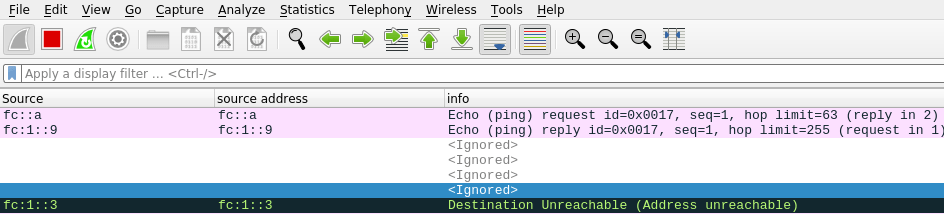
I had a WiresShark output

The destination Unreachable had

Internet Control Message Protocol v6
    Type: Destination Unreachable (1)
    Code: 3 (Address unreachable)
    ...
    Internet Protocol Version 6, Src: fc:1::9, Dst: fc::a
    Internet Control Message Protocol v6

This is saying that at the server end of the link to z/OS, where the server end had address fc:1::3 ( see the data at the start of the black line) was unable to deliver the packet to dst: fc::a. This shows the problem is with the server in the middle rather than z/OS.

The solution turned out to be more complex than I first though.

I tried

sudo ip -6 route add fc::/64 dev eno1 via fc::7

but this gave

RTNETLINK answers: No route to host

On the laptop I did

ip -6 addr

which gave me

enp0s31f6: <BROADCAST,MULTICAST,UP,LOWER_UP> mtu 1500 state UP qlen 1000
    inet6 fc::7/128 scope global 
       valid_lft forever preferred_lft forever
    inet6 fe80::9b07:33a1:aa30:e272/64 scope link noprefixroute 
       valid_lft forever preferred_lft forever

back on the server I replaced fc::7 with fe80::9b07:33a1:aa30:e272

sudo ip -6 route add fc::/64 dev eno1 via fe80::9b07:33a1:aa30:e272

and then ping worked!

Digging into this I found the documentation on Neighbourhood discovery section 8 says

For static routing, this requirement implies that the next- hop router’s address should be specified using the link-local address of the router.

Sometimes

sudo ip -6 route add fc::/64 dev eno1 via fc::7

worked fine. ip -6 route gave

fc::7 dev eno1 metric 1024 pref medium
fc::/64 via fc::7 dev eno1 metric 1024 pref medium
fc:1::/64 dev tap1 metric 1024 pref medium

I think this just goes to show that this is a complex area, and there are things happening which I do not understand.