Checking the daisy chain around my MQ network

Young children collect flowers and chain them to make a circle and so make a daisy chain.

People also talk about daisy chaining electrical extension leads together to make a very long lead out of lots of small leads.

In MQ we can also have daisy chains.  One use is to check all of the links are working, and there are no delays on the channels.

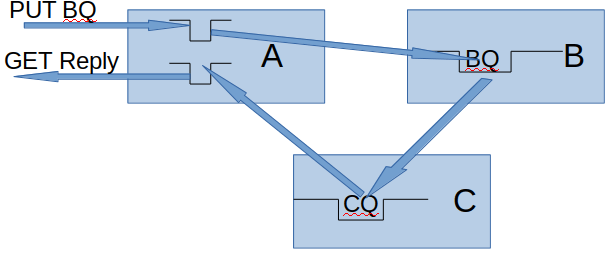
If an application puts a message onto the Clustered Request Queue(BQ) on QMA, it goes around and the reply can be got from the Reply queue, then we have checked all the links are working; we have daisy chained the requests.

DaisyChainOnce I Once I got it working the definitions were simple.


On QMB

DEFINE QR(BQ) RQMNAME(QMC) RNAME(CQ) CLUSTER(MYCLUSTER)

On QMC

DEFINE QREMOTE(CQ) CLUSTER(MYCLUSTER) RQMNAME(QMA) RNAME(REPLY)

On QMA

DEFINE QL(REPLY)

Once we have set the definitions up I could can use the MQ utility dspmqrte to show us the path.  For example

  • dspmqrte puts a message to the BQ .  This is a clustered queued on QMB,  It reports the queue BQ is being used, and stores the message on SYSTEM.CLUSTER.XMIT.QUEUE.
  • On QMA the channel TO.B gets the message from the SCTQ and sends it
  • On QMB the channel TO.B says put this to BQ, which is defined as CQ, and stores it on the SCTQ.
  • On QMB the channel TO.C gets the message from the SCTQ and sends it to QMC.
  • On QMC the channel TO.C says put this to CQ, which is defined as REPLY,  and stores if on SCTQ
  • On QMC the channel TO.A gets the message from the SCTQ and sends it to QMA.
  • On QMA the channel TO.A puts it to the Reply queue.

I used dspmqrte -m QMA -q BQ …, and it worked like magic.   I requested summary information(-v summary) and I got the following output, which shows the intermediate queues used.

AMQ8653I: DSPMQRTE command started with options ‘-m QMA -qBQ -rqCP0001 -rqm QMA -v summary -d yes -w5’.
AMQ8659I: DSPMQRTE command successfully put a message on queue ‘SYSTEM.CLUSTER.TRANSMIT.QUEUE’, queue manager ‘QMA’.
AMQ8674I: DSPMQRTE command is now waiting for information to display.
AMQ8666I: Queue ‘SYSTEM.CLUSTER.TRANSMIT.QUEUE’ on queue manager ‘QMA’.
AMQ8666I: Queue ‘SYSTEM.CLUSTER.TRANSMIT.QUEUE’ on queue manager ‘QMB’.
AMQ8666I: Queue ‘SYSTEM.CLUSTER.TRANSMIT.QUEUE’ on queue manager ‘QMC’.
AMQ8666I: Queue ‘REPLY’ on queue manager ‘QMA’.
AMQ8652I: DSPMQRTE command has finished.

Note, specifying RQMNAME is not required, and clustering will pick a queue manager which hosts the queue.  This means that you may be testing a different path to what you expected.  By using it you specify the route.

When I stopped QMC and retried the dspmqrte command , I got

AMQ8653I: DSPMQRTE command started with options ‘-m QMA -qBQ -rqCP0001 -rqm QMA -v summary -d yes -w5’.
AMQ8659I: DSPMQRTE command successfully put a message on queue ‘SYSTEM.CLUSTER.TRANSMIT.QUEUE’, queue manager ‘QMA’.
AMQ8674I: DSPMQRTE command is now waiting for information to display.
AMQ8666I: Queue ‘SYSTEM.CLUSTER.TRANSMIT.QUEUE’ on queue manager ‘QMA’.
AMQ8666I: Queue ‘SYSTEM.CLUSTER.TRANSMIT.QUEUE’ on queue manager ‘QMB’.
AMQ8652I: DSPMQRTE command has finished.

It does not report that there were any problems;  it just did not report two hops.

To see if there are problem, I think the best thing to do is pipe the output into a file

dspmqrte… > today

and compare this with a good day.

diff today goodday -d  gave me the differences – so I could see there was a problem because I was missing

> AMQ8666I: Queue ‘SYSTEM.CLUSTER.TRANSMIT.QUEUE’ on queue manager ‘QMC’.
> AMQ8666I: Queue ‘REPLY’ on queue manager ‘QMA’.


I had tried to define a clustered queue alias queues instead of a remote queue.  I got responses like

Feedback: UnknownAliasBaseQ, MQRC_UNKNOWN_ALIAS_BASE_Q, RC2082.

Should I use dynamic queues? – probably not for high volume production work

I’ve been looking into temporary dynamic queues on midrange MQ.  People tend to use these as a scratch queue which can be deleted when it has been finished with.   Rather than use a shared reply queue, and get messages by msgid or correlid, you can just say get next message, as you know there will only be messages for your application instance  on the  queue.

The application team may save money by using a dynamic instead of a common replyTo queue,  but you are likely to pay for it else where – including management time.

Using dynamic queues may be easy to program – but can have some serious implications.

Sometimes a dynamic queue is used because it saves the programmer about 5 minutes of coding by not specify nor testing gets specifying  msgid or correlid.
One customer had a paranoid architect  who did not want an application instance to have access to messages from another instance.  With a well designed, coded, and reviewed application this should not occur – or use IBM MQ AMS to encrypt the messages.

I had a email from someone who said they are having problems with statistics on midrange because of the  large number of dynamic queue – more of this later.   I think they said they get statistics  for 10 million dynamic queues a day, hence the question if they should change their applications.

This temp dynamic queue can be used for

  • a one-of:  MQOPEN of a model queue to create a  dynamic queue. Then  MQPUT of request, the reply comes back to the dynamic queue, MQCLOSE of the reply queue, which deletes the queue.
  • open the queue in the morning, use it all day when there is no work to do. The application ends, and deletes the queue.

You get the messages, close the queue, and the queue disappears – easy – what can go wrong?

I’ll cover

  • the impact on the applications of using dynamic queues,
  • the impact of systems management.

The impact of applications using dynamic queues

The documentation says The queues are deleted when the application that issued the MQOPEN call that created the queue closes the queue or terminates. … If the queue is in use at this time (by the creating, or another application), the queue is marked as being logically deleted, and is only physically deleted when closed by the last application using the queue.

For performance reasons, a receiver channel does not use MQPUT1 to put the messages to the queue, it does MQOPEN, MQPUT, MQPUT…  as is many cases the same few queues are used. and MQOPEN, MQPUT, MQPUT is more efficient.  After some time, if the queue has not been used the channel will close the queue.
The implications of this are that if the application is a one-of,  the program started and finished in 1 second,  a channel may keep hold of the queue. You think there is only one dynamic queue in use at any time, but if you have 1000 channels – there is potentially a lot of queues being only logically deleted and still around.

Conceptually the queue manager has to created the queue every time a dynamic queue is needed.   In practice the queue manager has a pool of these which can be serially reused and so keep the costs down.   This is fine for a small number of queues.

I did some totally unscientific measurement on my laptop to give a indication of the impact of using dynamic queues.  The applications I used are completely non typical.  The measurement give an indication and are meant to make you think about using dynamic queues rather than giving information you can use.

First measurement open the queues

Have a thread open a queue, 20,00 times.  The application does 2000 opens, report statistics,  wait 1 second, repeat.

Queue type Average CPU per open Average Elapsed time uSeconds per open
Permanent First 2000 : 7
Last 2000 : 8
First 2000 : 64
Last 2000:  101
Dynamic First 2000 : 8
Last 2000 : 8
First 2000 : 183
Last 2000: 303

The CPU usage looks similar, but the elapsed time increases when dynamic queues are used.

While the first program had its dynamic queues open, a second instance was run, the first 2000 took  290 microseconds, the last 2000 took 343 microsecond per open on average, so there is an increase in open time depending on the number of temp dynamic queues which are open.  The increase is not just dependent of the number of queues opened per thread.

Second measurement – close the queues.

The queues were closed

  • test 2A, in the order they were opened,
  • test 2B,  in reverse order of opening.
Queue type Order Average CPU Average Elapsed time uSeconds
Permanent First opened, first closed First 2000 : 284 Last 2000 : 11 First 2000 : 1533
Last 2000: 83
Permanent Last opened, first closed First 2000: 5
Last: 2000: 8
First 2000 : 58
Last 2000: 65
Dynamic First opened, first closed First 2000 : 284 Last 2000 : 16 First 2000 : 1533
Last 2000: 783
Dynamic Last opened, first closed First 2000: 8
Last: 2000: 8
First 2000: 295
Last: 2000: 736

When the queue is last-opened-first-closed this is much cheaper than first-opened-first- closed.  It feels like there is a linear list of handles.  It starts at the last opened, and scans backwards looking for the specific handle.

  • An application should not have hundreds of queues open.
  • If it does, the cost will depend, on where the handle is in the list – the “cheap end”, or the “expensive end”.  You may have no control over this, so expect significant variation in the cost and elapsed time of performing the MQCLOSE on the queue.
  • The dynamic queues took longer to close than the permanent queues
  • In general it is quicker and uses less CPU time to open a permanent queue  than using a dynamic queue.   If you open and shut a queue 100 times a second this may be relevant.  If you open and close them once a day, and keep them open all day,  this is not so important.

Overwhelmed by statistics data.

All good production environment should be collecting statistics on queue usage.  If the STATQ attribute is ON ( either for the queue, or for the queue manager) then a statistics record will be produced every STATINT seconds.

Each time I ran my test  I had over 200 messages on SYSTEM.ADMIN.STATISTICS.QUEUE, and 20,000 records, one for each dynamic queue (100 record per statistics message).
For STATINT of 5 minutes, if I had opened the queues, and left them open, in  a 10 hour day this would be 12 * 10  * 20,000 which is 2.4 million records.  (If it reported the model queue name, instead of the generated name this would be just 120 records and would be so much more useful)!.
When I ran my program many times in the 5 minute interval I got many * 20,000 rows.

You take these records and store them in your statistics database, and instead of having one database row saying “at 0805 queue PAYROLL had 10000 MQPUTS”, you have 10,000 rows saying “At 0805 Queue AMQ.5CF22BF6214…. had one MQPUT”.   As you keep your data for at least 13 months (so you can look back at last year’s peak periods), you have a lot of data and wasted space.

What you can do.

  1. Turn off stats collection for these dynamic queues – not very helpful.
  2. Post process the data and aggregate all of the dynamic queues for a period into one record (select (sum(puts),….) where qname like ‘AMQ%’….) – and then delete the individual records.  Extra work which could be avoided if you did not use dynamic queues.
  3. Use a model queue name for each business application so you get  MOBILE.5CF22BF62144A7A4, and CreditCheck.5CF22BF62144A7A4 instead of AMQ.5CF22BF62144A7A4 to make it easier to see where the queues are used.
  4. Change the applications to use a shared reply queue. This may be the hardest one to do.
    1. Ensure the applications get their message by MSGID or CORRELID, and not just get next.
    2. Use a common reply queue names to provide isolation – such as MOBILE.REPLY and CREDITCHECK.REPLY.
    3. You may have to implement best practices of cleaning up old messages.   If a dynamic queue was closed any messages on the queue would be deleted.  As you are not deleting the common queue – you need to clean these up yourself.   This can occur when an application timed out and then the reply arrived.

In summary

The applications team may have saved some money  by using a dynamic queue instead of a shared reply queue – but you will spend much more money, on CPU, disk space for database tables.   Then of course there is the management time spent discussing why the reporting of dynamic queue usage is not so useful.



When is activity trace enabled?

I found the documentation for activity trace was not clear as to the activity trace settings.

In mqat.ini you can provide information as to what applications (including channels) you want traced.

For example

applicationTrace:
ApplClass=USER
ApplName=progput
Trace=OFF

This file and trace value are checked when the application connects.  If you have TRACE=ON when the application connects, and you change it to TRACE=OFF, it will continue tracing.

If you have TRACE=OFF specified, and the application connects, changing it to TRACE=ON will not produce any records.

With

  • TRACE=ON, the application will be traced
  • TRACE=OFF the application will not be traced
  • TRACE= or omitted then the tracing depends on alter qmgr ACTVTRC(ON|OFF).   For a long running transaction using alter qmgr to turn it on, and then off, you will get trace records for the application from in the gap.

If you have

applicationTrace:
ApplClass=USER 
ApplName=prog* 
Trace=OFF

applicationTrace:
ApplClass=USER 
ApplName=progp*
Trace=ON

then program progput will have trace turned on because the definition is more specific.

You could have

applicationTrace:
ApplClass=USER 
ApplName=progzzz
Trace=OFF

applicationTrace:
ApplClass=USER 
ApplName=prog*
Trace=

to  be able to turn trace on for all programs beginning with prog, but not to trace progzzz.


Thanks to Morag of MQGEM  who got in contact with me, and said  long running tasks are notified of a change to the mqat.ini file, if the file has changed, and a queue manager attributed has been changed – even if it is changed to the same variable.

This and lots of other great info about activity trace (a whole presentation’s worth of information) is available here.

Buried options to dspmqrte make it more useful, but…

I was bemoaning that I dspmqrte did not actually tell me when the message arrived on the queue (COA), and  when the application did an MQGET ( message delivered, COD).

I piped the output from the dspmqrte command into a few lines of python and got

AMQ8659I: DSPMQRTE command successfully put a message on queue SYSTEM.CLUSTER.TRANSMIT.QUEUE , queue manager QMA .
AMQ8674I: DSPMQRTE command is now waiting for information to display.
Put QM:QMA QN:CSERVER RemoteQMName:QMC
Get QM:QMA QN:SYSTEM.CLUSTER.TRANSMIT.QUEUE 
Send QM:QMA RQMN:QMC Chl:CL.QMC ChlT:ClusSdr 
Receive QM:QMC RQMN:QMA Chl:CL.QMC 
Discard QM:QMC QN:CSERVER
AMQ8652I: DSPMQRTE command has finished.

We can see the message got there because it was discarded.

I changed my back end application to ignore messages with

MsgType :MQMT_DATAGRAM  and Format :MQADMIN.

Now with the command

dspmqrte -m QMA -q CSERVER -rq CP0001 -rqm QMA -d yes -v outline -w5 -ro activity,coa,cod

I got additional messages

AMQ8654I: Trace-route message arrived on queue manager QMC .
AMQ8662I: Trace-route message delivered on queue manager QMC .

When I stopped my backend application I got the message arrived – but not the message delivered, as expected.

For a small of work in the application I got a huge improvement in problems diagnostic tools.    I was really please with my progress, and had a cup of tea to celebrate.

The title said “but…”.  This is because the message arrived, and message delivered are not displayed in real time, but are produced after the time out interval specified in the -w option had expired.  I had hoped to use dspmqrte to tell me where the delays were in route to the queue.
So all I can tell is the message got there – but not how long it took.  What a wasted opportunity to provide useful information.

So get your applications changed to ignore these trace route messages – and use the -ro COA and COD to tell you if your messages are being processed in a timely manner!


Update.
If you specify the -d yes option the message can be got by your application.
If you then mqput this message to the next application in a sequence of applications, you will get the channel activity for sending it on, and the COA and COD messages sent back when it arrives at each hop.
Unfortunately, the dspmqrte program displays the last COA, and the last COD messages.

I sent the request CSERVER on QMC.   The application sent this to queue CP0000 on QMA.  The COA and COD message displayed were for QMA.  The COA and COD messages do not tell you which queue the event applies to!


Sorting out the MQ application trace knotted spaghetti.

You can turn on report = MQRO_ACTIVITY to get activity traces sent to a queue.   This shows the hops and activity of your message.
You can create your own trace route messages to be sent to a remote queue, and get back the hops to get to the queue, or you can use the dspmqrte command to do this for you.

Which ever way you do it, the result is a collection of messages in your specified reply queue.  The problem is how do you untangle the messages.  It is not easy with for a single message.  If you are getting these activity messages every 10 seconds from multiple transactions, you quickly  get knotted spaghetti!   To entangle the spaghetti even more, you could have a central site processing these data from many queue managers, so you get data from multiple messages, and multiple queue managers.

You can get a message for part of your application or transaction.  For example,

  • a message with information about the first 10 MQ verbs your program uses.
  • a message for the sender channel with the MQGET and the send for the local queue manager, and the remote queue manager will send a message with the channel’s receive and MQPUT.

The easy bit – messages for activity on your queue manager.

The event message has a header section.  This has information including

QueueManager: ‘QMA’
Host Name: ‘colinpaice’
SeqNumber: 0
ApplicationName: ‘amqsact’
ApplicationPid: 28683
UserId: ‘colinpaice’

From  QueueManager: ‘QMA‘ and Host Name: ‘colinpaice‘, you know which machine and queue manager you are on.

From ApplicationPid: 28683 SeqNumber: 0, you can see the records for this applications Process ID, and the sequence number.   This happens to be for a program ApplicationName: ‘amqsact’ and UserId: ‘colinpaice’.  I dont know when the sequence number wraps.  If the application ends, and the same process is reused,  I would expect the sequence number to be reset to 0.

You may have many threads running in a process , such as for a web server.  For each MQ operation  there is information for example

MQI Operation: 0
Operation Id: MQXF_PUT
ApplicationTid: 81
OperationDate: ‘2019-05-25′
OperationTime: ’14:28:18’
High Res Time: 1558790898843979
QMgr Operation Duration: 114

We can see that this is for Task ID 81.

So to tie up all of the activity for a program, you have to select the records with the same ApplicationPid, and check the SeqNumber to make sure you are not missing records.  Then you can locate the record with the same TID.
You also need to remember that a thread behaviour can be complex ( like adding meat balls to the spaghetti).  Because of thread pooling, an application may finish with the thread, and the thread can be reused.  If a thread is not being used, it can be deleted, so you will get MQBACK and MQDISC occurring after a period of time.

It is similar for channels

For a sending channel you get the following fields.

QueueManager: ‘QMA’
Host Name: ‘colinpaice’
SeqNumber: 1723
ApplicationName: ‘runmqchl’
Application Type: MQAT_QMGR
ApplicationPid: 5157
ConnName: ‘127.0.0.1(1416)’
Channel Type: MQCHT_CLUSSDR

MQI Operation: 0
Operation Id: MQXF_GET
ApplicationTid: 1

For a  receiving channel you get

QueueManager: ‘QMA’
Host Name: ‘colinpaice’

SeqNumber: 1746
ApplicationName: ‘amqrmppa’
ApplicationPid: 4509
UserId: ‘colinpaice’

Channel Name: ‘CL.QMA’
ConnName: ‘127.0.0.1’
Channel Type: MQCHT_CLUSRCVR

MQI Operation: 0
Operation Id: MQXF_OPEN
ApplicationTid: 5
….
MQI Operation: 1
Operation Id: MQXF_PUT
ApplicationTid: 5
….

As there can be many receiver channels with the same name for example an Receiver MCA channel, you should be able to use the CONNAME IP address to identify the channel being used.

They may have the same or different ApplicationPid.

It might be easier just search all of the channels for the messages with matching msgid and correlid!


Using mqmd report activity options properly, is very difficult.

MQ has the ability to trace the activity of a message to its destination.  As chart-ware, this  statement this is 100% accurate and looks like a great facility. However, as with many bits of chart-ware the implementation is very difficult.  I can see why people tend not to use this function.

What MQ facilities are used

  • With an MQMD you can set a report option MQRO_COA, confirm on arrival.  This says when the message is put to the (remote) queue, send a copy of the MQMD (optionally + payload) with msgtype of report, to the replyTo queue and replyTo queue manager .
  • With an MQMD you can set a report option MQRO_COD, confirm on delivery.  This says when the message application  process the message on the (remote) queue, send a copy of the MQMD (optionally + payload) with msgtype of report, to the replyTo queue and replyTo queue manager.
  • With an MQMD you can set a report option MQRO_ACTIVITY.  When the message moves through the network, the channels reports the get and send, and the receive and put of the message.   The messages produced have an embedded  PCF message within the payload.  (A message of format Embedded PCF,  MQHEPCF, allow you to have a PCF followed by other data, for example application data).
  • Your application does some work and sends a reply to the replyTo queue and replyTo queue manager with msgtype of reply.  (For example “Transfer £1,000,000 to Colin Paice – has been done”)

You tie all of these pieces together with the msgid and correlid of the original message.

When a message is put on a transmission queue, it has a transmission header, with its own MQMD etc.  Your message is embedded within this transmission queue message, so your msgid and correlid are still available.

What information is available to you?

  1. When your message is put to the queue, the MQMD has the time the message was put.
  2. From the activity record for the sending channel, you have the time the message was got from the transmission queue, and from the embedded message you have the put time .  You can now calculate the duration spent on the transmission queue.
  3. From the activity record for the sending channel, you have the time the data was sent over the network.
  4. From the activity record for the receiving channel, you have the time the data was received over the network.   This should be close to the time it was sent.  If not then the clocks on the two systems may not be in sync, and you can calculate a correction factor.
  5. From the activity record for the receiving channel you have the time the message was put to the queue.
  6. From the Confirm on Arrival record, this should be the same (or close) to the time the receiving channel put the message to the queue.  Apply the correction factor.
  7. From the Confirm on Delivery  record, you know what time the message was got by the application, and so you can calculate duration =  Time of Delivery – Time of Arrival, to see how long the message was on the server queue.    If the message is persistent, then this will include time for the channel to force the data to the log, and do disk IO.   You should be able to calculate the duration between the message being put, and the time it is processed to see the total life time of the message.

The time of day values are in the format HHMMSShh where hh is hundredths of a second.  This allows you to get granularity down to 0.01 of a second.

You now have a detailed picture of where time is being spent en route to the remote queue.  Is it the send channel being slow to the message,  or does the message gets to the remote end quickly, and the application is slow to process it.  Wow – really useful stuff.

It now starts to get messy.

These messages arrive at the specified reply to queue, and reply to queue manager.

To support using these report options, your application needs some logic like

If this is a reply message, then carry on as usual.

Else move message using  MQPUT1 to MY.ACTIVITY.PROCESSING.QUEUE, so you can process these outside of the application.

How do you process MY.ACTIVITY.PROCESSING.QUEUE ?

This is the hard bit.
You have a mixture of PCF type messages, and your original message, (perhaps with a format of MQSTR) with the MQMD saying “report message”.

MQ provides programs which can process some PCF format messages on a queue, and another program for printing (in hex) non PCF messages.  There is no program which can handle both message types and do the calculations to extract all of the useful data.

Im working on getting my Python programs to do all of this processing.

If I have made this more complex than necessary, because I have overlooked some capability, please let me know.


A big Thank You to Morag of MQGEM who pointed me to MO71.  This can format out any PCF message, and it has a trace route viewer

Select a queue manager on the main window as your source queue manager and then choose Action->Trace Message from the menu. Fill in your target queue and queue manager, and press send. You’ll get a picture like this:-

You can view the data is several ways, right click on the picture and choose Display Type.  The Display Options part of the right click context menu changes what is shown in the above picture. Another display type that might be useful is a breakdown of the steps by looking at Display Type->Nodes:-

What the docs don’t tell you about using Report option in your MQMD

You can set the MQMD.Report option of a message to MQRO_ACTIVITY, and get a trace of the activity sent to your reply to queue.  This is great, but not very usable.

For my MQPUT to a cluster queue I got activities

  • Sending Message Channel Agent getting the message
  • Sending Message Channel Agent sending it over channel CL.QMC
  • Receiving Message Channel Agent receiving the data from channel CL.QMC
  • Receiving Message Channel Agent putting the message to the queue on the remote system

Note, I did not get a response saying the back end application had actually processed the message.

So by setting one bit I got this extra information and can do things like calculate times and write the name of the channel used etc – great,  go out and celebrate!

The problem is that these activity trace messages come back to the reply to queue you specified in your request.  You do not want to have to process these messages in your application, as it will be an ugly program to process these PCF messages.

The best thing your application can do is put these messages somewhere else, by using  logic like

If MQMD.Format = ‘MQHEPCF’ then use MQPUT1 to put the message to “MY.ACTIVITY.TRACE.QUEUE”, and get the next message.
The activity trace replies should get to the queue before the back end applications reply, which should prevent having lost activity trace messages.

You can then use the IBM supplied  dspmqrte program, for example
dspmqrte  -i 0 -q MY.ACTIVITY.TRACE.QUEUE -m QMA -w1
to display the messages.   The Knowledge Centre is missing some documentation, for example that you specify -i 0 to get all the messages.  The KC says you have to specify the MSGID of the messages – which you will not know.

I tried to use the amqsact sample (which is meant to display activity trace messages), but it does not seem to recognize these activity trace messages as they are in MQEPCF format.

I took a copy of the amqsevt sample which processes PCF and made a few changes to support MQHEPCF format.  Im still working on how to make this available.

It is not a good idea to have this MQRO_ACTIVITY  set for all applications because of the extra overhead of the additional messages it introduces.  You could do it every 1000 messages, or if the milliseconds of the current time is .000  (so you would expect this on average once in 1000 messages).  You can then capture the data, and plot real time graphs of your MQ network, and where the delays are.
Good hunting (for delays and bottlenecks)


Can I modify the samples without the lawyers coming to get me?

Yes!

The documentation says

COPYRIGHT LICENSE:

This information contains sample application programs in source language, which illustrate programming techniques on various operating platforms. You may copy, modify, and distribute these sample programs in any form without payment to IBM, for the purposes of developing, using, marketing or distributing application programs conforming to the application programming interface for the operating platform for which the sample programs are written. These examples have not been thoroughly tested under all conditions. IBM, therefore, cannot guarantee or imply reliability, serviceability, or function of these programs. The sample programs are provided “AS IS”, without warranty of any kind. IBM shall not be liable for any damages arising out of your use of the sample programs.

Each copy or any portion of these sample programs or any derivative work, must include a copyright notice as follows:

Portions of this code are derived from IBM Corp. Sample Programs.

© Copyright IBM Corp. 1993, 2019. All rights reserved.


Note – that this does not mean you can copy the code and put it up on GitHub – as GitHub is for open source, and the MQ samples are not open source.   Thanks to Matt Leming for this advice.

Every one should be made to suffer the chaos of their organization.

How difficult is to provide information which is
• clear
• provided at the right time
• accurate
• useful
From my recent experience this seems to be very difficult. Perhaps your organization is better – give it a try and see.

I went on holiday, involving two flights, and one of these was cancelled. I was amazed at how badly the airline handled this. It looked as if  this was the first time that they ever had a cancellation, and had no processes in place to handle this.   Talking to other people affected by this cancellation, the lack of clear process when there is a problem, seems very common.

We flew from Aberdeen to Manchester, and had a connecting flight from Manchester to Southampton. While we were in the air, the airline cancelled the second hop. We landed at Manchester and tried to get into the departures via the transit corridor to be told the flight was cancelled. I then got a text saying “your flight has been cancelled. Click on this link”.
The link took me to a page saying “re-book your flight”. There were no more flights that day, so it looked like we would have to stay over night at the airport.
Was the message clear ? No – it should have given us more information, told us that there was a coach being organised, where to collect your bags from, etc.
Was the message useful – no.

We went back through to arrivals and heard an announcement that people on the cancelled Southampton flight should go to the information desk.
We got to the desk and was told that a coach was provided, and our bags would be put on the coach.
We were taken to the coach, and before we got on, we checked to see if our bags were on the coach,  to be told we should have collected them first (and asked in an aggressive way,  why we had not collected them).
We had to go back to the terminal and we missed the coach. This is where the troubles really started.
We went to the airline’s service desk to be told that we had to go to the baggage handling agent’s office, next to the information desk.
• This was not accurate – there is no agent’s office.
• The information desk gave use the agents phone number. We rang it to be told that they handled missing bags, they could not help us because the plane had been cancelled, and so the bags were not lost. The bags were in the baggage transit area – and we should talk to the agent. The information the service desk told us was not useful nor correct.

When we mentioned that we had not heard any message about collecting bags, it turned out the message had been announced while we were in the air. So this message was not timely.
Eventually someone from the information desk took pity on us, went and found our bags – two hours later.

They airline had booked a hotel for us, and booked a taxi to take us there (“Out of the terminal, cross the road and use XYZ cabs”). The instructions for the taxi were totally wrong, we had to go to the taxi office close to the information office, to arrange a cab, and so it went on. I felt that the airline staff should have known this.

As the the airline frequently cancels planes, I would have expected to go to the service desk, or the information desk and to be given a piece of paper saying.

  • The service desk will try to book you on a later flight. If this is unsuccessful then…
  • If you were on a previous flight,  collect your bags from the following process….
  •  The service desk will arrange a hotel and a taxi to take you to and from the hotel.
    •   Once you have you bags, go to the xxxx office close to the information office on the ground floor. They will organise a car for you.
  • You can claim compensation, see this web site…

Maybe because I have been in a support role, I have high expectations.

How should an enterprise handle communications?

Make sure people have the right information.

When you have a major incident you need a well tested process. Once the incident has occurred, people will be dialing in to the incident hot line. You do not want to repeat the problem (One on’t cross beams gone owt askew on treddle)  twenty times – one for each new attendee. Having a blog post which people update with status is a good way of doing managing it.

You need evidence – not opinions.

It is easy to say “it must be an MQ problem because there are a lot of messages on the queue”. This usually indicates an application problem (the applications are not getting the messages fast enough), not an MQ problem. State the evidence “There are many messages on queue XYZ on queue manager ABC”. Then you can say “This can be caused by…”.   If you have no evidence, then you only have guesswork. You need to collect evidence.  I remember going out to work on a critsit on Message Broker, the problem description was “the problem is somewhere in there….”.   We turned on monitors and this showed that a SQL statement took over 10 seconds.  The table held temporary data for the duration of a transaction, and the data was never deleted.  Instead of an expected maximum of 100 rows, it had about 1 million rows.  Once we had the evidence – the root problem was obvious.

Solve the first problem first.

If there are messages accumulating on a queue at the front of the process, and also on a queue at the end of the process. They may be connected. Fix the first problem, and the second one may go away.

Be clear, and practice any actions.

With the problem with our bags, the airlines agent should have contacted the baggage handling agent, rather than us trying to talk to both ends. Decisions like switching workload, or going to a backup site need to be made by the right people. The MQ team cannot make this decision on their own.
At one site, the whole team practiced walked through problem scenarios in great detail. “We need to reconfigure the LPAR configuration; who has the userid and password for the hardware console?”. When a problem occurred, the person with this information was on a toilet and coffee break, and had left her phone on her desk. I was told that a man rushed out of the control room, burst into the ladies toilet calling out the ladies name! As a result they changed their process (you must always carry the duty phone – even in the toilets).

Make sure the messages for the end users are clear, and tell them what to do.
I had a message “you cannot do that operation at this time”. Did this mean – wait for 5 minutes because the server was down, or you cannot do the operation once you had checked in?

If you think the system will be available in 15 minutes, do not say “please retry”, but be more helpful “please try again in 30 minutes, we will update our twitter entry here… with status”.

I heard that the new CEO of a hire car company review their web site and looked at every page they expected the customer to use ( including the complaints and claiming compensation).  This resulted in major simplification of the pages, and providing much more useful information to their customers.
To test out your “error process as seen by an end user”, have a senior manager’s aged parents try out your processes and give you feedback on the chaos or smoothness of the experience!

Note.  One on’t cross beams gone owt askew on treddle is from Monty Python sketch, The Spanish Inquisition.

Beware unzipping a windows install file

I hit an interesting little problem trying to download and use the developer version of MQ V9.1 for windows.

I downloaded the zip file on my Linux box, and extracted it onto my memory stick.
I rebooted into Windows 10, and tried to install MQ from the memory stick.  I got various errors including error code 0x80004005, and “corrupt file” when trying to install Explorer.cab.  If you unzip it on Windows, and install it from the memory stick, it works!

Strange eh!