How do I know which queue manager to connect to ?

Question: How difficult can it be to decide which queue manager to connect to?

Answer: For the easy, it is easy, for the hard it is hard.
I would not be surprised to find that in many applications the MQCONN(x) are not coded properly!


That is a typical question and answer from me – but let me go into more detail so you understand what I am talking about.
If you have only one queue manager then it is easy to know which queue manager to connect to – it is the one and only queue manager.
If you have more than one – it gets more complex. If your application has just committed a funds transfer request and the connection is broken

  • you may just decide to connect to any available queue manager, and ignore a possibly partial funds transfer request
  • or you might wait for a period trying to connect to the same queue manager, and then give up, and connect to another, and later worry about any orphaned message on the queue.

You now see why the easy scenario is easy, and for the hard one, you need to do some hard thinking and some programming to get the optimum response.

There is an additional complexity that when you connect to the same instance – it may be a highly available queue manager, and it may have restarted somewhere else. For the purposes of this blog post I’ll ignore this, and treat it as the same logical queue manager.

I had lots of help from Morag who helped me understand this topic, and gave me the sample code.

You have only one queue manager.

This is easy, you issue an MQCONN for the queue manager. If the connect is not successful, the program waits for a while and then retries. See – I said it was easy.

You have more than one queue manager, and getting a reply back is not important.

For example, you are using non persistent messages.

Your application can decide which queue manager it tries to connect to, or you can exploit queue manager groups in the CCDT.

On queue manager QMA you can define a client channels for it and also for queue manager QMB

DEF CHL(QMA) CHLTYPE(CLNTCONN) QMNAME(GROUPX) 
CONNAME(LINUXA) CLNTWGHT(50)…
DEF CHL(QMB) CHLTYPE(CLNTCONN) QMNAME(GROUPX)
CONNAME(LINUXB) CLNTWGHT(50)…

DEF CHL(QMA) CHLTYPE(SVRCONN) ...

On Unix these are automatically put into the /var/mqm/qmgrs/../@ipcc/AMQCLCHL.TAB file. This is a binary file, and can be FTPed to the client machines that need it.

You can use the environment variables MQCHLLIB to specify the directory where the table is located, and MQCHLTAB to specify the file name of the table (it defaults to AMQCLCHL). See here for more information.

FTP the files in binary to your client machine, for example into ~/mq/.
I did
export MQCHLLIB=/home/colinpaice/mq
export MQCHLTAB=AMQCLCHL.TAB

I then used the command
SET |grep MQ
to make sure those variables are set, and did not have MQSERVER set.

Sample MQCONN code (from Morag)….

MQLONG  CompCode, Reason;
MQHCONN hConn = MQHC_UNUSABLE_HCONN;
char * QMName = "*GROUPX";
MQCONN(QMName,
&hConn,
&CompCode,
&Reason);
// and MQ will pick one of the two entries in the CCDT.

The application connected with queue manager name *GROUPX . Under the covers the MQ code found the channel connections with QMNAME of GROUPX and picked one to use. The “*” says do not check the name of the queue manager when you actually do the connect. If you omit the “*” you will get return code MQRC_Q_MGR_NAME_ERROR 2058 (080A in hex) because “GROUPX” did not match the queue manager name of “QMA” or “QMB”. I stopped QMA, and reconnected the application, and it connected to QMB as expected.

Common user error:When I tried connecting with queue manager name QMA, this failed with MQRC_Q_MGR_NAME_ERROR because there were no channel definitions with QMNAME value QMA. This was obvious once I had taken a trace, looked at the trace, and had a cup of tea and a biscuit, and remembering I had fallen over this before. So this may be the first thing to check if you get this return code.

Using channels defined with the same QMNAME, if your connection breaks, you reconnect with the same queue manager name “*GROUPX” and you connect to a queue manager if there is one available. You can specify extra options to bias which one gets selected. See CLNTWGHT and AFFINITY. See the bottom of this blog entry.

You can use MQINQ to get back the name of the queue manager you are actually connected to (so you can put it in your error messages).

//   Open the queue manager object to find out its name 
od.ObjectType = MQOT_Q_MGR; // open the queue manager object
MQOPEN(Hcon, // connection handle
  &od, // object descriptor for queue
  MQOO_INQUIRE + // open it for inquire          
  MQOO_FAIL_IF_QUIESCING, // but not if MQM stopping      
  &Hobj, // returned object handle
  &OpenCode, // MQOPEN completion code
  &Reason); // reason code
// report reason, if any
if (Reason != MQRC_NONE)
{
printf("MQOPEN of qm object rc %d\n", Reason);
.....
}
// Now do the actual INQ
Selector = MQCA_Q_MGR_NAME;
MQINQ(Hcon, // connection handle
  Hobj, // object handle for q manager
  1, // inquire only one selector
&Selector, // the selector to inquire
0, // no integer attributes are needed
NULL, // so no integer buffer
  MQ_Q_MGR_NAME_LENGTH, // inquiring a q manager name
ActiveQMName, // the buffer for the name
&CompCode, // MQINQ completion code
&Reason); // reason code

printf("Queue manager in use %s\n",ActiveQMName);

You have more than one queue manager, and getting a reply back >is< important

Your application should have some logic to handle the case when your queue manager is running normally, there is a problem in the back end, and so you do not get your reply message within the expected time. Typical logic for when the MQGET times out is:

  • Produce an event saying “response not received”, to alert automation that there may be a problem somewhere in the back end
  • Produce an event saying “there is a piece of work that needs special processing – to manually redo or undo – update number…..”.
    • At a later time a program can get the orphaned message and resolve it.
    • You do not want an end user getting a message “The status of the funds transfer request to Colin Paice is … unknown” because the reply message is sitting unprocessed on the queue.
    • Note: putting a message to a queue may not be possible as the application may not be connected to a queue manager.

When deciding to connect to any available queue manager, or connect to a specific queue manager, there are two key options in mqcno.Options field:

  • MQCNO_CD_FOR_OUTPUT_ONLY. This means, do not use any data in the passed in MQCD <as the field description says – use it for output only>, but pick a valid and available channel from the CCDT, and return the details.
  • MQCNO_USE_CD_SELECTION. This means, use the information in the MQCD to connect to the queue manager

Sample code (from Morag) showing MQCONNX

MQLONG  CompCode, Reason;
MQHCONN hConn = MQHC_UNUSABLE_HCONN;
MQCNO cno = {MQCNO_DEFAULT};
MQCD cd = {MQCD_CLIENT_CONN_DEFAULT};
char * QMName = "*GROUPX";
cno.Version = MQCNO_VERSION_2;
cno.ClientConnPtr = &cd;
// Main connection - choose freely from the CCDT
cno.Options = MQCNO_CD_FOR_OUTPUT_ONLY;
MQCONNX(QMName,
&cno,
&hConn,
&CompCode,
&Reason);
: :
// Oops, I really need to go back to the same connection to continue.

MQDISC(...); // without this you get queue manager name error

// Using same MQCNO as earlier, it already has MQCD pointer set.

cno.Options = MQCNO_USE_CD_SELECTION;
MQCONNX(QMName,
&cno,
&hConn,
&CompCode,
&Reason);

Let me dig into a typical scenario to show the complexity

  • set mqcno.Options = MQCNO_CD_FOR_OUTPUT_ONLY
  • MQCONN to any queue manager
  • MQPUT1 of a persistent message within syncpoint
  • set mqcno.Options = MQCNO_USE_CD_SELECTION, as you now want the application to connect to the same queue manager if there is a problem
  • MQCMIT. After this you want to connect to the specific queue manager you were using
  • MQGET with WAIT
  • MQCMIT
  • set mqcno.Options = MQCNO_CD_FOR_OUTPUT_ONLY. Because the application is not in a business unit of work it can connect to any queue manager.

The tricky bit is in the MQGET with WAIT. If your queue manager needs to be restarted you need to know how long this is likely to take. It may be 5 seconds, it may be 1 minute depending on the amount of work that needs to be recovered. (So make sure you know what this time is.)

Let’s say it typically takes 5 seconds between failure of the queue manager the application is connected to, and restart complete. You need some logic like

mqget with wait..
problem....
failure_time = time_now()
waitfor = 5 seconds
mqcno.Options = MQCNO_USE_CD_SELECTION
loop:
MQCONN to specific queue manager
If this worked goto MQCONN_worked_OK
try_time = time_now()
If try_time - failure_time > waitfor + 1 second goto problem;
sleep 1 second
go to loop:
MQCONN_worked_OK:
MQOPEN the reply to queue
Reissue the MQGET with wait

problem:
report problem to automation
report special_processing_needed .... msgid...
mqcno.Options = MQCNO_CD_FOR_OUTPUT_ONLY
Go to start of program and connect to any queue manager

If you thought the discussion above was complex, it gets worse!

I had a long think about where to put the set mqcno.Options = MQCNO_USE_CD_SELECTION.  My first thoughts were to put it after the first MQCMIT, but this may be wrong.

With the logic

MQCONN
MQPUT1
MQCMIT

If the MQCMIT fails, it could have failed going to the the queue manager so the commit request did not actually get to the queue manager, and the work was rolled back, or the commit could have worked, but the response did not get to your application.

The application should reconnect to the same queue manager, issue the MQGET WAIT. If the message arrives then the commit worked, if the MQGET times out, treat this as the MQGET WAIT timed out case (see above), and produce alerts. This is why I decided to put the set mqcno.Options = MQCNO_USE_CD_SELECTION before the commit. You could just as easily had logic which checks the return code of the MQCMIT and then set it.

A bit more detail on what is going on.

You can treat the MQCD as a black box object which you do not change, nor need to look into. I found it useful to see inside it. (So I could report problems with the channel name etc). The example below shows the fields displayed as an problem is introduced.

Before MQCONNX
set MQCNO_CD_FOR_OUTPUT_ONLY
pMQCD->ChannelName is '' - this is ignored
pMQCD->QMgrName is '' - this is ignored
QMName is '*GROUPX'. -this is needed
==MQCONNX had return code 0 0
pMQCD->ChannelName is 'QMBCLIENT'.
pMQCD->QMgrName is '';
QMName is '*GROUPX'.
MQINQ QMGR queue manager name gave QMB Sleep
during the sleep endmqm -i QMB and strmqm QMB
After sleep
MQOPEN of queue manager object ended with reason code MQ_CONNECTION_BROKEN = 2009.
Issue MQDISC, this ended with reason code 2009

set MQCNO_USE_CD_SELECTION
pMQCD->ChannelName is 'QMBCLIENT' - this is needed
pMQCD->QMgrName is ''
QMName is '*GROUPX'.
MQCONNX return code 0 0
MQINQ queue manager name is QMB

Anything else on clients?

It is good practice to periodically have the clients disconnect and reconnect to do work load balancing. For example

You have two queue managers QMA and QMB. On Monday morning between 0800 and 1000 QMA is shut down for essential maintenance. All the clients connect to QMB. QMA is restarted at 1000 – but does no work, because all the clients are all connected to QMB. If your clients disconnect and reconnect then over time some will connect to QMA.

It is a good idea to have a spread of times before they disconnect, so if 100 clients connected at 0900, they disconnect and reconnect between 10pm and 3am to avoid all 100 disconnecting and reconnecting at the same time.

To get the spread of connections to the various queue managers, you need to use CLNTWGHT with a non zero value. If you omit CLNTWGHT, or specify a value of 0, then the channel chosen is the first alphabetically, in my case they would all go to QMA, and not to QMB.

I feel there is enough material on this for another blog post.
MQWEB gets killed off after starting.

Gwydion kindly helped me with the following…. ( his words).

strmqweb is a shell script that sets some environment variables then calls the server start command to start Liberty. But, when you run it with the remote shell command, such as Ansible shell module, when the shell terminates it also kills the JVM child process, which kills the server.   The solution is to use nohup when running strmqweb, as described (half way down the page) here: https://ansibledaily.com/execute-detached-process-with-ansible.

Migrating your queue manager in an enterprise.

Migrating an isolated queue manager is not too difficult and some of it is covered in the MQ Knowledge Center.

Since my first blog post on this topic, Ive had some comments asking for more detailed steps… so I’ve added a section at the bottom.

Below are some other things you need to think about when working in an enterprise when you have test and production, multiple queue managers per application (for HA or load balancing) and multiple applications. I am focusing on midrange MQ, and not z/OS though many of the topics are relevant to all platforms.

Consider the scenario where you have 4 queue managers
QMA and QMB supporting MOBILE and STATUS applications,
QMX and QMY supporting PAYROLL application.

You want a low risk approach, so you decide to upgrade the STATUS application first. This application uses QMA and QMB which are also used by business critical application MOBILE. This would be a high risk change.
It would be safer to to first migrate application PAYROLL on QMX and QMY.

Looking at QMX and QMY.
You could migrate both queue managers the same weekend – this would be least work, but has a risk that you do not have a good fall back plan if it does not work as expected.
You could migrate QMX this weekend, and QMY next weekend if there were no problems found.
If QMX has problems you can continue using QMY while you resolve problems. If QMX has problem, then if QMY has problems or is shut down you have an availability issue, so you may want to define a new environment with QMZ (and the web server etc – so not a trivial task).

As well as production QMX and QMY you have test systems: You need to plan to migrate and test these pre-production systems before considering migrating production. While the test and production levels of MQ are different, you may want to freeze making application changes, and factor this in the plan.

If you have a machine with one MQ level of code, and multiple queue managers on it, you cannot just migrate one queue manager, as you delete the MQ executables and install the new version. You can use multiple installed levels of MQ – but you may have to migrate to this before exploiting it. See Multiple Installations.

Clustering. Remember to migrate your full repositories first – you might want to consider creating dedicated queue managers for your repositories if this is a problem.

License: You will need licenses for the versions of MQ you use. The MQ command dspmqver gives you information about your existing installation. Some licenses entitle you to support from IBM, others are for development or trial use.

There are three stages to migrating applications.

  • Run the applications with no changes on the upgraded system. These should run successfully, but MQ may do more checks, for example some data is meant to be on a 4 byte boundary. MQ now polices this.
  • Recompile the applications to use the newer MQ libraries. Some application MQ control blocks may be larger, and this may uncover application coding problems. For example uninitialised storage.
  • Exploitation of new function. Do this once you have successfully migrated the existing queue managers.

Testing: You need to test the normal working application, plus error paths, such as messages being put to a Dead Letter Queue, and making sure this process works.

Update your infrastructure harness: You need to review what new messages your automation processes, and what actions to take.
You need to decide what additional statistics etc to use and what reports you want to product for capacity planning, health review and day to day running.

You have to worry about applications coming in to your queue manager. For example what levels of MQ are they using. They may need to be rebuilt with the newer libraries. The client code may need to up upgraded. You can use the DIS CHS(…) RVERSION to display the level of MQ client code. Of course your challenge will be to get people outside of you organization to update their code – especially when they say they have lost the source to the program.

MQ is rarely used in isolation. You may need to upgrade web servers to a newer level which support the new level of MQ.

You may need to upgrade the hardware and operating system.

Going down to the next level of detail.

Exits

You need to check any exits you have can support new functions and different levels of control blocks. For example there are shared connections, and the MQMD can change size from release to release.

If you cannot have one exit that supports all level of MQ. You’ll have to manage how you deploy the exit matching the queue manager level.

TLS and SSL setup

  • You need to review the TLS and SSL support. Newer levels of MQ removes support for weaker levels of TLS.
  • You need to review the end user certificates to make sure they are using supported levels of encryption.
  • You need to review the cipherspecs used by SSL channels, and upgrade them before you migrate the queue manager. (You could migrate to a newer version and see which channels fail to start, then fix them, but this is not so good).
  • As part of this cipherspec review you may wish to upgrade to strong cipher specs which use less CPU, or can be offload on z/OS.
  • You may have a problem sharing keystores, and make sure you include the keystore files in your backups. See APAR IT16295.

Building your applications

  • In some environments application developers compile programs on their own machines; in other environments, there is a process to generate applications on a central build machine. You will need to change the build environment to have the newer version header files, and change the build process to be able to use them.
  • You will need to set up a build environment so you can use the MQ V9 header files for just the application being migrated.
  • You many need to change your deploy tool so that the program compiled at MQ V9 is only deployed to TESTQMA, ( at MQ V9) and not to TESTQMB(still at MQ v7).
  • You need to change your deploy tool for test, pre-production and production.

Using the Client Channel Definition Table (CCDT)

  • Older clients must continue to use existing CCDT
  • Newer clients are able to understand older CCDTs.
  • For an application to use a newer version CCDT, you must update the MQ client.
  • So you need to be careful about moving the CCDT file around

System management applications

You may have home grown applications that are used to manage MQ. These need to be changed to support new object types( such as chlauth records and topics) and new fields on objects. You cannot rely on a field of interest being the 5th in the list as it was in MQ V5.

MQ Console (MQWEB)

If you are using the MQ Console server to provide a web browser or REST API to a queue manager, you may need to do extra work for this.

You have an instance of MQ Console to support MQ V9.0 and a different instance to support MQ 9.1

If you have multiple queue managers on a box, and plan to to use MQ Multiple Installation to migrate one queue manager at a time, then you will to consider the following

  • The box has QMA and QMB on it at MQ V9.0
  • These box use MQCONSOLE-XX with port 9090
  • Install MQ 9.1 on the same box.
  • Migrate QMA to 9.1
  • Create an MQCONSOLE-YY at MQ 9.1 with port 9191
  • Change your web browser URL and REST api apps to use port 9191
  • Wait for a week
  • Migrate QMB to 9.1
  • Migrate MQCONSOLE-XX to 9.1
  • Web browser URL and REST API url can continue using port 9090
  • Shutdown MQCONSOLE-YY
  • Undo any changes to change your web browser URL and REST api apps to use port 9191 and go back to port 9090

“The rest of the stuff”

I remember seeing a poster of child sitting on a potty with a caption saying “no job is complete until the paper work is complete”.

Someone said that doing the actual migration of a queue manager took 1 hour. Doing the paper work ; planning, change management, talking to user etc took two weeks per queue manager.

And yes, you do need to update your documentation!

Education

You need to talk to the teams around your organization. This is mainly applications – but other teams as well ( eg monitoring, networking)

  • Tell them what changes you will be making, the time scales etc..
  • There will be an application freeze during the migration.
  • The application teams will need to test their applications, and may need to make changes to them.
  • The application teams will get these new events/alerts which they need to handle.
  • You may learn about how they use MQ, and how this will affect your migration plans. (We used this unsupported program for which we have no source and no one knows how it works – which is critical to our business).
  • You may get a free trip to an exotic location to talk to the application teams (or you may get told to go to some hell hole)
  • You need to talk to people outside if your organization. The hard bit may be finding out who they are

Security

  • You need to protect any new libraries.
  • MQ may have new facilities such as topics which you need to develop and implement a security policy for. In V9 MQ midrange now publishes statistics to a topic.
  • Your tools for processing MQ security events, may need to be enhanced to handle new resource types or new events.

New messages and events

You need to review all new events or messages, and add automation to process them. You need to decide who gets notified, and what actions to take.

You need to review changed messages or alerts in case you are relying on “constant” information in particular place in the message, which has been changed.

Backups

People often dump the configuration of their queue managers every day, so they can use runmqsc to recreate the queues etc. You need to backup all objects including topics and chlauth records, and check you can recreated them in a queue manager.

Backup your mq libraries for queue manager and clients – or be able to redeploy them from your systems management software.

Performing the migration

This is documented in the Knowledge Centre. One path for migration involves deleting the old level of MQ and installing the new level of MQ. If you need to go back to the old level, you need to have a copy of the old level of MQ base + CSD level as you were running on!

Carefully check the documentation for the hops.

The Migration paths documentation says

  • You can migrate from V8.0 or later direct to the latest version.
  • To migrate from V7.0.1, you must first migrate to V8.0.
  • To migrate from V7.1 or V7.5, you must first migrate to V8.0 or V9.0.
  • You might have an extra step to go to MQ V9.1

I found some really old doc saying

“If you are still on MQ version 5.3, you should plan a 2 step migration: first migrate to MQ v7.0.1 then migrate to 7.1 or 7.5”. This could be a challenge as you can not get the MQ 7.0.1 or the MQ 7.1 product. One of the reasons for this two stage approach is that the layout of files changed, so you have to restart at MQ 7.0.1 to make these file system changes.

Finally…

If I have missed anything or got something wrong, please let me know and I’ll update the list

Checklist for implementation

Different stages

  • Pre-reqs
  • Education for team doing migration
  • Investigate – until you have done the investigation you cannot plan the work. For example how many exits are used, and how many need to be changed.
  • Plan. The first time you do something you may be slow. Successive times should be faster as you should know what you are doing.
  • Implement/Migrate
  • Exploit new features.

Before you start

  • People doing the work need access to systems
  • Need to draw up a schedule (but you may need to do the investigation work before you know how much work there is to do)
  • Appoint a team leader.
  • Determine what skills you need, eg TLS, application design, build
  • Which people do admin – which people handle code eg review exit programs
  • Reporting and status
  • Communication with other teams – we will be migrating in.. and you will be asked to do some work..
  • Extract configuration to common disk, so people do not need to access each queue manager.
  • External customers – provide one list of changes for them if possible. This is better than giving them multiple lists of changes, and will help them understand the size of their work.

Education

  • Ensure every one has basic knowledge
    • MQ commands
    • Unix commands
    • TLS and security( and stop using SSL)
    • Manage remote MQ from one site using remote runmqsc command or logon to each machine
    • Efficient way of processing data
      • Use GREP on a file to find something, pipe it … sort it, do not find things by hand
  • How the project will be tracked

Areas for migration

  • TLS parameters and using stronger encryption
  • TLS certificate strength
  • Exits
  • Applications
  • Queue manager
  • Clients using the queue manager. A client may be able to connect to many queue managers.

Investigate SSL/TLS

  • Which TLS parameters are being used
  • Which ones are not supported in newer versions of MQ?
    • SSLCIPH
    • Need to worry about both ends of the connection
  • Identify “right” TLS parameters to use
    • eg Strong encryption which can be offloaded on z/OS.
  • Will these cost more CPU? Is this a problem?
  • If TLS not being used – document this

Implement TLS

  • Need a plan to change any cipher specs which are out of support.
  • May need to make multiple changes across multiple queue managers at “same time” – coordinate different ends
  • Can be done before MQ migration.
  • Can be done AFTER MQ migration if you set a flag.
    • May make implementation easier
    • Still need a plan to change any which are out of support.
    • Still may need to make multiple changes across multiple queue managers at “same time”

Investigate certificates

  • Investigate if certificates are using weak encryption
    • Which certificates need to be changed? May need RACF/Security team to help report userids that need to change
  • Plan to roll out updated certificates
    • Include checking external Business partners
  • Investigate any other changes in MQ configuration
  • Check changes to your TLS keystore in APAR UT16295.

How to check a certificate

  • /opt/mqm/java/jre64/jre/bin/ikeycmd -cert -details -db key.kdb -label …
  • A password is required to access the source key database.
  • Please enter a password:
  • Label: CLIENT
  • Key Size: 2048
  • Serial Number: ….
  • Issued by: CN=colinpaiceCA, O=Stromness Software Solutions, ST=Orkney, C=GB ? Check this is still valid
  • Subject: CN=colinpaice, C=GB
  • Valid: From: Thursday, 17 January 2019 18:22:45 o’clock GMT To: Sunday, 31 May 2020 19:22:45 o’clock BST ? Check ‘to’ date
  • Signature Algorithm: SHA256withRSA (1.2.840.113549.1.1.11) ? I think this needs to be SHA256withRSA
  • Trust Status: enabled

Implement certificate change

  • This can be done at any time before migrating a queue manager

Investigate exits

  • Find which exits are being used
    • DIS CHL(*)… grep for EXIT
    • dis qmgr grep for exit
  • Queue manager and clients
  • /var/mqm/qmgrs/QMNAME/qm.ini, channel definition (grep for EXIT)
  • Check exits at the correct level on all queue managers and clients. (change date,size)
  • May need emails to business partner.
  • Do exits need to be converted from 31 bit to 64 bit?
  • Locate exit source
  • Review source
  • Control blocks may be bigger
  • May have to support new functions, eg shared connections
  • Is function still needed?
  • Document exit usage

Implement exit changes

  • Recompile all exits and deploy to all platforms before you do any migration work – check no problems
  • Change and test exits
  • Need to change build tools to allow builds with new levels of header files etc, and roll out to selected queue managers
  • Should work on old and new releases
  • May need a V9.1 MQ to test exits on before migration
  • Can be deployed before MQ Migration ? Or do you have requirements for specific levels of exits.
  • Create documentation for exits

Investigate applications

  • External business partners as well as internal
  • Need to get named contact for each application
  • Check level of MQ client code
  • Check TLS options
  • Identify where connection info is stored (AMQCHLTAB)
  • What co-req products need to be updated
    • Web servers
  • Is there test suite which includes error paths etc.
  • Identify build and deploy tools
  • Need capability to compile application using newer MQ header files, and deploy to one MQ

Implement application changes

  • Need to have change freeze during migration
  • Build project plan
  • Duration for testing
  • Which systems to be used for testing
  • Create process to update MQ client code
  • Make sure there is process to roll out changes in future
  • Need to allow buffer

Application recompile

  • Recompile programs using existing libraries and jar files -to make sure every think works before you migrate
  • Deploy and test
  • Change deploy process to use new versions of libraries
  • Recompile using newer versions of libraries
  • Deploy and test
    • Any problems found need to be validated at previous levels, or have conditional statements around it
  • Once all queue managers upgraded
    • Comment out code for compiling with previous libraries
    • To prevent accidents
    • In case of problems in production (before migration) needing a fix.

Investigate queue managers

  • Does the hardware need to be upgraded?
  • Are there any coreqs – eg multi instance or HA environments?
  • Any co-reqs eg upgrade web server, database?
  • Does the Operating System need to be upgraded
    • For example MQ now 64 bit. Early versions were 31 bit
    • Newer versions of Java
  • Identify which applications run on this queue manager
    • Need plan for each application
  • Identify pre-reqs
    • TLS
    • Exits

Plan how you are going to update the Client Channel Definiton Table

  • If you migrate a queue manager, then its CCDT will be migrated to the newer level.
  • Clients cannot use a CCDT from a higher level queue manager.
  • If you migrate your clients to the latest level you will have no problems with the CCDT
  • If you migrate the CCDT owner queue manager first, you need to be careful about copying the CCDT to other machines, to prevent a mismatch.

Plan queue managers

  • Plan software and hardware upgrades
  • Identify order of queue manager migration
    • Test, pre-prod, production
    • Full repositories then partial
      • Consider setting up new QM just for full repository?
    • Do one server, test applications, do other servers
    • Need to worry about multi instance and HA queue. These need to be coordinated and done at the same time.
  • Check license for MQ
  • May need to migrate queue manager multiple times
    • from MQ V5.3 to V7.x
    • from 7.x to V9.0
    • from 9.0 to 9.1
  • Clients first/later

Automation

  • Need to set up automation for new messages and new events

Backups etc

  • Make sure you have back up your queue managers (and other tools such as build configuration files before you make any changes).

Do the migration

  • Follow the MQ knowledge centre.

JMS performance and tuning in WAS Liberty

Why these JMS blog posts?

I had a “quick” question from someone, “can I configure JMS to reduce CPU usage and improve performance?”. It was was wet Monday in Orkney (north of Scotland) and I thought I would spent an hour looking into it. A few weeks later, I am much wiser, and have some answers to the question. The Knowledge Center has a lot of information, mostly is useful, mostly accurate, some information is missing and some assumes that you are very familiar with the product.

I also found that that the Java people tend to use different words for familiar concepts, so I had to struggle with this different language.

Below are the blog posts I wrote on getting JMS working on Ubuntu 18.04 with MQ V9.


Paul Titheridge of the IBM MQ change team gave me a huge amount of help with this document – many of the words are his – any errors are all mine.

Tuning summary

  1. Use a connection pool for each business application so they do not interact.
  2. If you are using client connections specify applicationname  so you can see which connection pool is being for the connections and queue handles.
  3. Ensure each jmsActivationSpec has a connection pool with the right size, and labelled with the applicationname
  4. Use the display conn, and dis qstatus type(handles) commands to show the appltag (=applicationname) and userid, and pid (Process id) to identify connections coming from the web server.
  5. Use the MQ statistics to see the number of connects and disconnects, the appltag and userid

I’ll cover some basics before going into detail.  At the bottom I cover the (partial) success I had in tuning the configuration.

10 second performance background

  1. The MQCONN and MQDISC requests are expensive operations. You should use them as infrequently as possible.
  2. If you want to change the userid that your thread is using to communicate with MQ, you have to do MQDISC and then MQCONN with the new userid and password.

If you can keep a queue open, it uses less CPU than frequent opens and closes.

30 second background on JMS in a web server

There are three common patterns for JMS applications

  1. Connect once and stay connected all day doing sends and receives
  2. A listener task gets a message from the queue and passes it to an Message Driven Bean(MDB) which does all of the application work. It usually connects to MQ and sends a reply message.
  3. An application uses the web server and runs a transaction which invokes a program to do the work.

Scenarios in more detail

Connect once

This does one MQCONN/MQDISC

Message Driven Bean(MDB)

  • The listener thread is a long running thread which connects to the queue manager, and loops getting the message from the queue and passing it to a MDB. You specify the MDB name, but can have many instances of the MDB running.
  • The MDB does not need a connection to be given the message.
  • The MDB is given the message, and typically puts a reply back to the originator, so the MDB needs a connection to do this. If it consumes the message, and does no other MQ work, it does not need an MQ connection.
  • These MDB instances all run with the same userid (and password) This logically needs to do an MQCONN … MQDISC. As this is expensive, there is a capability called connection pooling (depending on your JMS provider). With Connection Pooling, when an application issues MQDISC, the request is not passed to MQ, but the connection is saved. Next time an application does an MQCONN, it can reuse this connection and so save a lot of CPU. In a similar way MQCLOSE may not always pass the request through to MQ, but keep the queue open for the next MQOPEN request. I do not think Liberty does this. With connection pooling you can usually specify the maximum number of connections that can be in the pool. If you look at the accounting data, you will see an application did one open of the reply to queue, and many puts. This shows connection pooling was used, and the queue was held open.
  • If the number of connections in use is at the maximum limit for the connection pool, then any new request will be queued.
  • The jmsActivationSpec has a parameter maxEndpoints which defaults to 500 .  This is the maximum number of MDB instances that can run concurrently.   The connectionFactory used by the MDBs need to have at least this maxEndpoints of connections in the pool.

A program running in the web server.

Typically a request is entered into the URL of a web browser for example http://localhost:9080/WMQ_IVT/

The string WMQ_IVT maps to a program which runs and processes the request. For example receive a message from a queue, and send a reply back.

You often have to sign on to be able to use the transaction, but a userid and password may be specified for the connection.

Connection pooling can be used, but it is more complex as the connection pooling code will search for an existing connection in the pool with the same userid and password (the same “subject”), and will use the connection if found. If one is not found, then it takes a unused connection from the pool (with the previous user’s userid and password) issues MQDISC to release the connection with the “wrong” userid, then MQCONN with the new userid and password

If the number of connections in use is at the maximum limit for the connection pool, then any new request will be queued.

Configuring the Web Server

  • When you configure your web server you define connection factory (CF) information. This has parameters such as maximum pool size.
  • An application specifies which connection factory to use. Note: Some applications define all the parameters in the program, and do not use a connection factory.
  • You can specify multiple connection factories.

What can possibly go wrong?

If the PAYROLL application is using the same connection factory as the INQUIRY application , and the INQUIRY applications instances are using all of the connections in the pool, then a PAYROLL instance will have to wait until there is a free connection. This is not good.

You should isolate the CF for different business applications to provide application isolation.

If the connection factory has a maximum size of 2 and the applications use different userids (and passwords) you can get

  • application INQUIRY with userid=INQUSER running twice. These end, and the connections are put back into the pool.
  • PAYROLL runs, with userid=PAYRUSER. There are no free connections with userid PAYRUSER. Under the covers the code has to obtain a free connection, and issue MQDISC + MQCONN. This program ends.
  • If PAYROLL runs again, it can reuse the connection in the pool.
  • If INQ runs next it finds there is a connection with the INQUSER, so does not need to do MQDISC and MQCONN.

So depending on the size of the pool there may be MQCONN and MQDISC to process different userids. Over time you may get lots of MQCONN and MQDISC when there is no connection with the required subject.

So again PAYROLL transaction is impacted by the INQUIRY transaction. In this example, making the connection pool larger(4) would improve the performance. It may be hard to decide how big to make the pool because/of the unknown number of userids that are being used. Making the maximum connection pool size very large can impact other applications if these other applications are unable to connect to MQ because of the MQ connection limit.

It will be easier to manage if each application has its own connection factory.

How many MDBs can be running concurrently?

You can configure the jmsActivationSpec to specify the maximum number of MDBs running at the same time. If each of these needs to put a reply, then the connection pool for these MDBs need to have a connection, so the connection factory being used needs to have the same capacity or larger than that on the jmsActivationSpec.

So Check the the connection pool used by MDBs have enough capacity for the size of the jmsActivationSpec connection pool.

MQ can limit the number of connections it has.

See MaxChannels in Attributes of channels stanzas the default is 200!

qm.ini -> Channel ->  maxChannels

 Maximum instances of server-connection channel connections (MAXINST) the default is 999999999.

Maximum instances per client (MAXINSTC) the default is 999999999.

How can I tell what is going on ?

You can get information about the queue manager, from the queue manager, and information about the web server from the web server and the queue manager.

Getting information from the queue manager.
On distributed MQ you can use MQ statistics to display the number of MQCONNs and MQDISCs in a time interval. If the number of these is low, you may not have a problem or you may have little activity.

Look at the MQ accounting data, this contains information about each transaction. Interesting fields are

“applName”: “java”, the applications will be java if using bindings mode, or the applicationName if using a client – and applicationName has been specified.

“processId”: 18560, in bindings mode, this is the process id of the web server instance.  When using client connections, this is the process id of the channel processing program, /opt/mqm/bin/amqrmppa.   There can be more than one of these depending on the number of connections

“userIdentifier”: “colinpaice”, the userid running the work

“startDateTime”: “2018-10-26T10:36:08”, when the MQCONN happened

“endtDateTime”: “2018-10-26T10:36:08”, when the MQDISC happened.

If you see the duration endDateTime – startDateTime is short – under 10 seconds, most probably you do not have connection pooling.

If you are using connection pooling on WAS liberty, you can specify the maxIdleTime so you would typically expect the duration of each record to be longer than this.

Note. If the configuration is changed, all threads may be closed down and restarted, in this case the duration may be short.

Getting started with information from the display commands.

To investigate the connection and handle usage I did the following.

  1. Specify applicationName in the properties.wmqJms definitions. This only works for client (not binding ) connections, so specify a client conection.
  2. Use a different applicationName for each connectionFactory and ActivationSpec


With this I could then use runmqsc to display some information. For example

DIS QSTATUS(IVT*) type(handle)
AMQ8450I: Display queue status details.

QUEUE(IVT2) TYPE(HANDLE)
APPLTAG(jmsASIVTCF) PID(8037) USERID(ibmsys1)

AMQ8450I: Display queue status details.
QUEUE(IVT2) TYPE(HANDLE)
APPLTAG(jmsASIVTCF) PID(8037) USERID(ibmsys1)

AMQ8450I: Display queue status details.
QUEUE(IVT2) TYPE(HANDLE)
APPLTAG(jmsASIVTCF) PID(8037) USERID(ibmsys1)

AMQ8450I: Display queue status details.
QUEUE(IVT2) TYPE(HANDLE)
APPLTAG(JMSIVTCFA) PID(8037) USERID(colinpaice)

This shows

  1. There is a definitions using applicationName=”jmsASIVTCF”. There are three instance in use, all with the same userid ibmsys1
  2. There is a definition using applicationName=”JMSIVTCFA”. There is an instance, with a userid of colinpaice
  3. These have a process id of 8037


dis conn(*) appltag where(pid,eq,8037)

gives

AMQ8276I: Display Connection details.
...  TYPE(CONN) PID(8037) APPLTAG(jmsASIVTCF)

AMQ8276I: Display Connection details.
 ...  TYPE(CONN) PID(8037) APPLTAG(jmsASIVTCF)

AMQ8276I: Display Connection details.
...  TYPE(CONN)  PID(8037) APPLTAG(IVTCF)

AMQ8276I: Display Connection details.
...  PID(8037) APPLTAG(IVTCF) TYPE(CONN)

AMQ8276I: Display Connection details.
... TYPE(CONN) PID(8037) APPLTAG(IVTCF)

AMQ8276I: Display Connection details.
... TYPE(CONN)  PID(8037) APPLTAG(IVTCF)

AMQ8276I: Display Connection details.
...  TYPE(CONN)  PID(8037) APPLTAG(JMSIVTCFA)

Which shows there are pooled connections as they are long lasting.

We can see what queues have been opened by the Liberty instance.

  dis conn(*) type(handle) where(pid,eq,8037)

AMQ8276I: Display Connection details.
 TYPE(HANDLE)  OBJNAME(IVT2) OBJTYPE(QUEUE)

AMQ8276I: Display Connection details.
 TYPE(HANDLE) 
 OBJNAME(IVT2) OBJTYPE(QUEUE)

AMQ8276I: Display Connection details.
 TYPE(HANDLE)  
AMQ8276I: Display Connection details.
 TYPE(HANDLE) 
AMQ8276I: Display Connection details.
 TYPE(HANDLE) 
AMQ8276I: Display Connection details.
 TYPE(HANDLE)  

AMQ8276I: Display Connection details.
 TYPE(HANDLE)
 OBJNAME(IVT2) OBJTYPE(QUEUE)

So we can see that there are 3 connections with a queue open.

We can display the number of connections by the appltag ( applicationName)

  dis conn(*) where(appltag,eq,IVTCF) userid

AMQ8276I: Display Connection details.
TYPE(CONN) APPLTAG(IVTCF) USERID(colinpaice)

AMQ8276I: Display Connection details.
TYPE(CONN) APPLTAG(IVTCF) USERID(colinpaice)

AMQ8276I: Display Connection details.
TYPE(CONN)APPLTAG(IVTCF) USERID(colinpaice)

AMQ8276I: Display Connection details.
TYPE(CONN)APPLTAG(IVTCF) USERID(colinpaice)

So we can see these all have the same userid.

I used some python (which I will publish at a later date) to take the output from the command and summarize it into queue, userid, appltag, and count. For example

q=CP0000,user=colinpaice,appltag=fromQMAJMS,47
q=CP0000,user=colinpaice,appltag=oemput, 1
q=CP0001,user=colinpaice,appltag=COLINMDBCF, 38
q=CP0001,user=ibmsys1,appltag=oemput, 1

oemput is a batch program, the fromQMAJMS and COLINMDBCF are from the applicationName of the  Liberty Connection Factories

Getting information from the Web Server.

Use the tools available with the Web Server to display information about the Connection Pools.

Most J2EE application servers provide some performance metric indicators which monitor connection pool usage. These metrics are usually exposed by either JMX or PMI, and include things such as how long an application waits for a connection from the connection pool, the average time that a connection in the pool was used by an application and so on. The metrics can be very useful in determining whether there is a lot of contention on a connection pool, and if the size of the connection pool needs to be increased

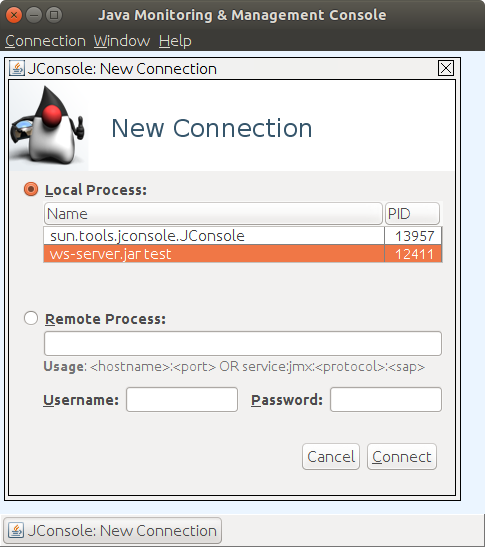
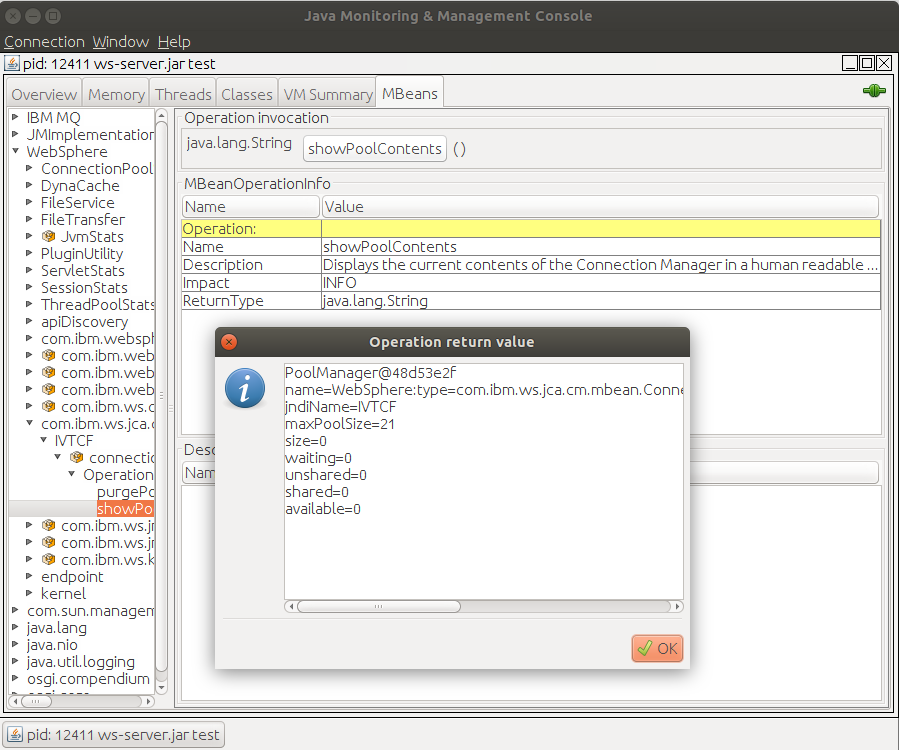
For example with WAS Liberty, you can use jconsole to connect to the liberty instance and display information about

com.ibm.ws.jca.cm.mbean.ConnectionManagerMBean.

This has a list of connection factories, and you can use operations→ showPoolContents. For example

PoolManager@2e32f2aa
name=WebSphere:type=com.ibm.ws.jca.cm.mbean.ConnectionManagerMBean,jndiName=IVTCF,name=jmsQueueConnectionFactory[samplejQCF]/connectionManager[QMA]
jndiName=IVTCF
maxPoolSize=3
size=3
waiting=0
unshared=0
shared=1
  ManagedConnection@7ce98dcb=ActiveInTransaction thread=null transaction=2 connectionHandles=0
available=2
  ManagedConnection@328a917a=Reusable
  ManagedConnection@59fec985=Reusable


So we can see one connection is currently in use, and there are two available for reuse.

There are no transactions waiting.

How to tune MQ for JMS

The answer is that most of the tuning is outside of MQ, not within MQ.

Within an application, a JMS connectionFactory is used to define the connection. This includes information on how to connect to the queue manager, for example client or bindings.

As MQCONN and MQDISC are expensive requests, JMS can use connection pooling, where a connection is release back into a pool. A request for a connection can use a free connection in the pool – if one is available.

In a well set up, balanced MQ environment, there will be few MQCONNs an MQDISCs a second, as most of the requests should come from the pool. If a lot of work comes in, you may see the number of connections increase to the maximum. As the work drops off, the number of connections will drop down to a steady state.

To use connection pooling you configure the WebSphere® MQ resource adapter to specify

  • maxConnections
  • reconnectionRetryCount
  • reconnectionRetryInterval
  • startupRetryCount
  • startupRetryInterval

See here.

If you are using the SI bus in liberty as your queuing infrastructure, you can prevent spikes in requests for connections when a log of work arrives, you can specify

  • Surge threshold
  • Surge creation interval.

Which limit how fast the pool grows.

These are not supported for MQ.

If the connection pool is not being used… what do I need to change to get it to be used

  • When running in WebSphere Application Server, connection pooling is provided for free providing an application is using a connection factory that is defined in the WebSphere Application Server JNDI repository.
  • I could no find much information about connection pooling in WebLogic Server.
  • JBOSS documentation refers to Connection pooling – see here  


What do the performance levers do?

With most machinery, there are usually levers to make it go faster, and levers to make it go slower.

Before publishing this blog, I thought I had better check that I had covered the basic Liberty tuning for MQ. I found some levers worked, some levers did not work, and there are  some bottlenecks or levers which are hidden. I used Google search to go through the available documentation and blog posts.

Basic scenario.

I used an MDB based on the code below. Note the Thread.sleep() to add a 2 second wait in the program.

The class

public class mdb implements javax.ejb.MessageDrivenBean,
MessageListener {
...
}

with the onMessage method to do the work

public void onMessage(Message message) {
try {
  InitialContext ctx = new InitialContext(); 
  ConnectionFactory cf = (ConnectionFactory) ctx.lookup(“COLINMDB”);
  connection = cf.createConnection();
  connection.start();
  session = connection.createSession(false, 1);
  producer = session.createProducer(dest);
  TextMessage response = session.createTextMessage(
      "Colins Reply”);
  producer.setDeliveryMode(message.getJMSDeliveryMode());
  response.setJMSCorrelationID(message.getJMSMessageID());
  producer.send(response);
  Thread.sleep(2000); // this many milliseconds
  return;
} catch (Exception je) {}
finally {}
}

The program uses conectionFactory COLINMDB when sending the reply back.

There was additional code to report when an MDB started, and to print out statistics when it was shut down.   This was done using the methods

public void ejbCreate() {// print out information  }
public void ejbRemove()
throws EJBException
 {   // print out statistics} 

My program has code to time the various requests, and reports the data during “ejbRemove” processing.

Driving program.

I use a program to put 100 non persistent messages, then waited for the replies and then looped. So I would expect to have 100 instances of the MDB running at a time.


Server.xml file

In the server.xml file, I started by making the tuning parameters very large (typically over 200)

Initial results

When I ran the workload I had many messages on the input queue but achieved

  • number of MDBs running                                                     40
  • number of queue handles for the input queue appltag   41
  • number of queue handles for the output queue appltag 30

This was a disappointing surprise.

  1. I expected the number of MDBs to be close to 100. Even when running multiple jobs, and the queue depth of the input queue was over 200, I could not get more than 40-45 MDBs running. There is clearly a bottleneck or hidden lever here.
  2. The number of handles for the input queue was larger than the number of handles for the output queue. So there is another bottleneck or hidden lever here.

I would expect the number of output handles to peak at the value of the input handles. This is true for when the number of MDBs is under about 20, but not for larger numbers

What did the levers do?

jmsActivationSpec maxEndPoints

<jmsActivationSpec id=”MDB/MDB/MDB”   maxEndpoints=”100″ >

Changing maxEndpoints from 100 to 25 gave

  • number of MDBs running                                                    25
  • number of queue handles for the input queue appltag   25
  • number of queue handles for the output queue appltag 25

The maxEndpoints lever clearly works.

jmsActivationSpec, properties.wmqJms maxPoolDepth

<jmsActivationSpec id="MDB/MDB/MDB"
<properties.wmqJms maxPoolDepth="800"

Setting maxPoolDepth to 7 gave

  • number of MDBs running                                                    7
  • number of queue handles for the input queue appltag   7
  • number of queue handles for the output queue appltag 7

So this clearly works.

I do not know the difference between maxEndPoints, and maxPoolDepth.  They both need to be set to a high value to work.

Output queue, jmsConnectionFactory, Connection Manager maxPoolSize

<jmsConnectionFactory id="COLINMDB" 
   <connectionManager maxPoolSize="200"…

Setting maxPoolSize to 13 gave

  • number of MDBs running 100
  • number of queue handles for the input queue appltag 100
  • number of queue handles for the output queue appltag 13

This was a surprise, I get more MDBs but fewer output handles used.

Output queue, jmsConnectionFactory, properties.wmqJms  maxPoolDepth

 <jmsConnectionFactory id="COLINMDB" jndiName="COLINMDB"> 
  <connectionManager maxPoolSize="100" </connectionManager>
   <properties.wmqJms maxPoolDepth="7" 

No difference (but it did make a difference when used in the jmsActivationSpec)

wmqJmsClient maxConnections

<wmqJmsClient maxConnections=”997″ nativeLibraryPath=”a/opt/mqm/java/lib64″/>

Changing maxConnections=”997″ to maxConnections=”25″ had no effect.

executor

<executor name=”Default Executor” coreThreads=”150″ id=”default” maxThreads=”496″ />

See here for the description of the executor tag.  Changing coreThreads and maxThreads had no effect

<executor name=”LargeThreadPool” id=”default”…

name=”LargeThreadPool” is mentioned in several blog posts.  Using this had no impact. 

If I used both, I got messages such as Property coreThreads has conflicting values when the server was restarted.  If I changed this dynamically the problem was not detected.

Startup times.

When the server was started, it took 30 seconds from the message

[AUDIT ] CWWKZ0001I: Application MDB started in 3.024 seconds

to the first MDB being started and processing messages.


Avoiding the random cut and paste approach to configuring JMS in a liberty web server

Why these JMS blog posts?

I had a “quick” question from someone, “can I configure JMS to reduce CPU usage and improve performance?”. It was was wet Monday in Orkney (north of Scotland) and I thought I would spent an hour looking into it. A few weeks later, I am much wiser, and have some answers to the question. The Knowledge Center has a lot of information, mostly is useful, mostly accurate, some information is missing and some assumes that you are very familiar with the product.

I also found that that the Java people tend to use different words for familiar concepts, so I had to struggle with this different language.

Below are the blog posts I wrote on getting JMS working on Ubuntu 18.04 with MQ V9.


WAS Liberty configuration

  • Liberty is a cut down IBM WebSphere Application Server (known as WAS)

  • There are two messaging engines available to WAS

    1. WMQ which all programs can use ( batch, CICS IMS etc)

    2. a messaging engine within the WAS know as the SI bus.

I’ll focus on the WMQ version.

  • A Liberty instance can connect to more than one queue manager, and can use local bindings or client attach.

  • An application running in Liberty can connect to multiple queue managers. For example, it might create a JMS connection to QM1 to get a message, and then connect to QM2 to send a reply. It usually connects to just one queue manager.

  • Different applications running in a Liberty instance can have different requirements, for example they may use different queue managers, or you want to limit how many application instances can connect to MQ at a time

  • You can run a program by specifying a URL in the web browser

  • You can have “triggering” within Liberty where there is a listening thread which gets messages from a queue, and runs an message-driven bean (MDB) instance on a new thread, passing it the message. . Typically these MDBs connect to MQ to put a reply.

  • There is “glue” code between applications and the queue manager. This is provided by IBM and converts the Java requests and issues the request to the queue manager, and handles syncpoint etc. This is the MQ resource adapter (RA), which implements the Java Connector Architecture (JCA) specification.

  • In days gone by you had

    • a jmsQueueConnectionFactory for generating a handle for working with queues,

    • a jmsTopicConnectionFactory for generating a handle for working with topics.

    • there is now a jmsConnectionFactory for working with either. They are not interchangable – I think jmsConnectionFactory is the way to go.

Programs that need a connection to MQ.

These applications

  1. Are involved with a URL. It typically connects to MQ, receives (gets) a message from a queue, and sends(puts) a reply message.

  2. or an MDB sending a reply back to the originator.

  3. or the thread which monitors a queue and invokes the MDB applications

There are several ways of providing the information needed to connect to MQ

  1. Provide all the information in the application. This is not very flexible, as you need to change constants, rebuild and redeploy the applications if you want to change the connection information

  2. Provide all of the information in a configuration file (server.xml). To change the connection information, you change the configuration and restart the application. You do not need to rebuild, nor redeploy the application. Your application passes in a label, and says give me the information.

  3. A mixture of the above.

Different applications may need a different connection profile

You may want different business applications to have a different connection profiles

You may want to specify

  • Queue manager name

  • TCP port number

  • SSL information etc

  • The maximum number of application instances that can get a connection to MQ – for a particular application. Different applications may have a different maximum.


Basic configuration

Page JMS Connection Factory (jmsConnectionFactory) describes the jmsConnectionFactory definition, but it is not very clear on how to specify things.
A sample jmsConnectionFactory definition is given below

<jmsConnectionFactory id="QMAJMS" jndiName="QMAJMS">
  <connectionManager maxPoolSize="21" > </connectionManager>
  <properties.wmqJms hostName="localhost"
    port="1414" transportType="CLIENT" 
    applicationName="fromjmsConnectionFactory"
  />
</jmsConnectionFactory>

Kindergarden basics.

<!– ….–> is a comment

For a “name” tag you either need

<name...>
.....
</name>

or <name… />

Where … is data relevant to that tag and ….. are other tags or is empty.

From the doc you can keyword=”value” on the jmsConnectionFactory tag.

<jmsConnectionFactory
id="QMAJMS"
jndiName="QMAJMS"
connectionManagerRef=”...”
containerAuthDataRef=”...”
recoveryAuthDataRef=”...”
>

From the doc, you can have tags between <jmsConnectionFactory …> and </jmsConnectionFactory> tags

  • <connectionManager…/>

  • <containerAuthData…/>

  • <properties.wasJms…/>

  • <properties.wmqJms…/>

  • <recoveryAuthData…/>

  • I found you can have <authData user=”…” password=”….”/> but this is not documented.

properties.wasJms are properties you specify if you are using the SI Bus, or internal queue manager, and properties.wmqJms if you are using MQSeries.

If you want to specify applicationName, this is a property on the <properties.wmqJms> and the <properties.wasJms>.  If you specify it else where, it will be ignored. So you cannot specify if on the <jmsConnectionFactory> tag and expect it be propogated to nested elements.  Make sure you specify the data on the correct tag.  You may not get told if you have misspelt it or added it to the wrong tag (as I frequently did).

Which data is used if there are multiple definitions

if you have multiple statements for the same definition, the last definition value is used. You generally do not get told of any differences.

<jmsConnectionFactory… >
<properties.wmqJms queueManager="QMB" transportType="CLIENT" 
   applicationName="Hello"/>
<properties.wmqJms queueManager="QMA" transportType="BINDINGS"/>
</jmsConnectionFactory>

The parameters used are

  • queueManager=”QMA”

  • transportType=”BINDINGS”

  • applicationName=”Hello”

Similarly 
<jmsConnectionFactory jndiName=J1 id=J1… >
<properties.wmqJms queueManager=”QMB” transportType=”CLIENT”
applicationName=”Hello”/>

/>
</jmsConnectionFactory>
<jmsConnectionFactory jndiName=J1 id=J1… >
<properties.wmqJms queueManager=”QMC”
transportType=”BINDINGS”
/>

</jmsConnectionFactory>

Will try to use bindings mode and queue manager QMC.

This behavior is not consistent, for examples

<jmsActivationSpec id="wmq.jmsra.ivt/WMQ_IVT_MDB/WMQ_IVT_MDB"
connectionFactoryLookup="IVTCFB"></jmsActivationSpec>
<jmsActivationSpec id="wmq.jmsra.ivt/WMQ_IVT_MDB/WMQ_IVT_MDB"
connectionFactoryLookup="IVTCFA" >
... 
</jmsActivationSpec>

Reports the inconsistency and gives

[AUDIT ] CWWKG0102I: Found conflicting settings for 
wmq.jmsra.ivt/WMQ_IVT_MDB/WMQ_IVT_MDB instance of 
jmsActivationSpec configuration.
Property connectionFactoryLookup has conflicting values:
Value IVTCFB is set in file:.../test/server.xml.
Value IVTCFA is set in file:...test/server.xml.
Property connectionFactoryLookup will be set to IVTCFA.

Server.xml pre-req information to run JMS applications

You need

<featureManager>
<!-- the next two features are needed to install 
the JMS and MDB code -->
<feature>wmqJmsClient-2.0</feature> 
<feature>mdb-3.2</feature> 
</featureManager>
<!-- point to the Resource Adapter- 
  specify the value for your system -->
<variable name="wmqJmsClient.rar.location" 
    value="/opt/mqm/java/lib/jca/wmq.jmsra.rar"/>
<!-- if you use BINDINGS transport you need to -->
<!-- tell the server where the MQ libraries are -->
<wmqJmsClient nativeLibraryPath="/opt/mqm/java/lib64"/>

Basic JMS configuration

Below is an example configuration to provide connection information for two applications, one to connect to QMA, the other to connect to QMB, both using binding mode.

<jmsConnectionFactory jndiName="jms/PAYROLLCF" id="samplej1>
<properties.wmqJms queueManager="QMA" 
  transportType="BINDINGS" "/>
</jmsConnectionFactory>

<jmsConnectionFactory jndiName="INQUIRYCF" id="samplej2>
<properties.wmqJms queueManager="QMB"
  transportType="BINDINGS" "/>
</jmsConnectionFactory>

The PAYROLL application issues a request for the JNDI “jms/PAYROLLCF” and will get a bindings connection to queue manager QMA.

The INQUIRY application issues a request for the JNDI “INQUIRYCF” and will get a bindings connection to queue manager QMB.

The properties.wmqJms says this is for an external queue manager. If you had specified. properties.wasJms… this would be for the SI bus queue manager within the WAS server.

You should specify a jmsConnectionFactory for each business application to provide application isolation otherwise they sharer connections.

This should be enough configuration for your applications to connect to MQ, but  quickly moving on to more advanced topics.

Specifying connection parameters

You may want to limit how many concurrent connections a jmsConnectionFactory can use. You specify this information using an <connectionManager.. > tag.

You can either put <connectionManager.. > inside

<jmsConnectionFactory jndiName="PAYROLLCF" id="samplej1>
<connectionManager maxPoolSize=50/>
<properties.wmqJms … />
</jmsConnectionFactory>

or create one outside of the tags, and point to it. This way a definition can be shared by multiple jmsConnectionFactorys.

<connectionManager id=”MYCM” maxPoolSize=50/>

<jmsConnectionFactory connectionManagerRef="MYCM"
     jndiName="IVTCF"...>
  <properties.wmqJms.../>
</jmsConnectionFactory>

<jmsConnectionFactory connectionManagerRef="MYCM" 
    jndiName="IVTCF2"...>
  <properties.wmqJms.../>
</jmsConnectionFactory>

Each jmsConnectionFactory will have its own pool of threads up to the specified maximum of 50.

Specifying default userid information

You can specify a default userid and password for the application You can specify it inline

For example

<jmsActivationSpec jndiName="PAYROLLCF" id="samplej1>
<authData user="colinpaice" password="ret1red"/>
<properties.wmqJms .../>
</<jmsActivationSpec>

The documentation describes containerAuthDataRef on the <jmsConnectionFactory…>

which points to a <authData id=..>
tag outside of the <jmsConnectionFactory..>, but I could not get it to work.

The connection factory pointed to by <properties.wmqJms connectionFactoryLookup=”QMAJMS”.. > can also has an authData, but this is not used for the jmsActivationSpec. It is used when applications use the jmsConnectionFactory – for example the WMQ_IVT sample.

You may have noticed that the password is in clear text! You can use

~/wlp/bin/securityUtility encode xxxxxxx

to encode xxxxxxxx to make it harder to read. For example

./securityUtility encode ret1red

gives

{xor}LTorbi06Ow==

and you use

<authData user=”me” password=”{xor}LTorbi06Ow==”/>

Note:
You have to do other configuration for
userid validationthis to work. For example using runmqsc

dis qmgr connauth    
   QMNAME(QMB) CONNAUTH(SYSTEM.DEFAULT.AUTHINFO.IDPWOS) 
dis authinfo(SYSTEM.DEFAULT.AUTHINFO.IDPWOS) CHCKLOCL   
   AUTHINFO(SYSTEM.DEFAULT.AUTHINFO.IDPWOS)   
   AUTHTYPE(IDPWOS)      CHCKLOCL(REQUIRED)

Check you have CHCKLOCL(REQUIRED).

If the queue manager has been configured not to require userid and password then you can omit the <authdata…./>

How to specify a queue

If the applications are looking up the queue information, you pass a jndiName.

If you are specifying the queue for an MDB listener you specify the id, and refer to it.

<jmsQueue id="AAAA" jndiName="JIVTQueue">
<properties.wmqJms baseQueueName="IVTQueue"/>
</jmsQueue>

Common parameters are

  • jndiName, this is what is used in the application to locate the queue definition

  • id used by the EJB listener task (jmsActivationSpec)

  • baseQueueName, this is the queue in the queue manager

  • baseQueueManagerName, this is used to specify a remote queue manager name, so there will typically be transmission queue with this name. This is not the name of the queue manager you need to connect to.

As with the properties.wmqJms above, the last definition is used, so with

<properties.wmqJms baseQueueName="IVT3"/>
<properties.wmqJms baseQueueName="IVT2"/>

the queue IVT2 would be used.

Specifying a MDB listener.

You need to configure the listening task for the queue.

I thought I had configured this properly, but when I tried to test it by using an invalid queue manager – it continued to work! This is because of new functions in <feature>wmqJmsClient-2.0</feature>

I had copied and pasted

<jmsActivationSpec id="wmq.jmsra.ivt/WMQ_IVT_MDB/WMQ_IVT_MDB"
     maxEndpoints=500 >
  <properties.wmqJms 
     destinationRef="AAAA"
      transportType="BINDINGS"
     queueManager="QMA"/>
  <authData id="auth1" user="colinpaice" password="ret1red"/>
</jmsActivationSpec>

The

  • id=”wmq.jmsra.ivt/WMQ_IVT_MDB/WMQ_IVT_MDB” is the identity of the EJB code, it is coded within the EJB itself. “a/b/c” is

    • a: wmq.jmsra.ivt is the ….ear file in dropins directory.

    • b: WMQ_IVT_MDB is the name of the jar file within the .ear file

    • c: WMQ_IVT_MDB is the name of the MDB within the jar file.

  • destinationRef=”AAAA” points to a jmsQueue object described above.

  • QueueManager is the queue manager that the listener connects to – QMA

  • MaxEndpoints is optional and specifies the maximum number of threads that can be used for EJBs. The default is 500. You should specify the maximum number of MDBs you want to run for this Activation spec.

  • destinationType you can specify if you want to get from a queue or subscribe to a topic.

When I changed this to use a different queue manager, it continued to work because the MDB had ConnectionFactoryLookup=”IVTCF” hidden away in the ejb-jar.xml file. To make it even more difficult to understand, parameters can also be coded in @annotations in the java code!

This says ignore the queue manager information specified in the <properties.wmqJms…> within the <jmsActivationSpec…> and use the information in the <jmsConnectionFactory jndiName=”IVTCF“…> definition to find the  queue manager configuration to use.

This creates its own pool of connections based on the information in the jmsConnectionFactory – it does not share the connection pool.

I tried to override it, and specified

<jmsActivationSpec id="wmq.jmsra.ivt/WMQ_IVT_MDB/WMQ_IVT_MDB" >
<properties.wmqJms connectionFactoryLookup="IVTCFBZ" …./>

where connection factory IVTCFBZ did not exist – but it still worked! ( Because connectionFactoryLookup property in the ejb-jar.xml file took precedence over the connectionFactoryLookup in the activation specification definition).

To be able to configure the jmsActivationSpec how I wanted it, I had to remove ConnectionFactoryLookup and DestinationLookup from the ejb-jar.xml file.

These are the steps I took

  1. copy out the .ear file cp wmq_jmsra_ivt.ear ~/temp/

  2. go to this file cd ~/temp

  3. save a copy in case things go wrong cp wmq_jmsra_ivt.ear wmq_jmsra_ivt.ear.save

  4. rename it mv wmq_jmsra_ivt.ear ccp.ear
  5. extract the jar file jar -xvf ccp.ear WMQ_IVT_MDB.jar

  6. extract the ejb-jar.xml jar -xvf WMQ_IVT_MDB.jar META-INF/ejb-jar.xml

  7. edit file to remove the two activation-config-properties

<activation-config>
<activation-config-property>
<activation-config-property-name>DestinationLookup</activation-config-property-name>
<activation-config-property-value>IVTQueue</activation-config-property-value>
</activation-config-property>
<activation-config-property>
<activation-config-property-name>ConnectionFactoryLookup</activation-config-property-name>
<activation-config-property-value>IVTCF</activation-config-property-value>
</activation-config-property>
</activation-config>
  1. save the updates

  2. update the jar file jar -uvf WMQ_IVT_MDB.jar META-INF/ejb-jar.xml

  3. rebuild the ear file jar -uvf ccp.ear WMQ_IVT_MDB.jar

  4. copy the file back to the dropins directory cp ccp.ear…

  5. rename the file in the dropins directory mv wmq_jmsra_ivt.ear wmq_jmsra_ivt.ear.old

I found Configuring the resource adapter for inbound communication

and Configuring the resource adapter for inbound communication useful.

The document describes destinationLookup , which is new – but I could not get it to work. I needed destinationRef= pointing to a <jmsQueue..>.

If I removed destinationRef=… I got

CWWKG0095E: The element properties.wmqJms is missing the required attribute destinationRef.

Without < properties.wmqJms…> I got no console messages and it didnt work!

Can my MDB access this activationSpec?

I could not find any documentation on having your MDB access information from the ActivationSpec, so I dont think you can specify useful information such as which connectionfactory the MDB  should use for sending replies.

I want to use the same MDB for more than one queue or queue manager.

The <jmsActivationSpec id=…> maps to one queue. If you have the same id in two definitions, you get a combined definition, not two. Each major element has to have a unique id, and so you need a different .ear/.jar/mdb combination.

To use a second queue, with the same MDB I had to create a second ear file, ccpdup.jmsra.ivt.ear. This is not simply a copy of the wmq.jmsra.ivt.ear file because the wmq…ear file defines the web application http://192.168.1.222:9080/WMQ_IVT/, and Liberty complained because I had duplicate definitions.

WAS Traditional allows you to create a single activation spec definition, and share that across multiple MDBs. It is not possible to do that with Liberty though, so I had to adopt this approach

I did the following steps to create a copy of the ear file.

  1. create a temporary directory

  2. copy wmq.jmsra.ivt.ear info this directory.

  3. expand it into its constituent pieces. jar -xvf wmq.jmsra.ivt.ear

  4. remove the web application .war file I didnt need rm WMQ_IVT.war

  5. edit META-INF/application.xml

  6. remove the WMQ_IVT.war reference

  7. change <display-name>wmq.jmsra.ivt</display-name> to <display-name>ccp.jmsra.ivt</display-name>

  8. create a new jar file jar -cvf ccpdup.jmsra.ivt.ear WMQ_IVT_MDB.jar

  9. add the meta data to the new jar file. jar -uvf ccp.jmsra.ivt.ear META-INF/*

  10. copy ccpdup.jmsra.ivt.ear to the dropins directory

  11. change server.xml to duplication the <jmsActivationSpec and change it to id=”ccpdup.jmsra.ivt/WMQ_IVT_MDB/WMQ_IVT_MDB”…>

  12. In the dropins directory I copied ccpdup.jmsra.ivt.ear to zzz.jmsra.ivt.ear, and created an jmsActivationSpec. The liberty instance started – I dont know if it works!

I duplicated the <jmsActivationSpec..> and changed the name to ccpdup…..

This then worked.

You do not have to specify …

Under the covers the wmq.jmsra.rar logically generates a <resourceAdapter
id="wmqJms" ..>
statement.

You do not need to specify <connectionFactory
...>
because the <jmsConnectionFactory… > does this for you.

Here be dragons – take care

In medieval maps you would get pictures of sea monsters and words of warning “Here be dragons” etc.
I think deploying MDBs and jmsActivationSpec is dragon country
because of the application development team specifying connectionFactoryLookup in the deployed file which overrides which queue manager parameters the system administrator has specified.  What works in test may not work in production, because the values have been hard coded.

The secret deployment can break you

Typically you have

  1. application developers who create the MDB and the .ear, .war and .jar files.

  2. System administrators who configure the environments and move deployments from test into production.

When using a MDB there is a risk that the jmsActivationSpec queue manager and queue information carefully crafted by the system administrators will be ignored. This is because the applications people have quietly added <activation-config-property-name>ConnectionFactoryLookup… → jndiname → queue manager name… deep down in the deployment of the jar file, and no one will know until there is a problem because the wrong queue is being processed, or a queue is not being serviced. To fix this you need to rebuild the application!

I could not find an easy set of commands to find if the string is in the ejb-jar.xml files. You have to extract from the .ear file to get the .jar files, then extract from the .jar files to get the ejb-jar.xml file and then use grep on it! So a big check every time you deploy (or redeploy) any MDB into production.

Difficult to deploy MDB more than once.

If you want to use an MDB on more than one queue, you need to have carefully consider your configuration. You may need multiple .ear files, or you may be able to use alias’s to a base .ear file.

Displaying connection manager information

You can use tools like jconsole to display information provided by JMX, such as the max size of a connection pool – but only a little useful information is provided.

I could not find how to display information about the connection factory built for the jmsActivationSpec.

Definitions not working.

I could not get applicationName=”MYAPP” definition to work on any binding connections.

This only works with client connections ( this is not documented). Once I had changed to use client connections, dis Q(IVT*) type(handle) gave me

AMQ8450I: Display queue status details.
 QUEUE(IVT2) TYPE(HANDLE)
 APPLTAG(jmsASIVTCF) PID(8037) 
 USERID(ibmsys1) 

Making it easier to configure your server.xml file

You can use the <include optional="true" location=".."/ statement to help

  1. Put the JMS stuff in its own file, so you reduced the complexity of the server.xml file.

  2. Put common, or repeated stuff in the file

See WAS Liberty documentation on Include

Location can be

  • an explicit path “/home/colinpaice/myxml.xml”

  • ${wlp.user.dir}/file.xml”
    in my case this is ~/wlp/usr

  • ${server.config.dir}/my.xml”.
    Where ${server.config.dir} =
    ${wlp.user.dir}/servers/servername
    the
    same place as the default server.xml file is stored

For example if you could have a server.xml file with

<server>
<include location=”${server.config.dir}/jmsfeat.xml"/> 
<include location=”${server.config.dir}/jmscf.xml"/> </server>

and in the same directory have jmsfeat.xml with

<server>
<featureManager>
<feature>wmqJmsClient-2.0</feature> 
<feature>mdb-3.2</feature> 
</featureManager>
<variable name="wmqJmsClient.rar.location" value="/opt/mqm/java/lib/jca/wmq.jmsra.rar"/>
<wmqJmsClient  nativeLibraryPath="/opt/mqm/java/lib64"/> 
</server>

and jmscf.xml with

<server>  
<jmsConnectionFactory… >

<properties.wmqJms queueManager="QMB"
transportType="BINDINGS”/> </jmsConnectionFactory>
</server>

When the server starts it puts out a message

[AUDIT  ] CWWKG0028A: Processing included configuration resource:  /home/colinpaice/wlp/usr/servers/test/jmsfeat.xml 
[AUDIT  ] CWWKG0028A: Processing included configuration resource:  /home/colinpaice/wlp/usr/servers/test/jmscf.xml

so you can see which files are (or are not) being included.

You  can specify

<include optional=”false” location=”${server.config.dir}/z.xml”/>

If this file is not found you get an error messages

[ERROR] CWWKG0090E: The ${server.config.dir}/z.xml configuration resource does not exist or cannot be read.

If  you specify optional=”true” you get no message if the file is not found.

See Customizing the Liberty environment for information on the ${…} variables

Being super efficient failed.

I tried putting the passwords in an includ file, but it did notwork.  So

Being super efficient failed.

<jmsConnectionFactory… >
<properties.wmqJms queueManager="QMB"  transportType="CLIENT" /> >

<include location=”/home/password.xml/password.xml”/> </jmsConnectionFactory>
</server>

did not try to include the file. If I moved the <include..> after the </jmsConnectionFactory> it  copied the file in but that did not help me with keeping the passwords in one place.

Also using Eclipse to validate the data in the server.xml file. Eclipse could check individual files, but it does not use information in other files, and may complain that something is not defined – when it is defined in another file.

Using Eclipse to check the configuration.

    • Start eclipse
    •  Window→ show view → servers
    •  No servers are available. Click this link to define a new server”
    •  Select IBM → Liberty Server
    • Next
    • Select “Chose an existing installation” and give the directory path of the liberty code (/home/colinpaice/wlp)
    •  next”
    •  select an existing server or create a new one”
  •  pick your server instance
  • Select Servers, and expand your “liberty server at..” and then expand “server configuration server.xml”
  • Double click on feature manager, and you should see the top middle pane have data in it.

You can now move through the file and check you definitions.

The “markers” tab has errors and warnings.

If you have used <include.. > then the validation is done on the individual file.

Some of the validation is not at the latest level. I had warning messages about  connectionFactoryLookup not being a valid parameter.

Use of Liberty Adminconsole

The Liberty Admin console provides a way of displaying your server.xml file. I found it often did not work, or did not display all of the information.

Check your liberty startup. If you have a statement like

[AUDIT ] CWWKT0016I: Web application available (default_host): http://…../adminCenter/

You may be able to use this URL to display and manage the server.xml file content.
It sometimes worked for me – sometimes it didnt and I got “One moment please…” and it did not get past this.

When it worked was random.

  • Sometime changing the level of java make it work, sometimes closing down and restarting the browser made it work.

  • Make sure you do not have the server.xml file open in an editor, or eclipse.

  • I also received SRVE8094W: WARNING: Cannot set header. Response already committed.

  • Working with one browser (Chrome) worked, when Firefox didn’t.

Good luck


Getting IBM JMS samples working in a WAS Libery Web Server on Ubuntu for people who cannot spell Java Massage Service.

Why these JMS blog posts?

I had a “quick” question from someone, “can I configure JMS to reduce CPU usage and improve performance?”. It was was wet Monday in Orkney (north of Scotland) and I thought I would spent an hour looking into it. A few weeks later, I am much wiser, and have some answers to the question. The Knowledge Centre has a lot of information, mostly is useful, mostly accurate, some information is missing and some assumes that you are very familiar with the product.

I also found that that the Java people tend to use different words for familiar concepts, so I had to struggle with this different language.

Below are the blog posts I wrote on getting JMS working on Ubuntu 18.04 with MQ V9.

This section builds on “Getting JMS samples working in batch on Ubuntu for people who cannot spell Java Massage Service” entry

What is a WAS Liberty server?

A WAS liberty server is a cut down version of a full function WAS server. You configure it by specifying information in a server.XML file.

I downloaded wlp-webProfile8-18.0.0.3.zip and unziped it into ~/wlp

Dont throw away your zip file… as you may need it if you make a mess of your configuration!

Create a server instance called test. (The WAS people call this a profile… another example of the strange language used by these Java people). See Setting up Liberty for more information

cd wlp
cd bin
./server create test

You can run the server in background using

./server start test

The messages go to a file in ~/wlp/usr/servers/test/logs

or run it in foreground using

./server run test

The messages come out in your terminal’s window, so it is easy to see the effects of changes to your configuration.

You can use ctrl-c to stop the server started with ./server run …

If you started the server with ./server run test, or ./server start test, you can stop it by running

./server stop test

in a different terminal window.

Note: If you stop the server it gives a message

CWWKE0036I: The server test stopped after 1 minutes, 43.709 seconds.
If you try to restart it, within a few seconds, it may give a message

CWWKE0055I: Server shutdown requested on Tuesday, 27 November 2018 at 17:02. The server test is shutting down.
I use Ctrl-C and it stops quicker.

If you wait for a short period( 10 seconds) it seems to start up OK.

Configure the server

In the directory (where ‘test’ is the name of my server) ~/wlp/usr/servers/test is a file server.xml

This contains the configuration for the instance. I added some statements to this file before configuring it for JMS.  The following is my initial server.xml file.

<?xml version="1.0" encoding="UTF-8"?>
<server description="new server">
<!-- Enable features -->
<featureManager>
<feature>webProfile-8.0</feature>
</featureManager>
<!-- Define an Administrator and non-Administrator -->
<basicRegistry id="basic">
<user name="admin" password="adminpw" />
<user name="nonadmin" password="nonadminpwd" />
</basicRegistry>
<!-- Assign 'admin' to Administrator -->
<administrator-role>
<user>admin</user>
</administrator-role>
<!-- To access this server from a remote client add a host attribute to
the following element, e.g. host="*" -->

<httpEndpoint id="defaultHttpEndpoint" httpPort="9080" httpsPort="9443"/>
</server>

This defines userid admin and password adminpw, and says that user admin is an administrator.

You use port 9080 to access it non securely, and port 9443 for an SSL, or a secure session.

The statements

<featureManager>
<feature>webProfile-8.0</feature>
</featureManager

specify which components are to run in the server. The feature webProfile-8.0 copies in other features.

Save this file.

cd  ~/wlp/bin

execute  ./installUtility install test

Thisreads the server.xml anddownloads the files needed by the test instance,if they are not already installed.  I did a lot of playing around trying to get the Liberty instance to work as I expected.

{When things did not work as I expected, I did the following to ensure I had a clean environment

  1. copied out the server.xml file,

  2. removed the ~/wlp directory (which deletes the server.xml file)

  3. unzipped the file again to recreate the wlp directory

  4. cd wlp.bin, ./server create test

  5. copy the server.xml file back

  6. run ./installUtility install test

  7. copy the file to dropin- see below

}

Start the server  ./server run test

This produced

colinpaice@colinpaice:~/wlp/bin$ ./server run test
Launching test (WebSphere Application Server 18.0.0.3/wlp-1.0.22.cl180320180905-2337)
on OpenJDK 64-Bit Server VM, version 10.0.2+13-Ubuntu-1ubuntu0.18.04.2 (en_GB)

[AUDIT ] CWWKE0001I: The server test has been launched.
[AUDIT ] CWWKE0100I: This product is licensed for development, and limited production use.
The full license terms can be viewed here: https://public.dhe.ibm.com/ibmdl/export/pub/software/websphere/wasdev/license/base_ilan/ilan/18.0.0.3/lafiles/en.html

[AUDIT ] CWWKZ0058I: Monitoring dropins for applications.
[AUDIT ] CWPKI0820A: The default keystore has been created using the 'keystore_password'
environment variable.

WARNING: An illegal reflective access operation has occurred
WARNING: Illegal reflective access by org.apache.aries.jndi.startup.Activator (file:/home/colinpaice/wlp/lib/com.ibm.ws.org.apache.aries.jndi.core_1.1.22.jar) to field javax.naming.spi.NamingManager.initctx_factory_builder
WARNING: Please consider reporting this to the maintainers of org.apache.aries.jndi.startup.Activator
WARNING: Use --illegal-access=warn to enable warnings of further illegal reflective access operations
WARNING: All illegal access operations will be denied in a future release
[AUDIT ] CWWKF0012I: The server installed the following features: [beanValidation-2.0, servlet-4.0, ssl-1.0, jndi-1.0, cdi-2.0, jdbc-4.2, osgiConsole-1.0, appSecurity-3.0, appSecurity-2.0, jaxrs-2.1, monitor-1.0, webProfile-8.0, jpa-2.2, jsp-2.3, jsonb-1.0, ejbLite-3.2, managedBeans-1.0, jsf-2.3, localConnector-1.0, jsonp-1.1, jaxrsClient-2.1, el-3.0, jpaContainer-2.2, jaspic-1.1, distributedMap-1.0, websocket-1.1].
[AUDIT ] CWWKF0011I: The server test is ready to run a smarter planet.

The statement
CWWKF0012I: The server installed the following features: [beanValidation-2.0, servlet-4.0, ssl-1.0, jndi-1.0,…, websocket-1.1]

shows you what <feature>…</feature> were included. <feature>webProfile-8.0</feature> included beanValidation-2.0, servlet-4.0 etc

See Liberty features  for a description and more information about them.

Enter http://localhost:9080/ into the URL of a web browser. A page should be displayed.

In the Liberty startup it should have displayed a url like

http://10.0.0.59:9080/adminCenter/

use this in the web browser.

sign on with the userid specified (admin) and password
I got 3 boxes

  • Explore

  • Server config

  • wasdev.net

I originally had problems using the Explore and Server Config functions.  If I used /usr/lib/jvm/java-11-openjdk-amd64/bin/java then I got “Just a minute” and a blue box. Sometimes I got past this and I was given a link “server.xml” to click. This gave me “Just a minute”, and I was unable to get past this and display the configuration.

A week or so later I changed java levels and then the server started, and I could work with the server.xml file.

I reverted back to the openjdk version of java ( java -version)

openjdk version "1.8.0_181"
OpenJDK Runtime Environment (build 1.8.0_181-8u181-b13-1ubuntu0.18.04.1-b13)
OpenJDK 64-Bit Server VM (build 25.181-b13, mixed mode)

and this also worked. I cannot explain why it didn’t work, and then a few weeks later it did work!  It has stopped working again.

Configuring your Liberty instance

You can use the web panels to configure the server, or you can edit the server.xml.

You may want to use the liberty web pages for initial configuration and exploration, but then use the server.xml file, so you can put common or shared data in their own file, and use change management on these files.

I’ve used the server.xml route in the rest of the section.

Adding the JMS components.

Shut down the liberty instance, either use Ctrl-c or issue the command ./server stop test.

The server needs access to the IBM MQ JMS resource adapter(RA). This is the code between the applications and the queue manager. It may already be in your MQ libraries.

If ls /opt/mqm/java/lib/jca shows two files, wmq.jmsra.ivt.ear wmq.jmsra.rar , you have the component installed.  If not, or you need a later version, you need to install it.

You can use the command jar -tvf /opt/mqm/java/lib/jca/wmq.jmsra.rar to show the dates of the files within the Resource Adapter. My files had a date of Mon Jul 09 … 2018.

Downloading the Jms Resource Adapter(RA)

See Installing the IBM MQ resource adapter and Installing the resource adapter in Liberty.

I downloaded the Resource Adapter from  Fix Central

I used java -jar ~/snap/firefox/common/Downloads/9.1.0.0-IBM-MQ-Java-InstallRA.jar

make a note of where the files are installed – by default this is directory wmq in your current working directory

You will have two files

  • wmq.jmsra.ivt.ear this is the installation verification program

  • wmq.jmsra.rar in the directory this is the Jms Resource Adapter (RA)

Contents of the JMS sample wmq.jmsra.ivt.ear

The wmq.jmsra.ivt.ear has two programs inside it.

  1. A program you can execute from a web URL, for example http://localhost:9080/WMQ_IVT/ This has logic

    1. connect to MQ –  create connection factory object using passed JNDI connection factory name – or default to IVTCF,

    2. open the queue – create destination object using passed JNDI destination name or default IVTQueue

    3. create temporary dynamic reply_to_queue

    4. set message property JNDI_CF to the JNDI connection factory name. This is is so the back end application knows which connection factory to use.

    5. set message property IVTMessageID to the message id

    6. (put)  – send the message

    7. issue (get) receive and wait up to 10 seconds

    8. close queue

    9. end

  2. A program which runs when a message arrives. The program is a Message Driven Bean (MDB) (think triggered program). This MDB is called WMQ_IVT_MDB/WMQ_IVT_MDB

    1. When a message arrives, the listening thread invokes the MDB by passing the message into the onMessage method of the MDB.

    2. It gets the connection factory name from the message property “JNDI_CF” , or default to IVTCF if it is not present in the message

    3. Create the connection using the connection factory name

    4. locate the reply_to_ queue name from the message

    5. put a reply to the reply to queue

    6. end

This application uses by default

  1. a connection factory name of IVTCF. This maps onto queue manager name

  2. A destination IVTQueue. This maps to a queue name

  3. A temporary dynamic queue for the reply.

Once you have configured the server, you can use the url http://localhost:9080/WMQ_IVT/ to run the program, and if the MDB is active it will quickly complete, and you can display the returned message

Configuring the liberty instance

You can edit the server.xml file or use  “AdminConsole” application on the web page.

Both will update the server.xml file.

Add the JMS components to the server.xml configuration file

Add the following to the bottom of the server.xml file before the </server> tag at the bottom

<featureManager>
<!– the next two features are needed to install the JMS and MDB code –>
<feature>wmqJmsClient-2.0</feature>
<feature>mdb-3.2</feature>
</featureManager>
<!– point to the Resource Adapter(RA) – specify the value for your system –>
<variable name=”wmqJmsClient.rar.location” value=”/opt/mqm/java/lib/jca/wmq.jmsra.rar”/>
<!– tell the server where the MQ libraries are –>
<wmqJmsClient nativeLibraryPath=”/opt/mqm/java/lib64″/>
<!– connection manager is used to define connection pool sizes etc
<connectionManager id=”QMAcf” />
<!– IVT Connection factory –>
<jmsConnectionFactory connectionManagerRef=”QMAcf”
     jndiName=”IVTCF”

    id=”samplejQCF”>
   <properties.wmqJms queueManager=”QMA”
         transportType=”BINDINGS”
        applicationName=”Hello”/>
</jmsConnectionFactory>
<!– IVT Queues –>
<jmsQueue id=”IVTQueue” jndiName=”IVTQueue”>
<properties.wmqJms baseQueueName=”IVTQueue”/>
</jmsQueue>

The  executable JMS code is in wmq.jmsra.ivt.ear. You need to add this to the liberty server dropin directory

cp /opt/mqm/java/lib/jca/wmq.jmsra.ivt.ear ~/wlp/usr/servers/test/dropins/wmq.jmsra.ivt.ear

where test is the name of my server instance.

run ./installUtility install test

Restart the server

You will get additional messages

[WARNING ] CNTR4015W: The message endpoint for the WMQ_IVT_MDB message-driven bean cannot be activated because the wmq.jmsra.ivt/WMQ_IVT_MDB/WMQ_IVT_MDB activation specification is not available. The message endpoint will not receive messages until the activation specification becomes available.

[AUDIT ] CWWKT0016I: Web application available (default_host): http://localhost:9080/WMQ_IVT/

[AUDIT ] CWWKZ0001I: Application wmq.jmsra.ivt started in 1.467 seconds.

Ignore the CNTR4015W: message. The liberty instance needs some more configuration which is done below.

Note the url in the CWWKT0016I: … http://localhost:9080/WMQ_IVT/ messsage.

Enter the URL in a web browser. You should get a panel displayed

The ConnectionFactory IVTCF needs to have a matching

<jmsConnectionFactory jndiName=”IVTCF” …

statement

within this jmsQueueConnectionFactory the queue manager to use is defined with the

<properties.wmqJms queueManager="QMA" 
transportType="BINDINGS"
/>

The Destination IVTQueue needs to have a matching jmsQueue

<jmsQueue id="IVTQueue" jndiName="IVTQueue">
<properties.wmqJms baseQueueName="IVTQueue"/>
</jmsQueue>

define the queue to the queue manager using runmqsc

Define ql(‘IVTQueue’) …

You need the quotes around the queue name, because the default is an upper case queue name IVTQUEUE and you get return code 2085 when you try to run the sample! You could change it to

<properties.wmqJms baseQueueName=”IVTQUEUE”/>.

When you click on the run ivt button it issues a request with URL

http://localhost:9080/WMQ_IVT/IVT?mqcf=IVTCF&dest=IVTQueue

As the MDB is not running, the web page will wait for about 10 seconds then reports  “failed to receive response message” – this is because the MDB is not running, and so did not send a reply back.Screenshot from 2018-11-26 08-43-37

Configuring the MDB

As with MQ on CICS on z/OS, you can have a thread listening for messages on a queue, and then passing the messages to a different thread do do the work.

In the JMS environment, you can run the same way. A thread listens, and when a message arrives on the queue, it runs a Message Driven Bean passes it the message.

You need to configure JMS so it know which queue to listen on, and which MDB to run.

When the Liberty instance was started, it produced a message

[WARNING ] CNTR4015W: The message endpoint for the WMQ_IVT_MDB message-driven bean cannot be activated because the wmq.jmsra.ivt/WMQ_IVT_MDB/WMQ_IVT_MDB activation specification is not available. The message endpoint will not receive messages until the activation specification becomes available.

This was because the application is in the dropins directory. Liberty tries to process applications in this directory. It finds there are some definitions missing, and so produces the warning message.

MDBs need an Activation Specification so it knows which MQ Queue to listen to.

<jmsActivationSpec id=”wmq.jmsra.ivt/WMQ_IVT_MDB/WMQ_IVT_MDB”>…

The ID value must be in the format of application name/module name/bean name where application name is the name of the jar file (without the .jar suffix). 

See Deploying message-driven beans to connect to IBM MQ

<jmsQueue id="AAAA" jndiName="IVTQueue">
<properties.wmqJms baseQueueName="IVTQueue"/>
</jmsQueue>
<jmsActivationSpec id="wmq.jmsra.ivt/WMQ_IVT_MDB/WMQ_IVT_MDB">
<properties.wmqJms
destinationRef="AAAA"
transportType="BINDINGS"
queueManager="QMA"/>
<authData id="auth1" user="colinpaice" password="ret1red"/>
</jmsActivationSpec>

The AAAAs must match up.  The id=”wmq.jmsra.ivt/WMQ_IVT_MDB/WMQ_IVT_MDB will use queue IVTQueue.

Specify the authData for the userid and password to use.

<connectionManager id="QMAJMS" maxPoolSize="21">
<jmsConnectionFactory connectionManagerRef="QMAJMS" jndiName="IVTCF" id="samplejQCF">
<authData user="colinpaice" password="ret1red"
 <properties.wmqJms queueManager="QMA"                       
     transportType="BINDINGS"
   />
</jmsConnectionFactory>

(Since I got this working I found that the queueManager=”QMA” is ignored because the sample application has a hard coded “use connectionFactory IVTCF”. If the configuration does not have this specified, then the queueManager=.. is needed)

If you now enter the http://localhost:9080/WMQ_IVT/ URL in a web browser, if all is working you should get all ticks.Screenshot from 2018-11-26 08-54-41

If you click on View Message Contents it shows the message content.

Phew after all that work – it works!

How can I see what is going on ?

I could not find much to tell me what was going on, and providing useful information. From a performance perspective I am interested in the number of threads being used by the connections pool.

You can use an external program called jconsole, which comes in your Java environment, to look within the server.

Stop your server

Add the following statements to your server.xml

<featureManager>
<feature>localConnector-1.0</feature>
<feature>monitor-1.0</feature>
<feature>jsp-2.3</feature>
<feature>osgiConsole-1.0</feature>
</featureManager>

run ./installUtility install test

restart your server

If you do not have jconsole it can be downloaded eg sudo apt install openjdk-8-jdk

type jconsole 

Screenshot from 2018-11-26 08-19-34

Click Connect.
MBeans
WebSphere → com.ibm.ws.jca.cm.mbean.ConnectionManagerMbean
→IVTCF
→ connectionManager[QMAJMS]
→operations
→ showPoolContents

It is the line under WebSphere which does not have an icon at the front of the line.

Screenshot from 2018-11-26 08-41-51

Getting the IBM JMS samples working in batch on Ubuntu for people who cannot spell Java Massage Service.

Why these JMS blog posts?

I had a “quick” question from someone, “can I configure JMS to reduce CPU usage and improve performance?”. It was was wet Monday in Orkney (north of Scotland) and I thought I would spent an hour looking into it. A few weeks later, I am much wiser, and have some answers to the question. The Knowledge Centre has a lot of information, mostly is useful, mostly accurate, some information is missing and some assumes that you are very familiar with the product.

I also found that that the Java people tend to use different words for familiar concepts, so I had to struggle with this different language.

Below are the blog posts I wrote on getting JMS working on Ubuntu 18.04with MQ V9.

Basic background to JMS

JMS programs are written in Java (the clue is in the name)

They can run as a batch job, for example one program to put a message to a queue, and another program to get the message and send a reply back. You might have an application that connects to MQ, processes one message and ends, or a server application which connects and stays connected all day processing messages


You can run JMS applications in a Web Server

  1. Connect once and stay connected all day doing sends and receives
  2. Like a trigger monitor, a listener task gets a message from the queue and passes it to an Message Driven Bean(MDB) application which does all of the work, and sends the reply back to the requester.
  3. An application uses the web server and runs a transaction which invokes a program (MDB) to do the work. This is an URL usually something like http://localhost:9080/WMQ_IVT/ in your web browser.

JMS people speak a different language.

The JMS people (being Java people) speak with a different accent, which takes a bit of getting used to.

Puts vs send: MQ people speak of puts and gets, JMS people talk about send and receive.

Specifying queue names: C programmers often hard code names in their programs for example

#define SERVERQUEUE “PAYROLLSERVERQ”.

Change the common header file, and recompile it and it picks up the new defintions.

The JMS people have a better way of doing it. The mapping of  SERVERQUEUE to “PAYROLLSERVERQ” can be done outside of the program. You just change a configuration file, and do not need to rebuild your program. However some Java people write programs without the use of the external parameters, and define every thing in their Java program!

Connecting to a queue manager. In a similar way, to get a C program to talk to a queue manager as a client you need to set up an environment variable containing the channel name, IP address etc.

In JMS this is usually stored in a configuration file, so to change the queue manager, or where it is located, you change the configuration and restart the application.

  • In WAS Liberty the code to connect to MQ is called a connectionFactory. You pass parameters to this using data in XML in <jmsConnectionFactory …> tags. Personally, I would have called this <jmsConnectionFactoryInput… >. You just have to get used to these naming conventions.

The Russian doll of packaging java programs

If you open up a Russian Doll, you find another one inside. If you open this one, you find another one etc down to the smallest baby.

When working with Java you need to understand some of the packaging terms ( .jar, .war, .ear, MDB). At first with any new concept it sounds really hard, but you soon get used to it

  • You start with a source program myprog.java. This gets processed and produces a myprog.class file. For simple programs, this class file can be executed.
  • Normally your program needs other bits from libraries or other java programs for it to work. You package up your program and the java classes it needs into a .jar file. You can execute a name.jar file.
    • Why .jar? Well my guess is that there are tools which creates an “archive”, packaging files together using zip. So it is natural to call it Java Archive. Also jar sounds half the word “Ja-va” and calling it .jbntrp (Java Bits Needed To Run Program) is much harder than saying .jar.
  • If you want to run a Web application you need you need your .jar file or classes, and the webpages your application will use. Web pages are not java classes, so storing them in a .jar file feels wrong,  so we now have .war files or Web ARchive. This is all the .class files and web pages etc zipped up.
  • As well as a web application running from a URL, these applications often need to uses other components. Message Driven Beans (MDB) provide a service, they get called with data (the message), they do something, and return some data.
  • If you are running a big commercial application, or Enterprise Application, you break up your huge program into bits. You can have some bits running here, and other bits running over there. Just like with CICS you can have a File Owning Region, and a Application Owning region. For your big commercial application you have Enterprise Java Beans (EJBs) Which take the .war files, and the MDBs, and other into and create an Enterprise Archive – or an .ear file.

How do you look inside these are archives?

You can use the jar command as in

jar -tvf xxxx.yyy

For example to list what is inside it you need the -t option

jar –tvf new.ear

17972 Tue Nov 13 20:09:26 GMT 2018 WMQ_IVT.war
571 Mon Jul 09 11:40:24 BST 2018 META-INF/application.xml
10984 Tue Nov 06 09:20:42 GMT 2018 WMQ_IVT_MDB.jar
17972 Tue Nov 13 20:09:24 GMT 2018 CCP.war

To break up the archive file and eXtract files within it into the current directory, use

jar –xvf new.ear

once you have extracted it, you can then use jar on the files within it

jar -tvf WMQ_IVT.war

gives


WEB-INF/classes/IVT.class

which is what is executed!

You may also see .rar which are Resource Adapter ARchive files – ok – this should be .raar – but it is called .rar to keep it simple.

As I said it is like a Russian doll with, files within files, within files.

What’s in a bean?

You will hear a lot about Java Beans.
When you create an instance of a Java object you pass parameters, such as

new currentJob("Colin Paice","retired") or
new currentJob("Colin Paice", "retired","Orkney")

and there are methods which take the varying number of parameters and do things with the data.

A Bean is a java program, and instead of passing parameters into the object you invoke methods such as

job  = new currentJob();  // note no parameters are passed in
job.setName("Colin Paice");
job.setStatus("retired");
job.setAddress("Orkeny");

You can also issue

job.getName() .

to extract information.

Now comes the clever usage bit.
I can ask Java to tell me the methods a class has.  I will get back [“setName”,”setStatus”,”setAddress”,”getName”..]

So now I can select all the “get….” methods, and call them in turn.  This makes it great for systems management.   You can process my bean, and display all of the information in it.  I change the bean – and your program does not have to change – good eh?

A Message Driven Bean – is a bean with an additional method, “onMessage(…)” so we can now pass it data ( eg the content of an MQ message) to process.

Looking up parameters – JNDI

Java developers like to use an interface called JNDI get the configuration information.

This configuration could be in a database, or in the local file system – it depends on how you configure it.

As different applications can use the same repository, the JNDI uses a hierarchical naming standard. For example

application/Payroll/Server → PAYROLLONINPUT

application/LookupBalancel/Server → BALANCEINPUT

The application issues a query saying get me the queue name from “application/Payroll/Server”

there may also be

setup/configuation/constants

This means you can isolate the “application” and “setup” environments.

The Java people use the term initial context to identify the “application” or “setup” at the top of the naming ree.

Setting up the JNDI

It is good practice to set up your definitions once, and have every one use the same set. This takes time, and perhaps a database and server.

To save me time, (and help me understand the concepts) I used a directory tree on my laptop for “batch” programs”, and had the information stored within the Web Server configuration for the web server.

When using the file system as a JNDI repository, you point to a directory, and JNDI stores information within the directory.

Running the JMS “batch programs”

My system is Ubuntu 18.04 and I was running MQ V9.1.

I used the linux command find /opt/mqm -name Jms*.java to display all of the JMS sample programs.

This gave me

/opt/mqm/samp/jms/samples/JmsJndiProducer.java
/opt/mqm/samp/jms/samples/JmsBrowser.java
/opt/mqm/samp/jms/samples/JmsConsumer.java
/opt/mqm/samp/jms/samples/JmsJndiBrowser.java
/opt/mqm/samp/jms/samples/JmsProducer.java
/opt/mqm/samp/jms/samples/interactive/helper/JmsApp.java
/opt/mqm/samp/jms/samples/JmsJndiConsumer.java

I was interested in the JmsJndi* examples.

There are /opt/mqm/samp/jms/samples/JmsJndiProducer.class etc ready to run.

The syntax of the command is

JmsJndiProducer -i JNDI-Directory -c myQCF -d myQueue

Where the parameters summarised immediately below, and explained in more detail in the following text

  • -i JNDI-Directory is the directory where the JNDI data is stored (or the URL where the database is)
  • -c myQCF is the name of the connection factory (connection information object)
  • -d myQueue is the label which points to which queue to use

You define resources in the JNDI file using the JMSAdmin tool.

You need the ibmmq-java* package installed to get the JMS stuff.

First you need to define where your JNDI resources will be stored.

mkdir ~/JNDI-Directory

See Starting the administration tool

The JMSAdmin tool needs to be told where the JNDI repository is.

MQ provides a file /opt/mqm/java/bin/JMSAdmin.config. Read it, there are lots of comments.

You can use the command grep -v “#” /opt/mqm/java/bin/JMSAdmin.config to display just the non comment lines. This gave me

INITIAL_CONTEXT_FACTORY=com.sun.jndi.fscontext.RefFSContextFactory
PROVIDER_URL=file:///home/colinpaice/JNDI-Directory
SECURITY_AUTHENTICATION=none

create a file JMSAdmin.config in your home directory and add the above statements to it.

INITIAL_CONTEXT_FACTORY=com.sun.jndi.fscontext.RefFSContextFactory

says it is to read JNDI from a file in the file system.

Change PROVIDER_URL=file:///home/colinpaice/JNDI-Directory to match the directory you created above.

and make it writable

chmod 744 JMSAdmin.config

Objects required to run the sample programs

  1. The applications get passed a connectionFactory object, I’ll use ConnectionFactory CF1. This connection is to use bindings mode to queue manager QMA, and not use a client.
  2. Define a queue. The application will use JMSQ1, and this maps to queue Q1 on queue manager QMA.

Run the JMSAdmin tool to create the resources, using the above JMSAdmin configuration file.

See  Configuring JMS objects using the administration tool.  The syntax of the commands and the options is here.

/opt/mqm/java/bin/JMSAdmin -v -cfg JMSAdmin.config

def CF(CF1) QMGR(QMA) TRANSPORT(BIND)
# Define Queue Q1
InitCtx> DEF Q(JMSQ1) QMGR(QMA) QUEUE(Q1)

dis CTX gives

InitCtx> DIS CTX
JMSADM4089 InitCtx
.bindings java.io.File
a CF1 com.ibm.mq.jms.MQConnectionFactory
a JMSQ1 com.ibm.mq.jms.MQQueue
3 Object(s)
0 Context(s)
3 Binding(s), 2 Administered

end

You can use the command DIS CF(*) and DIS Q(*) to display  the objects

We have created a ConnectionFactory called CF1, and a queue object JMSQ1 which maps to queue Q1 on queue manager QMA.


To do things properly I should define a proper hierarchy

InitCtx> def ctx(Application)
InitCtx> change ctx(Application)
InitCtx/Application>def Q(APJMSQ1) QMGR(QMA) QUEUE(APPQ)
InitCtx/Application> change ctx(=UP)
InitCtx> dis ctx
.bindings java.io.File
a APJMSQ1 com.ibm.mq.jms.MQQueue
2 Object(s)
0 Context(s)
2 Binding(s), 1 Administered
end

In an application I would normally create the connectionFactory as Application/CF1 and the queue as Application/APJMSQ1

If you list the directory, you can see some of the elements

colinpaice@colinpaice:~$ ls -ltra JNDI-Directory
-rw-r--r-- 1 colinpaice colinpaice 15133 Oct 23 15:32 .bindings
drwxr-xr-x 57 colinpaice colinpaice 4096 Oct 26 08:31 ..
drwxr-xr-x 3 colinpaice colinpaice 4096 Oct 26 13:40 .
drwxr-xr-x 2 colinpaice colinpaice 4096 Oct 26 13:42 Application

Run the JMS sample program

The syntax is

JmsJndiProducer -i JNDI-Directory -c myQCF -d myQueue

so we have

The whole command is

java -cp /opt/mqm/samp/jms/samples:/opt/mqm/java/lib/com.ibm.mqjms.jar -Djava.library.path=/opt/mqm/java/lib64 JmsJndiProducer -i file:///home/colinpaice/JNDI-Directory -c CF1 -d JMSQ1

This produced

Initial context found!
Sent message:
JMSMessage class: jms_text
JMSType: null
JMSDeliveryMode: 2
JMSDeliveryDelay: 0
JMSDeliveryTime: 1540558478659
JMSExpiration: 0
JMSPriority: 4
JMSMessageID: ID:414d5120514d41202020202020202020cdb6d25b09202925
JMSTimestamp: 1540558478659
JMSCorrelationID: null
JMSDestination: queue://QMA/Q1
JMSReplyTo: null
JMSRedelivered: false
JMSXAppID: java
JMSXDeliveryCount: 0
JMSXUserID: colinpaice
JMS_IBM_PutApplType: 6
JMS_IBM_PutDate: 20181026
JMS_IBM_PutTime: 12543866
JmsJndiProducer: Your lucky number today is 641
SUCCESS

To read the message run the consumer JMS application

java -cp /opt/mqm/samp/jms/samples:/opt/mqm/java/lib/com.ibm.mqjms.jar -Djava.library.path=/opt/mqm/java/lib64 JmsJndiConsumer -i file:///home/colinpaice/JNDI-Directory -c CF1 -d JMSQ1

I have successfully managed to use a JMS program in batch to put and get a message!

Doing the above was relatively painless – the hardest part was understanding the concepts and strange language.

Flashes of insight into the MQ SMF data

To misquote Raymond Smullyan’s quote in What Is the Name of This Book?

  • If Professor A says it is obvious then a child of 10 can instantly see it
  • If Professor B says it is obvious then if you spend 10 minutes on it you will see it
  • If Professor C says it is obvious then you might spend the rest of your life and not see it
  • If Professor D says it is obvious – then it is false

I hope the “one liners” below are obvious if you spend 10 minutes on it

I was sent a report of key fields (Opened queue name, number of Mopens, MQgets, MQPUTS etc) and a list of questions

Why do I have records for queues which are not on my queue manager?

If the application put a message to a reply to queue then typically the MQOPEN uses the the remote queue name and remote queue manager name.  This maps to another queue, such as the SYSTEM.CLUSTER.XMIT.QUEUE, or a remote queue name.

The name in the OPENNAME in the SMF record will be the remote queue name.  If you look at the BASENAME as well, you will see the real queue it uses.  So the queue in the OPENNAME may not exist on the system – but the BASENAME will exist.

I have puts but no gets for a queue

  1. This could be caused by using a shared queue.  Messages were put on one queue manager and got from another queue manager in the QSG.   The SMF data from the other QMGR should have the gets.
  2. The IMS bridge got the messages and sent them to IMS over the OTMA interface.  This code does not record any SMF data.

This applies to gets but no puts.

I have 1 SMF record for this queue, but 1000 records for that queue

  • If you have a long running task then the SMF data is produced at a regular time – typically half an hour.  This will produce one record.  If you break out the data into a set of queue records you will have few records (typically more than 1 – one for the putting task (channel), and one for the getting server task
  • If you have short lived transactions such as CICS, or IMS MPP transactions then you will get an SMF record when the transaction ends.  If you break out the data into a set of queue records you will have many records one for each transaction, and  one for each the putting/getting task (channel)

What is the impact of REVDNS(DISABLE) and use of host names?

This blog explains some of the effects of disabling REVDNS in MQ, and gives some best practices on use of host names in CHLAUTH statements.
You can convert a host name to an ip address format – for example (my.org.com) to ip address  (9.2.2.2) using a DNS service.  For example the command nslookup google.com gave me 216.58.198.238 .
You can convert an IP address to a host name using a reverse DNS service.  Normally a DNS server transparently does both!
nslookup 216.58.198.238   gave me name = lhr26s04-in-f238.1e100.net.  This shows that an IP address can have an alias as well as host name.
When a TCP Connection request comes in to MQ, the ip address ( 9.2.2.2) is passed in.
Channel auth rules can use host names or ip address formats.
If your CHLAUTH rules have host names rather than IP address, the CHLAUTH code needs to call the reverse DNS service to convert the incoming IP address to a hostname.   The CHLAUTH code can then use the returned hostname in its checks.
The DNS server will usually have  cache of recently used host names and IP addresses.  If an unusual IP address comes in and it is not in the DNS server cache, the DNS goes and asks another server for information about the request.
If there is a problem in the DNS setup, or the network, these requests can take a long time (many seconds).  This is not good, as in the MQ code other DNS lookups are blocked.
You can disable this reverse DNS lookup using ALTER QMGR REVDNS(DISABLED).
If you do this you need to change your CHLAUTH definitions to use the IP address instead of a  hostname.
Morag said
Hostnames are not a particularly secure manner to use for identification.  They are much more easily spoofed than IP addresses (which are of course spoof-able too with some effort).   You need to use digital certificates for identification.
You should NEVER use a hostname for a blocking rule but only for a positive allowing CHLAUTH rule.

Actions

  1. If you need to use REVDNS(DISABLE) check your CHLAUTH statements and replace hostname with IP address.
  2. Check your CHLAUTH and replace HOSTNAME with IP address where it is being used for identification
  3. Check CHLAUTH and change hostnames in blocking rules to be IP addresses.

The fast and slow of clients doing MQCONN and the impact of DNS

I was doing some investigation into the rate at which clients could connect and disconnect from MQ.  I found that about every 50-70th request took over 5 seconds!

I used export MQSERVER=SYSTEM.DEF.SVRCONN/TCP/’LOCALHOST(1414)’  and a client program which did MQCONN, MQDISC and looped.  It timed each call.

I was running on Ubuntu 18.04.

I did a bit more digging and found the following in AMQERR01.LOG
06/10/18 16:39:06 – Process(7703.1) User(colinpaice) Program(connc)
                    Host(colinpaice) Installation(Installation1)
                    VRMF(9.1.0.0)
                    Time(2018-10-06T15:39:06.124Z)
                    ArithInsert1(5)
                    CommentInsert1(LOCALHOST)
                    CommentInsert2(getaddrinfo)
                  
AMQ9788W: Slow DNS lookup for address ‘LOCALHOST’.EXPLANATION:
An attempt to resolve address ‘LOCALHOST’ using the ‘getaddrinfo’ function call
took 5 seconds to complete. This might indicate a problem with the DNS
configuration.
ACTION:
Ensure that DNS is correctly configured on the local system.

If the address was an IP address then the slow operation was a reverse DNS
lookup. Some DNS configurations are not capable of reverse DNS lookups and some
IP addresses have no valid reverse DNS entries. If the problem persists,
consider disabling reverse DNS lookups until the issue with the DNS can be
resolved.

There are some discussions about this on various fora, and there are discussions about the use of IP V6.

This failed consistently for a couple of days, but when I was sitting in an airport waiting for my plane, I turned MQ trace on – and the problem did not occur.  I turned trace off, and I have not seen the problem since, so it must have been related to sitting in a hotel room.

If I specify export MQSERVER=SYSTEM.DEF.SVRCONN/TCP/’LOCALHOST(1414)’ I get

MQCONN Mean:, 11.08,Max:, 15.51,Min:, 8.92,ms rate, 90.24 a second

If I specify export MQSERVER=SYSTEM.DEF.SVRCONN/TCP/’127.0.0.1(1414)’ I get

MQCONN Mean:, 1.31,Max:, 2.60,Min:, 1.09,ms rate,766.23 a second.

Lessons learned

  1. Use dotted IP addresses to avoid the DNS lookup time
  2. Look at the MQ error logs!
  3. There may be things going on outside of your control which should have no impact on you – but do have an impact ( eg my hotel room)
  4. Morag suggested you can disable revdns, but see What is the impact of REVDNS(DISABLE) and use of host names?

Does this matter?

If your clients are well behaved and connect once a week this is not a problem.  If your clients are connecting for every message, this will be a killer due to the extra CPU, and the elongated time.

CHLAUTH may be using DNS or reverse ( to convert dotted address into a name).   This will add to the extended duration.

Many “frameworks” designed to make it easier to use MQ have the settings to do an MQCONN for every message – so check your configurations – and tune it so it connects infrequently!

You may get better performance by having 10 threads connected all of the time, rather than have the framework expand and shrink the number of connections.

Notes on DNS

On Ubuntu I used the dig command to measure the response time to the DNS. For example

dig -4 -u LOCALHOST any

this gave me a lot of output – one line of which was

;; Query time: 354 usec

I then put the -4 -u LOCALHOST any into a file and repeated it for 100 lines.

I then used

dig -f dns.txt |grep Query |sort -n -k4 |less

This ran the commands in dns.txt, extracted the line with the response time, sorted it by the 4th field (ascending time), and displayed it

The majority of the requests were under 100 microseconds but one took 3829 microseconds

Another command

I found

systemd-resolve --status

an interesting command, and gave more info about the DNS