Using a cuckoo function

I was trying to track down a problem in Java where shared memory was not being accessed as it should. This was too early in the JVM startup for trace – so how to debug it?

One option I tried was using a cuckoo function. The Java code uses the C run time function shmget() — Get a shared memory segment. I wanted to write a stub function to display parameters, and then call the system version of shmget. To do this I had to get the Java program to use my cuckoo version of shmget.

My program

void wto( char * msg) { 
// time_t ltime;
// time(&ltime);
//printf(" the time is %s", ctime(&ltime));
struct __cons_msg cmsg;
int rc;
int cmsg_cmd = 0;
/* fill in the __cons_msg structure */
cmsg.__format.__f1.__msg = msg;
cmsg.__format.__f1.__msg_length = strlen(msg);
rc = __console(&cmsg,NULL,&cmsg_cmd);
}
// this has the same signature as the run time code
cpshmget(
key_t key, size_t size, int shmflg)

{
char buffer[200];
int i, j;
j = sprintf(buffer, ">shmget key %8.8x sz %i flg 0x%8.8x\0", key,size,shmflg);
wto(buffer);
int myresult = shmget(key,size,shmflg);
//sprintf(buffer,"<shmget1 r %i e %i e2 0x%8.8x\0",myresult, errno, __errno2());
//wto(buffer);
//myresult = shmget(key,size,shmflg);
return myresult;
}

I compiled it using a shell script (I found it easier than a make file)

name2=cp 
p1=" -DNDEBUG -O3 -qarch=10 -qlanglvl=extc99 -q64"
p2="-Wc,DLL -D_XOPEN_SOURCE_EXTENDED -D_POSIX_THREADS"
p2="-D_XOPEN_SOURCE_EXTENDED -D_POSIX_THREADS"
p3="-D_OPEN_SYS_FILE_EXT -qstrict "
p4="-Wa,asa,goff -qgonumber -qenum=int"
p5="-I."
p6=""
p7="-Wc,ASM,SHOWINC,ASMLIB(//'SYS1.MACLIB') "
p8="-Wc,LIST(c.lst),SOURCE,NOWARN64,XREF -Wa,LIST,RENT"
/bin/xlc $p1 $p2 $p3 $p4 $p5 $p6 $p7 $p8 -c $name2.c -o $name2.o

It is used as an object .o code – not as an executable module.

Bind it to the Java code

I wanted to cuckoo the module libj9prt29.so .

I saved a copy of the original module libj9prt29.so as libj9prt29.so.orig. I could then include this into the binder, and not worry about any of my old code staying around.

When I needed “a clean run”, without any of my code, I copied libj9prt29.so.orig over libj9prt29.so .

The bind job

//IBMBIND JOB 1,MSGCLASS=H 
// SET BPARM='CASE=MIXED,SIZE=(900K,124K),XREF,RMODE=ANY,CALL=YES'
// SET CPARM='MAP,DYNAM=DLL,LIST=ALL,AMODE=64,TERM=YES'
//BIND EXEC PGM=IEWL,REGION=0M,PARM='&CPARM,&BPARM'
//SYSLIB DD DSN=CEE.SCEEBND2,DISP=SHR
// DD DSN=CBC.SCCNOBJ,DISP=SHR
// DD DSN=SYS1.CSSLIB,DISP=SHR
//Z8921 DD DSN=CEE.SCEELIB(CELQS003),DISP=SHR
//SYSLMOD DD PATH='/usr/lpp/java/J17.0_64/lib/default/',
// PATHDISP=(KEEP,KEEP)
//SYSPRINT DD SYSOUT=*
//SYSLIN DD *
ORDER CELQSTRT
ENTRY CELQSTRT
INCLUDE /u/tmp/java/cp.o
change shmget(cpshmget)
INCLUDE /usr/lpp/java/J17.0_64/lib/default/libj9prt29.so.orig
include Z8921
name libj9prt29.so
//

Notes:

  • You specify SYSLMOD as a directory and specify the “name” later. This was not obvious from the documentation
  • INCLUDE /u/tmp/java/cp.o copies in my code
  • change shmget(cpshmget) says any code which is included after this, cuckoo the entry point shmget to point to cpshmget
  • INCLUDE /usr/lpp/java/J17.0_64/lib/default/libj9prt29.so.orig include the original module
  • include Z8921 = CEE.SCEELIB(CELQS003) contains statements like IMPORT CODE64,CELQV003,’shmget’,280 which defines where shmget is really defined
  • name libj9prt29.so save it as this name in //SYSLMOD

This worked well – but…

I originally had

  wto(buffer); 
int myresult = shmget(key,size,shmflg);
sprintf(buffer,"<shmget1 r %i e %i e2 0x%8.8x\0",myresult, errno, __errno2());
wto(buffer);
//myresult = shmget(key,size,shmflg);

But the wto function, which invokes __console(), sets errno and __errno2. The values passed back to Java were the values from the __console function, not the shmget function.

Issuing the myresult = shmget(key,size,shmflg); a second time set the errno and __errno2 – but if the request was to create, or delete, issuing it a second time gave a different error code. For example if “delete” was specified – the first time worked, the second time gave “not found”, and this confused the Java program calling this function.
Ripping the covers off Java and seeing what’s configured

I needed to see what definitions were being used by Java applications like z/OSMF and Zowe. I could not find an easy way, so I had to resort to taking a dump!

Use the Unix command ps -ef to display all of the Unix threads, and what they are running

For example

IBMUSER:/global/zosmf/configuration: >ps -ef  |grep zosmf                                                                         
OMVSKERN 50397205 83951638 - 18:36:28 ? 6:48 /usr/lpp/zosmf/liberty/lib/native/zos/s390x/bbgzsrv --clean zosmfServer
IZUSVR 50397230 50397231 - 18:36:18 ? 0:00 /usr/lpp/zosmf/liberty/lib/native/zos/s390x/bbgzangl COLD=N NAME=IZUANG1

Send a command to take a dump

kill -QUIT 50397205

This created a dump START1.JVM.IZUSVR0.D250206.T184027.X001 and a file /global/zosmf/data/logs/zosmfServer/javacore.20250206.184027.50397205.0002.txt

The .txt file is human readable, and may have all the data you need.

Extract information from the binary dump

Use the same Java as the application was using

  1. Copy the dump dataset (known as a TRANSACTION DUMP) to a Unix file, such as dump
    cp "//'START1.JVM.IZUSVR0.D250206.T184027.X001 '" dump
  2. extract a java dump from TRANSACTION DUMP using /usr/lpp/java/J11.0_64/bin/jextract dump -v, this creates a dump.zip
  3. Use the jdmpview to look at the dump.
  4. Run dump viewer /usr/lpp/java/J11.0_64/bin/jdmpview -J-Xmx768m -zip dump.zip
  5. Run info thread in jdmpview to display information about current thread java/native stack trace.

Get your granny to read it before you distribute it

I have spend a day trying to understand an electricity bill. There is online help called “how to understand your electricity bill”. It is a good example of how not to provide help, and people should learn from this.

When your write documents, get someone else outside of your area to review the document and make sure the documents are useful. My father was great, when I was eleven years old I had to write down how to make a pot of tea. My father would point out I had not checked/put any water in the kettle etc.

Some of the problems I found with the electricity bill help information were:

  • A PDF file showing the bill and help information, this had been created from a web page. I searched for a word, it was found but not displayed! In the PDF document it was white text on a white background – and so was invisible. If you copied the page to the clipboard and pasted it into a document, the text was visible.
  • In the pdf document, the instructions “move your mouse over the line to get more information” only applied to the web page, not the pdf page, but it was displayed in the pdf.
  • In the web page “how to understand your electricity bill” it gave an example bill, with a pop-up beside each line of interest. I thought this would be useful – but no. On the topic “Agreed Availability Charge”, the pop up said “Agreed Availability Charge”. Great – this adds no value, and does not explain, nor give me a link to what the Agreed Availability Charge actually is.
  • In the “Power information summary” section, it gives values like HH, MD, RE REAP, and only explains some of them. REAP is “reactive power”, what is this? I guess HH is Half Hourly readings. (Reactive power represents the electrical power that flows back and forth between the phase conductors and the neutral conductor of a three-phase network, but does not perform any mechanical work – this didn’t help me either.)
  • There is a helpful(?) video of someone who said to reduce the cost of your electricity, consider reducing the the availability cap/limit. Our value is 69, but does not give any units, nor how to compare it with you current usage.

The moral of this story is – get someone who is not an expert to try out your information.

What was that Linux command I issued yesterday about tea time?

With the Linux history command you can display the commands that have been issued. 

For example

history |grep route

Displays all the commands (in the history file) containing the word route.

It displays output like

 15  traceroute 2001:db8:8::9
16 sudo ip -6 route add fd00::6:1:1/128 dev tap2
18 sudo ip -6 route add 2001:db8:8::9/128 dev tap2
30 grep route /home/zPDT/*.sh
40 ip -6 route

This page has some good examples of history usage

  • !?route displays the lines in the history file which include route
  • !5 executes the 5th line in the history file

I wanted to find the command I issued yesterday around 4PM. You can display the dates and times of the history records.

Setting the environment variable

HISTTIMEFORMAT="%d/%m/%y %T "
history |grep route

gave me

  30  12/02/24 07:58:50 grep route /home/zPDT/*.sh 
40 12/02/24 07:58:50 ip -6 route
46 12/02/24 07:58:50 traceroute 2001:db8:8::9
74 12/02/24 07:58:50 traceroute 2001:db8::3

Using

HISTTIMEFORMAT="%T "
history |grep route

gave just the time of day.

30 07:58:50 grep route /home/zPDT/*.sh
40 07:58:50 ip -6 route
46 07:58:50 traceroute 2001:db8:8::9
74 07:58:50 traceroute 2001:db8::3
86 07:58:50 traceroute 192.168.1.74

To keep this, you should put

export HISTTIMEFORMAT=”%T “

in the .bashrc file

You can also set in .bashrc

  • export HISTSIZE=50 The maximum number of entries displayed with the history list.
  • export HISTFILESIZE=5000 The maximum number of entries in the .bash_history file.

CS IP filtering: allowing/denying packets flowing through z/OS

To see all my blog posts on IP filtering see here.

For the Communications Server on z/OS, you can define:

  • Default rules in the TCPIP profile, to allow traffic.
  • Named rules using Policy agent. These can allow or deny access.
  • Dynamic rules which can be automated, for example external monitors, using DMD to deny traffic. These are usually used in a problem situation to quickly deny traffic.

Writing of event messages is done using the TRMD task. The messages go to the syslogd daemon, to files in Unix.

Define default rules

The default default rule is to deny all access. You then specify rules to give access.

You can define default rules in the TCPIP profile – or replace them using an OBEYFILE

IPSEC LOGENable 
; Rule SourceIp DestIp Logging      Prot SrcPort   DestPort ...
  IPSECRULE 10.1.0.2 * LOG Protocol icmp Type 8 
  IPSECRULE * 10.1.0.2   LOG Protocol icmp 
ENDIPSEC 

This enables the default rules. It enables only

  • Ping traffic (icmp type 8) from 10.1.0.2 to any address
  • Any icmp from any address to 10.1.0.2. Note the response to ping is icmp type 0

If you use the OBEYFILE, the file contents replace any existing IPSEC default. So to add or remove an entry; edit the file, and use OBEYFILE to activate it.

Display the rules using

ipsec -f display -p TCPIP -c profile

The trace record looks like

EZD0814I Packet permitted: 11/18/2023 19:00:42.59 filter 
rule=SYSDEFAULTRULE.1 ext= 2 sipaddr= 10.1.0.2 dipaddr= 10.1.1.2 
proto= icmp(1) type= 8 code= 0 -= Interface= 10.1.1.2 (I) 
secclass= 255 dest= local len= 84 vpnaction= N/A tunnelID= 
N/A ifcname= ETH1 fragment= N 

Using the policy agent

The Policy agent uses a different syntax to using the IPSEC statments in the TCPIP profile. It can be used to allow and deny traffic (rather than just allow traffic). You can have common definitions which may make it easier to manage. It reads the policy from a file, and passes the policy to TCPIP.

Defensive rules

Defensive rules are created using the Unix command ipsec. The rules are used to deny (or simulate deny) traffic, and are typically used to restrict traffic in a problem situation. If you specify simulate, there is no impact to the traffic, but an event is written to syslogd.

If you use default rules or policy agent, you have to change a file, and redeploy it. With a defensive rule you define it, and it is immediately active.

You can delete an individual defensive rule.

Rather than have every event logged, which might overwhelm your system, it can be configured to provide summary records.

You can configure the defensive rule so that it expires after a time period.

Is car marketing poor – or am I weird ?

Over the last few weeks I’ve bought a new car. I was very surprised at how bad the experience was. I wondered if my experience was common – or was it just me.

The brochure

For the sorts of cars I was interested in, you cannot just pick up a brochure at the garage. Car manufacturers have moved with the times – the brochures are now online and you have to download a PDF. I wondered if the sales and marketing teams for the motor manufacturers ever used their own products.

Trying to look at a brochure on my mobile phone was impractical. Using a tablet was a bit better, but the quality of the image was not good enough to be able to read the small print. “Is the size 38 or 36 cm?” I could not tell as the quality of the image was not good enough.

The brochure contents

Someone once said to me “for every presentation there are two aspects. One is what information you as the speaker want to present, the other aspect is what the audience wants to hear”. For example for a talk on Greece, I would go along expecting to hear about Archimedes and the dawn of science, but the speaker might want to show us photographs of the beaches (and bars) when he went to on holiday.

In a similar way, I want to get useful information about the car. Having pictures of the Scottish highlands, or driving through a city with no traffic. I’ve seen these places before (and how often do you drive through a city when there is no other cars in sight). Perhaps there is a subtle message. People who drive these cars have this life style. If so, the message was lost on me.

My first question was which brand of car to buy, the second was having decided on a brand, which model with brand do I want

I created a spread sheet of my requirements, “nice to have”s, and other factors. Then I tried to extract the information from each brochure in a format so it can be compared with other cars.

My requirements included

  • Fuel type petrol
  • Height under 2.2 meters. If the height is more than this you have to pay more to take it onto a ferry
  • Length and width
  • Size of boot. This is usually given in litres. Today when we go on holiday we can easily stack our cases in the boot. Can we do this – or is the boot a different shape?
  • Electric windows, air con, CD player or equivalent.
  • 6 speed gear box.

For my existing car, there were no online brochures, so I had to get my tape measure and collect the size information myself.

I eliminated brands of cars, then I had to decide which models met my criteria. My old car had a 1.4 l engine, and had listed that as a minimum engine size requirement. I test drove a car with a 1.0 l engine size – and that felt like it had more power.

I got down to a choice of three cars. The deciding factor was the older car where you needed to put a key in the ignition – rather than keyless starting. This was a surprise to me, as it was not one of the factors I had listed!

It would have been great if I could enter details of my current (old) car, and ones I was interested in, and get a table of cars and their interesting ( to me) facilities.

It was also interesting how my views different from the sales person. I was told that to change the interior temperature, I bring up “car settings” on the screen, and swipe with my finger to make it hotter or cooler. My comment, was “So I have to look down at the screen and tap and swipe. So that means I need to look down for about 2 seconds. I prefer a knob I can touch, with no more than a glance, and can rotate it”. The sales person said I had a valid point.

Now I have my new car how does it work?

The instruction book has 178 pages – and covers all models. It covers 3 models of audio system – two of which look identical, I do not know how to tell them apart. The book covers how to start the engine with the key and without the key (for those cars with the technology). It has instructions like push that knob and pull that lever to engage the parking brake – except I do not have the knob.

What would be good (and bring the technology up to date) to be able to go to the manufacturer’s web site, enter the Vehicle Identification Number (which uniquely identifies the car) and you are given a list of web page instructions for the features that were installed in the factory. This would allow me to quickly skip the pages telling my why an electric car is good for the environment (but my car is petrol), and how to install a child seat (which I do not want).

What is your relationship with your car?

I remember doing a survey on the car I had, and cars I might buy in the future. There were questions like

  • Q:”What is your relationship with your car?”. A:”What!? – it is a car, I do not have a relationship with it”
  • Q:”Does your can have a name?” A:”No!”
  • Q:”What sort of people drive a xxxxx (a top range sports car)” A:”Bad drivers, who drive without due care and consideration for other people”.

Perhaps I am the strange one after all.

Changing Wi-Fi frequency on Ubuntu

The Wi-Fi on two computers was giving different performance. I wondered if this was because it was using a different frequency Wi-Fi . I found this article useful on Wi-Fi. It says the higher the frequency used, the better the performance.

Display information about what the Wi-Fi is currently using.

The iwconfig command gave

wlp4s0    IEEE 802.11  ESSID:"BTHub6-78RQ"  
          Mode:Managed  Frequency:5.24 GHz  Access Point: 94:6A:B0:85:54:AA   
          Bit Rate=585.1 Mb/s   Tx-Power=20 dBm   
          Retry short limit:7   RTS thr:off   Fragment thr:off
          Power Management:on
          Link Quality=41/70  Signal level=-69 dBm  
          Rx invalid nwid:0  Rx invalid crypt:0  Rx invalid frag:0
          Tx excessive retries:0  Invalid misc:32   Missed beacon:0

Which shows the frequency (5.24 GHz) and bit rate (585.1 Mega bits /second (not bytes).

On the slower computer on the same Wi-Fi network it had 2.412 GHz.

Display information about the wireless interface

The iwlist command displays information about the wireless interface and its capabilities

iwlist wlp4s0 frequency gave

wlp4s0    32 channels in total; available frequencies :
          Channel 01 : 2.412 GHz
          Channel 02 : 2.417 GHz
          Channel 03 : 2.422 GHz
...       
          Channel 48 : 5.24 GHz
...
          Channel 132 : 5.66 GHz
          Channel 136 : 5.68 GHz
          Channel 140 : 5.7 GHz
          Current Frequency:5.24 GHz (Channel 48)

On my other machine it only listed 2.412 to 2,484 GHz.

What frequency is available?

Displaying my BT hub (http://192.168.1.254/basic) it displayed 2.4 and 5 GHz and channels 1 and 48. Thus I can use frequencies 2.412 and 5.24 GHz

Change the frequency being used

sudo iwconfig wlp4s0 freq 2.412G

Turn Wi-Fi off and on – and it picks up the changed value.

Defibrillators in Orkney.

Someone having a heart attack does not necessarily need a defibrillator, it is normally needed when someone suffers a cardiac arrest. If they are breathing and conscious they would not require a defibrillator.

The usual process, if someone is suspected of having a cardiac event, is to phone 999, and the call centre can advise you were the nearest defibrillator is located and supply the unlock code if it is required. Calling 999 also ensures medical assistance is on the way

Once switched on the defibrillator will talk you through the whole process and if needed guide you through CPR. There is no need to be concerned about wrongly shocking a patient as the defibrillator analyses the situation and will not allow a shock to be administered if it is not required. Depending on the type of defibrillator you may be ask to press a button to administer the shock (which tends to be the most common and preferred option) or it will happen automatically.

Getting a machine.

The defib store has been used by people in Orkney. They are used to sending the machines with the Lithium batteries to Orkeny.

Defibs recently purchased (April 2023) are the iPAD SP1 semi-automatic units by CU medical Systems and the cabinet was the defibstore 4000

The prices quoted on defib store are – iPad SP1 £1134 (including VAT) , and 4000 cabinet £598.80. Replacement pads cost £66 and battery £246 All prices include VAT, Defibstore are offering free shipping at the moment.

One advantage of the iPAD SP1 is that you can switch between infant (under 8 years old) and adult modes.

The defib should be registered with “The Circuit” which allows the emergency services to know its location and availability and they can allow public access when required. This does require a responsible person to log on to the web site at regular intervals to confirm the defib is in good order and available.

Maintenance

A weekly health check of the defibrillator (usually indicated by a green light).

A monthly check to make sure the key-press combination lock is in working order, and a light spray of WD40 to the combination lock and hinges.

Replace the pads every 2 years (£65).

Replace the battery – about 4-5 years (£100 – £200).

The external cabinet should have a main s supply so a small thermostatically controlled heater can maintain good storage conditions for the defibrillator.

How to use display computer hardware in a Libre Office presentation

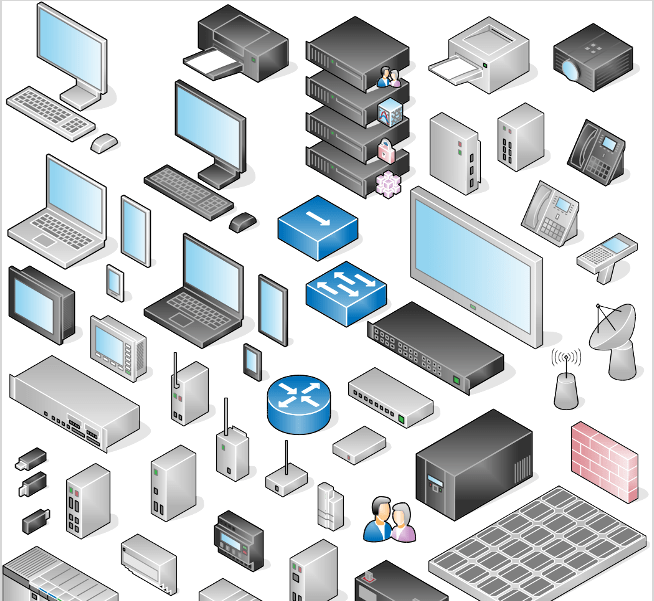
I was writing a presentation which needed a mixture of computing hardware. There is a Libre Office extension called VRT Network equipment which you can install and have a gallery of hardware, from scanners, printers, firewalls, routers to laptops and tablets and mobile phones.

See VRT Network Equipment Gallery. There are some good instructions here on how to install and use the icons.