Getting my z/OS client to talk to a remote server over TLS

I looked into this because someone asked me about using the mail client on z/OS talking to a mail server somewhere in the internet.

My z/OS running on zPDT under Linux did not have a working connection to the outside world.

Configuring Linux to pass the z/OS traffic to the external network.

A ping to the server, got no response back.

Using Wireshark on the wireless connection, I could see my request from z/OS coming via Linux and going to the outside network. The source IP address was 10.1.1.1 – a “local only” address, and so the server could not send a response back to me.

The routing through Linux worked because I had a default route; ip route gave me

default via 192.168.xxx.xxx4 dev wlxd037450ab7ac proto dhcp metric 600 
10.1.0.0/24 dev eno1 proto kernel scope link src 10.1.0.3 metric 100 
10.1.0.0/24 via 10.1.0.3 dev eno1 proto static metric 100 
10.1.1.0/24 dev tap0 proto kernel scope link src 10.1.1.1 

To get the “right” IP address passed to the external network, was surprisingly easy. It was documented in the zPDT book.

I created a script

echo ‘Your firewall must be enabled for this command to be meaningful’
echo 1 > /proc/sys/net/ipv4/ip_forward
iptables -F FORWARD
iptables -P FORWARD ACCEPT
iptables -t nat -A POSTROUTING -o wlxd037450ab7ac -j MASQUERADE
# iptables -I INPUT -p tcp --dport 3270 -j ACCEPT

and used sudo to execute it.

I started the firewall

sudo ufw status
sudo ufw enable

I could then successfully ping the address

When I used Wireshark on the connection between Linux and z/OS, the source IP address was 10.1.1.2. When I used Wireshark on the wireless connection between Linux and the external network, the IP address was 192.168.xxx.xxx. This shows the effect of the iptables commands, it changed the 10.1.1.2 to a 192.168.xxx.xxx – and back again on the replies.

Getting the server’s certificate

I configured the AT-TLS definitions, for TLS support, specifying the choice of cipher specs I wanted to be used, and specified the keyring.

My z/OS client connected to the remote server. I could see the “client hello” flow, and the “server hello” response. In the server hello flow were the CA certificates the server supported. The client validates the certificates by checking the client’s key store.

I did not have the matching CA certificate in my keystore, and so my client failed to validate the certificate sent down, and the connection ended.

I could do it properly, and get the certificate from the official source for the server, but this was a test system, and I was happy to trust what was sent down in the handshake.

You can use wireshark or openssl to get the certificate

With openssl

openssl s_client -showcerts -tls1_2 -starttls smtp -connect smtp.gmail.com:587 | sed -ne ‘/-BEGIN CERTIFICATE-/,/-END CERTIFICATE-/p’

You’ll need to interupt it (Ctrl-C) and paste the data into a file (google.pem)

You can display the contents of the certificate using

openssl x509 -in google.pem -text -noout|less

With Wireshark

display the certificates in the Server Hello flow.

right click on the certificate and use right click, export packet bytes. I created a file user.crt. This is a binary file.

The openssl command (on Linux)

openssl x509 -inform der -in user.crt -text > usercert.pem

displays the file in .pem format.

Put the certificate into the keyring

If you are using something that needs a keyring, you need to import the certificate into RACF and connect it to a keyring. If you are using something that uses openssl, such as Python, you need a .pem file in Unix Services.

I created a file on z/OS (VB) COLIN.USERCERT.PEM, and copied the .pem file into it (between and including the BEGIN CERTIFICATE and END CERTIFICATE lines).

I imported it, and connected it to my keyring using

//IBMRACF  JOB 1,MSGCLASS=H 
//S1  EXEC PGM=IKJEFT01,REGION=0M 
//SYSPRINT DD SYSOUT=*                                           
//SYSTSPRT DD SYSOUT=*                                           
//SYSTSIN DD *                                                   
RACDCERT CHECKCERT('COLIN.USERCERT.PEM')                         
RACDCERT DELETE  (LABEL('USERTRUST.ORG'))    CERTAUTH            
RACDCERT ADD('COLIN.USERCERT.PEM')        -                      
   CERTAUTH  WITHLABEL('USERTRUST.ORG') TRUST 
RACDCERT ID(START1) CONNECT(RING(TN3270) - 
                            CERTAUTH    - 
                            LABEL('USERTRUST.ORG')) 
SETROPTS RACLIST(DIGTCERT,DIGTRING ) refresh                     
                                                                 
RACDCERT LISTRING(TN3270)  ID(START1)                            
/*                                                              

Once I had refreshed my PAGENT job, and restarted my client code, I was able to establish a TLS session.

Client certificate

In the TLS handshake, the mail servers did not send down a request for the client certificate. As no certificate was requested, or sent up to the server, no certificate authentication was done. You need to check your mail server for it authentication process – it may just be userid and password. This information is sent once the TLS session has been established – so it flows encrypted.
Copying pages out of PDF files to make mini books.

I had been struggling trying to find content in some of the IBM pdf files (the same keyword is used in many places); and the online documentation is not very helpful in finding content.

I’ve found a brilliant way of cutting out the pages I need from a .pdf file.

I wanted to copy a pages 930-946 from a pdf file and create a new file. I used the pdftk package on Linux. PDF ToolKit = PDFTK.

pdftk ~/apdf/TCP/IP_reference24.pdf cat 930-946 output tls.pdf

Easy!

Merging and extracting

You can do

pdftk R=IP_reference24.pdf C=IP_configguide2.4.pdf U=IP_usersGuide.pdf cat R1253-1295 C1309-1327 U325-338 output cssmtp.pdf

I can now merge bits of the reference book with bits of the configuration guide and bits of the usage guide to produce a pdf on one particular topic.

You can create a handle so the handle R is for the book IP_reference24.pdf. I use it in R1253-1295 which says copy pages 1253 to 1295 of the book handle “R”. Note this is the page number in the PDF – not the book’s page number. The book’s page number 1 is page 47 in the PDF, after the table of contents, list of figures, list of tables etc..

The description of pdftk is

DESCRIPTION
If PDF is electronic paper, then pdftk is an electronic staple-remover, hole-punch, binder, secret-decoder-ring, and X-Ray-glasses. Pdftk is a simple tool for doing everyday things with
PDF documents. Use it to:

  • Merge PDF Documents or Collate PDF Page Scans
  • Split PDF Pages into a New Document
  • Rotate PDF Documents or Pages
  • Decrypt Input as Necessary (Password Required)
  • Encrypt Output as Desired
  • Fill PDF Forms with X/FDF Data and/or Flatten Forms
  • Generate FDF Data Stencils from PDF Forms
  • Apply a Background Watermark or a Foreground Stamp
  • Report PDF Metrics, Bookmarks and Metadata
  • Add/Update PDF Bookmarks or Metadata
  • Attach Files to PDF Pages or the PDF Document
  • Unpack PDF Attachments
  • Burst a PDF Document into Single Pages
  • Uncompress and Re-Compress Page Streams
  • Repair Corrupted PDF (Where Possible)

fopen trace etc is not so useful

If you can specify an environment variable you can trace the C file operations.

This did not give much useful information, as it did not give the name of the file being processed, and I could not trace the file which was causing fopen problems, so overall a good idea – but a poor implementation.

How to set it up

See File I/O trace, Locating the file I/O trace and the environment variable _EDC_IO_TRACE

For example

export _EDC_IO_TRACE="(*,2,1M)"

Where filter is

Filter Indicates which files to trace.

  • //DD:filter Trace will include the DD names matching the specified filter string.
  • //filter Trace will include the MVS™ data sets matching the specified filter string. Member names of partitioned data sets cannot be matched without the use of a wildcard. filter Trace will include the Unix files matching the specified filter string.
  • //DD:* Trace will include all DD names.
  • //* Trace will include all MVS data sets. This is the default setting.
  • /* Trace will include all Unix files.
  • * Trace will include all MVS data sets and Unix files.

Detail – use 2.

Buffer size such as 1M or 50K .

The output goes to a file such as /tmp, but you can change this with

export _CEE_DMPTARG=”.”

This worked for me … but initially I could not read the output file. (It may because it came from Python which has been compiled with ASCII option.

The command ls -ltrT showed the file was tagged in ASCII, so I used

chtag -r EDC*

to reset it, and I could edit the file.

Sample output

Trace details for ((POSIX)):
        Trace detail level:  2 
        Trace buffer size:   1024K                                                                  
        fdopen(10,r)                                                                 
        fldata: 
            __recfmF:1........ 0            __dsorgVSAM:1..... 0 
            __recfmV:1........ 0            __dsorgHFS:1...... 1 
            __recfmU:1........ 1            __openmode:2...... 1 
...

Which is not very helpful as it does not tell you the file that has been opened!

When I traced a Python program, I only got information on 5 files – instead of the hundreds I was expecting.

Various abends and problems

I’ll list them here for search engines to find.

CEE3250C The system or user abend U4000 R=00007017 was issued.

U4000

  • Explanation: The assembler user exit could have forced an abend for an unhandled condition. These are user-specified abend codes.
  • System action:Task terminated.
  • Programmer response:
  • Check the Language Environment message file for message output. This will tell you what the original abend was.

There were no other messages. BPXBATCH ended with return code 2304 which means a kill -9 was issued.

If I remove the _EDC_IO_TRACE it works.

I also got a file BST-1.20220809.110241.83951661 etc which is tagged as ASCII – but is not.

This file had the trace for they Python file which was being run – including the name of the file.

Recreating your certificates and keyrings with some hints on avoiding the swamp of RACF callable services and gsk.

I was trying to recreate the commands for the MQ certificates and keyring, so I could create a new set for a second queue manager.

At first glance it looked like writing it in rexx would involve a lot of parsing, so I started using the RACF callable service to extract information certificate and keyring information from RACF using a C/assembler interface.

This was a slow journey with many pitfalls, and I ended up using a REXX program.

I’ve put the code up on git hub for both the RACF and the C interface, to help other people who may be considering going into the RACF callable services swamp.

Using the C interface

You use the R_datalib or IRRSDL00 callable service.

The key bits of code  are

#pragma linkage(IRRSDL00 ,OS) 
- - - - - - - - - - - - - - - - -
char * workarea = (char *) malloc(1024) ;
- - - - - - - - - - - - - - - - -
struct {
char length;
char value[8];
} RACF_userid;
memcpy(RACF_userid.value,"START1 ",8);
RACF_userid.length = 6;
- - - - - - - - - - - - - - - - -
int parmlist_version = 0;
- - - - - - - - - - - - - - - - -
char DataGetFirst = 0x01 ; /*Data getFirst */
int attributes = 0;
rc= IRRSDL00( workarea, // WORKAREA
&ALET1 , // ALET
&SAF_RC, // SAF RC
&ALET2, // ALET
&RACF_RC,// RACF RC
&ALET3 , // ALET
&RACF_RS,// RACF Reason
&DataGetFirst ,// function code
&attributes, // option
&RACF_userid, // RACF userid
&ring_name, // certificate fw ... cert
&parmlist_version, // Aplication userid
&parmlist );

That code was not particularly difficult – it got more difficult using the parmlist.

#pragma pack(1) 
struct {
char * results_handle ; //in offset 0
int certificate_usage ; //out offset 4
int isDefault ; // out 8
int certificate_length; //in/out c
char * certificate ; // in 10
int private_key_length; //in/out 14
char * private_key ; //in 18
int private_key_type ; //out 1c
int private_bitsize ; //out 20
int label_length ; //in/out 24
char * label ; //in 28
char cert_useridl; // in 2c
char cert_userid[8]; // in 2d
char temp[3] ; // offset 35
int subjects_dn_length ; //in 38
char * subjects_dn_ptr ; //in 3c
int record_length ; //in/out 40
char * record_ptr ; //inp 44
int cert_status ; //in/out 48
} parmlist;
#pragma pack(4)
- - -
char certificate[2000];
parmlist.certificate_length = 2000 ;
parmlist.certificate =( char *) &certificate;

Notes:

  1. The temp[3] is not in the documentation and I got various errors without it – such as internal error.   This was because the pointers following it were at the wrong offset.
  2. parmlist.cert_useridl must be set to 8, and the value must be padded on the right with blanks.  This is different to the RACF_userid field in IRRSDL00 which is the true length of the userid. 

Compile it

//S1 JCLLIB ORDER=CBC.SCCNPRC 
//DOCLG EXEC PROC=EDCCBG,INFILE='ADCD.C.SOURCE(C)',
// CPARM='OPTF(DD:COPTS)'
//* CPARM='LIST,SSCOMM,SOURCE,LANGLVL(EXTENDED)'
//COMPILE.COPTS DD *
LIST,SSCOMM,SOURCE,LANGLVL(EXTENDED)
aggregate(offsethex) xref
TEST
/*
//COMPILE.SYSIN DD *
...
//BIND.SYSLMOD DD DISP=SHR,DSN=ADCD.PDSE.LOADLIB(CERT)
//BIND.CSS DD DISP=SHR,DSN=SYS1.CSSLIB
//BIND.SYSIN DD *
INCLUDE CSS(IRRSDL00)
/*

The output

The subject ( what I was after) had a format like in hex and ASCII is

00000000 : 3038310B 30090603 55040613 02474231 081.0...U....GB1 
00000010 : 0C300A06 0355040A 0C035353 53310B30 .0...U....SSS1.0
00000020 : 09060355 040B0C02 4341310E 300C0603 ...U....CA1.0...
00000030 : 5504030C 05535343 4138 U....SSCA8

If I list the certificate it reports Subject’s Name: CN=SSCA8.OU=CA.O=SSS.C=GB, you can see the elements in the hex dump.

The data is DER encoding of ANS.1 format. Buried within this,  is a field with value “GB” which is a type 2.5.4.6 which is country.   Information is stored in certificate in ASCII and in DER format, so I was not surprised to see the data in this format.

The easiest way of decoding this is to use gskit (IBM global security kit).   Gskit provides c routines for encryption/decryption and management of certificates.

Using GSKIT

Change the compile JCL

//S1 JCLLIB ORDER=CBC.SCCNPRC 
//DOCLG EXEC PROC=EDCCBG,INFILE='ADCD.C.SOURCE(C)',
// CPARM='OPTF(DD:COPTS)',
// GREGSIZ='0M'
//COMPILE.COPTS DD *
LIST,SSCOMM,SOURCE,LANGLVL(EXTENDED)
TEST
LSEARCH(/usr/lpp/gskssl/include/)
SEARCH(//'CEE.SCEEH.+',/usr/lpp/gskssl/include/)
DEFINE(MVS),LONGNAME,RENT,DLL,EXPMAC
aggregate(offsethex) xref
//COMPILE.SYSIN DD *

#pragma runopts(POSIX(ON))
..

//BIND.SYSLMOD DD DISP=SHR,DSN=ADCD.PDSE.LOADLIB(CERT)
//BIND.IMP DD DISP=SHR,DSN=SYS1.SIEASID
//BIND.CSS DD DISP=SHR,DSN=SYS1.CSSLIB
//BIND.SYSIN DD *
INCLUDE CSS(IRRSDL00)
include imp(GSKSSL)
include imp(GSKCMS31)
/*

How to decode the returned data

Gskit uses a gsk_buffer structure to handle strings.  It is easy to use as it has

  • length – the length of the string
  • data – a pointer to the string

If gskit returns a gsk_buffer to your program, you should use gsk_free_buffer(…) to release the buffer when you have finished with it.

gsk_buffer name; 
x509_name out;
name.length = parmlist.subjects_dn_length;
name.data = parmlist.subjects_dn_ptr;
gskrc = gsk_decode_name(& name, &out);
if ( gskrc != 0)
printf("gsk_decode_name %s\n",gsk_strerror(gskrc));

All this routine does it to convert the ANS.1 encoded string, into a structure of elements.  You can then use the following to print it

gskrc = gsk_name_to_dn(&out,&pName); 
if ( gskrc != 0)
printf("gsk_name_to_dn %s\n",gsk_strerror(gskrc));
else printf("Name:%s\n",pName);

This produced

Name:CN=SSCA8,OU=CA,O=SSS,C=GB 

As an exercise I wrote some code to format some of the x509 value –

for ( int i = 0; i < out.u.dn.count;i++) 
{
for (int j = 0;j < out.u.dn.rdns[i].count; j++ )
{
printf("Type %s ",px509_attribute_type(
out.u.dn.rdns[i].attributes[j].attributeType ));
char * p2 = out.u.dn.rdns[i]. attributes[j]. name.data;
int l = out.u.dn.rdns[i]. attributes[j]. name.length;
printf("%*.*s\n",l,l, fromascii(p2,l));
}
}

It took an hour or so to work out how to access the elements:  out.u.dn.rdns[i].attributes[j].attributeType .  I had to write a routine px509_attribute_type which took the attribute type and return a string such as “CN” etc.  I already had a function fromascii which took and ASCII string and converted it to EBCDIC.  Using gsk_name_to_dn was much easier.

Why can’t GitHub show my html pages as html?

I struggled for a while trying to get GitHub hub to display some html. It can be done, but not as slickly as other GitHub functions.

I had a page at https://github.com/colinpaicemq/zpymqi/blob/main/docs/test.html, but whenever I displayed it, the raw html was displayed. My challenge was to display the html as rendered html.

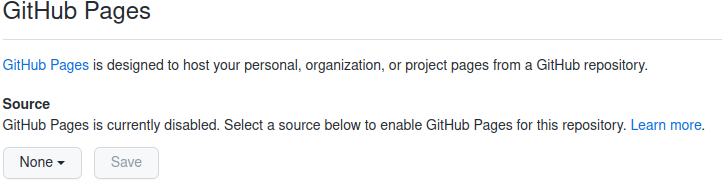
Display your repository in a web browser, and select the “settings” icon. On the settings page, click on “pages” in the left hand window. When it displays “GitHub Pages”, go down to source and select on the “None” pull down.

Select “main” to make pages available, or none to make them unavailable.

Click “save”.

It will then display

Your site is ready to be published at https://colinpaicemq.github.io/zpymqi/

After a several minute delay I could display my page at

https://colinpaicemq.github.io/zpymqi/docs/test.html

There is always a few minute delay before displaying the pages.

Compare this site with my source site

Impossible puzzles

I’ve been on holiday, visiting friends and family, and one of my friends gave me three impossible puzzles. I thought I would pass them on.

The impossible puzzle

X and Y are two different whole numbers greater than 1. Their sum is not greater than 100, and Y is greater than X. S and P are two mathematicians (and consequently perfect logicians); S knows the sum X + Y and P knows the product X × Y. Both S and P know all the information in this paragraph.

The following conversation occurs (both participants are telling the truth):

  • S says “P does not know X and Y.”
  • P says “Now I know X and Y.”
  • S says “Now I also know X and Y.”

What are X and Y?

The Seemingly Impossible “Guess The Number Logic Puzzle

I got this from Mind your decisions by Presh Talwalkar.

Alice and Bob are on a game show. Each is secretly told a whole, positive number. They are told the two numbers are consecutive, but neither knows the other person’s number. For example, if Alice is told 20, she does not know if Bob was told 19 or 21. And if Bob is told 21, he does not know if Alice was told 20 or 22. The point of the game is to guess the other person’s number. The game works as follows.

  • Alice and Bob cannot communicate with each other, and they are not allowed to plan their strategy either.
  • The two are in a room where a clock rings every minute.
  • After the clock rings, either player can call out a guess of the other player’s number, or they can stay silent.
  • The game continues until Alice or Bob makes a guess. After the first guess is made, the game ends.
  • Alice and Bob win $1 million each if the guess is correct, and they lose and get nothing if the guess is incorrect.

How should Alice and Bob play this game to have the best chance of winning? Each knows the other person is perfect at logical reasoning.

Pirates, and being thrown overboard

Some pirates caught a yacht on the high seas. The 8 people on the yacht were all logicians.

The pirate king said “Tomorrow I will put a red dot or a black dot on your forehead. You cannot see the dot, but every one else can. I will place you in a circle, so you can see every one else, and I will ask each of you in turn, if you have a red dot or a black dot. If you get it right – you live, if you get it wrong you walk the plank, and feed the sharks. Now go to the cell and plan your strategy, arr Jim lad”.

What strategy should they use to save most people.

Problems with Firefox accessing sites?

I was having problems accessing the IBM documentation from my Firefox browser. Nothing was displayed. The Firefox error log reported problems with some of the HTML. I started getting problems with other sites, such as being unable to logon to gmail. I was getting annoyed with all of these little problems, so I decided to find out why.

I eventually fixed the problems by refreshing Firefox. Type about:support on the input line, and click the box saying “Refresh Firefox”. After a few moments it came back and worked.

I can access all sites, including the IBM documentation.

I only regret clearing my cache beforehand!

Help! I’m in a Dilbertian, looking-glass world

I’ve spent an hour struggling with a web site trying to download some files and was amazed at the poor usability of the web site. I tried an alternate supplier, and this was just as bad.

It feels like I am in a world which is upside down, and what is obvious to me, is clearly not obvious to other people who design build these web sites.

I was talking to someone who lives in an “architect designed house” which looks very smart, but is not very practical. There is an open plan kitchen, flowing into the seating area, and upstairs to the open plan master bedroom. When smelly food is being cooked, you smell it in the lounge and in the master bedroom ; just imagine waking up the the smell of last night’s curry. The master bedroom has very little privacy. The master bedroom has a bath in it, with views over the town and hills. Your bedroom will be full of damp air! An “architect designed” does not mean practical and useful. Perhaps the same architect also builds web sites.

The design brainstorm

I can visualise the conference room where Dilbert’s Pointy Haired Boss is telling the team about the goals of the new web site for ordering CDs

  • “A good measure of a web site, is how much time people spend on it. I hear people spend all day on Facebook and that is popular”
  • “Real estate is valuable – so use as much as you can”
  • Use the latest Java Script tools to make it look really modern; Can we display lines where nothing is displayed until you move your mouse over it? That would be really cool.

Marketing terms

“These are the “upside down” terms we will use in our Marketing material – please ensure you follow them”

  • “Improved” : worse;slower
  • “Intuitive”: When you’ve used the interface for a few weeks, you know how your way around, and know the pitfalls.
  • “Elegant”: we use the design for a mobile phone on a web page, so the users have a narrow column of data, and do not use the available space in the web browser.
  • “Modern”: more (or less) rounded corners; different fonts (which make it harder to read – do not use the fonts which dyslexics find easier to read).
  • “Uncluttered”: provide less information on the screen; remove visual clues.
  • “Dynamic”: we use a lot of interactive scripts which look cool; such as windows that disappear when you move your mouse over them.
  • “Smart icons”: for example FEEDback is about FEEDing which is about food – so use a knife and fork for the icon – clever idea isn’t it?.

A Jelly Bean for the person who can use the greatest number of these terms.

The outcome

  • Allow search for some topics, such as Pop group – but not the name of the CD.
  • Use lots of space on the web page. For example we could easily display 40 items on a page – let’s display just 10 and make them ask for the next page by a “more”button. Though having just one line per screen would be silly – wouldn’t it?
  • List information like “Beatles hits by year” – but not the name of the CD. You have to select on each line to see what the CD is.
  • When they click to see what is in each CD, do not display all of the contents, just display 3 entries “inline” and give them another “more button”
  • When you click on a line you can select “Buy”. When they use the browser back button – do not go back to where they came from, go to the start of the web site, and so more clicks on our site. They stay logged on – it would be stupid to make them logon every time wouldn’t it?
  • Make the site inconsistent. Sometimes you can click on a line for more information, sometime you have to click on the button at the end of the line – that only appears when you hover over it.
  • Have buttons on the page which have no description or hover text, until you have clicked on it. For example ‘contact us’.
  • Use really big fonts to use more space.
  • Can we sell a course on how to use our interface? If people who have never used our web site before can quickly order things this counts as a failure because they didn’t spend much time on the web site.
  • Make it slow – so people spend more time on the site – but provide some good animation (such as a greyhound racing) to make people think it is doing something useful.

Back in the real world.

I remember having a talk about 20 years ago by  a UI expert.  I cannot remember all of it, but the points I remember were….

  • Make it easy for the end user
    1. Minimise the actions the user has to take (clicks, scrolls etc). Put the “up arrow” adjacent to the “down arrow”- not at different ends of the screen. If they have to keep clicking a button – put the buttons close to the same place on each page.
    2. Make actions obvious
    3. If the web site is slow, and you have to keep doing “next” this will frustrate the user.  Is it better to have one page to load slowly with all of the information – or have smaller pages which take seconds to load?
    4. Test it in a typical environment.  I remember trying to use the IBM documentation web site from a customer using a dial up in Indonesia,  going to the UK, to go to the US.  IBM support said the response time was “ok” because they were in the same building as the server!  For me it was taking me minutes per page.
    5. Creating a dyslexia friendly workplace is a very useful site.
  • Make the best use of available space
    1. Use the appropriate font.  For one page – do you need a big font?  No.    For a 50 “page” you need bigger fonts to make the sections visible.
    2. Try to provide the most information on the screen as possible – without going too far.   For a list of items consider colouring every 3rd or 5th line to help the user keep their eye on the line.
    3. Make all information visible – do not hide it.  Do not make users move the mouse over something to display it.
    4. If you have icons, make sure the icons are “standard”.
    5. Consider how much you display before having a “more” button.  If you expect people to “find” data, then have more lines, and make it scrollable.  Too much data ( > 1000 lines) can make it slow to load.   I think 100 -200 lines is acceptable.
    6. Provide information the end user wants.  If all the items in a list are for “ABC Wonderful software product for new users”. 
      • This would be clearer
        • ABC Wonderful software product for new users English edition
        1. version 1
        2. version 2
        3. version 3
      • than
        1. ABC Wonderful software product for new users V1English edition
        2. ABC Wonderful software product for new users V2 English edition
        3. ABC Wonderful software product for new users v3 English edition.
  • Make it clear what each part is, for example a link (it is underlined).   it should be obvious from looking at it – the end user should not have to move the mouse to display it.  ( I know modern “standards” seem to say do not underline a link – let the end user guess). Consider  people with screen readers and how they read and navigate it.
  • Less is more.   I know of this from my acting.  A character who is still, with small moves, is often more powerful than big gestures.  People expect a web site with response time of around 1-2 seconds.  The BBC new web site https://www.bbc.co.uk/news/uk displays for me in under 2 seconds ( usually 1 second) with full graphics.  Some sites I use frequently take over 5 seconds, sometimes 10 seconds.  Do we really need clever animation etc.?
  • The word “Intuitive” is often abused.
    1. If you use windows 10 as your primary work station then move to windows 11; the GUI is the same as before.   You find it “intuitive”.   I come from Linux, and having to use Windows, a lot is not intuitive.   Similarly someone going from Windows to Linux will not find it entirely intuitive.   You have to allow for people who are not familiar with the web site as well as people who use frequently use the web site (eg the web site developer and testers).
    2. Icons are often not obvious.   Giving them useful information via a hover is a good start.
  • When testing usability of web pages, use people who have never used your site before. The worst people for testing the new user experience, are those who use it every day and who work round the problems.

How long can you talk for without drawing breath?

I remember reading a book on technical writing which said you should read every report aloud to make sure the text flows, and makes sense. A comma is where you pause, (or have a side comment), and a full stop is where you finish the thought, and take a breath. If you cannot express the sentence in one breath – the sentence is too long and you should rewrite it.

If you have to read a sentence twice or more, consider rewriting it. Also remember the people reading your document may not have English as their first language. “Foreign words” take more brain power and the reader may not be entirely familiar with the word or the context used. I recently heard a conversation

  • “is it right to turn left here?”,
  • “no, right”

which maybe valid English, but it takes a moment to understand it.

Another advantage of reading it aloud is it it helps you to spot duplicated words or missing. (There was a double whoops in that sentence.)

I was reading a description in a technical report which took me several minutes to understand it. It used terms(defining some of them inline <and also had nested comments about the terms >), then using terms like “this” (when “this” could be one of several objects) (I kept thinking which this?, that this, or this this), and so I copied the text into an editor so I could break it into phrases (logical groups of thoughts) and work out what was important. See – it is hard work to understand some sentences.

I am a great believer that reading should be linear, you should not have to keep going back to reread text. I also think that people need signposts to help them through the text, along the lines of the old adage saying for a good presentation “tell them what you are going to tell them, tell them, tell them what you have told them”. Instead of one long rambling paragraph it might be clearer to say

There are three areas we need to consider, area1, area2, area3

Area1

Area2

Area3

I have noticed also noticed that people often read the first sentence, and ignore the second part, this is where good signposting can help. This applies to emails and conversations. My wife said to me “We’ll need some of the nice bread with seeds on it, and some rolls, from the bakers, but the bakers isn’t open yet’. So off I went to the bakers to find it closed. I was busy parsing the first part of the sentence, and missed the second part.

I found with some people that if you have two questions send them as two emails not one. They read the first question, reply to it, and do not read the rest of the email.

Why are you telling me this – and what do you want me to do with the information

I was talking to someone about providing useful information in reports, and we got onto the subject of “Why are you telling me this” a topic I once had in a mentoring presentation.

Why are you telling me this?

I was in a meeting with the Lab Director, on a hot summers afternoon, with the sound of the bees coming through the open window, and the smell of freshly cut grass. A team were presenting a topic to us, and it was only mildly interesting. It was easy to shut your eyes and listen (a polite way of saying fall asleep). At the end of the presentation they said “And we would like you (the Lab Director) to fund £1 million for four people to take this forward.” Whoa – we all woke up. The Lab Director said he had not been listening with his “funding ears”, and didn’t think he could fund it. He went on to say “Next time you want something from me, then at the beginning of the presentation say ‘We want you to fund this project to £1 Million’ and I’ll know what you want before we start.”

It is very useful to know why someone had come to see you. It would be very helpful if the person was to say:

  • I’m telling you this for your information. You do not need to do anything. You may get asked about it.
  • I’m telling you this for your action. I would like you to sign these expenses; give me advice; or go and talk to someone on my behalf.
  • I’ve had a great success – I just want to share it with someone!
  • I’m bored and I just want a chat. (We had someone who would come round and chat. We solved this by sending a message through the computer to a friend saying “please phone me”).

Writing reports

The “Why are you telling me this” questions applies to writing reports as well. You need to know what you expect your audience to do with the report.

I was asked to review a 60 page performance report before it was presented to the customer. Although I was jet lagged, I spend the evening going through the graphs and the explanation and marked up many comments. The next day I asked who wanted my comments, and the reply was “we don’t want any comments we just wanted you to review it”!

They planned to spend a couple of hours going through the report with the customer; a senior manager and his team. I managed to persuade them that the senior manager would not know the technical details, so he would not understand most of the charts. I asked the team “what do you expect the manager to do with the report?” the answer was “give it to one of the system programmers”. “What do you expect the systems programmers to do with it?”, “We don’t know”!

We had a lot of discussion, came up with a short presentation aimed at the executive. We took data from the report and summarised it, for example

  • We tested it up to 50,000 transactions a second” before we ran out of CPU. Your requirement is 10,000 a second.
  • The cost per transaction stayed pretty constant. At the high transaction rate, it was 20% more than than a low transaction rate.
  • In a disaster recovery it took us 2 minutes to switch to the backup servers, and continue working. It may take you longer depending on your database.

It is much better to tell people information, than have people work to get the same information. It is much quicker to read

The cost per transaction stayed pretty constant. At the high transaction rate, it was 20% more than than a low transaction rate

than to give them a chart they have to look at – read the title, the axis, the ranges of the data, and interpret it (should it be flat or should it slope up? Why is there a wobble in the data?). Many people do not listen while they are reading.

Graphs have their places, for example showing how the response time changes with transaction rate may be good. But

at 100 transactions a second the response time is 500 ms, and 1000 transactions a second the response time is 1000 milliseconds.

may be good enough if the requirement is 2000 milliseconds at 1000 transactions a second.

It all comes down to …

What you expect the audience to do with the data.

I have been working on some blog posts about z/OS performance. I had someone review it to make sure it was at the right level and I was surprised at the comments. For example

  • You have told me about the RMF reports, but you haven’t told me how to collect the data, or how to format it.
  • You said if this number was large, you have a problem. What do you mean by large?

I should have written a “specification” in comments at the top of the blog post.

Q:Why am I writing this?
A:So people can collect and report performance data; and see if there is a problem.

Q:What will they do with the report
A:Use it to collect performance data.
A:Use it to process the data
A:Understand which fields are important, and have background to explain
why the field is important
A:Identify good and bad values of fields
A:Understand what they can do about problems.

If I had done this and written the blog post to meet these goals it would have been a better document.

Feel the weight!

I once saw a report about MQ for a customer. It was about 100 pages long! They gave an introduction to MQ, listed all the parameters, gave the size of all the data sets etc. A lot of the data was just cut and paste of other data. When I mentioned this to the team, they replied, the customer executive likes to get value for money, and a long report shows value for money (feel the weight), it shows how much work we did.

I thought the executive was out of his depth.

This reminded me of Parkinson’s law, “work expands so as to fill the time available for its completion”. He also described “the bike shed problem”. A committee has two items on its agenda

  • Should we invest in a nuclear reactor?
  • What colour should we paint the bike shed?

No one had any experience of nuclear reactors, so after 5 minutes discussion they approved it. They spent the next 55 minutes discussing the bike shed. The cost of them discussing it was much more than the cost of a person to repaint the shed if they made the wrong decision.

They understood the bike shed problem, and knew nothing about the nuclear reactors, so focused on things they knew about rather than getting experts in to advise them.

This is not to be confused with the Peter Principal which observes that people in a hierarchy tend to rise to their “level of incompetence”. If the person is competent in the new role, they will be promoted again and will continue to be promoted until reaching a level at which they are incompetent. Being incompetent, the individual will not qualify for promotion again.

Nor is it to be confused with The Dilbert principle which says that incompetent employees are promoted to management positions to get them out of the workflow.