Using the Java Health centre for looking into Z/OSMF, MQWEB and other Liberty products.

The Java Health centre has an agent running in the JVM of interest, and there is Eclipse plug-in to display the data.

A Java server such as Liberty ( as used in z/OSMF, z/OSMF and MQWEB) can provide information on how the server is running. I was running MQWEB with Openj9, Java 21 (Semeru).

You need to configure the Liberty server and have something to process the data such as Health Center running on Eclipse.

You can display information in graphical time line format, such as

  • CPU used, system and application as used by the JVM
  • Which classes are being used
  • The environment – such as the parameters used to start the JVM
  • Garbage collection activity
  • I/O – number of files open, and open activity
  • Method profiling
  • Threads in use.

Configure the Eclipse

I installed Health Center from the Market place.

How to collect the data

You can configure the JVM in different modes:

  • headless – data is collected and written to the local file system
  • collect from the start – and view in Eclipse, this means you get all of the Java class loading activity
  • start collecting only after Eclipse has started, and connected to the JVM. I use this method. I start my server, and run a workload to “warm up the JVM” then use Eclipse to show the activity due to my testing.

Configure the JVM server

The options are listed here.

You can specify the JVM options on the command line or the jvm.options file.

You can specify them on the -Xhealthcenter:… statement, or as

-Dcom.ibm.diagnostics.healthcenter...=... 

values. For example

-Xhealthcenter:level=off,readonly=off,jmx=on,port=1972 

or

-Xhealthcenter:level=off
-Dcom.ibm.java.diagnostics.healthcenter.agent.port=1972
-Dcom.ibm.diagnostics.healthcenter.jmx=on
-Dcom.ibm.diagnostics.healthcenter.readonly=on

To run headless

In the server

I added the following to my jvm.options

-Xhealthcenter:level=headless 
-Dcom.ibm.java.diagnostics.healthcenter.headless.delay.start=2
-Dcom.ibm.diagnostics.healthcenter.headless=on
-Dcom.ibm.java.diagnostics.healthcenter.data.collection.level=headless
-Dcom.ibm.java.diagnostics.healthcenter.headless.output.directory=/u/tmp/zowec/
-Dcom.ibm.diagnostics.healthcenter.readonly=on

Down load the files to your work station, and use File -> Load Data to process the files.

To run the Health centre in real time

In the server

-Xhealthcenter:level=off,readonly=off,jmx=on,port=1972 
-Dcom.ibm.diagnostics.healthcenter.logging.level=debug

Note the jmx=on and the port number. You need this for the Eclipse configuration. The level=off means do not start collecting data until the Health centre agent connects.

In Eclipse

File -> New Connection… -> Enable an application for monitoring -> Next.

On the Select connector panel I used
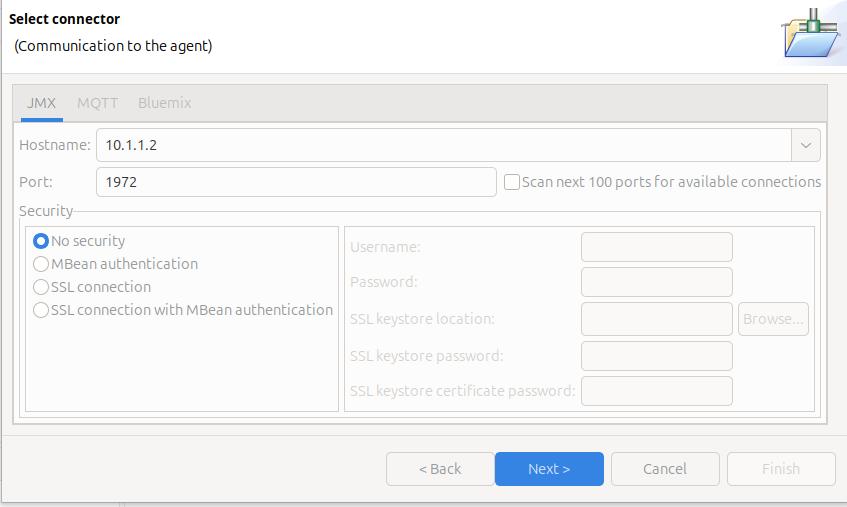
Once it worked, I enabled security.

Click Next

The Health Centre then starts searching at the specified port. I disable the Scan next 100 ports… When it manages to connect to the port, click Finish.

I initially had problems connecting to the server, see Why can’t I connect to a z/OS port?

It takes a few seconds to start the data collection, and start downloading the data.

Let the JVM warm up

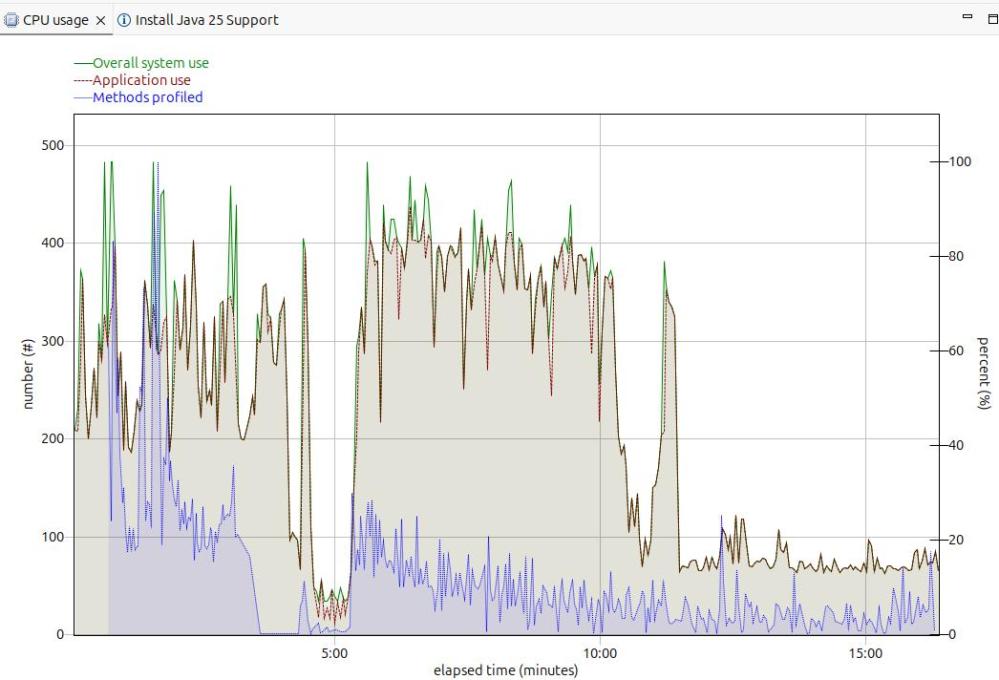
The image below shows the CPU usage from the start of the server.

For the first 5 minutes, this is the JVM starting up with no workload. Afterwards the CPU used drops to a low value.

After 5 minutes, I started my workload. For the first 12 or so minutes the CPU is high, but after about 13 minutes it levels out. If you want to do any measurements of cost per transaction you should take them from this period. During the “warm up” period, the JVM is optimising the code etc.

The green line shows the system CPU usage. The red line (and grey area) shows the Application usage. We can see most of the CPU used is application usage.

The number of methods profiled is the JVM optimising the code. It takes the “hottest” classes and does those first… until all (most) of the classes are optimised.
Long term monitoring.

f
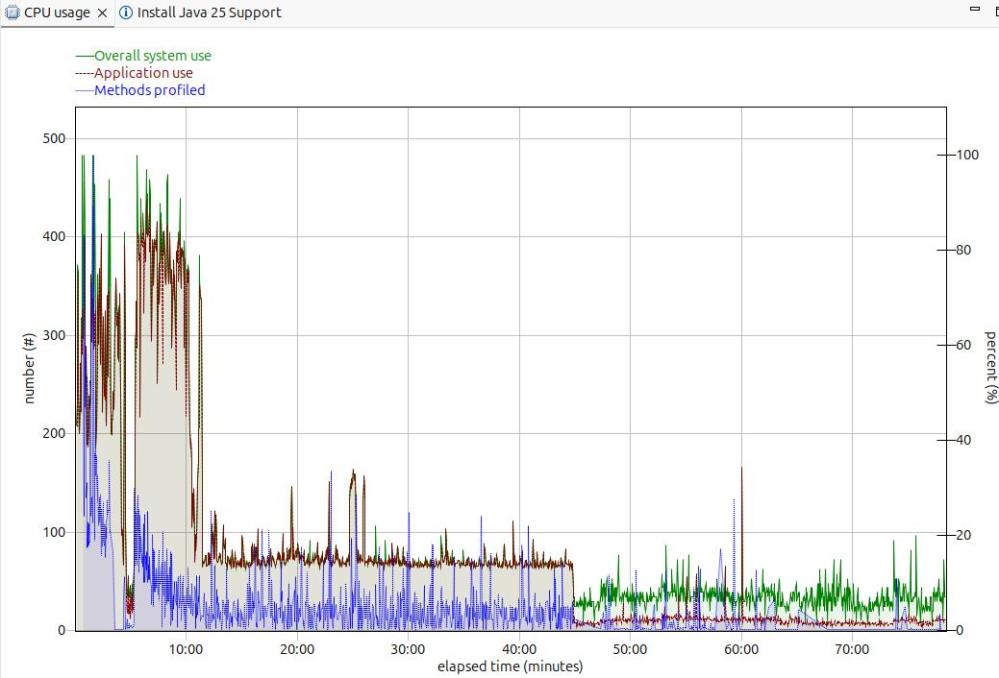
From this diagram you can see the JVM startup, the initial part of my test where the JVM was warming up, the remainder of the test, and the JVM overhead after the test.

You need to take all of these into consideration when running performance tests.

Running performance tests

I set up my Work Load Manager configuration to record the number of MQ transactions, and had a report class for the MQWEB server. From this I can calculate the cost per transaction.

Health centre agent logging

With

-Dcom.ibm.diagnostics.healthcenter.logging.level=finest

I had output in the STDERR output

[06:51:52] com.ibm.diagnostics.healthcenter.Agent FINE: System receiver, version 1.0 
[06:51:52] com.ibm.diagnostics.healthcenter.Agent FINE: /usr/lpp/java/J21.0_64//lib/libhcapiplugin.so, version 1.0
[06:51:52] com.ibm.diagnostics.healthcenter.java FINE: Health Center Agent 4.0.7
06:51:53com.ibm.java.diagnostics.healthcenter.agent.mbean.HCLaunchMBean <init>
INFO: Agent version "3.0.21.202109031203"
06:51:56 com.ibm.java.diagnostics.healthcenter.agent.mbean.HCLaunchMBean startAgent
INFO: Health Center agent running in off mode.
06:51:56 com.ibm.java.diagnostics.healthcenter.agent.mbean.HCLaunchMBean startAgent
INFO: Health Center agent started on port 1972.

and in STDOUT many

com.ibm.lang.management.OperatingSystemMXBean.getTotalPhysicalMemory() 

How to take (and process) a RACF GTF trace with Java

When trying to resolve a certificate problem in a Java program, see here, I tried unsuccessfully to take a RACF trace to see what calls were being issued, and what reason codes were being returned.

The RACF GTF had no entries for the Java program!

Start RACF trace

My started task was called OZUSRV4. I had to specify a jobname to RACF trace of OZUSRV4* because Java spawns address spaces, and it was a spawned address space that did all of the Java work. If your started task is 8 characters long – just specify the 8 character name.

The trace command was the RACF SET TRACE command, where # is my RACF subsystem recognition character.

#SET TRACE(CALLABLE(TYPE(41))JOBNAME(OZUSVR4*))

Where type(41) is for IRRSDL00 which performs the R_datalib, keyring processing.

Start GTF

S GTF.GTF
R 1,trace=usrp
R 2,USR=(F44) 
R 3,END
R 4,U 

Run the test

I ran my started task, and stopped the RACF trace

#SET TRACE(CALLABLE(NONE))JOBNAME(OZUSVR4*)) 
#set list

The output of the #set list command included

TRACE OPTIONS                   - NOIMAGE                                    
                                - NOAPPC                                     
                                - NOSYSTEMSSL                                
                                - NORRSF                                     
                                - NORACROUTE                                 
                                - NOCALLABLE                                 
                                - NOPDCALLABLE                               
                                - NODATABASE                                 
                                - NOGENERICANCHOR                            
                                - NOASID                                     
                                - JOBNAME                                    
                                   OZUSVR4*                                  
                                - NOCLASS                                    
                                - NOUSERID                                   
SUBSYSTEM USERID                - START1                                     

So the traces are off…. but it still has a reference to OZUSVR4 – strange.

Process the GTF file.

I used IPCS to look at the GTF file

  • =0 and specify the GTF file name
  • =6 dropd to drop any saved status from last time that dataset was used
  • gtf usr(all) It displays the output in an editor like window.
  • report view displays it in ISPF editor, view mod.
  • You can the do things like
    • x all
    • f ‘RACF Reason code’ all

To display the records with non zero return codes.

The output is very chatty – and it was hard to find the data I wanted from data with a hex dump of the string “OFFSET” etc. For example

Trace Identifier:             00000036                           
Record Eyecatcher:            RTRACE                             
Trace Type:                   OMVSPRE                            
Ending Sequence:              ........                           
Calling address:              00000000  79403A2D                 
Requestor/Subsystem:          ........  ........                 
Primary jobname:              OZUSVR44                           
Primary asid:                 00000035                           
Primary ACEEP:                00000000  008FC8A0                 
Home jobname:                 OZUSVR44                           
Home asid:                    00000035                           
Home ACEEP:                   00000000  008FC8A0                 
Task address:                 00000000  008CF298                 
Task ACEEP:                   00000000  00000000                 
Time:                         DDD4C11D  776E2A40                 
Error class:                  ........                           
Service number:               00000029                           
RACF Return code:             00000000                           
RACF Reason code:             00000000                           
Return area address:          00000000  00000000                 
Parameter count:              0000002B    
...                       
Area length:                  00000008                                                                                
                                                                                                                      
Area value:                                                                                                  
D6C6C6E2  C5E30050                               | OFFSET.&                         |  
                                                                                                                      
Area length:                  00000007                                                                                
                                                                                                                      
Area value:                                                                                                           
06E2E3C1  D9E3F1                                 | .START1                          |  

I wrote a REXX exec which post processes the output and removes what I think is irrelevant data.

An example of what I think is useful is below. Non zero return codes have ! in column 1

! Return code: 00000008 8 
! Reason code: 00000004 4  4 Parameter list error occurred. 
-  -  -  -  -  -  -  -  -  -  -  -  -  -  -  -  -  -  -  -  -  -  -  -  -  -  - 
! Return code: 00000008 8 
! Reason code: 0000002C 44 44 No certificate found with the specified status 
-  -  -  -  -  -  -  -  -  -  -  -  -  -  -  -  -  -  -  -  -  -  -  -  -  -  - 
Area value: 
00000050  10AFC67C  ...
...
  -  -  -  -  -  -  -  -  -  -  -  -  -  -  -  -  -  -  -  -  - 
Area value:          | .START1                          | 
06E2E3C1  D9E3F1                                                
Area value:          | .MQRING                          | 
06D4D8D9  C9D5C7                                                

You can download the rexx exec from

You need to upload it to a CLIST available to ISPF.

Solving certificate problems in Java on z/OS

I spent many any hour trying to understand why z/OSMF was getting a message saying certificate not found in keyring, when it was always there when I checked it.

I tried Java trace options but they did not help. I have my own Java program, and that gave me a message from IRRSDL00 (the callable service to access keyrings). But when I did a RACF GTF trace to get see what was going on I got no entries in the trace. Weird. Once I solved the problems, the solution was obvious.

My Java program reported

java.io.IOException: The private key of NEWTECCTEST is not available or no authority to access the private key

z/OSMF report

[ERROR ] CWPKI0024E: The NISTECCTEST certificate alias specified by the attribute serverKeyAlias is either not found in KeyStore safkeyring://START1/MQRING or it is invalid.

The problem and the solution

The message The private key … is not available or no authority to access the private key. Has a hint as to the problem. The documentation is hidden away. It was not as bad as

It was on display in the bottom of a locked filing cabinet stuck in a disused lavatory with a sign on the door saying ‘Beware of the Leopard.”

but it is not easy to find. It says

Applications can call the R_datalib callable service (IRRSDL00) to extract the private keys from certain certificates after they have access to the key ring. A private key is returned only when the following conditions are met:

  1. For RACF real key rings:
    • User certificates An application can extract the private key from a user certificate if the following conditions are met:
      • The certificate is connected to the key ring with the PERSONAL usage option.
      • One of the following two conditions is true:
        • The caller’s user ID is the user ID associated with the certificate if the access to the key ring is through the checking on IRR.DIGTCERT.LISTRING in the FACILITY CLASS, or
        • The caller’s user ID has READ or UPDATE authority to the <ringOwner>.<ringName>.LST resource in the RDATALIB class. READ access enables retrieving one’s own private key, UPDATE access enables retrieving other’s.

I had a keyring START1.MQRING and the start task userid had read access to it. Within the keyring was the certificate NISTECCTEST owner by userid START1. The started task userid needs UPDATE access to the keyring to be able to access the private key belonging to a different userid.

Reasons for “not found” reason code

Under the covers the callable server IRRSDL00 is called. The reason code are documented here. You might get SAF return code 8, RACF return code 8, RACF reason code 44.

  • The certificate was not in the keyring
  • It was NOTRUST
  • It had expired
  • The CA for the certificate was not in the keyring,
  • The userid did not have update access to the keyring when there are private certificates from other userids.

Java and z/OS keyrings – unlocking the puzzle

I had been trying to follow some instructions on how to use a z/OS keyring in a Java application, but I was having lots of error messages and little success. Searching the internet did not help because most of the documentation on the internet does not tell you what version of Java they were using; but fortunately I managed to stumble on the magic combination of options which worked.

I ended up with one of my configuration files with information for Java 8 and Java 11, which I had to clean up.

There are several pieces of the puzzle, all which have to be right.

  • Recent Java versions were better than old ones. Java V8 SR8 FP6 from 2023 was better than Java V8 SR6 FP19 from 2020
  • The java.security file; this contains the master set of security definitions for the system. Your application can override options within this file, or use a totally different file
  • Which jar file to use.
  • Which classes to use – specifying the high level qualifier
  • How you specify your keyring for example safkeyring://START1/MQRING, or safkeyringjce://START1/MQRING
  • Which Java start up overrides your Java program uses.

What worked for me

On Java 8 the following are typical default values

  • -Djava.protocol.handler.pkgs=com.ibm.crypto.provider
  • -Djavax.net.ssl.keyStoreType=JCERACFKS
  • -Djavax.net.ssl.keyStore=safkeyring://START1/MQRING

Because I was using Apache Tomcat web server, some of the definitions were taken from the server.xml file, and override the -Djavax.net.ssl.keyStoreType and -Djavax.net.ssl.keyStore parameters.

RSEAPI_KEYSTORE_FILE="safkeyring://START1/MQRING " 
RSEAPI_KEYSTORE_TYPE="JCERACFKS" 

The Java security file.

The default file is /usr/lpp/java/J8.0/lib/security/java.security or /usr/lpp/java/J8.0_64/lib/security/java.security depending on which JVM you are using (31 bit or 64 bit).

You can override this using

  • -Djava.security.properties==/etc/zexpl/java.security to specify which file to use instead of the default file.
  • -Djava.security.properties=/etc/zexpl/java.security for entries in the specified file to override the entries in the default file.

The content of interest is like

security.provider.1=com.ibm.jsse2.IBMJSSEProvider2
security.provider.2=com.ibm.crypto.provider.IBMJCE
security.provider.3=com.ibm.crypto.plus.provider.IBMJCEPlus
security.provider.4=com.ibm.security.jgss.IBMJGSSProvider
security.provider.5=com.ibm.security.cert.IBMCertPath
security.provider.6=com.ibm.security.sasl.IBMSASL

I’ll explain what this means below.

Which classes – the high level qualifier

This is defined like -Djava.protocol.handler.pkgs=com.ibm.crypto.provider

This usage is explained below.

How Java loads things

My explanation below may be wrong – but it should give the concepts.

  • By some magic Java know which classes are in which jars. (Java may look in every jar at startup).
  • My keying is defined as safkeyring://START1/MQRING.
  • I have -Djava.protocol.handler.pkgs=com.ibm.crypto.provider
  • Java combines this information and looks through the classes for com.ibm.crypto.provider.safkeyring.Handler class.
  • It finds the class in /usr/lpp/java/J8.0/lib/ext/ibmjceprovider.jar

If there are more than one potential class, it take the in the Jar file in the security.provider.n list.

When I used –Djava.protocol.handler.pkgs=com.ibm.crypto.hdwrCCA.provider, it searched for class com.ibm.crypto.hdwrCCA.provider.safkeyring.Handler which was in /usr/lpp/java/J8.0_64/lib/ext/ibmjcecca.jar .

When I used -Djava.protocol.handler.pkgs=com.ibm.crypto.hdwrCCA.provider, initially I got an ICSF security violation ( which was good news as it showed I was using ICSF). Once I fixed the security problem I got a Java exception

org.apache.catalina.LifecycleException: Protocol handler initialization failed 
Caused by: java.lang.IllegalArgumentException: Invalid keystore format 
Caused by: java.io.IOException: Invalid keystore format

There is documentation but I could not get round this problem

If I stopped ICSF (p CSF) I got Java exceptions

java.security.NoSuchAlgorithmException: no such algorithm: EC for provider IBMJCECCA 

What did not work for me

IBMJCEPlus

There was a reference which said in order to use TLS V1.3 you need to use IBMJCEPlus.

I overrode the java.security file by using

security.provider.1=com.ibm.crypto.plus.provider.IBMJCEPlus

but this gave a Java exception

java.security.ProviderException: Could not load dependent library

which looks like it could not load a load module (.so) from the file system.

Upgrading the Java fixpack worked for me

I upgraded the level of Java V8 from 2020 to a 2023 version, going from fix pack16 to fix pack 25, and lots of problems went away.

Java 11

Java 11 has different provider of the keyring support.

security.provider.1=OpenJCEPlus
security.provider.2=IBMZSecurity
security.provider.3=SUN
security.provider.4=SunRsaSign
security.provider.5=SunEC
security.provider.6=SunJSSE
security.provider.7=SunJCE
security.provider.8=SunJGSS
security.provider.9=SunSASL
security.provider.10=XMLDSig
security.provider.11=SunPCSC

I did not try to use these, as the application I was using did not support Java 11.

There is some documentation on Java 11 and security.

LPA for Unix System Services .so modules

I discovered a shared library facility for loading OMVS modules (for example .so) into storage which can be shared by all OMVS address spaces.

This is an unusual blog, in that I’ve written about a topic – then say “do not use it!

Phil Wakelyn of CICS strategy said….

The UNIX shared library region, this is not something we currently recommend – see this doc, and its now disabled by default in CICS at the JVM level using the variable

_BPXK_DISABLE_SHLIB=NO

The reasons  for this is that that:

  • It has negligible difference on JVM startup time
  • It has a substantial negative impact on virtual storage below the bar, as storage is allocated from the high private area in MB chunks for each library (dll), so there is lots of wasted space and you can quickly use up 100MB or more. This has been a large customer support issue for CICS customers where space is very tight below the bar and MVS private storage SOS conditions are fatal.
  • Shared libraries are loaded once per address space, so are cached at the address space level

Where are modules stored?

They are stored in a common area below the 31 bit line – so taking storage from all regions.

If you issue the command

D OMVS,L

it gives

BPXO051I 10.32.34 DISPLAY OMVS 293                              
OMVS     0010 ACTIVE             OMVS=(00,01,BP,IZ,RZ,BB,ZW,PY) 
SYSTEM WIDE LIMITS:         LIMMSG=NONE                         
                  CURRENT  HIGHWATER     SYSTEM                 
                    USAGE      USAGE      LIMIT                 
...               
SHRLIBRGNSIZE    58720256   65011712   67108864   
SHRLIBMAXPAGES          0          0     409600 *  

I made it larger than the default (4096) by using the operator command

SETOMVS SHRLIBMAXPAGES=409600

How do you load modules into the shared region?

You need to set the extended attribute +l for example

extattr +l /usr/lpp/java/J8.8_64/J8.0_64/bin/j9vm/libdbgwrapper80.so

When this module is loaded, it will be loaded into the shared region – if there is enough space.

Be careful how you reference the modules

You should use a consistent reference to files. For example

/usr/lpp/java/J8.8_64/libj9a2e.so is the same file as /Z24C/usr/lpp/java/J8.8_64/libj9a2e.so, but the shared library will treat them as two different objects, and load both of them. This will waste space.

How do you unload a module from the shared region

I reset the attribute using extattr -l. This did not unload it. When it was next loaded, it appeared to be unloaded from the shared region, and the file on disk was used.

How do you know what is in the shared region?

There is no IBM answer. There is a rexx exec OMVS command written by an IBMer

The syntax is

wjsigshl -p

This gives output

Usage  Meg Used-Unused-Pgs Pathname 
    1    1       8     248 647857ED xxx/libracfimp.so 
...
    1   25    6349      51 647857EC xxx/compressedrefs/libj9jit29.so 
...
 Total Storage (Meg)             60 
 Total Module (Pages)         10146 
 Total Unused (Pages)          5214 
 Total Module Count              28 

I changed /Z24C/usr/lpp/java/J8.8_64/J8.0_64/lib/s390x to xxx so the output would fit within the area.

Each modules gets storage in multiples of 1MB, so you waste space with small objects.

The used pages does not tie up directly with the size of the object on disk. For example for libjgsk8iccs_64.so

  • using ls -ltr the size is 913408
  • from the shared region mapping information is it 379648

It may be that there is information in the disk version which is not needed once the module is loaded.

How much space do I need?

I set the +l attribute for all of the .so objects in Java V8 SR 8. When I ran my Java program (which uses TLS) there were 28 modules loaded, and 60 MB of data used.

How do I turn it off for a job?

For your job, you can use the environment variable

_BPXK_DISABLE_SHLIB=YES

The documentation says

System shared libraries are disabled. When loading a program with the system shared library extended attribute (st_sharelib), the attribute is ignored and the program is loaded into the caller’s private storage. The _BPXK_DISABLE_SHLIB setting is propagated on both fork and spawn from the parent to the child process.

End words

Now you know how it works – do not use it.
I asked on one of the z/OS news groups if anyone used this facility and unusually I got no replies. It looks like it is not used in the z/OS community.

Turbo start your Java program on z/OS and save a bucket of CPU

This blog post follows on from Some of the mysteries of Java shared classes and gives some CPU figures.

This should help you with any of the Java applications running on z/OS, such as z/OSMF, z/OS Connect, MQWEB, RSEAPI, and ZOWE.

I ran the scenarios on z/OS on zPDT running on my Ubuntu Linux machine, and so the figures are nothing like you may expect on a real z/OS machine – but my figures should show you the potential.

Topics covered:

Overview of Java shared classes

With Java shared classes support, as a Java program starts, and reads the jar and class files and also copies them into memory somewhere. Successive start can use the in memory copy and avoid the read for disk and initial processing.

You can save the in-memory copy to disk, and restore this disk copy to memory, for example across IPLs.

Measurements

I measured the CPU user from the address space once the system was started

The Java program provides a high level trace. I note the time difference between the first message and the “I am up” message

Scenarios

I used three scenarios

  • IPL and start Java program with no share classes
  • Enable shared classes
  • IPL and restore the shared classes, and start the program

No shared classes

ScenarioCPUDuration seconds
First run after IPL 394172
Second run425183

Enable shared classes

I enabled shared classes by using the Java option

-Xshareclasses:verbose,name=rseapi,cachedir=/tmp/,groupAccess,nonpersistent,nonfatal,cacheDirPerm=0777″

ScenarioCPUDuration seconds
run after shared classes enabled 500200
Second run after shared classes enabled 292116
Third run after shared classes enabled25181

IPL and restore snapshot

ScenarioCPUDuration seconds
First run after (IPL and restore snapshot )27499
Second run272121
Third run279116
Fourth run264111

Analysis of the results

Using the shared classes saved CPU in the region of 25% and reduced the elapsed time by about a half.

The first time the Java program runs and creates the shared class data has a higher CPU cost, and increased elapsed time. The savings of CPU and elapsed time when the shared cache is reused outweighs this one time cost.

Observation

It appears that each time you restart using shared classes the CPU drops. I think this is due to the optimisation being done on the classes, but it may be some totally different effect – or it may just be co-incidence!

Setting up to use the shared classes

I added two job steps to my Java program JCL

Before – restore the share classes cache from the backup copy

// EXPORT SYMLIST=* 
// SET J='/usr/lpp/java/J8.8_64/J8.0_64/bin' 
// SET C='/tmp/' 
// SET N='rseapi' 
// SET V='restoreFromSnapshot'
// SET Q='cacheDirPerm=0777,groupAccess' 
//RESTORE  EXEC PGM=BPXBATCH,REGION=0M,PARMDD=PARMDD 
//PARMDD  DD *,SYMBOLS=(JCLONLY) 
SH &J/java -Xshareclasses:cacheDir=&C,name=&N,&V,&Q 
/* 

If the in-memory cache exists you get message

JVMSHRC726E Non-persistent shared cache “rseapi” already exists. It cannot be restored from the snapshot.

After – save the shared class cache to disk

// SET V='snapshotCache' 
// SET J='/usr/lpp/java/J8.8_64/J8.0_64/bin' 
//SAVECAC  EXEC PGM=BPXBATCH,REGION=0M, 
//   PARM='SH &J/java -Xshareclasses:cacheDir=&C,name=&N,&V' 
//STDERR   DD   SYSOUT=* 
//STDOUT   DD   SYSOUT=* 

Strange behaviour

By using the startup option -verbose:class,dynload you can get information about the classes as they are loaded.

When not using shared classes, there were records saying <Loaded ….. and giving durations of the loads etc.

When using shared classes there were still a few instances of <Loaded… . I could not find out why some classes were read from disk , and the rest were read from the shared classes cache.

If we could fix these, then the startup would be even faster!

After some investigation I can explain some of the strange behaviour.

  • When a jar is first used there is a <Loaded… for the class that requested the jar.
  • A class like <Loaded sun/reflect/GeneratedMethodAccessor1 with a number at the end gets a <Loader… entry.
  • Some other classes in a jar file get loaded using <Loader… though they do not look any different to classes which are loaded from the shared cache!

All in all, very strange.

Where do you harden the cache to?

By default the cache is saved to /tmp. As /tmp is often cleared at IPL, this means the cache will not exist across IPLs. You may wish to save it in an instance specific location such as /var/myprogram.

What happens if I change my Java program?

I had a small test program which I recompiled, and created the jar file. The Java source was

public class hw   { 
  public static void main(String[] args) throws Exception { 
    System.out.println("This will be printed"); 
    System.out.println("HELLo" )  ; 
    CPUtil.print(); // this prints Util.line 10 
    hw2.print(); 
  } 
} 

When I reran the program the output contained

JVMSHRC169I Change detected in /u/adcd/hw.jar... 
  ...marked 3 cached classes stale 
class load: sun/launcher/LauncherHelper$FXHelper from: .../lib/rt.jar 
<Loaded CPUtil> 
<  Class size 427; ROM size 416; debug size 0> 
<  Read time 4 usec; Load time 108 usec; Translate time 595 usec> 
class load: CPUtil from: file:/u/adcd/hw.jar 
Output from CPUtil.line 10 
<Loaded hw2> 
<  Class size 386; ROM size 368; debug size 0> 
<  Read time 3 usec; Load time 107 usec; Translate time 635 usec> 
class load: hw2 from: file:/u/adcd/hw.jar 

Where you can see output from my program is intermixed with the loader activity.

What happens internally

From the previous topic, it seems that Java has to read the files on disk for example to spot that a class has changed. This may just be a matter of reading the time stamp of the file on disk,or it may go into the file itself.

Should I use .class files or package the .class files into a .jar files?

This will be a hand waving type answer. Generally the answer is use a .jar file.

Use one .jar fileUse multiple .class files
One directory access and one security access check should reduce the CPU usage.Multiple directory access and multiple security checks are required.
Reading one large file may be faster than reading many smaller files. An I/O has “set-up I/O”, “transfer data”, “shutdown I/O” there is one set-up and one shutdown.Each file I/O has set-up and shutdown time as well as the transfer time and is generally slower than processing bigger files. (Think about large block sizes for data sets).
The .jar files are compressed so there is less data to transfer. The decompression of the jar file takes CPU.Files do not need to be decompressed
For integrity reasons you can have your .jar file cryptographically signed.You cannot sign .class files.

Should I use of BPXBATCH or BPXBATSL?

In the Tomcat script for starting the web server it issued

exec "/usr/lpp/java/J8.8_64/J8.0_64/bin/java" ...  &

The & makes it run in the background. As I was running this as a started task, this seemed unnecessary and removed the &.

I also used EXEC PGM=BPXBATSL instead of EXEC PGM=BPXBATCH

The combination of both reduced the start time significantly!

I had to specify environment variable _BPX_SPAWN_SCRIPT=YES to be able to run the script. Without it I got

BPXM047I BPXBATCH FAILED BECAUSE SPAWN (BPX1SPN) OF … FAILED WITH RETURN CODE 00000082 REASON CODE 0B1B0C27

Problems I experienced while setting this up.

Group access

When restoring from a snapshot I used

java -Xshareclasses:cacheDir=/tmp,name=rseapi’,restoreFromSnapshot’, cacheDirPerm=0777,groupAccess’

Which worked.

When I omitted the group Access I had the following messages in stderr of my Java program.

JVMSHRC020E An error has occurred while opening semaphore 
JVMSHRC336E Port layer error code = -197358 
JVMSHRC337E Platform error message: semget : EDC5111I Permission denied. 
JVMSHRC028E Permission Denied 
JVMSHRC670I Error recovery: attempting to use shared cache in readonly mode if the shared memory region exists, in response to "-Xshareclasses:nonfatal" option.                                                                                                                      
JVMSHRC659E An error has occurred while opening shared memory 
JVMSHRC336E Port layer error code = -393966 
JVMSHRC337E Platform error message: shmget : EDC5111I Permission denied. 
JVMSHRC028E Permission Denied 
JVMSHRC627I Recreation of shared memory control file is not allowed when running in read-only mode. 
JVMSHRC840E Failed to start up the shared cache. 
JVMSHRC686I Failed to startup shared class cache. Continue without using it as -Xshareclasses:nonfatal is specified c

The OMVS command ipcs -m gave

>ipcs -m
IPC status as of Mon Aug 21 17:33:54 2023
Shared Memory:
T ID KEY MODE OWNER GROUP
m 8196 0x6100c70e --rw-rw---- OMVSKERN SYS1
m 8197 0x6100c30e --rw------- OMVSKERN STCGROUP

When the correct group access was specified the ipcs -m command gave

>ipcs -m
IPC status as of Mon Aug 21 17:38:40 2023                         
Shared Memory:                                                    
T         ID     KEY        MODE       OWNER    GROUP             
m       8196 0x6100c70e --rw-rw---- OMVSKERN     SYS1             
m      73733 0x6100c30e --rw-rw---- OMVSKERN STCGROUP             

and the group mode has values -rw.

Wrong owner

I submitted a job to run Java which created the shared cache. I then tried running the same program using a started task with a different userid.

The cache on disk had access

-rw-rw----   1 COLIN    SYS1          32 Aug 25 11:05 C290M4F1A64_semaphore_zosmf_G41L00       
-rw-rw----   1 COLIN    SYS1          40 Aug 25 11:05 C290M4F1A64_memory_zosmf_G41L00          

But my started task was running with a different userid and group.

I got messages

JVMSHRC684E An error has occurred while opening semaphore. Control file could not be locked.         
JVMSHRC336E Port layer error code = -102                                                             
JVMSHRC337E Platform error message: EDC5111I Permission denied. (errno2=0xEF076015)                  
JVMSHRC028E Permission Denied                                                                        

I delete the cache entries, and restarted the started task. I also added another step to the started task to issue snapshotCache.

What options can I specify for Java on z/OS?

You can use the following command to list them all.

java -X -help 

On Java 8 SR 8 this gave me

The following options are non-standard and subject to change without notice. 
                                                                                                       
  -Xbootclasspath:<path>    set bootstrap classpath to <path> 
  -Xbootclasspath/p:<path>  prepend <path> to bootstrap classpath 
  -Xbootclasspath/a:<path>  append <path> to bootstrap classpath 
                                                                                                       
  -Xrun<library>[:options]  load native agent library 
                            (deprecated in favor of -agentlib) 
                                                                                                       
  -Xshareclasses[:options]  Enable class data sharing (use help for details) 
                                                                                                       
  -Xint           run interpreted only (equivalent to -Xnojit -Xnoaot) 
  -Xnojit         disable the JIT 
  -Xnoaot         do not run precompiled code 
  -Xquickstart    improve startup time by delaying optimizations 
  -Xfuture        enable strictest checks, anticipating future default
  -verbose[:(class|gcterse|gc|dynload|sizes|stack|debug)] 
                                                                                                       
  -Xtrace[:option,...]  control tracing use -Xtrace:help for more details 
                                                                                                       
  -Xcheck[:option[:...]]  control checking use -Xcheck:help for more details 
                                                                                                       
  -Xhealthcenter  enable the Health Center agent 
                                                                                                       
  -Xdiagnosticscollector enable the Diagnotics Collector 
                                                                                                       
  -XshowSettings                show all settings and continue 
  -XshowSettings:system 
                      (Linux Only) show host system or container 
                      configuration and continue 
  -XshowSettings:all            show all settings and continue 
  -XshowSettings:vm             show all vm related settings and continue 
  -XshowSettings:properties     show all property settings and continue 
  -XshowSettings:locale         show all locale related settings and continue 
                                                                                                         
Arguments to the following options are expressed in bytes. 
Values suffixed with "k" (kilo) or "m" (mega) will be factored accordingly. 
                                                                                                         
  -Xmca<x>        set RAM class segment increment to <x> 
  -Xmco<x>        set ROM class segment increment to <x> 
  -Xmn<x>         set initial/maximum new space size to <x> 
  -Xmns<x>        set initial new space size to <x> 
  -Xmnx<x>        set maximum new space size to <x> 
  -Xmo<x>         set initial/maximum old space size to <x> 
  -Xmos<x>        set initial old space size to <x> 
  -Xmox<x>        set maximum old space size to <x> 
  -Xmoi<x>        set old space increment to <x> 
  -Xms<x>         set initial memory size to <x> 
  -Xmx<x>         set memory maximum to <x> 
  -Xmr<x>         set remembered set size to <x> 
  -Xmrx<x>        set maximum size of remembered set to <x> 
  -Xmso<x>        set OS thread stack size to <x> 
  -Xiss<x>        set initial java thread stack size to <x> 
  -Xssi<x>        set java thread stack increment to <x> 
  -Xss<x>         set maximum java thread stack size to <x> 
  -Xscmx<x>       set size (or soft max size if option -XX:SharedCacheHardLimit= is 
                  present) of new shared class cache to <x> 
                                                                                                        
   -Xscminaot<x>   set minimum shared classes cache space reserved for AOT data to <x> 
   -Xscmaxaot<x>   set maximum shared classes cache space allowed for AOT data to <x> 
   -Xmine<x>       set minimum size for heap expansion to <x> 
   -Xmaxe<x>       set maximum size for heap expansion to <x> 
                                                                                                        
 Arguments to the following options are expressed as a decimal from 0 to 1. 
 A value of 0.3 represents a request of 30% 
                                                                                                        
   -Xminf<x>       minimum percentage of heap free after GC 
   -Xmaxf<x>       maximum percentage of heap free after GC

 Arguments to the following options are expressed a decimal numbers. 
                                                                                                                
   -Xgcthreads<x>                set number of GC threads 
   -Xnoclassgc                   disable dynamic class unloading 
   -Xclassgc                     enable dynamic class unloading 
   -Xalwaysclassgc               enable dynamic class unloading on every GC 
   -Xnocompactexplicitgc         disable compaction on a system GC 
   -Xcompactexplicitgc           enable compaction on every system GC 
   -Xcompactgc                   enable compaction 
   -Xnocompactgc                 disable compaction 
   -Xlp                          enable large page support 
   -Xrunjdwp:<options>           enable debug, JDWP standard options 
   -Xjni:<options>               set JNI options 
                                                                                                                  

I noticed that some products using Java have the nice option

-Xoptionsfile=/var/xxxf/configuration/colin_override.cfg

Where the file has a list of JVM options one on each line.

This option is not generally available.

Follow the instructions to install Java on z/OS and screw up production.

I downloaded an update to Java on z/OS, and noticed that the instructions would cause problems!

Java is in a directory like

/usr/lpp/java/J7.1        
/usr/lpp/java/J7.1_64     
/usr/lpp/java/J8.0        
/usr/lpp/java/J8.0_64     

I have Java V7 and V8 and 31 and 64 versions

The installation instruction say

cd to /usr/lpp/java and unpax the uploaded SDK8_64bit_SR8_FP6.PAX.Z file.

This will unpack the file into

/usr/lpp/java/J8.0_64

Overwriting your production system with the new version, so it goes live without any testing, and for a few minutes you have a mixture of files from different fixpacks!

What I would suggest is

  • Unzip the file gzip -l -d ibm-semeru-open-jre_x64_linux_11.0.20_8_openj9-0.40.0.tar.gz this upacks the file into a .tar – and delete the .gz
  • FTP it to z/OS in binary
  • Create a ZFS for the new Java.
  • mkdir  /usr/lpp/java/new
  • mount the ZFS in /usr/lpp/java/new
  • cd /usr/lpp/java/new
  • pax -ppx -rvzf SDK8_64bit_SR8_FP6.PAX.Z

This will create files under

/usr/lpp/java/new/J8.0_64

Test this by setting

export JAVA_HOME="/usr/lpp/java/new/J8.0_64"

and using it.

When you have finished your testing, you can mount the new ZFS on /usr/lpp/java/J8.0_64 .

You may want to do this as part of an IPL, because an unmount of a ZFS will terminate any thing using the file system – such as z/OSMF.

You could set up /usr/lpp/java/old/J8.0_64 and /usr/lpp/java/new/J8.0_64 and use /usr/lpp/java/J8.0_64 as an alias to one or the other.