z/OS health checker – understanding and configuring it

The z/OS Health Checker has many checks for the configuration of your z/OS system and it’s components. For example check for the existence of expired certificates, and z/OS parameters which are not best practice. The checks are configured into Health Checker, and you can have one or more policies which changes these checks. You can make checks inactive if they are not applicable, for example when they refer to a sysplex function, when your system is not in a sysplex.

Some checks are shipped as inactive, but most are active.

There are different sorts of check

  • local – these run in the Health Checker address space
  • remote – these run in other address spaces and report into the Health Checker
  • Rexx – these run in an address space and report to the Health Checker
  • global – these run once in a sysplex

Some of the concepts and commands are not very intuitive (for example the documentation is not very clear on how policy and checks are connected), but on the whole it is pretty easy to understand and use.

There is a policy which allows you to change the operational aspect of individual checks, for example make inactive, or change the description to it provides information specific to your configuration.

You can have multiple policies, so you could have one configuration and policies for different systems (for example different levels of z/OS), or different shifts. 

Within each policy each statement has an identifier (it defaults to a sequence number) or you can give each statement a label using the STATEMENT(…) option. Personally I would have used the term “label” to avoid description like the STATEMENT parameter is used to identify the statement. If you specify a STATEMENT then it makes it easy to find it. A check might report “changed by COLINZFS” or “changed by 17 ” it is easier to find COLINZFS than find the 17th STATEMENT.

When do checks run?

The checks are run when

  • the HSZPROC is started
  • as specified in the configuration (parameter INTERVAL=ONETIME|hhh:mm)
  • when the refresh command is issued, such as F HZSPROC,refresh,check(*,*)

What output do checks provide?

A successful check provides no information on the logs. Each exception writes a few lines to the system log. You can run a print job to get a fuller description include full message text, and operation actions etc. For example one RACF check gave a “one line” entry on syslog, but the print job listed of all digital certificates which had, or were due to expire. The output format is what you typically see in a z/OS messages manual.

You can use the SDSF CK command to display the checks, the status, including when they last ran, and take action on the checks; such as temporarily disable or delete a check.

There are various operator display commands you can issue

A summary of the Health Checker configuration

The commands are described here.

f hzsproc,display,checks

gave me

HZS0203I  16.02.33 HZS INFORMATION                          
POLICY(DEFAULT)
OUTSTANDING EXCEPTIONS: 12
(SEVERITY NONE: 0 LOW: 3 MEDIUM: 8 HIGH: 1)
ELIGIBLE CHECKS: 155 (CURRENTLY RUNNING: 0)
INELIGIBLE CHECKS: 67 DELETED CHECKS: 0
ASID: 0041 LOG STREAM: NOT DEFINED
LOG STREAM WRITES PER HOUR: 1327
LOG STREAM AVERAGE BUFFER SIZE: 2364 BYTES
HZSPDATA DSN: ADCD.S0W1.HZSPDATA
HZSPDATA RECORDS: 828
PARMLIB: AD,CP
ORIGINAL PARMLIB SOURCE: <USER>
OPTIONS: NONE

where

  • members HZSPRMAD and HZSPRMCP were used from the sys1.parmlib concatenation
  • ORIGINAL PARMLIB SOURCE: <USER> the definitions were read from the sys1.parmlib. You can specify PREV, which means use the same as last time – but the use of this is unclear to me.

Display the status of the individual checks

F HZSPROC,DISPLAY,CHECKS                                               
HZS0200I 16.03.07 CHECK SUMMARY 580
CHECK OWNER CHECK NAME STATE STATUS
IBMCS ZOSMIGV2R4PREV_CS_IWQSC_TCPIP IE INACTIVE
IBMCS CSTCP_IWQ_IPSEC_TCPIP AE SUCCESSFUL
IBMCS CSTCP_CINET_PORTRNG_RSV_TCPIP AE EXCEPTION-MED
IBMCS CSTCP_SYSPLEXMON_RECOV_TCPIP AE SUCCESSFUL
...
A - ACTIVE I - INACTIVE
E - ENABLED D - DISABLED
G - GLOBAL CHECK + - CHECK ERROR MESSAGES ISSUED

This shows

  • All of these checks came from the IBMCS (TCPIP) component
  • Check ZOSMIGV2R4PREV_CS_IWQSC_TCPIP is inactive
  • CSTCP_CINET_PORTRNG_RSV_TCPIP has detected a medium level exception
  • State: Indicates whether a check runs at the next specified interval. For example INACTIVE(ENABLED) and ACTIVE(ENABLED)
  • Status: Describes the output of the check when it last ran.
    For example INACTIVE and EXCEPTION-MED

You can display an individual or similar checks.

F HZSPROC,DISPLAY CHECKS,check=(IBMRACF,RACF_I*)
F HZSPROC,DISPLAY CHECKS,check=(IBMRACF,RACF_GRS_RNL)

F HZSPROC,DISPLAY CHECKS,CHECK=(IBMRACF,RACF_I*)                    
HZS0200I 14.41.21 CHECK SUMMARY 812
CHECK OWNER CHECK NAME STATE STATUS
IBMRACF RACF_ICHAUTAB_NONLPA AE SUCCESSFUL
IBMRACF RACF_IBMUSER_REVOKED IE INACTIVE
...

Using F HZSPROC,DISPLAY CHECKS,…DETAIL gives a lot of information about each checks, such as state, status, and last ran.

Display a policy

You can display all the items in a policy, or details about a statement in a policy. A policy is a group of changes you make to checks.  This could be to make a check inactive, or to change the description(reason) to provide more site specific information.


F HZSPROC,DISPLAY,POLICY,STATEMENT=COLINS
HZS0204I 17.29.33 POLICY SUMMARY 988
POLICY(DEFAULT)
STMT NAME TYPE CHECK OWNER CHECK NAME
COLINS UPD IBMRACF RACF_SYSPLEX_COMMUNICATION
F HZSPROC,DISPLAY,POLICY,STATEMENT=COLINS,DETAIL                 
HZS0202I 17.30.16 POLICY DETAIL 992
POLICY(DEFAULT) STATEMENT: COLINS
ORIGIN: HZSPRMUS DATE: 20240120
UPDATE CHECK(IBMRACF,RACF_SYSPLEX_COMMUNICATION)
REASON: Colins - Test/Development env
INACTIVE

Update a policy

You can use the command interface to temporarily update the checks and policy, or you can update the HZSPMxx members.

For example I updated USER.*.PARMLIB(HSZPRMUS) with

ADDREPLACE POLICY STATEMENT(COLINS) 
UPDATE CHECK(IBMRACF,RACF_SYSPLEX_COMMUNICATION)
DATE(20240120)
INACTIVE
REASON('COLIN - Test/Development env')

ADDREPLACE POLICY
UPDATE CHECK(IBMRACF,RACF_PROTECTALL_FAIL)
DATE(20240120)
INACTIVE
REASON('COLIN2- do not want in one person system')

Note:

  • Each update needs and ADDREPLACE POLICY… statement
  • If you do not provide a STATEMENT, a numerical one is generated for you
  • You need a date (see dates in policies). Each check has a default date specified. If you specify a data which is before the default date, the check is not used. I specified the date I changed it to inactive so I have an audit trail!
  • I specified a reason why I made it inactive. This reason is displayed when you display the policy details.

Then used the command

F hzsproc,ADD,PARMLIB=(US,CHECK)

To check the syntax and validity, where US is the suffix of the HZSPRM source (above). I then used

zsproc,ADD,PARMLIB=(US)

To activate the definition.

You can specify which parmlib members are used at startup in the HSZPROC JCL.

How do I check the status of the checks?

In SDSF you can use the CK option to display the checks. There are many columns. The interesting columns (to me) are

  • Name: like RACF_PROTECTALL_FAIL
  • Owner: (what I would call a component) IBMRACF
  • State: Indicates whether a check runs at the next specified interval. For example INACTIVE(ENABLED) and ACTIVE(ENABLED)
  • Status: Describes the output of the check when it last ran.
    For example INACTIVE and EXCEPTION-MEDIUM
  • Run count: such as 9
  • ModifiedBy: such as STMT(37) in the policy. This allows you to find your update statement. By specifying you STATEMENT(…) makes it easier to use SRCHFOR to find the member with the update.
  • Reason: the description from the check such as PROTECTALL(FAIL) should be enabled.
  • Update reason: any update from the policy statement, for example COLIN- do not want in one person system

In SDSF CK, you can use the DL line command to display the information in one screen. Sometimes the line command SV (display in ISPF View) works. You can use the DP line command to display the active policy (if any) for the check.

You can also use standard the SDSF commands sort, arrange and filters (such as FILTER STATUS EQ “INACTIVE”) to limit and change the data displayed.

Printing the full health check log

I used

//IBMHZSPR JOB 1,MSGCLASS=H 
//HZSPRINT EXEC PGM=HZSPRNT,TIME=1440,REGION=0M,PARMDD=SYSIN
//SYSIN DD *
CHECK(*,*)
,EXCEPTIONS
//SYSOUT DD SYSOUT=*,DCB=(LRECL=256)

After I cleaned my system I had two exception, and a total of 150 lines of output.
One minute MVS: Health checker

The z/OS Health checker is a great facility, and makes the systems programmer’s job much easier. z/OS provides a set of configuration guidelines, such as the value for … should be …. At IPL and periodically, it checks the system and reports anything which is out of line. This allows you to check your configuration is consistent with best practice, and may identify problems you were not aware of.

For example it reported

  • I had some digital certificates about to expire or had already expired – whoops.
  • Some OMVS mounts had failed (because the entries in the BPXPRM… file were not active on the system)
  • Some storage allocations were not as recommended.

When I printed out the full report, it told me what the recommended values where, and what values I had in my configuration so it was easy to change.

You can have different sorts of checks

  • local – these run in the Health Checker address space
  • remote – these run in other address spaces and report into the Health Checker
  • Rexx – these run in an address space and report to the Health Checker

You can print out the full list of problems, and this comes with comprehensive help information and instructions on what to do about the problem.

Example output in syslog

HZS0001I CHECK(IBMCS,CSVTAM_CSM_STG_LIMIT): 442                       
ISTH017E Communications storage manager (CSM) storage allocation
definitions might not be optimal
HZS0002E CHECK(IBMRACF,RACF_JESJOBS_ACTIVE): 443
IRRH229E The class JESJOBS is not active.
HZS0001I CHECK(IBMOCE,OCE_XTIOT_CHECK): 444
IECH0101E OPEN macro support for XTIOT, uncaptured UCBs and DSAB
above the line is not enabled for non-VSAM. IBM recommends setting
NON_VSAM_XTIOT=YES in the DEVSUPxx member of PARMLIB.
HZS0001I CHECK(IBMRACF,RACF_PASSWORD_CONTROLS): 445
IRRH283E The RACF_PASSWORD_CONTROLS check found an exception
with one or more password control settings.
HZS0002E CHECK(IBMXCF,XCF_TCLASS_CLASSLEN): 446
IXCH0420E The XCF transport class size segregation configuration on
system S0W1 is inconsistent with the owner specification.

You can disable health checks which you do not want, so after cleaning your system, you should aim to have no health check exceptions.

What do these mean?

You can run a print job

//IBMHZS   JOB 1,MSGCLASS=H 
//HZSPRINT EXEC PGM=HZSPRNT,TIME=1440,REGION=0M,PARMD
//SYSIN DD *
CHECK(*,*)
,EXCEPTIONS
//SYSOUT DD SYSOUT=*,DCB=(LRECL=256)

Example output of print job

Certificates Expiring within 60 Days

CHECK(IBMRACF,RACF_CERTIFICATE_EXPIRATION)                                 
SYSPLEX: ADCDPL SYSTEM: S0W1
START TIME: 01/19/2024 07:14:39.529686
CHECK DATE: 20111010 CHECK SEVERITY: MEDIUM

Certificates Expiring within 60 Days

S Cert Owner Certificate Label End Date Trust Rings
- ------------ -------------------------------- ---------- ----- -----
CERTAUTH Verisign Class 1 Individual CA 2008-05-12 No 0
E ID(START1) JES2 CLIENT EDS 2019-03-21 Yes 1
CERTAUTH GTE CyberTrust Root CA 2006-02-23 No 0
...
Only certificates that are marked as trusted result in exceptions.
Exceptions are indicated by an "E" or an "M" in the "S" (Status)
column. An "E" indicates that the certificate has expired within
time period examined by the check. An "M" indicates that the
certificate has no end date in the certificate profile. The trust
status of the certificate is shown in the "Trust" column. The number
of key rings to which the certificate is connected (other than the
virtual key ring) is shown in the "Rings" column. A value of "99999"
in the "Rings" column indicates that the certificate is connected to
99999 or more rings.
Use the RACDCERT LIST command to list complete information about any
certificate. The RACDCERT command syntax is:

RACDCERT CERTAUTH LIST(LABEL('label-name'))
or
RACDCERT SITE LIST(LABEL('label-name'))
or
RACDCERT ID(user-id) LIST(LABEL('label-name'))
...

BPXH061E One or more file systems specified in the BPXPRMxx parmlib
members are not mounted.

* High Severity Exception *      

BPXH059I The following file systems are not active:
-----------------------------------------------------------
File System: ZWE200.ZFS
Parmlib Member: BPXPRMZW
Path: /usr/lpp/zowe
Return Code: 00000099
Reason Code: EF096150

File System: ZWE200.CONFIG.ZFS
Parmlib Member: BPXPRMZW
Path: /apps/zowe/v20
Return Code: 00000099
Reason Code: EF096150

Whoops – I missed than one due to a finger problem

CSFH0042I Check for weak CCA cryptographic keys in the PKDS

CHECK(IBMICSF,ICSF_WEAK_CCA_KEYS)                                                   
SYSPLEX: ADCDPL SYSTEM: S0W1
START TIME: 01/19/2024 07:15:00.161074
CHECK DATE: 20181101 CHECK SEVERITY: LOW

CSFH0042I Check for weak CCA cryptographic keys in the PKDS

Active PKDS: CSF.CSFPKDS.NEW
---------------------------------------------------------
COLIN
COLIN2

* Low Severity Exception *

CSFH0044E Weak CCA cryptographic keys in the PKDS were found.
....

EZBH008E The port range defined for CINET use has not been reserved for
OMVS on this stack.

CHECK(IBMCS,CSTCP_CINET_PORTRNG_RSV_TCPIP)                                        
SYSPLEX: ADCDPL SYSTEM: S0W1
START TIME: 01/19/2024 07:14:59.665575
CHECK DATE: 20070901 CHECK SEVERITY: MEDIUM

* Medium Severity Exception *

EZBH008E The port range defined for CINET use has not been reserved for
OMVS on this stack.

Explanation: The port range defined for CINET use in the BPXPRMxx
parmlib member is not reserved for OMVS on this stack.
...

Should I use tar or pax to backup my Unix files?

I am running this on z/OS and want to copy Unix files from one z/OS image to another.

The tar command is very popular, and works for most people.

The pax command is similar to tar, but It can also save and restore file attributes that cannot be handled by any other format such as: files greater than 8 GB, large UID, and GID values , large time values and z/OS -specific attributes like user audit and auditor audit flags and file format.

You create a file using

pax -o saveext -wf pax_file_name files_to_add

and

pax -ppx -rf pax_file_name

to extract the files.

Thanks to Gwydion Tudur for the pointers about extended attributes.

Using a data set

You can use a data set as an output file for example you specify “//’COLIN.PAX.HTTP2′”

pax -E -f “//’COLIN.PAX.HTTP2′”

This will display the contents of the file, for example if gives

drwxrwxrwx        1 OMVSKERN SYS1           0 Aug  4 10:03 ./                                  
drwxrwxrwx 1 OMVSKERN SYS1 0 Nov 15 2021 ./images/
drwxrwxrwx 1 OMVSKERN SYS1 0 Nov 15 2021 ./images/ihs/
-rwxrwxrwx --s- 1 OMVSKERN SYS1 223 Nov 15 2021 ./images/ihs/administration.gif

-rwxrwxrwx --s- 1 COLIN SYS1 373 Jun 17 2023 ./colin.html

Using a data set makes it more portable, for example it is a data set, not a file in a Unix file system.

File owners

Within the .pax file the file owner is a name. When the file is unpacked, you can use the -p o option to preserves the user ID and group information. On my system userid OMVSKERN has uid 0, and group SYS1 has gid 0. On my newer z/OS system the file got the uid of COLIN on the new system – not from the old system.

Without the -po option, the files get the uid from the userid executing the pax command.

One minute MVS: What is IBM Multi Factor Authentication on z/OS?

Most people are familiar with Multi Factor Authentication (MFA). For example when accessing a banking site through the internet, you have a digital code sent to your phone which you enter in the web page.

There is a phrase associated with MFA. Something you know, something you have. When using internet banking, you use a userid and password(something you know) and the 6 digit code sent to your phone (something you have). At airports, the staff use a badge to get access to secure areas. They swipe the badge (something you have) and have to enter a 4 digit code (something you know).

In-band and out-of-band

With some applications you enter two factors to logon to the application. For example, I can logon to TSO with a “password” 983211:passw0rd - where 983211 is a one time code (which changes every minute) and passw0rd is my password. This is in-band (you enter the combined password >IN<to the application).

I can use a certificate to logon to a web page, get a one time password and enter that into the TSO logon screen. This is indirect, or out-of-band authentication, you set up the password >OUT<side of the application.

What is available on z/OS?

You can set up one-time-codes, or password (or pass phrase), or one-time-code and password (or pass phrase). A password can be up to 8 characters. A pass phrase must be between 14 to 100 characters in length (inclusive).

You can get a one-time-code from several sources:

  • A small hardware device, which you can hang on your keyring
  • Generated from software. I use the IBM Security Verify application on my Android phone. There are other applications, such as Google Authenticator and Duo Mobile, but the code generated by these was not accepted by z/OS. See below.

To set up the mobile phone application you logon on the IBM MFA web browser on your z/OS and get a QR code displayed. This code contains a secret, and other information such as algorithm=SHA256, period=60 seconds, digits=6. The app on your phone reads this and stores the information. When ever you use the app, it displays a code which you enter on z/OS. The value is time limited and expires after a short interval, typically 30 or 60 seconds.

I configured MFA to use just the TOTP (One Time Password). When I logged on to TSO with userid TOTP and the code I got

ICH70008I IBM MFA Message:
AZF1105I TOTP PASSCODE ACCEPTED
ICH70001I TOTP LAST ACCESS AT 07:37:37 ON SATURDAY, JANUARY 6, 2024

When I configured MFA to require TOTP and userid, I had to enter a password like 345112:PASSW0RD, where 345112 was the one time code from the application.

You configure the MFA on a per userid basis. I set up MFA for a new userid called TOTP, and this has to logon with two factors. Another userid only has to logon with the password.

The IBM Security verify application worked out of the box.

With applications Duo Mobile, and Google Authenticator I got message

AZF5042E Preflight saw invalid account metadata

because they provided an invalid code. The applications only worked with the following system wide options

  • Digest Algorithm . . . . . 1 (SHA-1)
  • Token Code Length . .. . 1 (6-digit)
  • Token Period. . . . . . . . . 2 (30 seconds)

See this page for more information.

Yubikey

A Yubikey is a small USB device from which you can get a one time password. I found the site and what you need to order confusing, and purchased the wrong device. On one of the Yubikey pages it compares the different devices. I needed a Yubikey 5 series; I had (wrongly) purchased a Yubikey Security key Series. When the new key arrives I’ll write up how to use it.

Using a certificate

To make your certificate known to the MFA instance, you logon to a web page using TLS. The web browser port has been secured using AT-TLS. When you logon to the web page, the web browser displays the list of valid certificates for you to choose. After you have selected one, the application running in the web server can extract information from the certificate, and update the userid information in the MFA profile for the userid.

You set up an “out-of-bounds policy” saying use which authentication method (use certificates) and how long the password is valid for (60 seconds).

You configure the userid to be able to use the policy.

To be able to logon, the userid logs on to a different web page ../mfa/mypolicy using the same certificate and enters the userid. A TLS handshake is done to the server (validating the certificate), and a password is returned. You enter the password in your application.

One minute MVS – Using individual data set encryption on z/OS.

Overview

You can have full disk encryption. This prevents the disk from being read if it is removed from the environment. The disk subsystem requests the keys from a key manager, not z/OS, as the disk subsystem is doing the encryption and decryption. The keys are requested at power on of the disk subsystem.

On z/OS you can have data set encryption. The data set contents are encrypted on disk. Each data set could have a unique encryption key. Users on the system need permission to read the data set, and need access to the encrypt key.

If a userid is permitted to the data set, and to the encryption key, the userid has access to the data and can read and write it, the same was as if the data set was not encrypted.

Once you have set up the definitions, they are used when the data set is created. To encrypt a data set, you can…

  • Create a new (encrypted) dataset
  • Copy the old to the new.
  • Delete the old, and rename the new to old.

If you delete the key, then the data is not accessible unless you have a backup of the key – or you have a copy of the key on another system.

This encryption does not apply to files in Unix System Services, because these are not RACF protected.

MQ 9.2 and later supports encryption, including for page sets and log data sets. See here. DB2 can use data set encryption for its page sets and logs, see here.

Topics

Implementation

You create an encryption key using the ICSF component on z/OS.

ISPF interface

If you are using the ICSF ISPF interface use options use : 5 Utility, 5 CKDS Keys, 7 Generate AES DATA keys. In the field Enter the CKDS record label for the new AES DATA key enter a memorable name. In the Red book, it uses a prefix of DATASET.name , I used COLINAES.

In AES key bit length: select 256 – other values give errors.

Batch interface

Use the operator command d icsf,kds to display the current datasets being used by ICSF. It gave me CSF.CSFCKDS.NEW .

The JCL below deletes the key, and creates a new key. It then refreshes the in memory data. (Once you delete the key, any data sets which used it cannot be read).

//IBMICSF  JOB 1,MSGCLASS=H 
//STEP10 EXEC PGM=CSFKGUP 
//  SET CKDS=CSF.CSFCKDS.NEW 
//CSFCKDS DD DISP=OLD,DSN=&CKDS 
//* LENGTH(32) GENERATES A 256 BIT KEY 
//CSFIN DD *,LRECL=80 
DELETE TYPE(DATA) LABEL(COLINBATCHAES ) 
ADD TYPE(DATA) ALGORITHM(AES), 
LABEL(COLINBATCHAES          ) LENGTH(32) 
/* 
//CSFDIAG DD SYSOUT=*,LRECL=133 
//CSFKEYS DD SYSOUT=*,LRECL=1044 
//CSFSTMNT DD SYSOUT=*,LRECL=80 
//* Refresh the in memory data
//REFRESH  EXEC PGM=CSFEUTIL,PARM='&CKDS,REFRESH' 

This gave

CSFG0321 STATEMENT SUCCESSFULLY PROCESSED.
CSFG0780 A REFRESH OF THE IN-STORAGE CKDS IS NECESSARY TO ACTIVATE CHANGES MADE BY KGUP.

and the refresh gave

CSFU002I CSFEUTIL COMPLETED, RETURN CODE = 0, REASON CODE = 0

Security profiles

The encryption information is used when the data set is created. This can be specified in JCL, VSAM DEFINE, or in the DFP extension of a dataset RACF profile.

Create and use the encryption key profiles

Use batch TSO. The statements below:

  • Uses SET to define the variable, as it is used in several places
  • Delete the old profile (there is no define replace)
  • Create the profile
  • Give userid IBMUSER read access to the profile
  • Refreshes the RACLIST information
  • Alters the data sets profile to set the DFP segment to use the key just defined
//IBMRACF2 JOB 1,MSGCLASS=H 
// EXPORT SYMLIST=*
// SET KEY=COLINAES
//S1 EXEC PGM=IKJEFT01,REGION=0M
//SYSPRINT DD SYSOUT=*
//SYSTSPRT DD SYSOUT=*
//SYSTSIN DD *,SYMBOLS=JCLONLY
RDELETE CSFKEYS &KEY
RDEFINE CSFKEYS &KEY +
ICSF(SYMCPACFWRAP(YES) SYMCPACFRET(YES)) +
UACC(NONE)
PERMIT &KEY +
CLASS(CSFKEYS) ID(IBMUSER ) +
ACCESS(READ)
SETROPTS RACLIST(CSFKEYS) REFRESH

RLIST CSFKEYS &KEY AUTHUSER ICSF


ALTDSD 'COLIN.ENCR.*' UACC(NONE) +
DFP(DATAKEY(&KEY))

/*
//* LISTCAT ENTRIES('COLIN.ENCR.DSN') ALL

This encryption information is only used when a data is created.

If you use LISTCAT, it will show old information, until the data set is recreated.

More set up

When I tried creating a data set with the encryption label I got

IEF344I IBMRACF2 S3 DD2 - ALLOCATION FAILED DUE TO DATA FACILITY SYSTEM ERROR           
IGD17157I DSNTYPE BASIC IS NOT A SUPPORTED DATA SET TYPE FOR ENCRYPTION
BECAUSE STGADMIN.SMS.ALLOW.DATASET.SEQ.ENCRYPT IS NOT DEFINED
IGD17151I ALLOCATION FAILED FOR DATA SET
COLIN.ENCR.DSN BECAUSE A KEY LABEL IS
SPECIFIED FOR AN UNSUPPORTED DATA SET TYPE.

See Specifying a key label for a non-extended format data set.

You can either use an SMS DC with Extended Format specified, or define the RACF resource

STGADMIN.SMS.ALLOW.DATASET.SEQ.ENCRYPT.

TSO RDEFINE FACILITY STGADMIN.SMS.ALLOW.DATASET.SEQ.ENCRYPT
TSO SETR RACLIST(FACILITY) REFRESH

Use the definitions with a dataset

You can specify the encryption key reference in

  • JCL using DSKEYLBL
  • Via a RACF data set profile and the DFP extension
  • DEFINE IDCAMS, with KEYLABEL(MYLABEL)
  • SMS definitions

If there is no DFP segment to the RACF profile you can use

//SYSUT2 DD   DSN=COLIN.ENCR.DSN,SPACE=(CYL,(1,1)), 
//       DSKEYLBL=COLINBATCHAES, 
//       DISP=(MOD,CATLG), 
//       DCB=(RECFM=FB,LRECL=80,BLKSIZE=800) 

In the JCL output it has

IGD17150I DATA SET COLIN.ENCR.DSN IS ELIGIBLE FOR ACCESS METHOD ENCRYPTION. KEY LABEL IS (COLINBATCHAES)

LISTCAT output gave

LISTCAT ENTRIES('COLIN.ENCR.DSN') ALL                           
NONVSAM ------- COLIN.ENCR.DSN                                  
     IN-CAT --- A4USR1.ICFCAT                                   
     HISTORY                                                    
       ...  
     SMSDATA                                                    
      ... 
     ENCRYPTIONDATA                                             
       DATA SET ENCRYPTION----(YES)
       DATA SET KEY LABEL-----COLINBATCHAES                              

Doing interesting things with encrypted data sets

You can use DFDSS to copy the encrypted dataset, without decrypting it. Any encryption parameters are copied to the new data set.

You need access to the CSFKEYS profile.

The JCL below

  • Deletes the old data set
  • Copies from COLIN.ENCR.DSN creating the output renaming COLIN to ADCD
  • List the catalog for the output data set
//IBMDFDSS JOB 1,MSGCLASS=H                                       
//S1 EXEC PGM=IEFBR14,REGION=0M                                  
//SYSPRINT DD SYSOUT=*                                            
//DDOLD DD DSN=ADCD.ENCR.DSN,SPACE=(CYL,(1,1)),DISP=(MOD,DELETE) 
//* 
//S1  EXEC PGM=ADRDSSU,REGION=0M PARM='TYPRUN=NORUN'              
//SYSPRINT DD SYSOUT=*                                            
//SYSIN DD *                                                      
 COPY  -                                                          
    DATASET(INCLUDE(COLIN.ENCR.DSN))       -               
    REPLACE  -                                                    
    RENUNC(ADCD )                                                 
/*                                                                
//S1  EXEC PGM=IKJEFT01,REGION=0M                                 
//SYSPRINT DD SYSOUT=*                                            
//SYSTSPRT DD SYSOUT=*                                            
//SYSTSIN DD *                                                    
LISTCAT ENTRIES('ADCD.ENCR.DSN') ALL                              
/*                                                                

The userid(COLIN) that ran this job had permission to read the data set, and has access to the key.

The output data set has

ENCRYPTIONDATA                      
  DATA SET ENCRYPTION----(YES)      
  DATA SET KEY LABEL-----COLINBATCHAES   

The data set has been copied encrypted with the same key as the original data set.

You can print the encrypted data in the file using DFDSS (ADRDSSU) PRINT DATASET(..) command.

Other questions

Does the size of the data set change?

It looks like the encrypted dataset is the same size as the unencrypted data set.

What happens if I delete and recreate the encryption key?

DFDDSS COPY worked (RC 0) – but gave a message IEC143I 213-91 which means the label points to a different key.

If I try to read the copied data set, I get the same message. The data set can be copied, but cannot be decrypted.

The key has been thrown away, and the contents are unreadable unless you have a backup of the key, or have a copy of the key on another system.

Configuring sshd server on z/OS

SSH is Secure SHell. It allows you to securely logon to a remote Unix-like shell using OpenSSl.

SSH has little in common with SSL or TSH. For example you cannot keep “certificates” in z/OS keyrings. (The documentation says you can – but it is talking about something else).

SSH uses a different protocol and certificate to TLS – you cannot use TLS certificate for SSH encryption and authentication because they have different formats.

The IBM documentation for sshd starts here.

To connect to a server, the server needs to be running a daemon.

I’ve written a blog post on using a client to connect to SSH.

Setting up the SSH Daemon

The SSH daemon runs by default as started task SSHD. I changed the PARM in the JCL to be

//SSHD    PROC 
//SSHD    EXEC PGM=BPXBATCH,REGION=0M,TIME=NOLIMIT, 
//             PARM='PGM /usr/sbin/sshd -f /etc/ssh/sshd_config ' 
//*            PARM='PGM /bin/sh -c /etc/ssh/sshd.sh' 
//* STDIN AND STDOUT ARE BOTH DEFAULTED TO /dev/null 
//STDERR DD PATH='/tmp/sshd.stderr',PATHOPTS=(OWRONLY,OCREAT,OAPPEND), 
//         PATHMODE=(SIRWXU) 
//STDOUT DD PATH='/tmp/sshd.stdout',PATHOPTS=(OWRONLY,OCREAT,OAPPEND), 
//         PATHMODE=(SIRWXU) 

The original PARM statement attaches the daemon as SSHD3. With my way, the started task is SSHD.

With the original PARM , the WLM classification came up as Workload SERVERS, SvrClass SRVOMVS, with my change the WLM classification was Workload STARTED, SvrClass STCLOM.

General setup

You can specify attributes that apply to all logons, and use theMatch statement to specify attributes which apply to a subset of logons. For example match on server userid, or match on client IP address.

Start the Daemon

S SSHD

Stop the Daemon

Either cancel SSHD, or cancel SSHD3, depending on how you started it.It may not responsd to the Stop command (P SSHD).

Basic configuration

You can display a logon message using

Banner /S0W1/var/log/banner.txt 

You can specify a command that runs when they user logs on.

 ForceCommand  echo "HI ADCDA" 

Listen address and port

You can specify

Port 22
Port 222
ListenAddress host
ListenAddress host:port

How to authenticate

AuthenticationMethods publickey,password publickey,keyboardinteractive

Limit/allow userids or groups

AllowGroups  sys1
DenyGroups   OTHERS
AllowUsers   ADCDA ADCDB
DenyUsers    ADCDC ADCDC

Examples of match

If there are multiple Match statements, then the first applicable one is used.

Match user  ADCDA 
    AuthenticationMethods  publickey 
    Banner /S0W1/var/log/banner.txt 
#   ForceCommand  echo "HI ADCDA" 
Match Address 10.1.0.3 
    AuthenticationMethods  publickey 
    Banner /S0W1/var/log/banner.txt 

Match Address 10.1.0.2 
    AllowUsers IBMUSER
    AuthenticationMethods  password 
    Banner /S0W1/var/log/banner.txt2 
#   ForceCommand  echo "HI 10.1.0.2 IBMUSER" 

Debugging startup problems

The SSHD server writes to syslogd. Check the SYSLOGD daemon is active.

Look at the config file for

Problems

I got message

EZYFT16E accept error : EDC5122I Input/output error. (errno2=0x74687308)

The Unix command BPXMTEXT 74687308 gave

JrNoDuAvailable: TCP/IP cannot create a dispatchable unit to process the request. Either TCP/IP is not active or there is insufficient common storage available.

I think the error message means the port is in use, SSHD was unable to connect to the port. Check /S0W1/etc/ssh/ssh_config and find the port. It defaults to 22. Check to see if this is active

TSO NETSTAT allcon (port 22

Using SSH to get to z/OS

What is SSH?

SSH is Secure SHell. It allows you to securely logon to a remote Unix-like shell.

SSH has little in common with SSL or TSH. For example you cannot keep “certificates” in z/OS keyrings. (The documentation says you can – but it is talking about something else).

SSH uses a different protocol and certificate to TLS – you cannot use TLS certificate for SSH encryption and authentication because they have different formats.

Basic use

You can issue

ssh colin@10.1.1.2

and this will set up a secure session to the host 10.1.1.2 with the userid colin. By default it will prompt for a password. if you copy a certificate to the server, you can do password-less logons.

The first time you set up a connection you get asked for additional information (along the lines of “are you sure you want to connect to this system“). It stores information so it knows when you reuse the address.

To get out of a remote session command prompt use exit .

Configuring the server

Ive written about configuring the SSH Daemon on z/OS, here.

Different ways of using SSH

Entering the ssh command and the password, may be acceptable in many cases. It many cases, such as within a shell script, you do not want to enter the password. There are several ways of doing this

  • Enter the password as part of the ssh command. The command and password can be seen in the history file, and over the shoulder, so is not secure.
  • Store the password in a file, read the file and pass the password to the command. For example use sshpass.
  • Use keys. You create a key on your client machine, copy the key to userid(s) on the server. When you connect with the key, it checks the userid has the same key; if so it does not need a password.
  • Use signed certificates. This make administration much easier (well, different). You create a key, and get an SSH Certificate Authority to generate a certificate which includes your public key, the userids it applies to, and other information such as validity dates. The server has just a copy of CA’s public key. When you send your certificate to the server. the CA’s public key is used to validate it, and use it. The server has no additional work to do.

If you use a pass phrase for a key you have the same problem. How do you enter the passphrase when using a script; so do not specify a pass phrase.

You need to ensure that the password file , passphrase, and key are secure – such as only the owner can read it.

You can store command information in ~/.ssh/config. For example

# simple ssh command
Host 10.1.0.3
        HostName 10.1.0.3
        User colin

# ssh command using certificate and keys
Host 10.1.1.2
        HostName 10.1.1.2
        User ibmuser
        IdentitiesOnly yes
        IdentityFile /home/colinpaice/ssl/ssh/colin.key
        CertificateFile /home/colinpaice/ssl/ssh/colin.key-cert.pub

# ssh command for using a key        
Host ss
        HostName 10.1.1.2
        User adcda
        IdentitiesOnly yes
        IdentityFile /home/colinpaice/ssl/ssh/colin.selfsigned
        

If I use

  • ssh 10.1.0.3 it will use the first definition and user colin
  • ssh 10.1.1.2 it will logon to userid ibmuser, use the key in the colin.key, and the (signed) certificate in colin.key-cert.pub
  • ssh ss it will logon with userid adcda using the colin.selfsigned file. Userid adcda on the server needs a copy of the colin.selfsigned file.

Using plain ol’ SSH with a password

You need do no special setup for this.

Using keys

You need to create the keys once, then use them in future.

You can specify different encryption techniques, for example ed25519, dsa, and rsa. It defaults to rsa-sha2-512.

On Linux create the user certificate ssh-keygen -t ed25519

it prompts

Enter file in which to save the key (/home/colin/.ssh/id_ed25519):to save 

it also creates ~/.ssh/id_ed25519.pub .

You need to copy the .pub file to the server. You can use

ssh-copy-id ibmuser@10.1.1.2

to copy the public key(s) to the userid (ibmuser). It will prompt for the userid’s password.

To use this file use the command

ssh ibmuser@10.1.12

You can explicitly say which keyfile to use. You can specify -f name on the ssh-keygen, and -i name on the ssh-copy and ssh commands to create and use a file name of your chosing.

The command

ssh -Q HostKeyAlgorithms

gives a list

ssh-ed25519                                      
ssh-ed25519-cert-v01@openssh.com                 
sk-ssh-ed25519@openssh.com                       
sk-ssh-ed25519-cert-v01@openssh.com              
ssh-rsa                                          
rsa-sha2-256                                     
rsa-sha2-512                                     

I do not know if this is a prioritised list, but the ssh-ed25519 certificate was chosen for the handshake when I had an rsa and ed25519 certificates.

If you want to be able to logon to multiple userids issue the ssh-copy and ssh commands for each userid.

With this you will not need a password to logon to the server. You may have entered the password as part of the ssh-copy-id command, or copied the file to the userid, so it assumes you have access to the userids’ files.

Note: even if you change the password on the server, you can still logon using the key.

To stop someone(ibmuser) using the key – remove it from the /u/ibmuser/.ssh/authorized_keys file on the server. There could be several lines in the file. At the end of each line in the file is client userid@system. For my client it was colinpaice@colinpaice . For example

ssh-ed25519 AAAAC3NzaC1...NY3Xpp50OeHB colinpaice@colinpaice
ssh-ed25519 AAAAC3NzaC1...Txwd2NxlrKKZ colin@ColinNew

This file needs limit access (0600), for example

+ ls -ltr .ssh/authorized_keys
-rw------- 1 COLIN SYS1 2256 Dec 18 08:21 .ssh/authorized_keys

If the logon without a password fails, use ssh -v colin@10.1.12

On the client, you can list the keys in ~/.ssh/known_hosts2 that a client has for a server using

ssh-keygen -F 10.1.1.2

where 10.1.1.2 is the server name.

Using certificates

When you create a certificate the key is signed by the CA. You can also add information such as validity dates, and add a list of userids this certificate can be used for with no password. I think this is a security exposure, as when you sign the certificate you give a list of userid. This action is out of the control of the z/OS systems programmer.

Even if you change the password on the back end, the logon will work – unless the userid is revoked.

Wikibooks has a good article on certificates.

Logically there are three machines involved in this

  1. An isolated machine, which has the CA private certificate. Certificates are sent to this machine for signing and returning.
  2. My client machine – for me this is running Ubuntu Linux.
  3. The server machine – this is z/OS

The steps I took were

  • On the isolated CA machine create a Certificate Authority. The command ssh-keygen -t ed25519 -f ~/.ssh/user_ca_key -C ‘User Certificate Authority for *.example.com’ created files
    • /home/colinpaice/.ssh/user_ca_key.pub
    • /home/colinpaice/.ssh/user_ca_key
  • On z/OS I created the file /etc/ssh/user_ca_key.pub and copied the user_ca_key.pub file from Linux into it – Using cut and paste.
  • Make the z/OS file universal read
    • chmod 644 /etc/ssh/user_ca_key.pub
  • On z/OS update /etc/ssh/sshd_config and add the following (to point to the file):
    • TrustedUserCAKeys /etc/ssh/trusted_user_ca_key
  • On z/OS restart SSHD
    • C SSHD3
    • S SSHD
  • On Linux create the user certificate ssh-keygen -t ed25519 -f colin.key. This creates files
    • colin.key
    • colin.key.pub. This contains data like ssh-ed25519 AAAAC3Nz…OeHB colinpaice@colinpaice
  • Send the .pub file to the CA machine
  • On the CA machine issue ssh-keygen -s ~/.ssh/user_ca_key -I ‘colin’log -z ‘0002’ -n colin,joe colin.key.pub Where
    • -I colinlog this is the value which is logged. For example on z/OS, when using the certificate; the SSHD log file had
      • Sep 10 13:11:40 S0W1 sshd[50397213]: Accepted certificate ID “colinlog” (serial 0) signed by ED25519 CA SHA256:s…TA via /etc/ssh/user_ca_key.pub
    • -z ‘0002’ you can specify a serial number, or omit this
    • -n colin,joe a list of userids within the certificate. If you want to logon to z/OS userid userid colin or joe you will not be asked for a password.
  • This creates colin.key-cert.pub. Send this file back to the requester.
  • Connect to z/OS. On Linux
    • ssh -o CertificateFile=colin.key-cert.pub -i colin.key colin@10.1.1.2
  • You can store the configuration information in ~/.ssh/config
Host 10.1.1.2
Hostname 10.1.1.2
User colin
IdentitiesOnly yes
IdentityFile /home/colinpaice/ssl/ssh/colin.key
CertificateFile /home/colinpaice/ssl/ssh/colin.key-cert.pub

Where

  • Host is the nickname
  • Hostname is the address to use
  • User is the userid to logon to at the remote machine (z/OS)
  • IdentityFile is the private key for my Linux userid
  • CertificateFile is the signed certificate sent to the server.

You can then use ssh 10.1.1.2 which will pick up the other parameters from the .ssh/config file.

This will get you into a OMVS session. Use exit to leave.

Another way of doing it.

You can use ssh to copy the key around.

Generate a key if (you do not have one)

Look in ~/.ssh for a file with extension .pub

ssh-keygen -t rsa 
Generating public/private rsa key pair.
Enter file in which to save the key (/home/colinpaice/.ssh/id_rsa):
/home/colinpaice/.ssh/id_rsa already exists.
Overwrite (y/n)? y
Enter passphrase (empty for no passphrase):
Enter same passphrase again:
Your identification has been saved in /home/colinpaice/.ssh/id_rsa
Your public key has been saved in /home/colinpaice/.ssh/id_rsa.pub
The key fingerprint is:
SHA256:7S50/Zf8Q7J2VLH71v2WBB2KEVFwyZn21aeI1Tzhk8c colinpaice@colinpaice

You can specify where to put the private and public keys by using -f /u/colin/.ssh/mykey

Copy the key to z/OS

Specify the public key file, and the target userid and destination

ssh-copy-id -i /home/colinpaice/.ssh/id_rsa.pub colin@10.1.1.2 

Connect without a password

ssh -i /home/colinpaice/.ssh/id_rsa.pub colin@10.1.1.2

If I did not specify the file name, I was prompted for the password.

Configuring RSEAPI on z/OS to use TLS

The RSEAPI server is the Apache Tomcat server plus RSEAPI specific stuff. If you know how to configure Tomcat, you know most of what you need. The Tomcat customising is documented here.

This post follows on from Getting REST to work into z/OS. I was unclear at first how to correctly specify overrides. I’ve blogged an article Passing parameters to Java program to show how some parameters are specified as RSEAPI_KEYSTORE_FILE=… and other parameters are specified as -Djava.protocol.handler.pkgs=…

See Java Parameters for how I configured RSEAPI to be able to flip configuration options.

Update your level of Java

I had various problems getting TLS to work with RSEAPI.

  • TLSv1.3 was not supported on the level of Java V8 I originally had.
  • I had to override the /etc/zexpl/java.security file so that it understood keyrings of the format safkeyring://START1/MQRING

When I refreshed the level of Java (to SR8 FP6 dated June 2023), things worked much better. I would recommend getting a level of Java shipped within the last year.

I tested this by changing rseapi.env to include

export JAVA_HOME="/usr/lpp/java/new/J8.0_64" 
export LIBPATH="$JAVA_HOME/bin:$JAVA_HOME/bin/classic:"$LIBPATH 
export PATH="$JAVA_HOME/bin:"$PATH 

Without this I got various Java problems, such as an unresolved dependency.

Getting RSE to work with TLS was not trivial

The original version of RSEAPI was v1.0.5 (see /usr/lpp/IBM/rseapi/tomcat.base/bin/current_version.txt) Another version is available in GITHUB with a version of v1.1.0 created 7 July 2022 which I worked with.

TLS configuration changes

RSEAPI supports only one port. To use TLS change the procedure to use SECURE=’true’, (or override it at startup).

The RESAPI proc has the location of the configuration files. Mine says /etc/zexpl.

The main file to edit is /etc/zexpl/rseapi.env . The sample has a lot of commented out statements. I added at the bottom

RSEAPI_KEYSTORE_FILE="safkeyring://START1/MQRING " 
RSEAPI_KEYSTORE_TYPE="JCERACFKS" 
RSEAPI_KEYSTORE_PASS="password" 
RSEAPI_USING_ATTLS=false 
RSEAPI_SSL_ENABLED_PROTOCOLS=TLSv1.2

Which server certificate to use?

By default, the first key read from the keystore will be used. See certificateKeyAlias in Apache Tomcat configuration.

To change this I edited /usr/lpp/IBM/rseapi/tomcat.base/conf/sserver.xml and added

 <Connector port="${port.http}" protocol="${http.protocol}" 
   certificateKeyAlias="${serverCert}" 
   ...
/> 

I then edited /etc/zexpl/rseapi.env and added

d3=" -DserverCert=NISTECCTEST" 
JAVA_OPTS="$d3 " 
CATALINA_OPTS=$JAVA_OPTS 
export JAVA_OPTS 
export CATALINA_OPTS 

Using TLSv1.3

I blogged configuring Java to support TLSV1.3 a separate post TLS 1.3, Java and z/OS.

The additional RSEAPI specific configuration was

RSEAPI_HTTP_PROTOCOL=HTTP/1.1 
RSEAPI_SSL_ENABLED_PROTOCOLS=TLSv1.3 
RSEAPI_SSL_CIPHERS=TLS_AES_128_GCM_SHA256,TLS_AES_256_GCM_SHA384,TLS_CHACHA_POLY1305_SHA256 
RSEAPI_KEYSTORE_FILE="safkeyring://START1/MQRING " 
RSEAPI_KEYSTORE_TYPE="JCERACFKS" 
RSEAPI_KEYSTORE_PASS="password" 
RSEAPI_USING_ATTLS=false 

You can use RSEAPI_SSL_ENABLED_PROTOCOLS=TLSv1.3,TLSV1.2 to get both TLS 1.2 and 1.3 support.

ClientAuth Support

The web browser (Tomcat) has support for requiring clients to specify a certificate as part of the TLS handshake.

I got this to work by editing /usr/lpp/IBM/rseapi/tomcat.base/conf/sserver.xml, and changing clientAuth=”false” to clientAuth=”{$clientAuth}”

<Connector port="${port.http}" protocol="${http.protocol}" 
     clientAuth="${clientAuth}" sslProtocol="TLS" 
...
>

and setting the value to “required” or specifying the value in the startup options:

d1="-DclientAuth=required"
t1=" -Djavax.net.ssl.trustStoreType=JCERACFKS" 
t2=" -Djavax.net.ssl.trustStore=safkeyring://START1/MQRING"
JAVA_OPTS=" $d1 $t1 $t2" 
CATALINA_OPTS=$JAVA_OPTS  
export JAVA_OPTS 
export CATALINA_OPTS 

The …trustStoreType and … trustStore provide the defaults if non are specified in the sserver.xml.

Use of keystore and trust store

The use of a trust store to store the CA certificates, and any self signed certificates is recommended. The keystore then contains just the private keys needed by the server. This means you can have one trust store per LPAR, which saves administratio.

If you use a combined trust key and trust store, and this is shared by applications, then applications may get access to private certificates used by other application, so is not as secure.

The tomcat documentation describes the truststore* parameters. These are in the in <Connector…. within file /usr/lpp/IBM/rseapi/tomcat.base/conf/sserver.xml .

For example

<SSLHostConfig 
       protocols="${ssl.enabled.protocols}"> 
       <Certificate type="EC" 
          certificateKeyAlias="NISTECCTEST" 
          certificateKeystoreFile="${keystoreFile}" 
          certificateKeystorePassword="${keystorePass}" 
          truststoreType="${trustStoreType}"                     
          truststoreFile="${trustStoreFile}"
          truststorePassword="${trustStorePass}"
      /> 
</SSLHostConfig>

and specify -Dxx where xx is the value in ${xx} such as -DtrustStoreType=”JCERACFKS” . You can hard code the values.

Setup problems

I had a variety of problems. Most were solved by going to a newer level of Java or RSEAPI. For example earlier versions did not support TLSv1.3

Authority issue

I got the message

Caused by: java.lang.IllegalArgumentException: The private key of NEWTECCTEST is not available or no authority to access the private key

This was caused by the certificate belonged to a userid START1, but I was running RSEAPI on userid STCRSE. For userid STCRSE to be able to access the private certificate part of the certificate of another userid’s certificate, the STCRSE userid need UPDATE access to the keyring profile.

My keyring was safkeyring://START1/MQRING. I needed

permit START1.MQRING.LST   class(RDATALIB) access(update) id(STCRSE)
setropts raclist(rdatalib) refresh

Getting REST to work into z/OS with RSEAPI

I was asked if there was a REST API into z/OS, to enable a Python program to work with z/OS files.

The answer is yes, and it is pretty easy to set up and get working.

z/OS Explorer and z/OS ZOWE, have a REST interface into z/OS. For example with z/OS explorer you can use the VS Code to edit files on z/OS.

You can just use the server; you do not have to use z/OS explorer or ZOWE.

Remote System Explorer API (RSEAPI) is some RSEAPI specify code on top of Apache Tomcat web server. The customising is documented here.

See Configuring RSEAPI on z/OS to use TLS.

List of topics

Which program/stc to use?

I found two Remote System Explorer (RSE) servers on my z/OS

  • RSED (dated on my system 2016)
  • RSEAPI (dated on my system 2020).

RSED used an internal interface, and is there for backwards compatibility.

RSEAPI is strategic with a REST API. It uses the Apache Tomcat Java web server.

The notes below are how I got RSEAPI to work on z/OS, and run my REST request into z/OS. I was running on z/PDT where the product was installed in HUH100.* libraries, but the system was only partially configured.

There are at least two versions of RSEAPI.

  1. v1.0.5 from 2021 only support Java V8 – and you should use a recent fix pack for Java.
  2. v1.1.0 from 2022 supports Java V8 and Java V11. You should use recent fix packs for these, as earlier ones do not have the latest TLS support.

I found it easier to use a current level of Java.

Basic setup

Mount the file system

The REST server is started with the RSEAPI started task.

The file system was not mounted. Use the TSO command

mount filesystem('HUH100.ZFS') mountpoint('/usr/lpp/IBM/rseapi/')       
type(ZFS) mode(read)

You can update your BPXPRMxx to include the same statements.

Start RSEAPI

The set up had mostly been done on my system, I just had to start it.

S RSEAPI,SECURE='false'       

SECURE=’false’ says do not use TLS.

This starts several subtasks, including Java. It took over 1 minute for it to accept a connection and over 200 seconds before it was fully up, and able to respond to requests. The time to start is typical of starting a Java Server on my little z/OS running on zPDT on my Linux machine. On real hardware it takes just seconds so I’ve been told.

Once it had started the response time was ok.

Stopping RSEAPI

Within the STDOUT from the RSEAPI was

Registering MVS Console Listener for job RSEAPI6   

To stop RSEAPI you have to use “P RSEAPI6”. Once Java had started successfully, it took less than 30 seconds to shut down. If Java was still starting up, it will not shutdown until Java has finished starting, so I tended to cancel the RSEAPI job (cancel RSEAPI6).

Changing the configuration

While exploring RSEAPI, I needed to change the configuration, for example using Java shared classes to improve start up time.

Some configuration is done using RSE specific environment variables in /etc/zexpl/rseapi.env, such as

RSE specific parameters

RSEAPI_KEYSTORE_FILE="safkeyring://START1/MQRING "

The level of Java

I changed the level of Java using

export JAVA_HOME="/usr/lpp/java/new/J8.0_64" 
export LIBPATH="$JAVA_HOME/bin:$JAVA_HOME/bin/classic:"$LIBPATH 
export PATH="$JAVA_HOME/bin:"$PATH 

Java parameters

I added some Java specific parameters.

d1=" -verbose:dynload,class " 
d1="" 
d2=" -Dlog.level=INFO "                                                                                
JAVA_OPTS=" $d1 $d2  " 
CATALINA_OPTS=$JAVA_OPTS 
export JAVA_OPTS 
export CATALINA_OPTS 

I built up a big list of variables and added them to the JAVA_OPTS, for example

JAVA_OPTS= “$d1 $d2 $d3 $p1 $p2” .

In the above example d1 is blank, and is not passed to Java. If I reorder the two d1 statements I can easily change the configuration, and later change it back again.

Reading the error logs

I had various problems getting TLS working. One hiccup was that Java writes error messages to //STDERR – in ASCII! and so is not easily read. I changed this to

//STDERR   DD PATH='/var/zexpl/logs/rseapi_6800.1/stderr',                   
//            PATHOPTS=(OWRONLY,OCREAT,OTRUNC),         
//            PATHMODE=SIRWXU

Normally this file is empty. You can use date and time in the file name

// SET PATH='/var/zexpl/logs/rseapi_6800.1' 
//RSEAPI   EXEC PGM=BPXBATSL,REGION=0M,TIME=NOLIMIT, 
//            PARM='PGM &HOME./tomcat.base/start.sh' 
//STDOUT   DD SYSOUT=* 
//STDERR DD PATH='&PATH/stderr.D&YYMMDD..T&HHMMSS', 
//        PATHOPTS=(OWRONLY,OCREAT,OTRUNC),PATHMODE=SIRWXU
//STDERR   DD SYSOUT=* 
//CEEOPTS DD * 
RPTSTG(ON) 
/* 
//STDENV   DD *,SYMBOLS=(JCLONLY) 
_BPXK_AUTOCVT=ON 
...

To look at the output I used the omvs command

oedit /var/zexpl/logs/rseapi_6800.1/

which lists the contents of the directory, then used E to edit stderr – it displays EBCDIC text, or EA to display the file in ASCII – for the Java stuff.

The TLS support writes messages to the same (/var/zexpl/logs/rseapi_6800.1/) directory. Files have format description.yyyy-mm-dd

The files of interest

  • catalina.2023-08-07 has information from Java about problems with TLS.
  • localhost_access.2023-08-07 shows the request and the return code such as “GET /rseapi/api/v1/datasets/COLIN.D%2A/list HTTP/1.1″ 401 437

Enhanced startup messages

By specifying

-Dlog.level=finer

I got useful information in stderr and catalina….log files. For example

Server version name:   Apache Tomcat/10.0.23 
Server built:          Jul 14 2022 08:16:11 UTC 
Server version number: 10.0.23.0 
OS Name:               z/OS 
OS Version:            02.04.00 
Architecture:          s390x 
Java Home:             /Z24C/usr/lpp/java/J8.8_64/J8.0_64 
JVM Version:           8.0.8.6 - pmz6480sr8fp6-20230601_01(SR8 FP6) 
JVM Vendor:            IBM Corporation 
CATALINA_BASE:         /u/ibmuser/aaa/tomcat.base 
CATALINA_HOME:         /u/ibmuser/aaa/tomcat.home 
...
Command line argument: -Duser.dir=/S0W1/tmp 
Command line argument: -Dlog.level=FINER 

Using the browser interface

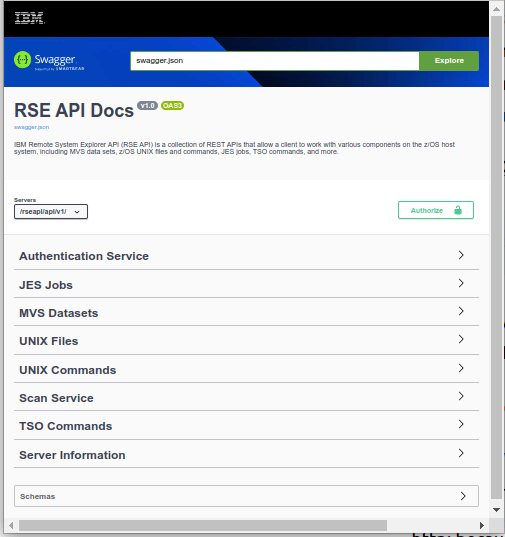
The URL http://10.1.1.2:6800/rseapi/api-docs/ displays a Swagger page, where you can try out the different commands, for example list dataset names, or display a member.

  • http: because I have not enabled https yet
  • 10.1.1.2 is the address of my z/OS image
  • 6800 is the port
  • /rseapi/api-docs/ is the URL to display the swagger documentation.

This gave me

Expand the MVS Datasets and it gives a list of option, including

I expanded the GET to get all dataset names matching the filter. I clicked on Try it out. I entered a High Level Qualifier, and selected execute. The first time the session issues a request it prompts for userid and password. It returns with the data about my data sets, and the strings

This is the information I need to issue a curl request.

For one of the operations I got

HTTP Status 401 – Unauthorized

This is because the userid using the service did not have a R/W home directory. I sometimes got

ICH408I USER(COLIN ) GROUP(SYS1 ) NAME(COLIN PAICE)
/u/.rseapi CL(DIRACC ) FID(…)
INSUFFICIENT AUTHORITY TO MKDIR
ACCESS INTENT(-W-) ACCESS ALLOWED(GROUP R-X)

Using the curl interface.

I used the shell script

trace="-v"
url='http://10.1.1.2:6800/rseapi/api/v1/datasets/COLIN.ZL*/list'
curl $trace  --config  curlapi.config $url --user "colin:xxxxxxxx" 

and the configuration file curlapi.config

--header "accept: application/json"
--header "Accept-Encoding: gzip, deflate"
--header "Accept-Language: en-GB,en-US;q=0.9,en;q=0.8"
--header "Connection: keep-alive"

or combining them

head='--header "accept: application/json"  '
head2='--header "Accept-Encoding: gzip, deflate"'
head3='--header "Accept-Language: en-GB,en-US;q=0.9,en;q=0.8" '
head4='--header "Connection: keep-alive" '
url='http://10.1.1.2:6800/rseapi/api/v1/datasets/COLIN.ZL*/list'
curl $trace  --user "colin:xxxxxxxx"  $head $head2 $head3 $head4 $url

The output body was

{"items": [{
  "name": "COLIN.ZLOGON.CLIST",
  "migrated": false
* Connection #5 to host 10.1.1.2 left intact
}]}

This took about 2 seconds to process one file name. It took 7 seconds to process 300 file names.

Processing multiple requests from CURL

There is an overhead setting up the connection. You can issue multiple requests from CURL, so this connection is done once, and is faster than doing multiple CURL requests.

The examples below are for TLS session

I used a shell script

rsecurl.sh

trace="-v"
tls="--cert  ./$name.pem:password --key $name.key.pem --cacert doczosca.pem --tlsv1.2" 
post="GET"
user='--user colin:xxxxxxx'
curl $trace -X $post $tls  --config  curlapi.config $user -H@curlapi.headers

curlapi.headers

Accept: application/json
Accept-Encoding: gzip, deflate, br
Accept-Language: en-GB,en-US;q=0.9,en;q=0.8
Authorization: Basic Y29saW46cFFu3Gh2MDI=
Cache-Control: no-cache
Connection: keep-alive
Dnt: 1
Pragma: no-cache

curlapi.config

This has the two requests – with a different URL. The -o directs the output to a file

-o ./COLIN.LIST
url = "https://10.1.1.2:6800/rseapi/api/v1/datasets/COLIN.D%2A/list"

-o ./ADCD.LIST
url = "https://10.1.1.2:6800/rseapi/api/v1/datasets/ADCD.%2A/list"

The script ran and created COLIN.LIST and ADCD.LIST.

Using Python to issue a REST request

The Python code below issues two requests.

home = "/home/colinpaice/ssl/ssl2/"
ca=home+"doczosca.pem"
cert=home+"docec384.pem"
key=home+"docec384.key.pem"
cookie=home+"cookie.jar.txt"
# url="https://10.1.1.2:6800/rseapi/api/v1/datasets/COLIN.D%2A/list"

buffer = BytesIO()
c = pycurl.Curl()
dir(c)
print("C=",c)
try:
  c.setopt(c.URL, "https://10.1.1.2:6800/rseapi/api/v1/datasets/COLIN.Z%2A/list")
  c.setopt(c.WRITEDATA, buffer)
  c.setopt(pycurl.CAINFO, ca)
  c.setopt(pycurl.CAPATH, "") 
  c.setopt(pycurl.SSLKEY, key)
  c.setopt(pycurl.SSLCERT, cert)
  c.setopt(pycurl.COOKIE,cookie)
  c.setopt(pycurl.COOKIEJAR,cookie)
  c.setopt(pycurl.SSLKEYPASSWD , "password") 
  c.setopt(c.HEADERFUNCTION, header_function)
  c.setopt(pycurl.HTTPHEADER, ['Accept: application/json'])
  c.setopt(c.USERPWD, 'colin:xxxxxxxx')
  c.setopt(pycurl.VERBOSE, True)
  c.perform()
  body = buffer.getvalue()
  print(body.decode('iso-8859-1'))
# now a second one 
  c.setopt(c.URL, "https://10.1.1.2:6800/rseapi/api/v1/datasets/ADCD.*/list")
  c.perform()
  body = buffer.getvalue()
  print(body.decode('iso-8859-1'))
  print("==================")
  c.close()
except Exception as e:
  print("exception :",e  )
finally:
    print("ok") 

This gave the data in JSON format. The c.setopt(pycurl.VERBOSE, True) gave

C= <pycurl.Curl object at 0x55cc87355170>
*   Trying 10.1.1.2:6800...
* Connected to 10.1.1.2 (10.1.1.2) port 6800 (#0)
* found 1 certificates in /home/colinpaice/ssl/ssl2/doczosca.pem
* found 0 certificates in 
* GnuTLS ciphers: NORMAL:-ARCFOUR-128:-CTYPE-ALL:+CTYPE-X509:-VERS-SSL3.0
* ALPN, offering h2
* ALPN, offering http/1.1
* SSL connection using TLS1.2 / ECDHE_ECDSA_AES_256_GCM_SHA384
*   server certificate verification OK
*   server certificate status verification SKIPPED
*   common name: 10.1.1.2 (matched)
*   server certificate expiration date OK
*   server certificate activation date OK
*   certificate public key: EC/ECDSA
*   certificate version: #3
*   subject: O=NISTECCTEST,OU=SSS,CN=10.1.1.2
*   start date: Sun, 02 Jul 2023 00:00:00 GMT
*   expire date: Tue, 02 Jul 2024 23:59:59 GMT
*   issuer: O=COLIN,OU=CA,CN=DocZosCA
* ALPN, server did not agree to a protocol
* Server auth using Basic with user 'colin'

Which may be useful when trying to debug TLS problems.

CEE3501S The module libpython3.8.so was not found.

Running some Python programs on z/OS I got the above error when using Python 11.

If seems that when the C code was compiled, an option (which I cannot find documented) says make it downward compatible.

The fix is easy…

The command ls -ltr /u/ibmuser/python/v3r11/lib/libpython* gave

-rwxr-xr-x ... Jul 15 12:09 /u/ibmuser/python/v3r11/lib/libpython3.11.so                     
lrwxrwxrwx ... Sep 6 12:11  /u/ibmuser/python/v3r11/lib/libpython3.8.so -> libpython3.11.so
