Configuring RSEAPI on z/OS to use TLS

The RSEAPI server is the Apache Tomcat server plus RSEAPI specific stuff. If you know how to configure Tomcat, you know most of what you need. The Tomcat customising is documented here.

This post follows on from Getting REST to work into z/OS. I was unclear at first how to correctly specify overrides. I’ve blogged an article Passing parameters to Java program to show how some parameters are specified as RSEAPI_KEYSTORE_FILE=… and other parameters are specified as -Djava.protocol.handler.pkgs=…

See Java Parameters for how I configured RSEAPI to be able to flip configuration options.

Update your level of Java

I had various problems getting TLS to work with RSEAPI.

  • TLSv1.3 was not supported on the level of Java V8 I originally had.
  • I had to override the /etc/zexpl/java.security file so that it understood keyrings of the format safkeyring://START1/MQRING

When I refreshed the level of Java (to SR8 FP6 dated June 2023), things worked much better. I would recommend getting a level of Java shipped within the last year.

I tested this by changing rseapi.env to include

export JAVA_HOME="/usr/lpp/java/new/J8.0_64" 
export LIBPATH="$JAVA_HOME/bin:$JAVA_HOME/bin/classic:"$LIBPATH 
export PATH="$JAVA_HOME/bin:"$PATH 

Without this I got various Java problems, such as an unresolved dependency.

Getting RSE to work with TLS was not trivial

The original version of RSEAPI was v1.0.5 (see /usr/lpp/IBM/rseapi/tomcat.base/bin/current_version.txt) Another version is available in GITHUB with a version of v1.1.0 created 7 July 2022 which I worked with.

TLS configuration changes

RSEAPI supports only one port. To use TLS change the procedure to use SECURE=’true’, (or override it at startup).

The RESAPI proc has the location of the configuration files. Mine says /etc/zexpl.

The main file to edit is /etc/zexpl/rseapi.env . The sample has a lot of commented out statements. I added at the bottom

RSEAPI_KEYSTORE_FILE="safkeyring://START1/MQRING " 
RSEAPI_KEYSTORE_TYPE="JCERACFKS" 
RSEAPI_KEYSTORE_PASS="password" 
RSEAPI_USING_ATTLS=false 
RSEAPI_SSL_ENABLED_PROTOCOLS=TLSv1.2

Which server certificate to use?

By default, the first key read from the keystore will be used. See certificateKeyAlias in Apache Tomcat configuration.

To change this I edited /usr/lpp/IBM/rseapi/tomcat.base/conf/sserver.xml and added

 <Connector port="${port.http}" protocol="${http.protocol}" 
   certificateKeyAlias="${serverCert}" 
   ...
/> 

I then edited /etc/zexpl/rseapi.env and added

d3=" -DserverCert=NISTECCTEST" 
JAVA_OPTS="$d3 " 
CATALINA_OPTS=$JAVA_OPTS 
export JAVA_OPTS 
export CATALINA_OPTS 

Using TLSv1.3

I blogged configuring Java to support TLSV1.3 a separate post TLS 1.3, Java and z/OS.

The additional RSEAPI specific configuration was

RSEAPI_HTTP_PROTOCOL=HTTP/1.1 
RSEAPI_SSL_ENABLED_PROTOCOLS=TLSv1.3 
RSEAPI_SSL_CIPHERS=TLS_AES_128_GCM_SHA256,TLS_AES_256_GCM_SHA384,TLS_CHACHA_POLY1305_SHA256 
RSEAPI_KEYSTORE_FILE="safkeyring://START1/MQRING " 
RSEAPI_KEYSTORE_TYPE="JCERACFKS" 
RSEAPI_KEYSTORE_PASS="password" 
RSEAPI_USING_ATTLS=false 

You can use RSEAPI_SSL_ENABLED_PROTOCOLS=TLSv1.3,TLSV1.2 to get both TLS 1.2 and 1.3 support.

ClientAuth Support

The web browser (Tomcat) has support for requiring clients to specify a certificate as part of the TLS handshake.

I got this to work by editing /usr/lpp/IBM/rseapi/tomcat.base/conf/sserver.xml, and changing clientAuth=”false” to clientAuth=”{$clientAuth}”

<Connector port="${port.http}" protocol="${http.protocol}" 
     clientAuth="${clientAuth}" sslProtocol="TLS" 
...
>

and setting the value to “required” or specifying the value in the startup options:

d1="-DclientAuth=required"
t1=" -Djavax.net.ssl.trustStoreType=JCERACFKS" 
t2=" -Djavax.net.ssl.trustStore=safkeyring://START1/MQRING"
JAVA_OPTS=" $d1 $t1 $t2" 
CATALINA_OPTS=$JAVA_OPTS  
export JAVA_OPTS 
export CATALINA_OPTS 

The …trustStoreType and … trustStore provide the defaults if non are specified in the sserver.xml.

Use of keystore and trust store

The use of a trust store to store the CA certificates, and any self signed certificates is recommended. The keystore then contains just the private keys needed by the server. This means you can have one trust store per LPAR, which saves administratio.

If you use a combined trust key and trust store, and this is shared by applications, then applications may get access to private certificates used by other application, so is not as secure.

The tomcat documentation describes the truststore* parameters. These are in the in <Connector…. within file /usr/lpp/IBM/rseapi/tomcat.base/conf/sserver.xml .

For example

<SSLHostConfig 
       protocols="${ssl.enabled.protocols}"> 
       <Certificate type="EC" 
          certificateKeyAlias="NISTECCTEST" 
          certificateKeystoreFile="${keystoreFile}" 
          certificateKeystorePassword="${keystorePass}" 
          truststoreType="${trustStoreType}"                     
          truststoreFile="${trustStoreFile}"
          truststorePassword="${trustStorePass}"
      /> 
</SSLHostConfig>

and specify -Dxx where xx is the value in ${xx} such as -DtrustStoreType=”JCERACFKS” . You can hard code the values.

Setup problems

I had a variety of problems. Most were solved by going to a newer level of Java or RSEAPI. For example earlier versions did not support TLSv1.3

Authority issue

I got the message

Caused by: java.lang.IllegalArgumentException: The private key of NEWTECCTEST is not available or no authority to access the private key

This was caused by the certificate belonged to a userid START1, but I was running RSEAPI on userid STCRSE. For userid STCRSE to be able to access the private certificate part of the certificate of another userid’s certificate, the STCRSE userid need UPDATE access to the keyring profile.

My keyring was safkeyring://START1/MQRING. I needed

permit START1.MQRING.LST   class(RDATALIB) access(update) id(STCRSE)
setropts raclist(rdatalib) refresh

Getting REST to work into z/OS with RSEAPI

I was asked if there was a REST API into z/OS, to enable a Python program to work with z/OS files.

The answer is yes, and it is pretty easy to set up and get working.

z/OS Explorer and z/OS ZOWE, have a REST interface into z/OS. For example with z/OS explorer you can use the VS Code to edit files on z/OS.

You can just use the server; you do not have to use z/OS explorer or ZOWE.

Remote System Explorer API (RSEAPI) is some RSEAPI specify code on top of Apache Tomcat web server. The customising is documented here.

See Configuring RSEAPI on z/OS to use TLS.

List of topics

Which program/stc to use?

I found two Remote System Explorer (RSE) servers on my z/OS

  • RSED (dated on my system 2016)
  • RSEAPI (dated on my system 2020).

RSED used an internal interface, and is there for backwards compatibility.

RSEAPI is strategic with a REST API. It uses the Apache Tomcat Java web server.

The notes below are how I got RSEAPI to work on z/OS, and run my REST request into z/OS. I was running on z/PDT where the product was installed in HUH100.* libraries, but the system was only partially configured.

There are at least two versions of RSEAPI.

  1. v1.0.5 from 2021 only support Java V8 – and you should use a recent fix pack for Java.
  2. v1.1.0 from 2022 supports Java V8 and Java V11. You should use recent fix packs for these, as earlier ones do not have the latest TLS support.

I found it easier to use a current level of Java.

Basic setup

Mount the file system

The REST server is started with the RSEAPI started task.

The file system was not mounted. Use the TSO command

mount filesystem('HUH100.ZFS') mountpoint('/usr/lpp/IBM/rseapi/')       
type(ZFS) mode(read)

You can update your BPXPRMxx to include the same statements.

Start RSEAPI

The set up had mostly been done on my system, I just had to start it.

S RSEAPI,SECURE='false'       

SECURE=’false’ says do not use TLS.

This starts several subtasks, including Java. It took over 1 minute for it to accept a connection and over 200 seconds before it was fully up, and able to respond to requests. The time to start is typical of starting a Java Server on my little z/OS running on zPDT on my Linux machine. On real hardware it takes just seconds so I’ve been told.

Once it had started the response time was ok.

Stopping RSEAPI

Within the STDOUT from the RSEAPI was

Registering MVS Console Listener for job RSEAPI6   

To stop RSEAPI you have to use “P RSEAPI6”. Once Java had started successfully, it took less than 30 seconds to shut down. If Java was still starting up, it will not shutdown until Java has finished starting, so I tended to cancel the RSEAPI job (cancel RSEAPI6).

Changing the configuration

While exploring RSEAPI, I needed to change the configuration, for example using Java shared classes to improve start up time.

Some configuration is done using RSE specific environment variables in /etc/zexpl/rseapi.env, such as

RSE specific parameters

RSEAPI_KEYSTORE_FILE="safkeyring://START1/MQRING "

The level of Java

I changed the level of Java using

export JAVA_HOME="/usr/lpp/java/new/J8.0_64" 
export LIBPATH="$JAVA_HOME/bin:$JAVA_HOME/bin/classic:"$LIBPATH 
export PATH="$JAVA_HOME/bin:"$PATH 

Java parameters

I added some Java specific parameters.

d1=" -verbose:dynload,class " 
d1="" 
d2=" -Dlog.level=INFO "                                                                                
JAVA_OPTS=" $d1 $d2  " 
CATALINA_OPTS=$JAVA_OPTS 
export JAVA_OPTS 
export CATALINA_OPTS 

I built up a big list of variables and added them to the JAVA_OPTS, for example

JAVA_OPTS= “$d1 $d2 $d3 $p1 $p2” .

In the above example d1 is blank, and is not passed to Java. If I reorder the two d1 statements I can easily change the configuration, and later change it back again.

Reading the error logs

I had various problems getting TLS working. One hiccup was that Java writes error messages to //STDERR – in ASCII! and so is not easily read. I changed this to

//STDERR   DD PATH='/var/zexpl/logs/rseapi_6800.1/stderr',                   
//            PATHOPTS=(OWRONLY,OCREAT,OTRUNC),         
//            PATHMODE=SIRWXU

Normally this file is empty. You can use date and time in the file name

// SET PATH='/var/zexpl/logs/rseapi_6800.1' 
//RSEAPI   EXEC PGM=BPXBATSL,REGION=0M,TIME=NOLIMIT, 
//            PARM='PGM &HOME./tomcat.base/start.sh' 
//STDOUT   DD SYSOUT=* 
//STDERR DD PATH='&PATH/stderr.D&YYMMDD..T&HHMMSS', 
//        PATHOPTS=(OWRONLY,OCREAT,OTRUNC),PATHMODE=SIRWXU
//STDERR   DD SYSOUT=* 
//CEEOPTS DD * 
RPTSTG(ON) 
/* 
//STDENV   DD *,SYMBOLS=(JCLONLY) 
_BPXK_AUTOCVT=ON 
...

To look at the output I used the omvs command

oedit /var/zexpl/logs/rseapi_6800.1/

which lists the contents of the directory, then used E to edit stderr – it displays EBCDIC text, or EA to display the file in ASCII – for the Java stuff.

The TLS support writes messages to the same (/var/zexpl/logs/rseapi_6800.1/) directory. Files have format description.yyyy-mm-dd

The files of interest

  • catalina.2023-08-07 has information from Java about problems with TLS.
  • localhost_access.2023-08-07 shows the request and the return code such as “GET /rseapi/api/v1/datasets/COLIN.D%2A/list HTTP/1.1″ 401 437

Enhanced startup messages

By specifying

-Dlog.level=finer

I got useful information in stderr and catalina….log files. For example

Server version name:   Apache Tomcat/10.0.23 
Server built:          Jul 14 2022 08:16:11 UTC 
Server version number: 10.0.23.0 
OS Name:               z/OS 
OS Version:            02.04.00 
Architecture:          s390x 
Java Home:             /Z24C/usr/lpp/java/J8.8_64/J8.0_64 
JVM Version:           8.0.8.6 - pmz6480sr8fp6-20230601_01(SR8 FP6) 
JVM Vendor:            IBM Corporation 
CATALINA_BASE:         /u/ibmuser/aaa/tomcat.base 
CATALINA_HOME:         /u/ibmuser/aaa/tomcat.home 
...
Command line argument: -Duser.dir=/S0W1/tmp 
Command line argument: -Dlog.level=FINER 

Using the browser interface

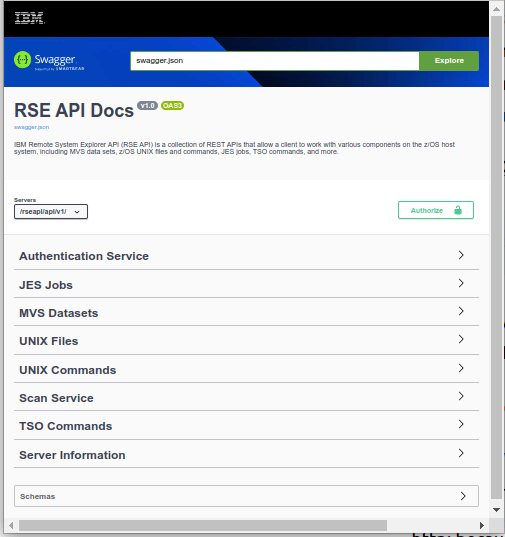
The URL http://10.1.1.2:6800/rseapi/api-docs/ displays a Swagger page, where you can try out the different commands, for example list dataset names, or display a member.

  • http: because I have not enabled https yet
  • 10.1.1.2 is the address of my z/OS image
  • 6800 is the port
  • /rseapi/api-docs/ is the URL to display the swagger documentation.

This gave me

Expand the MVS Datasets and it gives a list of option, including

I expanded the GET to get all dataset names matching the filter. I clicked on Try it out. I entered a High Level Qualifier, and selected execute. The first time the session issues a request it prompts for userid and password. It returns with the data about my data sets, and the strings

This is the information I need to issue a curl request.

For one of the operations I got

HTTP Status 401 – Unauthorized

This is because the userid using the service did not have a R/W home directory. I sometimes got

ICH408I USER(COLIN ) GROUP(SYS1 ) NAME(COLIN PAICE)
/u/.rseapi CL(DIRACC ) FID(…)
INSUFFICIENT AUTHORITY TO MKDIR
ACCESS INTENT(-W-) ACCESS ALLOWED(GROUP R-X)

Using the curl interface.

I used the shell script

trace="-v"
url='http://10.1.1.2:6800/rseapi/api/v1/datasets/COLIN.ZL*/list'
curl $trace  --config  curlapi.config $url --user "colin:xxxxxxxx" 

and the configuration file curlapi.config

--header "accept: application/json"
--header "Accept-Encoding: gzip, deflate"
--header "Accept-Language: en-GB,en-US;q=0.9,en;q=0.8"
--header "Connection: keep-alive"

or combining them

head='--header "accept: application/json"  '
head2='--header "Accept-Encoding: gzip, deflate"'
head3='--header "Accept-Language: en-GB,en-US;q=0.9,en;q=0.8" '
head4='--header "Connection: keep-alive" '
url='http://10.1.1.2:6800/rseapi/api/v1/datasets/COLIN.ZL*/list'
curl $trace  --user "colin:xxxxxxxx"  $head $head2 $head3 $head4 $url

The output body was

{"items": [{
  "name": "COLIN.ZLOGON.CLIST",
  "migrated": false
* Connection #5 to host 10.1.1.2 left intact
}]}

This took about 2 seconds to process one file name. It took 7 seconds to process 300 file names.

Processing multiple requests from CURL

There is an overhead setting up the connection. You can issue multiple requests from CURL, so this connection is done once, and is faster than doing multiple CURL requests.

The examples below are for TLS session

I used a shell script

rsecurl.sh

trace="-v"
tls="--cert  ./$name.pem:password --key $name.key.pem --cacert doczosca.pem --tlsv1.2" 
post="GET"
user='--user colin:xxxxxxx'
curl $trace -X $post $tls  --config  curlapi.config $user -H@curlapi.headers

curlapi.headers

Accept: application/json
Accept-Encoding: gzip, deflate, br
Accept-Language: en-GB,en-US;q=0.9,en;q=0.8
Authorization: Basic Y29saW46cFFu3Gh2MDI=
Cache-Control: no-cache
Connection: keep-alive
Dnt: 1
Pragma: no-cache

curlapi.config

This has the two requests – with a different URL. The -o directs the output to a file

-o ./COLIN.LIST
url = "https://10.1.1.2:6800/rseapi/api/v1/datasets/COLIN.D%2A/list"

-o ./ADCD.LIST
url = "https://10.1.1.2:6800/rseapi/api/v1/datasets/ADCD.%2A/list"

The script ran and created COLIN.LIST and ADCD.LIST.

Using Python to issue a REST request

The Python code below issues two requests.

home = "/home/colinpaice/ssl/ssl2/"
ca=home+"doczosca.pem"
cert=home+"docec384.pem"
key=home+"docec384.key.pem"
cookie=home+"cookie.jar.txt"
# url="https://10.1.1.2:6800/rseapi/api/v1/datasets/COLIN.D%2A/list"

buffer = BytesIO()
c = pycurl.Curl()
dir(c)
print("C=",c)
try:
  c.setopt(c.URL, "https://10.1.1.2:6800/rseapi/api/v1/datasets/COLIN.Z%2A/list")
  c.setopt(c.WRITEDATA, buffer)
  c.setopt(pycurl.CAINFO, ca)
  c.setopt(pycurl.CAPATH, "") 
  c.setopt(pycurl.SSLKEY, key)
  c.setopt(pycurl.SSLCERT, cert)
  c.setopt(pycurl.COOKIE,cookie)
  c.setopt(pycurl.COOKIEJAR,cookie)
  c.setopt(pycurl.SSLKEYPASSWD , "password") 
  c.setopt(c.HEADERFUNCTION, header_function)
  c.setopt(pycurl.HTTPHEADER, ['Accept: application/json'])
  c.setopt(c.USERPWD, 'colin:xxxxxxxx')
  c.setopt(pycurl.VERBOSE, True)
  c.perform()
  body = buffer.getvalue()
  print(body.decode('iso-8859-1'))
# now a second one 
  c.setopt(c.URL, "https://10.1.1.2:6800/rseapi/api/v1/datasets/ADCD.*/list")
  c.perform()
  body = buffer.getvalue()
  print(body.decode('iso-8859-1'))
  print("==================")
  c.close()
except Exception as e:
  print("exception :",e  )
finally:
    print("ok") 

This gave the data in JSON format. The c.setopt(pycurl.VERBOSE, True) gave

C= <pycurl.Curl object at 0x55cc87355170>
*   Trying 10.1.1.2:6800...
* Connected to 10.1.1.2 (10.1.1.2) port 6800 (#0)
* found 1 certificates in /home/colinpaice/ssl/ssl2/doczosca.pem
* found 0 certificates in 
* GnuTLS ciphers: NORMAL:-ARCFOUR-128:-CTYPE-ALL:+CTYPE-X509:-VERS-SSL3.0
* ALPN, offering h2
* ALPN, offering http/1.1
* SSL connection using TLS1.2 / ECDHE_ECDSA_AES_256_GCM_SHA384
*   server certificate verification OK
*   server certificate status verification SKIPPED
*   common name: 10.1.1.2 (matched)
*   server certificate expiration date OK
*   server certificate activation date OK
*   certificate public key: EC/ECDSA
*   certificate version: #3
*   subject: O=NISTECCTEST,OU=SSS,CN=10.1.1.2
*   start date: Sun, 02 Jul 2023 00:00:00 GMT
*   expire date: Tue, 02 Jul 2024 23:59:59 GMT
*   issuer: O=COLIN,OU=CA,CN=DocZosCA
* ALPN, server did not agree to a protocol
* Server auth using Basic with user 'colin'

Which may be useful when trying to debug TLS problems.