Tracing input and output of the Liberty web server.

The Liberty web server is used by many IBM products on z/OS, for example z/OSMF, MQSeries and z/OSConnect (but not Zowe).

When using Zowe, I struggled finding out what data was input to the server. As usual, when you have found the answer it is easy.

Once it worked, I had

<httpAccessLogging id="accessLogging" 
logFormat="%a %s ET=%D %r i=%i c=%C "
enabled="true"
/>
<httpEndpoint id="defaultHttpEndpoint"
accessLoggingRef="accessLogging"
httpPort="9080"
httpsPort="10443"
/>

Where the httpEndpoint defines the port 10443 , and references httpAccessLogging.

It one point I had two ports defined for https. I separated the output for each port using

filepath="${server.output.dir}/logs/http_10443_access.log" 

within the httpAccessLogging definition, to output the data to a specific file to match the port.

What data is output?

You can control what data is output. I used logFormat to output what I was interested in.

logFormat="%a %s ET=%D %r i=%i c=%C " 

Where

  • %a is the remote IP address 10.1.0.2
  • %s is the status – if it worked the value is 200.
  • ET=%D. This is the duration of the request in microseconds. It appears as ET=667601
  • %r the first line of the request POST /ibmmq/rest/v1/admin/action/qmgr/CSQ9/mqsc HTTP/1.
  • i=%i the header name from the request. My request did not have one so this comes out as i=-
  • c=%C gives the cookies. You can request a specific cookie. My output had c=jwtToken:eyJraWQiOiJhYVBkRzd5N…. which is the JSON Web Token. To see the contents, I took this token, and pasted it into http:jwt.io.

You can ask for the datetime, but this comes out as a long string with year,month, day hh:mm:ss.uuuuuu. I found the year month and day were not needed, but I could not find how to display just the time.

The output from the above format was

10.1.0.2 200 ET=667601 POST /ibmmq/rest/v1/admin/action/qmgr/CSQ9/mqsc HTTP/1.1 i=- c=jwtToken:eyJraWQiOiJhYVBkRzd5NmZETk5UT....

RACF: Processing audit records

RACF can write to SMF data information about which userid logged on, what resources it accessed etc.. This can be used to check there are no unexpected accesses, and any violations are actioned.

The data tends to be “this userid had access to that resource”. It does not contain numeric values, such as response time.

Overview of SMF data

SMF data is a standard across z/OS. Each product has an SMF record type, and record subtypes are used to provide granularity within a product’s records. It is common for an SMF record to have sections within it. There may be 0 or more sections, and the sections can be of varying length. A SMF formatting program needs to build and report useful information from these sections.

There are many tools or products to process SMF records. Individual products may produce tools for formatting records, and there are external tools available to process the records.

Layout of RACF SMF records

The layout of the RACF SMF records are described in the publications. Record type 80: RACF processing record. It describes the field names, at which offsets, and how to interpret the data (what each bit means), this information is sufficient for someone to write a formatting program.


RACF also provides a formatter. The formatter runs as a SORT exit, and expands the data. For example in the SMF data is a bit saying a userid has the SPECIAL attribute. The formatter expands this and creates a column “SPECIAL” with the value YES or NO. This makes it easy to filter and display records, because you do not need to map bits to their meaning – the exit has done it for you. The layout of the expanded records is described here.

What tools format the records?

A common(free) tool for processing the records that RACF produces is an extension to DFSORT called ICETOOL. (The IBM sort modules all begin with ICE… so calling it ICETOOL was natural).

With ICETOOL you can say include rows where…., display and format these fields, count the occurrences of this field, and add page titles. You can quickly generate tabular reports.

The output file of the RACF exit has different format records mixed up. You need to filter by record type and display the subset of records you need.

JCL to extract the RACF SMF record and convert to the expanded format

//* DUMP THE SMF DATASETS 
// SET SMFPDS=SYS1.S0W1.MAN1
// SET SMFSDS=SYS1.S0W1.MAN2
//*
//SMFDUMP EXEC PGM=IFASMFDP,REGION=0M
//DUMPINA DD DSN=&SMFPDS,DISP=SHR,AMP=('BUFSP=65536')
//DUMPINB DD DSN=&SMFSDS,DISP=SHR,AMP=('BUFSP=65536')
//DUMPOUT DD DISP=(NEW,PASS),DSN=&RMF,SPACE=(CYL,(1,1))
//OUTDD DD DISP=(NEW,PASS),DSN=&OUTDD,
// SPACE=(CYL,(1,1)),DCB=(RECFM=VB,LRECL=12288)
//ADUPRINT DD SYSOUT=*
//*XMLFORM DD DSN=COLIN.XMLFORM,DISP=(MOD,CATLG),
//* SPACE=(CYL,(1,1)),DCB=(RECFM=VB,LRECL=12288)
//SYSPRINT DD SYSOUT=*

//SYSIN DD *
INDD(DUMPINA,OPTIONS(DUMP))
INDD(DUMPINB,OPTIONS(DUMP))
OUTDD(DUMPOUT, TYPE(30,80,81,83))
START(0000)
END(2359)
DATE(2025230,2025360)
ABEND(NORETRY)
USER2(IRRADU00)
USER3(IRRADU86)
/*

The RACF exits produce several files.

  • //OUTDD the expanded records are written to this dataset
  • //ADUPRINT contains information on how many of each record type the exit processed
  • //XMLFORM you can have it write data in XML format – for post processing

JCL to process the expanded records

The JCL below invokes the ICETOOL processing.

//S1      EXEC  PGM=ICETOOL,REGION=0M 
//DFSMSG DD SYSOUT=*
//TOOLMSG DD SYSOUT=*
//IN DD DISP=(SHR,PASS,DELETE),DSN=*.SMFDUMP.OUTDD
//TEMP DD DSN=&&TEMP3,DISP=(NEW,PASS),SPACE=(CYL,(1,1))
//PRINT DD SYSOUT=*

Where

  • //IN refers to the //OUTDD statement in the earlier step
  • //TEMP is an intermediate dataset. The sort program writes filtered records to this data set.
  • //PRINT is where the formatted output goes

ICETOOL Processing

The whole job is

//IBMJOBI  JOB 1,MSGCLASS=H RESTART=PRINT 
// JCLLIB ORDER=COLIN.RACF.ICETOOL
// INCLUDE MEMBER=RACFSMF
// INCLUDE MEMBER=PRINT
// INCLUDE MEMBER=ICETOOL
//TOOLIN DD *
COPY FROM(IN) TO(TEMP) USING(TEMP)
DISPLAY FROM(TEMP) LIST(PRINT) -
BLANK -
ON(5,8,CH) HEADER('EVENT') -
ON(63,8,CH) HEADER('USER ID') -
ON(14,8,CH) HEADER('RESULT') -
ON(23,8,CH) HEADER('TIME') -
ON(175,8,CH) HEADER('TERMINAL') -
ON(184,8,CH) HEADER('JOBNAME') -
ON(286,8,CH) HEADER('APPL ')
//TEMPCNTL DD *
INCLUDE COND=(5,8,CH,EQ,C'JOBINIT ')
OPTION VLSHRT
//

You have to be careful about the offsets. The record has a 4 byte length field on the front of each record. So the field in the layout of the expanded records described here is column 1 for length 8, in the JCL you specify column 5 of length 8. In the documentation the userid is columns 59 of length 8, in the JCL it is ON(63,8,CH).

The processing is ….

  • Copy the data from the dataset in //IN and copy it to the dataset in //TEMP. Using the sort instructions in TEMPCNTL. You take name name in USING(TEMP) and put CNTL on the end to locate the DDname.
  • The sort instructions say include only those records where columns 5 of length 8 of the record are the string ‘JOBINIT ‘ ( so columns 1 for length 8 in the mapping description).
  • The DISPLAY step copies record from the //TEMP dataset to the //PRINT DDNAME.
  • The ON() selects the data from the record, giving start column, length and formatting. For each field, it uses the specified column heading.

The output

In the //PRINT is

EVENT      USER ID    RESULT     TIME       TERMINAL   JOBNAME    APPL    
-------- -------- -------- -------- -------- -------- --------
JOBINIT START1 SUCCESS 09:54:11 SMFCLEAR
JOBINIT START1 TERM 09:54:20 SMFCLEAR
JOBINIT START1 TERM 09:55:13 CSQ9WEB
JOBINIT IBMUSER SUCCESS 10:12:14 LCL702 IBMUSER
JOBINIT IBMUSER SUCCESS 10:14:18 IBMJOBI
JOBINIT IBMUSER TERM 10:14:18 IBMJOBI
JOBINIT IBMUSER SUCCESS 10:21:39 IBMACCES
JOBINIT IBMUSER TERM 10:21:40 IBMACCES
JOBINIT IBMUSER SUCCESS 10:22:10 IBMACCES
JOBINIT IBMUSER TERM 10:22:11 IBMACCES
JOBINIT IBMUSER SUCCESS 10:23:01 IBMPASST
JOBINIT IBMUSER TERM 10:23:05 IBMPASST

Extending this

Knowing the format of the RACF extend record, you can add more fields to the reports.

You can filter which records you want. For example all records for userid START1. You can link filters with AND and OR statements.

Using a Python script to access MQWEB with JSON Web Tokens

See JWT for my blog post on what JWT are and how they work.

I also gave myself the additional challenge of not saving sensitive information in disk files.

Once I had got the basics working using a Bash script, I used Python as a proper solution, because I could capture the information from the requests much easier.

Overall application

My overall application is

Python

Get the JWT

#!/usr/bin/env python3
from timeit import default_timer as timer
import ssl

#import time
#import base64
#import json
import sys
from http.client import HTTPConnection # py3
import requests
import urllib3
# trace the traffic flow
HTTPConnection.debuglevel = 1

my_header = { 'Accept' : 'application/json' }

urllib3.disable_warnings()

geturl = "https://10.1.1.2:10443/zosmf/services/authenticate"

context = ssl.SSLContext(ssl.PROTOCOL_TLS_CLIENT)

certificate="colinpaice.pem"
key="colinpaice.key.pem"
cpcert=(certificate,key)

jar = requests.cookies.RequestsCookieJar()

caCert='./doczosca.pem'

s = requests.Session()
res = s.post(geturl,headers=my_header,cookies=jar,cert=cpcert,verify=caCert)

if res.status_code != 200:
print(res.status_code)
#headers = res.headers
#print("Header",type(headers))
#for h in headers:
# print(h,headers[h])

cookies = res.cookies.get_dict()
token=""
for c in cookies:
print("cookie",c,cookies[c])
if c == "jwtToken":
token = cookies[c]

if token == "" :
print("No jwtToken cookie returned ")
sys.exit(8)

Issue the MQ command

print("===========NOW DO MQ ==============")
mqurl="https://10.1.1.2:9443/ibmmq/rest/v1/admin/action/qmgr/CSQ9/mqsc"
tok = "Bearer " + token
mq_header = {
'Accept' : 'application/json',
'Authorization' : tok,
'Content-Type': 'application/json',
'ibm-mq-rest-csrf-token' : ''
}

data={"type": "runCommand",
"parameters": {"command": "DIS QMGR ALL"}}

mqres = s.post(mqurl,headers=mq_header,cookies=jar,verify=False,json=data)

print("==MQRES",mqres)
print("mqheader",mqres.headers )
print("mqtext",mqres.text)

sys.exit(0)

Notes:

  • The authorisation token is created by “Beader ” concatenated from the jwtToken value.
  • The data is created as json. {“type”: “runCommand”,….}. It needs header ‘Content-Type’: ‘application/json’,

Using a Bash script to access MQWEB with JSON Web Tokens

See JWT for my blog post on what JWT are and how they work.

I also gave myself the additional challenge of not saving sensitive information in disk files.

Once I got the scripts working I used a Python script- which was much easier to use.

Overall application

My overall application is

BASH

I initially tried using a BASH script for creating and using JWT to issue MQ REST API requests to MQWEB.

This worked, but capturing the JWT from the cookie was not easy to implement.

Get the JWT

#!/bin/bash
rm cookie.jar.txt

url="https://10.1.1.2:10443/zosmf/services/authenticate"
tls="--cacert doczosca.pem --tlsv1.2 --tls-max 1.2"
certs=" --cert ./colinpaice.pem:password --key ./colinpaice.key.pem"
insecure="--insecure"
cj="--cookie cookie.jar.txt --cookie-jar cookie.jar.txt"

curl -v $cj $tls $certs $url $insecure

Note: If there was a valid JWT in the cookie store, the code did not return a JWT. I deleted the cookie file to get round this.

Issue the MQ command

#!/bin/bash
set -x

url="https://10.1.1.2:9443/ibmmq/rest/v1/admin/action/qmgr/CSQ9/mqsc"

token="..."

tls="--cacert ./doczosca.pem --tlsv1.2"
certca="--cacert ./doczosca.pem "

origin="-H Origin:"
post="-X POST"
# need --insecure to avoid subjectAltName does not match
insecure="--insecure"

cj="--cookie cookie.jar.txt --cookie-jar cookie.jar.txt"

curl --verbose -H "Authorization: Bearer $token" -H "Connection: close" $cj $header $insecure $verify $tls -H "Content-Type: application/json" -H "ibm-mq-rest-csrf-token: value" $certs $trace $url --data "{ \"type\": \"runCommand\", \"parameters\": {\"command\": \"DIS QMGR ALL\"} }"

I used cut and paste to copy the JWT from the output of the CURL z/OSMF request, and paste it in token=”” in the MQ script.
I did this because my BASH scripting was not up trying to getting the JWT from the z/OSMF script.

How to configure systems to use JSON Web Token

JSON Web Token(JWT) is a technique of authenticating across systems. It depends on trust, and technology similar to TLS and SSL.

The high level picture

A client wants to use a service on a server.

On the client machine

  • The client creates a payload containing authentication information, such as subject(=userid), issuer(=machine/company name), issued time, and expiry time.
  • This payload is signed using a private key. Where signing is doing a checksum on the payload and encrypted the checksum with the private key.
  • The payload and signature are sent to the server.

On the server machine

  • The server has a list of definitions, containing a issuer and other information, the name of a keyring, and the name of a certificate. The trust comes from if you trust the client then you store the public key for the client in the keyring. If you do not trust the client, you do not make the certificate available.
  • When the data from the client machine arrives, the list of definitions is processed until a match is found. It checks the issuer and other fields, (it can use filters) and if they match, checks the signature of the payload to find the public key in the keyring, and validates the signature.
  • If everything matches, information from the payload and the definition on the server are used to look up a list of subject, and issuer to get the RACF userid to be used.
  • The thread switches to the userid and does the application work.

How to create a JWT

  • z/OSMF can do this for you
  • You can create your own on z/OS – but you need to know how to do a checksum and encrypt with a private key. ICSF provides services which do this.
  • use Python.

Use z/OSMF

In the logical server.xml file

<featureManager> 
<feature>jwtSso-1.0</feature>
</featureManager>

<jwtSso cookieName="jwtToken"
jwtBuilderRef="zOSMFBuilder"
includeLtpaCookie="true"
useLtpaIfJwtAbsent="true"
/>

<jwtBuilder id="zOSMFBuilder"
issuer="zOSMF"
keyAlias="CONN2.IZUDFLT"
expiresInSeconds="10"
jwkEnabled="false"
signatureAlgorithm="RS384"
/>

<mpJwt id="myMpJwt"
issuer="zOSMF"
wksUri="https://${izu.jwks.hostname}:${izu.https.port}/jwt/ibm/api/zOSMFBuilder/jwk"
signatureAlgorithm="RS384"
/>

Interesting fields are

  • issuer=”zOSMF” this is put into the payload. It is used to help identify the realm
  • keyAlias=”CONN2.IZUDFLT”. This is the certificate with the private key in the keyring which is used to sign the JWT
  • expiresInSeconds=”10″ how long the JWT is valid for. During testing I set this to 600 seconds.
  • jwksUri=”https://${izu.jwks.hostname}:${izu.https.port}/jwt/ibm/api/zOSMFBuilder/jwk” if you want the server to issue a request to the client asking for validation, this is the URL the server would use.

Use Python

This is very easy

from datetime import datetime, timezone, timedelta
import jwt

# open the private key and read the contents
pemfile = open("/home/colinpaice/ssl/ssl2/colinpaice.key.pem", 'r')
keystring = pemfile.read()
pemfile.close()

# Create the header. Specify the type, and the encryption algorithm
header= {
"typ": "JWT",
"alg": "RS256"
}

# get time in number of seconds since "day 0"
now = datetime.now(timezone.utc)
payload = {
"token_type": "Bearer",
"sub": "ADCDC", # userid
"upn": "ADCDC",
"realm": "PYTHON",
"iss": "PYTHON", # issuer
"iat": now,
"exp": now + timedelta(seconds=6000) # valid for 6000 seconds

}

# encrypt it and create the jwt
token = jwt.encode(payload, keystring, algorithm='RS256')

print(token) # display it

Backend server set up

The page Configuration example: Securing a Liberty web application with a JWT and CICS transaction security explains how to do it for Liberty in a CICS region.

For my MQWEB server I added to mqwebuser.xml

<featureManager> 
<feature>openidConnectClient-1.0</feature>
</featureManager>

<openidConnectClient id="RSCOOKIE"
clientId="COLINCOOK"
realmName="zOSMF"
inboundPropagation="required"
issuerIdentifier="zOSMF"
mapIdentityToRegistryUser="false"
signatureAlgorithm="RS384"
jwkEndpointUrl="https://10.1.1.2:10443/jwt/ibm/api/zOSMFBuilder/jwk"
trustAliasName="CONN2.IZUDFLT"
trustStoreRef="defaultKeyStore"
userIdentifier="sub"
>
</openidConnectClient>

mapIdentityToRegistryUser=”false” says use the realm in this definition and the userid(subject) from the payload to look up the in the RACF RACMAP to get the userid.

If you specify “true” it uses the userid(subject) from the payload, and the sysplex name. This means a userid “COLIN” from a z/OS system, and a userid “COLIN” from Linux – get the same userid on z/OS.

Note: If they public key for the JWT is not in the keyring, add it, and restart the server.

Map subject(userid) and realm to get a userid.

See RACMAP (Create, delete, list, or query a distributed identity filter)

For example

RACMAP ID(IBMUSER) MAP USERIDFILTERNAME("IBMUSER")  REGISTRY("zPROD") WITHLABEL("zPROD")
RACMAP ID(NOONE) MAP USERIDFILTERNAME("IBMUSER") REGISTRY("LINUX") WITHLABEL("LINUX")
RACMAP ID(ZILTCH) MAP USERIDFILTERNAME("*") REGISTRY("*") WITHLABEL("CATCHALL")

The registry is the realm name from the server definitions.

if a valid userid is returned from the mapping, the thread is changed to run as that userid, and execute the application work – as that userid.

The backend server is a little more complex

You need a <openidConnectClient ../> for each “client” system the server supports.

You can specify one <authFilter../> to restrict what the <openidConnectClient ../> processes. For example if can be an IP address(10.1.0.2) or a range (10.1.*.*), or restrict it by URL.

For the <openidConnectClient ../> definition to match it needs

  • The signature validated – so the public key needs to be in a keyring. (You could have a different keyring for each realm)
  • The issuer from the payload to match the definition
  • The input data must pass the authFilter.

You need to plan for

  • the realms you need,
  • the mapping of subjects and realms to userids in the server,
  • public keys and keyrings

Some useful links

My Server’s definition

<featureManager> 
<feature>transportSecurity-1.0</feature>
<feature>openidConnectClient-1.0</feature>
</featureManager>

<openidConnectClient id="RSCOOKIE"

headerName="colin"

clientId="COLINCOO2"
realmName="zOSMF"
inboundPropagation="required"
issuerIdentifier="zOSMF"
mapIdentityToRegistryUser="false"
signatureAlgorithm="RS384"
jwkEndpointUrl="https://10.1.1.2:10443/jwt/ibm/api/zOSMFBuilder/jwk"
trustAliasName="CONN1.IZUDFLT"
trustStoreRef="defaultKeyStore"
userIdentifier="sub"
>
<authFilter id="afint">
<remoteAddress id="myAddress" ip="10.1.0.2" matchType="equals" />
</authFilter >

</openidConnectClient>

<keyStore
id="defaultKeyStore"
filebased="false"
location="safkeyring://IZUSVR/CCPKeyring.IZUDFLT"
password="password" readOnly="true" type="JCERACFKS"
/>

Where

  • headerName=”colin”. My curl request has -H “colin: $token” where token is the bash variable with the is the JWT token. Without this, the request needs -H “Authorization: Bearer $token”
  • realmName=”zOSMF” used with the userid to lookup in the RACMAP table for the z/OS userid to use
  • signatureAlgorithm=”RS384″ matches the value in the JWT. (I had problems using RS256)
  • trustAliasName=”CONN1.IZUDFLT” the name of the certificate to use on the server
  • trustStoreRef=”defaultKeyStore” points to the keyring definition

z/OSMF console times out with return code 2 reason code 21

When trying to use the z/OSMF console interface to issue a console command and get the response I got after 60 seconds.

{“reason”:”Timeout when creating TSO address space for console COLIN99″,”return-code”:2,”reason-code”:21}

This was caused by PARMLIB(IZUPRMCM) not having a HOSTNAME specified, and was picking up a HOSTNAME of S0W1.DAL-EBIS.IHOST.COM. When I specified HOSTNAME(10.1.1.2) and restarted z/OSMF it all worked!

The HOSTNAME can be in various places in TCP/IP and the value from TSO (and jobs) may be different from a Unix thread.

I had to use the address of the TCP/IP stack for example 10.1.1.2; using the address of 127.0.0.1 didn’t work. I could not connect to z/OSMF from my client.

It was strange that with the HOSTNAME missing, I could create TSO address spaces.

How did I diagnose this problem?

In the file /global/zosmf/data/logs/IZUG0.log were entries like

INFO:Prepare to start new TSO/E address space with acct: ACCT#, proc: IZUFPROC, rsize: 50000, apptag: IZUCONAP 
Ýtx000000000000000E:IBMUSER@10.1.0.2 (PUT) /zosmf/restconsoles/consoles/COLIN99?null¨
2025-06-28T16:44:02.114Z|00000092|com.ibm.zoszmf.consoles.tsoconnect.Connection|run
WARNING:exception when run as server:
java.net.SocketTimeoutException: Connect timed out
...
at java.base/sun.net.www.http.HttpClient.openServer(HttpClient.java:531)
...
at com.ibm.zoszmf.consoles.tsoconnect.Connection$3.run(Connection.java:372)

This shows the TSO account number, the TSO procedure, the region size. I checked these were valid, and the userid had access to them.

The http request was a clue that this was using TCP/IP, and not using the TSO services available through CEA interface.

How did I run the command?

I used a script like

name=”colinpaice”
cert=” –cert ./$name.pem:password –key $name.key.pem”

insecure=”–insecure”
curl -X PUT –header ‘Content-Type: application/json’ $cert –header ‘Accept: application/json’
–insecure -d ‘{ “cmd”: “d a,l”, “sol-key”: “JES” }’
https://10.1.1.2:10443/zosmf/restconsoles/consoles/COLIN99&#8217;

z/OSMF: what traces are available

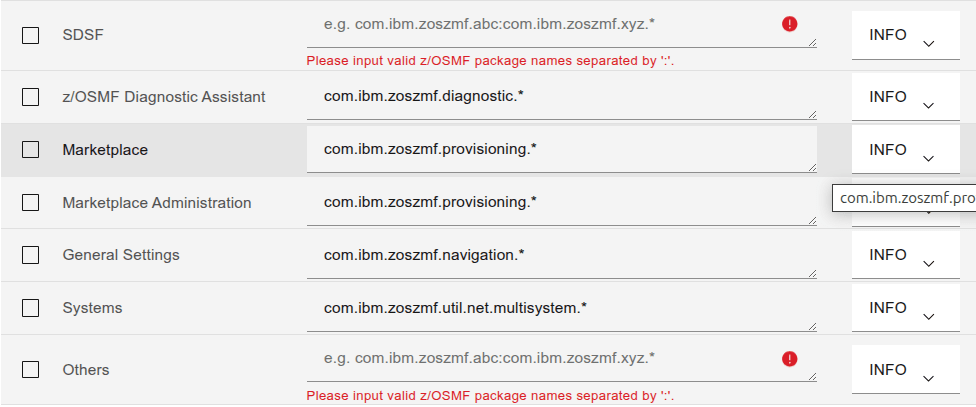
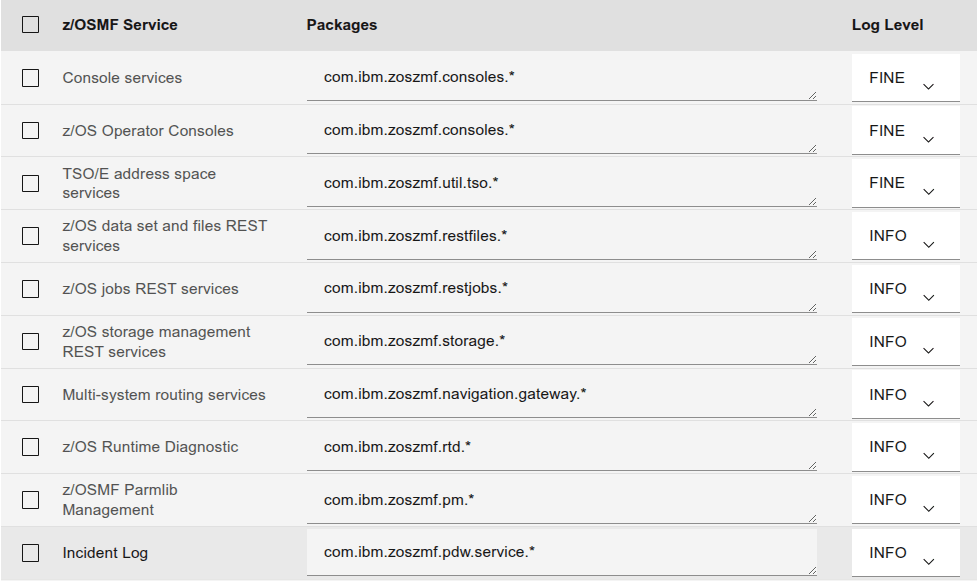
I could find no z/OSMF documentation on how to turn on traces. The documentation says “Contact IBM”. Someone pointed out the z/OSMF Diagnostic Assistant. This is an icon on the z/OSMF main screen (https://10.1.1.2:10443/zosmf/ for me).

You need to click on “Add Service” to list the components, before you can change the log level.

Fill in the details, use the Tick box at the start of the line, and the Log Level pull down. Once you have chose them, click on the “Set” button.

You can issue an operator command.

f server-name,logging='trace_specification'

Below is a list of the trace commands from the diagnostic Assistant . The granularity of the trace is warning, info, fine, finer, finest

For SAF security calls use zos.native=finest.

Ive seen this as zos.native.03=…

I also found these – but I dont know what they mean!

  • com.ibm.ccc.=ALL:
  • com.ibm.crypto.=all:
  • com.ibm.websphere.security.*=all:
  • com.ibm.ws.security.=ALL:
  • com.ibm.ws.webcontainer.=all:
  • com.ibm.wsspi.webcontainer.*=all:
  • HTTPChannel=all:
  • GenericBNF=all:
  • zos.native.03=all – this give information about a subset of z/OS calls
  • com.ibm.websphere.security.jwt=all

SAF security calls: zos.native=finest

Produces output like (formatted for display)

6/23/25, 16:39:20:192 GMT?] 00000028 id=00000000 zos.native.03.001 
Trace: 6/23/25, 16:39:20:192 GMT? t=8c8140 key=S2 (300100f)
Description: RACROUTE REQUEST=FASTAUTH call
racrouteArea_p: 000000007e4b0c10
6/23/25, 16:39:20:193 GMT?] 00000028 id=00000000 zos.native.03.001
Trace: 6/23/25, 16:39:20:193 GMT? t=8c8140 key=S2 (3001010)
Description: RACROUTE REQUEST=FASTAUTH return
returnCode: 0
safReturnCode: 0
racfReturnCode: 0

racfReasonCode: 4
6/23/25, 16:39:20:194 GMT?] 00000028 id=00000000 zos.native.03.001
Trace: 6/23/25, 16:39:20:194 GMT? t=8c8140 key=S2 (3001012)
Description: Exit: checkAuthorizationFast
returnCode: 0
6/23/25, 16:39:20:195 GMT?] 00000028 id=00000000 zos.native.02.008
Trace: 6/23/25, 16:39:20:195 GMT? t=8c8140 key=S2 (2008005)
Description: Entry: registrySetUnused
alreadyVerified: true
token: data_address=00000051_2a6103b8, data_length=64
+--------------------------------------------------------------------------+
|OSet| A=000000512a6103b8 Length=0000040 | EBCDIC | ASCII |
+----+-----------------------------------+----------------+----------------+
|0000|C2C2C7E9 D9C5C7E3 00000001 00000040|BBGZREGT....... |...............@|
|0010|00000000 7DC72100 00000007 00000000|....'G..........|....}.!.........|
|0020|01000000 00000000 00000000 00000000|................|................|
|0030|00000000 00000000 00000000 00000000|................|................|
+--------------------------------------------------------------------------+

It is not very well written, because there are “safReturnCode:”, “SAF return code:”,”return code:” and “returnCode:”, and “rc:”. I found it easiest to use the following in an edit session to find non zero return codes.

  • x all
  • f ‘code: 0’ all
  • del all x
  • f ‘code:’ all

The trace entry ” token: data_address=00000051_2a6103b8, data_length=64 ” shows the value with name “token” at the specified address, and length. It is displayed in hex, EBCDIC and ASCII.

Trace points.

Taken from a trace file

  • zos.native.02.002 getConsoleCommand
  • zos.native.02.006 CommandProcessor.ntv_issueCommandResponse
  • zos.native.02.00d DeleteWorkUnit*
  • zos.native.02.00e wlm_enclave_*
  • zos.native.02.00e wlm_enclave_create leave
  • zos.native.03.001 RACROUTE REQUEST=FASTAUTH
  • zos.native.03.003 CertificateCredential…
  • zos.native.03.004 ntv_createCertificateCredential
  • zos.native.03.005 checkAccess
  • zos.native.03.006 ntv_checkAccess
  • zos.native.03.007 invokeIRRSIA00 createACEE
  • zos.native.03.008 PenaltyBox
  • zos.native.03.00b getGroupsForUser
  • zos.native.04.002 write_to_operator_response
  • zos.native.04.004 Latch
  • zos.native.04.007 getStck

Zowe: What is Zowe

At one level Zowe allows people running on their works stations to access z/OS without having to logon to TSO and use ISPF. This can be done using

  • A browser
  • A scriptable command level interface(s)
  • Plug in to VSCode, so you can do all your work using the IDE.
  • You own code using a REST API using URLs and data in JSON format.

What is unique about Zowe?

There are other products which provide similar function. For example z/OSMF (z/OS Management Facility) provides many of the same facilities. Zowe uses z/OSMF for a lot of the function.

I’ll give a bit of history to show how Zowe and z/OSMF fit in today’s environment.

The 1970’s

In the the 1970’s a client machine would connect to z/OS quite likely using a proprietary interface. There may be one or just a few (for availability) back end servers . A typical client might connect to the server in the morning, and stay connected all day until the client machine was shutdown. The cost of using the networks was high, and a typical transaction had several flows to and from the server, sending updates (rather than the whole transaction data – see below).

One of the problems with this model is if you start another server mid-morning, it may get very few connections because the client connected to the server first thing, and might only go to the new server if they had to restart.

Another problem is that the client only signed on once a day, and if a userid was revoked it would still be in use till the client shut down.

Both of these problems can be solved by having the clients periodically disconnect at the end of a transaction and reconnect.

Today…

The architecture has matured. The web browser is used as a front end for much of the transactions. A typical request is now a url like

https://bigshop.co.uk:5555/sales?part=123456,name=ColinPaice


Where

  • https: is the protocol, another protocol could be ftp
  • bigshop.co.uk: is the IP address (or the name which maps to an IP address)
  • 5555: the port on the server
  • sales: this is the transaction
  • ?: splits the transaction from the data
  • part=123456,name=ColinPaice: this is the data passed to the transaction.

When this request flows to the server there may be a software router in z/OS which says “if this is a new session request – then send it to the lightest used server”. This gives load balancing. If you issue the same request multiple times it may go to different servers each time.

The request gets to a server machine. Several instances of an application can be running listening on the port 5555. Again this provides workload balancing.

One shot request

A request can be one-shot – start a session, authenticate, do something, get a response back – end. This provides a highly available scalable solution. You can take servers in and out of commission and work will execute.

Conversation request

A session can be long lived, where there are many flows within a session. For example list all data set, display this member etc. This does: start a session, authenticate, have a conversation end.

When the server responds to the request it sends back the IP address for future traffic in the session, and the session specific port. When the client sends data within the session, it goes to this partner session.

Authentication

Authentication can be expensive. For example using TLS to provide secure network flows, requires several network flows. Using a certificate or userid and password can be expensive. TLS has a Session resumption or fast reconnect. If you disconnect and reconnect again the client can send a token, the server can validate it, and if it is valid bypass some of the set up.

To reduce the costs at the application to application level, you can use an authentication token. Once you have authenticated, you are given an encrypted token. This token contains your userid and other information, and is valid for a time period ranging from minutes to hours. If the token expires you have to re-authenticate to get a new token. This token may be valid across server instances on one machine, and may be valid on servers on different systems.

How do you issue a request?

You can write your own program to establish a TCP/IP session to the server and send and receive data. There are several tools to help you, including cURL, openssl client, Python, Java and the Zowe client.

Many services are REST services, where the server has no saved information, and all requried information is passed in the request data.

For example using cURL to logon, using a certificate, and not using a userid/password

curl --cookie-jar zowe.cookie.jar --cookie zowe.cookie.jar --key ./colinpaice.key.pem  --cert ./colinpaice.pem:password   --cacert ./doczosca.pem -c - -X POST https://10.1.1.2:7554/gateway/api/v1/auth/login

Where

  • –cookie-jar … is where tokens (http tokens) are saved across invocations.
  • –key…. contains the user’s private key, used to encrypt data
  • -cert … is the public certificate sent to the server as part of the TLS handshake. It is used to decrypt ( and so validate the encrypted data sent to the server)
  • -cacert …. is the TLS certificate used to validate the TLS cerificate sent from the server
  • -X POST which http protocol to use
  • https://10.1.1.2:7554/gateway/api/v1/auth/login
    • It is http using tls ( hence the https)
    • The IP address is 10.1.1.2
    • The port is 7554
    • The application within the server is gateway/api/v1/auth/login.

The back end looks up the id from the certificate and finds the associated userid. This look up can be for a specific distinguish name, or part of the distinguished name, such as all those with o=bigbank.co.uk in the DN.

Curl has options so you can have the network traffic displayed (in clear text) so you can validate what certificates etc are being used.

I use curl to check out the backend before using Zowe.

You can specify a userid and password using the cURL options “–basic –user colin:passw0rd”.

TLS can validate the certificate, and then use the specified userid and password for authentication.

How to define an application

You can configure the back end server for Zowe and z/OSMF in different ways

So what does Zowe do?

The Zowe Command Level Interface implements the REST API and hides some of the complexity, of what headers are needed. You can provide a system wide configuration file containing the default parameters for all users, a team/project wide for the defaults specific to a team, and a person file of parameters just for you.

Zowe has been designed to work with The VSCode Interactive Development Environment, and so you can edit files on your workstation, and have them copied back to z/OS when you save the file. You can look at spool files, and issue operator commands. All this in a familiar development environment.

z/OS curl headers not always working.

I had problems using cURL trying to get to a back end server (z/OSMF). Once it did work, I realised it should not have worked – because I had not defined a security profile!

My basic bash script was

set -x 
trace=" "
ca="--cacert /u/colin/ssl/zosmfca.pem"
key="--cert key.pem:12345678 "
insecure="--insecure"
cert=" "
header='-H "X-CSRF-ZOSMF-HEADER: Dummy "'
userid="--basic --user colin2:password"
url="https://127.0.0.1:10443/zosmf/rest/mvssubs"

If I hard coded the header statement it worked

curl -v  -H "X-CSRF-ZOSMF-HEADER: dummy" $trace $cert $key $insecure $userid $ca  $url 

If I used the bash variable in $header it did not work, even though it looked as if was identical to the case above.

curl  -v  -H  $header $trace $cert $key $insecure  $userid $ca  $url 

{ “errorID”:”IZUG846W”,”errorMsg”:”IZUG846W: An HTTP request for a z/OSMF REST service was received from a remote site. The request was rejected, however, because the remote site “” is not permitted to z/OSMF server “IZUSVR” on target system “127.0.0.1:10443″ .”}

If I put the parameter in a config file (curl.config below) it worked

-H "X-CSRF-ZOSMF-HEADER: Dummy" 

and I used

curl -v --config ./curl.config $trace $cert $key $insecure $userid $ca $url 

I think it is all to do with an interaction between curl, bash and double quotes.

It worked – when it should not have worked!

The documentation says you need a security profile set up see Enabling cross-origin resource sharing (CORS) for REST services.

On my system, there was no profile IZUDFLT.REST…. so I do not understand how it works, as the documentation implies I need an allow list!

Why can’t java use my key ring?

I had a problem with z/OSMF. I configured it to use an exiting keyring, but it consistently refused to use it. I had messages like

[WARNING ] CWPKI0809W: There is a failure loading the defaultKeyStore keystore. If an SSL configuration references the defaultKeyStore keystore, then the SSL configuration will fail to initialize.

This blog post covers how I debugged this situation.

What seemed strange was this only occurred when an Elliptic Curve certificate was being used – and not an RSA certificate.

Even more curiouser was the documentation mentioned access to the <ringOwner>.<ringName>.LST resource in the RDATALIB class. See here. I didn’t have this defined and yet RSA certificates would work! So curiouser and curiouser (or for the people who like correct grammar, curiouser and more curiouser).

All applications needing access to certificates and private keys use the R_datalib callable service.

The bottom line

  • z/OSMF has userid IZUSVR
  • I had a keyring and used two certificates
    • An RSA certificate, CCPKeyring.IZUDFLT, belonging to userid IZUSVR – based on the sample JCL provided by z/OSMF
    • An existing Elliptic Curve certificate NISTEC224 belonging to userid COLIN. This works else where.
  • Without <ringOwner>.<ringName>.LST defined the class(RDATALIB) the RSA certificate worked
  • Without <ringOwner>.<ringName>.LST defined the class(RDATALIB) the Elliptic Curve certificate failed
  • Once I found the problem I defined <ringOwner>.<ringName>.LST in class(RDATALIB), and gave the userid IZUSVR Update access to it – and the Elliptic curve worked
  • The reasons (being wise after the event)
    • R_datalib checks access on one profile in the RDATALIB class first – <ringowner>.<ringname>.LST. If there is none, it will fall back to check on two profiles in the FACILITY class – IRR.DIGTCERT.LISTRING and IRR.DIGTCERT.GENCERT. If the certificate is not owned by the accessing ID (except CERTAUTH or SITE), RDATALIB class has to be used for private key access.
    • This is true for the RSA certificate, used the IRRDIGTCERT.LISTRING class(FACILITY) and had access. So this worked.
    • For the Elliptic Curve, the caller’s userid (IZUSVR) is not the associated with the certificate (COLIN) so this fails, and the logic drops through to the RDATALIB checking.
    • The caller’s user ID has READ or UPDATE authority to the ..LST resource in the RDATALIB class. READ access enables retrieving one’s own private key, UPDATE access enables retrieving other’s. The ring did not exist, and so this access was not given.

How did I debug this? – Using Java trace

Adding configuration to z/OSMF

I copied /global/zosmf/configuration/local_override.cfg to /global/zosmf/configuration/local_override.colin

I edited/global/zosmf/configuration/local_override.cfg and changes the JVM options line to

JVM_OPTIONS=”-Xoptionsfile=’/global/zosmf/configuration/local_override.colin'”

I edited the local_override.colin, deleted all but the JVM options line, then split the line at \n so it looks like

-Dcom.ibm.ws.classloading.tcclLockWaitTimeMillis=300000
-Xscmx150M
-Xquickstart

Add debug information to the configuraton file

I added

-Djava.security.auth.debug=pkcs11keystore
-Dlog.level=Error

The output

[err] Jan 17, 2025 8:18:52 AM com.ibm.crypto.ibmjcehybrid.provider.HybridRACFKeyStore engineLoad 
TRACE: Loading keyring CCPKeyring.IZUDFLT as a JCECCARACFKS type keystore.
...
[err] Jan 17, 2025 8:19:02 AM com.ibm.crypto.hdwrCCA.provider.RACFInputStream getEntry
FINER: The private key of NISTEC224 is not available or no authority to access the private key
[err] Jan 17, 2025 8:19:02 AM com.ibm.crypto.ibmjcehybrid.provider.HybridRACFKeyStore engineLoad
TRACE: Error loading and storing certificates and key material from underlying JCECCARACFKS keyring CCPKeyring.IZUDFLT
java.io.IOException: The private key of NISTEC224 is not available or no authority to access the private key . This can be expected if the IBMJCECCA is not setup correctly or
ICSF is down. Will now attempt to load the keyring as a JCERACFKS keyring.

Which is not a very helpful message.

How did I debug this? – Using RACF trace

R_datalib is the callable service to ALL the exploiters which need access to a RACF keyring (certificates and private keys). It is r_datalib or its alias irrsdl00 with callable type number 41.

Enable the RACF trace

#SET TRACE(CALLABLE(TYPE(41))JOBNAME(IZU*))

Start GTF

S GTF.GTF,M=GTFRACF

This reported

IEF403I GTF - STARTED - TIME=08.17.03                                  
IEF188I PROBLEM PROGRAM ATTRIBUTES ASSIGNED
AHL121I TRACE OPTION INPUT INDICATED FROM MEMBER GTFRACF OF PDS
USER.Z24C.PROCLIB
TRACE=USRP
USR=(F44)
END
AHL103I TRACE OPTIONS SELECTED --USR=(F44)
AHL906I THE OUTPUT BLOCK SIZE OF 27998 WILL BE USED FOR OUTPUT 702
DATA SETS:
SYS1.TRACE

I started z/OSMF until it failed.

Stop GTF

p GTF 
AHL006I GTF ACKNOWLEDGES STOP COMMAND
AHL904I THE FOLLOWING TRACE DATASETS CONTAIN TRACE DATA :
SYS1.TRACE

Use IPCS to look at the dump, using command GTF USR(ALL). Go to the bottom of the output, use the command report view. This gives an ISPF edit session.

  • x all
  • f ‘RACF Reason code:’ all
    • You are interested in the non zero codes. “Label” each line of interest using the line prefix command .a, .b etc.
  • reset
  • loc .a
    • This will position you by the labelled line. Look up the RACF return and reason codes here. I had Reason Code 2c, which is decimal 44. Look for the keyring, or other information. I do not know which data tells you which sub operation r_datalib was doing, but for me it had the keyring name “CCPKeyring.IZUDFLT “. The description in the reason code documentation does not cover the situation of not having update access to the keyring, so I’ve raised a doc comment on it.