Adding a data set to an existing DDNAME in TSO.

I wanted to add a data set to the already allocated ISPTLIB concatenation. You can use the TSO ALLOCate command to allocate a list of data sets, but not to add a data set to an existing definition.

Lionel B. Dyck pointed me to the TSO function bpxwdyn.

When I logon to TSO I invoke a userid.ZLOGON.REXX data set

/* Rexx */                                                              

address TSO
userid = userid()
dsn= userid".S0W1.ISPF.ISPPROF"
req = "ALLOC FI(tmp) DA('"dsn"') SHR "
if bpxwdyn(req ) =0 then
call bpxwdyn "concat ddlist(ISPTLIB,tmp) "

"ispf"
  • The bpxwdyn(req ) allocates the dataset to the DDNAME TMP.
  • The call bpxwdyn “concat ddlist(ISPTLIB,tmp) copies the data set(s) in the tmp DDNAME to the end of the ISPTLIB DDNAME
  • ispf starts ISPF.

The TSO ISRDDN command gave me

                          Current Data Set Allocations           Row 68 of 122
Command ===> Scroll ===> CSR

Volume Disposition Act DDname Data Set Name Actions: B E V M F C I Q
B3RES1 SHR,KEEP > ISPTLIB ISP.SISPTENU
...
A4USR1 SHR,KEEP > COLIN.S0W1.ISPF.ISPPROF

Easy once you know how.

On the CBTAPE are KONCAT and CONCAT which do a similar function.

Using the Java Health centre for looking into Z/OSMF, MQWEB and other Liberty products.

The Java Health centre has an agent running in the JVM of interest, and there is Eclipse plug-in to display the data.

A Java server such as Liberty ( as used in z/OSMF, z/OSMF and MQWEB) can provide information on how the server is running. I was running MQWEB with Openj9, Java 21 (Semeru).

You need to configure the Liberty server and have something to process the data such as Health Center running on Eclipse.

You can display information in graphical time line format, such as

  • CPU used, system and application as used by the JVM
  • Which classes are being used
  • The environment – such as the parameters used to start the JVM
  • Garbage collection activity
  • I/O – number of files open, and open activity
  • Method profiling
  • Threads in use.

Configure the Eclipse

I installed Health Center from the Market place.

How to collect the data

You can configure the JVM in different modes:

  • headless – data is collected and written to the local file system
  • collect from the start – and view in Eclipse, this means you get all of the Java class loading activity
  • start collecting only after Eclipse has started, and connected to the JVM. I use this method. I start my server, and run a workload to “warm up the JVM” then use Eclipse to show the activity due to my testing.

Configure the JVM server

The options are listed here.

You can specify the JVM options on the command line or the jvm.options file.

You can specify them on the -Xhealthcenter:… statement, or as

-Dcom.ibm.diagnostics.healthcenter...=... 

values. For example

-Xhealthcenter:level=off,readonly=off,jmx=on,port=1972 

or

-Xhealthcenter:level=off
-Dcom.ibm.java.diagnostics.healthcenter.agent.port=1972
-Dcom.ibm.diagnostics.healthcenter.jmx=on
-Dcom.ibm.diagnostics.healthcenter.readonly=on

To run headless

In the server

I added the following to my jvm.options

-Xhealthcenter:level=headless 
-Dcom.ibm.java.diagnostics.healthcenter.headless.delay.start=2
-Dcom.ibm.diagnostics.healthcenter.headless=on
-Dcom.ibm.java.diagnostics.healthcenter.data.collection.level=headless
-Dcom.ibm.java.diagnostics.healthcenter.headless.output.directory=/u/tmp/zowec/
-Dcom.ibm.diagnostics.healthcenter.readonly=on

Down load the files to your work station, and use File -> Load Data to process the files.

To run the Health centre in real time

In the server

-Xhealthcenter:level=off,readonly=off,jmx=on,port=1972 
-Dcom.ibm.diagnostics.healthcenter.logging.level=debug

Note the jmx=on and the port number. You need this for the Eclipse configuration. The level=off means do not start collecting data until the Health centre agent connects.

In Eclipse

File -> New Connection… -> Enable an application for monitoring -> Next.

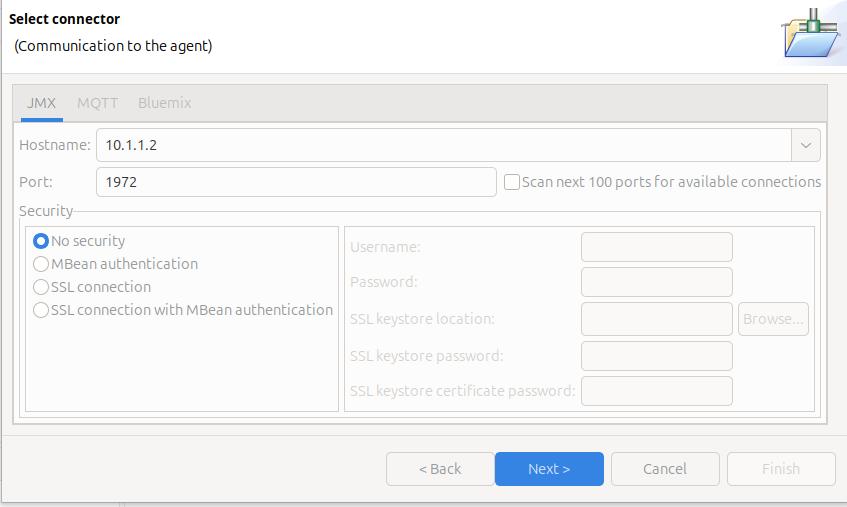
On the Select connector panel I used

Once it worked, I enabled security.

Click Next

The Health Centre then starts searching at the specified port. I disable the Scan next 100 ports… When it manages to connect to the port, click Finish.

I initially had problems connecting to the server, see Why can’t I connect to a z/OS port?

It takes a few seconds to start the data collection, and start downloading the data.

Let the JVM warm up

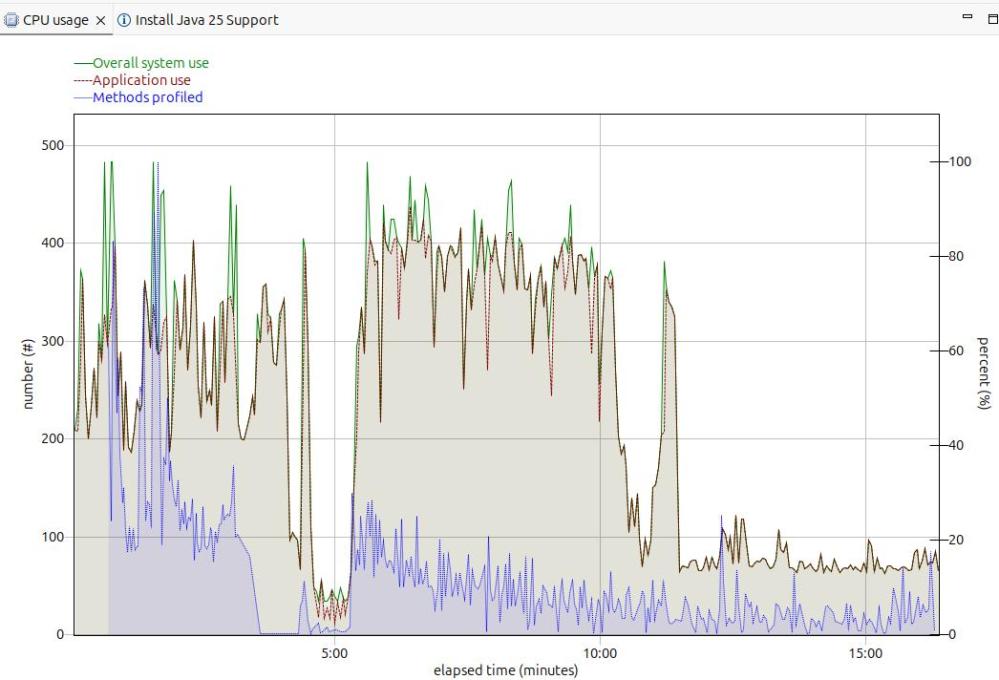
The image below shows the CPU usage from the start of the server.

For the first 5 minutes, this is the JVM starting up with no workload. Afterwards the CPU used drops to a low value.

After 5 minutes, I started my workload. For the first 12 or so minutes the CPU is high, but after about 13 minutes it levels out. If you want to do any measurements of cost per transaction you should take them from this period. During the “warm up” period, the JVM is optimising the code etc.

The green line shows the system CPU usage. The red line (and grey area) shows the Application usage. We can see most of the CPU used is application usage.

The number of methods profiled is the JVM optimising the code. It takes the “hottest” classes and does those first… until all (most) of the classes are optimised.

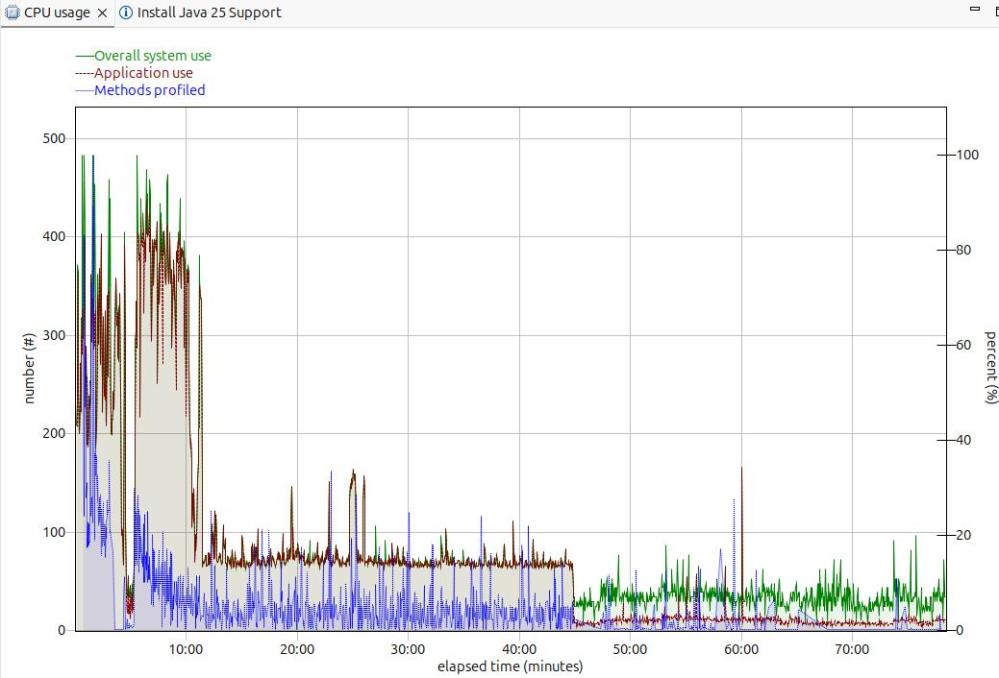
Long term monitoring.

f

From this diagram you can see the JVM startup, the initial part of my test where the JVM was warming up, the remainder of the test, and the JVM overhead after the test.

You need to take all of these into consideration when running performance tests.

Running performance tests

I set up my Work Load Manager configuration to record the number of MQ transactions, and had a report class for the MQWEB server. From this I can calculate the cost per transaction.

Health centre agent logging

With

-Dcom.ibm.diagnostics.healthcenter.logging.level=finest

I had output in the STDERR output

[06:51:52] com.ibm.diagnostics.healthcenter.Agent FINE: System receiver, version 1.0 
[06:51:52] com.ibm.diagnostics.healthcenter.Agent FINE: /usr/lpp/java/J21.0_64//lib/libhcapiplugin.so, version 1.0
[06:51:52] com.ibm.diagnostics.healthcenter.java FINE: Health Center Agent 4.0.7
06:51:53com.ibm.java.diagnostics.healthcenter.agent.mbean.HCLaunchMBean <init>
INFO: Agent version "3.0.21.202109031203"
06:51:56 com.ibm.java.diagnostics.healthcenter.agent.mbean.HCLaunchMBean startAgent
INFO: Health Center agent running in off mode.
06:51:56 com.ibm.java.diagnostics.healthcenter.agent.mbean.HCLaunchMBean startAgent
INFO: Health Center agent started on port 1972.

and in STDOUT many

com.ibm.lang.management.OperatingSystemMXBean.getTotalPhysicalMemory() 

Using the z/OS DNS on ADCD

This came out of a question. It is another of the little questions that get much bigger.

Background to Domain Name System(DNS)

DNS allows you to get an IP address from a string such as “WWW.MY.COM”.

You can have some files on your local system which provide this mapping, or you can exploit DNS Servers in the big internet.

Some people configure their system so it tries the internet first, and if that fails, uses local files.

You can do reverse DNS lookup, mapping an IP address to a string. For example you want to allow access from sites in WWW.MYFRIEND.COM. When a connection is started, you get the IP address, and can then do a reverse DNS lookup to get a name, which you can check in your “allow” list.

DNS commands for the end user

You can use the “old” tso command NSLOOKUP http://www.ibm.com, or the “new” command dig http://www.ibm.com. Neither of which seemed to give me any output!

The NSLOOKUP and DIG commands send their output to SYSOUT. In my TSO system, SYSOUT has been configured to JES. If I use SDSF, and display the output of my TSO userid, there is a SYSOUT, with the output in it!

NSLOOKUP

The NSLOOKUP command

NSLOOKUP http://www.my.com

NSLOOKUP http://www.my.com this.dns.site

NSLOOKUP 10.1.1.2

Tracing a DNS request

This does not provide much useful information! It does not tell you what happened, or what failed. It is described here.

Starting and stopping the DNS

This is not obvious. At IPL the ADCD.Z24C.PARMLIB(BPXPRM00) member has

RESOLVER_PROC(RESOLVER)

the resolver procedure must be in a data set that is specified by the IEFPDSI DD card specification of the MSTJCLxx PARMLIB member.

If you use D A,L it does not show up.

D A,RESOLVER gives you the normal output.

When I issued

P RESOLVER
S RESOLVER

It used the RESOLVER procedure from USER.Z24C.PROCLIB, the normal concatenation.

Displaying and changing the configuration.

You can display some of the current resolver configuration using

f resolver,display

The output is like

EZZ9298I RESOLVERSETUP - USER.Z24C.TCPPARMS(GBLRESOL)                   
EZZ9298I DEFAULTTCPIPDATA - USER.Z24C.TCPPARMS(GBLTDATA)                
EZZ9298I GLOBALTCPIPDATA - /etc/resolv.conf                             
EZZ9298I DEFAULTIPNODES - ADCD.Z24C.TCPPARMS(ZPDTIPN1)                  
EZZ9298I GLOBALIPNODES - /etc/hosts                                     
EZZ9304I COMMONSEARCH                                                   
EZZ9304I CACHE                                                          
EZZ9298I CACHESIZE - 200M                                               
EZZ9298I MAXTTL - 2147483647                                            
EZZ9298I MAXNEGTTL - 2147483647                                         
EZZ9304I NOCACHEREORDER                                                 
EZZ9298I UNRESPONSIVETHRESHOLD - 25                                     

The only way I could display all of the resolver configuration was to get a resolver trace!

//IBMRESO JOB 1,MSGCLASS=H 
//S1  EXEC PGM=IKJEFT01,REGION=0M 
//SYSPRINT DD SYSOUT=* 
//SYSTSPRT DD SYSOUT=* 
//SYSTCPT DD SYSOUT=* 
//SYSPRINT DD SYSOUT=* 
//SYSTSIN DD * 
NSLOOKUP 99.99.99.99 
/* 

This gave me in //SYSTCPT

Resolver Trace Initialization Complete -> 2023/02/26 18:01:56.725504                      
res_init Parse error on line 1: /etc/resolv.conf

res_init Resolver values:
Setup file warning messages = No
CTRACE TRACERES option = No
Global Tcp/Ip Dataset = /etc/resolv.conf
Default Tcp/Ip Dataset = USER.Z24C.TCPPARMS(GBLTDATA)
Local Tcp/Ip Dataset = None
Translation Table = TCPIP.STANDARD.TCPXLBIN
UserId/JobName = IBMUSER
Caller API = TCP/IP C Sockets
Caller Mode = EBCDIC
System Name = S0W1 (from VMCF)
UnresponsiveThreshold = 25
(D) DataSetPrefix = TCPIP
(D) HostName = S0W1
(D) TcpIpJobName = TCPIP
(*) DomainOrigin = None
(*) NameServer(s) = None
(*) NsPortAddr = 53 (*) ResolverTimeout = 5
(*) ResolveVia = UDP (*) ResolverUdpRetries = 1
(*) Options NDots = 1
(D) Trace Resolver (*) SockNoTestStor
(D) AlwaysWto = NO (D) MessageCase = MIXED
(*) LookUp = DNS LOCAL
(*) Cache
(*) NoCacheReorder
res_init Succeeded
res_init Started: 2023/02/26 18:01:56.794280
res_init Ended: 2023/02/26 18:01:56.794305

This is documented here.

The source of the value is

  • (*) Default value
  • (A) Modified by application
  • (D) Default file (not used if the local file is found)
  • (E) Environment variable
  • (G) Global file
  • (L) Local file

This means the “LookUp = DNS LOCAL ” value came from the default value.

The resolver JCL in USER.Z24C.PROCLIB had

//SETUP DISP=SHR,DSN=USER.Z24C.TCPPARMS(GBLRESOL)

When I changed this member to have LOOKUP LOCAL DSN, and used the F RESOLVER,REFRESH command, this changed the value.

Sample hosts file

The sample host file in TCPIP.SEZAINST(HOSTS) has

; The format of this file is documented in RFC 952, "DoD Internet 
; Host Table Specification". 
; 
; The format for entries is: 
; 
; NET : ADDR : NETNAME : 
; GATEWAY : ADDR, ALT-ADDR : HOSTNM : CPUTYPE : OPSYS : PROTOCOLS : 
; HOST : ADDR, ALT-ADDR : HOSTNM, NICKNM : CPUTYPE : OPSYS : PROTOCOLS : 
; 
; Where: 
;   ADDR, ALT-ADDR = IP address in decimal, e.g., 26.0.0.73 
;   HOSTNM, NICKNM = the fully qualified host name and any nicknames 
;   CPUTYPE = machine type (PDP-11/70, VAX-11/780, IBM-3090, C/30, etc.) 
;   OPSYS = operating system (UNIX, TOPS20, TENEX, VM/SP, etc.) 
;   PROTOCOLS = transport/service (TCP/TELNET,TCP/FTP, etc.) 
;   : (colon) = field delimiter 
;   :: (2 colons) = null field 
; *** CPUTYPE, OPSYS, and PROTOCOLS are optional fields. 
; 
;   MAKESITE does not allow continuation lines, as described in 
;   note 2 of the section "GRAMMATICAL HOST TABLE SPECIFICATION" 
;   in RFC 952.  Entries should be specified on a single line of 
;   up to a maximum of 512 characters per line. 
HOST : 129.34.128.245, 129.34.128.246 : YORKTOWN, WATSON :::: 
; 
NET  : 9.67.43.0 : RALEIGH.IBM.COM : 
; 
GATEWAY : 129.34.0.0 : YORKTOWN-GATEWAY :::: 

Unix application trace

Enable the trace by issuing the Unix command

export RESOLVER_TRACE=~/trace

Run the command

pip install mfpandas      

gave

-[33mWARNING: Retrying (Retry(total=4, connect=None, read=None, redirect=None, status=None)) after connection broken by 'NewConnectionError('<pip._vendor.urllib3.connection.HTTPSConnection object at 0x500B209580>: 
Failed to establish a new connection:
[Errno 1] EDC9501I The name does not resolve for the supplied parameters.')': /simple/mfpandas/-[0m-[33m

Look at the trace file

oedit trace

gave

GetAddrInfo Started: 2025/11/25 15:58:36.890589 
GetAddrinfo Invoked with following inputs:
Host Name: pypi.org
Service Name: 443
Hints parameter supplied with settings:
ai_family = 0, ai_flags = 0x00000000
ai_protocol = 0, ai_socktype = 1
No NameServers specified, no DNS activity
GetAddrInfo Opening Socket for IOCTLs
BPX1SOC: RetVal = 0, RC = 0, Reason = 0x00000000, Type=IPv4
BPX1IOC: RetVal = 0, RC = 0, Reason = 0x00000000
GetAddrInfo Opened Socket 0x00000005
GetAddrInfo Only IPv4 Interfaces Exist
GetAddrInfo Searching Local Tables for IPv6 Address
Global IpNodes Dataset = ADCD.Z31B.TCPPARMS(ZPDTIPN1)
Default IpNodes Dataset = ADCD.Z31B.TCPPARMS(ZPDTIPN1)
Search order = CommonSearch
BPX1ENV Get _BPXK_AUTOCVT: RetVal = 0, RC = 0, Reason = 0x00000000
_BPXK_AUTOCVT current value is ON
BPX1ENV Set _BPXK_AUTOCVT: RetVal = 0, RC = 0, Reason = 0x00000000
_BPXK_AUTOCVT set to OFF
Parse error on line 22: ADCD.Z31B.TCPPARMS(ZPDTIPN1)
SITETABLE from globalipnodes ADCD.Z31B.TCPPARMS(ZPDTIPN1)
- Lookup for pypi.org
GetAddrInfo Searching Local Tables for IPv4 Address
- Lookup for pypi.org
GetAddrInfo Searching Local Tables for IPv6 Address
- Lookup for pypi.org.DAL-EBIS.IHOST.COM
GetAddrInfo Searching Local Tables for IPv4 Address
- Lookup for pypi.org.DAL-EBIS.IHOST.COM
GetAddrInfo Closing IOCTL Socket 0x00000005
BPX1CLO: RetVal = 0, RC = 0, Reason = 0x00000000
GetAddrInfo Failed: RetVal = -1, RC = 1, Reason = 0x78AE1004
GetAddrInfo Ended: 2025/11/25 15:58:36.904995

EDIT       /etc/hosts
Command ===>
****** ******************************************************* Top
==MSG> -Warning- The UNDO command is not available until you chang
==MSG> your edit profile using the command RECOVERY ON.
000001 # BEGIN ANSIBLE MANAGED BLOCK
000002 #72.26.1.2 s0w1.dal-ebis.ihost.com S0W1
000003 127.0.0.1 localhost
000004 # END ANSIBLE MANAGED BLOCK
000005 #IPAddress Hostname alias
000006 151.101.128.223 pypi.org pip

Why can’t I connect to a z/OS port?

I’ve found couple of those little problems which took me a day to resolve – but which are obvious when you understand the problem.

The problems

I was trying to connect the Health Center in Eclipse to the Health agent in Liberty on z/OS.

The first problem was the health center agent on z/OS could not connect to the port. This was due to bad TCPIP configuration

The second problem was I could not connect to it from Eclipse. I had configured the port to be on the local rather than external interface.

My setup

In my jvm.options I had

-Xhealthcenter:level=off,readonly=off,jmx=on,port=1972

Problem 1: The health center agent on z/OS could not connect to the port

In the Liberty startup output I received (after about a timeout of about a minute)

SEVERE: Health Center agent failed to start. java.io.IOException: Cannot bind to URL [rmi://S0W1:1972/jmxrmi]: javax.naming.ServiceUnavailableException [Root exception is java.rmi.ConnectException: Connection refused to host:

Where my system is called S0W1.

It is trying to connect to system S0W1 port 1972, and failing.

TSO PING S0W1 gave

 CS 3.1: Pinging host S0W1.DAL-EBIS.IHOST.COM (172.26.1.2)
Ping #1 timed out

This was a surprise to me – I was expecting it to be my local z/OS machine…. I do not have an interface with address 172.26.1.2. This explains why it timed out.

In my ADCD.Z31B.TCPPARMS(GBLTDATA) I had

S0W1:   HOSTNAME   S0W1 
;
;
; NOTE - Use either DOMAINORIGIN/DOMAIN or SEARCH to specify your domain
; origin value
;
; DOMAINORIGIN or DOMAIN statement
; ================================
; DOMAINORIGIN or DOMAIN specifies the domain origin that will be
; appended to host names passed to the resolver. If a host name
; ends with a dot, then the domain origin will not be appended to the
; host name.
;
DOMAINORIGIN DAL-EBIS.IHOST.COM

Because S0W1 did not end with a dot – TCPIP put the DOMAINORIGIN on the end.

ADCD.Z31B.TCPPARMS(ZPDTIPN1)

had

172.26.1.2 S0W1.DAL-EBIS.IHOST.COM S0W1      
127.0.0.1 LOCALHOST

Which says for S0W1…. use IP address 172.26.1.2.

I changed this to

S0W1:   HOSTNAME   S0W1.
   127.0.0.1       S0W1        
127.0.0.1 LOCALHOST

With these changes, I restarted TCPIP, and told the resolver to use the updated configuration.

F RESOLVER,REFRESH,SETUP=ADCD.Z31b.TCPPARMS(GBLRESOL)

I then got

INFO: Health Center agent started on port 1972.

So my first success. However…

Problem 2 : I could not connect Eclipse to the port

… once I had managed to get get the server to connect to the port. When the server issues a TCPIP binds to a port, you need to specify the IP address and port. I had configured the hostname S0W1 as the local interface (127.0.0.1). When I tried to connect from Eclipse, I was trying to connect to port 1972 on interface 10.1.1.2 – which had not been configured!

The Liberty output had

WARNING: RMI TCP Accept-1972: accept loop for erverSocket[addr=0.0.0.0/0.0.0.0, localport=1972] throws java.io.IOException: EDC5122I Input/output error. (errno2=0x12B804B9)

I changed ADCD.Z31B.TCPPARMS(ZPDTIPN1) to have

10.1.1.2 S0W1
127.0.0.1 LOCALHOST

so the name S0W1 is associated with interface 10.1.1.2. I started restart TCPIP and the resolver and it manage to connect. It only took a day to resolve these problems.

Why can’t Liberty see my bootstrap.properties? The answer is in the title!

I put the osgi address and port information into the bootstrap.properties file, but it wasn’t being picked up. A couple of hours later I found out why – the answer is that Liberty could see my bootstrap.properties file.

The command

ls -lT bootstrap.properties

gave

- untagged    T=off -rwx------   1 OMVSKERN SYS1 ... bootstrap.properties     

which means the started task running Liberty did not have access to it, only the owner had rwx access. Java did not process it, because it could not see it.

I used the command

chmod 744 bootstrap.properties

and next time I started the Liberty instance, it could find the file.

My file had

osgi.console = 10.1.1.2:5400

The TSO command

tso netstat allconn (port 5400

saying – show all the connections which are, or were recently active, filtered by port 5400

gave

User Id  Conn     State
------- ---- -----
CSQ9WEB 00000139 Listen
Local Socket: ::ffff:10.1.1.2..5400
Foreign Socket: ::ffff:0.0.0.0..0

Showing it is active.

Understanding LTPA tokens for accessing a web site.

What is an LTPA token? – the short answer

When a client connects to a web server and logs on (for example with a userid and password), the server can send back a cookie containing encrypted logon information.

When the client sends this cookie in the next request, the server decrypts it, and so shortens the logon process. Eventually the token will expire and the client will need to logon again.

What is an LTPA token? – a longer answer.

There is a long (perhaps too long) description of LTPA here.

The Lightweight Third-Party Authentication says When accessing web servers that use the LTPA technology it is possible for a web user to re-use their login across physical servers.

The server has an encryption key which it uses to encrypt the “reuse” content. This key could change every time the server start, in fact it is good practice to change the key “often”.
For Liberty the information is configured in the <ltpa…/> tag. See Configuring LTPA in Liberty.

If a client has an LTPA2 token, and the server restarts, if they encryption keys are the same as before, the LTPA2 will be accepted (providing it hasn’t expired). If they encryption key has changed, the client will need to logon to get a new LTPA.

How to configure LTPA?

The ltpa tag in server.xml looks like

<ltpa keysFileName="yourLTPAKeysFileName.keys" 
      keysPassword="keysPassword" 
      expiration="120" />

Where

  • keysFileName defaults to ${server.output.dir}/resources/security/ltpa.keys Note: This is a file, not a keyring.
  • expiration defaults to 120 minutes.

Often password or key data is just base64 encoded, so it trivial to decode. You can encrypt these using the Liberty securityUtility command. The createLTPAKeys option creates a set of LTPA keys for use by the server, or that can be shared with multiple servers. If no server or file is specified, an ltpa.keys file is created in the current working directory.

Single server mode

If the web server is isolated and has its own encryption key then the LTPA can be passed to the server. It can use its encryption key to decrypt the userid information and use it.

If you try to use the LTPA on another web server, which has a different encryption key, the decryption will fail, and the LTPA cannot be used.

Sharing an encryption key

If multiple web servers share the same key, then the LTPA can be used on those servers. For example, you have multiple back-end servers for availability, and a work request can be routed to any server. Once the client has logged on and got the LTPA, future requests can be routed to any of the servers, without the need to logon. The LTPA can be decrypted because of the shared key.

Does this give a different access?

If MQWEB and z/OSMF share the same encryption key, a client logs on to MQWEB and gets a LTPA. The client then uses the LTPA to logon to z/OSMF. All this does is replace the userid and password. MQWEB and z/OSMF still have to determine what permissions the userid has. LTPA does not affect the access.

What happens when the LTPA expires?

Using CURL to send a request to MQWEB with an expired LTPA, I got

 
< HTTP/2 401
...
* Replaced cookie LtpaToken2_8443="""" for domain 10.1.1.2, path /, expire 786297600
< set-cookie: LtpaToken2_8443=""; Expires=Thu, 01 Dec 1994 16:00:00 GMT; Path=/; Secure; HttpOnly
* Added cookie LtpaToken2_8443="""" for domain 10.1.1.2, path /, expire 786297600
< set-cookie: LtpaToken2_8443=""; Expires=Thu, 01 Dec 1994 16:00:00 GMT; Path=/; Secure; HttpOnly
* Added cookie LtpaToken2_8443="""" for domain 10.1.1.2, path /, expire 786297600
< set-cookie: LtpaToken2_8443=""; Expires=Thu, 01 Dec 1994 16:00:00 GMT; Path=/; Secure; HttpOnly
...
{"error": [{
"msgId": "MQWB0112E",
"action": "Login to the REST API to obtain a valid authentication cookie.",
"completionCode": 0,
"reasonCode": 0,
"type": "rest",
"message": "MQWB0112E: The 'LtpaToken2_8443' authentication token cookie failed verification.",
"explanation": "The REST API request cannot be completed because the authentication token failed verification."

Where MQ uses the token name LtpaToken2_${httpsPort}, and so has the https port in it.

Because the Ltpa token had expired, a null token was stored in the cookie.

MQ returned a message giving an explanation. Each product will be different.

Tracing LTPA2

Using a LTPA2 token.

I had problems with LTPA2 – I thought an LTPA2 token would expire – but it continued to work.
A Liberty trace with

com.ibm.ws.security.token.ltpa.internal.LTPAToken2=finest

gave me a lot more data which was not useful – but it did give me

LTPAToken2 3 Current time = Wed Aug 27 17:21:31 GMT 2025, expiration time = Wed Aug 27 19:16:23 GMT 2025

This shows the LTPA was valid from 17:21 to 19:16 or 115 minutes remaining.

Logging on and creating a LTPA token

With

com.ibm.ws.security.token.ltpa.internal.LTPAToken2=finer

I got lots of data including

00000055 LTPAToken2    >  <init> Entry 
user:ADCDPL/COLIN
120

Which shows the userid, and the expiry interval in minutes

When the LTPA had expired

Current time = Thu Aug 28 06:51:35 GMT 2025, expiration time = Wed Aug 27 19:42:20 GMT 2025  
The token has expired: current time = Thu Aug 28 06:51:35 GMT 2025, expire time = Wed Aug 27 19:42:20 GMT 2025.

What RACF audit records are produced with pass tickets?

A pass ticket is a one time password for a userid, valid with the specified application. I’ve blogged Creating and using pass tickets on z/OS.

I’ve also blogged Of course – JCL subroutines is the answer about using ICETOOL to process RACF audit records in SMF.

Create a pass ticket

After I had created the pass ticket, I used the following JCL below to format the RACF SMF PTCREATE record.

//IBMPTICK JOB 1,MSGCLASS=H RESTART=PRINT 
// JCLLIB ORDER=COLIN.RACF.ICETOOL
// INCLUDE MEMBER=RACFSMF
//* INCLUDE MEMBER=PRINT
// INCLUDE MEMBER=ICETOOL
//TOOLIN DD *
COPY FROM(IN) TO(TEMP) USING(TEMP)
DISPLAY FROM(TEMP) LIST(PRINT) -
BLANK -
ON(63,8,CH) HEADER('USER ID') -
ON(184,8,CH) HEADER('FROMJOB') -
ON(14,8,CH) HEADER('RESULT') -
ON(23,8,CH) HEADER('TIME') -
ON(286,8,CH) HEADER('APPL ') -
ON(295,8,CH) HEADER('FORUSER ')
//TEMPCNTL DD *
INCLUDE COND=(5,8,CH,EQ,C'PTCREATE')
OPTION VLSHRT
//

to produce

USER ID    FROMJOB    RESULT     TIME       APPL       FORUSER     USER NAME   
-------- -------- -------- -------- -------- --------- ------------
ZWESVUSR ZWE1AZ SUCCESS 15:00:55 MQWEB COLIN ZOWE SERVER

Which shows from Job ZWE1AZ running with userid ZWESVUSR; it successfully created a pass ticket for userid COLIN with application MQWEB.

Show where the pass ticket is used

Once the pass ticket had been used, I used the following JCL to display the JOBINIT audit record.

//IBMJOBI  JOB 1,MSGCLASS=H RESTART=PRINT 
// JCLLIB ORDER=COLIN.RACF.ICETOOL
// INCLUDE MEMBER=RACFSMF
//* INCLUDE MEMBER=PRINT
// INCLUDE MEMBER=ICETOOL
//TOOLIN DD *
COPY FROM(IN) TO(TEMP) USING(TEMP)
DISPLAY FROM(TEMP) LIST(PRINT) -
BLANK -
ON(63,8,CH) HEADER('USER ID ') -
ON(14,8,CH) HEADER('RESULT ') -
ON(23,8,CH) HEADER('TIME ') -
ON(184,8,CH) HEADER('JOBNAME ') -
ON(286,8,CH) HEADER('APPL ') -
ON(631,8,CH) HEADER('SESSTYPE')-
ON(4604,4,CH) HEADER('PTOEVAL ') -
ON(4609,4,CH) HEADER('PSUCC ')
//TEMPCNTL DD *
INCLUDE COND=(5,8,CH,EQ,C'JOBINIT ')
OPTION VLSHRT
//

it produced the output

USER ID    RESULT     TIME       JOBNAME    APPL       SESSTYPE   PTOEVAL    PSUCC 
-------- -------- -------- -------- -------- -------- -------- --------
COLIN SUCCESSP 15:01:02 CSQ9WEB MQWEB OMVSSRV YES YES
COLIN RACINITD 15:01:02 CSQ9WEB MQWEB OMVSSRV NO NO

The first record shows,

  • in job CSQ9WEB,
  • running with APPLication id of MQWEB.
  • Sesstype OMVSSVR is a z/OS UNIX server application. See RACROUTE TYPE=VERIFY under SESSION=type.
  • userid COLIN SUCCCESSfully logged on with Passticket (SUCCESSP)
  • PTOEVAL – YES the supplied password was evaluated as a PassTicket,
  • PSUCC – YES the supplied password was evaluated successfully as a PassTicket.

The second record shows RACINITD (Successful RACINIT deletion) for the userid COLIN in the job CSQ9WEB, and the password was not used.

Zowe: Getting data from Zowe

As part of an effort to trace the https traffic from Zowe, I found there are trace points you can enable.

You can get a list of these from a request like “https://10.1.1.2:7558/application/loggers&#8221;. In the browser it returns one long string like (my formatting)

{"levels":["OFF","ERROR","WARN","INFO","DEBUG","TRACE"],
"loggers":{"ROOT":{"configuredLevel":"INFO","effectiveLevel":"INFO"},
"_org":{"configuredLevel":null,"effectiveLevel":"INFO"},
"_org.springframework":{"configuredLevel":null,"effectiveLevel":"INFO"},
"_org.springframework.web":{"configuredLevel":null,"effectiveLevel":"INFO"},
...

Once you know the trace point, you can change it. See here.

Using https module

certs="--cert colinpaice.pem --cert-key colinpaice.key.pem"
verify="--verify no"
url="https://10.1.1.2:7558/application/loggers"
https GET ${url} $certs $verify

This displayed the data, nicely formatted. But if you pipe it, the next stage receives one long character string.

Using Python

#!/usr/bin/env python3

import ssl
import json
import sys
from http.client import HTTPConnection 
import requests
import urllib3
# trace the traffic flow
HTTPConnection.debuglevel = 1

my_header = {  'Accept' : 'application/json' }

urllib3.disable_warnings()
context = ssl.SSLContext(ssl.PROTOCOL_TLS_CLIENT)

certificate="colinpaice.pem"
key="colinpaice.key.pem"
cpcert=(certificate,key)
jar = requests.cookies.RequestsCookieJar()

s = requests.Session()
geturl="https://10.1.1.2:7558/application/loggers"

res = s.get(geturl,headers=my_header,cookies=jar,cert=cpcert,verify=False)

if res.status_code != 200:
    print("error code",res.status_code)
    sys.exit(8)

headers = res.headers

for h in headers:
    print(h,headers[h])

cookies = res.cookies.get_dict()
for c in cookies:
    print("cookie",c,cookies[c])

js = json.loads(res.text)
print("type",js.keys())
print(js['levels'])
print(js['groups'])
loggers = js['loggers']
for ll in loggers:
    print(ll,loggers[ll])

This prints out one line per item.

The command

python3  zloggers.py |grep HTTP

gives

...
org.apache.http {'configuredLevel': 'DEBUG', 'effectiveLevel': 'DEBUG'}
org.apache.http.conn {'configuredLevel': None, 'effectiveLevel': 'DEBUG'}
org.apache.http.conn.ssl {'configuredLevel': None, 'effectiveLevel': 'DEBUG'}
...