Digital certificates are great. They allow program to program communication so each end can get information to identify the other end, and the programs can then communicate securely, with encryption, or just checking the payload has not changed.
A certificate is basically a file with two parts (or two files) – a public certificate and a private key. You can publicize the public part to any one who wants it (which is why is is called the public part). Anyone with the private key can use it to say they are you. (If you can get access to the private key, then you can impersonate the identity)
There are times when you want to say this certificate is not longer valid. For example when I worked at IBM, I had a certificate on my laptop to access the IBM mail servers.
- If my laptop was stolen, IBM would need to revoke the certificate.
- When I retired from IBM, IBM revoked my certificate to prevent me from trying to access my IBM mail using my old certificate from my personal laptop.
Managing these certificate is difficult. There could be billions of certificates in use today.
Your server should validate every connection request to ensure the certificate sent from the client is still valid.
A client should validate the certificate sent by the server to ensure that it is connecting to a valid server.
In the early days of certificates, there was a big list of revoked certificates – the Certificate Revocation List(CRL). If a certificate is on the list then it has been revoked. You tend to have an LDAP server within your firewall which contains these lists of revoked certificates.
This was a step in the right direction, but it is difficult to keep these lists up to date, when you consider how many certificates are in use today, and how many organizations generate certificates. How often do I need to refresh my list? If the CRL server was to refresh it every day, it may be up to one day out of date, and report “this certificate is ok” – when it had been revoked.
These days there is a technique called Online Certificate Status Protocol (OCSP). Basically this says go and ask the site which issued this certificate if it is still valid. This is a good idea – and they say the simple ideas are the best.
How do you know who to ask? A certificate can have url information within in it Authority Information Access: OCSP – URI:http://ColinsCert.Checker.com/, or you can specify URL information in the queue manager configuration for those certificates without the Authority Information Access(AIA) information.
Often the URL in the certificate is outside of your organization, and outside of your firewall. To access the OCSP site you may need to have an SSL Proxy server which has access through the firewall.
You can configure MQ to use a (one) OCSP server for those certificates not using AIA information. If your organization is a multinational company, you may be working with other companies who use different Certificate Authorities. If you have certificates from more than one CA, you will not be able use MQ to check all of them to see if they are still valid. You may want to set up an offline job which runs periodically and checks the validity of the certificates.
Starting the MQ channel can be slow
When an TLS/SSL MQ channel is started, you can use OCSP or CRL to check that a certificate is valid. This means sending a request to a remote server and waiting for a response. The LDAP server for CRL requests is likely to be within your domain, as your organization manages it. The OCSP server could be outside of your control, and in the external network. If this server is slow, or the access to the server is slow, the channel will be slow to start. For many customers the network time within a site is under 1 millisecond, between two sites could be 50 ms. Going to an external site the time could be seconds – and dependent on the traffic to the external site.
This time may be acceptable when starting the channel, first thing in the morning, but restarting a channel during a busy period can cause a spike in traffic because no messages flow while the channel is starting. For example
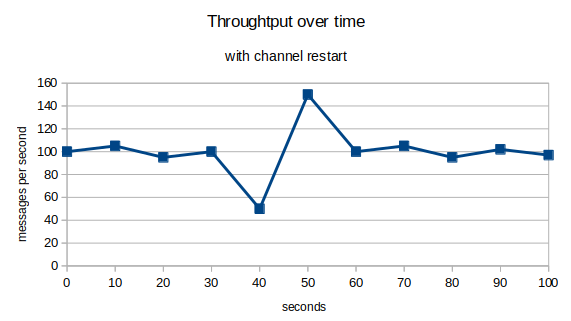
No messages will flow while the channel is starting, and this delay will add to the round trip time of the messages.
How do I check to see if I have a problem
This is tough. MQ does not provide any information. I used MQ internal trace when debugging problems, but you cannot run with trace enabled during normal running.
There are two parts to the validation request. The time to get to and from the server, and the time to process your request once it has got to the server.
You can use TCP Ping to get to the server (or to the proxy server). If you are using a proxy server you cannot “ping” through the proxy server.
Openssl provides a many functions for creating and managing certificates.
You can use the command
time openssl s_client -connect server:port
or
time openssl s_client -connect -proxy host:port server:port
The “time” is a linux command which tells your the duration in milliseconds of the command following it.
The openssl s_client is a powerful ssl client program. The -connect… tries connecting to server:port. You can specify -proxy host:port to use the proxy.
The server at the remote end may not recognize the request – but you will get the response time of the request.
Running this on my laptop I got
time openssl s_client -connect 127.0.0.1:8888
CONNECTED(00000005)
140566846001600:error:1408F10B:SSL routines:ssl3_get_record:wrong version number:../ssl/record/ssl3_record.c:332:
—
no peer certificate available
—
No client certificate CA names sent
—
SSL handshake has read 5 bytes and written 233 bytes
Verification: OK
…
real 0m0.012s
The request took 0.012 seconds.
My openssl OCSP server reported
OCSP Response Data:
OCSP Response Status: malformedrequest (0x1)
You can use openssl ocsp …. to send a certificate validation request to the OCSP server and check the validity of the system – but you would have to first extract the certificates from the iKeyman keystore.
How do I test this?
I’ve created the instructions I used:
More information about OCSP.
There is a good article in the IBM Knowledge Centre here .
The article says
To check the revocation status of a digital certificate using OCSP, IBM MQ determines which OCSP responder to contact in one of two ways:
- Using a URL specified in an authentication information object or specified by a client application.
- Using the AuthorityInfoAccess (AIA) certificate extension in the certificate to be checked.
Configure a QM for OSCP checking for certificates without AIA information.
You can configure a queue manager to do OCSP checking, for those certificates without AIA information within the certificate.
There is a queue manager attribute SSLCRLNL ( SSL Certificate RevocationList Name List) which points to a name list. This name list has a list of AUTHINFO object names.
The name list can have up to one AUTHINFO object for OCSP checking and up to 10 AUTHINFO objects for CRL checking.
You define an AUTHINFO object to define the URL of an OCSP server.
Define AUTHINFO(MYOSCP) AUTHTYPE(OCSP) OCSPURL(‘HTTP://MyOSCP.server’)
Create a name list, and add the AUTHINFO to it.
Use alter qmgr SSLCRLNL(name) and refresh security type(SSL)
You need to change the qm.ini file SSL stanza of the queue manager configuration file see here.
- OCSPAuthentication=REQUIRED|WARN|OPTIONAL
- OCSPCheckExtensions= YES|NO
- SSLHTTPProxyName= string
If you have a fire wall around your network, you can use SSLHTTPProxyName to get through your fire wall.
There is some good information here.
Configure client OSCP checking for certificates without AIA information.
You need the CCDT created by a queue manager rather than a JSON CCDT.
When you configure a queue manager with the AUTHINFO objects and the queue manager SSLCRLNL attributes, the information is copied to the CCDT.
This CCDT is in the usual location, for example the /prefix/qmgrs/QUEUEMANAGERNAME/@ipcc directory.
You can use a CCDT from one queue manager, when accessing other queue managers.
You need to make the CCDT file available to the client machines, for example email or FTP, or use URL access to the CCDT.
You also should configure the mqclient.ini file see here.
How do I check to see if my certificates have AIA information.
You can use the iKeyman GUI to display details about the certificate, or a command line like
/opt/mqm/bin/runmqckm -cert -details -db key.kdb -pw password -label CLIENT
This gives output like
Label: CLIENT
Key Size: 2048
Version: X509 V3
Serial Number: 01
Issued by: ….
Extensions:
– AuthorityInfoAccess: ObjectId: 1.3.6.1.5.5.7.1.1 Criticality=false
AuthorityInfoAccess [
[accessMethod: ocsp
accessLocation: URIName: http://ocspserver.my.host/
]]
Can I turn this OCSP checking off ?
For example if you think you have a problem with OCSP server response time.
In the mqclient.ini you can set
- ClientRevocationChecks = DISABLED No attempt is made to load certificate revocation configuration from the CCDT and no certificate revocation checking is done
- OCSPCheckExtensions = NO This says ignore the URL in the AIA information within a certificate.
See SSL stanza of the client configuration file.
In the qm.ini you can set
- OCSPCheckExtensions=NO This says ignore the URL in the AIA information within a certificate.
- alter qmgr SSLCRLNL(‘ ‘) and refresh security type(SSL)
See SSL stanza of the queue manager configuration file and Revoked certificates and OCSP.
How do I tell if I have a problem with OCSP?
There are no events or messages which tell you the response time of requests.
You may get message AMQ9716
- AMQ9716
- Remote SSL certificate revocation status check failed for channel …
- Explanation
- IBM MQ failed to determine the revocation status of the remote SSL certificate for one of the following reasons:
(a) The channel was unable to contact any of the CRL servers or OCSP responders for the certificate.
(b) None of the OCSP responders contacted knows the revocation status of the certificate.
(c) An OCSP response was received, but the digital signature of the response could not be verified.
- You can change the queue manager configuration to not produce these messages, by setting ClientRevocationChecks = OPTIONAL
- From this message you cannot tell if the request got to the server.
- The easiest way may be to ask the network people to take a packet trace to the URL(s) and review the time of the requests and the responses.
Using the AuthorityInfoAccess (AIA) certificate extension in the certificate.
You can create certificates containing the URL needed to validate the certificate. Most of the IBM MQ documentation assumes you have already have a certificate with this information in it.
You can use openssl to create a certificate with AIA information, and import it into the iKeyman keystore. See here.
You cannot use IBM GSKIT program iKeyman to generate this data because it does not support it. You can use iKeyman to display the information once it is inside the keystore.
Timing the validation request
Openssl has a command to validate a certificate for example
openssl ocsp -CAfile cacert.pem -issuer cacert.pem -cert servercert.pem -url http://OCSP.server.com:port -resp_text
You can use the linux time command, for example
time openssl ocsp -CAfile cacert.pem -issuer cacert.pem -cert servercert.pem -url http://OCSP.server.com:port -resp_text
you get
Response verify OK
servercert.pem: good
real 0m0.040s
The time taken to go to a OCSP server on the same machine is 40 milliseconds. The time for a ping to 127.0.0.1 was also 40 ms.
Thanks…
Thanks to Morag of MQGEM, and Gwydion at IBM for helping me get my head round this topic.

 ColinPaice