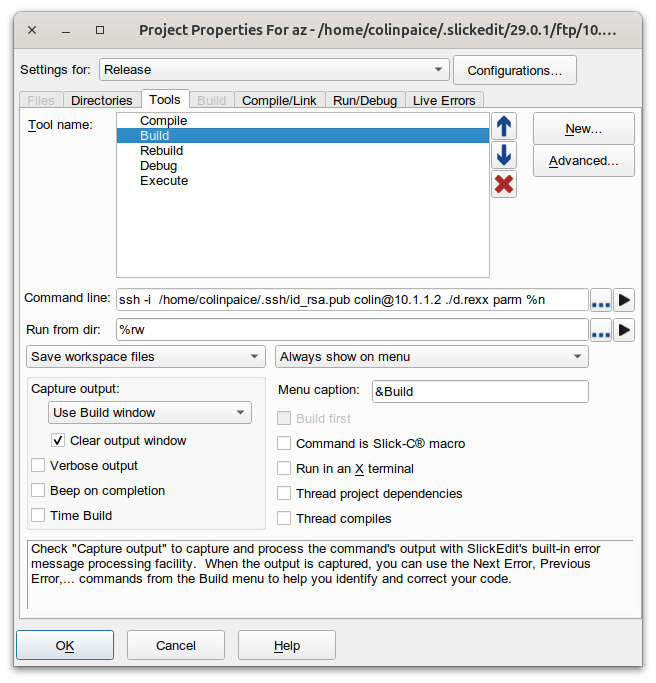
As part of using Slickedit and VScode to work on z/OS I wanted to be able to submit JCL from these tools and look at the output. With a bit of glue code it was pretty easy.
SlickEdit and VScode can use SSH to issue commands in Unix on z/OS.
Submitting the JCL
There are several ways of doing it
- Using TSO SUBMIT to submit a file. It was not easy to tailor the file. Also you do not get back the Jobid, so you cannot easily retrieve the output.
- Submitting from Rexx variables to the internal reader. This was OK.You do not get back the Jobid.
- Using the Rexx submit command.
Submit to the internal reader
You do not get back the job id, so you do not know which is your job in the spool.
/* REXX */
"ALLOC FI(INTRDR) SYSOUT(A) WRITER(INTRDR) REUSE"
JOB.1="//COLIN JOB CLASS=A"
JOB.2="//TEST1 EXEC PGM=IEFBR14,REGION=0M"
JOB.3="//"
"EXECIO * DISKW INTRDR (FINIS STEM JOB."
"FREE FI(INTRDR)"
EXIT
Using the Rexx submit
This worked, and was easy. See the documentation.
For example
mysub.rexx
/* rexx */
parse arg  input
say "*************************"input
rc=isfcalls('ON')
rc= syscalls('ON')
JOB.0=4
JOB.1="//COLINJ2  JOB "
JOB.2="//S1 EXEC PGM=IEFBR14"
JOB.3="//*"
JOB.4="//"
jobid =  submit("JOB.")
say "submitted " jobid
You can tailor the JCL depending on your input parameter. For example invoke a JCL procedure, or explicitly build the JCL. For example pass the name of a member of C code in a PDS, and compile that member.
Retrieving the output
SDSF has some great facilities to retrieve the output. SDSF “owns” the prefix ISF. It uses the isf prefix to identify its variables.
If you use SDSF from a terminal you would use:
- the STatus command to display the jobs you are interested in
- You can filter what jobs you want displayed, for example COLIN*, or JOB98765,
- Select the specific jobid
- Use the ? line command to display the job output
- Select the output file and browse it.
I use the Jobid because this should be unique. If you use job name, it is not unique (I have 20 jobs in the spool for the COLINCC job to compile a C program).
Selecting the ST display
isffilter = "JOBID = "jobid  /* isf filter=... */

 /* Access the ST panel */
Address SDSF "ISFEXEC 'ST' ()"
lrc=rc

if lrc<>0 then do error handling.
The above code says filter on the specified jobid. You could specify ISFOWNER, and ISFPREFIX. See the documentation.
If you have filtered by jobname, for example COLINCC, there could be multiple instances, so you need to select the one(s) you are interested in, so you might just a well use the JobId from the start.
If the ISFEXEC ST command was successful, it returns variables: The count of rows, and details on each row. See the list of available columns/field names.
- isfrows the number of rows
- JobId.n is the job at the nth row
- RETCODE.n this could be a number such as 0000 or JCL ERROR
- PhaseName.n such as “AWAITING OUTPUT” or “EXECUTING”
- Token.n uniquely identifies the job, file or spool output.
do i=1 to isfrows  /* Loop for all rows */
   if ( JobId.i = jobid) then /* pick the ones of interest */
   do 5           /* loop up to 5 times  - while executing */
      say "PhaseName" PhaseName.i
      say "RETCODE" RETCODE.i
      if  RETCODE.i ="JCL ERROR" then
      do
        call "./readspool" TOKEN.i  "JESYSMSG.JES2. JESMSGLG.JES2. JESJCL.JES2 "
        leave
      end
      if PhaseName.i  ="AWAITING OUTPUT" then /* it completed */
      do
         call "./readspool" TOKEN.i rest /* Rest is the list of output files */
         leave
      end
      /* if PhaseName.i  ="EXECUTING" then */
      call sleep 5  /* wait 5 seconds before retry */
   end /* do 5 */
end   /* For all rows */
To display files of interest… call the external Rexx readspool ( the Rexx program is called readspool without a suffix).
readspool – display the contents of the spool file
Process each data set, if it matches the passed names, then display the contents. In my program a names is DDNAME, StepName and ProcStep concatenation with ‘.’.
SDSD Job Dataset Display panel has columns
COMMAND INPUT ===>
NP   DDNAME   StepName ProcStep
     JESJCL   JES2
     JESMSGLG JES2
     JESYSMSG JES2
     SYSCPRT  COMPILE  COMPILE
     SYSOUT   COMPILE  COMPILE
     SYSPRINT COMPILE  BIND
     SYSPRINT RUN
To display the JESYSMSG output use “JESYSMSG.JES2.” to look at the output from the C bind use “SYSOUT.COMPILE.BIND”
The token to uniquely identify the job is passed. Use the SDSF parm “?” to get access to the data sets.
/* rexx */
rc=isfcalls('ON')
rc= syscalls('ON')
parse arg token rest
Address SDSF "ISFACT ST TOKEN('"token"') PARM(NP ?)( prefix jds_)"
lrc=rc
if lrc<>0 then do error handling.
This gets you into the Job Data Set panel. There are many fields you can use relating to each data set. The (prefix jds_) puts jds_ before each variable so it does not overwrite existing symbols. So to reference the DDNAME.n you specify jds_DDNAME.n
Each data set will have
- TOKEN.n a token to uniquely identify it.
- STEPN.n the job step name
- PROCS.n the procedure step name
/* go through each spool record and see if it in the list we were passed */
do jx=1 to jds_DDNAME.0
  /* build up the list of matching names */
  which = jds_DDNAME.jx||"."||jds_STEPN.jx ||"."||jds_PROCS.jx
  if wordpos(which,rest) > 0 then /* was it passed in ? */
    do
      Address SDSF "ISFACT ST TOKEN('"jds_TOKEN.jx"') PARM(NP SA)"
      lrc=rc
      if lrc<>0 then do error handling.

      /* Read the records from the data set and list them. */
      /* The ddname for each allocated data set will be in */
      /* the isfddname stem. Since the SA action was done */
      /* from JDS, only one data set will be allocated. */
     do kx=1 to isfddname.0
       ADDRESS MVS "EXECIO * DISKR" isfddname.kx "(STEM line. FINIS"
       Say "==="Which"===="
       do lx = 1 to line.0
         say line.lx
       end
       Say "              "
     end
   end
return 0
The EXECIO reads from the DDName, into the stem variable line., and the data is then written to the terminal.
Note: When running the script in Unix, it needed ADDRESS MVS “EXECIO * DISKR”. Without it I got
FSUM7332 syntax error: got (, expecting Newline
Which usually indicates a code page problem.
Example output
The command
./mysub.rexx
submitted a simple IEFBR14 job. It produced
*************************
submitted  JOB07229
PhaseName AWAITING OUTPUT
RETCODE CC 0000
===JESMSGLG.JES2.====
1                       J E S 2  J O B  L O G  --  S Y S T E M  S 0 W 1  --  N O D E
0
 07.24.52 JOB07229 ---- FRIDAY,    25 APR 2025 ----
 07.24.52 JOB07229  IRR010I  USERID COLIN    IS ASSIGNED TO THIS JOB.
 07.24.52 JOB07229  ICH70001I COLIN    LAST ACCESS AT 07:24:13 ON FRIDAY, APRIL 25, 2025
 07.24.52 JOB07229  $HASP373 COLINJ2  STARTED - INIT 1    - CLASS A        - SYS S0W1
 07.24.52 JOB07229  IEF403I COLINJ2 - STARTED - TIME=07.24.52
 07.24.52 JOB07229  -                                      -----TIMINGS (MINS.)----
-
 07.24.52 JOB07229  -STEPNAME PROCSTEP    RC   EXCP   CONN       TCB       SRB
S
 07.24.52 JOB07229  -S1                   00      6      0       .00       .00     .0
0
 07.24.52 JOB07229  IEF404I COLINJ2 - ENDED - TIME=07.24.52
 07.24.52 JOB07229  -COLINJ2  ENDED.  NAME-                     TOTAL TCB CPU TIME= .00
 07.24.52 JOB07229  $HASP395 COLINJ2  ENDED - RC=0000
0------ JES2 JOB STATISTICS ------
-  25 APR 2025 JOB EXECUTION DATE
-            4 CARDS READ
-           41 SYSOUT PRINT RECORDS
-            0 SYSOUT PUNCH RECORDS
-            6 SYSOUT SPOOL KBYTES
-         0.00 MINUTES EXECUTION TIME
With thanks to Rob Scott and Dave Crayford for opening my eyes as to how easy it is, and for help in the basics. A lot of code was generated from SDSF using the RGEN facility.
What now?
Having displayed the job output, you could include a step to delete the job.

 ColinPaice