The best way to save money, is not to spend it. The same is true for CPU.

I was trying to understand why a z/OSMF address space, using the Liberty web server (written in Java) was using a lot of CPU – when it was doing no work. I looked into the MVS system trace and saw some interesting behaviour. If you are trying to investigate a high CPU usage in a z/OS Job, I hope the following may help you with where you need to start looking.

If you are looking at a Java program, knowing there is a problem does not help you with what is causing the problem. There is Java, which uses C code, which uses USS services, which uses MVS services which is what you see in the system trace. The symptom is a long way from the source code. You might be able to correlate the time stamp in the system trace with the Java trace.

The ‘interesting’ behaviour…

  • Getmain/freemain storage requests. These are heavy weight requests for getting and freeing storage. Once warmed up, I would expect no storage requests.
  • “Storage Obtain”/”Storage Release” requests. These are medium weight requests for getting and freeing storage. Once warmed up, I would expect no storage requests.
  • Attach task and detach tasks, or pthread_create(). I would have expected tasks would have been attached at start up, and there would be no need for more tasks. I can see that under load more tasks may be required until the system stabilises.
  • Many timer pops a second. There were 50 time pops every second (one every 20 milliseconds). Is this efficient? No! It may be more efficient to have the duration between timer pops increase if there is no load, so a timer pop 10 times a second may be acceptable when the system is idle – and reset it to a short interval when the system is busy, or change the programming model to be wait-post rather than spinning the wheels.

I’ll discuss these in more detail below.

Storage requests, GETMAINs, FREEMAINs, STORAGE requests.

For a non trivial application such as a web server, MQ, DB2 etc, I would not expect to see any storage requests in the system trace once the system has warmed up. When I worked for MQ development, we went through the system trace, and every time we found a GETMAIN or STORAGE OBTAIN, we worked to eliminate it, until there were non left.

Use a stack

Instead of each subroutine using GETMAIN or “Storage request” to get a block of storage for its variables, I would expect a program stack to be used. For example the top level program for the thread allocates a 1MB block of storage and uses this as a stack. The top level program uses the first 2KB from this buffer. The first subroutine uses this buffer from 2KB for 3KB. If this subroutine calls another subroutine, the lower level subroutine uses this buffer from 5KB for 2KB. This is a very efficient way of managing storage and each subroutine needs only 10’s of instructions to get and release storage from the stack.

A problem can occur if the stack is not big enough, and there is logic like “If no space in the stack – then GETMAIN a block of storage”. If this happens the request quickly becomes expensive.

C (Language Environment) programs on z/OS can set the stack size, and when the system is shutdown, print out statistics on the stack usage.

Use the heap

A subroutine may need some “external storage”, which exist outside of the subroutine, for example store entries in a table for the life of the job. A heap (or heappool) is a very efficient way of managing the storage. If your program gets some storage, it does not return it, when the block has been finished with, the program “adds it to the heap” so it can be reused.

A simple heap example.

This might be an array of 3 pointers;

  • storage[0] is a chain of free 1KB blocks,
  • storage[1] is a chain of free blocks from 1K+1 bytes to 10KB,
  • storage[2] is a chain of free blocks from 10K+1 bytes to 50KB.

If your program needs a 512 byte block – it looks to see if there is a free block chained from storage[0], if not allocate a 1KB block (not 512 byte). When it has finished with the block, put it onto the storage[0] chain.
Over time the number of elements on each chain is sufficient to run the workload, and there should be no more storage requests. An increase in throughput may increase the demand for storage, and so during this “warm up” period, there may be more storage requests.

C run time statistics

For C programs on z/OS you can get the C runtime component to print out statistics on the stack and heap usage, and gives recommendations on the best size to specify.

In the //CEEOPTS data set you can specify the following

You may want to use HEAPPOOLS64(ALIGN…) and HEAPPOOLS(ALIGN…) when there are multiple threads so the blocks are hardware cache friendly, and you do not have two CPUs fighting for the same hardware cache data.

Ive blogged One Minute MVS – tuning stack and heap pools.

Smart programs

MVS can call exit programs, for example when an asynchronous event has happened, such as a timer has expired. These programs are expected to allocate storage for their variables ,do some work, give back the storage, and return. This can be very expensive – you have the cost of getting and freeing a block of storage just to set a few bits.

You may be able to write your exit program so it only uses registers, and does not need any virtual storage for variables. If this is not possible then consider passing a block of storage into the called program. For example the RACF Admin function

CALL IRRSEQ00 (Work_area,… )

Work_area: The name of a 1024-byte work area for SAF and RACF usage. The work area must be in the primary address space.

Example exit program

You could use the assembler macro STIMERM (Set TIMER). You specify the time interval, the address of the exit, and a user parameter. This user parameter is passed to the exit program when it gets control.

  • This could be a pointer to a WAIT ECB block,
  • or a pointer to a structure, one element in the structure is the WAIT ECB block, another element is the address of a block of storage the exit can use.

Attach task and detach task.

It is expensive to attach and detach tasks, so it is important to do it as little as possible. From a USS perspective the attach is from pthread_create.

A common design template to eliminate the attach/detach model is to have a pool of threads to do work.

  • A work request comes in, the dispatcher task gets a worker thread from the pool, and gives the work request to it. When the worker has finished it puts itself back in the pool.
  • If there was no worker thread available, check the configuration for the maximum number of threads, If this limit has not been reached, create a new worker thread.
  • If the was no worker thread available and the number of threads was at the limit, then wait until a worker thread is free.
  • Some thread pools have logic to shrink the pool if it gets too big. Without this logic a thread pool could be very large because it hit a peak usage weeks ago, and the pool has only been little used since.

Having a pool means that some of the expensive set up is done only once per thread, for example connect to DB2 or connect to MQ. You also avoid the expensive create (attach) of a thread, and delete (detach) of the thread. The application has logic like

  • Dispatching application attaches a new thread.
  • start thread
    • perform the expensive set up – for example connect to DB2 or connect to MQ
    • add task to the thread pool
    • do until told to shutdown
      • wait for work
      • do the work
    • end do
    • disconnect from DB2 or MQ
    • thread returns and is detached
Problems with the thread pool

One problem with using a thread pool is if the minimum pool size is too small. Smart thread pools have options like

  • lowest number of threads in thread pool
  • maximum number of thread thread pool
  • maximum idle time of a thread. If there are more threads than the lowest number of threads, and a thread has been idle for longer than this time then free the thread.

You can get the”thrashing” on a low usage system

  • The lowest number of threads is specified as 10 threads.
  • The main program needs 50 threads – it uses 10 from the pool, and allocates 40 new threads. These are added to the pool when the work has finished.
  • The clean-up process periodically checks the pool. If there are more threads than the lowest number, then purge ones which have been idle for more than the specified idle-time. 40 threads are purged
  • Repeat:
  • The main program needs 50 threads- it uses 10 from the pool, and allocates 40 new threads. These are added to the pool when the work has finished.
  • The clean-up process periodically checks the pool. If there are more threads than the lowest number, then purge ones which have been idle for more than the specified idle-time. 40 threads are purged

In this case there is a lot of attach/purge activity.

Making the pool size 50, or the maximum idle time very large will prevent this thrashing…

  • The lowest number of threads is specified as 50 threads.
  • The main program needs 50 threads – it uses 50 from the pool.
  • The clean-up process periodically checks the pool. The pool size is OK – do nothing.
  • Repeat:
  • The main program needs 50 threads- it uses 50 from the pool.
  • The clean-up process periodically checks the pool. The pool size is OK – do nothing

In this case the number of threads stays constant and you do not get the create/delete (attach/purge) of threads.

In one test this reduced the CPU time used when idling by more than 50 %.

Many timer pops a second

In my system trace I can see a task wakes up, it sets a timer for 20 milliseconds later, and suspends itself. This is very inefficient. This should be a wait-post model instead of an application in a loop, sleeping and checking something.

When investigating this you need to think about the speed of your box. Consider an application which just does

  • setting a timer to wake up in 10 milliseconds
  • it wakes up a thread which does nothing – but set a timer for 10 ms later (or 100 times a second)

On my slow box this could take me 1 ms of CPU to do this once, – or 100 ms of CPU for 100 times a second. One engine would be busy 10% of the time.

If I had a box which was 10 times faster and only took 0.1 ms of CPU to do the same work. For 100 iterations this would be 10 ms of CPU or 1% of an engine. To some people this is at the “noise level” and not worth looking at.

To you 1% CPU per second is “noise level”, to me the noise level of 10% CPU per second is a flashing red light, a loud klaxon and people in body armour running past.

How to move a queue from one page set to another page set on z/OS?

I was asked this excellent question, and a quick search in the documentation showed there is a section in the documentation How to balance loads on page sets. Great – this worked a treat – for user queues, but there are a few additional things you need to consider. You also need to be careful when moving system queues.

Moving application queues.

Once you have moved the queues, you should backup the definitions so if you have to recreate the queue manager, you have a copy of the correct definitions you can use.

You need to update your central repository with the new storage class, and the updated definition for the queues and storage class. This is for when you deploy a new queue manager, it picks up the correct definitions.

Moving system queues.

This is the same as for application queues, but you have to do more.


Many people use the CSQINP1 and CSQINP2 data sets provided by the queue manager so they are executed at startup. This is what happens if you use the default QMGR JCL. If you move the SYSTEM.* queues you will need to make a copy of the datasets, make changes to the data sets, so the objects have the correct storage class, and then change the queue manager job to point to the new data sets. Alternatively create a file with the DEFINE QL.. objects you have changed, and have this member first in the list. This file would be executed first. If the objects do not exist, they would be created.

Note: If definitions have DEFINE … REPLACE the definition will override any existing definition.

SYSTEM.COMMAND.INPUT queue

You will not be able to move SYSTEM.COMMAND.INPUT using commands in CSQUTIL, as the command processor reads from this queue. You need to

+cpf alter ql(SYSTEM.COMMAND.INPUT) get(disabled) put(disabled)

This will stop the command processor.

Use commands from the operator console to move it to the new page set

Once you have moved the queue use

+cpf start cmdserv

to restart the command server.

If you want to use SYSTEM.* objects used by the CHINIT you will need to stop the CHINIT for the duration of the moves.

Other system queues

You should also review any model queues, for example SYSTEM.CLUSTER.TRANSMIT.MODEL.QUEUE, and SYSTEM.COMMAND.REPLY.MODEL, so any future queues are created on the correct page set.

Someone pointed out that they were not able to move SYSTEM.PENDING.DATA.QUEUE because a system thread had it open. The altered the queue to get(disabled), the system thread closed the queue, and so they were able to move it.

When to do this?

You may want to schedule an outage while moving queues around, especially SYSTEM.* queues. The moves should be very quick (unless you have deep queues). The other tasks may take longer to do.

One Minute MVS performance – DASD

Question: In your car how do you tell if your car has a problem? Answer: You look at the dashboard and see if there is a red light showing. You may not know how to fix it – but you know that you need to get help to fix it.

The aim of this series of blog posts is to show you what to look for in z/OS performance and if you have a problem.

I will cover

For some of these you need data from z/OS. This post describes how to get the SMF data, and format it using RMF.

DASD has changed in 40 years

40 years ago “disk storage” was on huge rotating disks and you had to carefully manage where you put your datasets -both which disk, and whereabouts on the disk. For example people would put the hot dataset in the “centre” of the disk to minimise the time to move the heads.

For the last 20 years people use the term “storage” because most I/O activity goes to cache in the disk controller, and the disk controller writes the data out to PC sized disks – which in turn may be solid state, and have no moving parts.

A pictorial view of disks

  • You have the processor running z/OS
  • Plugged into the side of the processor is the I/O adapter
  • Plugged into this I/O adapter are a lot of channels (think optical fibre cables)
  • Theses cables can be plugged into a switch – think of a plug board or telephone exchange. This allows channels from 2 processors plugged into the switch, and have one cable down to the storage controller . You could avoid a switch and have cables directly from the processor to the storage controller. Each processor would need its own set of cables.
  • The storage controller manages all of the IO
    • It has a lot of cache so most I/O may go to the cache. During a read, the storage controller will read from the disks if the data is not in the cache.
    • It has many PC type of disks. These disks could be solid state, or have rotating disks
    • If you have mirrored disks, the storage controller talks to a remote storage controller
  • Within each channel are many logical sub channels. Each disk has at least one sub-channel allocated to it. A disk can have multiple sub-channels allocated to it. There can be a pool of sub-channels which are used as needed to allowed parallel I/O to a disk.

The I/O journey

  • Your application wants to read the first record of a file.
  • Once the file has been opened, the application can issue the read.
  • z/OS knows where the data set is on disk (eg VOLID A4USR1, Cylinder 200, track 4)
  • z/OS builds up a set of commands (such as locate disk, locate cylinder 200, locate track 4, read data, read data, read data) to get the data and issues the Start Sub channel request, passing the list of I/O commands.
  • This is queued to the I/O adapter.
  • The original application is suspended (until the I/O is complete)
  • The I/O adapter looks for a free sub-channel for the disk, or gets one from the sub-channel pool.
  • The I/O adapter takes the list of commands, and executes them one at a time.
  • When the I/O adapter has finished the list of commands, it sends an interrupt to the mainframe saying “this subchannel has finished”.
  • z/OS wakes up, looks at the interrupt, and resumes the application.

Today you have to consider 3 areas where you can get delays, you need to be an expert if you want to look at more detail.

  1. Waiting in the I/O adapter before being able to get a sub channel. This is known as IOSQ – IO subsystem Queueing.
  2. Establishing the connection from processor to the storage controller
  3. Transferring the data the connect time.

This is complicated by being able to use disks 50 km away, which adds to the delay time.

RMF Reports

In the RMF MFR000… report with section D I R E C T A C C E S S D E V I C E A C T I V I T Y. (I search for IOSQ).


                  DEVICE   AVG  AVG   AVG  AVG  AVG   AVG  AVG  AVG    %      %    
 VOLUME PAV  LCU  ACTIVITY RESP IOSQ  CMR  DB   INT   PEND DISC CONN   DEV    DEV  
 SERIAL   1       RATE     TIME TIME  DLY  DLY  DLY   TIME TIME TIME   CONN   UTIL 
 A4RES1   1       102.896  .044 .003  .001 .000       .004 .000 .036   0.38   0.38 
 A4RES2   1        27.293  .036 .000  .001 .000       .003 .000 .032   0.09   0.09 
 USER00   1        25.331  .031 .003  .001 .000       .004 .000 .024   0.06   0.06 
 A4SYS1   1       365.102  .026 .005  .001 .000       .004 .000 .017   0.62  24.52 

Key fields

  1. Volume Serial such as A4RES1 is the volid of the disk
  2. PAV – I’ll mention this below.
  3. Device Activity Rate – how many requests (start sub channel) from z/OS, per second
  4. Average response time in milliseconds
  5. Average IOSQ – how long did it have to wait in z/OS and the I/O adapter before the request was sent down to the storage controller

The times are in milliseconds.

There are often thousands of volumes in a z/OS environment some are heavily used, some are not used. See below on how to find the hot volumes.

I typically look at the volumes with the highest I/O. If the hot volumes have good response time, the not so hot should be OK.

If you think of the sub-channel connection between the mainframe and the volid in the storage controller, there can only be one I/O requests at a time per sub-subchannel. You can have multiple connections down to a volume. These are known as PAV, or Parallel Access Volumes. The PAV is the average number of sub-channels in use.

The first field you look at is the IOSQ. This is the time between z/OS starting the request, and before the I/O could be started to the storage controller. This should be small 10s of microseconds ( 0.0xx in the report above). If this value is larger than this, you need to speak to your Storage Manager or z/OS Systems Programmer.

The second field you look at is the % DEV UTIL. How busy was the connection to the storage controller. A value of 100% means that it was running flat out. If the utilisation is around 70-80% it may be a OK – just something to note. More PAVs can increase throughput for a busy disk.

The next figure you look at is the RESP TIME. This is the response time the application sees. For local disk, response times of under 1 millisecond are OK. If you have remote disks, and synchronous I/O then the response time will be longer.

Finding the hot volumes

I take the RMF report and extract the DASD records.

  • For SDSF where the output is in the spool
    • I use Status to list all of the jobs, (Output or Hold work just as well)
    • Put ? in front of the job to show all of the spool data sets
    • use the SE command to Spool Edit the report
  • For a dataset I use the View prefix command in ISPF 3.4
  • Put DD in line prefix area on line 1
  • Find ‘D I R E C T’
  • Put DD in line prefix area, press enter, to delete the lines above it
  • Find ‘D I R E C T’ last
  • put d9999 in the line prefix area following the data (My report has ‘P A G I N G’), and press enter.
  • You should now have only DASD records
  • Put ‘cols’ in the line command area, note the columns of the DAR (50 to 58)
  • In the command line type SORT 50 58 D on Device Activity Rate.
  • This shows you the top usage volumes. Check the response times. Under 1 millisecond is good for locally attached disks. It can be down to 0.1 ms
  • If the response time is 1 ms or larger…
    • Check columns 60-65 (AVG IOSQ TIME) this should be 0. If this is non zero it means there was queueing in z/OS before it got to the disks. If there was only one I/O request to the volume, then there would IOSQ would be zero. If there are multiple I/O requests then you can get IOSQ queuing time.
    • Any IOSQ could be reduced by moving data sets to other volumes, or adding more paths(sub-channels) between the mainframe and the disks. Each disk requires at least one subchannel. You can allocate more in a pool – which are used when needed, but this is a z/OS system programmer/Storage manager job.
    • As a performance person you can control which disks you use, and can spread the load.
    • Avg CMR (ComMand Response) is the time to get from the processor down to the Storage Controller, and the controller to respond with “I’ve got the request” This should be small. This value allows you to see if delays are due to getting to the Storage controller, or within the controller.

If you do this for all disks you get an overall view of the data. Now you can select the DASD volumes you are using and check those.

If you find you have a long response time, then it is hard to find out the root cause. There are many links in the end to end chain. See here for more information.

One Minute MVS performance – CPU at the LPAR level

Question: In your car how do you tell if your car has a problem? Answer: You look at the dashboard and see if there is a red light showing. You may not know how to fix it – but you know that you need to get help to fix it.

The aim of this series of blog posts is to show you what to look for in z/OS performance and if you have a problem.

I will cover

For some of these you need data from z/OS. This post describes how to get the SMF data, and format it using RMF.

CPU

There are two basic things you need to check

  1. Has my LPAR got all the CPU it wanted – has the hyper-visor restricted the CPU?
  2. How busy are my CPUs?

Has my LPAR got all the CPU it wanted

An LPAR can be configured to have dedicated engines, or share a pool of engines. Dedicated engines means that the engine is always there when it is needed. If the LPAR is using a shared engine, it may not always be available when needed.

An example to explain the concept

You have a class from 10am to 11 am.  You go in, and sit down.  The teacher starts the class.  the teacher’s phone rings and goes out of the classroom. You play with your phone until the teacher comes back after 40 minutes. (The teacher went to teach in a different class room.)
How long were you in class for and how much work did you do?

  • You were in class for 1 hour.
  • You did 20 minutes work.

This concept is the same as any LPAR with shared engines.

  • The 1 hour class is a time slice as seen by z/OS.
  • The “processor” (teacher) was used in the time slice for only 20 minutes
  • For 40 minutes the “processor” was doing work elsewhere.

How do you get the report to show these figures.?

You need the RMF CPU report. It has “C P U A C T I V I T Y “ at the top of the page.

Look at the section

---CPU---    ---------------- TIME % ----------------   
NUM  TYPE    ONLINE    LPAR BUSY    MVS BUSY   PARKED   
 0    CP     100.00    46.68        46.32        0.00   
 1    CP     100.00    38.98        38.78        0.00   
 2    CP     100.00    34.91        34.62        0.00   
TOTAL/AVERAGE          40.19       39.90               
 3    IIP    100.00    94.43        94.70        0.00   
 4    IIP    100.00    93.50        93.74        0.00   
TOTAL/AVERAGE          93.96       94.22               

LPAR BUSY is how much teacher time you got

MVS Busy is how much time you were in the classroom for.

  • If MVS BUSY TIME = LPAR BUSY TIME, perfect, what you needed you got.
  • If MVS BUSY TIME > LPAR BUSY TIME, MVS had to wait for an engines, the system may need more CPU, a small difference(5%) is OK.
  • If MVS BUSY TIME >> LPAR BUSY TIME, For much of the time, there was no engine when MVS needed This will have a major impact on your work. If your end user work is not meeting targets, you need more CPUs, or give your LPAR a higher dispatching priority.

These values should be similar: MVS BUSY TIME 39.60 is close to LPAR BUSY 40.19, and for the ZIIP, 93.96 is close to 94.22.

When these figures are significantly different, stop, and fix the problem. This can make all other performance data look bad. For example, disk response time, and timing in application trace entries.

How busy are my CPUs?

The TOTAL/Average will be close to 100 % on a busy system. 95% busy is OK, Make a note that the system may be short of CPU.

These are average values. The individual values could be spiky. For example at 100% busy for 4 minutes, 80% busy for 1 minute, or an average of 96% busy over 5 minutes. Consider using an online monitoring to see if you have big peaks and trough.

More advanced topic for information.

The following section gives you information on how much work was waiting. It is hard to say what is good or bad, as it could look bad, but all the performance goals are being met.

How much work was waiting?

-----------------------DISTRIBUTION OF IN-READY WORK UNIT QUEUE--------------
 NUMBER OF              0    10   20   30   40   50   60   70   80   90   100
 WORK UNITS     (%)     |....|....|....|....|....|....|....|....|....|....|  
                                                                             
<=  N          26.3     >>>>>>>>>>>>>>                                       
 =  N +   1   12.9     >>>>>>>                                              
 =  N +   2    10.1     >>>>>>                                               
 =  N +   3    10.1     >>>>>>                                               
<=  N +   5    12.5     >>>>>>>                                              
<=  N +  10    11.0     >>>>>>                                               
<=  N +  15     6.0     >>>>                                                 
<=  N +  20     5.2     >>>                                                  
<=  N +  30     1.6     >                                                    
<=  N +  40     0.6     >                                                    
<=  N +  60     1.1     >                                                    
<=  N +  80     1.1     >                                                    
<=  N + 100     0.8     >                                                    
<=  N + 120     0.1     >                                                    
<=  N + 150     0.0                                                          
>   N + 150     0.0                                                          

N is the number of CPUs. I have 5 on my system.

The data is sampled. If system was sampled 10 times a second, every 0.1 of a second RMF counts the number of tasks in the “ready to dispatch queue”, and increments the value in the appropriate box; if there were 5 tasks executing and one task waiting, increment the N+1 element;

  • 26.3 % of the time, there were no tasks waiting for CPU.
  • 12.9 % of the time, there was 1 task waiting for CPU. See the bold data in the data above. (N+1 12.9 >>)
  • 10.1 % of the time, there were 2 tasks waiting for CPU
  • 5.2 % of the time there were between 16 and 20 tasks waiting for CPU
  • 0.1 % of the time there were between 101 and 120 task waiting for CPU

Remember this could be waiting for CP, or IIP.

If there are hundreds to tasks waiting for CPU you should make a note. It may not be a problem.

If there are under 50 tasks waiting for CPU, this should be OK.

On a busy system there will always be work waiting to run. Compare the pictures from a busy time and a not so busy time.

Is this important?

I once did some measurements with MQ on a machine with 16 processors, on average the engines were about 5% busy. A performance person from IBM said that my workload showed a shortage of CPU! 5 % busy on 16 processors – was I really short of CPU?

My application received some data, and posted 30 threads to come and process the data. The first 15 threads could be dispatched because there were 15 unused CPUs. 15 threads had to wait.

This showed up in the above report at line N+15 of the tasks were waiting 20% of the time.

Out of the 30 tasks that were dispatched, one processed the work,the other 29 went back to sleep.

We changed the program to post no more threads the number of CPUs (16) in the LPAR, and had a significant saving in CPU.

One minute MVS performance – getting batch RMF reports

There is an introduction to getting RMF reports docucmented here.

You can display information about your SMF environment, using

D SMF,O

This tells you if you are using SMF datasets, or log streams ( in the coupling facility) for the RMF data.

Copy the data from SMF dataset

// SET SMFPDS=SYS1.S0W1.MAN3 
// SET SMFSDS=SYS1.S0W1.MAN4 
//* 
//SMFDUMP  EXEC PGM=IFASMFDP 
//DUMPINA  DD   DSN=&SMFPDS,DISP=SHR,AMP=('BUFSP=65536') 
//DUMPINB  DD   DSN=&SMFSDS,DISP=SHR,AMP=('BUFSP=65536') 
//* MPOUT  DD   DISP=(NEW,PASS),DSN=&RMF,SPACE=(CYL,(1,1)) 
//DUMPOUT  DD   DISP=SHR,DSN=IBMUSER.RMF SPACE=(CYL,(1,1)) 
//SYSPRINT DD   SYSOUT=* 
//SYSIN  DD * 
  INDD(DUMPINA,OPTIONS(DUMP)) 
  INDD(DUMPINB,OPTIONS(DUMP)) 
  OUTDD(DUMPOUT,TYPE(70:79)) 
  DATE(2020316,2022284) 
  START(0930) 
  END(1700) 
/* 

This job copies the records from the “MAN” data sets, and writes them to the DUMPOUT.

The RMF records with types 70 to 79 are copied, within the specified dates and start and end times.

Copy the data from a log stream.

SMF can write data to log streams, for example MQ records go to the MQ stream, and the RMF records go to the RMF Stream.

//SMFDUMP EXEC PGM=IFASMFDL
//DUMPOUT DD DSN=&TEMP,SPACE=(CYL,(10,10),RLSE),DISP=(NEW,PASS)
//SYSPRINT DD SYSOUT=*
//SYSIN DD *
DATE(2018004,2018012)
START(0900)
END(1900)
LSNAME(IFASMF.RMF,OPTIONS(ALL))
OUTDD(DUMPOUT,TYPE(70:79,116))
/*

This step writes the data to a temporary data set.

Sort the data

If you are processing the data from more than one LPAR you will need to sort the data. See here.

Format the RMF data

The RMF control statements are described here

//POST EXEC PGM=ERBRMFPP 
//* use the following if using a temporary data set in same job.
//* MPFINPUT DD DISP=SHR,DSN=*.SMFDUMP.DUMPOUT 
//MFPINPUT DD DISP=SHR,DSN=IBMUSER.RMF 
//PPXSRPTS DD   SYSOUT=*,DCB=(LRECL=200,BLKSIZE=4000) 
//SYSPRINT DD   SYSOUT=* 
//SYSOUT   DD   SYSOUT=* 
//SYSIN DD * 
  SUMMARY(INT,TOT) 
  NODELTA 
  SYSOUT(H) 
  REPORTS(ALL,NOENQ,DEVICE(NOUNITR,NOCOMM)) 
SYSRPTS(WLMGL(RCPER)) 
SYSRPTS(WLMGL(SCPER)) 
/* 
/* SYSRPTS(WLMGL(RCPER)) 
/* SYSRPTS(WLMGL(SCPER,RCLASS,RCPER,SCLASS)) 

This takes the records from MFPINPUT which could be a permanent data set, or a temporary data set passed from a previous job step.

You can have the output go to the spool (by default) or to preallocated data sets. See here

One Minute MVS performance reports of interest are

REPORTS(CPU,DEV(DASD))

For WLM the reports

SYSRPTS(WLMGL(RCPER,SCPER))

Why are you telling me this – and what do you want me to do with the information

I was talking to someone about providing useful information in reports, and we got onto the subject of “Why are you telling me this” a topic I once had in a mentoring presentation.

Why are you telling me this?

I was in a meeting with the Lab Director, on a hot summers afternoon, with the sound of the bees coming through the open window, and the smell of freshly cut grass. A team were presenting a topic to us, and it was only mildly interesting. It was easy to shut your eyes and listen (a polite way of saying fall asleep). At the end of the presentation they said “And we would like you (the Lab Director) to fund £1 million for four people to take this forward.” Whoa – we all woke up. The Lab Director said he had not been listening with his “funding ears”, and didn’t think he could fund it. He went on to say “Next time you want something from me, then at the beginning of the presentation say ‘We want you to fund this project to £1 Million’ and I’ll know what you want before we start.”

It is very useful to know why someone had come to see you. It would be very helpful if the person was to say:

  • I’m telling you this for your information. You do not need to do anything. You may get asked about it.
  • I’m telling you this for your action. I would like you to sign these expenses; give me advice; or go and talk to someone on my behalf.
  • I’ve had a great success – I just want to share it with someone!
  • I’m bored and I just want a chat. (We had someone who would come round and chat. We solved this by sending a message through the computer to a friend saying “please phone me”).

Writing reports

The “Why are you telling me this” questions applies to writing reports as well. You need to know what you expect your audience to do with the report.

I was asked to review a 60 page performance report before it was presented to the customer. Although I was jet lagged, I spend the evening going through the graphs and the explanation and marked up many comments. The next day I asked who wanted my comments, and the reply was “we don’t want any comments we just wanted you to review it”!

They planned to spend a couple of hours going through the report with the customer; a senior manager and his team. I managed to persuade them that the senior manager would not know the technical details, so he would not understand most of the charts. I asked the team “what do you expect the manager to do with the report?” the answer was “give it to one of the system programmers”. “What do you expect the systems programmers to do with it?”, “We don’t know”!

We had a lot of discussion, came up with a short presentation aimed at the executive. We took data from the report and summarised it, for example

  • We tested it up to 50,000 transactions a second” before we ran out of CPU. Your requirement is 10,000 a second.
  • The cost per transaction stayed pretty constant. At the high transaction rate, it was 20% more than than a low transaction rate.
  • In a disaster recovery it took us 2 minutes to switch to the backup servers, and continue working. It may take you longer depending on your database.

It is much better to tell people information, than have people work to get the same information. It is much quicker to read

The cost per transaction stayed pretty constant. At the high transaction rate, it was 20% more than than a low transaction rate

than to give them a chart they have to look at – read the title, the axis, the ranges of the data, and interpret it (should it be flat or should it slope up? Why is there a wobble in the data?). Many people do not listen while they are reading.

Graphs have their places, for example showing how the response time changes with transaction rate may be good. But

at 100 transactions a second the response time is 500 ms, and 1000 transactions a second the response time is 1000 milliseconds.

may be good enough if the requirement is 2000 milliseconds at 1000 transactions a second.

It all comes down to …

What you expect the audience to do with the data.

I have been working on some blog posts about z/OS performance. I had someone review it to make sure it was at the right level and I was surprised at the comments. For example

  • You have told me about the RMF reports, but you haven’t told me how to collect the data, or how to format it.
  • You said if this number was large, you have a problem. What do you mean by large?

I should have written a “specification” in comments at the top of the blog post.

Q:Why am I writing this?
A:So people can collect and report performance data; and see if there is a problem.

Q:What will they do with the report
A:Use it to collect performance data.
A:Use it to process the data
A:Understand which fields are important, and have background to explain
why the field is important
A:Identify good and bad values of fields
A:Understand what they can do about problems.

If I had done this and written the blog post to meet these goals it would have been a better document.

Feel the weight!

I once saw a report about MQ for a customer. It was about 100 pages long! They gave an introduction to MQ, listed all the parameters, gave the size of all the data sets etc. A lot of the data was just cut and paste of other data. When I mentioned this to the team, they replied, the customer executive likes to get value for money, and a long report shows value for money (feel the weight), it shows how much work we did.

I thought the executive was out of his depth.

This reminded me of Parkinson’s law, “work expands so as to fill the time available for its completion”. He also described “the bike shed problem”. A committee has two items on its agenda

  • Should we invest in a nuclear reactor?
  • What colour should we paint the bike shed?

No one had any experience of nuclear reactors, so after 5 minutes discussion they approved it. They spent the next 55 minutes discussing the bike shed. The cost of them discussing it was much more than the cost of a person to repaint the shed if they made the wrong decision.

They understood the bike shed problem, and knew nothing about the nuclear reactors, so focused on things they knew about rather than getting experts in to advise them.

This is not to be confused with the Peter Principal which observes that people in a hierarchy tend to rise to their “level of incompetence”. If the person is competent in the new role, they will be promoted again and will continue to be promoted until reaching a level at which they are incompetent. Being incompetent, the individual will not qualify for promotion again.

Nor is it to be confused with The Dilbert principle which says that incompetent employees are promoted to management positions to get them out of the workflow.

Refreshing my zD&T and ADCD z/OS libraries

I wanted to refresh my zD&T system, and update some of the Z/OS volumes available from ADCD, so I could run the latest z/OS on my Ubuntu server.

It was not easy to find the route, and on the journey I found IBM has some web sites that are hard to use!

This page has been updated to reflect ZDT_Install_PE_V14…

Getting started

You access the updates through IBM Passport Advantage.

I started with the IBM home page for my country, logged on and searched for “passport advantage”.

The top item was Download products from IBM Passport Advantage. Great, I clicked and got to a page giving an overview of Passport Advantage. Hidden at the very bottom it has a picture and a link “Sign on to Passport Advantage”.

This gets me to a page Passport Advantage Online for Customers. Click on “Sign on to your Passport Advantage site” (even though I am already signed on). If you click on the “sign in now” link, you get to a page with another(!) sign on link. It would be better to call this path ” Sign in now, with just a few more clicks now and then wait 30 seconds”.

Under Software download & media access click “Download Software“.

This gets you to another page called “Software download & media access”.

At the bottom of a page is a pull down with “Passport Advantage Express” pre selected. “Click on the Continue button to begin your personalized download experience“. It was “Passport Advantage Slow” rather than express.

You get to yet another page called “Software download & media access”.

You can pick a part if you know the name or part number, but I found this almost impossible to use. I kept going round in circles. Instead I used “All Products” (see below). This would be better called “All products you are licensed to”.

I cannot see how you get a product to appear as “My preferred products”. I have zD&T as a favourite.

Selecting All products displayed the following below the text.

IBM Z Development and Test Environment Personal Edition

When I clicked on it, it gave me the choice of

  • All operating systems
  • Redhat Enterprise Linux Base Server
  • Redhat Enterprise Linux Base Server

I wanted Ubuntu – and not two copies of Redhat, so I selected “All operating systems”.
I chose English language

This gives a page with a lot of information, and is a bit hard to navigate until you understand it.

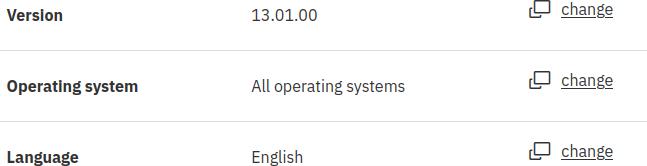
This says you are using version 13.01.00 – click on change to select a different version. The version pull down has a random order – 10, 13, 8, 9 13 etc.

Pick your version.

The screen displays content based on your selection.

Expand “select individual files”. This gave me

Review the IBM z Development so you know what to expect. I think it is good practice to upgrade zD&T before upgrading ADCD.

Update the level of zD&T.

Expand IBM Z Development and Test Environment Personal Edition 13.01.

Download the ZDT* file and follow the instructions here.

On V14 you execute ./zdt-install-pe

I used sudo instead of using a super user password (which I do not have configured)

sudo ./ZDT_Install_PE_V13.0.0.0.x86_64

After it installed, I shutdown and rebooted.

After the reboot the z1091ver command gave

z1091, version 1.10.55.05.01, build date – 09/15/20 for Linux on Ubuntu 64bit

This is the same as it was with version 12.05!

With version 14.0 it gives

z1091, version 1.11.57.06.01, build date – 08/18/22 for Linux on Ubuntu 64bit

The same as V13!

Once you have reipled z/OS and checked it works, you can think about upgrading z/OS.

You can download the z/OS volumes while you are on the web site, and install them later.

Select the Z/OS volumes you want to download

Expand ADCD…

This gives a table with contents like

z/OS 2.4 Part 1 of 19 – RES volume 1 Multilingual (CC88DML)

At the top of the table click “show details”. This gives additional information like

  • z/OS 2.4 Part 1 of 19 – RES volume 1 Multilingual (CC88DML)
  • Part number: CC88DML
  • File name: B4RES1.ZPD

For zD&T version 12.05, the set of download files for z/OS 2.4 were called A4… for version 13.0.0 service refresh the files were called B4… for version 13.1.0 the files were called C4… . I expect the first volumes for z/OS 2.5 will be called A5RES1 etc.

If you know what volid you want within a release, you can enter it in the Search: box, for example B4RES1.

Download the files you want.

Using them is a much bigger challenge which I may write up another day. (For example SYS1.LINKLIB is currently catalogued on A4RES1. If I add B4RES1 to my system, I cannot just IPL from it as the volids will not match up.

My zD&T dongle is about to expire – what do I need to do?

To be able to run z/OS on my laptop I need the zD&T software plus a hardware dongle which has a license on it. This license expires every year and needs to be renewed.

I had messages like the following in the ZD&T terminal window

Warning: CPU 2 zPDTA will expire on 06/27/2021 (MM/DD/YY)
Current date & time: 06/11/2021 (MM/DD/YY) 14:51

The instructions on how to renew the key are obscure. If you know the secret, then it is easy. If you do not know the secret, then all the searching for it will not find it!

The portal to getting your key renewed is here Enabling a license key. This links you through to Rational License Key Centre. You may think I already have a license – I just want to renew it I have already enabled it. That is just to confuse you. The page has links to

  • Obtaining an update file from Rational License Key Center
    Learn about the steps to obtain an initial update file from the Rational® License Key Center.
  • Returning an existing license key
    For perpetual license entitlements, USB hardware device activations are set to expire one year from the date that an update file is generated. For this type of entitlement, you can return previously generated update files at any time, and generate a new update file.

Did you spot the secret? reread it For this type of entitlement, you can return previously generated update files at any time, and generate a new update file. To make it clearer I would have said. To generate a new update file, return the previously generated file, and (re-)obtain an update file.

Once you know the secret just

  • Return the existing license key
  • Obtain a file from the Rational Key Center

Return the existing key

Go to the rational site, logon, goto Manage your license keys and select View keys by host from the navigation window.

Make a note of the key number. ( eg 03-12345) (If you return the key, and did not make a note of the number, you’ll have to crawl round the back of your server to extract the dongle and read the key number).

The page has

License Management
Get Keys
Return Keys
View keys by host
View keys by user
License Availability Repor

You can then use return keys, and follow the pages, and finally click on the return button.

Obtain a file

You can then use “get keys”. Enter your serial license, and 1 license.

if you follow the process and get

IBM Z Development and Test Environment Personal Edition Authorized User Single Install License
     0 Available

You have no spare licenses – you need to return one.

You need to download the file. For me the file name was like RDT-xxxxx-202405302359-3CP-1I-0.zip. Where the file name has a combination of your key number and the date and time.

Install it

Follow the documentation to download and install it.

I used

cd /usr/z1090/bin
sudo ./Z1091_token_update -status
sudo ./Z1091_token_update -u /u/colin/RDT-12345-202206122359-3CP-1I-0.zip

This has the serial number of the dongle 12345, the expiry data, and the number of CPs licensed.

Instead of taking the dongle out etc, I shut the machine down for the night. Next morning I used

cd /usr/z1090/bin

sudo ./Z1091_token_update -status

to display the status before I started zD&T.

Who do you get to implement this critical fix? The senior techie or a grunt?

I was reading an article about making systems resilient and how events can conspire to cause problems. As Terry Pratchett said Million-to-one chances…crop up nine times out of ten. For example the day you have a power outage and fail over to generators, is the day you find the fuel tank for the generators has not been filled, and with the weekly tests, it has emptied the tank.

This article made me think about the best way of implementing changes. If you have a critical change that needs to be made with no possible errors; who do you get to implement it – the team leader, or a junior person in the team? (Grunt – slang: Junior person in a team, lacking prestige, and authority. The grunts do all of the heavy lifting, and when people lift heavy things, they grunt as they lift.)

I assume that you have the steps documented, and have tested them. For example using cut and paste instead of typing information. You copy files from test to production, rather than create from new.

I think it would be good for a junior person in the team to make the change, with the team leader watching. This has several advantages:

  • You only learn by doing. You can watch someone do something a hundred times – but it only when you have to do it do you learn (and get the fear of doing it wrong).
  • The junior person will be very careful, and double check things. The team leader may just check once – as there were no problems in the past.
  • The junior person will be focused on the changes. Having the team leader there as another pair of eyes, and looking at the systems overall can alert you to problems. Hmm we made the change – now that over there has produced an alert – is that connected? You need the team leader’s experience to make the judgement call, while the rest of the change is implemented.
  • When the change has been made and had unexpected side effects, the junior person can follow the backout process while the team leader is on the phone to management and the incident room to explain what happened, and what they are doing about it. There is nothing worse than trying to resolve a problem while explaining to the incident team conference call that you would rather fix the problem, than do a causal analysis of the root cause of the problems. I remember one manager said to the management call “We estimate it will take an hour to resolve. I will dial back in in 30 minutes and give a status – good bye”. It takes seniority and courage to make that sort of call.
  • When you are in a hole, it is easy to keep trying things, and making the hole deeper. Having the team leader as an observer means they can say “step back from the keyboard and let us discuss what we can do”.
  • One person whom I respected, said that his life goal was to make himself redundant, by getting his team to make the hard decisions. His teams always had a reputation of getting things done, and doing a good job. He said the hardest part of his job was standing back and letting the team gently struggle, and letting them get themselves out of the problem. He never told us what to do – he just asked us questions to make us find the solutions ourselves – to me that was the skilful part. As he said – “I am a manager, I am technical, but not deeply technical, and I could not solve the problem – but my job is to help you find the solution”

Using the Java Health Centre to look at Liberty on z/OS

The Java Health centre is an eclipse plugin which allows you to monitor Liberty( and so MQWEB, z/OSMF, z/OS Connect, etc) on z/OS.

You can look at

  • the Java classes being used,
  • the environment variables, and startup parameters.
  • charts of garbage collection
  • method profiling

Before you get to far into investigation be warned, this is basically insecure.

  • By default anyone can connect to it
  • You can specify a file with userid and password in it (in clear text)
  • You can use TLS – but you have to have a keystore in a file rather than the security manager, and RACF keyrings.
  • You cannot use RACF or other security manager for authentication and authorization.

Install the health centre on Eclipse.

I used Eclipse Marketplace to install IBM Monitoring and Diagnostic Tools – Health Center 3.0.12

Configuring Health center on Liberty.

You can use

  • headless mode, where files are written to the local file system, transported to your Eclipse environment and reviewed offline.
  • Connection from Eclipse to give real time information

See Configuring the monitoring agent and Health Center configuration properties, and here

Headless mode

Add the following to the JVM.options (or other start up), change the directory location.

-XHealthCenter 
-Dcom.ibm.diagnostics.healthcenter.headless=on
-Dcom.ibm.java.diagnostics.healthcenter.data.collection.level=headless
-Dcom.ibm.java.diagnostics.healthcenter.headless.output.directory=/u/tmp/zowec/
-Dcom.ibm.diagnostics.healthcenter.readonly=on

Restart the server.

Download the files from the specified directory to your works station, so the files are available from Eclipse.

In Eclipse

Window -> Open Perspective -> Open Perspective -> Health Center Status Summary

File -> Load Data…

Specify the file name.

Interactive mode

First time use (with little or no security)

-Xhealthcenter:transport=jrmp,port=8125 
-Dcom.ibm.diagnostics.healthcenter.logging.level=info
-Dcom.ibm.diagnostics.healthcenter.readonly=on
-Dcom.ibm.diagnostics.healthcenter.data.profiling=off

Note: Use -Dcom.ibm.diagnostics.healthcenter.data.profiling=off to start the server with profiling disabled.

Restart the server. Check the error log for messages like INFO: Health Center agent started on port 8125.a

On Eclipse, once you have installed the health center.

Window -> Open Perspective -> Open Perspective -> Health Center Status Summary

Open a connection to the server

File->”New Connection” (do not select the “New” option)

JMX; Host name 10.1.1.2; Port 8125; Untick Scan next 100 ports

This should connect you.

Problems

If you get

  • Unable to contact agent: Non IBM version of Java has been detected. Check the server is fully active, and you get a message in STDERR INFO: Health Center agent started on port 8125. in STDERR

Ping the IP address to check connectivity.

Quick overview

Once you have connected, or loaded the files

  • Environment gives you the properties and class paths.
  • Classes
    • Classes loaded shows you the classes loaded, and if they can from the shared cache or not.
    • Class Histogram shows you information of all the fields and variables. For example I had 196106 Ljava/lang/String – so lots of string variables, and 146973 HashMap nodes.
  • Method profiling
    • Self – which was the hottest method.
    • Tree – includes parents. The top element in the tree is java.lan.Thread.run. All work runs on a thread, so all work will be reported under this.
    • Click a line and select Invocation Paths to show who called the method.
  • Where you get a chart with Elapsed time … you can use your mouse, to select a time period and zoom in. Click on “elapsed time” to unzoom.

Securing Health Center

This is documented in Securing Health Center – but is missing standard Z techniques of protecting resources.

  • By default anyone can connect to it
  • You can specify a file with userid and password in it (in clear text)
  • You can use TLS – but you have to have a keystore in a file rather than the security manager, and using RACF keyrings.
  • You cannot use RACF or other security manager for authentication and authorization.