To get static routing working I needed a route like one of
# specific destination
sudo ip -6 route add fc:1::9/128 via fc::2 dev enp0s31f6r
sudo ip -6 route add fc:1::9/128  via fc::2
#range of addresses
sudo ip -6 route add fc:1::/64 via fc::2  dev enp0s31f6
sudo ip -6 route add fc:1::/64 via fc::2
If I a route without the via
sudo ip -6 route add fc:1::9/128 dev enp0s31f6
then it ignored my static routing and did Neighbor Solicitation; it asked adjacent systems if they had knew about the IP address fc:1::9. This is an IP V6 Neighbour Discovery facility.
There were hints around the internet that if the next hop address is not specified, then the “next hop router” will try to locate the passed address.
So the short answer to the question is: “yes. You should specify it when using static routing”.
I’m sure every one reading this post has the kindergarten level of knowledge of ping (when it works), the hard part is when ping does not work. Ping can do so much more.
Pinging 101
If you successfully ping an IP address you get a response like
PING 2001:db8::7(2001:db8::7) 56 data bytes
64 bytes from 2001:db8::7: icmp_seq=1 ttl=64 time=0.705 ms
64 bytes from 2001:db8::7: icmp_seq=2 ttl=64 time=0.409 ms
First steps
For the ping to be successful the ping has to get to the remote end, and the response needs to get back to the originator. This has two implications (which are obvious once you understand)
At each hop the node needs to know how to get to the destination.
At each hop the node needs to know how to get to the originator.
If the remote end does not have a routing definition to get to the originator, the response will get thrown away, and your ping will time out.
Did it leave/arrive in mybox?
Depending on how heavily used your system is displaying the number of bytes and packets sent over an interface may be of some help. If the number is zero, then the interace was not used. If the number is non zero, this could be caused by your ping, or by some other traffic.
Using TSO NETSTAT DEVLINKS and a ping -c1 192.168.1.74 (for one ping)
If forwarding is not specified, the ping request will come in on one interface and be thrown away.
Pinging to a multicast address
With multicast you can send the same data to multiple destinations on a connection(interface), or on a host.
You can issue
ping ff02::1%tap1
where
ff02::1 is an IP V6 multi cast address – ff02 is for everything on this link
%tap1 says use the interface tap1. Without it, ping does not know which link to send it to.
Wireshark shows the source was fe80::5460:31ff:fed4:4587 which is the address of the interface used to send out the request.
The output was
PING ff02::1%tap1(ff02::1%tap1) 56 data bytes
64 bytes from fe80::5460:31ff:fed4:4587%tap1: icmp_seq=1 ttl=64 time=0.082 ms
64 bytes from fe80::7:7:7:7%tap1: icmp_seq=1 ttl=255 time=3.36 ms (DUP!)
64 bytes from fe80::5460:31ff:fed4:4587%tap1: icmp_seq=2 ttl=64 time=0.082 ms
64 bytes from fe80::7:7:7:7%tap1: icmp_seq=2 ttl=255 time=3.01 ms (DUP!)
64 bytes from fe80::5460:31ff:fed4:4587%tap1: icmp_seq=3 ttl=64 time=0.083 ms
64 bytes from fe80::7:7:7:7%tap1: icmp_seq=3 ttl=255 time=3.22 ms (DUP!)
The z/OS host, has two IP addresses for the interface – and both of them replied.
Pinging from a different address on the machine
I had a server where there as
an Ethernet connection to my laptop. The server end of the connection had address 2001:db8::2
an Ethernet like connection to z/OS running through a tunnel. The device (interface) was called tap1.
To ping to the multicast address, as if it came from 2001:db8::2, the address of an Ethernet connection on the same machine, you can use
ping -I 2001:db8::2 ff02::1%tap1
Wireshark shows the source was 2001:db8::2.
The output was
PING ff02::1%tap1(ff02::1%tap1) from 2001:db8::2 : 56 data bytes
64 bytes from 2001:db8:1::9: icmp_seq=1 ttl=255 time=3.15 ms
64 bytes from 2001:db8:1::9: icmp_seq=2 ttl=255 time=1.22 ms
64 bytes from 2001:db8:1::9: icmp_seq=3 ttl=255 time=3.21 ms
without the duplicate responses (I do not know why). (It may be due to the global address 2001… compare with the link-local address 9e80…)
You might use this ping from a different address when checking a firewall. The firewall may be restricting the source of a packet.
The problems of ping using a different address on the machine
I had a wireless connection, and an Ethernet connection to my laptop. If I pinged through my server to z/OS, the “return address” was from the wireless connection. z/OS was not configured for this, so the reply to the ping was lost.
Even trying to force the interface id to use with
ping -I enp0s31f6 2001:db8:1::9
The wireless connection was chosen, and ping gave a message
ping: Warning: source address might be selected on device other than: enp0s31f6
I had to give my Ethenet connection an address, and change the route to add the src
sudo ip -6 addr add 2001:db8::7 dev enp0s31f6
sudo ip route replace 2001:db8:1::/64 via fe80::a2f0:9936:ddfd:95fa dev enp0s31f6 … src 2001:db8::7
Only then did the ping request get to z/OS – but z/OS did not know how to get back to my laptop!
A normal Wireshark trace
This shows the request and the reply.
Why can ping fail?
If you only get the request data in the Wireshark trace, this means no reply was sent back.
This could be for many reasons including
The IP address (2001:db8::1:0:0:9 in the wireshark output above) could not be reached. This could be due to
A fire wall dropped it
It could not be routed on
The address did not exist
The response could not be sent back
A firewall blocked it
There is no routing from the destination back to the originator
The 2001:db8:0:0:1::/64 says traffic for 2001:db8:0:0 is on this system, and traffic for 2001:db8::/64 is off this host.
When ping tried to reply – it tried to send the packet to 2001:db8::/64 – which was routed to the same host and so IP just dropped the packet.
I needed 2001:db8:0:0:1::/80. This says traffic for 2001:db8:0:0:1 is on this system. I also used 2001:db8::/80 which is 2001:db8:0:0:0/80 is off this host. The /80 gave the finer granularity.
Once you know these things, it is obvious. This is called experience.
Another example of a failure
As part of writing up another blog post, I created my network to use only address fc00:…
With this, ping failed to work.
The reason for this was that at the back-end, I could see the source was an 2001:db8:… address, which was not configured in my back-end.
On my front end system my Ethernet device had
2: enp0s31f6: <BROADCAST,MULTICAST,UP,LOWER_UP> mtu 1500 state UP qlen 1000
    inet6 fc::7/128 scope global
       valid_lft forever preferred_lft forever
    inet6 2001:db8::4cca:6215:5c30:4f5e/64 scope global temporary dynamic
       valid_lft 84274sec preferred_lft 12274sec
    inet6 2001:db8::51d8:9a9f:784:3684/64 scope global dynamic mngtmpaddr noprefixroute
       valid_lft 84274sec preferred_lft 12274sec
    inet6 fe80::9b07:33a1:aa30:e272/64 scope link noprefixroute
       valid_lft forever preferred_lft forever
I deleted this using
sudo ip -6 addr del 2001:db8::4cca:6215:5c30:4f5e/64 dev enp0s31f6
and ping worked!
When I added it back in, ping continued to work. I cannot find which interface address ping uses.
Of course I could have used
ping -I fc::7 fc:1::9
to which interface address to use!
A failure with a hint
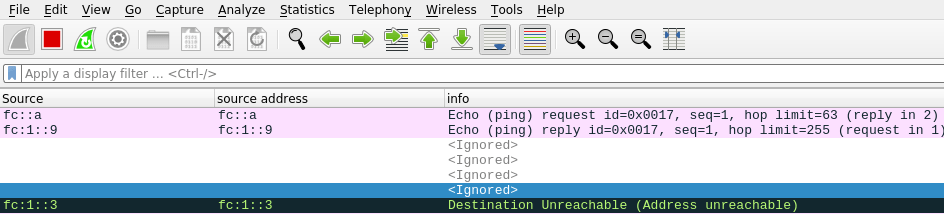
I had a WiresShark output
The destination Unreachable had
Internet Control Message Protocol v6
Type: Destination Unreachable (1)Code: 3 (Address unreachable)
...
Internet Protocol Version 6, Src: fc:1::9, Dst: fc::a
Internet Control Message Protocol v6
This is saying that at the server end of the link to z/OS, where the server end had address fc:1::3 ( see the data at the start of the black line) was unable to deliver the packet to dst: fc::a. This shows the problem is with the server in the middle rather than z/OS.
The solution turned out to be more complex than I first though.
I tried
sudo ip -6 route add fc::/64 dev eno1 via fc::7
but this gave
RTNETLINK answers: No route to host
On the laptop I did
ip -6 addr
which gave me
enp0s31f6: <BROADCAST,MULTICAST,UP,LOWER_UP> mtu 1500 state UP qlen 1000
    inet6 fc::7/128 scope global
       valid_lft forever preferred_lft forever
    inet6 fe80::9b07:33a1:aa30:e272/64 scope link noprefixroute
       valid_lft forever preferred_lft forever
back on the server I replaced fc::7 with fe80::9b07:33a1:aa30:e272
sudo ip -6 route add fc::/64 dev eno1 via fe80::9b07:33a1:aa30:e272
DestIP: Default this is statically set up with default6
Gw: 2001:db8:1::3 This is (one of) the IP address at the remote end of the connection.
Intf: IFPORTCP6 The z/OS interface name is IFPORTCP6
The flags are
U – The route is up.
G – The route uses a gateway.
H – The route is to a host rather than to a network.
S – The route is a static route not replaceable by a routing daemon or router advertisements (IPv6).
D – The route was created dynamically by ICMP processing or router advertisements (IPv6) (possibly OMPROUTE).
DestIP: 2001:db8::/64 This is for IP addresses 2001:0DB8:0000:0000:something there are 64 bits in the significant part of the address. This applies to 2001:0DB8:0:0:0:0:0:99 and 2001:0DB8:0:0:FFFF:0:0:99 for example
DestIP: 2001:db8:1::3/128 This says all 128 bits are significant in the address. This is the 2001:db8:0:0:0:0:0:3 and no other address.
RefCnt Reference count – the current number of active users for the route. See below.
Where does an entry come from?
An entry can be statically configured between BEGINRoutes… ENDoutes.
An entry can be dynamically configured from an adjacent system. For example
a prefix entry when using radvd – this defines IP address ranges into or through the z/OS host
a route entry when using radvd, this defines IP address ranges going off the host, to the other end of the connection.
An entry be generated dynamically from OSPF and RIP. On z/OS these are usually configured with the OMPROUTE address space. See below.
A statically defined entry has an S in the Flgs
A dynamic entry has a D in the Flgs -sometimes – see below.
Why does Gw: sometimes have a value?
Gw: has a value when
it was specified in the static definitions
the DestIP entry was created dynamically, for example as a route …{} statement in radvd. This is an output entry, so the Gw: is part of the definition.
Note: a radvd prefix… {} entry is inbound, so the gateway is irrelevant.
I see this as it is only relevant for connections out of z/OS. When traffic comes into the host, you do not care which gateway it came from.
What does refcnt mean for a DestIP?
The documentation it says “Reference count (RefCnt): The current number of active users for the route.”
When I pinged z/OS ten times from 2001:db8::7, the RefCnt for DestIP: 2001:db8::/80 increased by 10.
When I pinged z/OS ten times from another address, the RefCnt values were unchanged.
Issuing a traceroute to the system did not increment any values.
I could find no active connections to this interface, so all in all this field is bit of a mystery.
The Linux documentation says The reference count (i.e. attached processes via this socket), so the z/OS meaning may be a partial historical count of usage rather than the number of active users.
What is the default value?
This was a surprise. I had defined a static route using default6, and this was in the netstat route display output.
When I used
tso netstat route radv
to display the routes added via Router Advertisement it gave me a list including a Default.
Note: It seems you can have only one active Default, even with IPCONIG6 MULIPATH option. I do not know which default becomes active if you have more than one dynamically defined
The detail option
If you use TSO NETSTAT ROUTE DETAIL you get additional information.
Metric: 00000001
MVS Specific Configured Parameters:
  MaxReTransmitTime:  120.000   MinReTransmitTime: 0.500
  RoundTripGain:      0.125     VarianceGain:      0.250
  VarianceMultiplier: 2.000     DelayAcks:         Yes d
These numbers look like defaults, and I got them even when not traffic had flowed over the connection.
OMPROUTE
OMPROUTE can
Provides some “dynamic” information about default IP6 routes
It listens to messages from other routers, and can update the routing tables
Sometimes
Without OMPROUTE, routes that were dynamically created, for example using radvd on Linx, which broadcast z/OS address ranges to z/OS, and advertised “come to me for these address ranges”.
These could be seen as Dynamic, for example the D in UD below.


 ColinPaice