IPV6 getting an address automagically

You can use static definitions to give a device or link an IP address. You can use modern(last 20 years) technology to do this for you – and get additional advantages.

A server application needs a fixed IP address and port. A client, connecting to the server, can use a different IP address and port on different days. This has the advantage that it makes it harder for the bad guys to track you from your address and port combination

Client application usually use the option “allocate me any free port”.

To get a different IP address every time you can use IPv6 Stateless Address Auto-configuration (SLAAC). It is called stateless because it does not need to remember any state information from one day to the next. The client application says “give me an IP address, any IP Address” and then uses the IP address, until the device is shutdown, or the interface is closed.

On Linux You need radvd for this to work.

Router Advertisement Daemon (radvd)

You used to have dedicated routers. Now you can run radvd on a computer and it acts like a router. You can run it on your personal machine, or run it in its own machine.

This supports Neighbor Discovery Protocol. When your machine connects to the network, it asks all routers on your local network for configuration information. It gets back a list of prefixes defined on the router (for example 2001:db8::/64). If your machine wants to send a packet to 2001:db8::99, it sends a request to all routers on the local network, asking if any router has 2001:db8::99 defined. If so, the router responds, and so your machine knows where to send the packet to.

When an IP address is allocated to a device, it sends a request to all devices in the local network, asking “does anyone have this address”. This avoids devices with the same IP address. It is known as Duplicate Address Detection (DAD).

My radvd config file

The syntax of the configuration file is defined here

For my interface vl100 I wanted it to give it an IP address 2100… and 2100…

interface  vl100
{
AdvSendAdvert on;
MaxRtrAdvInterval 60;
MinDelayBetweenRAs 3;

prefix 2100::/64
{
AdvAutonomous on;
};
prefix 2200::/64
{
};
};

Where

  • AdvAutonomous on (the default) says support SLAAC

Creates

: vl100@enp0s31f6: <BROADCAST,MULTICAST,UP,LOWER_UP> mtu 1500 state UP qlen 1000
inet6 2200::3905:281e:909b:5e00/64 scope global temporary dynamic
valid_lft 86398sec preferred_lft 14398sec
inet6 2200::8e16:45ff:fe36:f48a/64 scope global dynamic mngtmpaddr
valid_lft 86398sec preferred_lft 14398sec
inet6 2100::3863:da22:619a:42e0/64 scope global temporary dynamic
valid_lft 86398sec preferred_lft 14398sec
inet6 2100::8e16:45ff:fe36:f48a/64 scope global dynamic mngtmpaddr
valid_lft 86398sec preferred_lft 14398sec
inet6 fe80::8e16:45ff:fe36:f48a/64 scope link
valid_lft forever preferred_lft forever

See here for the meaning of the fields

The attributes of the connection include :scope global temporary dynamic

  • dynamic was created by using stateless SLAAC configuration. If the address was created by an ip -6 addr add … dev … command, it will not have dynamic.
  • tentative – in the process of Duplicate Address Detection processing.
  • temporary – it expires after the time interval.
  • mngtmpaddr – is used as a template for temporary connections

You can change the attributes of an address using the change command. For example to change the time out value

sudo ip -6 addr change 2200::… dev vl100 valid_lft 100 preferred_lft 10

For me it expired and generated another connection with the same address.

Configuring frr on Linux

frr is a network router for Linux systems.

It works well, and has a lot of good documentation about all of the commands and options, but it does doesn’t have a “getting started” section. It is a bit like getting the wiring diagram for a car, when all you to do is get in and drive the car.

Below are some of the things I stumbled across lessons I learned.

Some later definitions override earlier definitions.

With

router ospf6
ospf6 router-id 6.6.6.6
ospf6 router-id 6.6.6.7

The definition used is 6.6.6.7 because it overrides the earlier 6.6.6.6

interface AB
description colins AB first
ip ospf area 0.0.0.0
ip ospf area 20.0.0.0

In this case the area 0.0.0.0 is used – so the order does not look consistent.

interface eno1 
ipv6 nd prefix 2001:db8:6099::/64
ipv6 nd prefix 2008::/64


interface eno1
description server2 ospf6
ipv6 ospf6 instance-id 2

The description is description server2 ospf6 because it was the only one specified.

Both of the nd prefix values are used.

What is used where?

If you want to configure a daemon, you needs to specify parameters in different places.

For example, the ospf6 daemon

router ospf6
ospf6 router-id 6.6.6.6
...

interface enp0s31f6
ipv6 ospf6 area 0.0.0.0

The router ospf6 configuration is for the daemon thread.

The information on the interface…. statement is for each interface. This means all of the configuration information for an interface is under the interface…. section.

To display the ospf6 configuration use

show running-config ospf6

It extracts the ospf6 interesting information from the configuration

Current configuration:
!
frr version 8.1
...
hostname Server
!
debug ospf6 zebra
debug ospf6 interface
!
interface eno1
description server2 ospzz
ipv6 ospf6 area 0.0.0.0
ipv6 ospf6 instance-id 2
ipv6 ospf6 network point-to-point
exit
!

router ospf6
ospf6 router-id 6.6.1.1
redistribute static
redistribute ripng
exit
!
end

and ignored other information like

debug ospf zebra
debug ospf interface

interface eno1
ipv6 nd prefix 2001:db8:6099::/64
ipv6 nd prefix 2008::/64

The debug ospf… is ignored because this relates to ospf not to ospf6.

The ipv6 nd is ignored because this is not ospf6 related.

Configuring using vtysh

You can use vtysh to configure your /etc/frr/frr.cntl for example

  • vtysh
  • configure
  • interface vl100
  • ipv6 address 3000::1/64
  • do write
  • quit
  • quite
  • quit

it is a good idea to make a copy of the /etc/frr/frr.conf before you do this.

Show doesn’t always show

You can use the command

show running-config

and that shows you most of what is configured and running.

Note that default values may not be displayed.

When my definitions had

interface eno1 
ip ospf hello-interval 11

the show running-configuration gave

interface eno1
description server ospzz
ip address 10.1.0.3 peer 10.1.0.2/24
ip ospf area 0.0.0.0
ip ospf dead-interval 40
ip ospf hello-interval 11

When I had ip ospf hello-interval 10 the output did not include ip ospf hello-interval 10 because it was the default value.

You can use sudo vtysh

show running config
write file

to rewrite the /etc/frr/frr.conf control file with the defaults removed, and the frr version line updated.

If you use the command

show ip ospf interface

it gives you the values for each interface such as

Timer intervals configured, Hello 10s, Dead 40s, Wait 40s, Retransmit 5

OSPF defaults

these were in the file lib/libospf.h in the frr source.

 OSPF_MIN_LS_INTERVAL                  5000     /* msec */
OSPF_MIN_LS_ARRIVAL 1000 /* in milliseconds */
OSPF_LSA_INITIAL_AGE 0 /* useful for debug */
OSPF_LSA_MAXAGE 3600
OSPF_CHECK_AGE 300
OSPF_LSA_MAXAGE_DIFF 900
OSPF_LS_INFINITY 0xffffff
OSPF_DEFAULT_DESTINATION 0x00000000 /* 0.0.0.0 */
OSPF_INITIAL_SEQUENCE_NUMBER 0x80000001U
OSPF_MAX_SEQUENCE_NUMBER 0x7fffffffU


/* OSPF interface default values. */
OSPF_OUTPUT_COST_DEFAULT 10
OSPF_OUTPUT_COST_INFINITE UINT16_MAX
OSPF_ROUTER_DEAD_INTERVAL_DEFAULT 40

OSPF_ROUTER_DEAD_INTERVAL_MINIMAL 1
OSPF_HELLO_INTERVAL_DEFAULT 10
OSPF_ROUTER_PRIORITY_DEFAULT 1
OSPF_RETRANSMIT_INTERVAL_DEFAULT 5
OSPF_TRANSMIT_DELAY_DEFAULT 1
OSPF_DEFAULT_BANDWIDTH 10000 /* Mbps */

OSPF_DEFAULT_REF_BANDWIDTH 100000 /* Mbps */

OSPF_POLL_INTERVAL_DEFAULT 60
OSPF_NEIGHBOR_PRIORITY_DEFAULT 0

OSPF_MTU_IGNORE_DEFAULT 0
OSPF_FAST_HELLO_DEFAULT 0

OSPF_AREA_BACKBONE 0x00000000 /* 0.0.0.0 */
OSPF_AREA_RANGE_COST_UNSPEC -1U

OSPF_AREA_DEFAULT 0
OSPF_AREA_STUB 1
OSPF_AREA_NSSA 2
OSPF_AREA_TYPE_MAX 3

/* SPF Throttling timer values. */
OSPF_SPF_DELAY_DEFAULT 0
OSPF_SPF_HOLDTIME_DEFAULT 50
OSPF_SPF_MAX_HOLDTIME_DEFAULT 5000

OSPF_LSA_MAXAGE_CHECK_INTERVAL 30
OSPF_LSA_MAXAGE_REMOVE_DELAY_DEFAULT 60

CS IP filtering: “standard IP flows”

To see all my blog posts on IP filtering see here.

When setting up rules for IP filtering, I discovered the following, which you might want to define rules for.

Ping

This is an icmp request type 8. The response is an icmp type 0

Traceroute

This can be protocol icmp or udp.

See “Understanding traceroute”

With protocol udp it sends packets to the IP address with different hop count. The first hop is typically port 33434, the second hop is 33435 etc. When traceroute gets the response back, it knows how far the packet got before the hop count went to zero.

To support traceroute, you need to allow IP traffic with ports in the range 33434… the upper limit which is normally less than 33434 + 100.

FTP

See Trying to use FTP.

SFTP

uses port 22.

X3270

You can configure multiple ports in TCPIP, for example one for TLS, and one for non TLS.

You need to have rules for both inbound and outbound traffic specifying the x3270 port.

Internet Group Management Protocol (IGMP)

The Internet Group Management Protocol (IGMP) is a protocol that allows several devices to share one IP address so they can all receive the same data. IGMP is a network layer protocol used to set up multicasting on networks that use the IPv4. Specifically, IGMP allows devices to join a multicasting group.

I had an interface name ETH2 type (IntfType): IPAQENET with IpAddr: 192.168.1.74/0.

I had log records like

source IP Address 192.168.1.254 destination IP address 224.0.0.1
proto=igmp

OMPROUTE

This supports OSPF

When I started OMRPOUTE on z/OS I had a log record with

source IP address 10.1.1.2 destination IP addr= 224.0.0.5 proto= ospf(89)
type= 1 outbound

OMPROUTE also gave a message (every 10 seconds)

EZZ8052I OMPROUTE SEND TO 224.0.0.5 BLOCKED BY TCPIP WHEN USING ETH1

When I started frr on a Linux machine I got a log entry

Source IP address 10.1.1.1 Destination IP address = 224.0.0.5 proto= ospf(89)
type= 1 Interface= 10.1.1.2 Inbound

Which shows it came in over the z/OS interface 10.1.1.2 attached to my Linux machine

Getting the simplest OSPF network to work.

I struggled (and failed) to get OSPF routing to work with IPV6, so I tried with IP V4. This only took a couple of hours to get working. But I could not find any documentation which had baby steps to show you how it works, and what any output means.

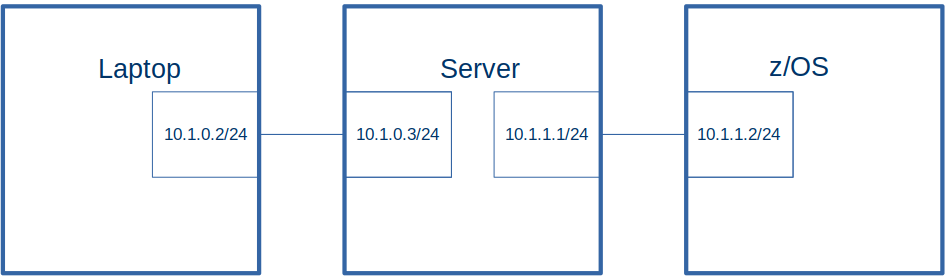
This blog post is getting two Linux machines and z/OS to work with IPV4 and OSPF routing.

Some other blog articles give examples of the commands you can use to explore the configuration, and find what is running where.

What is OSPF

OSPF is a routing protocol where a router knows the topology of the network – rather than just the next hop. As the network changes, the changes are sent to the routers and their picture of the network is updated. OSPF scales to large number of routers.

My configuration

I used the frr (Free Range Routing) package which has routing capabilities for OSPF, OSPF6, RIP etc.

The laptop had

  • ip v4 address 10.1.0.2/24
  • routes
    • 10.1.0.0/24 dev enp0s31f6 proto kernel scope link src 10.1.0.2 metric 100
    • 10.1.0.0/24 via 10.1.0.2 dev enp0s31f6 proto static metric 100
    • 10.1.1.0/24 via 10.1.0.3 dev enp0s31f6
  • ospf router id 1.2.3.4

The server had

  • ip v4 address 10.1.0.3/24
  • routes
    • 10.1.0.0/24 dev eno1 proto kernel scope link src 10.1.0.3 metric 100
    • 10.1.0.0/24 via 10.1.0.3 dev eno1 proto static metric 100
  • ospf router-id 9.2.3.4

The z/OS system has

  • ip v4 address 10.1.1.2
  • routes
    • 10.1.0.0/24 via 10.1.1.1 on ETH1
    • 10.1.1.0/24 dev tap0 proto kernel scope link src 10.1.1.1
  • ospf router-id 10.1.1.2

Laptop frr.conf configuration file

The configuration file is described here.

frr version 7.2.1
frr defaults traditional
hostname laptop
log file /var/log/frr/frr.log
log timestamp precision 6

hostname laptop
service integrated-vtysh-config
...

! zebra definition
interface enp0s31f6
description colins ospf
ip address 10.1.0.2 peer 10.1.0.3/24
ip ospf area 0.0.0.0

!
router ospf
ospf router-id 1.2.3.4

line vty

Server frr.conf configuration file

frr version 7.2.1
frr defaults traditional
hostname colin-ThinkCentre-M920s
log file /var/log/frr/frr.log
log timestamp precision 6
hostname Server
service integrated-vtysh-config

interface eno1
 description colins ospf
 ip address 10.1.0.3 peer 10.1.0.2/24
 ip ospf area 0.0.0.0

!
router ospf
 ospf router-id 9.2.3.4
!
line vty

z/OS configuration

TCPIP configuration file – defining ETH1

DEVICE PORTA  MPCIPA 
LINK ETH1  IPAQENET PORTA 
HOME 10.1.1.2 ETH1 
PORT 
   520 UDP OMP2                ; RouteD Server 
BEGINRoutes 
;     Destination   SubnetMask    FirstHop       LinkName  Size 

ROUTE 10.0.0.0    255.0.0.0           =        ETH1 MTU 1492 
ROUTE DEFAULT                     10.1.1.1     ETH1 MTU 1492 
ROUTE 10.1.0.0    255.255.255.0   10.1.1.1     ETH1 MTU 1492 
ROUTE 10.1.1.0    255.255.255.0       =        ETH1 MTU 1492 
ENDRoutes 
ITRACE OFF 
IPCONFIG NODATAGRAMFWD 
UDPCONFIG RESTRICTLOWPORTS 
TCPCONFIG RESTRICTLOWPORTS 
TCPCONFIG TTLS 
START PORTA 

JFPORTCP4 Interface configuration

This is in member USER.Z24C.TCPPARMS(jFACE41)

INTERFACE JFPORTCP4 
    DEFINE IPAQENET 
    CHPIDTYPE OSD 
    IPADDR 10.1.3.2 
    PORTNAME PORT2 

activate and start this using

v tcpip,tcpip,obeyfile,USER.Z24C.TCPPARMS(jFACE41) 

v tcpip,tcpip,sta,jfportcp4

OMPROUTE procedure

//OMPROUTE PROC 
// SET PO='POSIX(ON)' 
//OMPROUTE EXEC PGM=OMPROUTE,REGION=0M,TIME=NOLIMIT, 
// PARM=('&PO.,ENVAR("_CEE_ENVFILE_S=DD:STDENV")/ -6t2 -6d2') 
//OMPCFG DD DISP=SHR,DSN=USER.Z24C.TCPPARMS(&SYSJOBNM) 
//STDENV DD DISP=SHR,DSN=USER.Z24C.TCPPARMS(ENV&SYSJOBNM) 
//SYSPRINT DD SYSOUT=* 
//SYSOUT   DD SYSOUT=* 
//SYSTCPD DD DISP=SHR,DSN=ADCD.Z24C.TCPPARMS(TCPDATA) 
//CEEDUMP  DD SYSOUT=*,DCB=(RECFM=FB,LRECL=132,BLKSIZE=132) 
//  PEND 

and started with

S OMPROUTE,jobname=omp1

USER.Z24C.TCPPARMS(ENV&SYSJOBNM)

RESOLVER_CONFIG=//'ADCD.Z24C.TCPPARMS(TCPDATA)' 
OMPROUTE_DEBUG_FILE=/tmp/logs/omproute.debug 
OMPROUTE_IPV6_DEBUG_FILE=/tmp/logs/omprout6.debug 
OMPROUTE_DEBUG_FILE_CONTROL=1000,5 

OMPROUTE configuration USER.Z24C.TCPPARMS(OMP1)

ospf  RouterID=10.1.1.2; 
                                           
ospf_interface IP_address=10.1.1.2 
      name=ETH1 
      subnet_mask=255.255.255.0 
      ; 
ospf_interface IP_address=10.1.3.2 
      name=JFPORTCP4 
      subnet_mask=255.255.255.0 
      ; 

Startup joblog messages

EZZ7800I OMP1 STARTING
EZZ8171I OMP1 IPV4 OSPF IS USING CONFIGURED ROUTER ID 10.1.1.2 FROM OSPF STATEMENT
EZZ7898I OMP1 INITIALIZATION COMPLETE
EZZ8100I OMP1 SUBAGENT STARTING

OSPF on z/OS, basic commands

This article follows on from getting the simplest example of OSPF working. It gives the z/OS commands to display useful information.

I want to


OMP1

I configured multiple TCPIP subsystems, and each one had an OMPROUTE defined. I used a started task OEMP1, as the OMPROUTE for my base TCPIP.

If you have only one TCPIP subsystem, you can use OMPROUTE as your name.

F OMP1,OSPF,areasum

This displays the area summary.

AREA ID        AUTHENTICATION   #IFCS  #NETS  #RTRS  #BRDRS DEMAND     
0.0.0.0           NONE              2      3      3      0  OFF        

F OMP1,OSPF,EXTERNAL

EZZ7853I AREA LINK STATE DATABASE                        
TYPE LS DESTINATION     LS ORIGINATOR     SEQNO     AGE   XSUM
                # ADVERTISEMENTS:       0                     
                CHECKSUM TOTAL:         0X0                   

F OMP1,ospf,list,areas

“Displays all information concerning configured OSPF areas and their associated ranges.”

 EZZ7832I AREA CONFIGURATION 820 
 AREA ID          AUTYPE          STUB? DEFAULT-COST IMPORT-SUMMARIES? 
 0.0.0.0          0=NONE           NO          N/A           N/A 
                                                                               
 --AREA RANGES-- 
 AREA ID          ADDRESS          MASK             ADVERTISE? 
 0.0.0.0          11.11.0.0        255.255.255.0    YES 

The entry with address 11.11.0.0 comes from the omproute configuration file entry

range ip_address=11.11.0.1 
      subnet_mask=255.255.255.0 
      ; 

F OMP1,ospf,list,ifs

“For each OSPF interface, display the IP address and configured parameters as coded in the
OMPROUTE configuation file”

 EZZ7833I INTERFACE CONFIGURATION 822 
 IP ADDRESS      AREA             COST RTRNS TRDLY PRI HELLO  DEAD DB_EX 
 10.1.3.2        0.0.0.0             1     5     1   1    10    40    40 
 10.1.1.2        0.0.0.0             1     5     1   1    10    40    40 

F OMP1,ospf,list,nbma

“Displays the interface address and polling interval related to interfaces connected to nonbroadcast multiaccess networks.”

 NBMA CONFIGURATION 824 
 INTERFACE ADDR      POLL INTERVAL 
 << NONE CONFIGURED >> 

F OMP1,ospf,list,nbrs

“Displays the configured neighbors on non-broadcast networks”

 NEIGHBOR CONFIGURATION 826 
 NEIGHBOR ADDR     INTERFACE ADDRESS   DR ELIGIBLE? 
 << NONE CONFIGURED >> 

“Displays all virtual links that have been configured with this router as an endpoint.”

F OMP1,ospf,database,areaid=0.0.0.0

EZZ7853I AREA LINK STATE DATABASE                           
TYPE LS DESTINATION     LS ORIGINATOR     SEQNO     AGE   XSUM     
  1  1.2.3.4            1.2.3.4         0X80000013   61  0X3D8D    
  1  9.2.3.4            9.2.3.4         0X8000001A  393  0X5A78    
  1 @10.1.1.2           10.1.1.2        0X8000000D  286  0X9E22    
  2  10.1.0.2           1.2.3.4         0X80000006 1241  0XC35E    
  2  10.1.1.1           9.2.3.4         0X80000003  353  0X8197    
  2 @10.1.1.2           10.1.1.2        0X80000005 3600  0X64BD    
  2  10.1.3.1           9.2.3.4         0X80000003  383  0X6BAB    
  2 @10.1.3.2           10.1.1.2        0X80000005 3600  0X4ED1    

(LS) Type is described here.

  1. Router links advertisement
  2. Network link advertisement
  3. Summary link advertisement
  4. Summary ASBR advertisement
  5. Autonomous System (AS -think entire network) external link.
  • LS ORIGINATOR: Indicates the router that originated the advertisement.
  • LS DESTINATION: Indicates an IP destination (network, subnet, or host).

From the above

TYPE LS DESTINATION     LS ORIGINATOR
  2  10.1.0.2           1.2.3.4        

means router 1.2.3.4 told every one that it has the end of a network link, and its address is 10.1.0.2.

TYPE LS DESTINATION     LS ORIGINATOR      
  1  1.2.3.4            1.2.3.4

says router 1.2.3.4 told every one “here I am, router 1.2.3.4”.

You can use the type and destination in the command:

F OMP1,OSPF,LSA,LSTYPE=…,LSID=…

For example

below.

F OMP1,OSPF,LSA,LSTYPE=1,LSID=1.2.3.4

This allows you to see a lot of information about an individual element of the OSPF database.

LSTYPE=1 is for Router Links Advertisment.

The valid LSID values are given in the output of F OMP1,ospf,database,areaid=0.0.0.0 above.

F OMP1,OSPF,LSA,LSTYPE=1,LSID=9.2.3.4 
EZZ7880I LSA DETAILS  
  LS DESTINATION (ID): 9.2.3.4                     
  LS ORIGINATOR:   9.2.3.4 
  ROUTER TYPE:      (0X00)                         
  # ROUTER IFCS:   3                        
    LINK ID:          10.1.0.2        
    LINK DATA:        10.1.0.3        
    INTERFACE TYPE:   2               
    
    LINK ID:          10.1.1.2        
    LINK DATA:        10.1.1.1        
    INTERFACE TYPE:   2               
   
    LINK ID:          10.1.3.2        
    LINK DATA:        10.1.3.1        
    INTERFACE TYPE:   2 
  • LINK ID: Is the IP address of the remote end
  • LINK DATA: Is the IP address of the router’s end
  • INTERFACE TYPE: 2 is “Network links”.

F OMP1,OSPF,LSA,LSTYPE=2,LSID=10.1.0.3

This allows you to see a lot of information about an individual element of the OSPF database.

LSTYPE=2 is “Network links the set of routers attached to a network”.

The valid LSID values are given in the output of F OMP1,ospf,database,areaid=0.0.0.0 above, with type=2.

F OMP1,OSPF,LSA,LSTYPE=2,LSID=10.1.0.3                     
EZZ7880I LSA DETAILS                                   
LS OPTIONS:      E (0X02)                          
LS TYPE:         2                                 
LS DESTINATION (ID): 10.1.0.3                      
LS ORIGINATOR:   9.2.3.4                           
NETWORK MASK:    255.255.255.0                     
 ATTACHED ROUTER: 1.2.3.4          (100)    
 ATTACHED ROUTER: 9.2.3.4          (100)    

Where (100) is the metric.

F OMP1,ospf,if

 EZZ7849I INTERFACES 832 
 IFC ADDRESS     PHYS         ASSOC. AREA     TYPE   STATE  #NBRS  #ADJS 
 10.1.3.2        JFPORTCP4    0.0.0.0         BRDCST   64      1      1 
 10.1.1.2        ETH1         0.0.0.0         BRDCST   64      1      1 

F OMP1,ospf,neighbor

EZZ7851I NEIGHBOR SUMMARY 834 
 NEIGHBOR ADDR   NEIGHBOR ID     STATE  LSRXL DBSUM LSREQ HSUP IFC 
 10.1.3.1        9.2.3.4           128      0     0     0  OFF JFPORTCP4 
 10.1.1.1        9.2.3.4           128      0     0     0  OFF ETH1 

F OMP1,ospf,routers

EZZ7855I OSPF ROUTERS 836 
DTYPE RTYPE DESTINATION AREA COST NEXT HOP(S)
NONE

F OMP1,ospf,statistics

EZZ7856I OSPF STATISTICS 838 
                 OSPF ROUTER ID:         10.1.1.2 (*OSPF) 
                 EXTERNAL COMPARISON:    TYPE 2 
                 AS BOUNDARY CAPABILITY: NO 
                                                                          
 ATTACHED AREAS:                  1  OSPF PACKETS RCVD:             3336 
 OSPF PACKETS RCVD W/ERRS:        0  TRANSIT NODES ALLOCATED:         84 
 TRANSIT NODES FREED:            78  LS ADV. ALLOCATED:                1 
 LS ADV. FREED:                   1  QUEUE HEADERS ALLOC:             32 
 QUEUE HEADERS AVAIL:            32  MAXIMUM LSA SIZE:               512 
 # DIJKSTRA RUNS:                 4  INCREMENTAL SUMM. UPDATES:        0 
 INCREMENTAL VL UPDATES:          0  MULTICAST PKTS SENT:           3371 
 UNICAST PKTS SENT:               7  LS ADV. AGED OUT:                 1 
 LS ADV. FLUSHED:                 1  PTRS TO INVALID LS ADV:           0 
 INCREMENTAL EXT. UPDATES:        0 

F OMP1,OSPF,LSA,LSTYPE=2,LSID=10.1.0.3

Where

  • LSTYPE=2 is “Network links the set of routers attached to a network”.
  • 10.1.0.3 is an LS destination (from F OMP1,ospf,database,areaid=…) It comes from the frr definition below
interface eno1
ip address 10.1.0.3 peer 10.1.0.2/24

Only addresses on the Server are accepted. Addresses from the Laptop are not valid.

In the command F OMP1,OSPF,LSA,LSTYPE=1,LSID=1.2.3.4, some of the LINK IDs seem to be valid.

F OMP1,OSPF,LSA,LSTYPE=1,LSID=x.x.x.x

This allows you to see a lot of information about an individual element of the OSPF database.

The LSATYPE is described in here. LSTYPE=1 is for Router Links Advertisment.

The LSID is one of the routers, for example in

  • F OMP1,ospf,database,areaid=0.0.0.0, it displays, LS DESTINATION LS ORIGINATOR
  • F OMP1,ospf,neighbor, it displays NEIGHBOR ID
F OMP1,OSPF,LSA,LSTYPE=1,LSID=9.2.3.4 
EZZ7880I LSA DETAILS  
  LS DESTINATION (ID): 9.2.3.4                     
  LS ORIGINATOR:   9.2.3.4 
  ROUTER TYPE:      (0X00)                         
  # ROUTER IFCS:   3                               
     LINK ID:          10.1.0.3               
     LINK DATA:        10.1.0.3               
        INTERFACE TYPE:   2
     LINK ID:          10.1.1.1
     LINK DATA:        10.1.1.1              
        INTERFACE TYPE:   2 
     LINK ID:          10.1.3.1              
     LINK DATA:        10.1.3.1              
        INTERFACE TYPE:   2 

F OMP1,RTTABLE

EZZ7847I ROUTING TABLE 842 
 TYPE   DEST NET         MASK      COST    AGE     NEXT HOP(S) 
                                                                        
 STAT*  10.0.0.0         FF000000  0       16079   10.1.1.2 
  SPF   10.1.0.0         FFFFFF00  101     16071   10.1.1.1         (2) 
  SPF*  10.1.1.0         FFFFFF00  1       16078   ETH1 
  SPF*  10.1.3.0         FFFFFF00  1       16078   JFPORTCP4 
  SPF   11.1.0.2         FFFFFFFF  201     4733    10.1.1.1         (2) 
                        0 NETS DELETED, 3 NETS INACTIVE 

(2) is the number of equal-cost routes to the destination.

D TCPIP,,OMPROUTE,RTTABLE,DEST=10.1.0.0

gives

EZZ7874I ROUTE EXPANSION 105                   
DESTINATION:    10.1.0.0                       
MASK:           255.255.255.0                  
ROUTE TYPE:     SPF                            
DISTANCE:       101                            
AGE:            943                            
NEXT HOP(S):    10.1.1.1          (ETH1)       
                10.1.3.1          (JFPORTCP4)  

OSPF on Linux with frr: the basic commands

This article follows on from getting the simplest example of OSPF working. It gives the frr commands to display useful information.

How to extract useful information

This article is a good introduction in drawing the network based on the information from OSPF.

Getting started

Use the command

sudo vtysh

I think of this as the Virtual TeletYpe SHell command processor(vtysh).

You can enter a command such as show and use the ->| key twice to display the options.

If you use the subcommand configure then the subcommand interface, the line prefix becomes

laptop(config-if)

Use quit to return to the previous level, and to exit the program.

Filter the output

With the frr show commands you can use regular expressions to filter the output data.

show ip ospf database route | include address|router

gives

laptop# show ip ospf database route  | include address|router
  LS Type: router-LSA
     (Link ID) Designated Router address: 10.1.0.3
     (Link Data) Router Interface address: 10.1.0.2
  LS Type: router-LSA
     (Link ID) Designated Router address: 10.1.0.3
     (Link Data) Router Interface address: 10.1.0.3
     ...

You can also issue the sudo vtysh -c ‘show ip route’ | …. and use standard Linux facilities like grep, less and sort.

Use JSON

You can display the output in JSON format, for example

show ip ospf route json

gives

Server# show ip ospf route json 
{ "10.1.0.0/24": { "routeType": "N", "cost": 100, "area": "0.0.0.0", "nexthops": [ { "ip": " ", "directly attached to": "eno1" } ] }... }

With JSON you can find out the field names for example “cost” has a value 100.

Options and flags

Many commands give options and flags, such as

Options: 0x2 : *|-|-|-|-|-|E|-
LS Flags: 0x6

I’ve collected some interpretation on these here.

I want to…


frr commands

show ip ospf

 OSPF Routing Process, Router ID: 1.2.3.4
 ...
 Number of areas attached to this router: 1
 Area ID: 0.0.0.0 (Backbone)
   Number of interfaces in this area: Total: 1, Active: 1
   Number of fully adjacent neighbors in this area: 1
   Area has no authentication
   SPF algorithm executed 4 times
   Number of LSA 5
   Number of router LSA 3. Checksum Sum 0x000109da
   Number of network LSA 2. Checksum Sum 0x000139df
   Number of summary LSA 0. Checksum Sum 0x00000000
   ...

There are 3 router Link States, and 2 network Link States; they are displayed below:

show ip ospf database

OSPF Router with ID (1.2.3.4)
  Router Link States (Area 0.0.0.0)
    Link ID         ADV Router      Age  Seq#       CkSum  Link count
    1.2.3.4        1.2.3.4          288 0x80000003 0x15a9 1
    9.2.3.4        9.2.3.4          288 0x80000007 0x56f1 2
    10.1.1.2       10.1.1.2        1078 0x8000001e 0x9d40 1
  Net Link States (Area 0.0.0.0)
    Link ID         ADV Router      Age  Seq#       CkSum
    10.1.0.3       9.2.3.4          289 0x80000001 0x7ba2
    10.1.1.2       10.1.1.2        1082 0x80000003 0xbe3d

show ip ospf database router self-originate

This shows the links attached to this OSPF environment.

OSPF Router with ID (9.2.3.4)
Router Link States (Area 0.0.0.0)
Link State ID: 9.2.3.4 
Number of Links: 2
  Link connected to: Stub Network
  (Link ID) Net: 10.1.0.0
  (Link Data) Network Mask: 255.255.255.0

  Link connected to: a Transit Network
  (Link ID) Designated Router address: 10.1.1.2
  (Link Data) Router Interface address: 10.1.1.1

show ip ospf database router

  OSPF Router with ID (1.2.3.4)
  Router Link States (Area 0.0.0.0)
===================================
  LS age: 387
  Options: 0x2  : *|-|-|-|-|-|E|-
  LS Flags: 0x3  
  Flags: 0x0
  LS Type: router-LSA
  Link State ID: 1.2.3.4 
  Advertising Router: 1.2.3.4
  ...
  Length: 36

  Number of Links: 1

  Link connected to: a Transit Network
    (Link ID) Designated Router address: 10.1.0.3
    (Link Data) Router Interface address: 10.1.0.2
   ...
===================================
  LS Type: router-LSA
  Link State ID: 9.2.3.4 
  Advertising Router: 9.2.3.4
 
 Number of Links: 2
 Link connected to: a Transit Network
  (Link ID) Designated Router address: 10.1.0.3
  (Link Data) Router Interface address: 10.1.0.3

 Link connected to: a Transit Network
  (Link ID) Designated Router address: 10.1.1.2
  (Link Data) Router Interface address: 10.1.1.1
===================================
  LS Type: router-LSA
  Link State ID: 10.1.1.2 
  Advertising Router: 10.1.1.2
  Number of Links: 1
  Link connected to: a Transit Network
   (Link ID) Designated Router address: 10.1.1.2
   (Link Data) Router Interface address: 10.1.1.2 

show ip ospf database router 9.2.3.4

laptop# show ip ospf database router 9.2.3.4
OSPF Router with ID (1.2.3.4)
Router Link States (Area 0.0.0.0)
LS Type: router-LSA
Link State ID: 9.2.3.4 
Advertising Router: 9.2.3.4
Number of Links: 2
  Link connected to: a Transit Network
  (Link ID) Designated Router address: 10.1.0.3
  (Link Data) Router Interface address: 10.1.0.3

  Link connected to: a Transit Network
  (Link ID) Designated Router address: 10.1.1.1
  (Link Data) Router Interface address: 10.1.1.1 

show ip ospf database network

laptop# show ip ospf database network 

  OSPF Router with ID (1.2.3.4)
  Net Link States (Area 0.0.0.0)
  ====   
  LS age:
  LS Type: network-LSA
  Link State ID: 10.1.0.3 (address of Designated Router)
  Advertising Router: 9.2.3.4
 
  Network Mask: /24
    Attached Router: 1.2.3.4
    Attached Router: 9.2.3.4
  ====
  LS age:...
  LS Type: network-LSA
  Link State ID: 10.1.1.2 (address of Designated Router)
  Advertising Router: 10.1.1.2
  Network Mask: /24
    Attached Router: 10.1.1.2
    Attached Router: 9.2.3.4

show ip ospf route

Server# show ip ospf route
============ OSPF network routing table ============
N    10.1.0.0/24           [100] area: 0.0.0.0
                           directly attached to eno1
N    10.1.1.0/24           [10000] area: 0.0.0.0
                           directly attached to tap0
N    10.1.3.0/24           [10000] area: 0.0.0.0
                           directly attached to tap2
N    11.1.0.2/32           [200] area: 0.0.0.0
                           via 10.1.0.2, eno1

Where

  • N is the route type,
    • N, Network, Intra area
    • N IA, network, Inter area
    • D IA, Discard Inter area
  • 10.1.0.0.24 is the IP address
  • [] is the cost
  • 0.0.0.0 is the area

show ip ospf interface enp0s31f6

This command shows the interface on the local system. I’ve displayed what I think is important. There are many more parameters, and it is missing the description from the configuration file!

enp0s31f6 is up
  ... 
  ifindex 2, MTU 1500 bytes, BW 1000 Mbit <UP,BROADCAST,RUNNING,MULTICAST>
  Internet Address 10.1.0.2/24, Broadcast 10.1.0.255, Area 0.0.0.0
  Router ID 1.2.3.4, Network Type BROADCAST, Cost: 100
  Designated Router (ID) 9.2.3.4 Interface Address 10.1.0.3/24
  Backup Designated Router (ID) 1.2.3.4, Interface Address 10.1.0.2
  Neighbor Count is 1, Adjacent neighbor count is 1
  ...

show ip ospf interface traffic

Interface HELLO   DB-Desc LS-Req LS-Update LS-Ack Packets      
          Rx/Tx   Rx/Tx   Rx/Tx  Rx/Tx     Rx/Tx  Queued       
----------------------------------------------------------
enp0s31f6 128/129 4/3     1/1    11/5      4/10   0

show ip ospf router-info

This just shows a setting – or Router Information is disabled on this router.

show ip route

The output below shows there is one OSPF defined route (which has been active for 1 hour 9:51 minutes). (There are other routes defined.)

Codes: K - kernel route, C - connected, S - static, R - RIP,
       O - OSPF, I - IS-IS, B - BGP, E - EIGRP, N - NHRP,
       T - Table, v - VNC, V - VNC-Direct, A - Babel, F - PBR,
       f - OpenFabric,
       > - selected route, * - FIB route, q - queued, r - rejected, b - backup
       t - trapped, o - offload failure

K>* 0.0.0.0/0 [0/600] via 192.168.1.254, wlp4s0, 01:10:41
O   10.1.0.0/24 [110/100] is directly connected, enp0s31f6, weight 1, 01:10:41
K * 10.1.0.0/24 [0/100] via 10.1.0.2, enp0s31f6, 01:10:41
C>* 10.1.0.0/24 is directly connected, enp0s31f6, 01:10:41
O   10.1.1.0/24 [110/10100] via 10.1.0.3, enp0s31f6, weight 1, 01:09:51
K>* 10.1.1.0/24 [0/0] via 10.1.0.3, enp0s31f6, 01:10:41
K>* 10.2.1.0/24 [0/0] is directly connected, enp0s31f6, 01:10:41
K>* 10.3.1.0/24 [0/0] via 10.1.0.3, enp0s31f6, 01:10:41
K>* 169.254.0.0/16 [0/1000] is directly connected, virbr0 linkdown, 01:10:41
C>* 192.168.1.0/24 is directly connected, wlp4s0, 01:10:41

show ip rpf

Codes: K - kernel route, C - connected, S - static, R - RIP,
       O - OSPF, I - IS-IS, B - BGP, E - EIGRP, N - NHRP,
       T - Table, v - VNC, V - VNC-Direct, A - Babel, F - PBR,
       f - OpenFabric,
       > - selected route, * - FIB route, q - queued, r - rejected, b - backup
       t - trapped, o - offload failure

C>  10.1.0.0/24 is directly connected, enp0s31f6, 01:12:22
C>  192.168.1.0/24 is directly connected, wlp4s0, 01:12:22

Options and flags

You get information displayed like

Options: 0x2  : *|-|-|-|-|-|E|-
LS Flags: 0x6  

Where the options are: See Wikipedia.

  • * reserved
  • O – router’s willingness to receive and forward Opaque-LSAs
  • DC – Handling of Demand Circuits
  • EA” : “-“, describes the router’s willingness to receive and forward External Attributes LSAs
  • N/P – if area is NSSA.
  • MC – Multicast datagrams forwarded
  • E – external link advertisements are not flooded into OSPF
  • M/T – Multi-Topology (MT) Routing in OSPF
  • T – router’s TOS capability

and flags are:

  • SELF 0x01
  • SELF_CHECKED 0x02
  • RECEIVED 0x04
  • APPROVED 0x08
  • DISCARD 0x10
  • LOCAL_XLT 0x20
  • PREMATURE_AGE 0x40
  • IN_MAXAGE 0x80

Other information

ip -4 route

colinpaice@colinpaice:~$ ip -4 route
default via 192.168.1.254 dev wlp4s0 proto dhcp metric 600 
10.1.0.0/24 dev enp0s31f6 proto kernel scope link src 10.1.0.2 metric 100 
10.1.0.0/24 via 10.1.0.2 dev enp0s31f6 proto static metric 100 
10.1.1.0/24 via 10.1.0.3 dev enp0s31f6 
10.2.1.0/24 dev enp0s31f6 scope link 
10.3.1.0/24 via 10.1.0.3 dev enp0s31f6 
169.254.0.0/16 dev virbr0 scope link metric 1000 linkdown 
192.168.1.0/24 dev wlp4s0 proto kernel scope link src 192.168.1.222 metric 600 
192.168.122.0/24 dev virbr0 proto kernel scope link src 192.168.122.1 linkdown 

Understanding what OSPF does from the data flows.

I found that understanding the flows between to OSPF nodes helped me understand OSPF.

I used Wireshark to trace the data sent from my OSPF router with id 9.2.3.4.

There are four basic flows

  1. My router sending configuration information to the remote router
  2. The remote router sending acknowledgments back to my router
  3. The remote router sending configuration information to my router (the same as 1. above, but in the opposite direction)
  4. My router sending acknowledgements back to the remote router (the same as 2., but in the opposite direction).

It looks like a lot of data flowing – but I focused on my router sending information to the remote router.

Background information

Link state information helps others build a map of the configuration. This gives status information about the links.

Each router sends “new” information to the remote end of the connection; for example a Link State Update. The remote end acknowledges these with a Link State Acknowledgement.

While the local router is sending stuff to the remote router, the remote router is sending it’s configuration information to the local router.

Once the configuration information has been exchanged, and the configuration information stabilises, there is still a periodic “Hello Packet” between each router. This is a heartbeat to tell the remote end that the local end is still alive. The “Hello Packet” is sent out typically every 10 seconds. Updates are sent out around the “Hello Packet” time, so changes typically propagate through the network, 10 seconds a hop.

Information is exchanged via Link State Advertisement (LSA) which advertises the state of a link.

  • LSA type 1 is for routers, it contains information about routers
  • LSA type 2 is for networks, it contains information about IP addresses

Stub areas.

If you had all boxes in one big area – every box will know about other boxes. This may not scale well.

You can create areas, for example an area could be a country. Areas are connected together through the backbone area, area 0. An area, such as area1, can have information such as for addresses in area 17, go via the default routing to the backbone, and let the router where area 1 joins the backbone area sort out the routing.

Nodes in area 1need fewer definitions – as the definitions just say “go by the backbone”

Summary

I restarted my laptop, and it joined the network.
It’s configuration was

OSPF router id 1.2.3.4

Somewhere else in the network a node received two flows

  • Flow 1
    • I am router, 9.2.3.4
    • Type 1 Router-LSA. I have 3 direct connections
      • Remote end’s IP address 10.1.1.2, my address 10.1.1.1
      • Remote end’s IP address 10.1.3.2, my address 10.1.3.1
      • Remove end’s IP address 10.1.0.3, my address 10.1.0.3
    • Type 2- Network LSA
      • Attached routers 1.2.3.4 and 9.2.3.4
  • Flow 2
    • I am router 1.2.3.4
    • Type 1 Router LSA
      • I have IP address 10.1.0.0 type stub
      • I have IP address 12.1.0.1 type stub.

If the configuration changes, such as a new address is added to the node, the data broadcast is the current configuration.

Each system supporting OSPF gets the same information and can build up a database of the network, and can make informed routing decisions.

Changing the configuration

Adding an address to a link

I used the command

sudo ip -4 addr add 12.12.0.1 dev enp0s31f6

to add an additional IP address to the Ethernet connection on my laptop. The command

ip -4 addr gave

enp0s31f6: <BROADCAST,MULTICAST,UP,LOWER_UP> mtu 1500 qdisc fq_codel state UP group default qlen 1000
    inet 10.1.0.2/24 brd 10.1.0.255 scope global noprefixroute enp0s31f6
       valid_lft forever preferred_lft forever
    inet 12.13.0.1/32 scope global enp0s31f6
       valid_lft forever preferred_lft forever
    inet 12.14.0.1/32 scope global enp0s31f6
       valid_lft forever preferred_lft forever
    inet 12.12.0.1/32 scope global enp0s31f6
       valid_lft forever preferred_lft foreverd

This cause a flow to the z/OS system, saying “this is all the IP addresses I know about”.

LS Update Packet
 Number of LSAs: 1
 LSA-type 1 (Router-LSA), len 72
  LS Type: Router-LSA (1)
  Link State ID: 1.2.3.4
  Advertising Router: 1.2.3.4
   Number of Links: 4
    Type: Transit  ID: 10.1.0.3        Data: 10.1.0.2        Metric: 100
     Type: Stub     ID: 12.13.0.1      Data: 255.255.255.255 Metric: 100
     Type: Stub     ID: 12.14.0.1      Data: 255.255.255.255 Metric: 100
     Type: Stub     ID: 12.12.0.1      Data: 255.255.255.255 Metric: 100

The transit address was the original address.

The stub address(es) were added manually.

Deleting an address to a link

I used the command

sudo ip -4 addr del 12.12.0.1 dev enp0s31f6

to remove the link I had previously added.

This cause a flow to the z/OS system, saying “this is all the IP addresses I know about” – omitting the address I had just deleted.

LS Update Packet
 Number of LSAs: 1
 LSA-type 1 (Router-LSA), len 72
  LS Type: Router-LSA (1)
  Link State ID: 1.2.3.4
  Advertising Router: 1.2.3.4
   Number of Links: 4
     Type: Transit ID: 10.1.0.3  Data: 10.1.0.2        Metric: 100
     Type: Stub    ID: 12.13.0.1 Data: 255.255.255.255 Metric: 100
     Type: Stub    ID: 12.14.0.1 Data: 255.255.255.255 Metric: 100
     Type: Stub    ID: 12.12.0.1 Data: 255.255.255.255 Metric: 100

One way flows in more detail

The “Hello packet”

  • I have Source OSPF router 9.2.3.4, area 0.0.0.0

DB Description

Source OSPF router 9.2.3.4, area 0.0.0.0

DB Description

“I know about…”

Source ospf router 9.2.3.4, area 0.0.0.0

  • LSA-type 1 (Router-LSA) Link State ID 1.2.3.4 advertising 1.2.3.4
  • LSA-type 1 (Router-LSA) Link State ID 9.2.3.4 advertising 9.2.3.4
  • LSA-type 1 (Router-LSA) Link State ID 10.1.1.2 advertising 10.1.1.2
  • LSA-type 2 (Network-LSA) Link State ID 10.1.0.2 advertising 1.2.3.4
  • LSA-type 2 (Networ-kLSA) Link State ID 10.1.1.2 advertising 10.1.1.2

Link state update

“Here is information about the links and the IP addresses”.

Source router 9.2.3.4, Area 0.0.0.0

  • LSA-type 1 (Router-LSA) Link State ID 1.2.3.4 advertising 1.2.3.4
    • Links: Type Transit ID 10.1.0.2 Data 10.1.0.2 Metric 100
  • LSA-type 1 (Router-LSA) Link State ID 9.2.3.4 advertising 9.2.3.4
    • Links: Type Transit ID 10.1.0.2 Data 10.1.0.3 Metric 100
    • Links: Type Stub ID 10.1.1.0 Data 255.255.255.0 Metric 1000
  • LSA-type 1 (Router-LSA) Link State ID 10.1.1.2 advertising 10.1.1.2
    • Links: Type Transit ID 10.1.1.1 Data 10.1.1.2 Metric 1
  • LSA-type 2 (Network-LSA) Link State ID 10.1.0.2 advertising 1.2.3.4
    • Attached router: 1.2.3.4
    • Attached router 9.2.3.4
  • LSA-type 2 (Network-LSA) Link State ID 10.1.1.2 Advertising 10.1.1.2
    • Attached router 10.1.1.2
    • Attached router 9.2.3.4

DB Description

I have OSPF router 9.2.3.4, Area 0.0.0.0

I support external routing

Link state update (2)

Source router 9.2.3.4, Area 0.0.0.0

Link State Type Router

  • LSA-type 1 (Router-LSA) Link State ID 9.2.3.4 advertising 9.2.3.4
    • Links: Type Transit ID 10.1.0.2 Data 10.1.0.3 Metric 100
    • Links: Type Transit ID 10.1.1.1 Data 10.1.1.1 Metric 1000
  • LSA-type 1 (Router-LSA) Link State ID 10.1.1.1 advertising 9.2.3.4
    • Attached router: 9.2.3.4
    • Attached router: 10.1.1.2

Hello Packet

Periodically (every 10 or so seconds) there is a Hello Packet flow, which acts as a heartbeat to let the remote end the know the local end is still alive.

One minute networking: Understanding TCPIP routing: Static, RIP, OSPF

This is another blog post in the series “One minute…” which gives the basic concepts of a topic, with enough information so that you can read other documentation, but without going too deeply.

IP networks can range in size from 2 nodes(machines), to millions of nodes(machines), and a packet can go from my machine to any available machines – and it arrives! How does this miracle work?

I’ll work with IP V6 to make it more interesting (and there is already a lot of documentation for IP V4)

I have and old laptop, connected by Ethernet to my new laptop. My new laptop is connected by wireless to my server which is connected to z/OS. I can ping from the old laptop to z/OS.

  • Each machine needs connectivity for example wireless, Ethernet, or both.
  • Each machine has one or more interfaces where the connectivity comes in (think Ethernet port, and Wireless connection). This is sometimes known as a device.
  • Each interface has one or more IP addresses.
  • You can have hardware routers, or can route through software, without a hardware router. A hardware router can do more than route.
  • Each machine can route traffic over an interface (or throw away the packet).
    • If there is only one interface this is easy – all traffic goes down it.
    • If there is more than one interface you can specify which address ranges go to which interface.
    • You can have a default catch-all if none of the definitions match
    • You can have the same address using different interfaces, and the system can exploit metrics to decide which will be used.
    • You can have policy based routing. For example
      • packets from this premier user, going to a specific IP address should use the high performance (and more expensive) interface,
      • people using the free service, use the slower(and cheaper) interface.

Modern routing uses the network topology to manage the routing tables and metrics in each machine.

Static

The administrator defines a table of “if you want get to… then use this interface, the default is to send the packet using this … interface”. For example with z/OS

BEGINRoutes 
;     Destination   SubnetMask    FirstHop    LinkName  Size 
; ROUTE 192.168.0.0 255.255.255.0       =     ETH2 MTU 1492 
ROUTE 10.0.0.0      255.0.0.0           =     ETH1 MTU 1492 
ROUTE DEFAULT                     10.1.1.1    ETH1 MTU 1492 
ROUTE 10.1.0.0      255.255.255.0   10.1.1.1  ETH1 MTU 1492 

ROUTE 2001:db8::/64 fe80::f8b5:3466:aa53:2f56 JFPORTCP2 MTU 5000 
ROUTE fe80::17      HOST =                    IFPORTCP6 MTU 5000 
ROUTE default6      fe80::f8b5:e4ff:fe59:2e51 IFPORTCP6 MTU 5000
                                                                      
ENDRoutes 

Says

  • All traffic for 10.*.*.* goes via interface ETH1.
  • If no rule matches (for IP V4) use the DEFAULT route via ETH1. The remote end of the connection has IP address 10.1.1.1
  • All traffic for IPV6 address 2001:db8:0:* goes via interface JFPORTCP2
  • If no rule matches (for IP V6) use the DEFAULT6 route via IFPORTCP6. The remote end of the connection has IP address fe80::f8b5:e4ff:fe59:2e51.

On Linux the ip route command gave

default via 192.168.1.254 dev wlxd037450ab7ac proto dhcp metric 600 
10.1.0.0/24 dev eno1 proto kernel scope link src 10.1.0.3 metric 100 
10.1.1.0/24 dev tap0 proto kernel scope link src 10.1.1.1 

This says

  • The default is to send any traffic via device wlxd037450ab7ac.
  • Any traffic for 10.1.0.* goes via device eno1
  • Any traffic for 10.1.1.* goes via device tap0.

Routing Information Protocol(RIP)

Manually assigning metrics (priorities) to hint which routes are best, quickly becomes unmanageable when the number of nodes(hosts) increases.

If the 1980’s the first attempt to solve this was using RIP. It uses “hop count” of the destination from the machine as a metric. A route with a small hop count will get selected over a route with a large hop count. Of course this means that each machine needs to know the topology. RIP can support at most 15 hops.

Each node participating in RIP learns about all other nodes participating in RIP.

Every 30 seconds each node sends to adjacent nodes “I know about the following nodes and their route statements”. Given this, eventually all nodes connected to the network will know the complete topology.
For example, from the frr(Free Range Routing) trace on Linux

RIPng update timer expired!
RIPng update routes on interface tap1
  send interface tap1
  SEND response version 1 packet size 144
   2001:db8::/64 metric 1 tag 0
    2001:db8:1::/64 metric 1 tag 0
   2002::/64 metric 2 tag 0
    2002:2::/64 metric 2 tag 0
   2008::/64 metric 3 tag 0
    2009::/64 metric 1 tag 0
    2a00:23c5:978f:6e01::/64 metric 1 tag 0

This says

  • The 30 second timer woke up
  • It sent information to interface tap1
  • 2001:db8::/64 metric 1 this is on my host(1 hop)
  • 2002::/64 metric 2 this is from a router directly connected to me (2 hops).
  • 2008::/64 metric 3 is connected to a router connected to a router directly connected to me (3 hops.)

On z/OS the command F OMP1,RT6TABLE gave me message EZZ7979I . See OMPROUTE IPv6 main routing table for more information

DESTINATION: 2002::/64 
  NEXT HOP: FE80::E42D:73FF:FEB1:1AB8 
  TYPE:  RIP           COST:  3         AGE: 10 
DESTINATION: 2001:DB8::/64 
  NEXT HOP: FE80::E42D:73FF:FEB1:1AB8 
  TYPE:  RIP*          COST:  2         AGE: 0 

This says

  • To get to 2002::/64 go down interface with the IP address FE80::E42D:73FF:FEB1:1AB8.
  • This route has been provided by the RIP code.
  • The destination is 3 hops away (in the information sent from the server it was 2 hops away)

The fields are

  • RIP – Indicates a route that was learned through the IPv6 RIP protocol.
  • * An asterisk (*) after the route type indicates that the route has a directly connected backup.
  • Cost 3 – this route is 3 hops away.
  • Age 10 -Indicates the time that has elapsed since the routing table entry was last refreshed

OSPF (Open Shortest Path First)

OSPF was developed after RIP, as RIP had limitations – the maximum number of hops was 15, and every 30 seconds there was a deluge of information being sent around. The OSPF standard came out in 1998 10 years after RIP.

The 10 second picture

You create areas in your network. An area could be a building, or a city. The backbone or area 0 is connected to your area.

Within an area all computers have a map of IP addresses in the area, and how to get to them. If you define a new address for a link on one computer or add a new router , all of the computers in the area get updated within seconds.

The more detailed picture

Using OSPF, when a system starts up it sends to the neighbouring systems “Hello, my router id is 9.3.4.66, and I have the following IP addresses and routes.” This information is propagated to all nodes in the OSPF area. When a node receives this information it updates its internal map (database) with this information. Every 10 seconds or so, each node sends a “Hello Packet” to the adjacent nodes to say “I’m still here”. If this packet is not received, then the (working) node can broadcast “The node …. is not_responsive/dead”, and all other nodes can then update their maps.

If the configuration changes, for example an IP address is added to an interface, the node’s information is propagated to a ‘managing node’ and its backup, and this propagates the update throughout the network. In a stable network, the network traffic is just the “Hello packet” sent to the next node, and any configuration changes propagated.

One of the pieces of information sent out about node’s route is the metric or “cost”. When a node is deciding which interface to route a packet to, OSPF can calculate the overall “cost” and if there are a choice of routes to the destination it can decide which interface gives the best cost.

To make it easier to administer, you can have areas, so you might have an area being the UK, another area being Denmark, and another area being the USA.

How it works on Linux

OSPF plugs its map of the network into the IP router code. When the IP router gets a packet it looks at its internal tables, including the OSPF data to decide on the best route.

Authenticating ospf

This is another of those little tasks that look simple but turn out to be more a little more complex than it first looked.

Authentication in OSPF is performed by sending authentication data in every flow. This can be a password (not very secure) or an MD5 check sum, based on a shared password and sequence number. The receiver checks the data sent is valid, and matches the data it has.

Enabling authentication on Linux

To do any authentication you need to enable it at the area level.

router ospf
  ospf router-id 9.2.3.4
  area 0.0.0.0 authentication

This turns it on for all interfaces – defaulting to password based with a null password. I did this and my connections failed because the two ends of the link were configured differently.

I first had to configure ip ospf authentication null for all interfaces, then enable area authenticate, and the the connections to other systems worked.

interface tap2
   ip ospf area 0.0.0.0
   ip ospf authentication null

interface ...

router ospf
  ospf router-id 9.2.3.4
  area 0.0.0.0 authentication

I could then enable the authentication on an interface by interface basis.

If there is a mismatch,

  • z/OS will report a mismatch,
  • frr quietly drops the packet. I enabled packet trace.

debug ospf packet hello

I got out a trace

OSPF: ... interface enp0s31f6:10.1.0.2: auth-type mismatch, local Null, rcvd Simple
OSPF: ... ospf_read[10.1.0.3]: Header check failed, dropping.

The router ospf … area … authentication is the master switch.

To define authentication on a link, you have to change both ends, then activate the change at the same time at each end.

On z/OS

I could not find how to get OMPROUTE to reread its configuration file after I updated and OSPF entry. There is an option

f OMP1,reconfig

but the documentation says

RECONFIG
Reread the OMPROUTE configuration file. This command ignores all statements in the configuration file except new OSPF_Interface, RIP_Interface, Interface, IPv6_RIP_Interface, and IPv6_Interface
statements.

and I got messages like

EZZ7821I Ignoring duplicate OSPF_Interface statement for 10.1.1.2

For z/OS OMPROUTE to communicate with frr (and CISCO routers) I had to specify the z/OS definition Authentication_… for example

ospf_interface IP_address=10.1.1.2 
      name=ETH1 
      subnet_mask=255.255.255.0 
      Authentication_type=PASSWORD 
      Authentication_Key="colin" 
      ;    

Then stop and restart OMPROUTE.

Using password (or not)

If you use a password, then it flows in clear text. Anyone sniffing your network will see it. It should not be used to protect your system.

On frr

You need router ospf area … authentication. If you have area … authentication message-digest then the password authentication statement on the interface is ignored.

router ospf
  ospf router-id 9.2.3.4
  router-info area
  area 0.0.0.0 authentication

interface tap0
   ip ospf authentication colin
   ...

On z/OS

ospf_interface IP_address=10.1.3.2 
      name=JFPORTCP4 
      subnet_mask=255.255.255.0 
      Authentication_type=PASSWORD 
      Authentication_Key="colin" 
      ; 

Using MD5

Background

An MD5 checksum is calculated from

  • the key – a string of up to 16 bytes
  • key id – an integer in the range 0-255. In the future this key could be used to specify which checksum algorithm to use. Currently only its value is used only as part of the check sum calculation.
  • the increasing sequence number of the flow.

This checksum is calculated and the sequence number and checksum are sent as part of each flow. The remote end performs the same calculation, with the same data, and the checksum value should match.

Because the sequence number changes with every flow, the checksum value changes with every flow. This prevents replay attacks.

The key must be the same on both ends of the connection. Because frr and hardware routers are based in ASCII, an ASCII value must be specified when using z/OS and these routers.

On frr

router ospf
  ospf router-id 9.2.3.4
  area 0.0.0.0 authentication 

interface tap0
   ip ospf authentication message-digest
   ip ospf message-digest-key 3 md5 AAAAAAAAAAAAAAAA

On z/OS

ospf_interface IP_address=10.1.1.2 
      name=ETH1 
      subnet_mask=255.255.255.0 
      Authentication_type=MD5 
      Authentication_Key=0X41414141414141414141414141414141 
      Authentication_Key_ID=3 
      ;
     ;     Authentication_Key=A"AAAAAAAAAAAAAAAA" 

You can either specify the ASCII value A”A…” or as hex “0x4141…” where 0x41 is the value of A in ASCII.

The z/OS documentation is not very clear. My edited version is

Authentication_Key
The value of the authentication key for this interface. This value must be the same for all routers attached to a common medium a link. The coding of this parameter depends on the authentication type being used on this interface.

For authentication type MD5, code the 16-byte authentication key used in the md5 processing for OSPF routers attached to this interface.

This value must be the same at each end.

If the router at the remote end is ASCII based, for example CISCO or Extreme routers, or the frr package on Linux, this value must be specified in ASCII.

You can specify a value in ASCII as A”ABCD…” or as hexadecimal 0x41424344…”, were 41424344 is the ASCII for ABCD.

For non ASCII routers you can specify an ASCII or hexadecimal value.   You can use pwtokey to generate a suitable hexadecimal key from a password.


Using frr (routing program) on Linux

It took me a day to get frr (Free Range Routing) working on Linux. Some of this was due to missing documentation, and getting it started was a problem until I found the golden path which worked.

What is frr?

frr is an offshoot of quagga, which provides ospf, and rip services etc for IP routing on Linux.

Install frr

I used

sudo apt install frr frr-doc

This creates a userid frr, a group frr and may connect your userid to the group.

Check this with

grep frr /etc/group

This gave me

frrvty:x:146:frr
frr:x:147:

I added myself to the group, so I could edit the configuration files

sudo usermod -a -G frr colin

This does not take effect until next time you logon. In the mean time you can use sudo… to access the files.

It may start up every reboot. To disable this use

sudo systemctl disable frr

and

sudo systemctl enablr frr

to restart at reboot.

You can use

sudo /etc/init.d/frr start

sudo /etc/init.d/frr stop

sudo /etc/init.d/frr restart

Configuration files

You need several configuration files, in /etc/frr. I had to use

sudo nano /etc/frr/…

because gedit did not work in sudo mode.

Make changes; use ctrl-s to save, and ctrl-x to exit.

/etc/frr/daemons

This file says which daemons to start. I was only interested in ripngd, and the parameters to pass to the daemons.

I think the comments about the config apply to the frr.conf and vtysh.conf.

# This file tells the frr package which daemons to start.
#
# Sample configurations for these daemons can be found in
# /usr/share/doc/frr/examples/.
#
# ATTENTION:
#
# When activating a daemon for the first time, a config file, even if it is
# empty, has to be present *and* be owned by the user and group "frr", else
# the daemon will not be started by /etc/init.d/frr. The permissions should
# be u=rw,g=r,o=.
# When using "vtysh" such a config file is also needed. It should be owned by
# group "frrvty" and set to ug=rw,o= though. Check /etc/pam.d/frr, too.
#
# The watchfrr and zebra daemons are always started.
#
bgpd=no
ospfd=no
ospf6d=no
ripd=no
ripngd=yes
isisd=no
pimd=no
ldpd=no
nhrpd=no
eigrpd=no
babeld=no
sharpd=no
pbrd=no
bfdd=no
fabricd=no
vrrpd=no

#
# If this option is set the /etc/init.d/frr script automatically loads
# the config via "vtysh -b" when the servers are started.
# Check /etc/pam.d/frr if you intend to use "vtysh"!
#
vtysh_enable=yes
#zebra_options="  -A 127.0.0.1 -s 90000000 --config_file /etc/frr/frr.conf"
zebra_options="  -A 127.0.0.1 -s 90000000 "
bgpd_options="   -A 127.0.0.1"
ospfd_options="  -A 127.0.0.1"
ospf6d_options=" -A ::1"
ripd_options="   -A 127.0.0.1"
ripngd_options=" -A ::1 "
isisd_options="  -A 127.0.0.1"
pimd_options="   -A 127.0.0.1"
ldpd_options="   -A 127.0.0.1"
nhrpd_options="  -A 127.0.0.1"
eigrpd_options=" -A 127.0.0.1"
babeld_options=" -A 127.0.0.1"
sharpd_options=" -A 127.0.0.1"
pbrd_options="   -A 127.0.0.1"
staticd_options="-A 127.0.0.1"
bfdd_options="   -A 127.0.0.1"
fabricd_options="-A 127.0.0.1"
vrrpd_options="  -A 127.0.0.1"

#
# This is the maximum number of FD's that will be available.
# Upon startup this is read by the control files and ulimit
# is called.  Uncomment and use a reasonable value for your
# setup if you are expecting a large number of peers in
# say BGP.
#MAX_FDS=1024

# The list of daemons to watch is automatically generated by the init script.
#watchfrr_options=""

# for debugging purposes, you can specify a "wrap" command to start instead
# of starting the daemon directly, e.g. to use valgrind on ospfd:
#   ospfd_wrap="/usr/bin/valgrind"
# or you can use "all_wrap" for all daemons, e.g. to use perf record:
#   all_wrap="/usr/bin/perf record --call-graph -"
# the normal daemon command is added to this at the end.

/etc/frr/vtysh.conf

This provides configuration information for the command tool:

service integrated-vtysh-config
hostname laptop
password  zebra
log file /var/frr/vtysh.log debug
  • service integrated-vtysh-config this says use one config file (/etc/frr/frr.conf) rather than one per daemon (as used in quagga)
  • hostname laptop when using vtysh it puts this value at the start of each line (so you know which system you are working with)
  • password zebra I do not know when this is used
  • log file /var/frr/vtysh.log debug I do not know when this is used.

You may want to omit the password.

/etc/frr/frr.conf

The option service integrated-vtysh-config above says use one configuration file (the integrated option) /etc/frr/frr.conf . If service integrated-vtysh-config is not specified, you need one config file per daemon.

frr version 7.2.1
frr defaults traditional
hostname Router
log file /var/log/frr/frr.log
log timestamp precision 3
ipv6 forwarding
hostname colinpaice
hostname vtysh3
service integrated-vtysh-config
!
debug ripng events
debug ripng packet
!
enable password zebra
password zebra
!
router ripng
  network enp0s31f6
  network wlp4s0
!
line vty
!
  • log file /var/log/frr/frr.log You can write to the syslog daemon or to a file. It defaults to log syslog informational See logging below.
  • log timestamp precision 3 Records written to the log have millisecond accuracy (6 gives microseconds). I changed this when trying to get frr to work, to check the config file was being picked up
  • debug ripng events this writes information such as time expired to the log.
  • debug ripng packet this prints out the data sent and received, for example the addresses.
  • enable password zebra
  • password zebra
  • router ripng this is configuration for the ripng daemon.
    • network enp0s31f6
    • network wlp4s0

Structure of the file

Within the config file you can have

interface enp0s31f6
   ip ospf area 0.0.0.0
   ip ospf hello-interval 30
   description colins ospf first


interface enp0s31f6
 description colins ospf second

if you use vtysh

laptop# show interface enp0s31f6 
Interface enp0s31f6 is up, line protocol is up
  Link ups:       0    last: (never)
  Link downs:     0    last: (never)
  vrf: default
  Description: colins ospf second

In this case the second definition overrides the first definition.

With a ip ospf area 0.1.0.0 in the second definition I got message

Must remove previous area config before changing ospf area 
line 33: Failure to communicate[13] to ospfd, line:  ip ospf area 0.1.0.0

Starting and stopping frr

frr starts even though the configuration has problems, and does not provide any diagnostic information.

To check the configuration file syntax

sudo vtysh -m -f /etc/frr/frr.conf

This displays the file, and reports any errors.

Once frr has started there is a command

sudo vtysh -c “show startup-config”

which is meant to display the contents of the start up configuration file. For me this produced no output.

The following command does display the running configuration.

sudo vtysh -c “show running-config”

Starting frr.

The documentation says

Integrated configuration mode
Integrated configuration mode uses a single configuration file, frr.conf, for all daemons. This replaces the individual files like zebra.conf or bgpd.conf.
frr.conf is located in /etc/frr. All daemons check for the existence of this file at startup, and if it exists will not load their individual configuration files. Instead, vtysh -b must be invoked to process frr.conf and apply its settings to the individual daemons.

It looks like the configuration file is not used until vtysh -b has been issued; vtysh sends the configuration file to the daemons.

I used a script

sudo rm /var/log/frr/frr.log
sudo touch /var/log/frr/frr.log
sudo chown frr:frr /var/log/frr/frr.log

sudo /etc/init.d/frr stop 
sleep 1s
sudo /etc/init.d/frr start 
sudo systemctl start ripngd.service
sleep 1s
sudo /etc/init.d/frr status

sleep 1s
less /var/log/frr/frr.log*
ls -ltr /var/log/frr/
  • I could have used sudo /etc/init.d/frr restart instead of stop and start.
  • The log file must exist, and have the correct owner:group.

When I ran vtysh -b I got messages

can’t open logfile /var/log/frr/frr.log
line 4: Failure to communicate[13] to zebra, line: log file /var/log/frr/frr.log

Configuration file[/etc/frr/frr.conf] processing failure: 13

which basically means the file does not exist, or has the wrong owner.

When running I had the following threads running

colinpaice@colinpaice:~$ ps -ef |grep frr
root 5107 1 0 09:09 ? 00:00:00 /usr/lib/frr/watchfrr -d zebra ripngd staticd
frr  5124 1 0 09:09 ? 00:00:00 /usr/lib/frr/zebra -d -A 127.0.0.1 -s 90000000
frr  5129 1 0 09:09 ? 00:00:00 /usr/lib/frr/ripngd -d -A ::1
frr  5133 1 0 09:09 ? 00:00:00 /usr/lib/frr/staticd -d -A 127.0.0.1
 

Displaying and configuring frr.

You can use the command

sudo vtysh

or

sudo vtysh -c “show running-config”

To execute commands to frr.

If configured you can use commands

telnet localhost zebra

but vtysh is easier to type.

You can issue

sudo vtysh -c “show ?”

to show the options on the show command.

sudo vtysh -c “show ipv6 ripng”

gave me

Codes: R - RIPng, C - connected, S - Static, O - OSPF, B - BGP
Sub-codes:
      (n) - normal, (s) - static, (d) - default, (r) - redistribute,
      (i) - interface, (a/S) - aggregated/Suppressed

   Network      Next Hop                      Via     Metric Tag Time
C(i) 2a00:23c5:978f:6e01::/64 
                  ::                          self       1    0  

Displaying is not that easy

I had defined an interface with

interface enp0s31f6
   ipv6 ospf6 instance-id 1
   ipv6 nd prefix 2001:db8:5099::/64
   ipv6 ospf6 network point-to-point
   ipv6 ospf6 advertise prefix-list 2001:db8:2::/64
   ipv6 ospf6 advertise prefix-list 2001::/64
   ip ospf area 0.0.0.0
   ip ospf hello-interval 30
   description colins ospf first

interface enp0s31f6
 description colins ospf second

When I had the ospf daemon running, but not the ospf6 daemon, the show running command gave

interface enp0s31f6
 description colins ospf second
 ip ospf area 0.0.0.0
 ip ospf hello-interval 30
 ipv6 nd prefix 2001:db8:5099::/64
!

When both daemons were running the show running command gave

interface enp0s31f6
 description colins ospf second
 ip ospf area 0.0.0.0
 ip ospf hello-interval 30
 ipv6 nd prefix 2001:db8:5099::/64
 ipv6 ospf6 advertise prefix-list 2001::/64
 ipv6 ospf6 instance-id 1
 ipv6 ospf6 network point-to-point

including the ospf6 information.

The show interface enp0s31f6 command gave

Interface enp0s31f6 is up, line protocol is up
  Link ups:       0    last: (never)
  Link downs:     0    last: (never)
  vrf: default
  Description: colins ospf second
  index 2 metric 0 mtu 1500 speed 1000 
  flags: <UP,BROADCAST,RUNNING,MULTICAST>
  Type: Ethernet
  HWaddr: 8c:16:45:36:f4:8a
  inet 10.1.0.2/24
  inet6 2001:db8::1/128
  inet6 fe80::78e8:9e55:9f3f:768/64
  Interface Type Other

This has some information from my configuration (description) and information from querying the system ( HWaddress, ip addresses).

Logging

If you are logging to syslogd, either by design or default, if you remove the log file, and restart frr you may get messages like

Jan 03 08:51:31 colin-ThinkCentre-M920s systemd[1]: Started FRRouting.
can't open logfile /var/log/frr/frr.log
line 7: Failure to communicate[13] to zebra, line: log file /var/log/frr/frr.log debug 

You need to restart the syslogd daemon, for example

systemctl restart rsyslog.service

If you are logging to syslogd, there is an frr file /etc/rsyslog.d/45-frr.conf which defines the log file as

$outchannel frr_log,/var/log/frr/frr.log

The log file filling up

After day’s usage I noticed the files in the log directory:

ls -ltr  /var/log/frr/
total 1720
-rw-r--r-- 1 frr frr   51171 Jan  4 18:40 frr.log.1.gz
-rw-r--r-- 1 frr frr 1701760 Jan  6 16:37 frr.log

it looks like it does log maintenance, and compresses old logs.