What’s my Appache HTTPD configuration?

I was trying to understand how my HTTPD configuration worked, and which file something was in. I was pleasantly surprised to find how easy it was to get this information. Rather than just list the configuration files as they were read, the data is displayed by function. This means I can see all the configuration information about “Environment variables”, or SAF.

It displays all the configuration keywords. For example for Module Name:mod_ibm_ssl.c it displays

  • SSLDisable – SSL is disabled for this server
  • SSLSNIMap – Add a new SNI/label mapping
  • SSLEnable – SSL is enabled for this server
  • SSLServerCert – Certificate within keyfile for this server
  • SSLClientAuth – The type of Client Authentication

Values are substituted, in my configuration files I had

colin.conf:define  urls  https://10.1.1.2   
...
RewriteRule "¬/(AdmRootca|Rootca)/ssl-cgi/(.*) ${urls}/$1/ssl-cgi-bin/$2 [R,NE,L] " 

This was displayed as

RewriteRule "^/(AdmRootca|Rootca)/ssl-cgi/(.*) https://10.1.1.2/$1/ssl-cgi-bin/$2 [R,NE,L] "

and I could check my configuration was correct.

You can change the startup to display the configuration at startup… but…

The documentation says you can add -DDUMP_CONFIG to the startup parameters. But when I tried this, it made the parameter list too long for the PARM=…

I had to change

//HTTPCP   PROC ACTION='start  -DDUMP_CONFIG ', 
//         DIR='/usr/lpp/ihsa_zos', 
//         CONF='/u/mqweb2/conf/httpd.conf'
//IHS      EXEC PGM=BPXBATCH,REGION=0M, 
//  PARM='SH &DIR/bin/apachectl -k &ACTION -f &CONF -DNO_DETACH   ', 
// MEMLIMIT=1236M  

to

//HTTPCP   PROC 
//  EXPORT SYMLIST=* 
//  SET ACTION='start  -DDUMP_CONFIG ' 
//  SET DIR='/usr/lpp/ihsa_zos' 
//  SET CONF='/u/mqweb2/conf/httpd.conf' 
//IHS      EXEC PGM=BPXBATCH,REGION=0M,PARMDD=PARMDD, 
// MEMLIMIT=1236M 
//PARMDD DD  *,SYMBOLS=EXECSYS 
SH &DIR/bin/apachectl 
 -k &ACTION 
 -f &CONF -DNO_DETACH 
 -DDUMP_CONFIG 
/* 

Then I got the configuration in STDOUT – though without the HTML links.

To display it online, you need to configure HTTPD

In my colin.conf file I had

LoadModule info_module modules/mod_info.so 

<IfModule mod_info.c> 
<Location /info> 
    SetHandler server-info 
#   Require all denied 
#   To allow access from a specific IP: 
#   Require ip 192.168.1 
</Location>
</IfModule> 

Of course you’ll enable security once it works…

I used

https://10.1.1.2:443/info

and it displayed the configuration. It has sections on

  • Loaded modules (I was pleased to see mod_info.so in the list)
  • Server settings
  • Hooks and providers
  • What I call “function type parameters” with the relevant configuration. For example for mod_alias.c it shows
    • Module directives
      • Alias – a fakename and a realname, or a realname in a Location
      • ScriptAlias – a fakename and a realname, or a realname in a Location
      • Redirect – an optional status, then document to be redirected and destination URL
      • Current configuration – and the information applicable to the function. For Module Name:mod_alias.c
        • In file: /u/mqweb2/conf/httpd.conf 
          • 467: Alias /icons/ “/u/mqweb2/icons/” 
          • 483: ScriptAlias /cgi-bin/ “/u/mqweb2/cgi-bin/”
        • In file: /u/mqweb2/conf/vhost80.conf  
          • 23: <VirtualHost *:80>  
          • 44:   ScriptAliasMatch /(PKIServ|Customers)/public-cgi/(.*) /usr/lpp/pkiserv/PKIServ/public-cgi/$
          • 2    : </VirtualHost>
      • For Module Name:mod_env.c
        • In file: /u/mqweb2/conf/vhost80.conf  
          • 23: <VirtualHost *:80>  
          • 27:   SetEnv LIBPATH “/usr/lpp/pkiserv/lib:/usr/lpp/ihsa_zos/lib:/usr/lpp/ihsa_zos/modules:/usr/lpp/ihsa_zos”  
          • 28:   SetEnv _PKISERV_CONFIG_PATH “/etc/pkiserv”    
          • : </VirtualHost>
        • In file: /u/mqweb2/conf/vhost443.conf  
          • 27: <VirtualHost *:443>  
          • 28:   SetEnv LIBPATH “/usr/lpp/pkiserv/lib:/usr/lpp/ihsa_zos/lib:/usr/lpp/ihsa_zos/modules:/usr/lpp/ihsa_zos”  
          • 29:   SetEnv _PKISERV_CONFIG_PATH “/etc/pkiserv”    
          • : </VirtualHost>

This is all very well thought through and easy to use.

Strong keys may be bad for your blood pressure.

I’ve just spent a couple of days trying to get a web server to use an Elliptic key with size 521. It works on Firefox, Curl, and OpenSSL, but not on Chrome. Weaker keys work of size 256 and 384 work fine, except in some cases a key size of 256 gave did not work on z/OS.

I’ve since found a page going back to 2015 discussing the dropping of several EC cipher specs. There is also discussion “NSA Suite B says that NSA uses curves P-256 and P-384” which (to some people) implied that other elliptic curves should not be used, and so were removed. There is another discussion that P256 is as strong as P521, but requires less CPU, and so P521 should not be used.

So the short answer is use Elliptic curves with key size 256 or 256, and do not use the others.

I was trying to get the Apache HTTPD server on z/OS to use a certificate, and it failed. I tried using a similar certificate from the openssl Simple server on Linux and it failed, so I’m guessing that my Chrome version (Version 114.0.5735.198 (Official Build) (64-bit)) does not support it.

The problem

In Chrome I got

This site can’t provide a secure connection 10.1.1.2 sent an invalid response.
ERR_SSL_PROTOCOL_ERROR

This is not entirely true, as the browser sent the Alert response to the server and it was not an ERR_SSL_PROTOCOL_ERROR. After this the browser code returned its caller saying “failed” . Using Wireshark, capturing encrypted data showed the data flowing from the browser to the server to port 443),

Transmission Control Protocol, Src Port: 38188, Dst Port: 443

Transport Layer Security
  TLSv1.3 Record Layer: Change Cipher Spec Protocol: Change Cipher Spec
    Content Type: Change Cipher Spec (20)
    Change Cipher Spec Message
  TLSv1.3 Record Layer: Alert (Level: Fatal, Description: Decrypt Error)
    Opaque Type: Application Data (23)
    Alert Message
      Level: Fatal (2)
      Description: Decrypt Error (51)

In the Apache HTTPD error.log it had

SSL0209E: SSL Handshake Failed, ERROR processing cryptography. [10.1.0.2:38188 -> 10.1.1.2:443] 

Which is not very helpful. The problem occurred on the browser; all the server sees is Alert code 51.

Taking a system SSL trace on z/OS(GSK Server) gave me

Job HTTPCP8   Process 0501003C  Thread 00000032  read_tls13_alert 
  TLS 1.3 alert 51 received from ::ffff:10.1.0.2.38188. 

Diagnostics

Using tools like gsktrace on z/OS, and Wireshark to see the flow over the network. I could see that an alert was sent from the Chrome browser to server with type Decrypt Error(51). This meant it was a problem at the browser end, not the server end.

Wireshark capturing encrypted data.

If you use TLS 1.3 once the “change cipher spec” has been issued, all traffic is encrypted, and by default Wireshark cannot read it. For example

Transport Layer Security
 TLSv1.3 Record Layer: Change Cipher Spec Protocol: Change Cipher Spec
   Content Type: Change Cipher Spec (20)
     Change Cipher Spec Message
 TLSv1.3 Record Layer: Application Data Protocol: http-over-tls
   Opaque Type: Application Data (23)
     Version: TLS 1.2 (0x0303)
       Encrypted Application Data: 489be8a0976798290766c9ee158c24f5863d18
      [Application Data Protocol: http-over-tls]d

and you cannot tell this is reporting an error.

Wireshark can decrypt this. You need to set an environment variable, and start the application from the terminal window, to pickup the environment variable.

export SSLKEYLOGFILE=$HOME/sslkeylog.log
google-chrome

This will cause the application( the google-chrome browser) to start and to write the TLS key data to the file.

Configure Wireshark to use this file:

  • Edit
  • Preferences
  • Expand the Protocols twistie
  • Scroll down to TLS ( typing T gets you near it)
  • Enter the Master-Secret log file name mine is /home/colinpaice/sslkeylog.log

Now, if you run the test you should get the data decrypted

Transport Layer Security
 TLSv1.3 Record Layer: Change Cipher Spec Protocol: Change Cipher Spec
   Content Type: Change Cipher Spec (20)
   Change Cipher Spec Message
 TLSv1.3 Record Layer: Alert (Level: Fatal, Description: Decrypt Error)
  Opaque Type: Application Data (23)
    [Content Type: Alert (21)]
    Alert Message
      Level: Fatal (2)
      Description: Decrypt Error (51)

Diagnostics that were not helpful.

Chrome trace

Starting Chrome from a terminal session

google-chrome --enable-logging --v=1

The output was in ./.config/google-chrome/chrome_debug.log.

Using grep ERROR ./.config/google-chrome/chrome_debug.log gave me

...:ERROR:nss_util.cc(357)] After loading Root Certs, loaded==false: NSS error code: -8018
...:ERROR:ssl_client_socket_impl.cc(978)] handshake failed; returned -1, SSL error code 1, net_error -107

and no other useful information besides net_error -107. For these codes see here. 107 is an unhelpful message NET_ERROR SSL_PROTOCOL_ERROR.

Wireshark gave me decrypt error.

z/OS system SSL trace

Using GSKSRVR and CTRACE on z/OS. See here. This gave me

S0W1      MESSAGE   00000004  17:20:47.690772  SSL_ERROR 
  Job HTTPCP8   Process 0501003C  Thread 00000032  read_tls13_alert 
  TLS 1.3 alert 51 received from ::ffff:10.1.0.2.60830. 

Which shows the alert came from the browser.

Another way of getting system SSL trace.

The documentation says you can collect trace by changing the configuration. This allows you to trace just the pages/scripts that you want.

Creating a certificate on z/OS

On z/OS I used

RACDCERT ID(START1) GENCERT -                            
  SUBJECTSDN(CN('10.1.1.2') - 
             O('NISTECCTEST') - 
             OU('SSS')) -                                
   ALTNAME(IP(10.1.1.2))-                                
   NISTECC - 
   KEYUSAGE(   HANDSHAKE     )  - 
   SIZE(384) - 
   SIGNWITH (CERTAUTH LABEL('DOCZOSCA')) -               
   WITHLABEL('NISTECCTEST')     - 
                                                         

With different sizes 256,284, and 521. The IBM documentation says For NISTECC keys, valid key sizes are 192, 224, 256, 384, and 521 bits. I had problems with key size 521 bits.

On Linux I used

timeout="--connect-timeout 10"
enddate="-enddate 20240130164600Z" 
ext="-extensions end_user"
name="docec384"
key="$name.key.pem"
cert="$name.pem"

subj="-subj /C=GB/O=Doc2/CN="$name 
CA="docca256"
cafiles="-cert $CA.pem -keyfile $CA.key.pem "
rm $name.key.pem
rm $name.csr
rm $name.pem
passin="-passin file:password.file"
passout="-passout file:password.file"
md="-md sha384"
policy="-policy signing_policy"
caconfig="-config ca2.config"
caextensions="-extensions clientServer"
config="-config openssl.config"

openssl ecparam -name secp384r1 -genkey -noout -out $name.key.pem 
openssl req $config -new -key $key -out $name.csr -outform PEM -$subj $passin $passout 
openssl ca $caconfig $policy $ext $md $cafiles -out $cert -in $name.csr $enddate $caextensions 

openssl x509 -in $name.pem -text -noout|lessf

I used this as a template with different flavours of -name secp384r1

  • -name secp384r1
  • -name prime256v1 which worked
  • -name secp521r1 which did not work

You can get a list of valid names from the command openssl ecparam -list_curves.

Running a Linux web server

I tried using the openssl s_server, and could also reproduce this problem (with a much faster turnaround). I used

tls="-tls1_3  "
#cert=" -cert ./docec256.pem -key ./docec256.key.pem"
#cert=" -cert ./docecgen.pem -certform pem -key docecgen.key.pem -keyform pem" 
#cert=" -cert ./docec521.pem -certform pem -key docec521.key.pem -keyform pem"
cert=" -cert ./docec384.pem -certform pem -key docec384.key.pem -keyform pem" 
CA="-chainCAfile ./docca256.pem"
cipher1="-cipher TLS_AES_256_GCM_SHA384:TLS_CHACHA20_POLY1305_SHA256:TLS_AES_128_GCM_SHA256:ECDHE-ECDSA-AES256-GCM-SHA384"

cipher=$cipher1
port="-port 4433 "

strict="-x509_strict -strict"
debug="-trace"

#  ca="-CAfile ./zpdt.ca.pem "
openssl s_server $port $tls  $cert $cipher $CA $debug $strict -www  

Chrome startup options

You can start chrome from a terminal with many startup options. See here

Writing a simple html page and service was not as simple as it looks.

I’ve been using the internet for over 30 years – using “gopher” before web browsers were invented, and I assumed I knew how web pages worked. I’ve had a steep learning curve to get a simple html application talking which talks to a back end server, to work. I also want to invoke the back end service from a REST API request. I thought this should not take me more than an hour or two. Ha Ha – I never learn that these simple things, always takes longer than you thought.

If there is an easier way to update my page from the back-end, please tell me.

My expectations

Having worked with CICS BMS maps, ISPF panels and IOS3270, I was expecting the application model where the layout and the data are separate. You send down the boiler plate layout of the data, and then send down the data in the format of label = data. The display manager then merges the data into the correct field in the boiler plate. This allows you to use different boiler plates, without changing your application, and helps preserver data isolation.

If seems that the HTML model is that you build up the data stream as you go along, (merging boiler plate and data at generation time) so you use

print('<Label for="name">Name<label>')
print('<input type="readonly" value="%s">' %"Colin")
print('<p>....')

to put “Colin” in the field. At a naive level it looks very simple, but it merges display with data, and makes it harder to maintain and update.

What I wanted

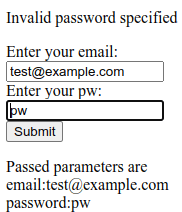
I want the front end display to look like

to display (after the submit button is pressed)

Some useful information.

When you give a URL such as http://mysite/mypage?parm1=abc&parm2=zyz&parm3=99, the page or program can process the keyword=value pairs after the ? and delimited by &. You can write a page and pass these parameters, so the page can display these values. This can provide the application model of “here is the boilerplate of the layout, and here are the data to go in the fields”.

HTML options

The easy bit – the anchor tag

Within an HTML page you can have code like <a href=”colin.html”>colins link</a. This displays the text colins_link, and if you click on the text it goes off and displays page “colin.html” from the same directory as the current page. This tends to be used when displaying information, with no input from the end user.

The almost easy bit – using a form

If you want the end user to provide information, you can use the <input>…</input> tag for example

<input id=email name="email" value="test@example.com">

where

  • id can be used to reference this field from a script within the page
  • name – is passed with the data to the back end server
  • value – you can preset a value.

You typically have a “submit” button or similar to send the data in the input fields to the next stage.

Typically you put these input fields in a form. You can set up event handlers, so when the user presses the “submit” button, scripts are run in the page to validate data before it is sent off.

Using forms – still pretty easy

Using forms is more complex than a simple anchor page and link to another page.

A form can have

  • action=url. The request is sent to the given url. This may just be another html page, or it may be a script which processes data in the request.
  • method=post|method=get. Method=post is used for transactional type work (make a database update) . Method=get tends to be used for non transactional request, (no changes made in the backend).

method=get

With method=get, the input data is appended to the action URL ,so a request may be colin.html?userid=colin&password=passw0rd. This can be seen in URLs.

method=post

With method=post, the data is read from stdin in the backend application. It is not in the URL.

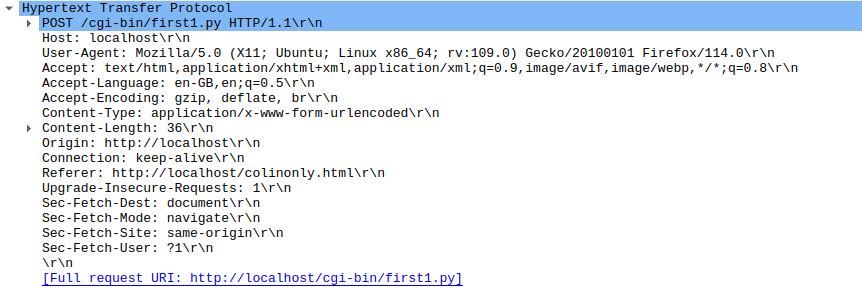
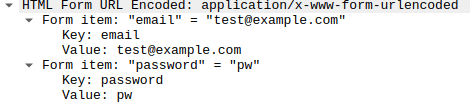
In the HTTP section of a wireshark trace,

and followed by

I want the back-end to update my front end page – this suddenly gets hard!

My application scenario is

The end user is presented with an HTML page, the data is sent to the back-end server. Some validation is done, and a response is sent back to the requester.

The back end can return

  • Headers which say redirect (status 303); display a specified URL, and pass it some parameters. The web browser can then go and get the page , display it, and used the passed field values to update the display.
  • Display HTML. You could build the html, and include any variable data as you build it, and send the whole stream of data.
  • Other data, such as a JSON object, eg {“rc”:”ok”,”field”:”password”,”msg”:”this is the problem”}
  • A file or other data to download – rather than display
  • You can also return headers giving security information or meta data about the payload.

My back-end application wants to report a parameter error to the requester – how do I do it?

I want to report an error the the end user, and have the cursor in the field with the problem. The front end and back end are isolated from each other which makes this hard.

I cannot just return some html data, as it will replace what is currently displayed. I know the link which called my back end (the “referer” header), but do not know the field names, or what other processing was done before my back end was called, I cannot just say redisplay it.

The only way I could find was to pass back some JSON data, for example in the format {“rc”:”error”,”field”:”password”,”msg”:”there is the problem”} and have some complex logic in the front end to process this.

I’ll skip over some magic, for a moment, for getting the data back to the front end page. The request gets sent, and the front page waits for the response. The front page extracts the JSON response and processes it…

  • Check the status code is OK, and that there were no errors reported by the back-end (for example file not found, or logic problem in the script).
  • Update the error message field
    • The returned JSON has a field “msg:…..” which can be referenced as json.msg .
    • Have a field in the front end page like <p id=”errorMessage“>No error messages yet</p> .
    • Update the error message field (with id “errormessage”) in the document from a field in the JSON using JavaScript document.getElementById(‘errorMessage‘).innerHtml = json.msg. The id=.. field links these up.
  • The data passed to the back end was a series of ?fieldname1=value1&fieldname2=value2&fieldnam3=value3... . The back-end puts the field-name in error into the JSON “field” attributes. The script in the front page:
    • Extracts the “field:…” from the JSON.
    • Gives focus to the field name taken from the JSON.field and uses document.getElementById(json.field).focus(); to give the field the focus, and so position the cursor in the field.

The magic to trap the response from the back-end – the advanced topic.

The only way I found find of capturing the json data passed back from my server application was some complex coding.

Within the code below is the use of Promises, a way of handling asynchronous requests. Rather than a deeply nested set of if-then-else, it uses a sequence of .then(itworks_callback, error_callback). The returned value of the itworks_callback is passed to the next .then(…,…).

We then have

fetch(...)
.then((aobject) => {... return(aobject.json) } )
.then((b) => {... return("a returned value"}) 

The .then((aobject) => ... is passed an object (aobject) which is passed into an inline function which extracts the json payload and passes it to the next .then statement. In the second “.then” , “b” gets the aobject.json data.

Within the <body..</body> of my html page I had displayable fields

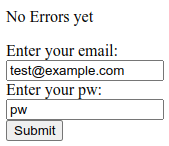
<p id="errorField">No Errors yet</p>

<form id="target"  
      action="cgi-bin/first.py" 
      enctype="multipart/form-data"  >
  <label for="email">Enter your email: </label>
  <input id=email 
      name="email" 
      value="test@example.com" 
  >
  <label for="password">Enter your pw: </label>
  <input id=password name="password" value="pw">
  <input type="submit">
  <input type="text" onblur = "check(this)" >
</form>
<p id="passed"></p>

Within the <body>…</body> I had

<script>
  document.forms["target"].addEventListener('submit', (event) => {
  event.preventDefault();
  fetch("cgi-bin/first.py", {
      method: 'POST',
      body: new URLSearchParams(new FormData(event.target)) // event.target is the form
  }).then((response) => { 
      if (!response.ok) {
        throw new Error(`HTTP error! Status: ${response.status}`);
      }
      // for (var pair of response.headers.entries()) {
      //    console.log("31:"+ pair[0]+ ': '+ pair[1]);
      // }    
      return (response.json();
    })
    .then(function(result) 
    {
      // set the focus to the value returned
      document.getElementById(result.field).focus(); 
      // update the fields on the page
      document.getElementById('errorField').innerHTML = result.msg
      document.getElementById('passed').innerHTML = result.passed;

  }).catch((error) => {
       errorField.innerHTML = error;
      console.log(error);// TODO handle error
      return(error);
  });
});
</script>

The script does

  • document.forms[“target”].addEventListener(‘submit’, (event) => set up a handler for the form with id “target”, for when the form is submitted, and set the variable “event” to the parameter object.
  • event.preventDefault(); Do not do the default – I want to process it.
  • Send the data off to the url cgi-bin/first.py and wait for the response
    • fetch(“cgi-bin/first.py”, {
    • method: ‘POST’,
    • body: new URLSearchParams(new FormData(event.target)) // event.target is the form
    • }).
  • then((response) => { the result of the fetch is passed to an inline function, with object called response.
  • Handle any errors
    • if (!response.ok) {
    • throw new Error(`HTTP error! Status: ${response.status}`);
    • }
  • Display the header records from the response … commented out
    • // for (var pair of response.headers.entries()) {
    • // console.log(“31:”+ pair[0]+ ‘: ‘+ pair[1]);
    • // }
  • return (response.json(); Pass on the json payload to the next .then statement
  • })
  • .then(function(result) This is passed the json data and stored in result.
  • {
  • // set the focus to the value returned
  • document.getElementById(result.field).focus(); Extract the field name from the json and set the focus to the field
  • // update the fields on the page
  • document.getElementById(‘errorField’).innerHTML = result.msg This is the error message field.
  • document.getElementById(‘passed’).innerHTML = result.passed; And provide some feedback information , which is the parameters passed to the backend.
  • }).catch((error) => {
  • errorField.innerHTML = error;
  • console.log(error);// TODO handle error
  • return(error);
  • });
  • });

Phew! What a lot you need to understand to just pass back the return code, and error message! I could not find an easier method. It may exist… but it is not well documented.

Useful Linux ufw commands

I had just install Apache Httpd server, and found the documentation had some useful Useful FireWall (ufw) commands, which makes it even easier to configure ufw.

ufw app list

The ufw documentation says

ufw supports application integration by reading profiles located in

/etc/ufw/applications.d. To list the names of application profiles known to ufw, use:

ufw app list

Users can specify an application name when adding a rule (quoting any profile names with spaces). For example, when using the simple syntax, users can use:

ufw allow <name>

Or for the extended syntax:
ufw allow from 192.168.0.0/16 to any app <name>

My commands

ufw app list

gave me

Available applications:
  Apache
  Apache Full
  Apache Secure
  CUPS
  OpenSSH
  Postfix
  Postfix SMTPS
  Postfix Submission

sudo ufw allow ‘Apache’

gave me

Rule added
Rule added (v6)

sudo ufw status gave me

Status: active

To                         Action      From
--                         ------      ----
Anywhere                   ALLOW       10.1.1.2                  
...                  
Apache                     ALLOW       Anywhere                  
...             
Apache (v6)                ALLOW       Anywhere (v6)    

Really useful functions!

The hidden startup options for httd on z/OS

I had clearly configured http on z/OS, as when it started it printed Colins startup, but I could not find where this was being executed from.

I eventually found it was in the home directory for httpd. My http server starts with PARM=’SH /usr/lpp/ihsa_zos/bin/apachectl…’. In /usr/lpp/ihsa_zos/bin/envvars are the magic startup parameters, including some gsktrace settings.

I have

#!/bin/sh 
.  /usr/lpp/ihsa_zos/bin/cleanup.sh 
IHS=/usr/lpp/ihsa_zos 
LIBPATH=$IHS/lib:$IHS/modules:$IHS 
PATH=$IHS/bin 
_EDC_ADD_ERRNO2=1 
_BPX_SHAREAS=NO 
_BPX_BATCH_SPAWN=YES 
GSK_SSL_HW_DETECT_MESSAGE=1 
LC_ALL=En_US.IBM-1047 
#rm /u/mqweb3/conf/*.log 

export GSK_TRACE=0x00 
export GSK_TRACE=0xff 
export GSK_TRACE_FILE=/u/mqweb3/conf/httpd.gsktrace 
#xport GSK_SERVER_TLS_KEY_SHARES=00300029002500240023 
#export GSK_TLS_SIG_ALG_PAIRS=0601050104010301080608050804050304030603 
#export GSK_TLS_CERT_SIG_ALG_PAIRS=0601050104010301080608050804050304030603 f

and /usr/lpp/ihsa_zos/bin/cleanup.sh has

#!/bin/sh 
# 
echo 'colins cleanup' 
rm /u/mqweb3/conf/*.log 
rm /u/mqweb3/conf/httpd.gsktrace 

It is always easy when you know the answer.

Putting the GSK_TRACE information in this file is not recommended as it will trace every system SSL call, and to turn it off, you have to stop http, edit the file to say GSK_TRACE=0x00 and restart the server. This article describes how to collect a trace using CTRACE. You can turn trace on and off without restarting the HTTP server.

To format this gsk trace I had to use the following command in Unix Services

gsktrace /u/mqweb3/conf/httpd.gsktrace > gsktrace.txt

Getting a system ssl trace for httpd server on z/OS

I had a problem getting the httpd server to work on z/OS. It did not like my certificate – but reported messages about ICSF security not being set up. I got to learn a lot about traces, but could not find how to trace System SSL (GSK) and httpd.

I specified SSLTRACE in my vhost*.conf file which gave me a little information – but not at the System SSL Level.

Other applications using System SSL, can set environment variables

GSK_TRACE=0xff 
GSK_TRACE_FILE=/tmp/gskssl.%.trc 

but this does not work with http. (I think the environment variables are not passed on to any spawned thread).

You have to use the gsksrvr task, and collect the trace through CTRACE.

Set up gsk trace.

I have used gsk trace before, and described setting it up.

I had to create a parmlib member

TRACEOPTS 
          WTRSTART(ctwtr) 
          on 
          wtr(ctwtr) 
jobname(httpcp) 
          OPTIONS('LEVEL=255,JOBSUFFIX=ANY') 

I start my http server with the S HTTPCP command, and specified httpcp in the jobname of the parmlib.

I got out no trace. I tried the various jobnames until it produced a trace. My trace was produced from jobname httpcp8! I could not find a way of displaying which of my httpcp* job was used, so I had to try them all.

If I had had a long name eg httpcpxx then specifying jobname(httpcpxx) should have worked.

Starting the trace

I used

TRACE CT,ON,COMP=GSKSRVR,PARM=CTGSKON

where my parmlib member was CTGSKOK

It produced

TRACE CT,ON,COMP=GSKSRVR,PARM=CTGSKON
IEE252I MEMBER CTGSKON FOUND IN USER.Z24C.PARMLIB
GSK01040I SSL component trace started.
ITT038I ALL OF THE TRANSACTIONS REQUESTED VIA THE TRACE CT COMMAND WERE
SUCCESSFULLY EXECUTED.

and the CTWTR started up.

What is the status of the trace?

d trace,comp=gsksrvr

gave me

IEE843I 08.32.25  TRACE DISPLAY       
  COMPONENT     MODE BUFFER HEAD SUBS                                  
 --------------------------------------------------------------        
  GSKSRVR       ON   0064K                                             
     ASIDS      *NOT SUPPORTED*                                        
     JOBNAMES   HTTPCP8 ,HTTPCP1 ,HTTPCP2 ,HTTPCP3 ,HTTPCP4 ,          
                HTTPCP5 ,HTTPCP6 ,HTTPCP7                              
     OPTIONS    LEVEL=255                                              
     WRITER     CTWTR                                                  

Run my test

When I ran my test, some System SSL messages were produced on the console from the gsksrvr address space

GSK01047I SSL component trace started for HTTPCP8/STC01000.
GSK01050I SSL component trace started for HTTPCP8/STC01000/05010022.

Stop the trace

TRACE CT,OFF,COMP=GSKSRVR

Wait until you get

GSK01041I SSL component trace ended.

from the gsksrvr address space, and stop the trace writer.

D TRACE,WTR=ALL
TRACE CT,WTRSTOP=CTWTR

This seems to take a few seconds to run. It outputs

IEF196I AHL904I THE FOLLOWING TRACE DATASETS CONTAIN TRACE DATA : 
IEF196I           IBMUSER.CTRACE1 
ITT111I CTRACE WRITER CTWTR TERMINATED BECAUSE OF A WTRSTOP REQUEST.  
IEF404I CTWTR - ENDED - TIME=08.40.21                                                                 

Format the trace

You need to use IPCS to format it

  • =0 – and enter the data set name (IBMUSER.CTRACE1)
  • =6 – to get to the ipcs command screen
  • dropd – to tell IPCS to forget any historical information it may know about for the dataset
  • CTRACE COMP(GSKSRVR) full – this displays any System SSL CTRACE data
  • m PF8 – go to the bottom of the data
  • report view – to go into ISPF View mode on the data set
  • X ALL – to hide all of the data
  • f SSL_ERROR ALL – this shows any error codes
  • if you get any lines displayed, you can tab down to the hidden command and use the line prefix command f4 to display the first 4 hidden lines.

The errors I got were

 S0W1      MESSAGE   00000004  08:35:55.049451  SSL_ERROR 
   Job HTTPCP8   Process 05010022  Thread 00000005  crypto_ec_token_private_key_sign 
   ICSF service failure: CSFPPKS retCode = 0x8, rsnCode = 0x2b00 
                                                                                                              
 S0W1      MESSAGE   00000004  08:35:55.049733  SSL_ERROR 
   Job HTTPCP8   Process 05010022  Thread 00000005  crypto_sign_data 
   crypto_ec_sign_data() failed: Error 0x03353084 
                                                                                                              
 S0W1      MESSAGE   00000004  08:35:55.050012  SSL_ERROR 
   Job HTTPCP8   Process 05010022  Thread 00000005  construct_tls13_certificate_verify_message 
   Unable to generate certificate verify message: Error 0x03353084 
                                                                                                              
 S0W1      MESSAGE   00000004  08:35:55.050393  SSL_ERROR 
   Job HTTPCP8   Process 05010022  Thread 00000005  send_tls13_alert 
   Sent TLS 1.3 alert 51 to ::ffff:10.1.0.2.45432. 
                                                                                                              

The Alert 51 matches what my browser received.

File /usr/include/gskcms.h had #define CMSERR_ICSF_SERVICE_FAILURE 0x03353084

CSFPPKS is PKCS #11 Private Key Sign.

The return code 0x2b00 (from here) gives:

User action: You might need to re-create the token by using the PKA key token build or PKA key import callable service or regenerate the key values on another platform.

or in other words, it did not like my certificate created with NISTECC SIZE(256) but did like NISTECC SIZE(521).

Using PKI Server with the HTTPD web interface.

This post follows on from configuring PKI Server, and explains how to configure the HTTPD server, explains how to use it, and gives some hints on debugging it when it goes wrong.

Having tried to get this working (and fixing the odd bug) I feel that this area is not as well designed as it could have been, and I could not get parts of it to work.

For example

  • You cannot generate browser based certificate request because the <keygen> html tag was removed around 2017, and the web page fails. See here. You can use 1-Year PKI Generated Key Certificate instead, so not a big problem now we know.
  • The TLS cipher specs did not have the cipher specs I was using.
  • I was expecting a simple URL like https://10.1.1.2/PKIServer/Admin. You have to use https://10.1.1.2/PKIServ/ssl-cgi-bin/camain.rexx, which exposes the structure of the files. You can go directly go to the Admin URL using https://10.1.1.2/PKIServ/ssl-cgi-bin/auth/admmain.rexx, which is not very elegant.
  • For an end user to request a certificate you have to use https://10.1.1.2/Customers/ssl-cgi-bin/camain.rexx.
  • There seem to be few security checks.
    • I managed to get into the administrative panels and display information using a certificate mapping to a z/OS userid, and with no authority!
    • There are no authority checks for people requesting a certificate. This may not be an exposure as the person giving the OK should be checking the request.
    • There were no security checks for administration functions. (It is easy to add them).
  • You can configure HTTPD to use certificates for authentication and fall back to userid and password.
  • There is no FallbackResource specified. This is a default page which is displayed if you get the URL wrong.
  • The web pages are generated dynamically. These feel over engineered. There was a problem with one of the supplied pages, but after some time trying to resolve the problem, I gave up.

I’ll discuss how to use the web interface, then I’ll cover the improvements I made to make the HTTP configuration files meet my requirements, and give some guidance on debugging.

You may want to use a HTTPD server just for PKI Server, or if you want to share, then I suggest you allocate a TLS port just for PKI Server.

URL

The URL looks like

https://10.1.1.2:443/PKIServ/ssl-cgi-bin/camain.rexx

where (see Overview of port usage below for more explanation)

  • 10.1.1.2 is the address of my server
  • port 443 is for TLS with userid and password authentication
  • PKIServ is the part of the configuration. If you have multiple CA’s this will be CA dependant.
  • ssl-cgi-bin is the “directory” where …
  • camain.rexx the Rexx program that does the work.

With https:10.1.1.2:443/Customers/ssl-cgi-bin/camain.rexx this uses the same camain.rexx as for PKIServ, but in the template for displaying data, it uses a section with the same name (Customers) as the URL.

Overview of port usage

There are three default ports set up in the HTTPD server for PKI Server. I found the port set-up confusing, and not well document. I’ve learned (by trial and error) that

  • port 80 (the default for non https requests) for unauthenticated requests, with no TLS session protection. All data flows as clear text. You many not want to use port 80.
  • port 443 (the default for https requests) for authentication with userid and password, with TLS session protection
  • port 1443 for certificate authentication, with TLS Session protection. Using https://10.1.1.2:443/PKIServ/clientauth-cgi/auth/admmain.rexx, internally this gets mapped to https://10.1.1.2:1443/PKIServ/clientauth-cgi-bin/auth/admmain.rexx. I cannot see the need for this port and its configuration.

and for the default configuration

  • port:/PKIServ/xxx is for administrators
  • port:/Customers/xxx is for an end user.

and xxx is

  • clientauth-cgi. This uses TLS for session encryption. Port 1443 runs with user SAFRunAs PKISERV. All updates are done using the PKISERVD userid, this means you do not need to set up the admin authority for each userid. There is no security checking enabled. I was able to process certificates from a userid with no authority!
  • ssl-cgi-bin. This uses port TLS and 443. I had to change the file to be SAFRunAs %%CERTIF%% as $$CLIENT$$ is invalid. You have to give each administrator ID access to the appropriate security profiles.
  • public-cgi. This is used by some insecure requests, such as print a certificate.

I think the only one you should use is ssl-cgi-bin.

Accessing the services

You can start using

These both give a page with

  • Administration Page. This may prompt for your userid and password, and gives you a page
  • Customer’s Home Page. This gives a page https://10.1.1.2/Customers/ssl-cgi-bin/camain.rexx? called PKI Services Certificate Generation Application. This has functions like
    • Request a new certificate using a model
    • Pickup a previously requested certificate
    • Renew or revoke a previously issued browser certificate

Note: You cannot use https://10.1.1.2:1443/PKIServ/ssl-cgi-bin/camain.rexx, as 1443 is not configured for this. I could access the admin panel directly using https://10.1.1.2:1443/PKIServ/ssl-cgi-bin/auth/admmain.rexx

I changed the 443 definition to support client and password authentication by using

  • SSLClientAuth Optional . This will cause the end user to use a certificate if one is available.
  • SAFRunAs %%CERTIF%% . This says use the Certificate authentication when available, if not prompt for userid and password.

Certificate requests

I was able to use the admin interface and display all certificate requests.

Request a new certificate using a model.

I tried to use the model “1 Year PKI SSL Browser Certificate“. This asks the browser to generate a private/public key (rather than the PKIServer generating them). This had a few problems. Within the page is a <KEYGEN> tag which is not supported in most browsers. It gave me

  • The field “Select a key size” does not have anything to select, or type.
  • Clicking submit request gave me IKYI003I PKI Services CGI error in careq.rexx: PublicKey is a required field. Please use back button to try again or report the problem to admin person to

I was able to use a “1 Year PKI Generated Key Certificate

The values PKIServ and Customer are hard-coded within some of the files.

If you want to use more than one CA, read z/OS PKI Services: Quick Set-up for Multiple CAs. Use this book if you want to change “PKIServ” and “Customer”.

Colin’s HTTPD configuration files.

Because I had problems with getting the supplied files to work, I found it easier to restructure, parameterise and extend the provided files.

I’ve put these files up to github.

Basic restructure

I restructured and parametrised the files. The new files are

  • pki.conf. You edit this to define your variables.
  • 80.conf contains the definitions for a general end user, not using TLS. So the session is not encrypted. Not recommended.
  • 443.conf the definitions for the TLS port. You should not need to edit this while you are getting started. If you want to use multiple Certificate Authorities, then you need to duplicate some sections, and add definitions to the pki.conf file. See here.
  • 1443.conf the definitions for the TLS port for the client-auth path. You should not need to edit this while you are getting started. If you want to use multiple Certificate Authorities, then you need to duplicate some sections, and add definitions to the pki.conf file. See here.
  • Include conf/pkisetenv.conf to set some environment variables.
  • pkissl.conf. The SSL definitions have been moved to this file, and it has an updated list of cipher specs.

The top level configuration file pki.conf

The top level file is pki.conf. It has several sections

system wide

# define system wide stuff
# define my host name

Define sdn 10.1.1.2
Define PKIAppRoot /usr/lpp/pkiserv
Define PKIKeyRing START1/MQRING
Define PKILOG “/u/mqweb3/conf”

# The following is the default
#Define PKISAFAPPL “OMVSAPPL”
Define PKISAFAPPL “ZZZ”
Define serverCert “SERVEREC”
Define pkidir “/usr/lpp/pkiserv”

#the format of the trace entry
Define elf “[%{u}t] %E: %M”

Defined the CA specific stuff

# This defines the path of PKIServ or Customers as part of the URL
# This is used in a regular expression to map URLs to executables.
Define CA1 PKIServ|Customers
Define CA1PATH “_PKISERV_CONFIG_PATH_PKIServ /etc/pkiserv”

#Define the port for TLS
Define CA1Port 443

# specify the groups which can use the admin facility
Define CA1AdminAuth ” Require saf-group SYS1 “

other stuff

LogLevel debug
ErrorLog “${PKILOG}/zzzz.log”
ErrorLogFormat “${elf}”
# uncomment these if you want the traces
#Define _PKISERV_CMP_TRACE 0xff
#Define _PKISERV_CMP_TRACE_FILE /tmp/pkicmp.%.trc
#Define _PKISERV_EST_TRACE 0xff
#Define _PKISERV_EST_TRACE_FILE /tmp/pkiest.%.trc

#Include the files
Include conf/80.conf
Include conf/1443.conf
Include conf/443.conf

The TLS configuration file

The file 443.conf has several parts. It uses the parametrised values above, for example ${pkidir} is substituted with /usr/lpp/pkiserv/. When getting started you should not need to edit this file.

Listen ${CA1Port}
<VirtualHost *:${CA1Port}>

#define the log file for this port
ErrorLog “${PKILOG}/z${CA1Port}.log


DocumentRoot “${pkidr}”
LogLevel Warn
ErrorLogFormat “${elf}”

Include conf/pkisetenv.conf
Include conf/pkissl.conf
KeyFile /saf ${PKIKeyRing}
SSLClientAuth Optional
#SSLClientAuth None

RewriteEngine On

# display a default page if there are problems
# I created it in ${PKIAppRoot}/PKIServ,
# (/usr/lpp/pkiserv/PKIServ/index.html)
FallbackResource “index.html”

Below the definitions for one CA are defined. If you want a second CA, then duplicate the definitions,and change CA1 to CA2.

Notes on following section.

# Start of definitions for a CA

<IfDefine CA1>
SetEnv ${CA1PATH}
RewriteRule ¬/(${CA1})/ssl-cgi/(.) https://${sdn}/$1/ssl-cgi-bin/$2 [R,NE]

RewriteRule ¬/(${CA1})/clientauth-cgi/(.) https://${sdn}:1443/$1/clientauth-cgi-bin/$2 [R,NE,L]
ScriptAliasMatch ¬/(${CA1})/adm(.).rexx(.) “${PKIAppRoot}/PKIServ/ssl-cgi-bin/auth/adm$2.rexx$3
ScriptAliasMatch ¬/(${CA1})/Admin “${PKIAppRoot}/PKIServ/ssl-cgi-bin/auth/admmain.rexx”
ScriptAliasMatch ¬/(${CA1})/EU “${PKIAppRoot}/PKIServ/ssl-cgi-bin/camain.rexx”
ScriptAliasMatch ¬/(${CA1})/(public-cgi|ssl-cgi-bin)/(.*) “${PKIAppRoot}/PKIServ/$2/$3”
<LocationMatch “¬/(${CA1})/clientauth-cgi-bin/auth/pkicmp”>
CharsetOptions NoTranslateRequestBodies
</LocationMatch>
<LocationMatch “¬/(${CA1})/ssl-cgi-bin(/(auth|surrogateauth))?/cagetcert.rexx”>
Charsetoptions TranslateAllMimeTypes
</LocationMatch>
<IfDefine>

#End of definitions for CA1

Grouping the statements for a CA in one place means it is very easy to change it to use multiple CA’s, just repeat the section between <IfDefine…> and</IfDefine> and change CA1 to CA2.

The third part has definitions for controlling access to a directory. I added more some security information, and changed $$CLIENT$$ to %%CLIENT%%. This is a subset of the file, for illustration

# The User will be prompted to enter a RACF User ID
#and password and will use the same RACF User ID
# and password to access files in this directory
<Directory ${PKIAppRoot}/PKIServ/ssl-cgi-bin/auth>
AuthName AuthenticatedUser
AuthType Basic
AuthBasicProvider saf
Require valid-user

#Users must have access to the SAF APPLID to work
# ZZZ in my case
# it defaults to OMVSAPPL
<IfDefine PKISAFAPPL>
SAFAPPLID ${PKISAFAPPL}
</IfDefine>

# IBM Provided has $$CLIENT$$ where it should have %%CLIENT%%
# SAFRunAs $$CLIENT$$
# The following says use certificate if available else prompt for
# userid and password
SAFRunAs %%CERTIF%%
</Directory>…

Debugging hints and tips

I spent a lot of time investigating problems, and getting the definitions right.

Whenever I made a change, I used

s COLWEB,action=’restart’

to cause the running instance of HTTPD server to stop and restart. Any errors in the configuration are reported in the job which has the action=’restart’. It is easy to overlook configuration problems, and then spend time wondering why your change has not been picked up.

I edited the envvars file, and added code to rename and delete logs. For example rm z443.log.save, and mv z443.log z443.log.save .

I found it useful to have

<VirtualHost *:443>
DocumentRoot “${pkidr}”
ErrorLog “${PKILOG}/z443.log
ErrorLogFormat “${elf}”
LogLevel Warn


Where

  • Error logs is where the logs for this virtual host (port 443) are stored. I like to have one per port.
  • The format is defined in the variable Define elf “[%{c}t] %E: %M” in the pki.conf file. The c is compact time (2021-11-27 17:19:09). If you use %{cu}t you also get microseconds. I could not find where you just get the time, and no date.
  • LogLevel Warn. When trying to debug the RewriteRule and ScriptAlias I used LogLevel trace6. I also used LogLevel Debug authz_core_module:Trace6 which sets the default to Debug, but the authorization checking to Trace6.

With LogLevel Debug, I got a lot of good TLS diagnostics

Validating ciphers for server: S0W1, port: 443
No ciphers enabled for SSLV2
SSL0320I: Using SSLv3,TLSv1.0,TLSv1.1,TLSv1.2,TLSv1.3 Cipher: TLS_RSA_WITH_AES_128_GCM_SHA256(9C)

TLSv10 disabled, not setting ciphers
TLSv11 disabled, not setting ciphers
TLSv13 disabled, not setting ciphers
env_init entry (generation 2)
VirtualHost S0W1:443 is the default and only vhost

Then for each web session

Cert Body Len: 872
Serial Number: 02:63
Distinguished name CN=secp256r1,O=cpwebuser,C=GB
Country: GB
Organization: cpwebuser
Common Name: secp256r1
Issuer’s Distinguished Name: CN=SSCA256,OU=CA,O=SSS,C=GB
Issuer’s Country: GB
Issuer’s Organization: SSS
Issuer’s Organization Unit: CA
Issuer’s Common Name: SSCA256
[500865c0f0] SSL2002I: Session ID: A…AAE= (new)
[500865c0f0] [33620012] Peer certificate: DN [CN=secp256r1,O=cpwebuser,C=GB], SN [02:63], Issuer [CN=SSCA256,OU=CA,O=SSS,C=GB]

With LogLevel Trace6 I got information about the RewriteRule, for example we can see /Customers/EU was mapped to /usr/lpp/pkiserv/PKIServ/ssl-cgi-bin/camain.rexx

applying pattern ‘¬/(PKIServ|Customers)/clientauth-cgi/(.*)’ to uri ‘/Customers/EU’

AH01626: authorization result of Require all granted: granted
AH01626: authorization result of : granted

should_translate_request: r->handler=cgi-script r->uri=/Customers/EU r->filename=/usr/lpp/pkiserv/PKIServ/ssl-cgi-bin/camain.rexx dcpath=/

uri: /Customers/EU file: /usr/lpp/pkiserv/PKIServ/ssl-cgi-bin/camain.rexx method: 0 imt: (unknown) flags: 00 IBM-1047->ISO8859-1

# and the output

Headers from script ‘camain.rexx’:
Status: 200 OK
Status line from script ‘camain.rexx’: 200 OK
Content-Type: text/html
X-Frame-Options: SAMEORIGIN
Cache-Control: no-store, no-cache

PKI Server error messages

IKYK002I PKCS#11 token unavailable for icsfpkcs11::genKeyPair with return code 0xe0. The request is not processed.
IKYC010I Error 791740499 returned from CP_NewKeysCreate: Unable to generate or store a public/private key pair through ICSF
IKYC010I Error 791740499 returned from JNH_create_certificate: Unable to generate or store a public/private key pair through ICSF

In pkiserve.conf is TokenName=PKISRVD.PKITOKEN.

The PKIServer does not have UPDATE access to SO.PKISRVD.PKITOKEN and update access to USER.PKISRVD.PKITOKEN .

Note: Defining a token using the ICSF ISPF panels, you can only enter the value in upper case. The PKI documentation describes it in lower case.

IKYP050I PKI SERVICES COULD NOT START BECAUSE ICSF IS UNAVAILABLE

Check for other messages, for example

ICH408I USER(PKISRVD ) GROUP(SYS1    ) NAME(COLINS              )
CSF1TRL CL(CSFSERV )
INSUFFICIENT ACCESS AUTHORITY
ACCESS INTENT(READ ) ACCESS ALLOWED(NONE )

AH00526: … \xac

I got AH00526:

Syntax error on line … of…: RewriteRule: bad argument line ‘\xac/…

This was because I had ^ and I needed ¬ in the documents.

The USS command chtag -p /u/mqweb3/conf/443.conf gave me

untagged T=off /u/mqweb3/conf/443.conf

My 3270 emulator code page was Bracket CP 037 modified.

Using the ISPF edit command hex on, showed the correct hex data is x’5f’. This can display as ¬ or as ^ depending on your 3270 emulator.

IKYC901I Error 76677164 initializing ICL: The CA certificate in the ICL does not match the one in the keyring

I got this when I redefined my userids and keyrings. I recreated the VSAM files. Display the ICL VSAM file

export PATH=/usr/lpp/pkiserv/bin/
export LIBPATH=/usr/lpp/pkiserv/lib
export NLSPATH=/usr/lpp/pkiserv/lib//usr/lpp/nls/msg/%L/%N
/usr/lpp/pkiserv/bin/iclview -d \’PKISRVD.VSAM.ICL\’

Need to escape the data set name.

My file was empty, so I recreated the VSAM data sets.

IKYP022I Unable to register PKI Services for restart: Error 12, Reason 0x160

This server has not been set up for ARM (Automatic Restart Management). The return code makes no sense to me.

Ignore it.

IKYC009I LDAP post unsuccessful for object id = 101, state = 0x2150000, status =
581500960: No such object
IKYP039E DIRECTORY POST UNSUCCESSFUL. ERROR CODE = 581500960

Unable to get the CA DN from the LDAP server. Check the suffix (eg CN=PKICA,OU=SSS,O=ZZUR COMPANY

IKYP040I PKI SERVICES DOES NOT HAVE KEY GENERATION CAPABILITY

You are missing the TokenName such as

[SAF]
KeyRing=PKISRVD/CARING
TokenName=PKISRVD.PKIToken

in /etc/pkiserv/pkiserv.conf.

This in turn caused rc 0 safrc 8 racfrc 8 racfrs 64 with function GENCERT in IRRSPX00 (R_pkiserve).

In the PKISERVD log (with debug trace turned on)

POLICY IKYK001I Unexpected PKCS#11 icsfpkcs11::genKeyPair return code 0x190. The request is not processed.

CORE IKYC010I Error 791740499 returned from CP_NewKeysCreate: Unable to generate or store a public/private key pair through ICSF

CORE IKYC010I Error 791740499 returned from JNH_create_certificate: Unable to generate or store a public/private key pair through ICSF

httpd: SSL0278E: SSL Handshake Failed, ICSF error. Review ‘RACF
CSFSERV Resource Requirements’ of the z/OS infocenter for
webserver userid requirements. [10.1.0.2:59342 ->
10.1.1.2:443]

This took me two days to find this. The HTTP doc said

SSL0278E: SSL Handshake Failed, ICSF error. Review ‘RACF CSFSERV Resource Requirements’ of the z/OS documentation.

Reason: The webservers userid does not have access to CSFSERV resource classes required for SSL.
Solution: Configure the ICSF started task and allow access to the CSFSRV resources, or disable ECDHE and AES-GCM based ciphers.

The following certificate in the keyring worked

  • Signing Algorithm: sha256RSA
  • Key Usage: HANDSHAKE
  • Key Type: NIST ECC
  • Key Size: 521

The following did not work

  • Signing Algorithm: sha256RSA
  • Key Usage: HANDSHAKE, KEYAGREE
  • Key Type: NIST ECC
  • Key Size: 256

The only difference seems to be the key size.

httpd: SSL0222W: SSL Handshake Failed, No ciphers specified (no shared
ciphers or no shared protocols).

During a TLS handshake there was no matching certificate found for the client.

I added

SSLCipherSpec TLS_AES_128_GCM_SHA256
SSLCipherSpec TLS_AES_256_GCM_SHA384
SSLCipherSpec TLS_ECDHE_RSA_WITH_AES_128_GCM_SHA256
SSLCipherSpec TLS_ECDHE_ECDSA_WITH_AES_256_GCM_SHA384
SSLCipherSpec TLS_ECDHE_RSA_WITH_AES_256_GCM_SHA384
SSLCipherSpec TLS_ECDHE_RSA_WITH_AES_128_CBC_SHA
SSLCipherSpec TLS_ECDHE_RSA_WITH_AES_256_CBC_SHA
SSLCipherSpec TLS_RSA_WITH_AES_128_GCM_SHA256
SSLCipherSpec TLS_RSA_WITH_AES_256_GCM_SHA384
SSLCipherSpec TLS_RSA_WITH_AES_128_CBC_SHA
SSLCipherSpec TLS_RSA_WITH_AES_256_CBC_SHA
SSLCipherSpec TLS_ECDHE_ECDSA_WITH_AES_128_GCM_SHA256

ICH408I USER(…) GROUP(…) NAME(…)
NOT AUTHORIZED TO REQUEST DIGITAL CERTIFICATES

I got

ICH408I NOT AUTHORIZED TO GENERATE DIGITAL CERTIFICATES

when the userid did not have >=read access to the appropriate IRR.DIGTCERT.* profile,

PERMIT IRR.DIGTCERT.GENCERT CLASS(FACILITY) ID(ADCDA ) ACCESS(read )

setropts raclist(FACILITY) refresh

ICH408I USER(…) GROUP(…) NAME(ADCDA )NOT AUTHORIZED TO ADMINISTER DIGITAL CERTIFICATES OR CERTIFICATE REQUESTS. READ DENIED

and

IKYI002I SAF Service IRRSPX00 Returned SAF RC = 8 RACF RC = 8 RACF RSN = 8 Request denied, not authorized.

The user issuing the request was not authorised to IRR.RPKISERV.PKIADMIN CLASS(FACILITY).

Note what the message says

  • READ DENIED
  • UPDATE DENIED

Use

tso rlist facility irr.RPKISERV.PKIADmin auth

and connect the userid ( if required) to a group or give the required access with

PERMIT IRR.RPKISERV.PKIADMIN CLASS(FACILITY)
ID(ADCDA ) ACCESS(read )

setropts raclist(FACILITY) refresh

(163) EDC5163I SAF/RACF
extract error. (errno2 = 0x0BE8081C ): …


pthread_security_applid_np(__CREATE_SECURITY_ENV,
__CERTIFICATE_IDENTITY, 32, …, NULL, 0,… returned -1,
errno 163 errno2 be8081c 0x0be8081

The userid being used is revoked

EDC5130I Exec format error. (errno2=0x0B1B0C27)

I got this trying to run a rexx exec within Apache HTTPD. The rexx did not have /* REXX */ as the first line.

IEW2646W 5383 ESD RMODE(24) CONFLICTS WITH USER-SPECIFIED RMODE(ANY) FOR SECTION …. CLASS B_TEXT.
IEW2646W 5383 ESD RMODE(24) CONFLICTS WITH USER-SPECIFIED RMODE(ANY) FOR SECTION … CLASS B_LIT.

I got these trying to bind a C program. I also had an assembler stub which caused this problem.

I added the RMODE and AMODE to my assembler program and cured the problem

CALLPRTF RMODE ANY
CALLPRTF AMODE ANY

CALLPRTF CSECT

IRRSPX00 R_PKIServ rc 0 safrc 8 racfrc 8 racfrs 72

With MODIFYCERTS (delete) I got

One or more certificates cannot be set up for automatic renewal.
SerialNums contains the certificate serial numbers that could not be set up for automatic renewal.
ErrorList contains the corresponding error description.
Error text returned:Record not found.

The One or more certificates cannot be set up for automatic renewal. SerialNums contains the certificate serial numbers that could not be set up for automatic renewal. is confusing because i was not trying to do automatic renewal. The Error text returned:Record not found. was correct.

HTTPD configuring the config file

The HTTPD server has a configuration file. This has some great facilities for making it easy to manage the contents of the configuration file. In summary these are

  • Ability to include files into the configuration
  • Define and use symbols
  • If then..
  • Use of regular expressions

Use include files

You can use Include

  • Include /usr/colin/a.conf an explicit, fully qualified path.
  • Include conf/ssl.conf relative to the ServerRoot directory (which you specify at start up).
  • Include conf/vhosts/*.conf multiple files in the directory.

If the files do not exist, the server will fail to start.

You can also use IncludeOptional if the files do not exist, the processing continues

Define and use symbols

You can use Define

  • Define symbol
  • Define symbol myvalue

Use the symbol

Define myvalue “mydata”

DocumentRoot “/var/%{myvalue}”

If symbol has been Defined

You can check to see if a symbol has been defined

<IfDefine>symbol>

</IfDefine>

<IfDefine !symbol>

</IfDefine>

Use a symbol in an if

<If %{v} == “yes”>

</if>

If processing

You can use

  • <IfDefined.. to determine if a symbol has been defined
  • <If to use value
  • <IfDirective. Check to see if the directive was specified in a -D parameter at startup.

You can do

<If … >

</If>

<ElseIf…>

</Elseif>
<Else>

</Else>

You can do

<If ..>
Error ” message “
</If>

This produces

AH00526: Syntax error on line … of /u/mqweb3/conf…

and ends. It does not continue past this.

Regular expressions

Within many of the statements you can use regular expressions, see Apache Documentation and Wikipedia. For example, all .gif and .jpg files under any “images” directory could be written as “/images/.*(jpg|gif)$“.

Packaging files

If you have

Listen 1834
<VirtualHost *:1834>

</VirtualHost>
<VirtualHost *:1834>

</VirtualHost>

The second <VirtualHost is ignored.

Multiple <Location..> for the same resource name do not work.

Try to put common definitions in one file and include them where needed, for example the list of TLS certificates.

If the same value is used in multiple configuration files, make it a variable and set it once. If it is changed, it will be picked up automatically. You can display the configuration to see what is actually being used.

HTTPD, SAFAPPL and protecting web resources

The HTTPD server can check a userid’s access to a RACF APPLID to enforce checks on resources.

Setting it up to give access seemed trivial, setting it up to deny access took longer.

In my VirtualHost I had

SAFAPPLID ZZZ
AuthType Basic
AuthBasicProvider saf
SAFRunAs %%CLIENT%%
Require saf-user ADCDA
Require saf-group SYS1

This says

  • userids must have read access to the APPL profile ZZZ.
  • a request should include the userid and password as part of the request.
  • the userid must be ADCDA or in group SYS1.

If the RACF profile is not set up (or not set up properly) then access defaults to yes.

Setup the profile

rdefine APPL ZZZ uacc(NONE) NOTIFY(COLIN)
setropts raclist(APPL) refresh

The NOTIFY is to notify a user(COLIN) when a user is denied access to the resource. This is useful while testing to check authentication is working. A failed attempt gave me

ICH70004I USER(ADCDB) GROUP(ADCDGR) NAME(COLIN PAICE) ATTEMPTED ‘READ’ ACCESS OF ‘ZZZ’

You do not get a message if a user does not have the right access (as you do with other resources), so the NOTIFY seems the only way of finding out there is a problem.

If I logged on with certificate, the same checks were done.

To give a user access, (actually it is better to give the user’s group access)

permit ZZZ class(APPL) ID(WEB2) access(READ)
setropts raclist(APPL) refresh

Problems with SAFAPPLID

The SAFAPPLID statement is meant to be supported in directory, virtual host, and server sections, but it only accepted it in the <Directory…> section.

For example the following fails to parse

<virtualHost *:8833>
SAFAPPLID ZZZ

with

AH00526: Syntax error on line 11 of /u/mqweb3/conf/notls.conf: SAFAPPLID not allowed here

Originally I defined APPL ZZZZZZZZ, but used ZZZZZZZ (7 Z’z not 8). And the application continued to have access to HTTPD. By specifying NOTIFY(COLIN) this notified me when the request failed.

With

<VirtualHost …>
LogLevel debug
ErrorLog “/u/mqweb3/conf/yy.log”

I got the following in the yy.log file

pthread_security_applid_np(__CREATE_SECURITY_ENV, __USERID_IDENTITY, 5, colin, …, 0, ZZZ) returned OK

From this I can see the userid “colin”, the SAFAPPLID “ZZZ”, and the return code “OK”.