Getting HTTPD server to work with TLS on z/OS

This is one of a series of blog posts on HTTPD.

The HTTPD web server is the Apache web server ported to run on z/OS. It runs in Unix Services, and behaves like a proper z/OS program, for example it can use z/OS userids and keyrings.

One catch is that there is Apache SSL, and IBM SSL. For example SSLProtocolEnable is part of IBM SSL support, and does not exist in Apache SSL; and SSLVerifyClient exists in Apache SSL, and not in IBM SSL support.

You need to know which options you need to use. With the wrong options you will get a message like

AH00526: Syntax error on line .. of … Invalid command … , perhaps misspelled or defined by a module not included in the server configuration

This post describes how to get TLS to work with the HTTPD server.

You can use TLS to encrypt the session data, and you can use TLS to use the client certificate as authentication.

The IBM httpd TLS options are described here.

Before you start

  • You need a keyring with certificates. I won’t cover this, as it well documented. I had problems using elliptic keys with size other than 256 and 384. See here.
  • You need to select a port for the TLS sessions. The default for TLS is 443. You may wish to use another port for isolation, and ease of management and configuration.
  • I set up a self contained Virtual Host for the TLS stuff, you do not need to do this.
  • Consider putting your common TLS definitions in a file and including it where needed. For example the list of TLS Ciphers, and the keyring. If you want to change the parameters, you change it once, and restart the server.
  • You can define the SSL parameters in the main server section of the configuration, or within a virtual host. A definition within a virtual host overrides the main server definitions.

Establish a TLS session to encrypt the session data.

Set up permissions

The started task userid needs access to read the keyring. Because WEB2 is not the owner of the ring (START1 is the owner), WEB2 needs CONTROL to get access to the private key.

permit START1.MQRING.LST class(RDATALIB) ID(WEB2) ACCESS(CONTROL)
setropts raclist(RDATALIB) refresh

PERMIT CSFOWH CLASS(CSFSERV) ID(WEB2) ACCESS(READ)
SETROPTS RACLIST(CSFSERV) REFRESH

I was using keyring START1.MQRING,and the httpd server userid is WEB2.

Setup the configuration

For the z/OS SSL support you need

LoadModule ibm_ssl_module modules/mod_ibm_ssl.so

The Apache module mod_ssl.so does not exist on z/OS, so it, and the facilities it provides cannot be used.

I set up a configuration file tls.conf (and used Include conf/tls.conf in my colin.conf)

Listen 8832
<VirtualHost *:8832>
SSLEnable

# SSLTrace
<Location /xxxx.html>

</Location>

ErrorLog “/u/mqweb3/conf/tls.log”
ErrorLogFormat “[%{%X}t]![%l] %F: %E: [client %a] %M”

KeyFile /saf START1/MQRING#

# SSLVerifyClient None

SSLClientAuth optional

SSLProtocolEnable TLSv12
SSLServerCert SERVEREC
SSLCipherSpec TLS_AES_128_GCM_SHA256
SSLCipherSpec TLS_AES_256_GCM_SHA384

# TLS 1.3 cipher specs
# SSLCipherSpec TLS_CHACHA20_POLY1305_SHA256
# SSLCipherSpec TLS_ECDHE_ECDSA_WITH_CHACHA20_POLY1305_SHA256
# SSLCipherSpec TLS_ECDHE_RSA_WITH_CHACHA20_POLY1305_SHA256
SSLCipherSpec TLS_ECDHE_RSA_WITH_AES_128_GCM_SHA256
SSLCipherSpec TLS_ECDHE_ECDSA_WITH_AES_256_GCM_SHA384
SSLCipherSpec TLS_ECDHE_RSA_WITH_AES_256_GCM_SHA384
SSLCipherSpec TLS_ECDHE_RSA_WITH_AES_128_CBC_SHA
SSLCipherSpec TLS_ECDHE_RSA_WITH_AES_256_CBC_SHA
SSLCipherSpec TLS_RSA_WITH_AES_128_GCM_SHA256
SSLCipherSpec TLS_RSA_WITH_AES_256_GCM_SHA384
SSLCipherSpec TLS_RSA_WITH_AES_128_CBC_SHA
SSLCipherSpec TLS_RSA_WITH_AES_256_CBC_SHA
SSLCipherSpec TLS_ECDHE_ECDSA_WITH_AES_128_GCM_SHA256
SSLClientAuth none
TLS13Options ServerKeyRefresh=604800

</VirtualHost>

Debugging it

You can either have an SSL VirtualHost wide trace, or a server wide SSL trace (or both)

VirtualHost wide trace

You can use SSLTrace (see above) in your virtual host and it writes it to the error log for that virtual host.

Server wide trace

I changed the environment to create a GSK trace. I added

export GSK_TRACE=0x0f
export GSK_TRACE_FILE=/u/mqweb3/conf/httpd.gsktrace%

to /usr/lpp/ihsa_zos/bin/envvars .

You use the gskit command gsktrace /u/mqweb3/conf/httpd.gsktrace... > gsk_out to format it.

Testing it

If the httpd server starts, try connecting to it from a web browser. Don’t for get to use https:

https://10.1.1.2:8832

If you get

Internal Server Error

This means the TLS handshake worked, you just have not set up the backend application.

When I used

https://10.1.1.2:8832/xxxx.html

(matching the entry in my VirtualHost definition) I was prompted for userid and password.

Using a client certificate for authentication and identification.

You can use a certificate on a client to authenticate with the server, without having to enter a userid and password. The server needs the CA from the client to be able to authenticate the client certificate. I had problems using elliptic keys on the client with size other than 256 and 384. See here.
You need to set up the certificate in RACF to map from the certificate to a userid.

Map from certificate to userid

My certificate had DN CN=secp256r1,O=cpwebuser,C=GB.

I used the following to map it to userid ADCDA

RACDCERT LISTMAP ID(ADCDA)
RACDCERT DELMAP(LABEL(‘SECP256R1 )) ID(ADCDA)
RACDCERT MAP ID(ADCDA ) –
SDNFILTER(‘CN=secp256r1.O=cpwebuser.C=GB’) –
WITHLABEL(‘SECP256r1’)
RACDCERT LISTMAP ID(ADCDA)
SETROPTS RACLIST(DIGTNMAP, DIGTCRIT) REFRESH

Note: In the certificate the DN is CN=secp256r1,O=cpwebuser, in the RACF command, the comma is replace with a period CN=secp256r1.O… I get it wrong every time!

To force the client to send a certificate you need

SSLClientAuth Required

instead of SSLClientAuth none in your <VirtualHost>…</VirtualHost>.

You also need to specify SAFRunAs

<Location /xxxx.html>
AuthName colinvh
AuthType Basic
AuthBasicProvider saf
SAFRunAs %%CERTIF_REQ%%
Require saf-user ADCDA
Require saf-user COLIN
</Location

The documentation said SAFRunAs can be in “directory, virtual host, server config” , I could only get it to be accepted in the location or the directory statement.

Some comments from a knowledgable user

The required first parameter is either a %% special token or a userid. The userid would be what z/OS people would call a surrogate. The %% special tokens represent assuming the ID of the person who made the request — either by their z/OS userid/password as basic authority, or client cert mapping.

The second parameter is optional and only supported when SAFRunAs appears outside of directory/location. It takes the place of the context usually implied by those config sections. This is a workaround to allow SAFRunAs to run before the code in Apache that processes <Location> and <Directory> sections. Some gory details are in the Notes section in the apache-style doc.

My certificate mapped to ADCDA userid, and so with this certificate I can display page xxxx.html.

SAFAPPLID didn’t work at first.

You can use SAFAPPLID you can say that a user needs access to a profile in the APPL class, for example PAYROLL. The default is OMVSAPPL.

Initially I could not get SAFAPPLID to work. This was due to a set up error. See here for more information.

AuthName didn’t work

When HTTPD prompts you for a userid and password, it is meant to display the authname as the title of the popup window, so you know which userid and password to specify. It didn’t display it for me. I could tell from the network traffic that the AuthName was sent down to the Chromium Browser as WWW-Authenticate: Basic realm=”colinvh“. I believe this is for integrity reasons – someone could change the value, and get you to enter “the wrong” credentials.

Now you’ve go it to work

You should consider

  • How many ports do you need to support.
  • Moving your TLS definitions into one configuration file, and include this where needed.
  • Removing the weak SSL cipher specs.
  • Moving to TLS 1.2 or above.

Documentation

HTTPD server – what is configured?

This is one of a series of blog posts on HTTPD.

You can run an Apache command, or display in the web browser, the active configuration with variables substituted, and If statements processed.

The server can dump configuration at startup. The best option was

-t -DDUMP_CONFIG

which displays the configuration with symbols substituted and after If processing. You can use this as part of your startup, or standalone, or as a web page. The web page displays more information.

/usr/lpp/ihs*/bin/apachectl -f /u/mqweb3/conf/httpd.conf -t -DDUMP_CONFIG > aa

This displays lots of good information. Below is an illustrative subset of what is available

  • Server settings
    • Server build:Jun 10 2020 16:22:51
    • Host Name/port:10.1.1.2:8831
    • Server Root: /u/mqweb3
  • Information about each module, for example ‘Module Name:mod_rewrite.c
    • Module directives, a list of all the actions supported eg
      • ‘RewriteRule – an URL-applied regexp-pattern and a substitution URL
    • Current configuration for that module, with If statements processed, and variables substituted
      • In file: /u/mqweb3/conf/80.conf
  • Information about each module, for example ‘Module Name:mod_ibm_ssl.c
    • Module directives, a list of all the actions supported eg
      • ‘SSLEnable – SSL is enabled for this server
    • Current configuration for that module, with If statements processed, and variables substituted. Line 10 was ‘Keyfile /saf ${pkiRing}’
      • In file: /u/mqweb3/conf/pkissl.conf   
      • 1:   SSLEnable  
      • 10:   Keyfile /saf START1/MQRING
      • etc

To run it as a web page, the configuration is below.

LoadModule info_module modules/mod_info.so
<Location /server-info>
SetHandler server-info
AuthType Basic
AuthBasicProvider saf
SAFRunAs PKISERV
</Location>

and the URL was

http://10.1.1.2:8831/server-info

Extending the HTTPD server on z/OS

The HTTPD web server is the Apache web server ported to run on z/OS. It runs in Unix Services, and behaves like a proper z/OS program, for example it can use z/OS userids and keyrings.

The configuration is easy, it is text driven (rather than XML), can imbed other configuration files, and can substitute variables.

I found the Apache documentation was as good, but the z/OS documentation was not very good. I prefer baby steps, taking the smallest system and adding functions, rather than configure everything and be disappointed when fails to work.

This post follows on Getting started with httpd server on z/OS and describes how to configure your first web page. Other posts on HTTPD server

Baby step number 2 – extending it

My HTTPD instance directory is /u/mqweb3/ .

I like to keep any changes I make to a configuration file, in a different file, and include this file in the original file. This way, if the original file changes, I just have to add the include statement rather than “diff” the my config file with the new config file. I also like to logically group changes, so my TLS configuration are in the tls.conf file, my definitions for port 8800 are in a file 8800.conf.

In the /u/mqweb3/conf is the httpd.conf file.

I edited this, and inserted

Include conf/colin.conf

at the bottom of the file.

I created /u/mqweb3/conf/colin.conf with

LogLevel debug

ErrorLog “/u/mqweb3/conf/error.log”

LoadModule rewrite_module modules/mod_rewrite.so
LoadModule authnz_saf_module modules/mod_authnz_saf.so
LoadModule ibm_ssl_module modules/mod_ibm_ssl.so

<Location /server-status>
AuthName “Colins Page”
AuthType Basic
AuthBasicProvider saf
Require valid-user
AuthSAFExpiration “EXPIRED! oldpw/newpw/newpw”
AuthSAFReEnter “Enter new password one more time”
CharsetSourceEnc IBM-1047
CharsetDefault ISO8859-1
SetHandler server-status
</Location>

The LoadModules provide the SAF support for logon

Shutdown the server (use P HTTPPCP6) – do not just cancel it – as there are several address spaces running for the server.

Restart the server (or do S httpcp,action=’restart’ ), fix any problems and try logging on to

http://10.1.1.2:8300/server-status

This should prompt for userid and password, and display the status of the server. The web browsers remember the userid and password, so if you want to reuse the page it will not prompt you for the userid and password. To change to a different userid and password you will need to restart the browser.

While playing with pages and logging on, I found the curl request

curl -u colin:password -i http://10.1.1.2:8830/xxxx.html

a good way of checking the page out, and logging on each time, as the password is not saved.

If you get

BPXP015I HFS PROGRAM /usr/lpp/ihsa_zos/bin/httpd IS NOT MARKED PROGRAM
CONTROLLED.
BPXP014I ENVIRONMENT MUST BE CONTROLLED FOR SERVER (BPX.SERVER)
PROCESSING.

You need to use the command

extattr +p /usr/lpp/ihsa_zos/bin/httpd

Create your a virtual host (container)

The HTTPD server can support multiple ports, and treat them as isolated environments. These are known as Virtual Hosts.

In my colin.conf I add

Include conf/vhost8831.conf

I created a file vhost8831.conf

Listen 8831
<VirtualHost *.8831>

<Location /xxxx.html>

#ServerName Colins.com
AuthName colinvh
AuthType Basic
AuthBasicProvider saf
#Require valid-user

Require saf-user COLIN JOE

# CharsetSourceEnc IBM-1047
# CharsetDefault ISO8859-1
# SetHandler server-status
</Location>

<Directory “/u/mweb3/htdocs”>
Require saf-user COLIN JOE
# Require saf-group SYS1

DocumentRoot “/u/mqweb3/htdocs”
#DirectoryIndex index_ihs.html

</Directory>
ErrorLog “/u/mqweb3/conf/zz.log”
ErrorLogFormat “[%t] [%l] %F: %E: [client %a] %M”

</VirtualHost>

Only userids COLIN and JOE are authorised to this (http://10.1.1.2:8831/xxxx.html service).

Restart the server

If you are authorised to use this service you will get

The requested URL was not found on this server.

Because this has not been set up yet.

The DocumentRoot works with the URL to identify a file.

The URL

http://10.1.1.2:8831/xxxx.html

will look for xxxx.html in DocumentRoot so it looks for file /u/mqweb3/htdocs/xxxx.html .

Baby steps 3 – create a page.

Create a file /u/mqweb3/htdocs/xxxx.html

<!DOCTYPE HTML PUBLIC "-//W3C//DTD HTML 4//EN"> 
<html lang="en"> 
<head> 
<meta http-equiv="Content-Type" content="text/html; charset=iso-8859-1"> 
<title>Colin's page</title> 
</head> 
<body width="778" height="556" background="images/ihs/background.gif" resize="no" scroll="no"> 
<h1>Colins header</h1> 
<p>Colin</p> 
</body> 
</html> 

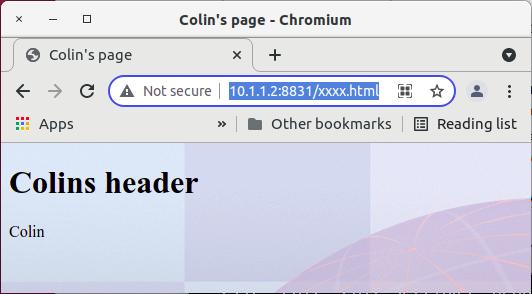
Retry the web browser page.

When this is displayed you get

Where

  • The title maps to the page heading
  • The background image comes from the body

Getting started with HTTPD server on z/OS

Apache web server

The HTTPD web server is the Apache web server ported to run on z/OS. It runs in Unix Services, and behaves like a proper z/OS program, for example it can use z/OS userids and keyrings. It starts in seconds!

The configuration is easy, it is text driven (rather than XML), can imbed other configuration files, and can substitute variables.

I found the Apache documentation was very good, but the z/OS documentation was not as good. I prefer baby steps, taking the smallest system and adding functions, rather than configure everything and be disappointed when it fails to work first time.

Other posts

Getting started

I used the IBM HTTP Server – Powered by Apache Version 9 PDF document. The text below is an addition to the IBM documentation, not a replacement. I’m trying to fill the holes in the documentation.

The product comes pre-installed. Mine was in /usr/lpp/ihsa_zos/bin/httpd

You need a directory for your HTTPD instance.

You need the userid to run the server.

ADDUSER WEB2 NAME(‘COLWEB’) NOPASSWORD –
OMVS(AUTOUID ASSIZE(256000000) THREADS(512) –
Program(‘/bin/sh’) home(‘/u/mqweb3/’))

CONNECT IBMUSER GROUP(COLWEB )
CONNECT WEB2 GROUP(COLWEB )

When you set up the userid, it is better to use OMVS(AUTOUID .. than to give a specific numeric id, similarly use OMVS(AUTOGID… for the group.

The userid needs OMVS, PROGRAM= /bin/sh, and a home directory.

Setup the system with environment file

The /usr/lpp/ihsa_zos/bin/envvars file allows you to set up an image wide environment file. You can rename /usr/lpp/ihsa_zos/bin/envvars-std to /usr/lpp/ihsa_zos/bin/envvars

I set up this file with

#/!bin/sh
IHS=/usr/lpp/ihsa_zos
LIBPATH=$IHS/lib:$IHS/modules:$IHS
PATH=$IHS/bin
_EDC_ADD_ERRNO2=1
_BPX_SHAREAS=NO
_BPX_BATCH_SPAWN=YES
GSK_SSL_HW_DETECT_MESSAGE=1
LC_ALL=En_US.IBM-1047

Create the instance

Follow the instructions in the documentation.

cd /usr/lpp/ihsa*
umask 022
bin/install_ihs /u/mqweb3 8300

Note down the port you specified (8300) as you will need it when you try to connect to the server.

The documentation says switch to the instance directory and issue apachectl -v. This failed for me because the path and libpath were not set up. I set up the envvars file (above) and it worked.

/usr/lpp/ihs*/bin/apachectl -v

When I ran it, it produced

test: /usr/lpp/ihsa_zos/bin/apachectl 49: FSUM7351 not found
[: /usr/lpp/ihsa_zos/bin/apachectl 74: FSUM7351 not found
[: /usr/lpp/ihsa_zos/bin/apachectl 87: FSUM7351 not found
[: /usr/lpp/ihsa_zos/bin/apachectl 92: FSUM7351 not found
Server version: IBM_HTTP_Server/9.0.5.5 (Unix) (SMP/E, 64-bit)
Server built: Jun 10 2020 16:22:51

This is because it cannot find “echo” in the path. Check in the /usr/lpp/ihsa_zos/bin/envvars file. I had to use

LIBPATH=$IHS/lib:$IHS/modules:$IHS:/bin:/usr/sbin 
PATH=$IHS/bin:/bin:/usr/sbin 

The apachectl takes the following options, so you can display the configuration, or modify the start.

Options:
-D name : define a name for use in directives
-d directory : specify an initial ServerRoot
-f file : specify an alternate ServerConfigFile
-C “directive” : process directive before reading config files
-c “directive” : process directive after reading config files
-e level : show startup errors of level (see LogLevel)
-E file : log startup errors to file
-v : show version number
-V : show compile settings
-h : list available command line options (this page)
-l : list compiled in modules
-L : list available configuration directives
-t -D DUMP_VHOSTS : show parsed vhost settings
-t -D DUMP_RUN_CFG : show parsed run settings
-S : a synonym for -t -D DUMP_VHOSTS -D DUMP_RUN_CFG
-t -D DUMP_MODULES : show all loaded modules
-M : a synonym for -t -D DUMP_MODULES
-t -D DUMP_SSL_CONFIG: show parsed SSL vhost configurations
-t -D DUMP_SSL_CIPHERS: show all known SSL ciphers
-t -D DUMP_UNIFIED_CONFIG: show configuration with all includes merged
-t -D DUMP_INCLUDES: show all included configuration files
-t : run syntax check for config files
-T : start without DocumentRoot(s) check
-X : debug mode (only one worker, do not detach)

-t -DDUMP_CONFIG is very useful as it shows what you have configured after any <If…> and after variable substitution. I use this as a standalone command to see what’s configured.

Note:I had problems using //STDENV in the started task, so I had to use the envvars file.

Create the JCL procedure

See the documentation.

//HTTPCP PROC ACTION='start',
// DIR='/usr/lpp/ihsa_zos',
// CONF='/u/mqweb3/conf/httpd.conf'
//*---------------------------------------------------------
//IHS EXEC PGM=BPXBATCH,REGION=0M,
// PARM='SH &DIR/bin/apachectl -k &ACTION -f &CONF -DNO_DETACH ',
// MEMLIMIT=1236M
//STDOUT DD SYSOUT=H
//STDERR DD SYSOUT=H
// PEND

BPXBATCH needs REGION=0M, and at least MEMLIMIT=1236M

Define the STARTED task to RACF.

RDEFINE STARTED HTTPCP* STDATA(USER(WEB2)
SETROPTS RACLIST(STARTED ) REFRESH

Start the started task

S HTTPCP

You cannot just type P HTTPCP. In the syslog I had

CRIHS0001I IHS S0W1 is active. 83951827 0.0.0.0:8300 unspecified:-1.
Use jobname HTTPCP6 for console commands.

This means you have to issue P HTTPCP6 to stop it.

You can also use

s HTTPCP,action=’start’
s HTTPCP,action=’stop’

To start and stop the server.
Note: When you run these commands it checks the syntax of the configuration file, and if there is a problem, then the command is not executed. I kept wondering why my HTTPD instance was not shutting down; it was because I had a configuration error, and so the stop request was being ignored.

If it starts (there are no helpful messages saying success) try connecting a web browser to it in my case

http://10.1.1.2:8300

This gave me page with links to IBM sites. If you get here – you have done the first baby step. You cannot do much with the server.