One minute networking: Understanding TCPIP routing: Static, RIP, OSPF

This is another blog post in the series “One minute…” which gives the basic concepts of a topic, with enough information so that you can read other documentation, but without going too deeply.

IP networks can range in size from 2 nodes(machines), to millions of nodes(machines), and a packet can go from my machine to any available machines – and it arrives! How does this miracle work?

I’ll work with IP V6 to make it more interesting (and there is already a lot of documentation for IP V4)

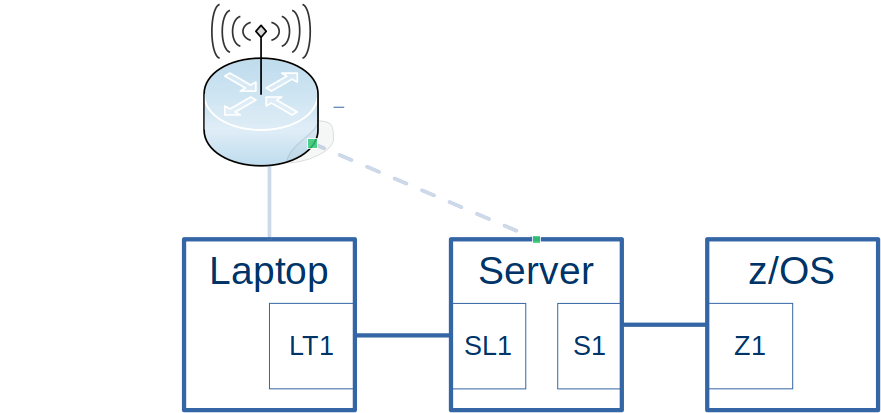
I have and old laptop, connected by Ethernet to my new laptop. My new laptop is connected by wireless to my server which is connected to z/OS. I can ping from the old laptop to z/OS.

  • Each machine needs connectivity for example wireless, Ethernet, or both.
  • Each machine has one or more interfaces where the connectivity comes in (think Ethernet port, and Wireless connection). This is sometimes known as a device.
  • Each interface has one or more IP addresses.
  • You can have hardware routers, or can route through software, without a hardware router. A hardware router can do more than route.
  • Each machine can route traffic over an interface (or throw away the packet).
    • If there is only one interface this is easy – all traffic goes down it.
    • If there is more than one interface you can specify which address ranges go to which interface.
    • You can have a default catch-all if none of the definitions match
    • You can have the same address using different interfaces, and the system can exploit metrics to decide which will be used.
    • You can have policy based routing. For example
      • packets from this premier user, going to a specific IP address should use the high performance (and more expensive) interface,
      • people using the free service, use the slower(and cheaper) interface.

Modern routing uses the network topology to manage the routing tables and metrics in each machine.

Static

The administrator defines a table of “if you want get to… then use this interface, the default is to send the packet using this … interface”. For example with z/OS

BEGINRoutes 
;     Destination   SubnetMask    FirstHop    LinkName  Size 
; ROUTE 192.168.0.0 255.255.255.0       =     ETH2 MTU 1492 
ROUTE 10.0.0.0      255.0.0.0           =     ETH1 MTU 1492 
ROUTE DEFAULT                     10.1.1.1    ETH1 MTU 1492 
ROUTE 10.1.0.0      255.255.255.0   10.1.1.1  ETH1 MTU 1492 

ROUTE 2001:db8::/64 fe80::f8b5:3466:aa53:2f56 JFPORTCP2 MTU 5000 
ROUTE fe80::17      HOST =                    IFPORTCP6 MTU 5000 
ROUTE default6      fe80::f8b5:e4ff:fe59:2e51 IFPORTCP6 MTU 5000
                                                                      
ENDRoutes 

Says

  • All traffic for 10.*.*.* goes via interface ETH1.
  • If no rule matches (for IP V4) use the DEFAULT route via ETH1. The remote end of the connection has IP address 10.1.1.1
  • All traffic for IPV6 address 2001:db8:0:* goes via interface JFPORTCP2
  • If no rule matches (for IP V6) use the DEFAULT6 route via IFPORTCP6. The remote end of the connection has IP address fe80::f8b5:e4ff:fe59:2e51.

On Linux the ip route command gave

default via 192.168.1.254 dev wlxd037450ab7ac proto dhcp metric 600 
10.1.0.0/24 dev eno1 proto kernel scope link src 10.1.0.3 metric 100 
10.1.1.0/24 dev tap0 proto kernel scope link src 10.1.1.1 

This says

  • The default is to send any traffic via device wlxd037450ab7ac.
  • Any traffic for 10.1.0.* goes via device eno1
  • Any traffic for 10.1.1.* goes via device tap0.

Routing Information Protocol(RIP)

Manually assigning metrics (priorities) to hint which routes are best, quickly becomes unmanageable when the number of nodes(hosts) increases.

If the 1980’s the first attempt to solve this was using RIP. It uses “hop count” of the destination from the machine as a metric. A route with a small hop count will get selected over a route with a large hop count. Of course this means that each machine needs to know the topology. RIP can support at most 15 hops.

Each node participating in RIP learns about all other nodes participating in RIP.

Every 30 seconds each node sends to adjacent nodes “I know about the following nodes and their route statements”. Given this, eventually all nodes connected to the network will know the complete topology.
For example, from the frr(Free Range Routing) trace on Linux

RIPng update timer expired!
RIPng update routes on interface tap1
  send interface tap1
  SEND response version 1 packet size 144
   2001:db8::/64 metric 1 tag 0
    2001:db8:1::/64 metric 1 tag 0
   2002::/64 metric 2 tag 0
    2002:2::/64 metric 2 tag 0
   2008::/64 metric 3 tag 0
    2009::/64 metric 1 tag 0
    2a00:23c5:978f:6e01::/64 metric 1 tag 0

This says

  • The 30 second timer woke up
  • It sent information to interface tap1
  • 2001:db8::/64 metric 1 this is on my host(1 hop)
  • 2002::/64 metric 2 this is from a router directly connected to me (2 hops).
  • 2008::/64 metric 3 is connected to a router connected to a router directly connected to me (3 hops.)

On z/OS the command F OMP1,RT6TABLE gave me message EZZ7979I . See OMPROUTE IPv6 main routing table for more information

DESTINATION: 2002::/64 
  NEXT HOP: FE80::E42D:73FF:FEB1:1AB8 
  TYPE:  RIP           COST:  3         AGE: 10 
DESTINATION: 2001:DB8::/64 
  NEXT HOP: FE80::E42D:73FF:FEB1:1AB8 
  TYPE:  RIP*          COST:  2         AGE: 0 

This says

  • To get to 2002::/64 go down interface with the IP address FE80::E42D:73FF:FEB1:1AB8.
  • This route has been provided by the RIP code.
  • The destination is 3 hops away (in the information sent from the server it was 2 hops away)

The fields are

  • RIP – Indicates a route that was learned through the IPv6 RIP protocol.
  • * An asterisk (*) after the route type indicates that the route has a directly connected backup.
  • Cost 3 – this route is 3 hops away.
  • Age 10 -Indicates the time that has elapsed since the routing table entry was last refreshed

OSPF (Open Shortest Path First)

OSPF was developed after RIP, as RIP had limitations – the maximum number of hops was 15, and every 30 seconds there was a deluge of information being sent around. The OSPF standard came out in 1998 10 years after RIP.

The 10 second picture

You create areas in your network. An area could be a building, or a city. The backbone or area 0 is connected to your area.

Within an area all computers have a map of IP addresses in the area, and how to get to them. If you define a new address for a link on one computer or add a new router , all of the computers in the area get updated within seconds.

The more detailed picture

Using OSPF, when a system starts up it sends to the neighbouring systems “Hello, my router id is 9.3.4.66, and I have the following IP addresses and routes.” This information is propagated to all nodes in the OSPF area. When a node receives this information it updates its internal map (database) with this information. Every 10 seconds or so, each node sends a “Hello Packet” to the adjacent nodes to say “I’m still here”. If this packet is not received, then the (working) node can broadcast “The node …. is not_responsive/dead”, and all other nodes can then update their maps.

If the configuration changes, for example an IP address is added to an interface, the node’s information is propagated to a ‘managing node’ and its backup, and this propagates the update throughout the network. In a stable network, the network traffic is just the “Hello packet” sent to the next node, and any configuration changes propagated.

One of the pieces of information sent out about node’s route is the metric or “cost”. When a node is deciding which interface to route a packet to, OSPF can calculate the overall “cost” and if there are a choice of routes to the destination it can decide which interface gives the best cost.

To make it easier to administer, you can have areas, so you might have an area being the UK, another area being Denmark, and another area being the USA.

How it works on Linux

OSPF plugs its map of the network into the IP router code. When the IP router gets a packet it looks at its internal tables, including the OSPF data to decide on the best route.

Authenticating ospf

This is another of those little tasks that look simple but turn out to be more a little more complex than it first looked.

Authentication in OSPF is performed by sending authentication data in every flow. This can be a password (not very secure) or an MD5 check sum, based on a shared password and sequence number. The receiver checks the data sent is valid, and matches the data it has.

Enabling authentication on Linux

To do any authentication you need to enable it at the area level.

router ospf
  ospf router-id 9.2.3.4
  area 0.0.0.0 authentication

This turns it on for all interfaces – defaulting to password based with a null password. I did this and my connections failed because the two ends of the link were configured differently.

I first had to configure ip ospf authentication null for all interfaces, then enable area authenticate, and the the connections to other systems worked.

interface tap2
   ip ospf area 0.0.0.0
   ip ospf authentication null

interface ...

router ospf
  ospf router-id 9.2.3.4
  area 0.0.0.0 authentication

I could then enable the authentication on an interface by interface basis.

If there is a mismatch,

  • z/OS will report a mismatch,
  • frr quietly drops the packet. I enabled packet trace.

debug ospf packet hello

I got out a trace

OSPF: ... interface enp0s31f6:10.1.0.2: auth-type mismatch, local Null, rcvd Simple
OSPF: ... ospf_read[10.1.0.3]: Header check failed, dropping.

The router ospf … area … authentication is the master switch.

To define authentication on a link, you have to change both ends, then activate the change at the same time at each end.

On z/OS

I could not find how to get OMPROUTE to reread its configuration file after I updated and OSPF entry. There is an option

f OMP1,reconfig

but the documentation says

RECONFIG
Reread the OMPROUTE configuration file. This command ignores all statements in the configuration file except new OSPF_Interface, RIP_Interface, Interface, IPv6_RIP_Interface, and IPv6_Interface
statements.

and I got messages like

EZZ7821I Ignoring duplicate OSPF_Interface statement for 10.1.1.2

For z/OS OMPROUTE to communicate with frr (and CISCO routers) I had to specify the z/OS definition Authentication_… for example

ospf_interface IP_address=10.1.1.2 
      name=ETH1 
      subnet_mask=255.255.255.0 
      Authentication_type=PASSWORD 
      Authentication_Key="colin" 
      ;    

Then stop and restart OMPROUTE.

Using password (or not)

If you use a password, then it flows in clear text. Anyone sniffing your network will see it. It should not be used to protect your system.

On frr

You need router ospf area … authentication. If you have area … authentication message-digest then the password authentication statement on the interface is ignored.

router ospf
  ospf router-id 9.2.3.4
  router-info area
  area 0.0.0.0 authentication

interface tap0
   ip ospf authentication colin
   ...

On z/OS

ospf_interface IP_address=10.1.3.2 
      name=JFPORTCP4 
      subnet_mask=255.255.255.0 
      Authentication_type=PASSWORD 
      Authentication_Key="colin" 
      ; 

Using MD5

Background

An MD5 checksum is calculated from

  • the key – a string of up to 16 bytes
  • key id – an integer in the range 0-255. In the future this key could be used to specify which checksum algorithm to use. Currently only its value is used only as part of the check sum calculation.
  • the increasing sequence number of the flow.

This checksum is calculated and the sequence number and checksum are sent as part of each flow. The remote end performs the same calculation, with the same data, and the checksum value should match.

Because the sequence number changes with every flow, the checksum value changes with every flow. This prevents replay attacks.

The key must be the same on both ends of the connection. Because frr and hardware routers are based in ASCII, an ASCII value must be specified when using z/OS and these routers.

On frr

router ospf
  ospf router-id 9.2.3.4
  area 0.0.0.0 authentication 

interface tap0
   ip ospf authentication message-digest
   ip ospf message-digest-key 3 md5 AAAAAAAAAAAAAAAA

On z/OS

ospf_interface IP_address=10.1.1.2 
      name=ETH1 
      subnet_mask=255.255.255.0 
      Authentication_type=MD5 
      Authentication_Key=0X41414141414141414141414141414141 
      Authentication_Key_ID=3 
      ;
     ;     Authentication_Key=A"AAAAAAAAAAAAAAAA" 

You can either specify the ASCII value A”A…” or as hex “0x4141…” where 0x41 is the value of A in ASCII.

The z/OS documentation is not very clear. My edited version is

Authentication_Key
The value of the authentication key for this interface. This value must be the same for all routers attached to a common medium a link. The coding of this parameter depends on the authentication type being used on this interface.

For authentication type MD5, code the 16-byte authentication key used in the md5 processing for OSPF routers attached to this interface.

This value must be the same at each end.

If the router at the remote end is ASCII based, for example CISCO or Extreme routers, or the frr package on Linux, this value must be specified in ASCII.

You can specify a value in ASCII as A”ABCD…” or as hexadecimal 0x41424344…”, were 41424344 is the ASCII for ABCD.

For non ASCII routers you can specify an ASCII or hexadecimal value.   You can use pwtokey to generate a suitable hexadecimal key from a password.


Why has my ethernet connection stopped connecting?

This morning my Ethernet connection between my two Linux systems stopped working. I could see IPV6 stuff flowing over the network, but Linux did not say connected. Also there was no IPV4 address. It took me almost a day to work out what the problem was. Googling and following the advice may have made it worse!

I also include some useful commands for next time it happens.

The high level problem

It looks like the Network Manager has changed.

A week ago, I had files like

/etc/NetworkManager/system-connections/enp0s31f6

containing the definitions for my Ethernet.

Now Network Manager uses

/etc/NetworkManager/system-connections/BTHub6-9999.nmconnection

and these configuration files were missing configuration data. I have a .nmconnection file going back to November, so something has changed.

Further study shows that the

nmcli connection migrate

converts from old format to .nmconnection files, so perhaps this was done under the covers.

Network manager files

Files in /etc/NetworkManager/system-connections/ must be owned by root and be readably only by root – otherwise NetworkManager will ignore it.

Some of my files had the wrong permissions, and so were ignored.

I used

sudo chmod -R 600 /etc/NetworkManager/system-connections/

and restarted NetworkManager

sudo systemctl restart NetworkManager

and missing files reappeared in Network Manager.

For more information about the files see man nm-settings-keyfile.

The detailed problem

Using Wireshark I could see IPV6 traffic flowing over the connection, so the cable was OK, and some of the definitions were OK.

The ip addr command showed there was an IPV6 address for the connection, but no IPV4 address.

I could not find a log for Network Manager with its error messages, see log below for the messages on syslog.

Looking online, there were suggestions that you delete your existing definition and recreate it, also use nm-connection-editor. This may have been a bad move; it is always better to rename than to delete.

Comparing the definitions currently in use /etc/NetworkManager/system-connections/ with a backup version, I could see that the .nmconnection files were in use.

I used Network Manager to change my Ethernet definitions. Under the IPv4 tab

  • IPv4 method: change from Automatic(DHCP) to Manual
  • Address: Added 10.1.0.2 Netmask 255.255.255.0
  • Route: Added 10.1.0.3 Netmask 255.255.255.255.0 Gateway 10.1.0.2

The route statement says to get to 10.1.0.3 go via 10.1.0.2 .

Once I restarted the connection it became active, and the ip -4 addr command showed it had an IPv4 address.

For the other end of the connection I did the matching changes and the end to end connection burst into life!

For my Ethernet connection my file was

[connection]
id=Wired connection 1
uuid=ecc4df76-4733-45f5-9b67-9fba9ef2d3bf
type=ethernet
interface-name=enp0s31f6
permissions=
timestamp=1673353909

[ethernet]
mac-address-blacklist=

[ipv4]
address1=10.1.0.2/24

dns-priority=100
dns-search=
method=manual
route1=10.1.0.3/24,10.1.0.2

[ipv6]
addr-gen-mode=stable-privacy
dns-search=
method=auto

[proxy]

This defines the IP address 10.1.0.2, and a route to 10.1.0.3 via 10.1.0.2 .

Useful commands

Display the devices

nmcli d

nmcli device

gives

DEVICE             TYPE      STATE         CONNECTION         
wlp4s0             wifi      connected     BTHub6-78RQ        
enp0s31f6          ethernet  connected     Wired connection 1 
virbr0             bridge    connected     virbr0  d

so for my en0s31f6 device, the connection file is ‘Wired connection 1’

Display the connection

nmcli c

nmcli connection

NAME                UUID                                  TYPE       DEVICE    
BTHub6-78RQ         fc74c8e0-6f96-4e8b-a8ba-6389abbe3396  wifi       wlp4s0    
Wired connection 1  ecc4df76-4733-45f5-9b67-9fba9ef2d3bf  ethernet   enp0s31f6 
virbr0              386a5a3a-023b-41d9-9138-04202d8dfda6  bridge     virbr0

Display more information

nmcli -f all c |less

Display only some fields

nmcli -f name,device,FILENAME c |less

gives

NAME                DEVICE     FILENAME                                                                    
BTHub6-78RQ         wlp4s0     /etc/NetworkManager/system-connections/BTHub6-78RQ.nmconnection.old2        
Wired connection 1  enp0s31f6  /etc/NetworkManager/system-connections/Wired connection 1.nmconnection.old2 
virbr0              virbr0     /run/NetworkManager/system-connections/virbr0.nmconnection                  

Displaying trace

When the Ethernet connection work, /var/log/syslog had entries

 NetworkManager[11240]: <info>  [....0612] device (enp0s31f6): Activation: starting connection 'enp0s31f6' (c066ca29-2253-41ef-8e69-2251fb15f7b8)
 NetworkManager[11240]: <info>  [....0617] audit: op="connection-activate" uuid="c066ca29-2253-41ef-8e69-2251fb15f7b8" name="enp0s31f6" pid=2585 uid=1000 result="success"
 NetworkManager[11240]: <info>  [....0636] device (enp0s31f6): state change: disconnected -> prepare (reason 'none', sys-iface-state: 'managed')
 NetworkManager[11240]: <info>  [....0678] device (enp0s31f6): state change: prepare -> config (reason 'none', sys-iface-state: 'managed')
 NetworkManager[11240]: <info>  [....0718] device (enp0s31f6): state change: config -> ip-config (reason 'none', sys-iface-state: 'managed')
 avahi-daemon[1123]: Joining mDNS multicast group on interface enp0s31f6.IPv6 with address fe80::9b07:33a1:aa30:e272.
 avahi-daemon[1123]: New relevant interface enp0s31f6.IPv6 for mDNS.
 avahi-daemon[1123]: Registering new address record for fe80::9b07:33a1:aa30:e272 on enp0s31f6.*.
 avahi-daemon[1123]: Joining mDNS multicast group on interface enp0s31f6.IPv4 with address 10.1.0.2.
 avahi-daemon[1123]: New relevant interface enp0s31f6.IPv4 for mDNS.
 avahi-daemon[1123]: Registering new address record for 10.1.0.2 on enp0s31f6.IPv4.
 NetworkManager[11240]: <info>  [....0830] device (enp0s31f6): state change: ip-config -> ip-check (reason 'none', sys-iface-state: 'managed')
 NetworkManager[11240]: <info>  [....1005] device (enp0s31f6): state change: ip-check -> secondaries (reason 'none', sys-iface-state: 'managed')
 NetworkManager[11240]: <info>  [....1008] device (enp0s31f6): state change: secondaries -> activated (reason 'none', sys-iface-state: 'managed')
 NetworkManager[11240]: <info>  [....1021] device (enp0s31f6): Activation: successful, device activated.

When the connection was defined as DHCP the trace was

NetworkManager: <info>  [...] device (enp0s31f6): state change: ip-config -> deactivating (reason 'user-requested', sys-iface-state: 'managed')
NetworkManager: <info>  [...] audit: op="device-disconnect" interface="enp0s31f6" ifindex=2 pid=2585 uid=1000 result="success"
NetworkManager: <info>  [...] device (enp0s31f6): state change: deactivating -> disconnected (reason 'user-requested', sys-iface-state: 'managed')
avahi-daemon: Withdrawing address record for fe80::78e8:9e55:9f3f:768 on enp0s31f6.
avahi-daemon: Leaving mDNS multicast group on interface enp0s31f6.IPv6 with address fe80::78e8:9e55:9f3f:768.
avahi-daemon: Interface enp0s31f6.IPv6 no longer relevant for mDNS.
NetworkManager: <info>  [...] dhcp4 (enp0s31f6): canceled DHCP transaction
NetworkManager: <info>  [...] dhcp4 (enp0s31f6): state changed unknown -> done
NetworkManager: <info>  [...] device (enp0s31f6): Activation: starting connection 'Wired connection 1' (ecc4df76-4733-45f5-9b67-9fba9ef2d3bf)
NetworkManager: <info>  [...] device (enp0s31f6): state change: disconnected -> prepare (reason 'none', sys-iface-state: 'managed')
NetworkManager: <info>  [...] device (enp0s31f6): state change: prepare -> config (reason 'none', sys-iface-state: 'managed')
NetworkManager: <info>  [...] device (enp0s31f6): state change: config -> ip-config (reason 'none', sys-iface-state: 'managed')
NetworkManager: <info>  [...] dhcp4 (enp0s31f6): activation: beginning transaction (timeout in 45 seconds)
avahi-daemon: Joining mDNS multicast group on interface enp0s31f6.IPv6 with address fe80::78e8:9e55:9f3f:768.
avahi-daemon: New relevant interface enp0s31f6.IPv6 for mDNS.
avahi-daemon: Registering new address record for fe80::78e8:9e55:9f3f:768 on enp0s31f6.*.

This has entries about DHCP.

My machine did not have a DHCP server installed – so any request for DHCP will fail to get an address.

Why is my z/OS IP address changing when using zPDT, and routing does not work?

I was looking into configuring IP V6 on my z/OS running on zPDT running on Linux. I could not understand why configuring the IP V6 link between Linux and z/OS was so difficult.

IP V6 address for use within a connection are like fe80::b0b6:daff:fe64:77f5 where b0b6:daff:fe64:77f5 is based on the MAC(hwaddr). On many systems, this value does not change across IPLs – and so most of the documentation uses the “constant” value.

The connection between Linux and z/OS is a “tap” interface (a kernel virtual device) which looks like an OSA adapter to z/OS.

I found a comment

Each TAP device has a random MAC address that is used as source address.

This explains why the connection was getting a different IP address every time I ipled.

On z/OS you defined a route using this IP address, for example

BEGINRoutes 
ROUTE 2001:db8::7/128 fe80::3f:67ff:fe08:51dc   IFPORTCP6   MTU 5000 
ENDRoutes 

To get round this problem you need to explicitly define an address on Linux

sudo ip -6 addr  add fec0::cccc/64 dev tap1

where cccc is for my initials!

You then put this address into the z/OS routing statements.

BEGINRoutes 
ROUTE 2001:db8::7/128 fe80::cccc   IFPORTCP6   MTU 5000 
ENDRoutes 

and it works first time!

IP V6 Neighbour Discovery in action

As part of understanding how IP V6 dynamic routing works, I managed to get my little home network to talk using IP V6.

Privacy

There are sites which can give you your geographic location from your IP V6 address. One site gave me the top part of my post code, the latitude and longitude of my garage, and my ISP provider. So instead of giving real IP addresses, Ive used xxxx:xxxx:xxxx:xxxx for the IP V6 address provided by my Internet Service Provider, and using the 2001:db8::/64 address which is assigned for documentation use.

My network for the easy bit

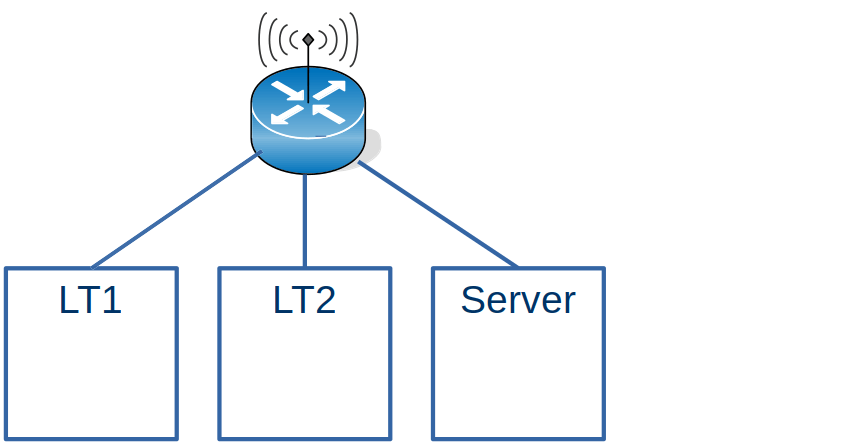
I have 2 Laptops and a Server all running Linux.

From my internet router I could see the information for LT2

  • GUA (Temporary): xxxx:xxxx:xxxx:xxxx:d539:f842:755d:8927
  • GUA (Permanent): xxxx:xxxx:xxxx:xxxx:4593:2842:db0b:4630

Where GUA is the Global address (known outside of my network).

On Linux I can use the ip -6 addr command to display the address of the connection. A connector can have more than one address.

On the server machine, the addresses were

wlxd037450ab7ac: <BROADCAST,MULTICAST,UP,LOWER_UP> mtu 1500 state UP qlen 1000
  inet6 xxxx:xxxx:xxxx:xxxx:7694:3711:8f98:7271/64 scope global temporary dynamic... 
  inet6 xxxx:xxxx:xxxx:xxxx:a5e4:61a:b3b2:9d8b/64 scope global dynamic mngtmpaddr noprefixroute ...
  inet6 fe80::216a:2b1d:c908:eb39/64 scope link noprefixroute      

Every time I rebooted, the xxxx… was the same, but the rest of the address was different.

The global address share the same prefix xxxx:xxxx:xxxx:xxxx/64, which is the address my Internet Service Provider allocated to my home.

The Link-Local fe80:: is only used within the use of its interface. The address should be stable across reboots, but may change if you change the configuration.

Talking between the Linux systems.

On LT2 I could issue ping xxxx:xxxx:xxxx:xxxx:7694:3711:8f98:7271 to the Server, and this worked.

Create your own addresses

The string xxxx:xxxx:xxxx:xxxx:7694:3711:8f98:7271 is very long, and changes every time I restart Linux. This means I had to manually type the long address in when trying to use it This was tedious for ping, and if I used ssh to logon to the box, every time it asked me about the authentication of the host.

You can create your own address for an interface.

sudo ip -6 addr add xxxx:xxxx:xxxx:xxxx::cccc dev wlxd037450ab7ac

It has to use the same 64 left bits xxxx:xxxx:xxxx:xxxx,;the remaining bits can be almost anything. I like nice short ::4 or ::cccc type values

I issued that command on the server, and I was able to successfully ping that address from my laptop. How does that work?

  • On my laptop I issued the ping command. Linux did not have any routing information for it, so it was sent using the default route to the wireless router.
  • The wireless router did not know about the address, so issued a multicast address to all(3) systems connected to it. “Does any one have xxxx:xxxx:xxxx:xxxx::cccc”.
  • Laptop1 got the request – and as it did not have the address – it ignored the request.
  • The Server got the request – and as it did have the address – it replied “I have xxxx:xxxx:xxxx:xxxx::cccc”.
  • The wireless router then forwards the ping request to the server, and cached the routing information.

If you look at the response times of the ping you can see the first request takes a long time

colinpaice@colinpaice:~$ ping  xxxx:xxxx:xxxx:xxxx::cccc
PING xxxx:xxxx:xxxx:xxxx::cccc(xxxx:xxxx:xxxx:xxxx::cccc) 56 data bytes
64 bytes from xxxx:xxxx:xxxx:xxxx::cccc: icmp_seq=1 ttl=64 time=383 ms
64 bytes from xxxx:xxxx:xxxx:xxxx::cccc: icmp_seq=2 ttl=64 time=74.5 ms
64 bytes from xxxx:xxxx:xxxx:xxxx::cccc: icmp_seq=3 ttl=64 time=6.95 ms

This information is cached on the Linux, and in the router.

For example ip -6 neigh gives

xxxx:xxxx:xxxx:xxxx::88 dev wlp4s0 lladdr 00:24:d6:5e:2e:d2 REACHABLE

After a few minutes the output is

xxxx:xxxx:xxxx:xxxx::88 dev wlp4s0 lladdr 00:24:d6:5e:2e:d2 STALE

The time for an entry to become stale is based on /proc/sys/net/ipv6/neigh/…/base_reachable_time. On my Linux system this is 30 seconds.

The above was the easy bit….

A more complex example – adding in a host without wireless access.

Laptop to z/OS

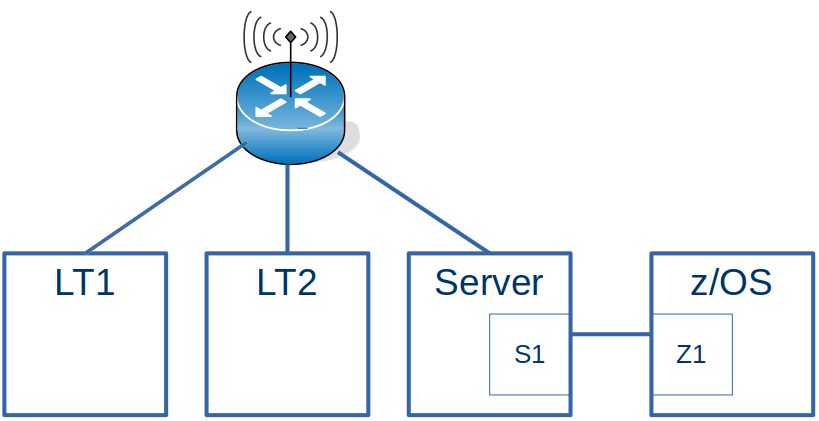
This configuration is the same as the first example with the addition of an Ethernet connection going to z/OS.

For z/OS to work with the Laptops, the wireless router needs to be told about the IP addresses on z/OS

One of the addresses for z/OS on the Ethernet-like connection from the server is 2001:db8:e::9. There are no 2a00… (xxxx…) addresses on z/OS because z/OS is not attached to the wireless network.

If I ping the 2001:db8:e::9 address from a laptop, it does not complete successfully. Looking at the traffic from the wireless router to the server, there is no traffic for 2001:db8:…

I had to use radvd on the Server to act as a router. The radvd configuration for the wireless router was

interface wlxd037450ab7ac
{
   AdvSendAdvert on;
   MaxRtrAdvInterval 60;
   MinDelayBetweenRAs  60; 
   AdvDefaultLifetime 3000;

   route 2001:db8:1::/64
   {
     AdvRoutePreference medium;
     AdvRouteLifetime 3100;
   
   };
};

The route…{} says I (the Linux system) know about this IP address range.

When this was activated, I could see a router advertisement of 2001:db8:e::/64 being sent to the wireless router. After this, there was traffic from the wireless router down to the server.

Ping to 2001:db8:1::9 on z/OS was successful. I stopped the radvd process on the server, and after about 3 minutes ping stopped working. This is because the information sent from radvd into wireless router gets stale and eventually deleted. Typically the radvd tasks sends the information regularly, so the wireless router has up to date routing information.

The source of the ping was xxxx:xxxx:xxxx:xxxx:84ce:f350:1dce:b4bf, the Laptop end of the wireless connection.

On z/OS this was routed through via the default route, xxxx:xxxx:xxxx:xxxx:84ce:f350:1dce:b4bf which was the Server end of the connection from z/OS.

The server either knew the route to my laptop, or it used the default to send it view the wireless router, which knew to send it to the laptop.

Pinging from z/OS

From z/OS I could successfully ping xxxx:xxxx:xxxx:xxxx:84ce:f350:1dce:b4bf. The request went via the z/OS default route to the server, and then via the wireless router to the laptop.

The reply (destination 2001:db8:1::9) went via the route described in laptop to z/OS above.

An even more complex example – doing it without using defaults.

I had this situation because the wireless dongle on the server was not very reliable and kept dropping the connection. This made it very hard to diagnose problem, as sometimes a ping would work – and a short while later, it would not work – and I assumed it was the configuration changes I was making.

Now that I understand more about Dynamic Routing and Neighbor Discovery, setting this up was remarkably easy. I’m sure there must be something I have missed.

z/OS setup

Define the interface

INTERFACE IFPORTCP6 
    DEFINE IPAQENET6 
    CHPIDTYPE OSD 
    PORTNAME PORTCP 
    INTFID 7:7:7:7 
                                                
INTERFACE IFPORTCP6 
    ADDADDR 2001:DB8:1::9 

Define an empty route table

You cannot define an empty routing table, so I defined a route with stupid addresses.

This means all routing addresses will be dynanic

BEGINRoutes 
;     Destination    FirstHop       LinkName  Size 
ROUTE 2999:db8::/80  2999:db8:3:0:3f57:d0f0:7e58:a7ed IFPORTCP6   MTU 5000 
ENDRoutes 

Linux Server setup

I had one radvd.conf file with a section for each interface

Interface to z/OS

interface  tap1
{
   AdvSendAdvert on; 
   MaxRtrAdvInterval 600;
   MinDelayBetweenRAs  600; 
   # make this a non default router
   AdvDefaultLifetime 0;
  # AdvDefaultLifetime 60;
  
   AdvManagedFlag  on;
   AdvOtherConfigFlag on;   
   
   prefix 2001:db8:1::/64
   {
     AdvRouterAddr on;
   };
  route 2001:db8::/64 {};
  route 2008::/64{};
};
  • AdvDefaultLifetime 0; Do not use this as a default route.
  • prefix 2001:db8:1::/64{…} use this route to get to 2001:db8:1:: range.
  • route 2001:db8::/64 {}; z/OS uses this information to build its dynamic routing.
  • route 2008::/64 {}; z/OS uses this information to build its dynamic routing.

Ethernet interface from server to the laptop

interface  eno1
{
   AdvSendAdvert on; 
   MaxRtrAdvInterval 600;
   MinDelayBetweenRAs  600;
   
   prefix 2008::/64
   {
     AdvRouterAddr on;
   };  
 
   prefix xxxx:xxxx:xxxx:xxxx::/64
   {
     AdvRouterAddr on; 
   };
   
    # I support this address range
   route 2001:db8:1::/64{};    
 
};
  • prefix 2008::/64{…} The server can use this interface to get to 2008::/64 on the laptop.
  • prefix xxxx:xxxx:xxxx:xxxx::/64 The server can use this interface to get to the wireless interface on the laptop.
  • route 2001:db8:1::/64{}; The laptop can use this information to define its dynamic routes to get to 2001:db8:1::/64 range on the server.

Wireless interface – when it worked

interface wlxd037450ab7ac
{
   AdvSendAdvert on;
   MaxRtrAdvInterval 60;
   MinDelayBetweenRAs  60; 
   AdvDefaultLifetime 3000;

   route 2001:db8:1::/64
   {
     AdvRoutePreference medium;
     AdvRouteLifetime 3100;
   
   };
};

I used this so that other devices on my home network, could get to the z/OS using the Wireless interface.

Start up script

I used

#!/bin/bash -x


sudo sysctl -w net.ipv6.conf.all.forwarding=1
sudo sysctl -w net.ipv6.conf.tap1.forwarding=1
sudo sysctl -w net.ipv6.conf.eno1.forwarding=1
sudo sysctl -w net.ipv6.conf.all.accept_ra=2
sudo sysctl -w net.ipv6.conf.tap1.accept_ra=2
sudo sysctl -w net.ipv6.conf.eno1.accept_ra=2

#kill off the running radvd agent
ps ax |grep radvd |grep -v grep |awk '{print $1 }'|sudo xargs kill  -9
ps -A |grep radvd

sudo ip -6 neigh flush all 
sudo ip -6 route flush root 2001:db8:1::/64
sudo ip -6 -statistics route flush proto ra 

# restart the radvd agent 
sudo rm /var/log/radvd.log
sudo radvd -d 5 -l /var/log/radvd.log -m logfile  -C $p
sleep 1
less /var/log/radvd.log

Although I had specified

sudo sysctl -w net.ipv6.conf.all.accept_ra=2

This did not seem to work (bug?), and I had to explicitly set

sudo sysctl -w net.ipv6.conf.tap1.accept_ra=2
sudo sysctl -w net.ipv6.conf.eno1.accept_ra=2

Laptop setup

Define a short address on the laptop.

sudo ip -6 addr add 2008::5 dev enp0s31f6

And that’s almost it.

There was a tiny little complication.

Usually when I used ping on my laptop, it used the IP address I had created, 2008::5. I could see this in the Wireshark trace going to z/OS. When playing around with the wireless adapter, sometimes ping used the wireless address, and the ping failed, because z/OS did not know how to route back to the wireless address. Ping gave me a warning Warning: source address might be selected on device other than: enp0s31f6.

I fixed this by creating a

route xxxx:xxxx:xxxx:xxxx::/64{}

in the tap1 configuration for z/OS

and a

prefix xxxx:xxxx:xxxx:xxxx::/64{…}

statement for the eno1 interface to the laptop.

How to change and delete network routing

This blog post arose when trying to document IP V6 routing. The behaviour did not work as expected.

Static routes

Linux

On Linux, you can use command like

sudo ip -6 route add 2001:0db8:1::9/64 dev tap1
sudo ip -6 route del 2001:0db8:1::9/64 dev tap1
sudo ip -6 route flush 2001:0db8:1::9/64 dev tap1
sudo ip -6 -statistics route flush 2001:0db8:1::9/64 dev tap1

Some information may be stored in the neighbour cache so you may need to use commands like:

sudo ip -6 neigh flush to 2001:db8:1::9
sudo ip -6 neigh flush dev tap1

z/OS

You define static routes between BEGINRoutes and ENDRoutes. If you want to change one entry, you have to replace all entries. You cannot add or remove individual entries.

You cannot have an empty BEGINRoute… ENDRoute. If used, it has to have at least one entry. You can create a dummy entry that will never be used.

You can change this file, and use the OBEY command to activate it

v tcpip,tcpip,obeyfile,USER.Z24C.TCPPARMS(routefc)

To delete an entry, remove it from the file, and activate the file.

Dynamic routes

Dynamic routes are created from facilities like radvd on Linux. This defines capability available on an interface.

For example

interface  tap1
{
   AdvSendAdvert on; 
   AdvDefaultLifetime 60;

   prefix 2001:db8:1::/64
   {
   };
   route 2001:db8::/64 {AdvRouteLifetime 1800};
   route 2008::/64{ AdvRouteLifetime 600};
};

At the Linx(sender)

  • it creates an internal address(fe80::…) for the tap1 interface
  • it create a route saying to get to 2001:db8::1/64 route it over the tap1 interface.

At the remote end, it receives a Router Advertisement packet. This includes

  • The IP address of tap1 at the Linux end (created above)
  • Route statements which have
    • The address range
    • The route lifetime.

From this, the remote end creates a dynamic route for every route in the packet.

How to change a dynamic route

Change the radvd configuration file, then either

  • cancel and restart ravd
    • ps ax |grep radvd |grep -v grep |awk ‘{print $1 }’|sudo xargs kill -9
    • sudo radvd -d 5 -l /var/log/radvd.log -m logfile -C radvd.conf
  • send a SIGHUP (sudo kill -s HUP <pid> )

The route expires after AdvRouteLifetime seconds. For the route to remain current, there needs to be a regular Router Advertisement message.

Displaying a dynamic route

On Linux ip -6 route gave me (for one of the dynamic routes) for one entry

2008::/64 dev eno1 proto ra metric 100 pref medium
2008::/64 dev eno1 proto kernel metric 256 expires 86293sec pref medium

Where 86293sec is just under 1 day.

On z/OS you can display this dynamic routing information using the TSO NETSTAT ROUTE RADV DETAIL command.

Example output

DestIP:   2008::/64 
  Gw:     fe80::8024:bff:fe45:840c 
  Intf:   IFPORTCP6  MTU:  0 
  Metric: 00000002   LifetimeExp: 12/20/2022 12:32 
  GwReachable:  Yes  IntfActive:  Yes 

This shows there is an entry for 2008::/64, and it is due to expire at 20th December 2022 at 12:32.

How do I delete a dynamically created route?

You have several ways

  • Remove it from the radvd configuraton file. Restart radvd, and let the definition expire – possibly hours later.
  • On Linux, remove the entry from the config file, restart radvd, use route delete….
  • Cause it to expire earlier
    • Edit the configuration file
    • Set AdvRouteLifetime to a low value like 10 seconds,
    • Restart the radvd agent. This sends the RA message to the remote system, and sets the expiry time of the one of interest,
    • Delete the route from the config file,
    • Restart the radvd agent again. This sends the RA which will not have the route.

The information may still be in the neighbourhood cache, and this may need to be flushed.

Creating a default router

For the interface statement, set a default life time > 0. A value of 0 says this is not a default router.

interface  tap1
{  
   AdvSendAdvert on;
   AdvDefaultLifetime 0;
...

To remove the default router, set AdvDefaultLifetime to 0; and redeploy.

If there is a static definition for the default route, this will be used in preference to the dynamically defined router.

What does tso netstat neighbour give you?

The command TSO NETSTAT ND gave me

Query Neighbor cache for 2001:db8:1:0:8024:bff:fe45:840c 
  IntfName: IFPORTCP6          IntfType: IPAQENET6 
  LinkLayerAddr: 82240B45840C  State: Reachable 
  Type: Router                 AdvDfltRtr: No 

Query Neighbor cache for fe80::8024:bff:fe45:840c 
  IntfName: IFPORTCP6          IntfType: IPAQENET6 
  LinkLayerAddr: 82240B45840C  State: Reachable 
  Type: Router                 AdvDfltRtr: No 

Query Neighbor cache for fe80::9863:1eff:fe13:1408 
  IntfName: JFPORTCP6          IntfType: IPAQENET6 
  LinkLayerAddr: 9A631E131408  State: Reachable 
  Type: Router                 AdvDfltRtr: No 

On Linux the

ip -6 addr

command gave me

tap1: <BROADCAST,MULTICAST,UP,LOWER_UP> mtu 1500 state UNKNOWN qlen 1000
    inet6 2001:db8:1:0:b0fd:f92b:8362:577b/64 ...
    inet6 2001:db8:1:0:8024:bff:fe45:840c/64 ...
    inet6 fe80::8024:bff:fe45:840c/64 ...

tap2: <BROADCAST,MULTICAST,UP,LOWER_UP> mtu 1500 state UNKNOWN qlen 1000
    inet6 fe80::9863:1eff:fe13:1408/64 ...

The TSO output means

  • Query Neighbor cache for 2001:db8:1:0:8024:bff:fe45:840c. The address is one of the addresses on the remote end of the connection. There is an entry because some traffic came via the address.
  • IntfName: IFPORTCP6 The z/OS Interface name used to create the defintion
  • IntfType: IPAQENET6 the OSA-Express QDIO interfaces statement
  • LinkLayerAddr: 82240B45840C
  • State: Reachable Other options can include stale, which means z/OS has not heard anything from this address for a while
  • Type: Router
  • AdvDfltRtr: No. The information passed in the Router Advertisement, said this was connection does not Advertise a Default Router(AdvDfltRtr).

From the NETSTAT ND output we can see data has been received from

  • IFPORTCP6:2001:db8:1:0:8024:bff:fe45:840c
  • IFPORTCP6:fe80::8024:bff:fe45:840c
  • JFPORTCP6:fe80::9863:1eff:fe13:1408

To get data to flow down the 2001…. address I had to use

ping -I 2001:db8:1:0:8024:bff:fe45:840c 2001:db8:1::9

Where the -I says use the interface address.

You can get information about bytes processed by interface (not by address) using the TSO NETSTAT DEVLINKS command.

Why has my packet suddenly decided to go over there? Grrr

As one of the many problems I had trying to get IPV6 routing to work, I found that I could run a configuration script, and it would all work successfully (including a ping) – then a few seconds later, a manual ping would not work.

I had a shell script to display all my IP configuration information, to display the route information all in one line… including

option="-6 -o"
echo "==ROUTE"
ip $option route  |awk '{ print "ROUTE", $0 } '

When it worked, my route was

ROUTE ::1 dev lo proto kernel metric 256 pref medium
ROUTE 2001:db8::/64 dev enp0s31f6 proto ra metric 100 pref medium
ROUTE 2001:db8::/64 dev enp0s31f6 proto kernel metric 256 expires 86395sec pref medium
ROUTE 2001:db99::/64 dev enp0s31f6 proto ra metric 100 pref medium
ROUTE 2a00:23c5:978f:6e01::/64 dev wlp4s0 proto ra metric 600 pref medium
ROUTE fe80::/64 dev enp0s31f6 proto kernel metric 100 pref medium
ROUTE fe80::/64 dev wlp4s0 proto kernel metric 600 pref medium
ROUTE default via fe80::966a:b0ff:fe85:54a7 dev wlp4s0 proto ra metric 600 pref medium
ROUTE default via fe80::a2f0:9936:ddfd:95fa dev enp0s31f6 proto ra metric 1024 expires 132sec hoplimit 64 pref medium
ROUTE default via fe80::a2f0:9936:ddfd:95fa dev enp0s31f6 proto ra metric 20100 pref medium

Some interesting information in this display (see the man page here)

ROUTE 2001:db8::/64 dev enp0s31f6 proto ra metric 100 pref medium
  • 2001:db8::/64, this is the prefix of length 64 bits so 2001:db8:0:0. It is the address range 2001:0db8:0000:0000…. where …. is 0000:0000:0000:0000 to ffff:ffff:ffff:ffff
  • dev enp0s31f6 is the device (also known as the interface)
  • proto ra. The protocol was installed by Router Discovery protocol
  • metric 100. When there is a choice of valid routes, the lower the metric, the more it is favoured.
  • pref medium. Preference medium (out of high, medium, low).

Another interesting one is

ROUTE default via fe80::a2f0:9936:ddfd:95fa dev enp0s31f6 proto ra metric 20100 pref medium
  • If no other routes are found use the default, route, via enp0s31f6, installed by router discovery protocol(ra).
  • The metric is 20100 – so a low priority value.

A short while later, when ping failed, there was an additional route

ROUTE default via fe80::966a:b0ff:fe85:54a7 dev wlp4s0 proto ra metric 600 pref medium

With this the metric is 600 – which is lower than 20100 from before, so packets were sent to the wireless interface – which did not know what to do with them, and dropped them!

Solution

I used

sudo ip -6 route replace default via fe80::a2f0:9936:ddfd:95fa dev enp0s31f6 proto ra metric 200 pref medium

where the metric value was lower than the metric value for the wireless connection, and ping worked.

The above solution worked, but the IP v6 address changed from day to day. The following worked better as it has a permanent global address.

sudo ip -6 route replace default via 2001:db8::2 dev enp0s31f6 proto ra metric 200  pref medium

where 2001:db8::2 is the IP address of the connection on the remote, server, machine. This was done using

sudo ip addr add 2001:db8::2/64 dev eno1

Getting IP v6 static routing from Linux to/from z/OS

For me this was an epic journey, taking weeks to get working. It was like a magical combination lock, which will not open unless all of the parameters are correct, today has an ‘r’ in the month, and you are standing on one leg. Once you know the secrets, it is easy.

With IP V6 there is a technology called dynamic discovery which is meant to make configuring your IP network much easier. Each node asks the adjacent nodes what IP addresses they have, and so your connection to the next box magically works. I could not get this to work, and thought I would do the simpler task of static configuration – this had similar problems – but they were smaller problems.

There were two three four five six seven key things that were needed to get ping to work in my setup:

The key things

Allow forwarding between interfaces

On Linux

sudo sysctl -w net.ipv6.conf.all.forwarding=1

The documentation says “… conf/all/forwarding – Enable global IPv6 forwarding between all interfaces”.

Clearing the cache

Routing and neighbourhood definitions are cached for a period. If you change a definition, and activate it, an old definition may still be used. I found I got different results if I rebooted, re-ipled, or went for a cup of tea; it worked – then next time I tried it with the same definitions, it did not work. Clearing the routing and neighbourhood cache made it more consistent.

On z/OS use V TCPIP,,PURGECACHE,IFPORTCP6

On Linux use sudo ip -6 neigh flush all

Put a delay between creating definitions and using them.

I had a 2 second delay between creating a definition, and using it, which helped getting it to work. I think data is propagated between the system, and issuing a ping or other command immediately after a definition, was too fast for it,

A timing window

I had scripts to clear and redefine the definitions. Some times if I ran the laptop script then the server script, then ping would not work. If I reran the laptop script, then usually ping worked. Sometimes I had to rerun the server script.

The default route would often change.

The wireless connection to the server was unreliable. There would be a route from my laptop to the server via the wireless. Then a few minutes later the connection to the server would stop, and so alternate routes had to be used, because traffic via the wireless would be dropped.

I got around this problem, by explicit coding of the routes and not needing to use the default definitions. (Also disabled the wireless connection while debugging)

The correct route syntax

I found I was getting “Neigbor Solicitation” instead of the static routing. To prevent this the route on the laptop needed the via…

sudo ip -6 route add 2001:db8:1::9/128 via 2001:db8::2 dev enp0s31f6

and not

sudo ip -6 route add 2001:db8:1::9/128                dev enp0s31f6

See Is “via” needed when creating a Linux IP route?

The z/OS IP address kept changing across IPLs

Why is my z/OS IP address changing when using zPDT, and routing does not work?

Configuration

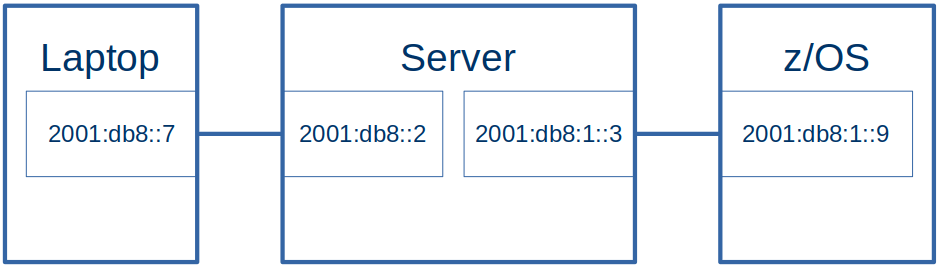
  • The laptop had an Ethernet connection to the server.
  • The server had an Ethernet like connection to z/OS. This was a tunnel(tap1), looking like an OSA to z/OS

The addresses:

Laptop Ethernet (enp0s31f6)2001:db8:::7
Server Ethernet (eno1)2001:db8:::2
Server Tunnel (tap1)2001:db8:1::3
Z/OS interface (ifacecp6)2001:db1::9

The Laptop side had prefix 2001:db8:0::/64, the z/OS side had prefix 2001:db8:1::/64 . See One minute topic: Understanding IP V6 addressing and routing if these numbers look strange.

Definitions

z/OS routing definitions

BEGINRoutes 
;     Destination      FirstHop          LinkName   Size 
ROUTE default6         2001:db8:99::3    IF2        MTU  1492
ROUTE 2001:db8:99::/64 2001:db8:99::3    IF2        MTU 5000 

ROUTE 2001:db8::/64    2001:db8:1::3     IFPORTCP6  MTU 5000 
ROUTE 2001:db8:1::/64  2001:db8:1::3     IFPORTCP6  MTU 5000 
                                                                              
ENDRoutes 

Where

  • default6 says if no other routes match, then send the traffic down IF2 connection. At the remote end of the IF2 connection, it has IP address 2001:db8:99::3.
  • Traffic for 2001:db8:99::/64 should be sent down interface IF2 – which has an address 2001:db8:99::3 at the remote end
  • Traffic for 2001:db8::/64 (2001:db8:0::/64) should be sent down interface IFPORTCP6 which has address 2001:db8:1::3 at the remote end.
  • Traffic for 2001:db8:1::/64 should be sent down interface IFPORTCP6 which has address 2001:db8:1::3 at the remote end.

I needed a route for both 2001:db8::/64 and 2001:db8:1::/64 as one was the route to the laptop, the other was the route to the Linux server.

Linux Server machine

On my Linux machine I had

from ip -6 addr

tap1: <BROADCAST,MULTICAST,UP,LOWER_UP> mtu 1500 state UNKNOWN qlen 1000
 inet6 2001:db8:1::3/64 scope global 
    valid_lft forever preferred_lft forever
 inet6 2001:db8::3/64 scope global 
    valid_lft forever preferred_lft forever
 inet6 fe80::e852:31ff:fe0f:81da/64 scope link 
    valid_lft forever preferred_lft forever

I used the global address 2001:db8:1::3 in my z/OS routing statement.

The documentation implies I should use the link-local address fe80::e852:31ff:fe0f:81da in my static z/OS definitions, but I could not see how to use this, as it changed every time I ipled my z/OS. This means I need to explicitly define an address on Linux for this connection ( 2001:db8:1::3).

Linux Server definitions

On my Linux server I defined static definitions.

sudo sysctl -w net.ipv6.conf.all.forwarding=1

# clear the state every time
sudo ip -6 route flush root 2001:db8:1::/64
sudo ip -6 route flush root 2001:db8::/64
sudo ip -6 neigh flush all 

# define the interface to z/OS
sudo ip -6 addr del 2001:db8:1::3/64 dev tap1
sudo ip -6 addr add 2001:db8:1::3/64 dev tap1

sudo ip -6 addr del 2001:db8::2/64 dev eno1
sudo ip -6 addr add 2001:db8::2/64 dev eno1


sudo ip -6 route del 2001:db8::/64 dev eno1
sudo ip -6 route add 2001:db8::/64 dev eno1

sudo ip -6 route del 2001:db8:1::9 dev tap1
sudo ip -6 route add  2001:db8:1::/64   dev tap1

# sudo traceroute -d -m 2 -n -q 1 -I    2001:db8::7 
# ping 2001:db8::7 -c 1 -r
# ping 2001:db8:1::9 -c 1 -r

This script grew as I added all of the options to get it to work.

The statements are

sudo sysctl -w net.ipv6.conf.all.forwarding=1

This enables the cross interface traffic.

sudo ip -6 route flush root 2001:db8:1::/64
sudo ip -6 route flush root 2001:db8::/64
sudo ip -6 neigh flush all

These clear the routing for the two addresses, and for the neighbourhood cache. I do not know if these are required, without them the results were not consistent.

#give the interface to z/OS an explicit address
sudo ip -6 addr del 2001:db8:1::3/64 dev tap1
sudo ip -6 addr add 2001:db8:1::3/64 dev tap1


#give the connection to the Laptop an explicit address
sudo ip -6 addr del 2001:db8::2/64 dev eno1
sudo ip -6 addr add 2001:db8::2/64 dev eno1

These deleted then created global addresses for the server end of the interfaces.

sudo ip -6 route del 2001:db8::/64 dev eno1
sudo ip -6 route add 2001:db8::/64 dev eno1


sudo ip -6 route del 2001:db8:1:: dev tap1
sudo ip -6 route add 2001:db8:1:: dev tap1

These deleted and created routes the traffic to the interfaces. I could have used route rep…

Linux Laptop definitions

#Give the ethernet connection to the server an explicit address
sudo ip -6 addr add 2001:db8::19 dev enp0s31f6

#create the route to the server using the via
sudo ip -6 route del 2001:db8:1::/64 dev enp0s31f6
sudo ip -6 route add 2001:db8:1::/64 via 2001:db8::2 dev enp0s31f6

I needed to specify

  • an explicit to the address of the interface to the server, so it could be used as a destination from z/OS.
  • the route to get to the server. I needed to specify the via, so the static route was used directly. Without the via, it tried to use Neighbourhood discovery.

Pinging

For “ping” to work, the packet has to reach the destination and the reply get back to the originator. See Understanding ping and why it does not answer.

If I pinged 2001:db8:1::9 (z/OS) from the Linux server (the end of the IFPORTCP6 connection) the traffic came from address 2001:db8:1::3, The reply was sent back using the matching 2001:db8:1::/64 definitions.

If I pinged 2001:db8:1::9 (z/OS) from my laptop, through the Linux server to z/OS, the traffic came from address 2001:db8::7. The reply was sent back using the matching 2001:db8::/64 definitions.

If I pinged 2001:db8::7 (laptop) from z/OS it was sent back using the matching 2001:db8::/64 definitions.

One minute topic: Understanding IP V6 addressing and routing

Understanding IP addressing and routing is not difficult, but there are some subtleties you need to be aware of.

This is a good place to start.

IP V4 addressing

An IP V4 address is like 192.6.24.56, where each number is between 0 and 255 inclusive (8 bits). You see routing statements like 192.6.24.9/24 which means the left 24 bits are significant for routing. 192.6.24.99/24 is routed the same as 192.6.24.22/24 because 192.6.24.n/24 refers to the range 192.6.24.0 to 192.6.24.255.

IP V6 addressing

IP V6 addresses are like abcd:efgh:ijkl:mnop:qrst:uvwx:yzab:cdef – or 8 groups of 4 hex digits.

Within each group leading zeros can be dropped.

The longest sequence of consecutive all-zero fields is replaced with two colons (::).

fe80:0000:0000:0000:11ad:b884:0000:0084 can be written fe80:0:0:0:11ad:b884:0:84 which can be written fe80::11ad:b884:0:84, which is a more manageable number to use.

I tend to use addresses like fe00::4 because they are short!

IP V6 prefixes

An Internet Service Provider (ISP) provides connectivity to its users. Each enterprise customer, or end user, is allocated a prefix, usually 48 digits long, and you have 16 digits for routers (the subnet) within your organisation. Normally the total prefix length is 64.

At home with a wireless router, my laptops address is 2a00:dddd:ffff:1111:65fa:229:f923:84b8. 2a00:dddd:ffff from my ISP and my subnet is 1111 within my organisation.

An address like 2001:db8::/64 is the range 2001:db8:0:0:0:0:0:0 to 2001:db8:0:0:ffff:ffff:ffff:ffff.

An address like 2001:db8::9/128 is the single address 2001:db8:0:0:0:0:0:9, because all digits are significant.

There are different levels of IP V6 addresses

  • Addresses starting with fe80::, called link-local addresses, are assigned to interfaces for communication on the attached link. If you think of lots of machines on an Ethernet connection, they have a fe80… address. They tend to be used internally by Dynamic Routing. I haven’t explicitly used one.
  • “global” addresses – or not on an Ethernet cable.
    • fc00::/7 Unique Local Addresses (ULA) – also known as “Private” IPv6 addresses. They are only valid within an enterprise.
    • 2…::/16 Global Unique Addresses (GUA) – Routable IPv6 addresses. These addresses allow you to access resources, such as web sites, outside of your domain. My ISP provides me with an address 2a00:abcd:….

Reserved addresses

Some addresses are reserved, for example

  • 2001:db8::/32 is reserved for documentation, these addresses do not leave your enterprise.
  • fe80::/10 Addresses in the link-local prefix. These are allocated to the “cable” or connection between two nodes. Two different “network cables” can have the same fe80… address because they are on different cables.
  • fc00/12 are addresses which are within your enterprise. Routers will not send these addresses out of its domain.
  • ff02::1 Multicast, all nodes in the link-local
  • ff02::2 Muticast, all routers in the link-local
  • ff05::2 All routers in the site-local (in your machine)

See here for a more complete list.

Defining an address

If I define an address for connection (on Linux) I can use

  • sudo ip -6 addr add 2001::99 dev tap1, this is one address. When displayed this gives 2001::99/128
  • sudo ip -6 addr add 2001::999/64 dev tap1, this is an address, and when used in routing, use the left 64 bits. When displayed this gives 2001::999/64

Routing

It is important to understand how the prefix affects the routing behaviour.

If I have two Ethernet connections(interfaces) into my laptop. I want traffic for 2001::a:0:0:0 to go via interface A, and traffic for 2001::b:0:0:0 to go via interface B.

If I use

sudo ip -6 route add 2001::a:0:0:0/64 dev A
sudo ip -6 route add 2001::b:0:0:0/64 dev B

then this will not always work. With 2001::a:0:0:0/64 the prefix is 2001:0:0:0:a:0:0:0/64. When comparing a packet with address 2001::b:0:0:0 with each route; both routes are available, because 2001:0:0:0 matches both, and if the packet gets sent to 2001::b:0:0:0 it will be lost.

You either need to move the a/b to make them significant, 2001:0:0:a::/64 and 2001:0:0:b::/64 or use 2001:0:0:0:a::/80 and 2001:0:0:0:b::/80 in the routing statements.

The system needs to be able to route traffic to the correct interface, so you need to be careful how you set up the routing.

Does this make sense?

Specifying

sudo ip -6 route add 2001:db8::99/64 dev eno1 metric 1024 pref medium

is the same as

sudo ip -6 route add 2001:db8::/64 dev eno1 metric 1024 pref medium

because the routing only looks at the left 64 bits. The ::99 is ignored.

Having the :99 makes it a bit more confusing for those stumbling about trying to understand this topic. I’ve had to rewrite some of my blog posts where I use 2001:db8::99/64 in the routing.

In the case of

sudo ip -6 route add 2001:db8::99/128 dev eno1 metric 1024 pref medium

the ::99 is relevant. A packet for 2001:db8::98 would not be routed down this definition because all 128 bits of the route definition are relevant.