You can use static definitions to give a device or link an IP address. You can use modern(last 20 years) technology to do this for you – and get additional advantages.
A server application needs a fixed IP address and port. A client, connecting to the server, can use a different IP address and port on different days. This has the advantage that it makes it harder for the bad guys to track you from your address and port combination
Client application usually use the option “allocate me any free port”.
To get a different IP address every time you can use IPv6 Stateless Address Auto-configuration (SLAAC). It is called stateless because it does not need to remember any state information from one day to the next. The client application says “give me an IP address, any IP Address” and then uses the IP address, until the device is shutdown, or the interface is closed.
You used to have dedicated routers. Now you can run radvd on a computer and it acts like a router. You can run it on your personal machine, or run it in its own machine.
This supports Neighbor Discovery Protocol. When your machine connects to the network, it asks all routers on your local network for configuration information. It gets back a list of prefixes defined on the router (for example 2001:db8::/64). If your machine wants to send a packet to 2001:db8::99, it sends a request to all routers on the local network, asking if any router has 2001:db8::99 defined. If so, the router responds, and so your machine knows where to send the packet to.
When an IP address is allocated to a device, it sends a request to all devices in the local network, asking “does anyone have this address”. This avoids devices with the same IP address. It is known as Duplicate Address Detection (DAD).
My radvd config file
The syntax of the configuration file is defined here
For my interface vl100 I wanted it to give it an IP address 2100… and 2100…
This article has some good concepts about IP V6 addresses.
What addresses does an interface have?
An interface (think end of an Ethernet cable) typically has one IP V4 address which is usually manually assigned to it, and/or multiple IPV6 addresses.
An interface can have multiple IPV6 addresses – why?
You can explicitly define it
You can assign your own IP address(es) to the interface. You can do this so it has a global address, reachable from other networks.
Dynamic Host Configuration Protocol (DHCP)
If you are using a DHCP client, it communicates with a DHCP server which gives it configuration information, such as an IP address, and subnet, the client then configures the interface.
There has been a shortage of IP V4 addresses for many years. Consider an office which has a “drop-in area”. Rather than give each of the potential uses an IP address, the office is given as many IP addresses as there are desks in the drop-in area. This means perhaps 10 ip addresses are needed instead of 100. This is the advantage of DHCP.
For client devices this is fine. Your machine connects to the server and passes its IP address. The server does some work and sends the response back to the requester.
Tomorrow you may get a different IP address. It works. This means no IP address information is saved across different days. It is stateless.
A server needs either
a fixed IP address so clients can contact it,
a dynamic address, and an update to the DNS router to say “today megabank.com is on IP address 9.99.99.1”. It can take time to propagate an IP address across the worldwide DNS network.
IPv6 Stateless Address Auto-configuration (SLAAC)
The ideas behind DHCP have been extended in IPV6, the concepts are similar. Stateless Address Auto-configuration is well documented here
Within a network or router domain the system can generate an address, and it is only used within this domain, it could have a different address every time the interface is started. This is known as Stateless Address Autoconfiguration.
When an interface is started it generates an “internal use” address composed of FE00 + a mangled MAC address.
The interface then asks all devices on the local network, does anyone have this address FE00… This is for Duplicate Address Detection (DAD). There should be no reply. If there is a reply, then there is a duplicate address on the network (and the interface generates another address and repeats the process).
The interface then sends out a Router Solicitation request asking “Are there any routers out there?”. A router will then reply giving information. It will contain the “global IP prefix” such as 2001:db8::. which means to the outside world, my the address of the router is 2001:db8::/64. From this information plus the MAC address the interface can generate its IP address. The router also contains the address of the gateway (the address of the router with connections to the outside world) so traffic can now be routed externally.
This means you configure the router, and not the individual devices. If you have many devices this can save you a lot of work. If you change the router configuration, it is propagated to all the devices attached to it.
IPV6 privacy extensions will generate a “random address” (within the subnet). This is to prevent bad actors from monitoring traffic and using your IP address to monitor what sites you visit. By having a different IP address every day means they cannot correlate the traffic for a user.
Does it matter if my address is auto generated?
This is another of the “it depends” answers.
For machines that initiate work, it may not matter that the allocated IP address is different everyday or the same every day. Your IP address is passed with the request to the server. The server does the work, and sends the response back through the network. Assuming the network is configured properly the response will get back to you.
If your machine is a server machine, clients need to know the server’s address. If this changes your clients may need to use DNS to find the new address, and not use the dotted IP address. You may want to allocate a permanent IP address (within the router’s subnet).
Routers, firewalls and filters.
If your machines address is within the router’s subnet, traffic should be able to get to your router and so to your machine. If you change the subnet, traffic may not get to your router.
A firewall can be configured to allow traffic to and from specified addresses (and ports). If you use a different address, either at client or the server, the firewall may not let your packets through. Similarly with a network filter.
I was playing around with configuring IP V6 on my laptop, and the connection to z/OS failed. This was because I had been using one IP address, which I could see flowing to the back-end. When I tried some other configuration, there were more IP addresses allocated to the client, and a different IP address was used as the originator’s IP address in the ping request. The back-end server did not know how to route traffic back to this address, and so the return packets were thrown away and the ping timed out.
You need to be aware which addresses are used for your work. With some IP programs you can bind to a specific local IP address, and force the application to use a particular IP address. For example the Linux Ping command -I interface option.
As part of understanding how IP V6 dynamic routing works, I managed to get my little home network to talk using IP V6.
Privacy
There are sites which can give you your geographic location from your IP V6 address. One site gave me the top part of my post code, the latitude and longitude of my garage, and my ISP provider. So instead of giving real IP addresses, Ive used xxxx:xxxx:xxxx:xxxx for the IP V6 address provided by my Internet Service Provider, and using the 2001:db8::/64 address which is assigned for documentation use.
My network for the easy bit
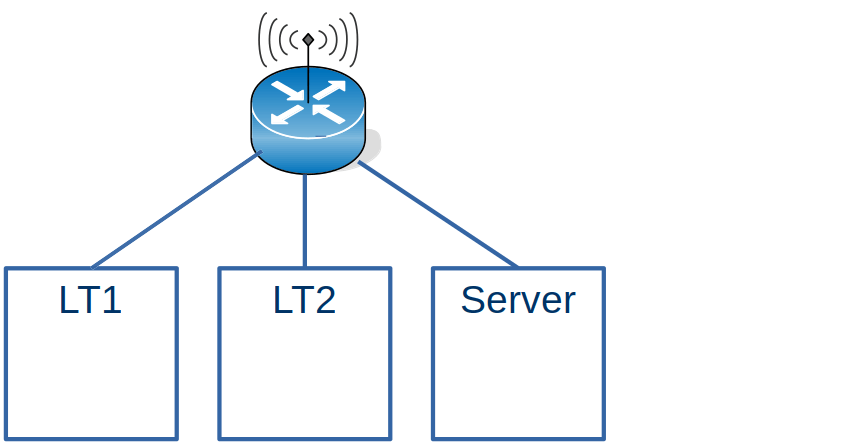
I have 2 Laptops and a Server all running Linux.
From my internet router I could see the information for LT2
Where GUA is the Global address (known outside of my network).
On Linux I can use the ip -6 addr command to display the address of the connection. A connector can have more than one address.
On the server machine, the addresses were
wlxd037450ab7ac: <BROADCAST,MULTICAST,UP,LOWER_UP> mtu 1500 state UP qlen 1000
  inet6 xxxx:xxxx:xxxx:xxxx:7694:3711:8f98:7271/64 scope global temporary dynamic...
  inet6 xxxx:xxxx:xxxx:xxxx:a5e4:61a:b3b2:9d8b/64 scope global dynamic mngtmpaddr noprefixroute ...
  inet6 fe80::216a:2b1d:c908:eb39/64 scope link noprefixroute
Every time I rebooted, the xxxx… was the same, but the rest of the address was different.
The global address share the same prefix xxxx:xxxx:xxxx:xxxx/64, which is the address my Internet Service Provider allocated to my home.
The Link-Local fe80:: is only used within the use of its interface. The address should be stable across reboots, but may change if you change the configuration.
Talking between the Linux systems.
On LT2 I could issue ping xxxx:xxxx:xxxx:xxxx:7694:3711:8f98:7271 to the Server, and this worked.
Create your own addresses
The string xxxx:xxxx:xxxx:xxxx:7694:3711:8f98:7271 is very long, and changes every time I restart Linux. This means I had to manually type the long address in when trying to use it This was tedious for ping, and if I used ssh to logon to the box, every time it asked me about the authentication of the host.
You can create your own address for an interface.
sudo ip -6 addr add xxxx:xxxx:xxxx:xxxx::cccc dev wlxd037450ab7ac
It has to use the same 64 left bits xxxx:xxxx:xxxx:xxxx,;the remaining bits can be almost anything. I like nice short ::4 or ::cccc type values
I issued that command on the server, and I was able to successfully ping that address from my laptop. How does that work?
On my laptop I issued the ping command. Linux did not have any routing information for it, so it was sent using the default route to the wireless router.
The wireless router did not know about the address, so issued a multicast address to all(3) systems connected to it. “Does any one have xxxx:xxxx:xxxx:xxxx::cccc”.
Laptop1 got the request – and as it did not have the address – it ignored the request.
The Server got the request – and as it did have the address – it replied “I have xxxx:xxxx:xxxx:xxxx::cccc”.
The wireless router then forwards the ping request to the server, and cached the routing information.
If you look at the response times of the ping you can see the first request takes a long time
colinpaice@colinpaice:~$ ping  xxxx:xxxx:xxxx:xxxx::cccc
PING xxxx:xxxx:xxxx:xxxx::cccc(xxxx:xxxx:xxxx:xxxx::cccc) 56 data bytes
64 bytes from xxxx:xxxx:xxxx:xxxx::cccc: icmp_seq=1 ttl=64 time=383 ms
64 bytes from xxxx:xxxx:xxxx:xxxx::cccc: icmp_seq=2 ttl=64 time=74.5 ms
64 bytes from xxxx:xxxx:xxxx:xxxx::cccc: icmp_seq=3 ttl=64 time=6.95 ms
This information is cached on the Linux, and in the router.
For example ip -6 neigh gives
xxxx:xxxx:xxxx:xxxx::88 dev wlp4s0 lladdr 00:24:d6:5e:2e:d2 REACHABLE
After a few minutes the output is
xxxx:xxxx:xxxx:xxxx::88 dev wlp4s0 lladdr 00:24:d6:5e:2e:d2 STALE
The time for an entry to become stale is based on /proc/sys/net/ipv6/neigh/…/base_reachable_time. On my Linux system this is 30 seconds.
The above was the easy bit….
A more complex example – adding in a host without wireless access.
Laptop to z/OS
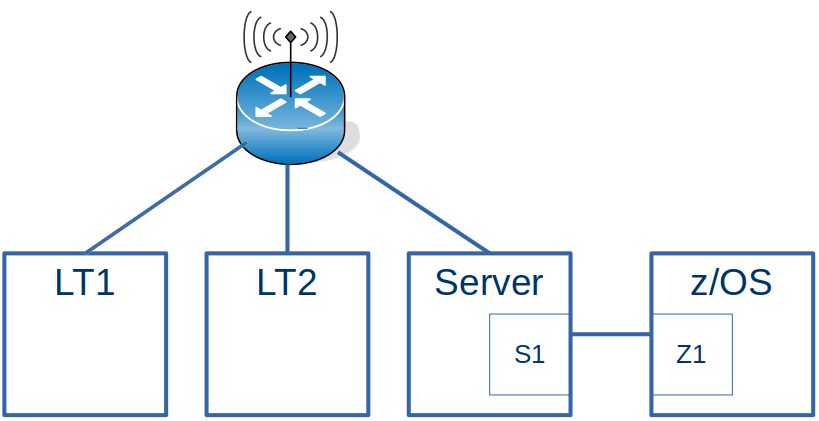
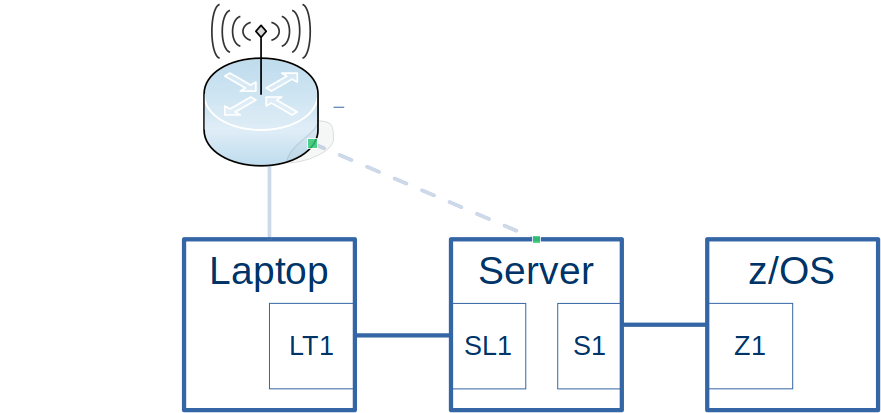
This configuration is the same as the first example with the addition of an Ethernet connection going to z/OS.
For z/OS to work with the Laptops, the wireless router needs to be told about the IP addresses on z/OS
One of the addresses for z/OS on the Ethernet-like connection from the server is 2001:db8:e::9. There are no 2a00… (xxxx…) addresses on z/OS because z/OS is not attached to the wireless network.
If I ping the 2001:db8:e::9 address from a laptop, it does not complete successfully. Looking at the traffic from the wireless router to the server, there is no traffic for 2001:db8:…
I had to use radvd on the Server to act as a router. The radvd configuration for the wireless router was
The route…{} says I (the Linux system) know about this IP address range.
When this was activated, I could see a router advertisement of 2001:db8:e::/64 being sent to the wireless router. After this, there was traffic from the wireless router down to the server.
Ping to 2001:db8:1::9 on z/OS was successful. I stopped the radvd process on the server, and after about 3 minutes ping stopped working. This is because the information sent from radvd into wireless router gets stale and eventually deleted. Typically the radvd tasks sends the information regularly, so the wireless router has up to date routing information.
The source of the ping was xxxx:xxxx:xxxx:xxxx:84ce:f350:1dce:b4bf, the Laptop end of the wireless connection.
On z/OS this was routed through via the default route, xxxx:xxxx:xxxx:xxxx:84ce:f350:1dce:b4bf which was the Server end of the connection from z/OS.
The server either knew the route to my laptop, or it used the default to send it view the wireless router, which knew to send it to the laptop.
Pinging from z/OS
From z/OS I could successfully ping xxxx:xxxx:xxxx:xxxx:84ce:f350:1dce:b4bf. The request went via the z/OS default route to the server, and then via the wireless router to the laptop.
The reply (destination 2001:db8:1::9) went via the route described in laptop to z/OS above.
An even more complex example – doing it without using defaults.
I had this situation because the wireless dongle on the server was not very reliable and kept dropping the connection. This made it very hard to diagnose problem, as sometimes a ping would work – and a short while later, it would not work – and I assumed it was the configuration changes I was making.
Now that I understand more about Dynamic Routing and Neighbor Discovery, setting this up was remarkably easy. I’m sure there must be something I have missed.
Usually when I used ping on my laptop, it used the IP address I had created, 2008::5. I could see this in the Wireshark trace going to z/OS. When playing around with the wireless adapter, sometimes ping used the wireless address, and the ping failed, because z/OS did not know how to route back to the wireless address. Ping gave me a warning Warning: source address might be selected on device other than: enp0s31f6.
sudo ip -6 route add 2001:0db8:1::9/64 dev tap1
sudo ip -6 route del 2001:0db8:1::9/64 dev tap1
sudo ip -6 route flush 2001:0db8:1::9/64 dev tap1
sudo ip -6 -statistics route flush 2001:0db8:1::9/64 dev tap1
Some information may be stored in the neighbour cache so you may need to use commands like:
sudo ip -6 neigh flush to 2001:db8:1::9
sudo ip -6 neigh flush dev tap1
z/OS
You define static routes between BEGINRoutes and ENDRoutes. If you want to change one entry, you have to replace all entries. You cannot add or remove individual entries.
You cannot have an empty BEGINRoute… ENDRoute. If used, it has to have at least one entry. You can create a dummy entry that will never be used.
You can change this file, and use the OBEY command to activate it
v tcpip,tcpip,obeyfile,USER.Z24C.TCPPARMS(routefc)
To delete an entry, remove it from the file, and activate the file.
Dynamic routes
Dynamic routes are created from facilities like radvd on Linux. This defines capability available on an interface.
My two day project to deploy IP V6 dynamic routing, turned into an eight week project before I got it to work.
I am documenting a lot of what I learned – today’s experience is understanding what radvd is and what the configuration options mean. I found a lot of documentation – most of which either assumed you know a lot, or only provided an incomplete description.
High level view of what radvd provides
There are several ways of providing configuration to TCPIP. One way is using radvd (on Linux).
In a configuration file you give
An interface name
Which IP addresses (and address ranges) are available at the remote end of the connection.
Which IP addresses (and address ranges) are available at the local end of the connection
From the information about the local end, the remote end can build its routing tables.
Background IP routing
With IP you can have
static routing, where you explicitly give the routes to a destination – such as to get to a.b.c.d – go via xyz interface. You have to do a lot of administration defining the addresses of each end of an interface (think Ethernet cable)
dynamic routing, and neighbourhood discovery, where the system automatically finds the neighbours and there is less work for an administrator to do.
With IPv6 you have
global addresses with IP addresses like 2001:db8:1:16…..
link-local addresses. These are specific to an interface. An Ethernet connection can have many terminals hanging off ‘the bus’. The link-local address is only used within the connection. A different Ethernet cable can use the same address. There is no problem as the addresses are only used with the cable.
Neighbour Discovery. Rather than specify every thing as you do with static routing, IP V6 supports Neighbour Discovery, where each node can tell connected nodes, what routes and IP addresses it knows about. This is documented in the specification. This supports
Router Advertisement (RA), (“Hello, I’m a router, I know about the following addresses and routes”),
Router Solicitation (RS), (“Hello, I’ve just started up, are there any routers out there?”),
Neighbour Solicitation(NS) (“Does anyone have this IP address?”), and
Neighbour Advertisement (Usually in response to a Neighbour Solicitation, “I have this address”).
What is radvd?
The radvd program is a Router Advertisment Daemon (RADvd) which provides fakes router information – but is not a router.
You specify a configuration file. The syntax is defined here.
You can specify that this interface provides a “default” route. See here.
Example definition
I have a Linux Server, and a laptop running Linux connected by an Ethernet cable.
2001:ccc::/64 is the ipv6 address range or, to say it another way, ipv6 addresses with the left 64 bits beginning with 2001:0ccc:0000:0000. In IP V6 this is known as the prefix.
Basically this prefix statement means “this interface is a route to the specified prefix”.
This creates some addresses on the server for the connection.
eno1    inet6 2001:ccc::e02a:943b:3642:1d73/64 scope global temporary dynamic...
eno1    inet6 2001:ccc::dbf:5c90:61a6:20ae/64 scope global dynamic mngtmpaddr...
eno1    inet6 2001:ccc::c48b:e8f1:495c:5b52/64 scope global temporary dynamic ...
eno1    inet6 2001:ccc::2d8:61ff:fee9:312a/64 scope global dynamic mngtmpaddr ...
create routes
The prefix statement creates a route on the server to get to the laptop
2001:ccc::/64 dev eno1 proto ra metric 100 pref medium
2001:ccc::/64 dev eno1 proto kernel metric 256 ...
This says that on the server, if there is a request for an address in the range 2001:ccc::/64 send it via device eno1.
route 2001:ff99::/64 statement.
If present this passes information to the remote end of the connection, see below. It says “I (the server) know how to route to 2001:ff99::/64”.
It the routing address does not show up in any ip -6 commands on the server.
I could see the Route Information data flowing across the network within a Router Advertisment packet. But I could not see it being used at the remote end.
I think the best thing to do is ignore the route statement.
Polling
The radvd code periodically sends information along the connection to the other end, at an interval you specify. See radvdump below on how to display it.
At the other end of the connection…
At the remote (laptop) end of the connection, using WiresShark to display the data received, shows a Router Advertisement with
Internet Protocol Version 6, Src: fe80::a2f0:9936:ddfd:95fa, Dst: ff02::1
Internet Control Message Protocol v6
    Type: Router Advertisement (134)
    ...
    ICMPv6 Option (Prefix information : 2001:ccc::/64)
    ICMPv6 Option (Route Information : Medium 2001:ff99::/64)
    ICMPv6 Option (Source link-layer address : 00:d8:61:e9:31:2a)
Where
fe80::a2f0:9936:ddfd:95fa is the link-local address on the server machine
ff02::1 the multicast address “All nodes” on a link (link-local scope)”
Prefix information : 2001:ccc::7/64 the prefix of the IP address 2001:ccc:0:0…
Route Information : Medium 2001:ff99::/64 This is from the “route” in the radvd configuration file on the Linux Server. It tells the laptop that this connection knows about routing to 2001:ccc::/64 .
From the route information it dynamically creates a route on the laptop to the server.
2001:ff99::/64 via fe80::a2f0:9936:ddfd:95fa dev enp0s31f6 proto ra metric 100 ...
This creates a route to 2001:ff99::/64 via the IP address fe80::….95fa, from the laptop end of the Ethernet connection with name enp0s31f6 to where-ever the connection goes to (in this example it goes to my server).
If I ping 2001:ffcc::9 from the laptop, it will use this route on its way to the z/OS server.
Connection to z/OS
Within the radvd.conf file is the definition to get to z/OS. This interface looks like an Ethernet (the ip -6 link command gives link/ether). This is for a different radvd configuration file to the earlier example.
This says there are IP addresses in the range 2001:db8:1::/64 via this connection. z/OS reads the Router Advertisement and creates a route for them. TSO Netstat route gives
In UHD, the U says the interface is Up, the H says this is for a host (a specific end point), and the D says this is dynamically created.
If you try to ping 2001:db8:1::99 from the server, a Neighbour Solicitation request is sent from the server to z/OS, asking “do you have 2001:db8:1:99?”. My z/OS did not have that defined and so did not respond.
When I defined this address on z/OS TCPIP using the obeyfile
After this, the ping was successful because there was a neighbour solicitation for 2001:db8:1::99, and z/OS replied with Neighbour Advertisement of 2001:db8:1::9 saying I have it.
Create a default route
If you specify AdvDefaultLifetime 0 on the interface, this indicates that the router is not a default router and should not appear on the default router list in the Router Advertiser broadcasts. If the value is non zero, the recipient, can use this connection as a default route, for example there is no existing default route. A statically defined default will be used in preference to a dynamically defined one.
Use radvdump to display what it sent in the RA
You can use sudo radvdump to display what is being sent in the Router Advertiser message broadcast over multicast. It looks just like the radvd.conf file, but with all of the values filled in, so you can see the defaults.

 ColinPaice