How does my network interface get an IP address, and is a generated address ok to use?

This article has some good concepts about IP V6 addresses.

What addresses does an interface have?

An interface (think end of an Ethernet cable) typically has one IP V4 address which is usually manually assigned to it, and/or multiple IPV6 addresses.

An interface can have multiple IPV6 addresses – why?

You can explicitly define it

You can assign your own IP address(es) to the interface. You can do this so it has a global address, reachable from other networks.

Dynamic Host Configuration Protocol (DHCP)

If you are using a DHCP client, it communicates with a DHCP server which gives it configuration information, such as an IP address, and subnet, the client then configures the interface.

There has been a shortage of IP V4 addresses for many years. Consider an office which has a “drop-in area”. Rather than give each of the potential uses an IP address, the office is given as many IP addresses as there are desks in the drop-in area. This means perhaps 10 ip addresses are needed instead of 100. This is the advantage of DHCP.

For client devices this is fine. Your machine connects to the server and passes its IP address. The server does some work and sends the response back to the requester.

Tomorrow you may get a different IP address. It works. This means no IP address information is saved across different days. It is stateless.

A server needs either

  • a fixed IP address so clients can contact it,
  • a dynamic address, and an update to the DNS router to say “today megabank.com is on IP address 9.99.99.1”. It can take time to propagate an IP address across the worldwide DNS network.

IPv6 Stateless Address Auto-configuration (SLAAC)

The ideas behind DHCP have been extended in IPV6, the concepts are similar. Stateless Address Auto-configuration is well documented here

Within a network or router domain the system can generate an address, and it is only used within this domain, it could have a different address every time the interface is started. This is known as Stateless Address Autoconfiguration.

When an interface is started it generates an “internal use” address composed of FE00 + a mangled MAC address.

The interface then asks all devices on the local network, does anyone have this address FE00… This is for Duplicate Address Detection (DAD). There should be no reply. If there is a reply, then there is a duplicate address on the network (and the interface generates another address and repeats the process).

The interface then sends out a Router Solicitation request asking “Are there any routers out there?”. A router will then reply giving information. It will contain the “global IP prefix” such as 2001:db8::. which means to the outside world, my the address of the router is 2001:db8::/64. From this information plus the MAC address the interface can generate its IP address. The router also contains the address of the gateway (the address of the router with connections to the outside world) so traffic can now be routed externally.

This means you configure the router, and not the individual devices. If you have many devices this can save you a lot of work. If you change the router configuration, it is propagated to all the devices attached to it.

IPV6 privacy extensions will generate a “random address” (within the subnet). This is to prevent bad actors from monitoring traffic and using your IP address to monitor what sites you visit. By having a different IP address every day means they cannot correlate the traffic for a user.

Does it matter if my address is auto generated?

This is another of the “it depends” answers.

For machines that initiate work, it may not matter that the allocated IP address is different everyday or the same every day. Your IP address is passed with the request to the server. The server does the work, and sends the response back through the network. Assuming the network is configured properly the response will get back to you.

If your machine is a server machine, clients need to know the server’s address. If this changes your clients may need to use DNS to find the new address, and not use the dotted IP address. You may want to allocate a permanent IP address (within the router’s subnet).

Routers, firewalls and filters.

If your machines address is within the router’s subnet, traffic should be able to get to your router and so to your machine. If you change the subnet, traffic may not get to your router.

A firewall can be configured to allow traffic to and from specified addresses (and ports). If you use a different address, either at client or the server, the firewall may not let your packets through. Similarly with a network filter.

I was playing around with configuring IP V6 on my laptop, and the connection to z/OS failed. This was because I had been using one IP address, which I could see flowing to the back-end. When I tried some other configuration, there were more IP addresses allocated to the client, and a different IP address was used as the originator’s IP address in the ping request. The back-end server did not know how to route traffic back to this address, and so the return packets were thrown away and the ping timed out.

You need to be aware which addresses are used for your work. With some IP programs you can bind to a specific local IP address, and force the application to use a particular IP address. For example the Linux Ping command -I interface option.
Why is my z/OS IP address changing when using zPDT, and routing does not work?

I was looking into configuring IP V6 on my z/OS running on zPDT running on Linux. I could not understand why configuring the IP V6 link between Linux and z/OS was so difficult.

IP V6 address for use within a connection are like fe80::b0b6:daff:fe64:77f5 where b0b6:daff:fe64:77f5 is based on the MAC(hwaddr). On many systems, this value does not change across IPLs – and so most of the documentation uses the “constant” value.

The connection between Linux and z/OS is a “tap” interface (a kernel virtual device) which looks like an OSA adapter to z/OS.

I found a comment

Each TAP device has a random MAC address that is used as source address.

This explains why the connection was getting a different IP address every time I ipled.

On z/OS you defined a route using this IP address, for example

BEGINRoutes 
ROUTE 2001:db8::7/128 fe80::3f:67ff:fe08:51dc   IFPORTCP6   MTU 5000 
ENDRoutes 

To get round this problem you need to explicitly define an address on Linux

sudo ip -6 addr  add fec0::cccc/64 dev tap1

where cccc is for my initials!

You then put this address into the z/OS routing statements.

BEGINRoutes 
ROUTE 2001:db8::7/128 fe80::cccc   IFPORTCP6   MTU 5000 
ENDRoutes 

and it works first time!

Getting IP v6 static routing from Linux to/from z/OS

For me this was an epic journey, taking weeks to get working. It was like a magical combination lock, which will not open unless all of the parameters are correct, today has an ‘r’ in the month, and you are standing on one leg. Once you know the secrets, it is easy.

With IP V6 there is a technology called dynamic discovery which is meant to make configuring your IP network much easier. Each node asks the adjacent nodes what IP addresses they have, and so your connection to the next box magically works. I could not get this to work, and thought I would do the simpler task of static configuration – this had similar problems – but they were smaller problems.

There were two three four five six seven key things that were needed to get ping to work in my setup:

The key things

Allow forwarding between interfaces

On Linux

sudo sysctl -w net.ipv6.conf.all.forwarding=1

The documentation says “… conf/all/forwarding – Enable global IPv6 forwarding between all interfaces”.

Clearing the cache

Routing and neighbourhood definitions are cached for a period. If you change a definition, and activate it, an old definition may still be used. I found I got different results if I rebooted, re-ipled, or went for a cup of tea; it worked – then next time I tried it with the same definitions, it did not work. Clearing the routing and neighbourhood cache made it more consistent.

On z/OS use V TCPIP,,PURGECACHE,IFPORTCP6

On Linux use sudo ip -6 neigh flush all

Put a delay between creating definitions and using them.

I had a 2 second delay between creating a definition, and using it, which helped getting it to work. I think data is propagated between the system, and issuing a ping or other command immediately after a definition, was too fast for it,

A timing window

I had scripts to clear and redefine the definitions. Some times if I ran the laptop script then the server script, then ping would not work. If I reran the laptop script, then usually ping worked. Sometimes I had to rerun the server script.

The default route would often change.

The wireless connection to the server was unreliable. There would be a route from my laptop to the server via the wireless. Then a few minutes later the connection to the server would stop, and so alternate routes had to be used, because traffic via the wireless would be dropped.

I got around this problem, by explicit coding of the routes and not needing to use the default definitions. (Also disabled the wireless connection while debugging)

The correct route syntax

I found I was getting “Neigbor Solicitation” instead of the static routing. To prevent this the route on the laptop needed the via…

sudo ip -6 route add 2001:db8:1::9/128 via 2001:db8::2 dev enp0s31f6

and not

sudo ip -6 route add 2001:db8:1::9/128                dev enp0s31f6

See Is “via” needed when creating a Linux IP route?

The z/OS IP address kept changing across IPLs

Why is my z/OS IP address changing when using zPDT, and routing does not work?

Configuration

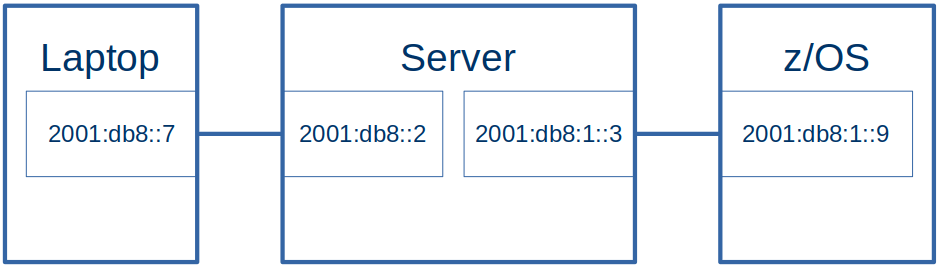
  • The laptop had an Ethernet connection to the server.
  • The server had an Ethernet like connection to z/OS. This was a tunnel(tap1), looking like an OSA to z/OS

The addresses:

Laptop Ethernet (enp0s31f6)2001:db8:::7
Server Ethernet (eno1)2001:db8:::2
Server Tunnel (tap1)2001:db8:1::3
Z/OS interface (ifacecp6)2001:db1::9

The Laptop side had prefix 2001:db8:0::/64, the z/OS side had prefix 2001:db8:1::/64 . See One minute topic: Understanding IP V6 addressing and routing if these numbers look strange.

Definitions

z/OS routing definitions

BEGINRoutes 
;     Destination      FirstHop          LinkName   Size 
ROUTE default6         2001:db8:99::3    IF2        MTU  1492
ROUTE 2001:db8:99::/64 2001:db8:99::3    IF2        MTU 5000 

ROUTE 2001:db8::/64    2001:db8:1::3     IFPORTCP6  MTU 5000 
ROUTE 2001:db8:1::/64  2001:db8:1::3     IFPORTCP6  MTU 5000 
                                                                              
ENDRoutes 

Where

  • default6 says if no other routes match, then send the traffic down IF2 connection. At the remote end of the IF2 connection, it has IP address 2001:db8:99::3.
  • Traffic for 2001:db8:99::/64 should be sent down interface IF2 – which has an address 2001:db8:99::3 at the remote end
  • Traffic for 2001:db8::/64 (2001:db8:0::/64) should be sent down interface IFPORTCP6 which has address 2001:db8:1::3 at the remote end.
  • Traffic for 2001:db8:1::/64 should be sent down interface IFPORTCP6 which has address 2001:db8:1::3 at the remote end.

I needed a route for both 2001:db8::/64 and 2001:db8:1::/64 as one was the route to the laptop, the other was the route to the Linux server.

Linux Server machine

On my Linux machine I had

from ip -6 addr

tap1: <BROADCAST,MULTICAST,UP,LOWER_UP> mtu 1500 state UNKNOWN qlen 1000
 inet6 2001:db8:1::3/64 scope global 
    valid_lft forever preferred_lft forever
 inet6 2001:db8::3/64 scope global 
    valid_lft forever preferred_lft forever
 inet6 fe80::e852:31ff:fe0f:81da/64 scope link 
    valid_lft forever preferred_lft forever

I used the global address 2001:db8:1::3 in my z/OS routing statement.

The documentation implies I should use the link-local address fe80::e852:31ff:fe0f:81da in my static z/OS definitions, but I could not see how to use this, as it changed every time I ipled my z/OS. This means I need to explicitly define an address on Linux for this connection ( 2001:db8:1::3).

Linux Server definitions

On my Linux server I defined static definitions.

sudo sysctl -w net.ipv6.conf.all.forwarding=1

# clear the state every time
sudo ip -6 route flush root 2001:db8:1::/64
sudo ip -6 route flush root 2001:db8::/64
sudo ip -6 neigh flush all 

# define the interface to z/OS
sudo ip -6 addr del 2001:db8:1::3/64 dev tap1
sudo ip -6 addr add 2001:db8:1::3/64 dev tap1

sudo ip -6 addr del 2001:db8::2/64 dev eno1
sudo ip -6 addr add 2001:db8::2/64 dev eno1


sudo ip -6 route del 2001:db8::/64 dev eno1
sudo ip -6 route add 2001:db8::/64 dev eno1

sudo ip -6 route del 2001:db8:1::9 dev tap1
sudo ip -6 route add  2001:db8:1::/64   dev tap1

# sudo traceroute -d -m 2 -n -q 1 -I    2001:db8::7 
# ping 2001:db8::7 -c 1 -r
# ping 2001:db8:1::9 -c 1 -r

This script grew as I added all of the options to get it to work.

The statements are

sudo sysctl -w net.ipv6.conf.all.forwarding=1

This enables the cross interface traffic.

sudo ip -6 route flush root 2001:db8:1::/64
sudo ip -6 route flush root 2001:db8::/64
sudo ip -6 neigh flush all

These clear the routing for the two addresses, and for the neighbourhood cache. I do not know if these are required, without them the results were not consistent.

#give the interface to z/OS an explicit address
sudo ip -6 addr del 2001:db8:1::3/64 dev tap1
sudo ip -6 addr add 2001:db8:1::3/64 dev tap1


#give the connection to the Laptop an explicit address
sudo ip -6 addr del 2001:db8::2/64 dev eno1
sudo ip -6 addr add 2001:db8::2/64 dev eno1

These deleted then created global addresses for the server end of the interfaces.

sudo ip -6 route del 2001:db8::/64 dev eno1
sudo ip -6 route add 2001:db8::/64 dev eno1


sudo ip -6 route del 2001:db8:1:: dev tap1
sudo ip -6 route add 2001:db8:1:: dev tap1

These deleted and created routes the traffic to the interfaces. I could have used route rep…

Linux Laptop definitions

#Give the ethernet connection to the server an explicit address
sudo ip -6 addr add 2001:db8::19 dev enp0s31f6

#create the route to the server using the via
sudo ip -6 route del 2001:db8:1::/64 dev enp0s31f6
sudo ip -6 route add 2001:db8:1::/64 via 2001:db8::2 dev enp0s31f6

I needed to specify

  • an explicit to the address of the interface to the server, so it could be used as a destination from z/OS.
  • the route to get to the server. I needed to specify the via, so the static route was used directly. Without the via, it tried to use Neighbourhood discovery.

Pinging

For “ping” to work, the packet has to reach the destination and the reply get back to the originator. See Understanding ping and why it does not answer.

If I pinged 2001:db8:1::9 (z/OS) from the Linux server (the end of the IFPORTCP6 connection) the traffic came from address 2001:db8:1::3, The reply was sent back using the matching 2001:db8:1::/64 definitions.

If I pinged 2001:db8:1::9 (z/OS) from my laptop, through the Linux server to z/OS, the traffic came from address 2001:db8::7. The reply was sent back using the matching 2001:db8::/64 definitions.

If I pinged 2001:db8::7 (laptop) from z/OS it was sent back using the matching 2001:db8::/64 definitions.

Is “via” needed when creating a Linux IP route?

To get static routing working I needed a route like one of

# specific destination
sudo ip -6 route add fc:1::9/128 via fc::2 dev enp0s31f6r
sudo ip -6 route add fc:1::9/128  via fc::2 
#range of addresses
sudo ip -6 route add fc:1::/64 via fc::2  dev enp0s31f6
sudo ip -6 route add fc:1::/64 via fc::2 

If I a route without the via

sudo ip -6 route add fc:1::9/128 dev enp0s31f6

then it ignored my static routing and did Neighbor Solicitation; it asked adjacent systems if they had knew about the IP address fc:1::9. This is an IP V6 Neighbour Discovery facility.

There were hints around the internet that if the next hop address is not specified, then the “next hop router” will try to locate the passed address.

So the short answer to the question is: “yes. You should specify it when using static routing”.