Configuring and using the RMF GPM Server

RMF provides information on the usage of system resources, such as CPU, Channel usage, Disk response time etc. You can get reports from an attached 3270 screen, from a web server, and from a REST request.

For the web server and REST requests, you need the GPM server running. It took me a while to get this running, and to get useful data out of it.

GPMServer uses basic authority checking of userid and password. Alternatively it can use certificates from the client to authenticate on z/OS.

There are two versions of GPMSERVE. It looks like the newer one is written in Java. I only have access to the old version.

GPM Setup

I used

//GPMSERVE PROC MEMBER=00 
//STEP1 EXEC PGM=GPMDDSRV,REGION=128M,TIME=1440,
// PARM='TRAP(ON)/&MEMBER'
//* PARM='TRAP(ON),ENVAR(ICLUI_TRACETO=STDERR)/&MEMBER'
//*
//*STEPLIB DD DISP=SHR,DSN=CEE.SCEERUN
//* DD DISP=SHR,DSN=CBC.SCLBDLL
//GPMINI DD DISP=SHR,DSN=SYS1.SERBPWSV(GPMINI)
//GPMHTC DD DISP=SHR,DSN=SYS1.SERBPWSV(GPMHTC)
//GPMPPJCL DD DISP=SHR,DSN=SYS1.SERBPWSV(GPMPPJCL)
//CEEDUMP DD SYSOUT=*
//SYSPRINT DD SYSOUT=*
//SYSOUT DD SYSOUT=*
// PEND

CACHESLOTS(4)                   /* Number of timestamps in CACHE     */ 
DEBUG_LEVEL(3) /* informational messages */
SERVERHOST(10.1.1.2)
HTTPS(ATTLS) /* AT-TLS setup required */
MAXSESSIONS_HTTP(20) /* MaxNo of concurrent HTTP requests */
HTTP_PORT(8803) /* Port number for HTTP requests */
HTTP_ALLOW(*) /* Mask for hosts that are allowed */
HTTP_NOAUTH() /* No server can access without auth.*/
CLIENT_CERT(NONE)
/* CLIENT_CERT(ACCEPT) */

The essence of my AT-TLS definitions is (from my Easy-ATTLS)

LocalPortRange : 8803
Direction : Both
ApplicationControlled : Off
TTLSEnabled : On
CtraceClearText : On
Trace : 2
HandshakeRole : Server
Keyring : start1/TN3270
TLSv1.1 : Off
TLSv1.2 : On
TLSv1.3 : Off
HandshakeTimeout : 3
ClientECurves : Any
ServerCertificateLabel : NISTECCTEST
V3CipherSuites : [
1302 TLS_AES_256_GCM_SHA384,
1301 TLS_AES_128_GCM_SHA256,
003D TLS_RSA_WITH_AES_256_CBC_SHA256,
C02C TLS_ECDHE_ECDSA_WITH_AES_256_GCM_SHA384,
]

I used CtraceClearText : On so I could trace the flows and see the encrypted traffic.

The Chrome browser used ECDHE* cipher specs. I had specified C02C TLS_ECDHE_ECDSA_WITH_AES_256_GCM_SHA384, and I could this was being used.

The Chrome browser prompted for userid and password which was passed up to the server.

Issuing commands

You start the server with

S GPMSERVE

If it abends with

IEF450I GPMSERVE GPMSERVE - ABEND=S0C4 U0000 REASON=00000011

Check RMF is active. And check you have issued F RMF,START III to start the data collection.

You stop the server

p gpmserve

You can display information about the server

f gpmserve,display

The newer version of GPMSERVE uses commands like F GPMSERVE,APPL=DISPLAY

The output is like

+GPM062I DDS-REFR 01/02 084125 CYCLE=314. WAITING 10 SEC
+GPM062I HTTP-LIS 01/02 084119 MAX=20 ACTIVE=0 SUSPEND=1
+GPM062I RMF_DDS_ATTLS 01/02 074900 STARTING …
+GPM062I RMF_DDS_OPTS 01/02 074900 STARTING …
+GPM062I HTTP-CLI 01/02 083219 ::FFFF:10.1.0.2 TERMINATED. SUSPENDED.

Where 01/02 is Jan 2nd. 074900 is 07:49:00

Certificate and keyring set up

I reused an existing keyring. The AT-TLS definitions give the keyring is start1/TN3270 and the certificate to use is NISTECCTEST.

List the ring contents

tso RACDCERT listring(TN3270) id(START1)

The keyring included the CA for my NISTECCTEST certificate, and the CA for the client’s certificate (on Linux).

My certificate authentication to work, I needed the client certificate connected to the keyring.

On Linux I had

  • ca256.pem the Certificate Authority
  • colinpaice.pem

I FTPed these to z/OS as VB data sets, COLIN.CA256.PEM, and COLIN.PAICE.PEM.

Import the CA into z/OS

//IBMRACFI JOB 1,MSGCLASS=H 
//S1 EXEC PGM=IKJEFT01,REGION=0M
//SYSPRINT DD SYSOUT=*
//SYSTSPRT DD SYSOUT=*
//SYSTSIN DD *
RACDCERT CHECKCERT('COLIN.CA256.PEM')
RACDCERT DELETE -
(LABEL('CA256')) CERTAUTH
RACDCERT CERTAUTH ADD('COLIN.CA256.PEM') -
WITHLABEL('CA256') TRUST
RACDCERT CERTAUTH LISTCHAIN(LABEL('CA256'))

RACDCERT CONNECT(CERTAUTH LABEL('CA256') -
RING(TN3270) ) ID(START1)
SETROPTS RACLIST(DIGTNMAP, DIGTCRIT) REFRESH
/*

and import the users .pem file.

//IBMRACFI JOB 1,MSGCLASS=H 
//S1 EXEC PGM=IKJEFT01,REGION=0M
//SYSPRINT DD SYSOUT=*
//SYSTSPRT DD SYSOUT=*
//SYSTSIN DD *
RACDCERT CHECKCERT('COLIN.PAICE.PEM')
RACDCERT DELETE -
(LABEL('RMFCERT')) ID(COLIN)
RACDCERT ID(COLIN) ADD('COLIN.PAICE.PEM') -
WITHLABEL('RMFCERT') TRUST
RACDCERT ID(COLIN) LISTCHAIN(LABEL('RMFCERT'))
RACDCERT ID(START1) CONNECT(ID(COLIN ) LABEL('RMFCERT') -
RING(TN3270))
SETROPTS RACLIST(DIGTNMAP, DIGTCRIT) REFRESH
/*

When a user connects with a certificate, GPMSERVE looks in the keyring for the passed certificate, and finds the userid for it.

Setting up the security profiles

You need to set up a CLASS(APPL) profile for GPMSERVE. Give any authorised userids read access to the profile.

//IBMRACF  JOB 1,MSGCLASS=H 
//S1 EXEC PGM=IKJEFT01,REGION=0M
//SYSPRINT DD SYSOUT=*
//SYSTSPRT DD SYSOUT=*
//SYSTSIN DD *
* Delete and redefine the profile
* List it first
RLIST APPL GPMSERVE authuser
RDELETE APPL GPMSERVE
SETROPTS RACLIST(APPL) refresh
RDEFINE APPL GPMSERVE UACC(NONE) NOTIFY(COLIN)
PERMIT GPMSERVE CLASS(APPL) ID(IBMUSER) ACCESS(READ)
PERMIT GPMSERVE CLASS(APPL) ID(COLIN ) ACCESS(READ)
PERMIT GPMSERVE CLASS(APPL) ID(ADCDB ) ACCESS(NONE)
SETROPTS RACLIST(APPL) refresh
RLIST APPL GPMSERVE authuser
SETROPTS RACLIST(APPL) refresh
/*

I specified RDEFINE APPL GPMSERVE UACC(NONE) NOTIFY(COLIN) so the userid COLIN gets notified if anyone tries to use the profile and fails. Using WARNING does not work.

Changing security

If you give a userid read permission to the CLASS(APPL) GPMSERVE profile, you need to stop and restart GPMSERVE to pick up the changes. It looks like GPMSERVE caches the access after first use, and there is no refresh security command.
When tracing a job it helps to trace the correct address space.

The title When tracing a job it helps to trace the correct address space is a clue – it looks obvious, but the problem was actually subtle.

The scenario

I was testing the new version of Zowe, and one of the components failed to start because it could not find a keyring. Other components could find it ok. I did a RACF trace and there were no records. The question is why were there no records?

The execution environment.

I start Zowe with S ZOWE33. This spawns some processes such as ZOWE335. This runs a Bash script which starts a Java program.

I start a GTF trace with

s gtf.gtf,m=gtfracf
#set trace(callable(type(41)),jobname(Zowe*))

Where callable type 41 is for r_datalib services to access a keyring.

No records were produced

What is the problem?
Have a few minute pause to think about it.

Solution

After 3 days I stumbled on the solution – having noticed, but ignored the evidence. I wondered if the Java code to process keyrings, did not use the R_datalib API, I wondered if Java 21 uses a different jar file for processing keyrings – yes – but this didn’t solve the problem.

The solution was I should have been tracing job ZWE33CS! Whoa – where did that come from?

The Java program was started with

_BPX_JOBNAME=ZWE33CS /usr/lpp/java/J21.0_64/bin/java

See here which says

When a new z/OS® UNIX process is started, it runs in a z/OS UNIX initiator (a BPXAS address space). By default, this address space has an assigned job name of userIDx, where userID is the user ID that started the process, and x is a decimal number. You can use the _BPX_JOBNAME environment variable to set the job name of the new process. Assigning a unique job name to each … process helps to identify the purpose of the process and makes it easier to group processes into a WLM service class.

If I use the command D A,L it lists all of the address spaces running on the system. I had seen the ZOWE33* ones, and also the ZWE* ones – but ignored the ZWE* ones. Once I knew the solution is was so obvious.

What is my Unix process doing?

I was familiar with the USS command ps -ef which displays output like

     UID        PID       PPID  C    STIME TTY       TIME CMD 
WEBSRV 16842766 1 - 07:23:05 ? 0:00 -sh -c /web/httpd1/bin/apachectl -k start -f /web/httpd1/conf/httpd.conf -DNO_f

For Zowe threads I was getting

/u/tmp/zowep33//bin/utils/configmgr -script /u/tmp/zowep33//bin/commands/inter

which was annoyingly truncated.

The command ps -e -o args > aa gives the whole command line (up to 1024 bytes) such as

/u/tmp/zowep33//bin/utils/configmgr -script /u/tmp/zowep33//bin/commands/internal/start/component/cli.js

Another useful command when you know it.

How do I logon to ISPF and allocate my data sets?

Yes, I know you do not logon to ISPF, but the title is shorter than how do I logon to TSO, and start ISPF so my data sets are allocated as I want them.
I wrote this blog post because I was trying to use ISMF and save information into ISPF tables, but I could not use the information in the tables because my table data set was not in the ISPTLIB concatenation.

When I used TSO ISRDDN to display the data sets allocated to my TSO session I had

ISPTABL -> COLIN.S0W1.ISPF.ISPPROF
ISPTLIB -> ISP.SISPTENU
-> SYS1.DGTTLIB
-> SYS1.SBLSTBL0
...

COLIN.S0W1.ISPF.ISPPROF was not in the list of data sets in the ISPTLIB concatenation.

This lead me to the question – how do I add COLIN.S0W1.ISPF.ISPPROF to the ISPTLIB concatenation?

How do I allocate my datasets to ISPF

When I logon to ISPF I get

------------------------------- TSO/E LOGON -----------------------------------


Enter LOGON parameters below: RACF LOGON parameters:
Userid ===> COLIN
Password ===>
Procedure ===> ISPFPROC Group Ident ===>
Acct Nmbr ===> ACCT#
Size ===> 2096128
Perform ===>
Command ===> ex 'colin.zlogon.clist'

You can influence what happens by specifying a different Procedure, or specifying a command in Command.

The PROCEDURE ===> ISPFPROC is JCL to start a TSO address space and allocate system wide datasets.

Once ISPF has started, you can issue the command TSO ISRDDN to display all of the datasets allocated to TSO.
The ISRDDN command member ISPFPROC will find and show you which of the allocated data sets contain the member.
it gave me

                           Current Data Set Allocation         Member was found
Command ===> Scroll ===> PAGE

Message Act DDname Data Set Name Actions: B E V M F C I Q
Member: ISPFPROC >_ SYSPROC ADCD.Z31B.PROCLIB

You can enter the B command in the >_ field to browse the member directly

Aside:

The Actions: B E V M F C I Q are commands for

  • B Browse the first sixteen data sets or a single data set.
  • E Edit the first sixteen data sets or a single data set.
  • V View the first sixteen data sets or a single data set.
  • M Show an enhanced member list for the first sixteen data sets or a single data set.
  • F Free the entire DDNAME.
  • C Compress a PDS using the existing allocation.
  • I Provide additional data set information.
  • Q Display list of users or jobs using a data set.

Browse the member

This member has

//********************************************************************    
//*
//* ISPF FULL-FUNCTION LOGON PROC
//*
//*********************************************************************
//ISPFPROC PROC ROOT='/usr/lpp/zosmf' /* ZOSMF INSTALL ROOT */
// EXPORT SYMLIST=(XX)
// SET QT=''''
// SET XX=&QT.&ROOT.&QT.
//ISPFPROC EXEC PGM=IKJEFT01,REGION=0M,DYNAMNBR=200,
// PARM='%ISPFCL'
//CEEOPTS DD *,SYMBOLS=JCLONLY
ENVAR("PATH=/bin:&XX./bin")
//SYSUADS DD DISP=SHR,DSN=SYS1.UADS
//SYSLBC DD DISP=SHR,DSN=SYS1.BRODCAST
//SYSPROC DD DISP=SHR,DSN=USER.&SYSVER..CLIST
// DD DISP=SHR,DSN=FEU.&SYSVER..CLIST
// DD DISP=SHR,DSN=ADCD.&SYSVER..CLIST
// DD DISP=SHR,DSN=ISP.SISPCLIB
...
//ISPTLIB DD DISP=SHR,DSN=ISP.SISPTENU
// DD DISP=SHR,DSN=SYS1.DGTTLIB
...
//SDSFMENU DD DSN=ISF.SISFPLIB,DISP=SHR
//ISPTABL DD DSN=SYS1.SMP.OTABLES,DISP=SHR

This JCL

  • creates the environment PATH=/bin/:/usr/lpp/zosmf/bin
  • Allocates lots of data sets, for example SYSPROC has USER…..CLIST depending on the value of the global symbol &SYSVER (Z31B at the moment). If I IPL a different level of z/OS it may have a different level, such as Z24C
  • Allocates fixed name data sets such as ISP.SISPCLIB
  • Allocates lots of ISPF tables for input
  • Allocates an SDSF menu data set
  • Allocates a table ISPTABL for ISPF
  • But does not allocate an ISPTABL for my personal tables.

In the JCL it has

//ISPFPROC EXEC PGM=IKJEFT01,REGION=0M,DYNAMNBR=200,          
// PARM='%ISPFCL'

Which says invoke TSO (IKJEFT01) and execute the %ISPFCL Clist (or REXX).

Use PF3 to return from ISRDDN.

Where is ISPFCL?

The above JCL uses CLIST/REXX ISPFCL as a profile to do additional processing, such as allocating additional data sets.

You could allocate datasets in the ISPF JCL instead of through the CLIST – but the CLIST allows conditional processing, such as if the ISPFPROF data set does not exist, then allocate it.

You can use TSO ISRDDN again and specify member ISPFCL . The member was found, in four places (see the Member: below)

                           Current Data Set Allocations           Row 98 of 118
Command ===> _____________________ Scroll ===> PAGE

Message Act DDname Data Set Name Actions: B E V M F C I Q
Member: ISPFCL >_ SYSPROC USER.Z31B.CLIST
>_ FEU.Z31B.CLIST
Member: ISPFCL >_ ADCD.Z31B.CLIST
>_ ISP.SISPCLIB
Member: ISPFCL >_ USER.Z31B.PROCLIB
>_ FEU.Z31B.PROCLIB
Member: ISPFPROC >_ ADCD.Z31B.PROCLIB
>_ ISM403.SFMNEXEC
>_ AUT430.SINGREXX
>_ SYSUADS SYS1.UADS
>_ SYSUDUMP ---------- JES2 Subsystem file -------------

The member is found in 4 places. You can browse a member by entering B in the >_

The first ISPFCL member has

PROC 0 VOL(B3SYS1)                                                       
CONTROL NOMSG NOFLUSH ASIS
PROFILE NOMODE MSGID PROMPT INTERCOM WTPMSG
WRITE *****************************************************************
...
FREE FILE(ISPPROF ISPTABL)
SET &SDSFTAB= &STR(&SYSUID..SDSF.ISFTABL)
ALLOC DA('&SDSFTAB') SHR FILE(ISFTABL)

SET &DSNAME = &STR(&SYSUID..&SYSNAME..ISPF.ISPPROF)
ALLOC DA('&DSNAME') SHR FILE(ISPPROF)
ALLOC DA('&DSNAME') SHR FILE(ISPTABL)
IF &LASTCC ¬= 0 THEN DO
/* Allocate the ISPF Prof dataset */
...
END
  • The FREE FILE(ISPPROF ISPTABL) says drop (ignore) the existing definitions for ISPPROF and ISPTABL. The CLIST will reallocate them.
  • The ALLOC DA(‘&DSNAME’) SHR FILE(ISPTABL) allocates my dataset to the ISPTABL ddname.
  • The problem is that you cannot easily concatenate my data sets to the ISPTLIB concatenation. You can use the TSO ALLOCate command to allocate a list of data sets to a DDNAME, but not just to add one data set to an existing allocated DDNAME. See Adding a data set to an existing DDNAME in TSO.

Starting ISPF

When you logon to the TSO Logon panel it has

Command   ===> ex 'colin.zlogon.clist'       

The command (if specified) will be processed after any command found in the PARM field of the EXEC JCL statement in your logon procedure.

You can specify ISPF, a clist, or other command.
If you want to invoke ISPF from your clist you will need to invoke the ISPF command for example

/* Rexx */                                                        
trace r
say "in colin.zlogon.clist"
address TSO

"alloc fi(ISPTLIB) DA('COLIN.S0W1.ISPF.ISPPROF') SHR "
zl =userid.SDSF.isftabl /* so we get colin.zlogon.clist */
if SYSDSN(zl) = OK then
do
"alloc fi(isftabl) da('"zl"') shr reus"
end
req = "ALLOC FI(tmp) DA('COLIN.S0W1.ISPF.ISPPROF') SHR "
if bpxwdyn(req ) =0 then
call bpxwdyn "concat ddlist(ISPTLIB,tmp) "
"ispf"

With this, ISPF starts with my data sets allocated as I want them!

Adding a data set to an existing DDNAME in TSO.

I wanted to add a data set to the already allocated ISPTLIB concatenation. You can use the TSO ALLOCate command to allocate a list of data sets, but not to add a data set to an existing definition.

Lionel B. Dyck pointed me to the TSO function bpxwdyn.

When I logon to TSO I invoke a userid.ZLOGON.REXX data set

/* Rexx */                                                              

address TSO
userid = userid()
dsn= userid".S0W1.ISPF.ISPPROF"
req = "ALLOC FI(tmp) DA('"dsn"') SHR "
if bpxwdyn(req ) =0 then
call bpxwdyn "concat ddlist(ISPTLIB,tmp) "

"ispf"
  • The bpxwdyn(req ) allocates the dataset to the DDNAME TMP.
  • The call bpxwdyn “concat ddlist(ISPTLIB,tmp) copies the data set(s) in the tmp DDNAME to the end of the ISPTLIB DDNAME
  • ispf starts ISPF.

The TSO ISRDDN command gave me

                          Current Data Set Allocations           Row 68 of 122
Command ===> Scroll ===> CSR

Volume Disposition Act DDname Data Set Name Actions: B E V M F C I Q
B3RES1 SHR,KEEP > ISPTLIB ISP.SISPTENU
...
A4USR1 SHR,KEEP > COLIN.S0W1.ISPF.ISPPROF

Easy once you know how.

On the CBTAPE are KONCAT and CONCAT which do a similar function.

Using the Java Health centre for looking into Z/OSMF, MQWEB and other Liberty products.

The Java Health centre has an agent running in the JVM of interest, and there is Eclipse plug-in to display the data.

A Java server such as Liberty ( as used in z/OSMF, z/OSMF and MQWEB) can provide information on how the server is running. I was running MQWEB with Openj9, Java 21 (Semeru).

You need to configure the Liberty server and have something to process the data such as Health Center running on Eclipse.

You can display information in graphical time line format, such as

  • CPU used, system and application as used by the JVM
  • Which classes are being used
  • The environment – such as the parameters used to start the JVM
  • Garbage collection activity
  • I/O – number of files open, and open activity
  • Method profiling
  • Threads in use.

Configure the Eclipse

I installed Health Center from the Market place.

How to collect the data

You can configure the JVM in different modes:

  • headless – data is collected and written to the local file system
  • collect from the start – and view in Eclipse, this means you get all of the Java class loading activity
  • start collecting only after Eclipse has started, and connected to the JVM. I use this method. I start my server, and run a workload to “warm up the JVM” then use Eclipse to show the activity due to my testing.

Configure the JVM server

The options are listed here.

You can specify the JVM options on the command line or the jvm.options file.

You can specify them on the -Xhealthcenter:… statement, or as

-Dcom.ibm.diagnostics.healthcenter...=... 

values. For example

-Xhealthcenter:level=off,readonly=off,jmx=on,port=1972 

or

-Xhealthcenter:level=off
-Dcom.ibm.java.diagnostics.healthcenter.agent.port=1972
-Dcom.ibm.diagnostics.healthcenter.jmx=on
-Dcom.ibm.diagnostics.healthcenter.readonly=on

To run headless

In the server

I added the following to my jvm.options

-Xhealthcenter:level=headless 
-Dcom.ibm.java.diagnostics.healthcenter.headless.delay.start=2
-Dcom.ibm.diagnostics.healthcenter.headless=on
-Dcom.ibm.java.diagnostics.healthcenter.data.collection.level=headless
-Dcom.ibm.java.diagnostics.healthcenter.headless.output.directory=/u/tmp/zowec/
-Dcom.ibm.diagnostics.healthcenter.readonly=on

Down load the files to your work station, and use File -> Load Data to process the files.

To run the Health centre in real time

In the server

-Xhealthcenter:level=off,readonly=off,jmx=on,port=1972 
-Dcom.ibm.diagnostics.healthcenter.logging.level=debug

Note the jmx=on and the port number. You need this for the Eclipse configuration. The level=off means do not start collecting data until the Health centre agent connects.

In Eclipse

File -> New Connection… -> Enable an application for monitoring -> Next.

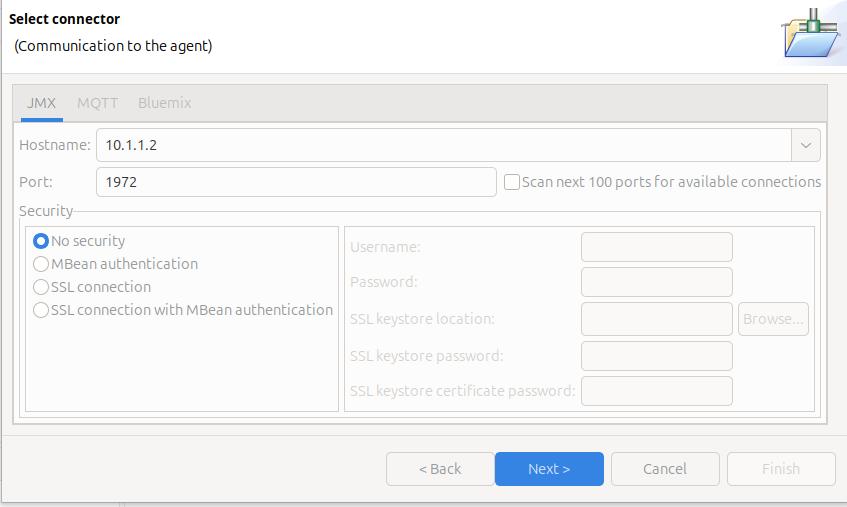
On the Select connector panel I used

Once it worked, I enabled security.

Click Next

The Health Centre then starts searching at the specified port. I disable the Scan next 100 ports… When it manages to connect to the port, click Finish.

I initially had problems connecting to the server, see Why can’t I connect to a z/OS port?

It takes a few seconds to start the data collection, and start downloading the data.

Let the JVM warm up

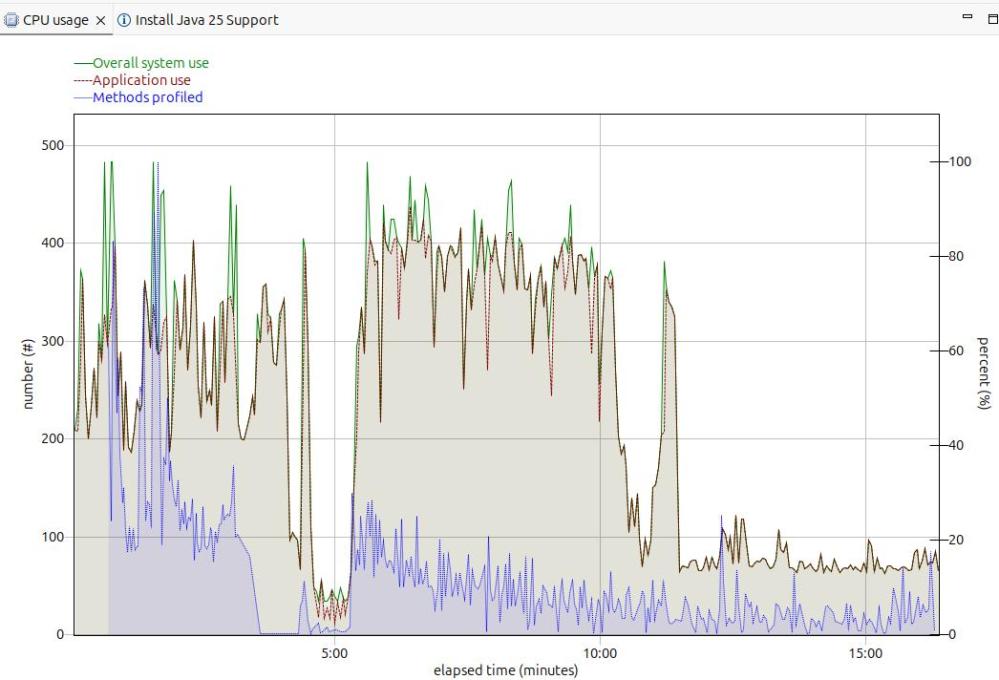
The image below shows the CPU usage from the start of the server.

For the first 5 minutes, this is the JVM starting up with no workload. Afterwards the CPU used drops to a low value.

After 5 minutes, I started my workload. For the first 12 or so minutes the CPU is high, but after about 13 minutes it levels out. If you want to do any measurements of cost per transaction you should take them from this period. During the “warm up” period, the JVM is optimising the code etc.

The green line shows the system CPU usage. The red line (and grey area) shows the Application usage. We can see most of the CPU used is application usage.

The number of methods profiled is the JVM optimising the code. It takes the “hottest” classes and does those first… until all (most) of the classes are optimised.

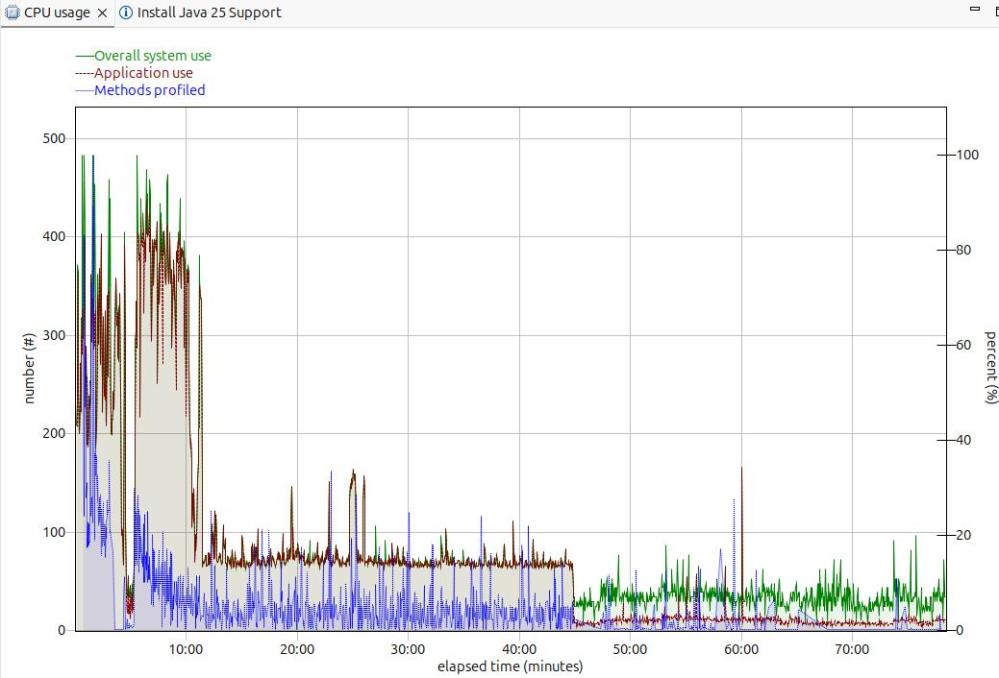
Long term monitoring.

f

From this diagram you can see the JVM startup, the initial part of my test where the JVM was warming up, the remainder of the test, and the JVM overhead after the test.

You need to take all of these into consideration when running performance tests.

Running performance tests

I set up my Work Load Manager configuration to record the number of MQ transactions, and had a report class for the MQWEB server. From this I can calculate the cost per transaction.

Health centre agent logging

With

-Dcom.ibm.diagnostics.healthcenter.logging.level=finest

I had output in the STDERR output

[06:51:52] com.ibm.diagnostics.healthcenter.Agent FINE: System receiver, version 1.0 
[06:51:52] com.ibm.diagnostics.healthcenter.Agent FINE: /usr/lpp/java/J21.0_64//lib/libhcapiplugin.so, version 1.0
[06:51:52] com.ibm.diagnostics.healthcenter.java FINE: Health Center Agent 4.0.7
06:51:53com.ibm.java.diagnostics.healthcenter.agent.mbean.HCLaunchMBean <init>
INFO: Agent version "3.0.21.202109031203"
06:51:56 com.ibm.java.diagnostics.healthcenter.agent.mbean.HCLaunchMBean startAgent
INFO: Health Center agent running in off mode.
06:51:56 com.ibm.java.diagnostics.healthcenter.agent.mbean.HCLaunchMBean startAgent
INFO: Health Center agent started on port 1972.

and in STDOUT many

com.ibm.lang.management.OperatingSystemMXBean.getTotalPhysicalMemory() 

I can’t automatically allocate a data set, and my SMS set up is not helping.

I’m running my little zD&T z/OS system on my laptop. I am the only person on this system, so I have to do every thing myself.

I started my MQ system last week, and now it is complaining that it cannot allocate archive logs. From my experience with MQ, I know this is serious. I know I have lots of space on my disks, so why can’t MQ use it.
I’ll go through the diagnostic path I took, which shows the SMS commands I used, and give the solution.

The blog post One minute SMS covers many of the concepts (and commands used).

The error messages

CSQJ072E %CSQ9 ARCHIVE LOG DATA SET 'CSQARC2.CSQ9.B0000002' HAS BEEN ALLOCATED TO NON-TAPE DEVICE AND CATALOGUED, OVERRIDING CATALOG PARAMETER                                    
IGD17272I VOLUME SELECTION HAS FAILED FOR INSUFFICIENT SPACE FOR DATA SET CSQARC2.CSQ9.A0000002 JOBNAME (CSQ9MSTR) STEPNAME (CSQ9MSTR) PROGNAME (CSQYASCP)
REQUESTED SPACE QUANTITY = 120960 KB
STORCLAS (SCMQS) MGMTCLAS ( ) DATACLAS ( )
STORGRPS (SGMQS SGBASE SGEXTEAV )
IKJ56893I DATA SET CSQARC2.CSQ9.A0000002 NOT ALLOCATED+
IGD17273I ALLOCATION HAS FAILED FOR ALL VOLUMES SELECTED FOR DATA SET
CSQARC2.CSQ9.A0000002
IGD17277I THERE ARE (247) CANDIDATE VOLUMES OF WHICH (7) ARE ENABLED OR
QUIESCED
IGD17290I THERE WERE 3 CANDIDATE STORAGE GROUPS OF WHICH THE FIRST 3 814
WERE ELIGIBLE FOR VOLUME SELECTION.
THE CANDIDATE STORAGE GROUPS WERE:SGMQS SGBASE SGEXTEAV
IGD17279I 240 VOLUMES WERE REJECTED BECAUSE THEY WERE NOT ONLINE
IGD17279I 240 VOLUMES WERE REJECTED BECAUSE THE UCB WAS NOT AVAILABLE
IGD17279I 7 VOLUMES WERE REJECTED BECAUSE THEY DID NOT HAVE SUFFICIENT
SPACE (041A041D)

Why is it using the storage class SCMQS?

From the ISMF panels,

  • option 7 Automatic Class Selection
  • option 5 Display – Display ACS Object Information

Gives a panel

   Panel  Utilities  Help                                                       
──────────────────────────────────────────────────────────────────────────────
ACS OBJECT DISPLAY
Command ===>

CDS Name : ACTIVE

ACS Rtn Source Data Set ACS Member Last Trans Last Date Last Time
Type Routine Translated from Name Userid Translated Translated
-------- ----------------------- -------- ---------- ---------- ----------
DATACLAS SYS1.S0W1.DFSMS.CNTL DATACLAS IBMUSER 2019/12/17 15:21
MGMTCLAS ----------------------- -------- -------- ---------- -----
STORCLAS SYS1.S0W1.DFSMS.CNTL STORCLAS IBMUSER 2020/12/02 11:23
STORGRP SYS1.S0W1.DFSMS.CNTL STORGRP IBMUSER 2019/12/17 15:23

So the ACS routine is in SYS1.S0W1.DFSMS.CNTL(STORCLAS)

This file has

PROC STORCLAS 
FILTLIST MQS_HLQ INCLUDE(CSQ*.**,
CSQ.**,
MQS.**,
MQS*.**)
...
SELECT
...
WHEN (&DSN = &MQS_HLQ)
DO
SET &STORCLAS = 'SCMQS'
EXIT CODE(0)
END
...
END
END

This says for any data set name (&DSN) that match the list (&MQS_HLQ) whic has CSQ* or MQS*, then set the Storage class to ‘SCMQS’

What storage groups are connected with the MQ data set?

Member SYS1.S0W1.DFSMS.CNTL(STORGRP) has

...
WHEN (&STORCLAS= 'SCMQS')
DO
SET &STORGRP = 'SGMQS','SGBASE','SGEXTEAV'
EXIT CODE(0)
END
...

so these are the storage groups that MQ data sets will use.

What DASD volumes are in the storage group?

D SMS,SG(SGbase)                             
IGD002I 13:34:38 DISPLAY SMS 699

STORGRP TYPE SYSTEM= 1
SGBASE POOL +
SPACE INFORMATION:
TOTAL SPACE = 29775MB USAGE% = 98 ALERT% = 0
TRACK-MANAGED SPACE = 29775MB USAGE% = 98 ALERT% = 0

Hows there is 29775 M allocated -and it is 98% full.

D SMS,SG(SGMQS)                                                        
IGD002I 13:31:33 DISPLAY SMS 678

STORGRP TYPE SYSTEM= 1
SGMQS POOL +
SPACE INFORMATION:
NOT AVAILABLE TO BE DISPLAYED
***************************** LEGEND *****************************
. THE STORAGE GROUP OR VOLUME IS NOT DEFINED TO THE SYSTEM
+ THE STORAGE GROUP OR VOLUME IS ENABLED
- THE STORAGE GROUP OR VOLUME IS DISABLED
* THE STORAGE GROUP OR VOLUME IS QUIESCED
D THE STORAGE GROUP OR VOLUME IS DISABLED FOR NEW ALLOCATIONS ONLY
Q THE STORAGE GROUP OR VOLUME IS QUIESCED FOR NEW ALLOCATIONS ONLY
> THE VOLSER IN UCB IS DIFFERENT FROM THE VOLSER IN CONFIGURATION
SYSTEM 1 = S0W1

There are no volumes allocated to this storage group.

What volumes are in the storage group?

D SMS,SG(SGBASE),LISTVOL                                             
IGD002I 13:39:07 DISPLAY SMS 705

STORGRP TYPE SYSTEM= 1
SGBASE POOL +
SPACE INFORMATION:
TOTAL SPACE = 29775MB USAGE% = 98 ALERT% = 0
TRACK-MANAGED SPACE = 29775MB USAGE% = 98 ALERT% = 0

VOLUME UNIT MVS SYSTEM= 1 STORGRP NAME
B3USR1 0ADA ONRW + SGBASE
USER0A + SGBASE
USER0B + SGBASE
USER0C + SGBASE
USER0D + SGBASE
USER0E + SGBASE
USER0F + SGBASE
USER00 0A9C ONRW + SGBASE
USER01 + SGBASE
USER02 0AB0 ONRW + SGBASE
USER03 0ACE ONRW + SGBASE
USER04 0AB2 ONRW + SGBASE
USER05 0AB5 ONRW + SGBASE
USER06 0A83 ONRW + SGBASE
...
+ THE STORAGE GROUP OR VOLUME IS ENABLED

How do I see how much space is available in my disks?

ISMF,

  • option 2 – Volume
  • option 1 – DASD

This gives a panel

                          VOLUME SELECTION ENTRY PANEL              Page 1 of 3
Command ===>

Select Source to Generate Volume List . . 2 (1 - Saved list, 2 - New list)
1 Generate from a Saved List Query Name To
List Name . . COLIN Save or Retrieve
2 Generate a New List from Criteria Below
Specify Source of the New List . . 1 (1 - Physical, 2 - SMS)
Optionally Specify One or More:
Enter "/" to select option Generate Exclusive list
Type of Volume List . . . 1 (1-Online,2-Not Online,3-Either)
Volume Serial Number . . USER* (fully or partially specified)
Device Type . . . . . . . (fully or partially specified)
Device Number . . . . . . (fully specified)
To Device Number . . . (for range of devices)
Acquire Physical Data . . Y (Y or N)
Acquire Space Data . . . Y (Y or N)
Storage Group Name . . . (fully or partially specified)
CDS Name . . . . . . .
(fully specified or 'Active')
Use ENTER to Perform Selection; Use DOWN Command to View next Selection Panel;
Use HELP Command for Help; Use END Command to Exit.

or

        Enter "/" to select option      Generate Exclusive list                 
Type of Volume List . . . 1 (1-Online,2-Not Online,3-Either)
Volume Serial Number . . * (fully or partially specified)
Device Type . . . . . . . (fully or partially specified)
Device Number . . . . . . (fully specified)
To Device Number . . . (for range of devices)
Acquire Physical Data . . Y (Y or N)
Acquire Space Data . . . Y (Y or N)
Storage Group Name . . . SGBASE (fully or partially specified)
CDS Name . . . . . . . 'ACTIVE'
(fully specified or 'Active')

You can specify a Volume Serial prefix, a Storage Group Name, or a combination of both.

You need to select Acquire Physical Data, and Acquire Space Data.

You get output like

 LINE       VOLUME FREE       %     ALLOC      FRAG   LARGEST    FREE     
OPERATOR SERIAL SPACE FREE SPACE INDEX EXTENT EXTENTS ... ...
---(1)---- -(2)-- ---(3)--- (4)- ---(5)--- -(6)- ---(7)--- --(8)--
B3USR1 149186K 2 8165315K 375 34032K 36
USER00 67067K 1 8247434K 718 2490K 133
USER02 30601K 1 2740899K 412 11621K 31
USER03 3209K 0 2768291K 333 2213K 6
USER04 146198K 5 2625302K 280 42332K 19
USER05 64466K 2 2707034K 9 63802K 3
USER06 273304K 10 2498196K 177 105581K 14

Which shows I do not have much free space.

Add more space

As it looks like my storage group pools are low on disk space, I need to allocate more volumes.

See Adding more disk space to z/OS, creating volumes and adding them to SMS.

Once I added the volume to the SGBASE storage group, it usage went from

TOTAL SPACE = 29775MB USAGE% = 98 ALERT% = 0                      
TRACK-MANAGED SPACE = 29775MB USAGE% = 98 ALERT% = 0

to

TOTAL SPACE = 32482MB USAGE% = 89 ALERT% = 0                      
TRACK-MANAGED SPACE = 32482MB USAGE% = 89 ALERT% = 0

What CEA TSO operator commands are there?

Part of the CEA facility service on z/OS, provides the capability for an application to start TSO address spaces, send it TSO commands, and receive the responses. This is used by products lie z/OSMF. You can have a CEA TSO address spaces for a user, as well as a “normal” TSO userid, where you logon and use ISPF.

More information about the commands

Change the CEA parameters F CEA,CEA=(x1,x2,…xN)

Display the CEA configuration parameters F CEA,D,P

STATUS: ACTIVE-FULL      CLIENTS: 0  INTERNAL: 0            
CEA = (00)
SNAPSHOT = N
HLQLONG = CEA HLQ =
BRANCH = COUNTRYCODE =
CAPTURE RANGE FOR SLIP DUMPS:
LOGREC = 01:00:00 LOGRECSUMMARY= 04:00:00
OPERLOG = 00:30:00
CAPTURE RANGE FOR ABEND DUMPS:
...
CAPTURE RANGE FOR CONSOLE DUMPS:
...
TSOASMGR:
RECONSESSIONS = 0 RECONTIME = 00:00:00
MAXSESSIONS = 50 MAXSESSPERUSER= 10

Display a summary of CEA TSO regions F CEA,D,S

STATUS: ACTIVE-FULL      CLIENTS: 0  INTERNAL: 0         
EVENTS BY TYPE: #WTO: 0 #ENF: 0 #PGM: 0
TSOASMGR: ALLOWED: 50 IN USE: 1 HIGHCNT: 0

Display client summary F CEA,D,CLIENTSUMMARY and D CEA,CLIENT=*

STATUS: ACTIVE-FULL      CLIENTS: 0  INTERNAL: 0                   
EVENTS BY TYPE: #WTO: 0 #ENF: 0 #PGM: 0
TSOASMGR: ALLOWED: 50 IN USE: 1 HIGHCNT: 0
NO CLIENTS KNOWN TO CEAS AT THIS TIME
12I CN=L700 DEVNUM=0700 SYS=S0W1

Display the session information F CEA,DIAG,SESSTABLE

INDEX=0001 USERID=COLIN    APPID=IZUCONAP ASID=004E MSGQID=00060018                       
COUNT=0001 ASCBADDR=FC3B80 STOKEN=0000013800000009 STTIME=15:34:43.966
LRTIME=15:34:43.967 LOGONPROC=IZUFPROC GROUP= REGION=50000
CODEPG=1047 CHARSET=697 ROWS=204 COLS=160 RECONN=N RCTIME=00:00:00.000
ACCT=ACCT#
HOST REMOTESYS= REMOTEQID=00000000 CALLERSYS=

This shows information like the TSO LOGON procedure used, the screen size,the region size and the account number.

Mapping a certificate to a userid and so avoid needing a password is good – but…

You can use the RACDCERT MAP command to map a certificate to a userid, and so avoid the need for specifying a password. Under the covers code uses the pthread_security_np and pass a certificate, or a userid and password, and if validated, the thread becomes that userid, just the same as if the userid was logged on.

Is this secure?

If you store a userid and password on your laptop, even though the data may be “protected” someone who has access to your machine may be able to copy the file and so impersonate you.

With a public certificate and private key, if someone can access your machine, they may be able to copy these files and so impersonate you.

You can get dongles which you plug into your laptop on which you can store protected data. In order to use the data, you need the physical device.

You need to protect the RACF command

Because the RACFCERT command has the power to be dangerous, you need to protect it.

You do not want someone to specify their certificate maps to a powerful userid, such as SYS1. The documentation says

To issue the RACDCERT MAP command, you must have the SPECIAL attribute or sufficient authority to the IRR.DIGTCERT.MAP resource in the FACILITY class for your intended purpose.

For a general user to create a mapping associated with their own user ID they need READ access to IRR.DIGTCERT.MAP.

For a general user to create a mapping associated with another user ID or MULTIID, they need need UPDATE access to IRR.DIGTCERT.MAP.

What’s the best way to set this up?

I think that as part of your process for setting up userids, the process should create the mapping for the certificate to a userid. This way you do not have people creating the mapping. If a mapping already exists, you cannot create another mapping.

You may want an automated process which checks the approval, and issues the commands, and so you do not have humans with the authority to issue the commands.

Of course you’ll have a break-glass all powerful userid in case of emergencies.

But….


Even though the password had expired, I could logon using the certificate. If I revoked the userid the logon failed.

I used certificate logon from z/OSMF and issued console commands. The starts a TSO address space, and z/OSMF passes the commands and responses to the tso address space.

Once a TSO address space has been started, there are no more checks to see if the userid is still valid.

If you want to inactivate the userid, you’ll need to revoke it, and then cancel all the TSO address spaces running on behalf of the userid. Walking someone off site is not good enough. There may be scripts which are automated, and will logon with no human intervention.
TSO address spaces may be configured to be cancelled if there is no activity. If the TSO address space is kept busy, (for example by sending it requests) it may never be forced off.

Getting a CTRACE

Component TRACE (CTRACE) is the z/OS system trace capability for z/OS components. Most z/OS components use it.

From “capturing a trace” perspective, there are two aspects.

  • Capturing the trace data
    • The trace can be an in-memory trace, which is available when a dump is taken. This is is often the default. For example by default a trace is enabled to capture errors, and the in-memory trace is used.
    • You can have a trace writer started task which writes to a data set. When you start the trace you give the name of the started task. Data is passed to the trace writer job. You can then use the trace data set in IPCS.
  • Enabling the trace for the component. Usually there are options you can specify, for example all entries, or just error entries and how big the in-memory trace should be.

To trace a z/OS component, you need to know the CTRACE component name, and what you want to trace.

I tried to capture a CTRACE of a z/OS component, and struggled, because I didn’t know the name of the component.

What are the trace component names?

The z/OS command

TRACE STATUS         

gave

IEE843I 16.10.22  TRACE DISPLAY 940                               
SYSTEM STATUS INFORMATION
ST=(ON,0001M,00005M) AS=ON BR=OFF EX=ON MO=OFF MT=(ON,064K)
COMPONENT MODE COMPONENT MODE COMPONENT MODE COMPONENT MODE
--------------------------------------------------------------
CSF ON NFSC ON SYSGRS MIN SYSANT00 MIN
SYSJES2 SUB SYSRRS MIN SYSIEAVX MIN SYSSPI OFF
SYSJES SUB SYSHZS MIN SYSSMS OFF SYSAXR MIN
SYSDLF MIN SYSOPS MIN SYSXCF MIN SYSDUMP ON
SYSLLA MIN SYSXES ON SYSUNI OFF SYSCATLG MIN
SYSTTRC OFF SYSTCPDA SUB SYSRSM SUB SYSAOM MIN
SYSVLF MIN SYSTCPIP SUB SYSLOGR ON SYSOMVS MIN
SYSCEA MIN SYSWLM MIN SYSTCPIS SUB SYSTCPRE SUB
SYSIOS MIN SYSANTMN MIN SYSDMO MIN SYSIEFAL ON
SYSTCPOT SUB

I was after a CEA trace, and from the above, the name is SYSCEA. It is MIN, so is already active.

What is the trace’s status?

d trace,comp=SYSCEA

gave me

COMPONENT     MODE BUFFER HEAD SUBS                           
-------------------------------------------------------------
SYSCEA MIN 0002M
ASIDS *NONE*
JOBNAMES *NONE*
OPTIONS ERROR
WRITER *NONE*

So it is active, capturing errors, and writing to the in-memory trace (because there is no WRITER). I recognised the options as the defaults in parmlib member CTICEA00.

I had my own trace writer started task

Member CTWTR in proclib

//CTWTR PROC                                                                  
//DELETE EXEC PGM=IEFBR14
//TRCOUT01 DD DSNAME=IBMUSER.CTRACE1,
// SPACE=(CYL,(10),,CONTIG),DISP=(MOD,DELETE)
//*
//IEFPROC EXEC PGM=ITTTRCWR,TIME=999
//TRCOUT01 DD DSNAME=IBMUSER.CTRACE1,
// SPACE=(CYL,(10),,CONTIG),DISP=(NEW,CATLG)
//SYSPRINT DD SYSOUT=*

I started my CTRACE writer

TRACE CT,WTRSTART=CTWTR          

I created my own member CTICEACP in parmlib

TRACEOPTS 
ON
BUFSIZE(20m)
OPTIONS('ALL')
WTR(CTWTR)

The WTR ties up with my CTRACE writer started task name.

Stop the current trace

TRACE CT,OFF,COMP=SYSCEA

Start the CEA trace using my member

TRACE CT,ON,COMP=sysCEA,PARM=CTICEACP

Run the test

Stop the CEA trace

TRACE CT,OFF,COMP=SYSCEA

Stop the trace writer

TRACE CT,WTRSTOP=CTWTR     

The output from the CTWTR task gave me

IEF196I IEF142I CTWTR CTWTR - STEP WAS EXECUTED - COND CODE 0000         
IEF196I IGD104I IBMUSER.CTRACE1 RETAINED,
IEF196I DDNAME=TRCOUT01

which gives me the name of the data set IBMUSER.CTRACE1.

Use IPCS to look at the trace

  • option =0 to specify the name of the data set
  • =6
  • dropd
  • The above command clears out any old information about the data set
  • CTRACE COMP(SYSCEA) full

I had some data in the trace – but not for the problem I had…. so I need to try something else.

The advanced class.

You do not need to have a member in parmlib. You can use

TRACE CT,ON,COMP=SYSCEA

and do not specify a PARM. This will then prompt for the parameters, asid, jobname, writer and options.