By default each request is a single shot, nothing is retained (such as a Java Web Token) so you need to enter your credentials every time.
However, HTTPie also supports persistent sessions via the --session=SESSION_NAME_OR_PATH option. In a session, custom HTTP headers (except for the ones starting with Content- or If-), authentication, and cookies (manually specified or sent by the server) persist between requests to the same host.
Named sessions
You can create one or more named session per host. For example, this is how you can create a new session named user1
http --session=user1 -a user1:password ....
From now on, you can refer to the session by its name (user1). When you choose to use the session again, all previously specified authentication or HTTP headers will automatically be set.
Plugins
There are plugins available see here. For example authentication
The HTTPD web server is the Apache web server ported to run on z/OS. It runs in Unix Services, and behaves like a proper z/OS program, for example it can use z/OS userids and keyrings.
The configuration is easy, it is text driven (rather than XML), can imbed other configuration files, and can substitute variables.
I found the Apache documentation was as good, but the z/OS documentation was not very good. I prefer baby steps, taking the smallest system and adding functions, rather than configure everything and be disappointed when fails to work.
This post follows on Getting started with httpd server on z/OS and describes how to configure your first web page. Other posts on HTTPD server
I like to keep any changes I make to a configuration file, in a different file, and include this file in the original file. This way, if the original file changes, I just have to add the include statement rather than “diff” the my config file with the new config file. I also like to logically group changes, so my TLS configuration are in the tls.conf file, my definitions for port 8800 are in a file 8800.conf.
This should prompt for userid and password, and display the status of the server. The web browsers remember the userid and password, so if you want to reuse the page it will not prompt you for the userid and password. To change to a different userid and password you will need to restart the browser.
While playing with pages and logging on, I found the curl request
a good way of checking the page out, and logging on each time, as the password is not saved.
If you get
BPXP015I HFS PROGRAM /usr/lpp/ihsa_zos/bin/httpd IS NOT MARKED PROGRAM CONTROLLED. BPXP014I ENVIRONMENT MUST BE CONTROLLED FOR SERVER (BPX.SERVER) PROCESSING.
You need to use the command
extattr +p /usr/lpp/ihsa_zos/bin/httpd
Create your a virtual host (container)
The HTTPD server can support multiple ports, and treat them as isolated environments. These are known as Virtual Hosts.
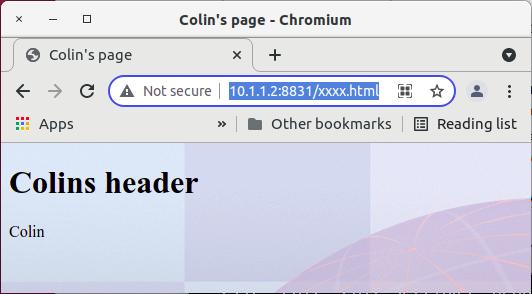
In my colin.conf I add
Include conf/vhost8831.conf
I created a file vhost8831.conf
Listen 8831 <VirtualHost *.8831>
<Location /xxxx.html>
#ServerName Colins.com AuthName colinvh AuthType Basic AuthBasicProvider saf #Require valid-user
I found cURL a good way of using the mq REST API, but I wanted to do more. cURL depends on a package called libcurl, which can be used by other languages.
Python seemed the next obvious place to look.
As I have found out, using digital certificates for authentication is hard to set up, and using signed certificates is even harder. As I had done the hard work of setting up the certificates before I tried curl and Python, the curl and Python experience was pretty easy.
I looked at using the Python “request” package. This allows you to specify most of the parameters that libcurl needs, except it does not allow you to specify the password for the user’s keystore.
I then looked at the Python package pycurl package. This is a slightly lower level API, but got it working in an hour or so.
My whole program is below.
During the testing I got various errors, such as “77”. These are documented here.
The messages were clear, for example
CURLE_SSL_CACERT_BADFILE (77) Problem with reading the SSL CA cert (path? access rights?).
Which was enough to tell me where to look.
All the things you can do with curl, you can do with pycurl.
# program - based on code in http://pycurl.io/docs/latest/quickstart.html
import sys
import pycurl

from io import BytesIO

# header_function take from http://pycurl.io/docs/latest/quickstart.html
headers = {}
def header_function(header_line):
# HTTP standard specifies that headers are encoded in iso-8859-1.

header_line = header_line.decode('iso-8859-1')

# Header lines include the first status line (HTTP/1.x ...).
# We are going to ignore all lines that don't have a colon in them.
# This will botch headers that are split on multiple lines...
if ':' not in header_line:
  return

# Break the header line into header name and value.
name, value = header_line.split(':', 1)
print("header",name,value)

home = "/home/colinpaice/ssl/ssl2/"
ca=home+"cacert.pem"
cert=home+"testuser.pem"
key=home+"testuser.key.pem"
cookie=home+"cookie.jar.txt"
url="https://127.0.0.1:9443/ibmmq/rest/v1/admin/qmgr/QMA/queue/CP0000?attributes=type"
buffer = BytesIO()
c = pycurl.Curl()
print("C=",c)
try:
  # see option names here https://curl.haxx.se/libcurl/c/curl_easy_setopt.html
  # PycURL option names are derived from libcurl
  # option names by removing the CURLOPT_ prefix.
  c.setopt(c.URL, url)
  c.setopt(c.WRITEDATA, buffer)
  c.setopt(pycurl.CAINFO, ca)
  c.setopt(pycurl.CAPATH, "")
  c.setopt(pycurl.SSLKEY, key)
  c.setopt(pycurl.SSLCERT, cert)
  c.setopt(pycurl.SSL_ENABLE_ALPN,1)
  c.setopt(pycurl.HTTP_VERSION,pycurl.CURL_HTTP_VERSION_2_0)
  c.setopt(pycurl.COOKIE,cookie)
  c.setopt(pycurl.COOKIEJAR,cookie)
  c.setopt(pycurl.SSLKEYPASSWD , "password")
  c.setopt(c.HEADERFUNCTION, header_function)
# c.setopt(c.VERBOSE, True)
  c.perform()
  c.close()
except Exception as e:
  print("exception :",e )
finally:
  print("done")
body = buffer.getvalue() # Body is a byte string.
# We have to know the encoding in order to print it to a text file
# such as standard output.
print(body.decode('iso-8859-1'))


 ColinPaice