Jump up and down: Do not give userids access to resources!

I am doing some work connecting subsystems together. The documentation for all the products involved, describe giving a userid permission to access to a resource.

This is not best practice. Like many things it will be obvious once you understand it. You need to look at the bigger pictures.
The documentation says for userids who want to use “this”, give them access to the profile “…”. What’s wrong with that?

  • If you have a department of 1000 people, giving them all access to the resource will be tedious
  • There are likely to be several resources people need access to, so connecting these 1000 userids to multiple resources will be even more tedious.
  • Someone joins your department – so you need to connect their userid to the long list of groups.
  • Someone leaves your department – you cannot trivially ask what resources can this userid access – you have to look at the access list for each resource and remove the userid from the group.

You most probably have groups set up already. Rather than give the userid access, give the group access to the resource.

If someone joins your group – you connect their userid to the groups – and they have access. If someone leaves your department, remove them from the groups – and they no longer have access to the resources.

You my want to support a new product… That’s easy – give the group(s) access to the resources – and the people will auto-magically get access.

As I said it is obvious once you see it.

Do not give userids access to resources – give groups access, and connect the userid to the group. I’ll go and raise documentation comments on the products’ documentation.

Setting up ICSF security for commands and APIs

The documentation for ICSF and securing access to keys is hard to follow. There is a lot of it, but is not easily consumed.

There are two orthogonal aspects of ICSF security

  • Giving permission for a userid to use CSFKGUP utility, the ICSF ISPF panels, or the ICSF API. For example they can use list, but not define.
  • Give permissions to groups of keys. You can define keys with names like DSENCR* have more controls that ANYONE*

There are different levels of granularity for ICSF security.

  • The default is no security – you need to define profiles to protect ICSF resources
  • There is on|off security. If you have any security you can do anything
  • Then there is granular security. You can control down to the operation type.

This blog post is about setting up security for ICSF before you start defining keys.

ICSF security for commands and APIs

The approach to security for ICSF seems to be every one has access unless you take action to define security!

The CSFKGUP utility.

There is a master switch – if this profile exists then do more checks. If this profile does not exist any userid can use CSFKGUP commands to maintain keys. You need to set up Optional SAF checking for KGUP.

RDEFINE XFACILIT CSF.KGUP.VERB.AUTHORITY.CHECK UACC(NONE) 
SETR RACLIST(XFACILIT) REFRESH

RDEFINE CSFSERV CSFKGUP UACC(NONE) WARNING
PERMIT CSFKGUP CLASS(CSFSERV) id(IBMUSER) ACCESS(READ)
SETR RACLIST(CSFSERV ) REFRESH
/*

With the above security setup anyone with read access to the CSFKGUP in class(CSFSERV) gets access to all of the CSFKGUP commands (not just read operations).

This is another master switch, to check the keys security. Its presence or absence controls its use. I had security set up for a key, and with warning mode, which allows the request, and gives a warning message on the console.

RDEFINE XFACILIT CSF.KGUP.CSFKEYS.AUTHORITY.CHECK UACC(NONE)
SETR RACLIST(XFACILIT) REFRESH

Now when I try to delete key SECKEY2 I got

ICH408I USER(IBMUSER ) GROUP(SYS1 ) ...
SECKEY2 CL(CSFKEYS )
WARNING: INSUFFICIENT AUTHORITY - TEMPORARY ACCESS ALLOWED
FROM SEC* (G)
ACCESS INTENT(CONTROL) ACCESS ALLOWED(NONE )

and when I defined a key SECKEY2

ICH408I USER(COLIN   ) GROUP(SYS1    ) NAME(###################
SECKEY2 CL(CSFKEYS )
WARNING: INSUFFICIENT AUTHORITY - TEMPORARY ACCESS ALLOWED
ACCESS INTENT(CONTROL) ACCESS ALLOWED(NONE )

If there is no matching CSFKEYS profile, the userid will be allowed access. When I defined a key ZZZKEY, it worked because there was no matching security profile.

You should define a minimum of

RDEFINE CSFKEYS   C*      AUDIT(ALL) 
PERMIT * CLASS(CSFKEYS) ID(COLIN ) ACCESS(READ)
SETR RACLIST(CSFKEYS ) REFRESH

ISPF ICSF access

You can control which userids can manage ICSF using the ISPF interface. Behind the ISPF interface is code which issues ICSF APIs. You can protect the API calls.

You need to define a resource like

RDEFINE CSFSERV CSFKDSL .... 

and give the userid read access to it.

FunctionThe resources needed
List the contents of a PKDS or CKDSCSFKDSL – list
CSFKDMR – read meta data
CSFKRR2 – read record
Define an AES KeyCSFKRR2 – read record
CSFKGN – key generate
CSFKGN2 – key generate 2
CSFKRC2 -record create 2
CSFKRD – delete record
List the contents of a CKDS elementCSFBRCK
List the contents of a PKDS elementCSFBRPK
Delete a CKDS recordCSFBRCK – control access

The functions and the SAF resource names are defined here.

To define a symmetric cipher key, I needed CONTROL access to the CLASS(CSFKEYS) profile for the key.

Setting up ICSF security for access to keys.

The documentation for ICSF and securing access to keys is hard to follow. There is a lot of it, but is not easily consumed. The security model has evolved over time, and I found the definitions confusing.

There are two orthogonal aspects of ICSF security

  • Giving permission for a userid to use CSFKGUP utility, the ICSF ISPF panels, or the ICSF API. For example they can use list, but not define.
  • Give permissions to groups of keys. You can define keys with names like DSENCR* have more controls that ANYONE*.

There are different levels of granularity for ICSF security.

  • The default is no security – you need to define profiles to protect ICSF resources
  • There is on|off security. If you have any security you can do anything
  • Then there is granular security. You can control down to the operation type.

This blog post is about setting up security to protect keys.

“Required” definitions

You should define the profile below to give you granular controls.

RDEFINE XFACILIT CSF.CKDS.TOKEN.CHECK.LABEL.FAIL 
SETROPTS RACLIST(XFACILIT) REFRESH

If the profile CSF.CKDS.TOKEN.CHECK.LABEL.FAIL is defined, a userid needs the appropriate access to the CSFKEYS profile:

  • READ authority to read a label from the CKDS,
  • UPDATE authority if creating a label,
  • CONTROL authority if writing to or deleting a label.

A userid will also need access to the ICSF commands or APIs to be able to use the key.

If the CSF.CKDS.TOKEN.CHECK.LABEL.FAIL profile is not defined, and the userid has at least read access to a profile for the key, the userid can create, write or delete a label. If there is no profile for the key the userid has access to the key.

If you define the profile RDEFINE XFACILIT CSF.CKDS.TOKEN.CHECK.LABEL.WARN instead of CSF.CKDS.TOKEN.CHECK.LABEL.FAIL, and the userid has at least read access to a profile, the userid can create, write or delete a label. In addition it produces a warning message.

This feels like the same as RDEFINE XFACILIT CSF.CKDS.TOKEN.CHECK.LABEL.FAIL WARNING, so I do not see why RDEFINE XFACILIT CSF.CKDS.TOKEN.CHECK.LABEL.WARN is needed.

“Required” access control for exporting keys.

If you want to control who can export AES and DES keys you can enable this by defining a profile

RDEFINE XFACILIT CSF.XCSFKEY.ENABLE.AES
RDEFINE XFACILIT CSF.XCSFKEY.ENABLE.DES
SETROPTS RACLIST(XFACILIT) REFRESH

This turns on the checking system wide, you do not need to give any userid access to it.

To protect the export of all keys,

RDEFINE XCSFKEY * UACC(NONE)
PERMIT * CLASS(XCSFKEY) ID(SECADMN) ACCESS(UPDATE)
SETROPTS RACLIST(XFCSFKEY) REFRESH

You can generate individual or generic profiles for specific keys.

This security model feels broken, as I can read a key from the CKDS (encrypted with the hardware keys) write it to a file. Send the file to a remote system, and if they remote system has the same hardware keys, write the key to the CKDS. I still need access to read and write the key – but I do not use the XCSFKEY profile.

Defining profiles

The easy bits

You can define a standard security resource, such as

RDEFINE CSFKEY COLINSKEY ...
PERMIT  COLINSKEY CLASS(CSFKEY) ID(...) ACCESS(...)

Where COLINSKEY is the label of an entry in the CKDS or the PKDS. This can be a CIPHER key or a KEK key.

If there is no matching profile, there are no restrictions, so you may want to define a default

RDEFINE CSFKEY * UACC(NONE) AUDIT(ALL) warning

Where AUDIT(ALL) says report every time it is used, and WARNING reports if there is a security violation and gives access anyway. You can then use the information to create more specific profile. Once you have configured security you can remove the warning option, and protect your resources.

You need to specify access:

  • READ to be able to read the profile
  • UPDATE authority if creating a label,
  • CONTROL authority if writing to or deleting a label.

But see “Required” definitions and the CSF.CKDS.TOKEN.CHECK.LABEL.FAIL to enable the granular access. Without the CSF.CKDS.TOKEN.CHECK.LABEL.FAIL profile, if a userid has at least read access to the CSFKEY profile, it can do anything with it. If there is no profile for the key, any userid can do anything with the key.

Which profile is used?

There are different ways of using a key (especially with APIs)

  1. Use the label character string of a key in the CKDS. You can pass a label into an API request. The label name is used in the security checks.
  2. You can read the token from the CKDS using the label, and pass the token (a long string of internal format data) to an API request. ICSF compares the token with the CKDS and if it locates a record with the same key value – it uses the label of the record in the security checks.
  3. You can get the token from elsewhere, for example read a data set. The same checks are done as in 2. above.
  4. If a record with the same key value was not found in the CKDS, (so you are using a key which your CKDS does not know about)
    • If the profile CSF.CKDS.TOKEN.CHECK.LABEL.WARN or CSF.CKDS.TOKEN.CHECK.LABEL.FAIL in class(XFACILIT) is defined, and profile CSF.CKDS.TOKEN.CHECK.DEFAULT.LABEL in class(XFACILIT) is defined, then check the userid’s permission to profile CSF-CKDS-DEFAULT in class(CSFKEYS). See here.

What access do I need to the profile?

If you have CONTROL access to CSFBRCK CLASS(CSFSERV), and CONTROL access to the key’s profile SECKEY2 CL(CSFKEYS) you can delete the key SECKEY2.

If you have ALTER (more powerful than CONTROL) access to CSFBRCK CLASS(CSFSERV), the CSFKEYS profile is ignored you can delete any key.

You might want to give administrator only CONTROL access to the commands and APIs.

Using PKI Server with the HTTPD web interface.

This post follows on from configuring PKI Server, and explains how to configure the HTTPD server, explains how to use it, and gives some hints on debugging it when it goes wrong.

Having tried to get this working (and fixing the odd bug) I feel that this area is not as well designed as it could have been, and I could not get parts of it to work.

For example

  • You cannot generate browser based certificate request because the <keygen> html tag was removed around 2017, and the web page fails. See here. You can use 1-Year PKI Generated Key Certificate instead, so not a big problem now we know.
  • The TLS cipher specs did not have the cipher specs I was using.
  • I was expecting a simple URL like https://10.1.1.2/PKIServer/Admin. You have to use https://10.1.1.2/PKIServ/ssl-cgi-bin/camain.rexx, which exposes the structure of the files. You can go directly go to the Admin URL using https://10.1.1.2/PKIServ/ssl-cgi-bin/auth/admmain.rexx, which is not very elegant.
  • For an end user to request a certificate you have to use https://10.1.1.2/Customers/ssl-cgi-bin/camain.rexx.
  • There seem to be few security checks.
    • I managed to get into the administrative panels and display information using a certificate mapping to a z/OS userid, and with no authority!
    • There are no authority checks for people requesting a certificate. This may not be an exposure as the person giving the OK should be checking the request.
    • There were no security checks for administration functions. (It is easy to add them).
  • You can configure HTTPD to use certificates for authentication and fall back to userid and password.
  • There is no FallbackResource specified. This is a default page which is displayed if you get the URL wrong.
  • The web pages are generated dynamically. These feel over engineered. There was a problem with one of the supplied pages, but after some time trying to resolve the problem, I gave up.

I’ll discuss how to use the web interface, then I’ll cover the improvements I made to make the HTTP configuration files meet my requirements, and give some guidance on debugging.

You may want to use a HTTPD server just for PKI Server, or if you want to share, then I suggest you allocate a TLS port just for PKI Server.

URL

The URL looks like

https://10.1.1.2:443/PKIServ/ssl-cgi-bin/camain.rexx

where (see Overview of port usage below for more explanation)

  • 10.1.1.2 is the address of my server
  • port 443 is for TLS with userid and password authentication
  • PKIServ is the part of the configuration. If you have multiple CA’s this will be CA dependant.
  • ssl-cgi-bin is the “directory” where …
  • camain.rexx the Rexx program that does the work.

With https:10.1.1.2:443/Customers/ssl-cgi-bin/camain.rexx this uses the same camain.rexx as for PKIServ, but in the template for displaying data, it uses a section with the same name (Customers) as the URL.

Overview of port usage

There are three default ports set up in the HTTPD server for PKI Server. I found the port set-up confusing, and not well document. I’ve learned (by trial and error) that

  • port 80 (the default for non https requests) for unauthenticated requests, with no TLS session protection. All data flows as clear text. You many not want to use port 80.
  • port 443 (the default for https requests) for authentication with userid and password, with TLS session protection
  • port 1443 for certificate authentication, with TLS Session protection. Using https://10.1.1.2:443/PKIServ/clientauth-cgi/auth/admmain.rexx, internally this gets mapped to https://10.1.1.2:1443/PKIServ/clientauth-cgi-bin/auth/admmain.rexx. I cannot see the need for this port and its configuration.

and for the default configuration

  • port:/PKIServ/xxx is for administrators
  • port:/Customers/xxx is for an end user.

and xxx is

  • clientauth-cgi. This uses TLS for session encryption. Port 1443 runs with user SAFRunAs PKISERV. All updates are done using the PKISERVD userid, this means you do not need to set up the admin authority for each userid. There is no security checking enabled. I was able to process certificates from a userid with no authority!
  • ssl-cgi-bin. This uses port TLS and 443. I had to change the file to be SAFRunAs %%CERTIF%% as $$CLIENT$$ is invalid. You have to give each administrator ID access to the appropriate security profiles.
  • public-cgi. This is used by some insecure requests, such as print a certificate.

I think the only one you should use is ssl-cgi-bin.

Accessing the services

You can start using

These both give a page with

  • Administration Page. This may prompt for your userid and password, and gives you a page
  • Customer’s Home Page. This gives a page https://10.1.1.2/Customers/ssl-cgi-bin/camain.rexx? called PKI Services Certificate Generation Application. This has functions like
    • Request a new certificate using a model
    • Pickup a previously requested certificate
    • Renew or revoke a previously issued browser certificate

Note: You cannot use https://10.1.1.2:1443/PKIServ/ssl-cgi-bin/camain.rexx, as 1443 is not configured for this. I could access the admin panel directly using https://10.1.1.2:1443/PKIServ/ssl-cgi-bin/auth/admmain.rexx

I changed the 443 definition to support client and password authentication by using

  • SSLClientAuth Optional . This will cause the end user to use a certificate if one is available.
  • SAFRunAs %%CERTIF%% . This says use the Certificate authentication when available, if not prompt for userid and password.

Certificate requests

I was able to use the admin interface and display all certificate requests.

Request a new certificate using a model.

I tried to use the model “1 Year PKI SSL Browser Certificate“. This asks the browser to generate a private/public key (rather than the PKIServer generating them). This had a few problems. Within the page is a <KEYGEN> tag which is not supported in most browsers. It gave me

  • The field “Select a key size” does not have anything to select, or type.
  • Clicking submit request gave me IKYI003I PKI Services CGI error in careq.rexx: PublicKey is a required field. Please use back button to try again or report the problem to admin person to

I was able to use a “1 Year PKI Generated Key Certificate

The values PKIServ and Customer are hard-coded within some of the files.

If you want to use more than one CA, read z/OS PKI Services: Quick Set-up for Multiple CAs. Use this book if you want to change “PKIServ” and “Customer”.

Colin’s HTTPD configuration files.

Because I had problems with getting the supplied files to work, I found it easier to restructure, parameterise and extend the provided files.

I’ve put these files up to github.

Basic restructure

I restructured and parametrised the files. The new files are

  • pki.conf. You edit this to define your variables.
  • 80.conf contains the definitions for a general end user, not using TLS. So the session is not encrypted. Not recommended.
  • 443.conf the definitions for the TLS port. You should not need to edit this while you are getting started. If you want to use multiple Certificate Authorities, then you need to duplicate some sections, and add definitions to the pki.conf file. See here.
  • 1443.conf the definitions for the TLS port for the client-auth path. You should not need to edit this while you are getting started. If you want to use multiple Certificate Authorities, then you need to duplicate some sections, and add definitions to the pki.conf file. See here.
  • Include conf/pkisetenv.conf to set some environment variables.
  • pkissl.conf. The SSL definitions have been moved to this file, and it has an updated list of cipher specs.

The top level configuration file pki.conf

The top level file is pki.conf. It has several sections

system wide

# define system wide stuff
# define my host name

Define sdn 10.1.1.2
Define PKIAppRoot /usr/lpp/pkiserv
Define PKIKeyRing START1/MQRING
Define PKILOG “/u/mqweb3/conf”

# The following is the default
#Define PKISAFAPPL “OMVSAPPL”
Define PKISAFAPPL “ZZZ”
Define serverCert “SERVEREC”
Define pkidir “/usr/lpp/pkiserv”

#the format of the trace entry
Define elf “[%{u}t] %E: %M”

Defined the CA specific stuff

# This defines the path of PKIServ or Customers as part of the URL
# This is used in a regular expression to map URLs to executables.
Define CA1 PKIServ|Customers
Define CA1PATH “_PKISERV_CONFIG_PATH_PKIServ /etc/pkiserv”

#Define the port for TLS
Define CA1Port 443

# specify the groups which can use the admin facility
Define CA1AdminAuth ” Require saf-group SYS1 “

other stuff

LogLevel debug
ErrorLog “${PKILOG}/zzzz.log”
ErrorLogFormat “${elf}”
# uncomment these if you want the traces
#Define _PKISERV_CMP_TRACE 0xff
#Define _PKISERV_CMP_TRACE_FILE /tmp/pkicmp.%.trc
#Define _PKISERV_EST_TRACE 0xff
#Define _PKISERV_EST_TRACE_FILE /tmp/pkiest.%.trc

#Include the files
Include conf/80.conf
Include conf/1443.conf
Include conf/443.conf

The TLS configuration file

The file 443.conf has several parts. It uses the parametrised values above, for example ${pkidir} is substituted with /usr/lpp/pkiserv/. When getting started you should not need to edit this file.

Listen ${CA1Port}
<VirtualHost *:${CA1Port}>

#define the log file for this port
ErrorLog “${PKILOG}/z${CA1Port}.log


DocumentRoot “${pkidr}”
LogLevel Warn
ErrorLogFormat “${elf}”

Include conf/pkisetenv.conf
Include conf/pkissl.conf
KeyFile /saf ${PKIKeyRing}
SSLClientAuth Optional
#SSLClientAuth None

RewriteEngine On

# display a default page if there are problems
# I created it in ${PKIAppRoot}/PKIServ,
# (/usr/lpp/pkiserv/PKIServ/index.html)
FallbackResource “index.html”

Below the definitions for one CA are defined. If you want a second CA, then duplicate the definitions,and change CA1 to CA2.

Notes on following section.

# Start of definitions for a CA

<IfDefine CA1>
SetEnv ${CA1PATH}
RewriteRule ¬/(${CA1})/ssl-cgi/(.) https://${sdn}/$1/ssl-cgi-bin/$2 [R,NE]

RewriteRule ¬/(${CA1})/clientauth-cgi/(.) https://${sdn}:1443/$1/clientauth-cgi-bin/$2 [R,NE,L]
ScriptAliasMatch ¬/(${CA1})/adm(.).rexx(.) “${PKIAppRoot}/PKIServ/ssl-cgi-bin/auth/adm$2.rexx$3
ScriptAliasMatch ¬/(${CA1})/Admin “${PKIAppRoot}/PKIServ/ssl-cgi-bin/auth/admmain.rexx”
ScriptAliasMatch ¬/(${CA1})/EU “${PKIAppRoot}/PKIServ/ssl-cgi-bin/camain.rexx”
ScriptAliasMatch ¬/(${CA1})/(public-cgi|ssl-cgi-bin)/(.*) “${PKIAppRoot}/PKIServ/$2/$3”
<LocationMatch “¬/(${CA1})/clientauth-cgi-bin/auth/pkicmp”>
CharsetOptions NoTranslateRequestBodies
</LocationMatch>
<LocationMatch “¬/(${CA1})/ssl-cgi-bin(/(auth|surrogateauth))?/cagetcert.rexx”>
Charsetoptions TranslateAllMimeTypes
</LocationMatch>
<IfDefine>

#End of definitions for CA1

Grouping the statements for a CA in one place means it is very easy to change it to use multiple CA’s, just repeat the section between <IfDefine…> and</IfDefine> and change CA1 to CA2.

The third part has definitions for controlling access to a directory. I added more some security information, and changed $$CLIENT$$ to %%CLIENT%%. This is a subset of the file, for illustration

# The User will be prompted to enter a RACF User ID
#and password and will use the same RACF User ID
# and password to access files in this directory
<Directory ${PKIAppRoot}/PKIServ/ssl-cgi-bin/auth>
AuthName AuthenticatedUser
AuthType Basic
AuthBasicProvider saf
Require valid-user

#Users must have access to the SAF APPLID to work
# ZZZ in my case
# it defaults to OMVSAPPL
<IfDefine PKISAFAPPL>
SAFAPPLID ${PKISAFAPPL}
</IfDefine>

# IBM Provided has $$CLIENT$$ where it should have %%CLIENT%%
# SAFRunAs $$CLIENT$$
# The following says use certificate if available else prompt for
# userid and password
SAFRunAs %%CERTIF%%
</Directory>…

Debugging hints and tips

I spent a lot of time investigating problems, and getting the definitions right.

Whenever I made a change, I used

s COLWEB,action=’restart’

to cause the running instance of HTTPD server to stop and restart. Any errors in the configuration are reported in the job which has the action=’restart’. It is easy to overlook configuration problems, and then spend time wondering why your change has not been picked up.

I edited the envvars file, and added code to rename and delete logs. For example rm z443.log.save, and mv z443.log z443.log.save .

I found it useful to have

<VirtualHost *:443>
DocumentRoot “${pkidr}”
ErrorLog “${PKILOG}/z443.log
ErrorLogFormat “${elf}”
LogLevel Warn


Where

  • Error logs is where the logs for this virtual host (port 443) are stored. I like to have one per port.
  • The format is defined in the variable Define elf “[%{c}t] %E: %M” in the pki.conf file. The c is compact time (2021-11-27 17:19:09). If you use %{cu}t you also get microseconds. I could not find where you just get the time, and no date.
  • LogLevel Warn. When trying to debug the RewriteRule and ScriptAlias I used LogLevel trace6. I also used LogLevel Debug authz_core_module:Trace6 which sets the default to Debug, but the authorization checking to Trace6.

With LogLevel Debug, I got a lot of good TLS diagnostics

Validating ciphers for server: S0W1, port: 443
No ciphers enabled for SSLV2
SSL0320I: Using SSLv3,TLSv1.0,TLSv1.1,TLSv1.2,TLSv1.3 Cipher: TLS_RSA_WITH_AES_128_GCM_SHA256(9C)

TLSv10 disabled, not setting ciphers
TLSv11 disabled, not setting ciphers
TLSv13 disabled, not setting ciphers
env_init entry (generation 2)
VirtualHost S0W1:443 is the default and only vhost

Then for each web session

Cert Body Len: 872
Serial Number: 02:63
Distinguished name CN=secp256r1,O=cpwebuser,C=GB
Country: GB
Organization: cpwebuser
Common Name: secp256r1
Issuer’s Distinguished Name: CN=SSCA256,OU=CA,O=SSS,C=GB
Issuer’s Country: GB
Issuer’s Organization: SSS
Issuer’s Organization Unit: CA
Issuer’s Common Name: SSCA256
[500865c0f0] SSL2002I: Session ID: A…AAE= (new)
[500865c0f0] [33620012] Peer certificate: DN [CN=secp256r1,O=cpwebuser,C=GB], SN [02:63], Issuer [CN=SSCA256,OU=CA,O=SSS,C=GB]

With LogLevel Trace6 I got information about the RewriteRule, for example we can see /Customers/EU was mapped to /usr/lpp/pkiserv/PKIServ/ssl-cgi-bin/camain.rexx

applying pattern ‘¬/(PKIServ|Customers)/clientauth-cgi/(.*)’ to uri ‘/Customers/EU’

AH01626: authorization result of Require all granted: granted
AH01626: authorization result of : granted

should_translate_request: r->handler=cgi-script r->uri=/Customers/EU r->filename=/usr/lpp/pkiserv/PKIServ/ssl-cgi-bin/camain.rexx dcpath=/

uri: /Customers/EU file: /usr/lpp/pkiserv/PKIServ/ssl-cgi-bin/camain.rexx method: 0 imt: (unknown) flags: 00 IBM-1047->ISO8859-1

# and the output

Headers from script ‘camain.rexx’:
Status: 200 OK
Status line from script ‘camain.rexx’: 200 OK
Content-Type: text/html
X-Frame-Options: SAMEORIGIN
Cache-Control: no-store, no-cache

Setting up the PKI server on z/OS.

The PKI server provides a certificate management package on z/OS. It provides a web interface for requesting and processing certificates, and updates LDAP if the certificates are revoked. I feel that there should be a command interface; but you can write your own using callable services.

I wanted to try this to generate certificates I could use with MQ, and check out the OCSP certificate validation in MQ.

Ultimately I was not able to get this working, as PKI depends on ICSF, which depends on some encryption technology which is not available on my zPDT system running z/OS on Ubuntu Linux. There were also bugs in the Web server files which initially stopped me from generating certificate requests.

I hope my experiences of my journey can help others who are trying to install it.

I’ve documented PKI and HTTPD server here.

Overall it took me a couple of days to get the PKI server up and working. If I had blindly used the product defaults – it might have been quicker, but more dangerous.

The documentation is more of a configure everything, then try to start it. I prefer baby steps, where you start small, get the smallest system working, then add more function to it. For example there are 15 pages of parameters for pkiserv.conf. I would rather be given a file of parameters you must have, and you gradually extend it.

You can have multiple PKI instances, for example if you have different CA authorities. There is a red book on this. I recommend you get the simple environment working first, then create the multi CA environment. This may mean you throw away the first configuration, but you will have had valuable experience of setting it up.

The PKI Server is documented in Cryptographic Services PKI Services Guide and Reference (SA23-2286-50)

Overview

  • The PKI server is an application that runs as a started task.
  • For the end user, you can have
    • Apache HTTPD web server and Rexx execs,
    • or WAS Liberty with Java Server Pages.
    • or full function WAS.
  • It stores information about certificates in VSAM files.
  • It needs a Certificate Authority certificate, and a Registration Authority certificate. A registration authority (RA) is responsible for accepting requests for digital certificates and authenticating the entity making the request.
  • The server needs to be able to issue commands as a surrogate – on behalf of other users.
  • The PKI server stores information in LDAP.

Before I started I set up an LDAP server, and the HTTPD server, as it takes some time to set these up and get working (baby steps).

Setting up the RACF environment.

The IBM documentation is here.

There is a set-up script which can execute the RACF commands you need, or you can have the script display the commands (and not execute them).

I had problems with the definitions it was creating, so I took the list of commands, and modified them before executing them. It feels that you must customise the script. I think it look longer to change the script, run it, change it etc until it all worked, than it would if I had edited the JCL with the statements embedded.

The setup script does the following

  • Creates some system wide profiles, some of which you may already have defined. Example profiles:
    • RDEFINE FACILITY BPX.SERVER
    • Enables Enhanced Generic Naming (EGN) which allows you to specify the generic character ** in datasets. This is most likely to be enabled anyway, but I did not want to enable this without proper consideration.
    • Activates generic profile checking for CSFKEYS CSFSERV etc.
    • Activates class CSFSERV and RACFLISTs it
  • Creates a userid, and group
    • You can specify a OMVS UID and GID, (or let them default). I changed it to use OMVS AUTOUID and AUTOGID.
    • It sets up a dataset profile ADDSD ‘PKISRVD.**’ and gives the started task userid, and the PKI admin group access to this.
    • Gives the started task userid access to IRR.DIGTCERT.LISTRING to be able to keyrings. I use the more specific RDATALIB, and give access to individual keyrings, rather than the more general IRR.DIGTCERT…. facility.
  • Sets up the certificates and keyrings
    • I prefer to use Elliptic Curve keys, rather than the default RSA. You can specify an option in IKYSETUP to pick which option(s) you want.
    • I had an existing CA certificate I wanted to use. It had been distributed to my whole enterprise (my laptop). You can set an option to not generate a certificate.
    • It has a naming scheme like SUBJECTSDN(OU(‘SSS’) O(‘Your Company’) C(‘GB’)), which does not match mine. My CA is CN=SSSCA,OU=CA,O=SSS, without the Country specification. You can change the Rexx exec to whatever you want. I would rather change the raw RACDCERT definitions, than change the Rexx, and rerun it (and keep rerunning it till it worked).

The configuration script IKYSETUP, has nearly 2000 lines, and you have to carefully read 1000 lines, and change some (perhaps 50) lines of Rexx (and fix them when you get them wrong).

When I ran it, I experienced problems like

  • trying to allocate a data set IKYSETUP.LOG failed, because IKYSETUP is not a valid userid on my system. I had to put trace statements into the rexx to find out the problem. I edited the log_dsn=… statement to an acceptable name.
  • It tried to allocate a log with the ca_domain as the HLQ. I set ca_domain = “” to prevent this.
  • Rerunning the command did not always work, for example after I changed an adduser command, the second time the command failed because the userid already existed. I had to add a “delete user” command to get it to work.
  • The userid running the script was not put into the PKIGRP group.
  • The PKIGRP needs ALTER access to ‘PKISRVD.**’ – not just CONTROL.
  • It uses RALTER PROGRAM * when RALTER PROGRAM ** is better. (if you use RLIST PROGRAM * – you get all definitions. If you use RLIST PROGRAM ** you get just those with **)

The RACF statements were written like

  • Define a profile
  • Give the ID access to the profile.

I think it is better to split these especially when there is a system wide resource. You create it in one file, and give access in other files.

If you add a user, then you may want to do a delete user before the add user command (or to do a list user followed by a delete user – in case you get it wrong).

Where the script has

RDEFINE FACILITY IRR.DIGTCERT.LISTRING

You do not want to just delete this, as the profile may be used by other applications.

I’ve been managing my certificates by RDATALIB rather than FACILITY, so I had to create my own definitions in a file. I was much more comfortable using the PDS members with the definitions in them.

I’ve put the files up on github.

  • Review and run the SYSTEM files.
  • Review and run the USER files
  • Review and run the INSTANCE file.
  • Connect your userid to the PKIGRP group. CONNECT IBMUSER GROUP(PKIGRP)
  • To backup the certificate the userid issuing the command needs ALTER access to ‘PKISRVD.**’ The group PKIGRP is only given CONTROL.
    • PERMIT ‘PKISRVD.**’ ID(PKIGRP ) ACCESS(ALTER )
  • Optional Review the UNIX file which does RALTER PROGRAM **… for the CSF libraries (and others if needed).

My process of defining the server

I suggest you do the RACF configuration first, so you set up the High Level Qualifier, and RACF profile before you create the VSAM data sets, because you do not usually want to have the VSAM data sets cataloged in the master catalog.

You should use an existing HLQ, or define an alias for PKISRVD to point to an existing user catalog. See create an ALIAS, and create a user catalog if you do not have a user catalog.

If you have to move systems (for example upgrading your zPDT system) you just need to import the catalog, and rerun the define alias command, and all the datasets will be available on your new system (rather than have to re-catalog the individual data sets).

Create the VSAM files

This was easy,

  • copy SYS1.SAMPLIB(IKYCVSAM) to your PDSE.
  • change the job card
  • change VOL(vvvvvv) to VOL(USER00)
  • If you want to change the HLQ, change PKISRVD to the new HLQ

If you have to rerun the job, it deletes the datasets before recreating them (great!).

You might need to talk to your Storage Administrator about any other parameters you need, for example how often the data sets should be backed up, or migrated. The Storage Administrator may need to change the SMS profiles for the High Level Qualifier.

For production make sure these data sets are backed up regularly and taken off-site.

There is a lot of good information in the documentation on this.

You can display the contents of the VSAM datasets using the iclview shell command. I had to set up a shell script with

export PATH=/usr/lpp/pkiserv/bin/
export LIBPATH=/usr/lpp/pkiserv/lib
export NLSPATH=/usr/lpp/pkiserv/lib//usr/lpp/nls/msg/%L/%N
/usr/lpp/pkiserv/bin/iclview -d \’PKISRVD.VSAM.ICL\’

You need to escape the data set name.

During first set up (where I changed the CA I wanted to use) I got

Error 76677164 initializing ICL: The CA certificate in the ICL does not match the one in the keyring

I had to recreate the VSAM datasets.

Create and configure the PKISERVD configuration file

This is documented here.

Check to see if the runtime instance directory exists, and if not, create it. You need one for each PKI Server. The documentation recommends /etc/pkiservd, but you can use another one.

ls -ltr /etc/pkiservd
mkdir /etc/pkiservd

Copy files from the supplied sample.

cp -r /usr/lpp/pkiserv/samples/* . /etc/pkiservd/

Edit pkiserv.conf

You need to change the LDAP information.

[LDAP]
NumServers=1
PostInterval=5m
Server1=127.0.0.1:389
AuthName1=cn=ibmuser, o=Your Company
AuthPwd1=password

Later you can change the file, and use a LDAPBIND profile, and remove the need to have the password stored in clear text.

Find KeyRing= and change (if necessary) the keyring value matches the value or the ring you created. ISPF may have upper cased it.

Check RALabel= for the one you created.

Edit pkiserv.envars and change _PKISERV_CONFIG_PATH= to the instance path.

Review the started task JCL PKISERVD

I changed the time zone. The JCL looked like

//PKISERVD PROC REGSIZE=256M,
// OUTCLASS='H',
// TZ='gmt0',
// FN='pkiserv.envars',
// DIR='/etc/pkiserv'
// STDO='1>DD:STDOUT',
// STDE='2>DD:STDERR'

Start it using S PKISERVD, and resolve any problems. You can stop it using P PKISERVD.

HTTPD, SAFAPPL and protecting web resources

The HTTPD server can check a userid’s access to a RACF APPLID to enforce checks on resources.

Setting it up to give access seemed trivial, setting it up to deny access took longer.

In my VirtualHost I had

SAFAPPLID ZZZ
AuthType Basic
AuthBasicProvider saf
SAFRunAs %%CLIENT%%
Require saf-user ADCDA
Require saf-group SYS1

This says

  • userids must have read access to the APPL profile ZZZ.
  • a request should include the userid and password as part of the request.
  • the userid must be ADCDA or in group SYS1.

If the RACF profile is not set up (or not set up properly) then access defaults to yes.

Setup the profile

rdefine APPL ZZZ uacc(NONE) NOTIFY(COLIN)
setropts raclist(APPL) refresh

The NOTIFY is to notify a user(COLIN) when a user is denied access to the resource. This is useful while testing to check authentication is working. A failed attempt gave me

ICH70004I USER(ADCDB) GROUP(ADCDGR) NAME(COLIN PAICE) ATTEMPTED ‘READ’ ACCESS OF ‘ZZZ’

You do not get a message if a user does not have the right access (as you do with other resources), so the NOTIFY seems the only way of finding out there is a problem.

If I logged on with certificate, the same checks were done.

To give a user access, (actually it is better to give the user’s group access)

permit ZZZ class(APPL) ID(WEB2) access(READ)
setropts raclist(APPL) refresh

Problems with SAFAPPLID

The SAFAPPLID statement is meant to be supported in directory, virtual host, and server sections, but it only accepted it in the <Directory…> section.

For example the following fails to parse

<virtualHost *:8833>
SAFAPPLID ZZZ

with

AH00526: Syntax error on line 11 of /u/mqweb3/conf/notls.conf: SAFAPPLID not allowed here

Originally I defined APPL ZZZZZZZZ, but used ZZZZZZZ (7 Z’z not 8). And the application continued to have access to HTTPD. By specifying NOTIFY(COLIN) this notified me when the request failed.

With

<VirtualHost …>
LogLevel debug
ErrorLog “/u/mqweb3/conf/yy.log”

I got the following in the yy.log file

pthread_security_applid_np(__CREATE_SECURITY_ENV, __USERID_IDENTITY, 5, colin, …, 0, ZZZ) returned OK

From this I can see the userid “colin”, the SAFAPPLID “ZZZ”, and the return code “OK”.

Getting HTTPD server to work with TLS on z/OS

This is one of a series of blog posts on HTTPD.

The HTTPD web server is the Apache web server ported to run on z/OS. It runs in Unix Services, and behaves like a proper z/OS program, for example it can use z/OS userids and keyrings.

One catch is that there is Apache SSL, and IBM SSL. For example SSLProtocolEnable is part of IBM SSL support, and does not exist in Apache SSL; and SSLVerifyClient exists in Apache SSL, and not in IBM SSL support.

You need to know which options you need to use. With the wrong options you will get a message like

AH00526: Syntax error on line .. of … Invalid command … , perhaps misspelled or defined by a module not included in the server configuration

This post describes how to get TLS to work with the HTTPD server.

You can use TLS to encrypt the session data, and you can use TLS to use the client certificate as authentication.

The IBM httpd TLS options are described here.

Before you start

  • You need a keyring with certificates. I won’t cover this, as it well documented. I had problems using elliptic keys with size other than 256 and 384. See here.
  • You need to select a port for the TLS sessions. The default for TLS is 443. You may wish to use another port for isolation, and ease of management and configuration.
  • I set up a self contained Virtual Host for the TLS stuff, you do not need to do this.
  • Consider putting your common TLS definitions in a file and including it where needed. For example the list of TLS Ciphers, and the keyring. If you want to change the parameters, you change it once, and restart the server.
  • You can define the SSL parameters in the main server section of the configuration, or within a virtual host. A definition within a virtual host overrides the main server definitions.

Establish a TLS session to encrypt the session data.

Set up permissions

The started task userid needs access to read the keyring. Because WEB2 is not the owner of the ring (START1 is the owner), WEB2 needs CONTROL to get access to the private key.

permit START1.MQRING.LST class(RDATALIB) ID(WEB2) ACCESS(CONTROL)
setropts raclist(RDATALIB) refresh

PERMIT CSFOWH CLASS(CSFSERV) ID(WEB2) ACCESS(READ)
SETROPTS RACLIST(CSFSERV) REFRESH

I was using keyring START1.MQRING,and the httpd server userid is WEB2.

Setup the configuration

For the z/OS SSL support you need

LoadModule ibm_ssl_module modules/mod_ibm_ssl.so

The Apache module mod_ssl.so does not exist on z/OS, so it, and the facilities it provides cannot be used.

I set up a configuration file tls.conf (and used Include conf/tls.conf in my colin.conf)

Listen 8832
<VirtualHost *:8832>
SSLEnable

# SSLTrace
<Location /xxxx.html>

</Location>

ErrorLog “/u/mqweb3/conf/tls.log”
ErrorLogFormat “[%{%X}t]![%l] %F: %E: [client %a] %M”

KeyFile /saf START1/MQRING#

# SSLVerifyClient None

SSLClientAuth optional

SSLProtocolEnable TLSv12
SSLServerCert SERVEREC
SSLCipherSpec TLS_AES_128_GCM_SHA256
SSLCipherSpec TLS_AES_256_GCM_SHA384

# TLS 1.3 cipher specs
# SSLCipherSpec TLS_CHACHA20_POLY1305_SHA256
# SSLCipherSpec TLS_ECDHE_ECDSA_WITH_CHACHA20_POLY1305_SHA256
# SSLCipherSpec TLS_ECDHE_RSA_WITH_CHACHA20_POLY1305_SHA256
SSLCipherSpec TLS_ECDHE_RSA_WITH_AES_128_GCM_SHA256
SSLCipherSpec TLS_ECDHE_ECDSA_WITH_AES_256_GCM_SHA384
SSLCipherSpec TLS_ECDHE_RSA_WITH_AES_256_GCM_SHA384
SSLCipherSpec TLS_ECDHE_RSA_WITH_AES_128_CBC_SHA
SSLCipherSpec TLS_ECDHE_RSA_WITH_AES_256_CBC_SHA
SSLCipherSpec TLS_RSA_WITH_AES_128_GCM_SHA256
SSLCipherSpec TLS_RSA_WITH_AES_256_GCM_SHA384
SSLCipherSpec TLS_RSA_WITH_AES_128_CBC_SHA
SSLCipherSpec TLS_RSA_WITH_AES_256_CBC_SHA
SSLCipherSpec TLS_ECDHE_ECDSA_WITH_AES_128_GCM_SHA256
SSLClientAuth none
TLS13Options ServerKeyRefresh=604800

</VirtualHost>

Debugging it

You can either have an SSL VirtualHost wide trace, or a server wide SSL trace (or both)

VirtualHost wide trace

You can use SSLTrace (see above) in your virtual host and it writes it to the error log for that virtual host.

Server wide trace

I changed the environment to create a GSK trace. I added

export GSK_TRACE=0x0f
export GSK_TRACE_FILE=/u/mqweb3/conf/httpd.gsktrace%

to /usr/lpp/ihsa_zos/bin/envvars .

You use the gskit command gsktrace /u/mqweb3/conf/httpd.gsktrace... > gsk_out to format it.

Testing it

If the httpd server starts, try connecting to it from a web browser. Don’t for get to use https:

https://10.1.1.2:8832

If you get

Internal Server Error

This means the TLS handshake worked, you just have not set up the backend application.

When I used

https://10.1.1.2:8832/xxxx.html

(matching the entry in my VirtualHost definition) I was prompted for userid and password.

Using a client certificate for authentication and identification.

You can use a certificate on a client to authenticate with the server, without having to enter a userid and password. The server needs the CA from the client to be able to authenticate the client certificate. I had problems using elliptic keys on the client with size other than 256 and 384. See here.
You need to set up the certificate in RACF to map from the certificate to a userid.

Map from certificate to userid

My certificate had DN CN=secp256r1,O=cpwebuser,C=GB.

I used the following to map it to userid ADCDA

RACDCERT LISTMAP ID(ADCDA)
RACDCERT DELMAP(LABEL(‘SECP256R1 )) ID(ADCDA)
RACDCERT MAP ID(ADCDA ) –
SDNFILTER(‘CN=secp256r1.O=cpwebuser.C=GB’) –
WITHLABEL(‘SECP256r1’)
RACDCERT LISTMAP ID(ADCDA)
SETROPTS RACLIST(DIGTNMAP, DIGTCRIT) REFRESH

Note: In the certificate the DN is CN=secp256r1,O=cpwebuser, in the RACF command, the comma is replace with a period CN=secp256r1.O… I get it wrong every time!

To force the client to send a certificate you need

SSLClientAuth Required

instead of SSLClientAuth none in your <VirtualHost>…</VirtualHost>.

You also need to specify SAFRunAs

<Location /xxxx.html>
AuthName colinvh
AuthType Basic
AuthBasicProvider saf
SAFRunAs %%CERTIF_REQ%%
Require saf-user ADCDA
Require saf-user COLIN
</Location

The documentation said SAFRunAs can be in “directory, virtual host, server config” , I could only get it to be accepted in the location or the directory statement.

Some comments from a knowledgable user

The required first parameter is either a %% special token or a userid. The userid would be what z/OS people would call a surrogate. The %% special tokens represent assuming the ID of the person who made the request — either by their z/OS userid/password as basic authority, or client cert mapping.

The second parameter is optional and only supported when SAFRunAs appears outside of directory/location. It takes the place of the context usually implied by those config sections. This is a workaround to allow SAFRunAs to run before the code in Apache that processes <Location> and <Directory> sections. Some gory details are in the Notes section in the apache-style doc.

My certificate mapped to ADCDA userid, and so with this certificate I can display page xxxx.html.

SAFAPPLID didn’t work at first.

You can use SAFAPPLID you can say that a user needs access to a profile in the APPL class, for example PAYROLL. The default is OMVSAPPL.

Initially I could not get SAFAPPLID to work. This was due to a set up error. See here for more information.

AuthName didn’t work

When HTTPD prompts you for a userid and password, it is meant to display the authname as the title of the popup window, so you know which userid and password to specify. It didn’t display it for me. I could tell from the network traffic that the AuthName was sent down to the Chromium Browser as WWW-Authenticate: Basic realm=”colinvh“. I believe this is for integrity reasons – someone could change the value, and get you to enter “the wrong” credentials.

Now you’ve go it to work

You should consider

  • How many ports do you need to support.
  • Moving your TLS definitions into one configuration file, and include this where needed.
  • Removing the weak SSL cipher specs.
  • Moving to TLS 1.2 or above.

Documentation

Extending the HTTPD server on z/OS

The HTTPD web server is the Apache web server ported to run on z/OS. It runs in Unix Services, and behaves like a proper z/OS program, for example it can use z/OS userids and keyrings.

The configuration is easy, it is text driven (rather than XML), can imbed other configuration files, and can substitute variables.

I found the Apache documentation was as good, but the z/OS documentation was not very good. I prefer baby steps, taking the smallest system and adding functions, rather than configure everything and be disappointed when fails to work.

This post follows on Getting started with httpd server on z/OS and describes how to configure your first web page. Other posts on HTTPD server

Baby step number 2 – extending it

My HTTPD instance directory is /u/mqweb3/ .

I like to keep any changes I make to a configuration file, in a different file, and include this file in the original file. This way, if the original file changes, I just have to add the include statement rather than “diff” the my config file with the new config file. I also like to logically group changes, so my TLS configuration are in the tls.conf file, my definitions for port 8800 are in a file 8800.conf.

In the /u/mqweb3/conf is the httpd.conf file.

I edited this, and inserted

Include conf/colin.conf

at the bottom of the file.

I created /u/mqweb3/conf/colin.conf with

LogLevel debug

ErrorLog “/u/mqweb3/conf/error.log”

LoadModule rewrite_module modules/mod_rewrite.so
LoadModule authnz_saf_module modules/mod_authnz_saf.so
LoadModule ibm_ssl_module modules/mod_ibm_ssl.so

<Location /server-status>
AuthName “Colins Page”
AuthType Basic
AuthBasicProvider saf
Require valid-user
AuthSAFExpiration “EXPIRED! oldpw/newpw/newpw”
AuthSAFReEnter “Enter new password one more time”
CharsetSourceEnc IBM-1047
CharsetDefault ISO8859-1
SetHandler server-status
</Location>

The LoadModules provide the SAF support for logon

Shutdown the server (use P HTTPPCP6) – do not just cancel it – as there are several address spaces running for the server.

Restart the server (or do S httpcp,action=’restart’ ), fix any problems and try logging on to

http://10.1.1.2:8300/server-status

This should prompt for userid and password, and display the status of the server. The web browsers remember the userid and password, so if you want to reuse the page it will not prompt you for the userid and password. To change to a different userid and password you will need to restart the browser.

While playing with pages and logging on, I found the curl request

curl -u colin:password -i http://10.1.1.2:8830/xxxx.html

a good way of checking the page out, and logging on each time, as the password is not saved.

If you get

BPXP015I HFS PROGRAM /usr/lpp/ihsa_zos/bin/httpd IS NOT MARKED PROGRAM
CONTROLLED.
BPXP014I ENVIRONMENT MUST BE CONTROLLED FOR SERVER (BPX.SERVER)
PROCESSING.

You need to use the command

extattr +p /usr/lpp/ihsa_zos/bin/httpd

Create your a virtual host (container)

The HTTPD server can support multiple ports, and treat them as isolated environments. These are known as Virtual Hosts.

In my colin.conf I add

Include conf/vhost8831.conf

I created a file vhost8831.conf

Listen 8831
<VirtualHost *.8831>

<Location /xxxx.html>

#ServerName Colins.com
AuthName colinvh
AuthType Basic
AuthBasicProvider saf
#Require valid-user

Require saf-user COLIN JOE

# CharsetSourceEnc IBM-1047
# CharsetDefault ISO8859-1
# SetHandler server-status
</Location>

<Directory “/u/mweb3/htdocs”>
Require saf-user COLIN JOE
# Require saf-group SYS1

DocumentRoot “/u/mqweb3/htdocs”
#DirectoryIndex index_ihs.html

</Directory>
ErrorLog “/u/mqweb3/conf/zz.log”
ErrorLogFormat “[%t] [%l] %F: %E: [client %a] %M”

</VirtualHost>

Only userids COLIN and JOE are authorised to this (http://10.1.1.2:8831/xxxx.html service).

Restart the server

If you are authorised to use this service you will get

The requested URL was not found on this server.

Because this has not been set up yet.

The DocumentRoot works with the URL to identify a file.

The URL

http://10.1.1.2:8831/xxxx.html

will look for xxxx.html in DocumentRoot so it looks for file /u/mqweb3/htdocs/xxxx.html .

Baby steps 3 – create a page.

Create a file /u/mqweb3/htdocs/xxxx.html

<!DOCTYPE HTML PUBLIC "-//W3C//DTD HTML 4//EN"> 
<html lang="en"> 
<head> 
<meta http-equiv="Content-Type" content="text/html; charset=iso-8859-1"> 
<title>Colin's page</title> 
</head> 
<body width="778" height="556" background="images/ihs/background.gif" resize="no" scroll="no"> 
<h1>Colins header</h1> 
<p>Colin</p> 
</body> 
</html> 

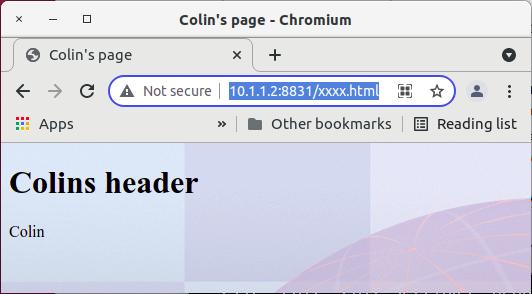
Retry the web browser page.

When this is displayed you get

Where

  • The title maps to the page heading
  • The background image comes from the body

Getting started with HTTPD server on z/OS

Apache web server

The HTTPD web server is the Apache web server ported to run on z/OS. It runs in Unix Services, and behaves like a proper z/OS program, for example it can use z/OS userids and keyrings. It starts in seconds!

The configuration is easy, it is text driven (rather than XML), can imbed other configuration files, and can substitute variables.

I found the Apache documentation was very good, but the z/OS documentation was not as good. I prefer baby steps, taking the smallest system and adding functions, rather than configure everything and be disappointed when it fails to work first time.

Other posts

Getting started

I used the IBM HTTP Server – Powered by Apache Version 9 PDF document. The text below is an addition to the IBM documentation, not a replacement. I’m trying to fill the holes in the documentation.

The product comes pre-installed. Mine was in /usr/lpp/ihsa_zos/bin/httpd

You need a directory for your HTTPD instance.

You need the userid to run the server.

ADDUSER WEB2 NAME(‘COLWEB’) NOPASSWORD –
OMVS(AUTOUID ASSIZE(256000000) THREADS(512) –
Program(‘/bin/sh’) home(‘/u/mqweb3/’))

CONNECT IBMUSER GROUP(COLWEB )
CONNECT WEB2 GROUP(COLWEB )

When you set up the userid, it is better to use OMVS(AUTOUID .. than to give a specific numeric id, similarly use OMVS(AUTOGID… for the group.

The userid needs OMVS, PROGRAM= /bin/sh, and a home directory.

Setup the system with environment file

The /usr/lpp/ihsa_zos/bin/envvars file allows you to set up an image wide environment file. You can rename /usr/lpp/ihsa_zos/bin/envvars-std to /usr/lpp/ihsa_zos/bin/envvars

I set up this file with

#/!bin/sh
IHS=/usr/lpp/ihsa_zos
LIBPATH=$IHS/lib:$IHS/modules:$IHS
PATH=$IHS/bin
_EDC_ADD_ERRNO2=1
_BPX_SHAREAS=NO
_BPX_BATCH_SPAWN=YES
GSK_SSL_HW_DETECT_MESSAGE=1
LC_ALL=En_US.IBM-1047

Create the instance

Follow the instructions in the documentation.

cd /usr/lpp/ihsa*
umask 022
bin/install_ihs /u/mqweb3 8300

Note down the port you specified (8300) as you will need it when you try to connect to the server.

The documentation says switch to the instance directory and issue apachectl -v. This failed for me because the path and libpath were not set up. I set up the envvars file (above) and it worked.

/usr/lpp/ihs*/bin/apachectl -v

When I ran it, it produced

test: /usr/lpp/ihsa_zos/bin/apachectl 49: FSUM7351 not found
[: /usr/lpp/ihsa_zos/bin/apachectl 74: FSUM7351 not found
[: /usr/lpp/ihsa_zos/bin/apachectl 87: FSUM7351 not found
[: /usr/lpp/ihsa_zos/bin/apachectl 92: FSUM7351 not found
Server version: IBM_HTTP_Server/9.0.5.5 (Unix) (SMP/E, 64-bit)
Server built: Jun 10 2020 16:22:51

This is because it cannot find “echo” in the path. Check in the /usr/lpp/ihsa_zos/bin/envvars file. I had to use

LIBPATH=$IHS/lib:$IHS/modules:$IHS:/bin:/usr/sbin 
PATH=$IHS/bin:/bin:/usr/sbin 

The apachectl takes the following options, so you can display the configuration, or modify the start.

Options:
-D name : define a name for use in directives
-d directory : specify an initial ServerRoot
-f file : specify an alternate ServerConfigFile
-C “directive” : process directive before reading config files
-c “directive” : process directive after reading config files
-e level : show startup errors of level (see LogLevel)
-E file : log startup errors to file
-v : show version number
-V : show compile settings
-h : list available command line options (this page)
-l : list compiled in modules
-L : list available configuration directives
-t -D DUMP_VHOSTS : show parsed vhost settings
-t -D DUMP_RUN_CFG : show parsed run settings
-S : a synonym for -t -D DUMP_VHOSTS -D DUMP_RUN_CFG
-t -D DUMP_MODULES : show all loaded modules
-M : a synonym for -t -D DUMP_MODULES
-t -D DUMP_SSL_CONFIG: show parsed SSL vhost configurations
-t -D DUMP_SSL_CIPHERS: show all known SSL ciphers
-t -D DUMP_UNIFIED_CONFIG: show configuration with all includes merged
-t -D DUMP_INCLUDES: show all included configuration files
-t : run syntax check for config files
-T : start without DocumentRoot(s) check
-X : debug mode (only one worker, do not detach)

-t -DDUMP_CONFIG is very useful as it shows what you have configured after any <If…> and after variable substitution. I use this as a standalone command to see what’s configured.

Note:I had problems using //STDENV in the started task, so I had to use the envvars file.

Create the JCL procedure

See the documentation.

//HTTPCP PROC ACTION='start',
// DIR='/usr/lpp/ihsa_zos',
// CONF='/u/mqweb3/conf/httpd.conf'
//*---------------------------------------------------------
//IHS EXEC PGM=BPXBATCH,REGION=0M,
// PARM='SH &DIR/bin/apachectl -k &ACTION -f &CONF -DNO_DETACH ',
// MEMLIMIT=1236M
//STDOUT DD SYSOUT=H
//STDERR DD SYSOUT=H
// PEND

BPXBATCH needs REGION=0M, and at least MEMLIMIT=1236M

Define the STARTED task to RACF.

RDEFINE STARTED HTTPCP* STDATA(USER(WEB2)
SETROPTS RACLIST(STARTED ) REFRESH

Start the started task

S HTTPCP

You cannot just type P HTTPCP. In the syslog I had

CRIHS0001I IHS S0W1 is active. 83951827 0.0.0.0:8300 unspecified:-1.
Use jobname HTTPCP6 for console commands.

This means you have to issue P HTTPCP6 to stop it.

You can also use

s HTTPCP,action=’start’
s HTTPCP,action=’stop’

To start and stop the server.
Note: When you run these commands it checks the syntax of the configuration file, and if there is a problem, then the command is not executed. I kept wondering why my HTTPD instance was not shutting down; it was because I had a configuration error, and so the stop request was being ignored.

If it starts (there are no helpful messages saying success) try connecting a web browser to it in my case

http://10.1.1.2:8300

This gave me page with links to IBM sites. If you get here – you have done the first baby step. You cannot do much with the server.

Don’t try this at home, PKI certificates.

I was trying to generate z/OS certificates which I could use to check out certificate revocation. I can do it in Linux – no problem. Getting it to work on z/OS was the challenge and I don’t think it can be done.

Meanwhile, back at the ranch (‘at home’), running z/OS on the zPDT environment on Linux, I found the PKI Server environment does not support PKI for key generation on zPDT or ZD&T, because zPDT does not support ICSF TKDS.

The longer story of why it will not work.

The RACF command RACDCERT GENCERT creates a basic certificate which is suitable for many uses. It does not support the extensions, such as specifying a URI for OCSP checking of the certificate.
The PKI product has these capabilities, and together with ICSF it can store the keys in the ICSF data sets. This product seems complex to set up (two web servers), and a GUI interface instead of a command interface.

There is an API, the RACF callable services R_PKISERV, which allows you to issue API requests to administer certificate.
You can use a SAF interface and pass in a public certificate, certificate request, or use PKI to generate a full certificate with all of the optional fields etc, and do full life cycle management with it.

I could not get this to work, and when I started the PKI SERVER, it reported

IKYP040I PKI SERVICES DOES NOT HAVE KEY GENERATION CAPABILITY

This in turn pointed me to ICSF and the TKDS (Token Key Data Set), not being set up – it needed a master key. You enter this master key on a TKE (Trusted Key Entry) workstation which sits inside the z hardware. I was running on zPDT, and following the trail, the zPDT documentation said PKCS#11 (Token Key Data Set) is not available with zPDT. This means it looks like I cannot create certificates which support OCSP on my z/OS.