How do I trace TCP/IP sockets on z/OS?

I stumbled on this by accident.

In the TCPIP.DATA configuration file you can specify

 TRACE SOCKET

I copied the configuration file, and made the change. I used it in my JCL

//SYSTCPD DD DISP=SHR,DSN=USER.Z24C.TCPPARMS(MYDATA)

Note if you use TRACE SOCKET in the configuration file used by every one – then every one will get their sockets traced – which may not be what you want.

The output to SYSPRINT is like

request = HCreate                                                                         
                                                                                          
EZY3829I  pre   0xe3e2d9c2 00c00001 00010000 00000020 e3c3d7c9 d7404040 00000000 00000000 
EZY3830I        0x00000000 00000000 00000000 00000000 00000000 00000000 00000000 00000000 
EZY3831I        0x00000000 1fa77318 00000000 00000000 00000000 00000080 00000000 00000000 
EZY3832I        0x00000000 00000000 00000000 00000000 00000000 00000000 00000000 00000000 
EZY3833I        0xffff0002 00000000 00000000 40404040 40404040 f18681f7 f68686f8 00000000 
EZY3834I        0x00000000 00000000 00000000 00000000 00000000 00000000 00000000 00000000 
                                                                                          
request = HCreate                                                                         
                                                                                          
EZY3835I  post  0xe3e2d9c2 00c00001 00010000 00000020 e3c3d7c9 d7404040 00000000 00000000 
EZY3830I        0x7f5ec0f0 00010000 00000000 00000000 00000000 00000000 00000000 00000000 
EZY3831I        0x00000000 1fa77318 00000000 00000000 00000000 00000080 00000000 00000000 
EZY3832I        0x00000000 00000000 00000000 00000000 00000000 00000000 00000000 00000000 
EZY3833I        0xffff0002 00000031 00000000 40404040 40404040 f18681f7 f68686f8 00000000 
EZY3834I        0x00000000 00000000 00000000 00000000 00000000 00000000 00000000 00000000 

These messages and the content are not documented – they are for IBM Software Support.

Compiling the TCP/IP samples on z/OS

Communications server (TCPIP) on z/OS provides some samples. I had problems getting these to compile, because the JCL in the documentation was a) wrong and b) about 20 years behind times.

Samples

There are some samples in TCPIP.SEZAINST

  • TCPS: a server which listens on a port
  • TCPC: a client which connects to a server using IP address and port
  • UDPC: C socket UDP client
  • UDPS: C socket UDP server
  • MTCCLNT: C socket Multitasking client
  • MTCSRVR: C socket Multitasking server
  • MTCCSUB: C socket subtask MTCCSUB

The JCL I used is

//COLCOMPI   JOB 1,MSGCLASS=H,COND=(4,LE) 
//S1          JCLLIB ORDER=CBC.SCCNPRC 
// SET LOADLIB=COLIN.LOAD 
// SET LIBPRFX=CEE 
// SET SOURCE=COLIN.C.SOURCE(TCPSORIG) 
//COMPILE  EXEC PROC=EDCCB, 
//       LIBPRFX=&LIBPRFX, 
//       CPARM='OPTFILE(DD:SYSOPTF),LSEARCH(/usr/include/)', 
// BPARM='SIZE=(900K,124K),RENT,LIST,RMODE=ANY,AMODE=31' 
//COMPILE.SYSLIB DD 
//               DD 
//               DD DISP=SHR,DSN=TCPIP.SEZACMAC 
//*              DD DISP=SHR,DSN=TCPIP.SEZANMAC  for IOCTL 
//COMPILE.SYSOPTF DD * 
DEF(_OE_SOCKETS) 
DEF(MVS) 
LIST,SOURCE 
TEST 
RENT ILP32        LO 
INFO(PAR,USE) 
NOMARGINS EXPMAC   SHOWINC XREF 
LANGLVL(EXTENDED) sscom dll 
DEBUG 
/* 
//COMPILE.SYSIN    DD  DISP=SHR,DSN=&SOURCE 
//BIND.SYSLMOD DD DISP=SHR,DSN=&LOADLIB. 
//BIND.SYSLIB  DD DISP=SHR,DSN=TCPIP.SEZARNT1 
//             DD DISP=SHR,DSN=&LIBPRFX..SCEELKED 
//* BIND.GSK     DD DISP=SHR,DSN=SYS1.SIEALNKE 
//* BIND.CSS    DD DISP=SHR,DSN=SYS1.CSSLIB 
//BIND.SYSIN DD * 
  NAME  TCPS(R) 
//START1   EXEC PGM=TCPS,REGION=0M, 
// PARM='4000          ' 
//STEPLIB  DD DISP=SHR,DSN=&LOADLIB 
//SYSERR   DD SYSOUT=*,DCB=(LRECL=200) 
//SYSOUT   DD SYSOUT=*,DCB=(LRECL=200) 
//SYSPRINT DD SYSOUT=*,DCB=(LRECL=200) 

Change the source

The samples do not compile with the above JCL. I needed to remove some includes

#include <manifest.h> 
// #include <bsdtypes.h> 
#include <socket.h> 
#include <in.h> 
// #include <netdb.h> 
#include <stdio.h> 

With the original sample I got compiler messages

ERROR CCN3334 CEE.SCEEH.SYS.H(TYPES):66 Identifier dev_t has already been defined on line 98 of “TCPIP.SEZACMAC(BSDTYPES)”.
ERROR CCN3334 CEE.SCEEH.SYS.H(TYPES):77 Identifier gid_t has already been defined on line 101 of “TCPIP.SEZACMAC(BSDTYPES)”.
ERROR CCN3334 CEE.SCEEH.SYS.H(TYPES):162 Identifier uid_t has already been defined on line 100 of “TCPIP.SEZACMAC(BSDTYPES)”.
ERROR CCN3334 CEE.SCEEH.H(NETDB):87 Identifier in_addr has already been defined on line 158 of “TCPIP.SEZACMAC(IN)”.


INFORMATIONAL CCN3409 TCPIP.SEZAINST(TCPS):133 The static variable “ibmcopyr” is defined but never referenced.

I tried many combinations of #define but could not get it to compile, unless I removed the #includes.

Compile problems I stumbled upon

Identifier dev_t has already been defined on line ...                                                     
Identifier gid_t has already been defined on line ...                                                     
Identifier uid_t has already been defined on line ....

This was caused by the wrong libraries in SYSLIB. I needed

  • CEE.SCEEH.H
  • CEE.SCEEH.SYS.H
  • TCPIP.SEZACMAC
  • TCPIP.SEZANMAC

The compile problems were caused by CEE.SCEEH.SYS.H being missing.

Execution problems

I had some strange execution problem when I tried to use AT-TLS within the program.

EDC5000I No error occurred. (errno2=0x05620062)

The errno2 reason from TSO BPXMTEXT 05620062 was

BPXFSOPN 04/27/18
JRNoFileNoCreatFlag: A service tried to open a nonexistent file without O_CREAT

Action: The open service request cannot be processed. Correct the name or the open flags and retry the operation.

Which seems very strange. I have a feeling that this field is not properly initialised and that this value can be ignored.

Colin’s “TCPIP on z/OS” message explanations

Purpose

This blog post is a repository of my interpretation of the messages from the Z/OS communications server family of products. Ive tried to add more information, or explain what some of the values are. it is aimed at search engines, not as a readable article.

EZZ7853I AREA LINK STATE DATABASE

This message can come from

  • OSPF external advertisements : The DISPLAY TCPIP,tcpipjobname,OMPROUTE,OSPF,EXTERNAL
  • OSPF area link state database: The DISPLAY TCPIP,tcpipjobname, OMPROUTE, OSPF, DATABASE, AREAID=area-id

in topic DISPLAY TCPIP,,OMPROUTE.

Type

  1. Router links advertisement
  2. Network links advertisements
  3. Network summaries
  4. Autonomous System(whole network) summaries
  5. Autonomous System(whole network) external advertisements (DISPLAY TCPIP, tcpipjobname, OMPROUTE, OSPF,EXTERNAL)

EZZ0318I HOST WAS FOUND ON LINE 8 AND FIRST HOP ADDRESS OR AN = WAS EXPECTED

I got this with

ROUTE 2001:db8::7/128 host 2001:db8:1::3    IFPORTCP6      MTU 5000 

Which has a first hop address! The problem was /128. Remove this and it worked. If you then issue TSO NETSTAT ROUTE it gives

DestIP:   2001:db8::7/128 
  Gw:     2001:db8:1::3 
  Intf:   IFPORTCP6         Refcnt:  0000000000 
  Flgs:   UGHS              MTU:     5000 

EZZ7904I Packet authentication failure, from 10.1.1.1, type 2

An OSPF packet of the specified type was received. The packet fails to authenticate.

System programmer response

Verify the authentication type and authentication key specified for the appropriate interfaces on this and the source router. The types and keys must match in order for authentication to succeed. If MD5 authentication is being used and OMPROUTE is stopped or recycled, ensure that it stays down for at least 3 times the largest configured dead router interval of the OSPF interfaces that use MD5 authenticaiton, in order to age out the authentication sequence numbers on routers that did not recycle.

Types are

  • 0 Null authentication
  • 1 Simple password
  • 2 Cryptographic authentication

See OSPF Version 2.

From the message description, this could be a timing issue.

EZZ7921I OSPF adjacency failure, neighbor 10.1.1.1, old state 128, new state 4, event 10

EZZ7921I.

I got this restarting frr on Linux.

The Neighbor State Codes can be one of the following:

  • 1 Down
  • 2 Attempt
  • 4 Init (session has (re) started
  • 8 2-way
  • 16 ExStart
  • 32 Exchange
  • 64 Loading
  • 128 Full. the router has sent and received an entire sequence of Database Description Packets.

The Neighbor Event Codes can be one of the following:

  • 7 SeqNumberMismatch
  • 8 BadLSReq
  • 10 1-way. An Hello packet has been received from the neighbor, in which this router is not mentioned. This indicates that communication with the neighbor is not bidirectional. For example the remote end is restarting.
  • 11 KillNbr
  • 12 InactivityTimer
  • 13 LLDown
  • 15 NoProg. This event is not described in RFC1583. This is an indication that adjacency establishment with the neighbor failed to complete in a reasonable time period (Dead_Router_Interval seconds). Adjacency establishment restarts.
  • 16 MaxAdj. This event is not described in RFC2328. This indicates that OMPROUTE has exceeded the futile neighbour state loop threshold (DR_Max_Adj_Attempt). Even if a redundant parallel interface (primary or backup) exists, OMPROUTE continues to attempt to establish adjacency with the same neighbouring designated router over the existing or alternate interface.

EZZ7905I No matching OSPF neighbor for packet from 10.1.1.1, type 4

  • EZZ7905I No matching OSPF neighbor for packet from 10.1.1.1, type 4
  • EZZ7904I Packet authentication failure, from 10.1.1.1, type 2

I got these when I was using OSPF Authentication_type=MD5, and the Authentication_Key_ID did not match.

BPXF024I

You get messages prefixed by this message if SYSLOGD is not running.

For example

BPXF024I (TCPIP) Oct 6 10:11:10 omproute 67174435 : EZZ8100I OMPROUTE subagent Starting

With the SYSLOGD running you get

EZZ8100I OMPROUTE SUBAGENT STARTING

TELNET and AT-TLS

EZZ6035I TN3270 DEBUG CONN DETAIL 1035-00 Policy is invalid for the conntype specified.

EZZ6035I TN3270 DEBUG CONN DETAIL 
IP..PORT: 10.1.0.2..34588
CONN: 0000004E LU: MOD: EZBTTACP
RCODE: 1035-00 Policy is invalid for the conntype specified.
PARM1: PARM2: SECURE PARM3: POLICY NOT APPLCNTRL

POLICY NOT APPLCNTRL

The AT-TLS policy needs

TTLSEnvironmentAdvancedParms CSQ1-ENVIRONMENT-ADVANCED 
{ 
  ApplicationControlled         On 
...
}

Now you know, it is obvious that APPLCNTRL in the message means ApplicationControlled!

PARM2: SECURE PARM3: NO POLICY

EZZ6035I TN3270 DEBUG CONN   DETAIL                      
  RCODE: 1035-00  Policy is invalid for the conntype specified.      
  PARM1:          PARM2: SECURE   PARM3: NO POLICY                   

There is no AT-TLS policy for the port being used. The message does not tell you which port or policy is being used. The operator command “D TCPIP,TN3270,PROFILE” shows which ports are in use.

EZZ6060I TN3270 PROFILE DISPLAY 968                            
PERSIS FUNCTION DIA SECURITY TIMERS MISC
(LMTGCAK)(OPATSKTQSSHRTL)(DRF)(PCKLECXN23)(IPKPSTS)(SMLT)
L****** ***TSBTQ***RT* TJ* TSTTTT**TT IP**STT SMD*
----- PORT: 2023 ACTIVE PROF: CURR CONNS: 0

The TS under security mean TLS connection, Secure Connection.

Use the Unix commands pasearch -t 1>a oedit a to display the configuration and search for “port”. The port value may be specified – or it may be within a range.

LocalPortFrom: 2023 LocalPortTo: 2025

EZZ6035I TN3270 RCODE: 1030-01 TTLS Ioctl failed for query or init HS.

PARM1: FFFFFFFF PARM2: 00000464 PARM3: 77B77221

The PARM1 value is the return value, the PARM2 value is the return code, and the PARM3 value is the reason code for the ioctl failure; these values are defined in z/OS UNIX System Services Messages and Codes.

  • Error numbers. 464 is ENOTCONN:The socket is not connected
  • Reason codes 7221: The connection was not in the proper state for retrieving.

I got this when

  • there was problems with the System SSL configuration, such as invalid certificate name,
  • when the z/OS certificate was not suitable eg the key needed to be bigger
  • the HandshakeRole ServerWithClientAuth was specified – it should be HandshakeRole Server
  • Breton Imhauser said this could also include a TCP connection flood – crude Denial Of Service attempt of TN3270. This is what it looks like when a set of remote clients are repeatedly establishing a tcp connection with your TN3270 and hanging up. They establish the TCP connection and FIN-ACK it without telnet negotiation. User may claim it was a “heartbeat” test of the host.

In my /etc/syslog.conf I have

daemon.debug /var/log/SSHDdebug

There were additional messages in this file after the TLS handshake problem.

EZZ6035I TN3270 DEBUG CONFIG EXCEPTION RCODE: 600F-00 System SSL initiation failed.


PARM1: 000000CA PARM2: 00000000 PARM3: GSK_ENVIRONMENT_INIT

AT-TLS did not have access to the keyring. For example need access to

RDEFINE RDATALIB START1.MQRING.LST UACC(NONE)
PERMIT START1.MQRING.LST CLASS(RDATALIB) ID(TCPIP) ACCESS(CONTROL)
tso setropts refresh raclist(rdatalib)

and perhaps access to

PERMIT IRR.DIGTCERT.LISTRING CLASS(FACILITY) ID(TCPIP) ACCESS(READ)

1030-02 – also to do with keyrings.

EZZ6035I TN3270 DEBUG TASK EXCEPTION TASK: MAIN MOD: EZBTZMST
RCODE: 1016-01 Port Task setup failed.
PARM1: 0000102B PARM2: 00000BCF PARM3: 00000000
EZZ6006I TN3270 CANNOT LISTEN ON PORT 3023, CONNECTION MANAGER TERMINATED, RSN =102B

This was caused by

PORT 
...
   3023 TCP *   SAF     VERIFY 

and getting

EZD1313I REQUIRED SAF SERVAUTH PROFILE NOT FOUND EZB.PORTACCESS.S0W1.TCPIP.VERIFY               

Define the profiles and give the userid access to it.

OMPRoute

EZZ7815I Socket 11 bind to port 521, address :: failed, errno=111:EDC5111I Permission denied., errno2=74637246

This was caused by

PORT
   520 UDP OMPROUTE            ; RouteD Server 
   521 UDP OMPROUTE            ; RouteD Server for IP V6 

The name after the UDP (OMPROUTE) did not match my job name which was trying to use it.

EDC5111I Permission denied. errno2=0x744C7246.

0x744C7246 744C7246. This problem occurred with using port 22 (Telnet).

Changing to port 2222 showed that it was just port 22, the other configuration worked.

Commenting out the RESTRICTLOWPORTS and the PORT reservation for “22 SSHD” showed it was one of those.

Using the RESTRICTLOWPORTS parameter to control access to unreserved ports below port 1024 (an application cannot obtain a port in the range 1 – 1023 that has not been reserved by a PORT or PORTRANGE statement, unless the application is APF-authorized or has OMVS superuser [UID(0)] authority).

The solution was to use port reservation such as

    22 TCP SSHD* NOAUTOLOG  ; OpenSSH SSHD server

EZZ7811I COULD NOT ESTABLISH AFFINITY WITH INET, ERRNO=1011:

EDC8011I A NAME OF A PFS WAS SPECIFIED THAT EITHER IS NOT CONFIGURED OR IS NOT A SOCKETS PFS., ERRNO2=11B3005A

I had RESOLVER_CONFIG=//’ADCD.Z24C.TCPPARMS(TCPDATA)’ pointing to an invalid data set.

EZZ7937I THE IPV6 OSPF ROUTING PROTOCOL IS DISABLED

The message in the documentation is pretty useless.

It means there was no valid IPV6 interfaces defined, and no IPV6 addresses.

EZZ7956I OSPF area 0.0.0.3 not configured, interface JFPORTCP6 not installed

The documentation

I was missing an IPv6_area for the interface

IPv6_AREA Area_Number=0.0.0.3; 
IPv6_OSPF_Interface
Name = JFPORTCP6
Attaches_To_area=0.0.0.3
Prefix=2001:db8:8::/64
;
IPv6_Default_Route
Name=JFPORTCP6
Next_Hop=2300::1
;
IPv6_OSPF
RouterID = 7.7.7.7


EZZ8125I IPV6 OSPF ROUTERS NONE

The documentation is useless.

I got NONE even though I had a router.

EZZ7886I NOT CONNECTED TO AREA SPECIFIED ON … DISPLAY COMMAND

I got this response to the F P1,IPV6OSPF,database command. You do not specify an area!

OSPF on z/OS, basic commands

This article follows on from getting the simplest example of OSPF working. It gives the z/OS commands to display useful information.

I want to


OMP1

I configured multiple TCPIP subsystems, and each one had an OMPROUTE defined. I used a started task OEMP1, as the OMPROUTE for my base TCPIP.

If you have only one TCPIP subsystem, you can use OMPROUTE as your name.

F OMP1,OSPF,areasum

This displays the area summary.

AREA ID        AUTHENTICATION   #IFCS  #NETS  #RTRS  #BRDRS DEMAND     
0.0.0.0           NONE              2      3      3      0  OFF        

F OMP1,OSPF,EXTERNAL

EZZ7853I AREA LINK STATE DATABASE                        
TYPE LS DESTINATION     LS ORIGINATOR     SEQNO     AGE   XSUM
                # ADVERTISEMENTS:       0                     
                CHECKSUM TOTAL:         0X0                   

F OMP1,ospf,list,areas

“Displays all information concerning configured OSPF areas and their associated ranges.”

 EZZ7832I AREA CONFIGURATION 820 
 AREA ID          AUTYPE          STUB? DEFAULT-COST IMPORT-SUMMARIES? 
 0.0.0.0          0=NONE           NO          N/A           N/A 
                                                                               
 --AREA RANGES-- 
 AREA ID          ADDRESS          MASK             ADVERTISE? 
 0.0.0.0          11.11.0.0        255.255.255.0    YES 

The entry with address 11.11.0.0 comes from the omproute configuration file entry

range ip_address=11.11.0.1 
      subnet_mask=255.255.255.0 
      ; 

F OMP1,ospf,list,ifs

“For each OSPF interface, display the IP address and configured parameters as coded in the
OMPROUTE configuation file”

 EZZ7833I INTERFACE CONFIGURATION 822 
 IP ADDRESS      AREA             COST RTRNS TRDLY PRI HELLO  DEAD DB_EX 
 10.1.3.2        0.0.0.0             1     5     1   1    10    40    40 
 10.1.1.2        0.0.0.0             1     5     1   1    10    40    40 

F OMP1,ospf,list,nbma

“Displays the interface address and polling interval related to interfaces connected to nonbroadcast multiaccess networks.”

 NBMA CONFIGURATION 824 
 INTERFACE ADDR      POLL INTERVAL 
 << NONE CONFIGURED >> 

F OMP1,ospf,list,nbrs

“Displays the configured neighbors on non-broadcast networks”

 NEIGHBOR CONFIGURATION 826 
 NEIGHBOR ADDR     INTERFACE ADDRESS   DR ELIGIBLE? 
 << NONE CONFIGURED >> 

“Displays all virtual links that have been configured with this router as an endpoint.”

F OMP1,ospf,database,areaid=0.0.0.0

EZZ7853I AREA LINK STATE DATABASE                           
TYPE LS DESTINATION     LS ORIGINATOR     SEQNO     AGE   XSUM     
  1  1.2.3.4            1.2.3.4         0X80000013   61  0X3D8D    
  1  9.2.3.4            9.2.3.4         0X8000001A  393  0X5A78    
  1 @10.1.1.2           10.1.1.2        0X8000000D  286  0X9E22    
  2  10.1.0.2           1.2.3.4         0X80000006 1241  0XC35E    
  2  10.1.1.1           9.2.3.4         0X80000003  353  0X8197    
  2 @10.1.1.2           10.1.1.2        0X80000005 3600  0X64BD    
  2  10.1.3.1           9.2.3.4         0X80000003  383  0X6BAB    
  2 @10.1.3.2           10.1.1.2        0X80000005 3600  0X4ED1    

(LS) Type is described here.

  1. Router links advertisement
  2. Network link advertisement
  3. Summary link advertisement
  4. Summary ASBR advertisement
  5. Autonomous System (AS -think entire network) external link.
  • LS ORIGINATOR: Indicates the router that originated the advertisement.
  • LS DESTINATION: Indicates an IP destination (network, subnet, or host).

From the above

TYPE LS DESTINATION     LS ORIGINATOR
  2  10.1.0.2           1.2.3.4        

means router 1.2.3.4 told every one that it has the end of a network link, and its address is 10.1.0.2.

TYPE LS DESTINATION     LS ORIGINATOR      
  1  1.2.3.4            1.2.3.4

says router 1.2.3.4 told every one “here I am, router 1.2.3.4”.

You can use the type and destination in the command:

F OMP1,OSPF,LSA,LSTYPE=…,LSID=…

For example

below.

F OMP1,OSPF,LSA,LSTYPE=1,LSID=1.2.3.4

This allows you to see a lot of information about an individual element of the OSPF database.

LSTYPE=1 is for Router Links Advertisment.

The valid LSID values are given in the output of F OMP1,ospf,database,areaid=0.0.0.0 above.

F OMP1,OSPF,LSA,LSTYPE=1,LSID=9.2.3.4 
EZZ7880I LSA DETAILS  
  LS DESTINATION (ID): 9.2.3.4                     
  LS ORIGINATOR:   9.2.3.4 
  ROUTER TYPE:      (0X00)                         
  # ROUTER IFCS:   3                        
    LINK ID:          10.1.0.2        
    LINK DATA:        10.1.0.3        
    INTERFACE TYPE:   2               
    
    LINK ID:          10.1.1.2        
    LINK DATA:        10.1.1.1        
    INTERFACE TYPE:   2               
   
    LINK ID:          10.1.3.2        
    LINK DATA:        10.1.3.1        
    INTERFACE TYPE:   2 
  • LINK ID: Is the IP address of the remote end
  • LINK DATA: Is the IP address of the router’s end
  • INTERFACE TYPE: 2 is “Network links”.

F OMP1,OSPF,LSA,LSTYPE=2,LSID=10.1.0.3

This allows you to see a lot of information about an individual element of the OSPF database.

LSTYPE=2 is “Network links the set of routers attached to a network”.

The valid LSID values are given in the output of F OMP1,ospf,database,areaid=0.0.0.0 above, with type=2.

F OMP1,OSPF,LSA,LSTYPE=2,LSID=10.1.0.3                     
EZZ7880I LSA DETAILS                                   
LS OPTIONS:      E (0X02)                          
LS TYPE:         2                                 
LS DESTINATION (ID): 10.1.0.3                      
LS ORIGINATOR:   9.2.3.4                           
NETWORK MASK:    255.255.255.0                     
 ATTACHED ROUTER: 1.2.3.4          (100)    
 ATTACHED ROUTER: 9.2.3.4          (100)    

Where (100) is the metric.

F OMP1,ospf,if

 EZZ7849I INTERFACES 832 
 IFC ADDRESS     PHYS         ASSOC. AREA     TYPE   STATE  #NBRS  #ADJS 
 10.1.3.2        JFPORTCP4    0.0.0.0         BRDCST   64      1      1 
 10.1.1.2        ETH1         0.0.0.0         BRDCST   64      1      1 

F OMP1,ospf,neighbor

EZZ7851I NEIGHBOR SUMMARY 834 
 NEIGHBOR ADDR   NEIGHBOR ID     STATE  LSRXL DBSUM LSREQ HSUP IFC 
 10.1.3.1        9.2.3.4           128      0     0     0  OFF JFPORTCP4 
 10.1.1.1        9.2.3.4           128      0     0     0  OFF ETH1 

F OMP1,ospf,routers

EZZ7855I OSPF ROUTERS 836 
DTYPE RTYPE DESTINATION AREA COST NEXT HOP(S)
NONE

F OMP1,ospf,statistics

EZZ7856I OSPF STATISTICS 838 
                 OSPF ROUTER ID:         10.1.1.2 (*OSPF) 
                 EXTERNAL COMPARISON:    TYPE 2 
                 AS BOUNDARY CAPABILITY: NO 
                                                                          
 ATTACHED AREAS:                  1  OSPF PACKETS RCVD:             3336 
 OSPF PACKETS RCVD W/ERRS:        0  TRANSIT NODES ALLOCATED:         84 
 TRANSIT NODES FREED:            78  LS ADV. ALLOCATED:                1 
 LS ADV. FREED:                   1  QUEUE HEADERS ALLOC:             32 
 QUEUE HEADERS AVAIL:            32  MAXIMUM LSA SIZE:               512 
 # DIJKSTRA RUNS:                 4  INCREMENTAL SUMM. UPDATES:        0 
 INCREMENTAL VL UPDATES:          0  MULTICAST PKTS SENT:           3371 
 UNICAST PKTS SENT:               7  LS ADV. AGED OUT:                 1 
 LS ADV. FLUSHED:                 1  PTRS TO INVALID LS ADV:           0 
 INCREMENTAL EXT. UPDATES:        0 

F OMP1,OSPF,LSA,LSTYPE=2,LSID=10.1.0.3

Where

  • LSTYPE=2 is “Network links the set of routers attached to a network”.
  • 10.1.0.3 is an LS destination (from F OMP1,ospf,database,areaid=…) It comes from the frr definition below
interface eno1
ip address 10.1.0.3 peer 10.1.0.2/24

Only addresses on the Server are accepted. Addresses from the Laptop are not valid.

In the command F OMP1,OSPF,LSA,LSTYPE=1,LSID=1.2.3.4, some of the LINK IDs seem to be valid.

F OMP1,OSPF,LSA,LSTYPE=1,LSID=x.x.x.x

This allows you to see a lot of information about an individual element of the OSPF database.

The LSATYPE is described in here. LSTYPE=1 is for Router Links Advertisment.

The LSID is one of the routers, for example in

  • F OMP1,ospf,database,areaid=0.0.0.0, it displays, LS DESTINATION LS ORIGINATOR
  • F OMP1,ospf,neighbor, it displays NEIGHBOR ID
F OMP1,OSPF,LSA,LSTYPE=1,LSID=9.2.3.4 
EZZ7880I LSA DETAILS  
  LS DESTINATION (ID): 9.2.3.4                     
  LS ORIGINATOR:   9.2.3.4 
  ROUTER TYPE:      (0X00)                         
  # ROUTER IFCS:   3                               
     LINK ID:          10.1.0.3               
     LINK DATA:        10.1.0.3               
        INTERFACE TYPE:   2
     LINK ID:          10.1.1.1
     LINK DATA:        10.1.1.1              
        INTERFACE TYPE:   2 
     LINK ID:          10.1.3.1              
     LINK DATA:        10.1.3.1              
        INTERFACE TYPE:   2 

F OMP1,RTTABLE

EZZ7847I ROUTING TABLE 842 
 TYPE   DEST NET         MASK      COST    AGE     NEXT HOP(S) 
                                                                        
 STAT*  10.0.0.0         FF000000  0       16079   10.1.1.2 
  SPF   10.1.0.0         FFFFFF00  101     16071   10.1.1.1         (2) 
  SPF*  10.1.1.0         FFFFFF00  1       16078   ETH1 
  SPF*  10.1.3.0         FFFFFF00  1       16078   JFPORTCP4 
  SPF   11.1.0.2         FFFFFFFF  201     4733    10.1.1.1         (2) 
                        0 NETS DELETED, 3 NETS INACTIVE 

(2) is the number of equal-cost routes to the destination.

D TCPIP,,OMPROUTE,RTTABLE,DEST=10.1.0.0

gives

EZZ7874I ROUTE EXPANSION 105                   
DESTINATION:    10.1.0.0                       
MASK:           255.255.255.0                  
ROUTE TYPE:     SPF                            
DISTANCE:       101                            
AGE:            943                            
NEXT HOP(S):    10.1.1.1          (ETH1)       
                10.1.3.1          (JFPORTCP4)  

Authenticating ospf

This is another of those little tasks that look simple but turn out to be more a little more complex than it first looked.

Authentication in OSPF is performed by sending authentication data in every flow. This can be a password (not very secure) or an MD5 check sum, based on a shared password and sequence number. The receiver checks the data sent is valid, and matches the data it has.

Enabling authentication on Linux

To do any authentication you need to enable it at the area level.

router ospf
  ospf router-id 9.2.3.4
  area 0.0.0.0 authentication

This turns it on for all interfaces – defaulting to password based with a null password. I did this and my connections failed because the two ends of the link were configured differently.

I first had to configure ip ospf authentication null for all interfaces, then enable area authenticate, and the the connections to other systems worked.

interface tap2
   ip ospf area 0.0.0.0
   ip ospf authentication null

interface ...

router ospf
  ospf router-id 9.2.3.4
  area 0.0.0.0 authentication

I could then enable the authentication on an interface by interface basis.

If there is a mismatch,

  • z/OS will report a mismatch,
  • frr quietly drops the packet. I enabled packet trace.

debug ospf packet hello

I got out a trace

OSPF: ... interface enp0s31f6:10.1.0.2: auth-type mismatch, local Null, rcvd Simple
OSPF: ... ospf_read[10.1.0.3]: Header check failed, dropping.

The router ospf … area … authentication is the master switch.

To define authentication on a link, you have to change both ends, then activate the change at the same time at each end.

On z/OS

I could not find how to get OMPROUTE to reread its configuration file after I updated and OSPF entry. There is an option

f OMP1,reconfig

but the documentation says

RECONFIG
Reread the OMPROUTE configuration file. This command ignores all statements in the configuration file except new OSPF_Interface, RIP_Interface, Interface, IPv6_RIP_Interface, and IPv6_Interface
statements.

and I got messages like

EZZ7821I Ignoring duplicate OSPF_Interface statement for 10.1.1.2

For z/OS OMPROUTE to communicate with frr (and CISCO routers) I had to specify the z/OS definition Authentication_… for example

ospf_interface IP_address=10.1.1.2 
      name=ETH1 
      subnet_mask=255.255.255.0 
      Authentication_type=PASSWORD 
      Authentication_Key="colin" 
      ;    

Then stop and restart OMPROUTE.

Using password (or not)

If you use a password, then it flows in clear text. Anyone sniffing your network will see it. It should not be used to protect your system.

On frr

You need router ospf area … authentication. If you have area … authentication message-digest then the password authentication statement on the interface is ignored.

router ospf
  ospf router-id 9.2.3.4
  router-info area
  area 0.0.0.0 authentication

interface tap0
   ip ospf authentication colin
   ...

On z/OS

ospf_interface IP_address=10.1.3.2 
      name=JFPORTCP4 
      subnet_mask=255.255.255.0 
      Authentication_type=PASSWORD 
      Authentication_Key="colin" 
      ; 

Using MD5

Background

An MD5 checksum is calculated from

  • the key – a string of up to 16 bytes
  • key id – an integer in the range 0-255. In the future this key could be used to specify which checksum algorithm to use. Currently only its value is used only as part of the check sum calculation.
  • the increasing sequence number of the flow.

This checksum is calculated and the sequence number and checksum are sent as part of each flow. The remote end performs the same calculation, with the same data, and the checksum value should match.

Because the sequence number changes with every flow, the checksum value changes with every flow. This prevents replay attacks.

The key must be the same on both ends of the connection. Because frr and hardware routers are based in ASCII, an ASCII value must be specified when using z/OS and these routers.

On frr

router ospf
  ospf router-id 9.2.3.4
  area 0.0.0.0 authentication 

interface tap0
   ip ospf authentication message-digest
   ip ospf message-digest-key 3 md5 AAAAAAAAAAAAAAAA

On z/OS

ospf_interface IP_address=10.1.1.2 
      name=ETH1 
      subnet_mask=255.255.255.0 
      Authentication_type=MD5 
      Authentication_Key=0X41414141414141414141414141414141 
      Authentication_Key_ID=3 
      ;
     ;     Authentication_Key=A"AAAAAAAAAAAAAAAA" 

You can either specify the ASCII value A”A…” or as hex “0x4141…” where 0x41 is the value of A in ASCII.

The z/OS documentation is not very clear. My edited version is

Authentication_Key
The value of the authentication key for this interface. This value must be the same for all routers attached to a common medium a link. The coding of this parameter depends on the authentication type being used on this interface.

For authentication type MD5, code the 16-byte authentication key used in the md5 processing for OSPF routers attached to this interface.

This value must be the same at each end.

If the router at the remote end is ASCII based, for example CISCO or Extreme routers, or the frr package on Linux, this value must be specified in ASCII.

You can specify a value in ASCII as A”ABCD…” or as hexadecimal 0x41424344…”, were 41424344 is the ASCII for ABCD.

For non ASCII routers you can specify an ASCII or hexadecimal value.   You can use pwtokey to generate a suitable hexadecimal key from a password.


What does tso netstat neighbour give you?

The command TSO NETSTAT ND gave me

Query Neighbor cache for 2001:db8:1:0:8024:bff:fe45:840c 
  IntfName: IFPORTCP6          IntfType: IPAQENET6 
  LinkLayerAddr: 82240B45840C  State: Reachable 
  Type: Router                 AdvDfltRtr: No 

Query Neighbor cache for fe80::8024:bff:fe45:840c 
  IntfName: IFPORTCP6          IntfType: IPAQENET6 
  LinkLayerAddr: 82240B45840C  State: Reachable 
  Type: Router                 AdvDfltRtr: No 

Query Neighbor cache for fe80::9863:1eff:fe13:1408 
  IntfName: JFPORTCP6          IntfType: IPAQENET6 
  LinkLayerAddr: 9A631E131408  State: Reachable 
  Type: Router                 AdvDfltRtr: No 

On Linux the

ip -6 addr

command gave me

tap1: <BROADCAST,MULTICAST,UP,LOWER_UP> mtu 1500 state UNKNOWN qlen 1000
    inet6 2001:db8:1:0:b0fd:f92b:8362:577b/64 ...
    inet6 2001:db8:1:0:8024:bff:fe45:840c/64 ...
    inet6 fe80::8024:bff:fe45:840c/64 ...

tap2: <BROADCAST,MULTICAST,UP,LOWER_UP> mtu 1500 state UNKNOWN qlen 1000
    inet6 fe80::9863:1eff:fe13:1408/64 ...

The TSO output means

  • Query Neighbor cache for 2001:db8:1:0:8024:bff:fe45:840c. The address is one of the addresses on the remote end of the connection. There is an entry because some traffic came via the address.
  • IntfName: IFPORTCP6 The z/OS Interface name used to create the defintion
  • IntfType: IPAQENET6 the OSA-Express QDIO interfaces statement
  • LinkLayerAddr: 82240B45840C
  • State: Reachable Other options can include stale, which means z/OS has not heard anything from this address for a while
  • Type: Router
  • AdvDfltRtr: No. The information passed in the Router Advertisement, said this was connection does not Advertise a Default Router(AdvDfltRtr).

From the NETSTAT ND output we can see data has been received from

  • IFPORTCP6:2001:db8:1:0:8024:bff:fe45:840c
  • IFPORTCP6:fe80::8024:bff:fe45:840c
  • JFPORTCP6:fe80::9863:1eff:fe13:1408

To get data to flow down the 2001…. address I had to use

ping -I 2001:db8:1:0:8024:bff:fe45:840c 2001:db8:1::9

Where the -I says use the interface address.

You can get information about bytes processed by interface (not by address) using the TSO NETSTAT DEVLINKS command.

Getting IP v6 static routing from Linux to/from z/OS

For me this was an epic journey, taking weeks to get working. It was like a magical combination lock, which will not open unless all of the parameters are correct, today has an ‘r’ in the month, and you are standing on one leg. Once you know the secrets, it is easy.

With IP V6 there is a technology called dynamic discovery which is meant to make configuring your IP network much easier. Each node asks the adjacent nodes what IP addresses they have, and so your connection to the next box magically works. I could not get this to work, and thought I would do the simpler task of static configuration – this had similar problems – but they were smaller problems.

There were two three four five six seven key things that were needed to get ping to work in my setup:

The key things

Allow forwarding between interfaces

On Linux

sudo sysctl -w net.ipv6.conf.all.forwarding=1

The documentation says “… conf/all/forwarding – Enable global IPv6 forwarding between all interfaces”.

Clearing the cache

Routing and neighbourhood definitions are cached for a period. If you change a definition, and activate it, an old definition may still be used. I found I got different results if I rebooted, re-ipled, or went for a cup of tea; it worked – then next time I tried it with the same definitions, it did not work. Clearing the routing and neighbourhood cache made it more consistent.

On z/OS use V TCPIP,,PURGECACHE,IFPORTCP6

On Linux use sudo ip -6 neigh flush all

Put a delay between creating definitions and using them.

I had a 2 second delay between creating a definition, and using it, which helped getting it to work. I think data is propagated between the system, and issuing a ping or other command immediately after a definition, was too fast for it,

A timing window

I had scripts to clear and redefine the definitions. Some times if I ran the laptop script then the server script, then ping would not work. If I reran the laptop script, then usually ping worked. Sometimes I had to rerun the server script.

The default route would often change.

The wireless connection to the server was unreliable. There would be a route from my laptop to the server via the wireless. Then a few minutes later the connection to the server would stop, and so alternate routes had to be used, because traffic via the wireless would be dropped.

I got around this problem, by explicit coding of the routes and not needing to use the default definitions. (Also disabled the wireless connection while debugging)

The correct route syntax

I found I was getting “Neigbor Solicitation” instead of the static routing. To prevent this the route on the laptop needed the via…

sudo ip -6 route add 2001:db8:1::9/128 via 2001:db8::2 dev enp0s31f6

and not

sudo ip -6 route add 2001:db8:1::9/128                dev enp0s31f6

See Is “via” needed when creating a Linux IP route?

The z/OS IP address kept changing across IPLs

Why is my z/OS IP address changing when using zPDT, and routing does not work?

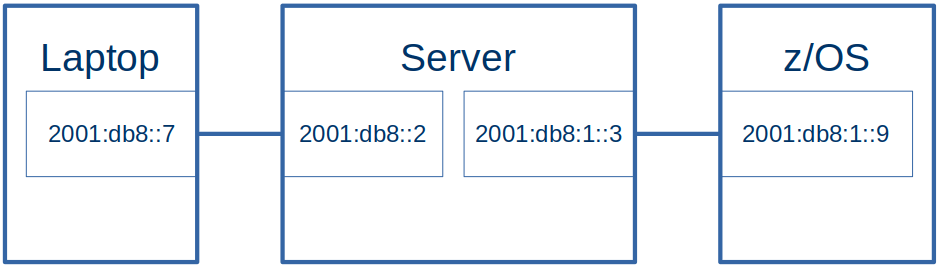
Configuration

  • The laptop had an Ethernet connection to the server.
  • The server had an Ethernet like connection to z/OS. This was a tunnel(tap1), looking like an OSA to z/OS

The addresses:

Laptop Ethernet (enp0s31f6)2001:db8:::7
Server Ethernet (eno1)2001:db8:::2
Server Tunnel (tap1)2001:db8:1::3
Z/OS interface (ifacecp6)2001:db1::9

The Laptop side had prefix 2001:db8:0::/64, the z/OS side had prefix 2001:db8:1::/64 . See One minute topic: Understanding IP V6 addressing and routing if these numbers look strange.

Definitions

z/OS routing definitions

BEGINRoutes 
;     Destination      FirstHop          LinkName   Size 
ROUTE default6         2001:db8:99::3    IF2        MTU  1492
ROUTE 2001:db8:99::/64 2001:db8:99::3    IF2        MTU 5000 

ROUTE 2001:db8::/64    2001:db8:1::3     IFPORTCP6  MTU 5000 
ROUTE 2001:db8:1::/64  2001:db8:1::3     IFPORTCP6  MTU 5000 
                                                                              
ENDRoutes 

Where

  • default6 says if no other routes match, then send the traffic down IF2 connection. At the remote end of the IF2 connection, it has IP address 2001:db8:99::3.
  • Traffic for 2001:db8:99::/64 should be sent down interface IF2 – which has an address 2001:db8:99::3 at the remote end
  • Traffic for 2001:db8::/64 (2001:db8:0::/64) should be sent down interface IFPORTCP6 which has address 2001:db8:1::3 at the remote end.
  • Traffic for 2001:db8:1::/64 should be sent down interface IFPORTCP6 which has address 2001:db8:1::3 at the remote end.

I needed a route for both 2001:db8::/64 and 2001:db8:1::/64 as one was the route to the laptop, the other was the route to the Linux server.

Linux Server machine

On my Linux machine I had

from ip -6 addr

tap1: <BROADCAST,MULTICAST,UP,LOWER_UP> mtu 1500 state UNKNOWN qlen 1000
 inet6 2001:db8:1::3/64 scope global 
    valid_lft forever preferred_lft forever
 inet6 2001:db8::3/64 scope global 
    valid_lft forever preferred_lft forever
 inet6 fe80::e852:31ff:fe0f:81da/64 scope link 
    valid_lft forever preferred_lft forever

I used the global address 2001:db8:1::3 in my z/OS routing statement.

The documentation implies I should use the link-local address fe80::e852:31ff:fe0f:81da in my static z/OS definitions, but I could not see how to use this, as it changed every time I ipled my z/OS. This means I need to explicitly define an address on Linux for this connection ( 2001:db8:1::3).

Linux Server definitions

On my Linux server I defined static definitions.

sudo sysctl -w net.ipv6.conf.all.forwarding=1

# clear the state every time
sudo ip -6 route flush root 2001:db8:1::/64
sudo ip -6 route flush root 2001:db8::/64
sudo ip -6 neigh flush all 

# define the interface to z/OS
sudo ip -6 addr del 2001:db8:1::3/64 dev tap1
sudo ip -6 addr add 2001:db8:1::3/64 dev tap1

sudo ip -6 addr del 2001:db8::2/64 dev eno1
sudo ip -6 addr add 2001:db8::2/64 dev eno1


sudo ip -6 route del 2001:db8::/64 dev eno1
sudo ip -6 route add 2001:db8::/64 dev eno1

sudo ip -6 route del 2001:db8:1::9 dev tap1
sudo ip -6 route add  2001:db8:1::/64   dev tap1

# sudo traceroute -d -m 2 -n -q 1 -I    2001:db8::7 
# ping 2001:db8::7 -c 1 -r
# ping 2001:db8:1::9 -c 1 -r

This script grew as I added all of the options to get it to work.

The statements are

sudo sysctl -w net.ipv6.conf.all.forwarding=1

This enables the cross interface traffic.

sudo ip -6 route flush root 2001:db8:1::/64
sudo ip -6 route flush root 2001:db8::/64
sudo ip -6 neigh flush all

These clear the routing for the two addresses, and for the neighbourhood cache. I do not know if these are required, without them the results were not consistent.

#give the interface to z/OS an explicit address
sudo ip -6 addr del 2001:db8:1::3/64 dev tap1
sudo ip -6 addr add 2001:db8:1::3/64 dev tap1


#give the connection to the Laptop an explicit address
sudo ip -6 addr del 2001:db8::2/64 dev eno1
sudo ip -6 addr add 2001:db8::2/64 dev eno1

These deleted then created global addresses for the server end of the interfaces.

sudo ip -6 route del 2001:db8::/64 dev eno1
sudo ip -6 route add 2001:db8::/64 dev eno1


sudo ip -6 route del 2001:db8:1:: dev tap1
sudo ip -6 route add 2001:db8:1:: dev tap1

These deleted and created routes the traffic to the interfaces. I could have used route rep…

Linux Laptop definitions

#Give the ethernet connection to the server an explicit address
sudo ip -6 addr add 2001:db8::19 dev enp0s31f6

#create the route to the server using the via
sudo ip -6 route del 2001:db8:1::/64 dev enp0s31f6
sudo ip -6 route add 2001:db8:1::/64 via 2001:db8::2 dev enp0s31f6

I needed to specify

  • an explicit to the address of the interface to the server, so it could be used as a destination from z/OS.
  • the route to get to the server. I needed to specify the via, so the static route was used directly. Without the via, it tried to use Neighbourhood discovery.

Pinging

For “ping” to work, the packet has to reach the destination and the reply get back to the originator. See Understanding ping and why it does not answer.

If I pinged 2001:db8:1::9 (z/OS) from the Linux server (the end of the IFPORTCP6 connection) the traffic came from address 2001:db8:1::3, The reply was sent back using the matching 2001:db8:1::/64 definitions.

If I pinged 2001:db8:1::9 (z/OS) from my laptop, through the Linux server to z/OS, the traffic came from address 2001:db8::7. The reply was sent back using the matching 2001:db8::/64 definitions.

If I pinged 2001:db8::7 (laptop) from z/OS it was sent back using the matching 2001:db8::/64 definitions.

Understanding radvd with IPV6 on Linux.

My two day project to deploy IP V6 dynamic routing, turned into an eight week project before I got it to work.

I am documenting a lot of what I learned – today’s experience is understanding what radvd is and what the configuration options mean. I found a lot of documentation – most of which either assumed you know a lot, or only provided an incomplete description.

High level view of what radvd provides

There are several ways of providing configuration to TCPIP. One way is using radvd (on Linux).

In a configuration file you give

  • An interface name
    • Which IP addresses (and address ranges) are available at the remote end of the connection.
    • Which IP addresses (and address ranges) are available at the local end of the connection

From the information about the local end, the remote end can build its routing tables.

Background IP routing

With IP you can have

  • static routing, where you explicitly give the routes to a destination – such as to get to a.b.c.d – go via xyz interface. You have to do a lot of administration defining the addresses of each end of an interface (think Ethernet cable)
  • dynamic routing, and neighbourhood discovery, where the system automatically finds the neighbours and there is less work for an administrator to do.

With IPv6 you have

  • global addresses with IP addresses like 2001:db8:1:16…..
  • link-local addresses. These are specific to an interface. An Ethernet connection can have many terminals hanging off ‘the bus’. The link-local address is only used within the connection. A different Ethernet cable can use the same address. There is no problem as the addresses are only used with the cable.
  • Neighbour Discovery. Rather than specify every thing as you do with static routing, IP V6 supports Neighbour Discovery, where each node can tell connected nodes, what routes and IP addresses it knows about. This is documented in the specification. This supports
    • Router Advertisement (RA), (“Hello, I’m a router, I know about the following addresses and routes”),
    • Router Solicitation (RS), (“Hello, I’ve just started up, are there any routers out there?”),
    • Neighbour Solicitation(NS) (“Does anyone have this IP address?”), and
    • Neighbour Advertisement (Usually in response to a Neighbour Solicitation, “I have this address”).

What is radvd?

The radvd program is a Router Advertisment Daemon (RADvd) which provides fakes router information – but is not a router.

You specify a configuration file. The syntax is defined here.

You can specify that this interface provides a “default” route. See here.

Example definition

I have a Linux Server, and a laptop running Linux connected by an Ethernet cable.

For the server, the radvd.conf file has

# define the ethernet connection
interface eno1
{
AdvSendAdvert on;
MaxRtrAdvInterval 60;
MinDelayBetweenRAs 60;

prefix 2001:ccc::/64
{
# AdvOnLink on;
# AdvAutonomous on;
AdvRouterAddr on;
};

# route 2001:ff99::/64
# {
# # AdvRoutePreference medium;
# # 3600 = 1 hour
# AdvRouteLifetime 3600;
#
# };
};

The key information is

Comments

Data following #

The name of the interface

interface eno1{….};

prefix statement

prefix 2001:ccc::/64{…}

2001:ccc::/64 is the ipv6 address range or, to say it another way, ipv6 addresses with the left 64 bits beginning with 2001:0ccc:0000:0000. In IP V6 this is known as the prefix.

Basically this prefix statement means “this interface is a route to the specified prefix”.

This creates some addresses on the server for the connection.

eno1    inet6 2001:ccc::e02a:943b:3642:1d73/64 scope global temporary dynamic...       
eno1    inet6 2001:ccc::dbf:5c90:61a6:20ae/64 scope global dynamic mngtmpaddr...
eno1    inet6 2001:ccc::c48b:e8f1:495c:5b52/64 scope global temporary dynamic ...       
eno1    inet6 2001:ccc::2d8:61ff:fee9:312a/64 scope global dynamic mngtmpaddr ...

create routes

The prefix statement creates a route on the server to get to the laptop

2001:ccc::/64 dev eno1 proto ra metric 100 pref medium
2001:ccc::/64 dev eno1 proto kernel metric 256 ...

This says that on the server, if there is a request for an address in the range 2001:ccc::/64 send it via device eno1.

route 2001:ff99::/64 statement.

If present this passes information to the remote end of the connection, see below. It says “I (the server) know how to route to 2001:ff99::/64”.

It the routing address does not show up in any ip -6 commands on the server.

I could see the Route Information data flowing across the network within a Router Advertisment packet. But I could not see it being used at the remote end.

I think the best thing to do is ignore the route statement.

Polling

The radvd code periodically sends information along the connection to the other end, at an interval you specify. See radvdump below on how to display it.

At the other end of the connection…

At the remote (laptop) end of the connection, using WiresShark to display the data received, shows a Router Advertisement with

Internet Protocol Version 6, Src: fe80::a2f0:9936:ddfd:95fa, Dst: ff02::1
Internet Control Message Protocol v6
    Type: Router Advertisement (134)
    ...
    ICMPv6 Option (Prefix information : 2001:ccc::/64)
    ICMPv6 Option (Route Information : Medium 2001:ff99::/64)
    ICMPv6 Option (Source link-layer address : 00:d8:61:e9:31:2a)

Where

  • fe80::a2f0:9936:ddfd:95fa is the link-local address on the server machine
  • ff02::1 the multicast address “All nodes” on a link (link-local scope)”
  • Prefix information : 2001:ccc::7/64 the prefix of the IP address 2001:ccc:0:0…
  • Route Information : Medium 2001:ff99::/64 This is from the “route” in the radvd configuration file on the Linux Server. It tells the laptop that this connection knows about routing to 2001:ccc::/64 .

From the route information it dynamically creates a route on the laptop to the server.

2001:ff99::/64 via fe80::a2f0:9936:ddfd:95fa dev enp0s31f6 proto ra metric 100 ...

This creates a route to 2001:ff99::/64 via the IP address fe80::….95fa, from the laptop end of the Ethernet connection with name enp0s31f6 to where-ever the connection goes to (in this example it goes to my server).

If I ping 2001:ffcc::9 from the laptop, it will use this route on its way to the z/OS server.

Connection to z/OS

Within the radvd.conf file is the definition to get to z/OS. This interface looks like an Ethernet (the ip -6 link command gives link/ether). This is for a different radvd configuration file to the earlier example.

interface  tap1
{
   AdvSendAdvert on; 
   MaxRtrAdvInterval 60;
   MinDelayBetweenRAs  60; 
   AdvManagedFlag  on;
   AdvOtherConfigFlag on;
   
   prefix 2001:db8:1::/64
   {
     AdvOnLink on;
     AdvAutonomous on;
     AdvRouterAddr on;
    
   };
   prefix 2001:db8:1::99/128
   {
     AdvOnLink on;
     AdvAutonomous on;
     AdvRouterAddr on;
    
   };

   route 2001:db8::/64
   {
     AdvRoutePreference medium;
     AdvRouteLifetime 3100;
   
   };
};

This says there are IP addresses in the range 2001:db8:1::/64 via this connection. z/OS reads the Router Advertisement and creates a route for them. TSO Netstat route gives

DestIP:   2001:db8:1::/64 
  Gw:     :: 
  Intf:   IFPORTCP6         Refcnt:  0000000000 
  Flgs:   UD                MTU:     9000 

The explicit IP address, with the 128 to specify use the whole value, rather than just the prefix,

 prefix 2001:db8:1::99/128
   {
     AdvOnLink on;
     AdvAutonomous on;
     AdvRouterAddr on;    
   };

creates a route in z/OS; from TSO NETSTAT ROUTE

DestIP:   2001:db8:1::99/128 
  Gw:     :: 
  Intf:   IFPORTCP6         Refcnt:  0000000000 
  Flgs:   UHD               MTU:     9000 

In UHD, the U says the interface is Up, the H says this is for a host (a specific end point), and the D says this is dynamically created.

If you try to ping 2001:db8:1::99 from the server, a Neighbour Solicitation request is sent from the server to z/OS, asking “do you have 2001:db8:1:99?”. My z/OS did not have that defined and so did not respond.

When I defined this address on z/OS TCPIP using the obeyfile

INTERFACE IFPORTCP6  DELETE 
INTERFACE IFPORTCP6 
    DEFINE IPAQENET6 
    CHPIDTYPE OSD 
    PORTNAME PORTCP 
    INTFID 7:7:7:7 
                                             
INTERFACE IFPORTCP6 
    ADDADDR 2001:DB8:1::9 
INTERFACE IFPORTCP6 
    ADDADDR 2001:DB8:9::9 
INTERFACE IFPORTCP6 
    ADDADDR 2001:DB8:1::99 

(And used

  • v tcpip,,sto,ifportcp6
  • v tcpip,,obeyfile,USER.Z24C.TCPPARMS(IFACE61)
  • v tcpip,,sta,ifportcp6

to activate it)

After this, the ping was successful because there was a neighbour solicitation for 2001:db8:1::99, and z/OS replied with Neighbour Advertisement of 2001:db8:1::9 saying I have it.

Create a default route

If you specify AdvDefaultLifetime 0 on the interface, this indicates that the router is not a default router and should not appear on the default router list in the Router Advertiser broadcasts. If the value is non zero, the recipient, can use this connection as a default route, for example there is no existing default route. A statically defined default will be used in preference to a dynamically defined one.

Use radvdump to display what it sent in the RA

You can use sudo radvdump to display what is being sent in the Router Advertiser message broadcast over multicast. It looks just like the radvd.conf file, but with all of the values filled in, so you can see the defaults.

New (well, old) job name symbol simplifies JCL!

This function has been around since z/OS 2.3, so is not that new!

There are JCL symbols

&SYSJOBNM

You can use it in started tasks and Jobs

S OMPROUTE.OMP4 JCL symbol &SYSJOBNM gives OMROUTE

S OMPROUTE,JOBNAME=OMP4  JCL symbol &SYSJOBNM gives OMP4

You can use this like

//PARM1 DD DISP=SHR,DSN=USER.PARMLIB(X&SYSJOBNM)
//PARM2 DD DISP=SHR,DSN=USER.PARMLIB(Y&SYSJOBNM)  

and so have data sets based on the invoked job name.  This means you can simplify your started task procedures, and may not need the user to specify overrides on the start command.  

Note: If you move to using JOBNAME= instead of specifying a .identifier, you may need to change other definitions. For example TCPIP defines port 520 with jobname OMPROUTE. If you switch to using OMPROUTE,JOBNAME=OMP1 this jobname will need to change to OMP1.

&SYSJOBID

gives a value like STC08460 for a started task.

&SYSUID

gives the userid like IBMUSER

&JOBNAME

gives the job assigned to the address space in which the JCL is converted, so JES2 for me.

Is “via” needed when creating a Linux IP route?

To get static routing working I needed a route like one of

# specific destination
sudo ip -6 route add fc:1::9/128 via fc::2 dev enp0s31f6r
sudo ip -6 route add fc:1::9/128  via fc::2 
#range of addresses
sudo ip -6 route add fc:1::/64 via fc::2  dev enp0s31f6
sudo ip -6 route add fc:1::/64 via fc::2 

If I a route without the via

sudo ip -6 route add fc:1::9/128 dev enp0s31f6

then it ignored my static routing and did Neighbor Solicitation; it asked adjacent systems if they had knew about the IP address fc:1::9. This is an IP V6 Neighbour Discovery facility.

There were hints around the internet that if the next hop address is not specified, then the “next hop router” will try to locate the passed address.

So the short answer to the question is: “yes. You should specify it when using static routing”.