Using dynamic allocation (SVC99) from a C program.

I wanted to monitor TCPIP, and wanted to create a SYSPRINT file for each interface. I did not know the names of the interface before I started, but by using dynamic allocation, I can have “a print file” for each interface. I can programmatically create the following JCL

//COLIN DD SYSOUT=A
or
//MEMBER DD DSN=COLIN.PDS(MEMBER1),DISP=SHR

The SVC 99 routine can print error messages, or you can use the z/OS module IEFZB476 to have have the messages passed back to you program to process. Using IEFZB476 was an extra challenge.

Which function do I use?

C run time provides

  • dynalloc(), where you have a structure which you use to point to your data. For example ip.__ddname = “ABCD “;
  • svc99(), where you create an array of definitions with a numeric code, such {0x0001,..”COLIN”}

I initially use the dynalloc() function, but this does not allow you to display error messages. You get back an error code which you have to look up. Internally it creates and use an SVC 99 parameter list. z/OS has a program IEFZB476 which you can use to produce messages from the error codes, and the SVC99 parameter list, but as you do not have access to the SVC 99 parameter list, you cannot use this print message program.

The SVC99 was not that much more difficult to use, and I would recommend this to other people.

The svc99() can display error messages as WTO, or WTL, and you can pass the SVC99 parameter list to IEFZB476 to print or return the messages.

Basic dynamic allocation program.

You can create data sets, or mimic what JCL does, by associating a data set or file to a //DDNAME.

I’ll just set up output to the “printer” to illustrate the concepts. (//COLIN DD SYSOUT=A)

You pass a set of parameters to SVC 99 with the following format

  • A code to identify what this parameter is for. For example (see here for the list, and here for JCL -> value mapping)
    • 0X0001 (DALDDNAM) is to specify the DDNAME
    • 0x0018 (DALSYSOU) is for SYSOUT
  • A count of the options ( I set this to one)
  • The length of the data, for a string “COLIN” use the value 5.
  • The value of the data.
    • For SYSOUT, the data is the class, ‘A’, this has length 1
    • For DDNAME the data is “COLIN” and has a length of 5.

I set up some macros to make it easier to create these structures

#define SVC99char1(name, code,v)\     
struct{\
short key;\
short count;\
short length;\
char value[sizeof(v)]; \
} name = {code,1,1,v};
#define SVC99string(name, code,v)\
struct{\
short key;\
short count;\
short length;\
char value[sizeof(v)]; // this has a terminating null
} name = {code,1,sizeof(v)-1,v};

and used to create the structures. I then stored them in the array.

//  create them 
SVC99char1( sysoutClass, DALSYSOU,'A')
SVC99string(ddname,DALDDNAM,"COLIN")

//and use them. Create an array to contain the addresses
void *tp[2]= { /* array of text pointers */
&sysoutClass,
&ddname
};

The last entry needs the top bit set on. You can do what the documentation says

#define MASK 0x80000000 
...
void *tp[2]= { /* array of text pointers */
&sysoutClass,
&ddname};
tp[1] = (char *)((int unsigned) (tp[1]) | MASK); // set on top bit

The complication is that the documentation says

The __S99parms structure must be in 31-bit addressable storage. A call to svc99() with 64-bit addressable storage will result in -1 return code.

Which makes this harder.

I could not get this to work when running in a 64 bit program. I found it easier to create a null entry with the top bit turned on.

void * __ptr32  tp[3];   
...
int mask = 0x80000000;
memcpy(&p->tp[2],&mask,4);

You need an extension request block to get messages printed out on the job log, or returned to your program.

 struct __S99rbx rbx = 
{
.__S99EID = "S99RBX",
.__S99EOPTS =0xC4, // issue message before return, and use wto
.__S99EVER =0x01 // version
};

The _S99EOPTS controls what happens with the error messages:

  • X’80’ ISSUE MSG BEFORE RETURNING TO CALLER
  • X’40’ RETURN MSG TO CALLER
  • X’20’ USER STORAGE SHOULD BE BELOW 16M BOUNDARY
  • X’10’ USER SPECIFIED STORAGE KEY FOR MESSAGE BLOCKS
  • X’08’ USER SPECIFIED SUBPOOL FOR MESSAGE BLOCKS
  • X’04’ USE WTO FOR MESSAGE OUTPUT

Originally I used X’80’ + x’04’ to get the messages displayed.

I had to add X’40’ to get the messages back so I could use them as input to IEFZB476.

Define and initialise the SVC99 parmlist

#include <stdio.h>  // this contains the SVC99 parameter list
struct __S99struc parmlist;
memset(&parmlist, 0, sizeof(parmlist));
parmlist.__S99RBLN = sizeof(parmlist);
parmlist.__S99VERB = 01; /* verb for dsname allocation */
parmlist.__S99FLAG1 = 0x4000; /* do not use existing allocation */
parmlist.__S99TXTPP = tp; // pointer to pointer to text units defined above
parmlist.__S99S99X =&rbx; // pointer to extension
int rc;
rc = svc99(&parmlist);
//if (rc != 0)
printf("S99ERROR = %hu %4.4x S99INFO = %hu %4.4x \n",
parmlist.__S99ERROR,
parmlist.__S99INFO,
parmlist.__S99INFO);

__S99FLAG1 is described here. You can specify things like

  • Do not use an existing allocation to satisfy this request.
  • Do use an existing allocation to satisfy this request.
  • Requests that no messages be issued for this dynamic allocation.
  • Disable symbolic substitution for the current request.

You pass a pointer to the array of the addresses of the definitions. The last address has to have the top bit to indicate the last element.

I found it easiest to get the svc99 to print the error messages than trying to find them in the documentation. When I cause an error I got out in the joblog

-STEPNAME PROCSTEP    RC   EXCP   CONN       TCB       SRB  CLOCK   
-COMPILE COMPILE 00 14633 0 .03 .00 .0
-COMPILE BIND 00 325 0 .00 .00 .0
IKJ56893I DATA SET COLIN.JCL2 NOT ALLOCATED+
IGD17101I DATA SET COLIN.JCL2 107
NOT DEFINED BECAUSE DUPLICATE NAME EXISTS IN CATALOG
RETURN CODE IS 8 REASON CODE IS 38 IGG0CLEH

If the svc 99 gave return code 0, I could use the following to write some data to the file.

FILE * hFile; 
hFile= fopen("DD:COLIN","w");
if (hFile == 0) perror("hFile is zero");
else
fprintf(hFile,"colins output\n");

Processing the error messages using IEFZB476.

You need to specify __S99EOPTS with bit 0x40 set. This tells SVC99 to return the errors in the extension.

The number of messages returned is defined in rbx.__S99ENMSG. If this value is zero, there are no messages to display.

Create the control data

  struct { 
char EMFUNCT;
#define EMWTP 0x40 //WTO
char EMIDNUM ;
char EMNMSGBK ;
char EMRSV02 ;
char * EMS99RBP ; // Address of the failing SVC 99 RB
int EMRETCOD; // The SVC 99 return code
char * EMCPPLP; // used with tso putline
char * EMBUFP ; // Address of message buffers
int EMRSV03;
char * EMWTPCDP;
} EMPARMS;
memset(&EMPARMS,0,sizeof(EMPARMS));
EMPARMS.EMFUNCT = EMWTP ; // write to programmer
EMPARMS.EMIDNUM = 50; // EMSVC99 General caller with a DYNALLOC error
EMPARMS.EMNMSGBK= rbx.__S99ENMSG;
EMPARMS.EMS99RBP= (char *) &parmlist;
//EMPARMS.EMDAPLP Not used because we are svc 99
EMPARMS.EMRETCOD= rc;

You need to fetch the program and execute it

typedef int (*funcPtr)(); // define  a pointer type to point to a fetched module
funcPtr pIZFZB;
// Fetch the module and set the address in pIZFZB
pIZFZB = (funcPtr) fetch("IEFDB476"); /* load module */
if (pIZFZB == NULL) {
PERROR("ERROR: fetch failed\n");
return;
}
int rc2;
// and invoke it
rc2 = (*pIZFZB )(&EMPARMS);

printf("RC2 from format message, %i\n",rc2);
printf("rbx __S99EERR %hi, __S99EINFO, %hi\n", rbx.__S99EERR,rbx.__S99EINFO);
printf("__S99ERCO %2.2x __S99ERCF %2.2x\n", rbx.__S99ERCO,rbx.__S99ERCF);

Where’s my packet gone? How can I see it being discarded.

I was testing out tracing TCP/IP on z/OS and wondered why I was not seeing packets with a bad destination address in the trace. I’ve now found out WHY I cannot see them, it’s just a little extra complexity of TCP/IP.

I had configured my z/OS to have an IP address of 7.1.168.74, and I could trace the packet. When I defined a route to z/OS for 7.168.1.>75< it did not appear in my trace even as an undeliverable packet.

My configuration was

  INTERFACE TAP1 
DEFINE IPAQENET
CHPIDTYPE OSD
IPADDR 7.168.1.74
; PRIROUTER
PORTNAME PORTB
START TAP1

If you add the PRIROUTER option, my packet appeared in the trace. The documentation says

The primary router stack is the only stack to which OSA forwards packets when the destination IP address has not been previously registered with OSA. If no active TCP/IP instance using this device is defined as the primary router (PRIROUTER) or secondary router (SECROUTER), the device discards the datagram.

I think of an OSA as a clever hardware socket where you plug your Ethernet cable into the side of the z/OS box. Amongst other things, it drops traffic not destined for the z/OS image(s).

The quoted text means the OSA is doing some of the network work, and dropping packets not destined for the z/OS image(s), and so less work for z/OS.

With PRIROUTER I had a trace record, and the drop reason code was 4167, IP_NO_FWD: the packet cannot be forwarded, as expected.

Can I see this in NETSTAT output?

When I use NETSTAT STATS, it now has

Received Address Errors = 5

When I use NETSTAT DEVLINKS, the interface now has

Inbound Packets In Error = 5

When PRIROUTE is not specified, these values are 0.

zWireshark – capturing TCPIP trace on z/OS and displaying it in wireshark.

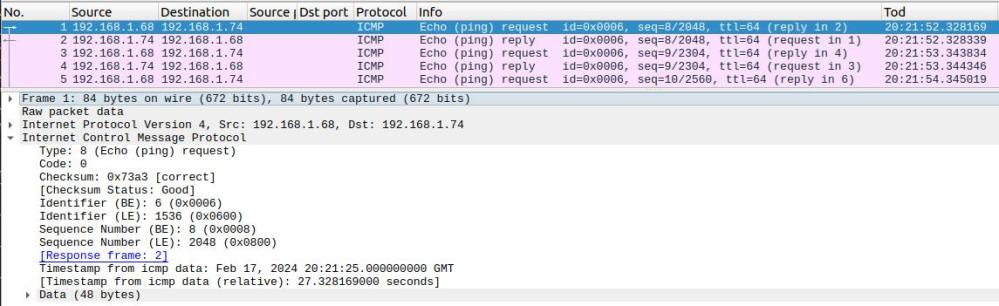
For example, a ping to z/OS as seen by z/OS

The TCPTRACE module runs as a batch job. It uses a documented TCPIP interface to collect packet trace data. It writes the trace data to a file which can be downloaded and used as input to wireshark.

Using the TCPTRACE module, you submit the job, run your test. Stop the job, download the file. Simple.

The documented way to collect a trace from z/OS is 

  • Start a CTRACE trace writer
  • Start CTRACE
  • Start TCP trace
  • Run your test
  • Stop TCP trace
  • Stop Ctrace
  • Stop Trace writer 
  • use IPCS to process the trace and create a file to download
  • Download the file

Which is complex and has many steps.

Ive created a github project called zWireshark. You only need the load module, the source is there for example.

Please let me know of any suggestions or improvements.

What was that Linux command I issued yesterday about tea time?

With the Linux history command you can display the commands that have been issued. 

For example

history |grep route

Displays all the commands (in the history file) containing the word route.

It displays output like

 15  traceroute 2001:db8:8::9
16 sudo ip -6 route add fd00::6:1:1/128 dev tap2
18 sudo ip -6 route add 2001:db8:8::9/128 dev tap2
30 grep route /home/zPDT/*.sh
40 ip -6 route

This page has some good examples of history usage

  • !?route displays the lines in the history file which include route
  • !5 executes the 5th line in the history file

I wanted to find the command I issued yesterday around 4PM. You can display the dates and times of the history records.

Setting the environment variable

HISTTIMEFORMAT="%d/%m/%y %T "
history |grep route

gave me

  30  12/02/24 07:58:50 grep route /home/zPDT/*.sh 
40 12/02/24 07:58:50 ip -6 route
46 12/02/24 07:58:50 traceroute 2001:db8:8::9
74 12/02/24 07:58:50 traceroute 2001:db8::3

Using

HISTTIMEFORMAT="%T "
history |grep route

gave just the time of day.

30 07:58:50 grep route /home/zPDT/*.sh
40 07:58:50 ip -6 route
46 07:58:50 traceroute 2001:db8:8::9
74 07:58:50 traceroute 2001:db8::3
86 07:58:50 traceroute 192.168.1.74

To keep this, you should put

export HISTTIMEFORMAT=”%T “

in the .bashrc file

You can also set in .bashrc

  • export HISTSIZE=50 The maximum number of entries displayed with the history list.
  • export HISTFILESIZE=5000 The maximum number of entries in the .bash_history file.

traceroute and “port unreachable”

I was trying to connect two systems using IP V6, and was despairing when I kept getting flows with errors like

This one seemed OK (from laptop to z/OS)

Internet Protocol Version 6, Src: 2001:db8:3::3, Dst: 2001:db8:8::9
Hop Limit: 1
Source Address: 2001:db8:3::3
Destination Address: 2001:db8:8::9
User Datagram Protocol, Src Port: 45239, Dst Port: 33435
Source Port: 45239
Destination Port: 33435
[Expert Info (Chat/Sequence): Possible traceroute: hop #1, attempt #1]

This one looked like a problem (from z/OS to laptop)


Internet Control Message Protocol v6
Type: Destination Unreachable (1)
Code: 4 (Port unreachable)

Internet Protocol Version 6, Src: 2001:db8:3::3, Dst: 2001:db8:8::9
Next Header: UDP (17)
Hop Limit: 1
Source Address: 2001:db8:3::3
Destination Address: 2001:db8:8::9
User Datagram Protocol, Src Port: 45239, Dst Port: 33435
Source Port: 45239
Destination Port: 33435
[Expert Info (Chat/Sequence): Possible traceroute: hop #1, attempt #1]

Is this a problem?

No – this is how traceroute works

Ive explained about traceroute.

From laptop to z/OS

  • Internet Protocol Version 6, Src: 2001:db8:3::3, Dst: 2001:db8:8::9
    • Hop Limit: 1 The hop count is decremented on each top
    • Source Address: 2001:db8:3::3
    • Destination Address: 2001:db8:8::9
  • User Datagram Protocol, Src Port: 45239, Dst Port: 33435
    • Source Port: 45239
    • Destination Port: 33435
    • [Expert Info (Chat/Sequence): Possible traceroute: hop #1, attempt #1] This is Wireshark’s interpretation of the request.

From z/OS to laptop

  • Internet Control Message Protocol v6
    • Type: Destination Unreachable (1)
    • Code: 4 (Port unreachable)
    • Internet Protocol Version 6, Src: 2001:db8:3::3, Dst: 2001:db8:8::9
    • Hop Limit: 1
    • Source Address: 2001:db8:3::3
    • Destination Address: 2001:db8:8::9
  • User Datagram Protocol, Src Port: 45239, Dst Port: 33435
    • Source Port: 45239 This matches the original request
    • Destination Port: 33435 This matches the original request
    • [Expert Info (Chat/Sequence): Possible traceroute: hop #1, attempt #1] This is Wireshark’s interpretation of the data

In this case the “problem flows” are expected as a result of the way the traceroute command works.

p’ing and f’ing a C job or started task

I have a C program which can run as a long running batch program. I wanted to be able to stop it when I had finished using it. C runtime has the __console and __console2 which allow an operator to interact with the job, by using the operator commands stop(p) and modify(f).

Using the __console* interface I can use the operator commands

p colinjob
f colinjob,appl=’these parameters’

When the modify command is used, the string returned to the application is null terminated. I think you can enter 127 characters in the appl=’…’ parameter.

The string is converted to upper case.

__console or __console2?

__console was available first. __console2 extends the capability of __console, by having the capability to set more attributes on the message, such as where the message gets routed to.

An application can issue an operator command, and specify a Command And Response Token (CART). The target application can tag responses with the same CART value, and so the requesting application gets the responses to its original request.

Write to operator

You can use __console() __console2() just to write to the operator.

  • If the user does not have access to BPX.CONSOLE in the FACILITY class, and is not a super user, you get “BPXM023I (userid) A Message”
  • If the userid is has read access to BPX.CONSOLE in the FACILITY class or running as a super user (id(0) ), you get “A Message” without the BPXM023I

You can use __console* to write to the operator and return with no special programming.

Waiting for a stop or modify request

When using __console* to wait for a modify or stop request, the __console* request is suspended, until it receives a modify or stop request. This means that you need to set up a thread to do this work, and to notify the main program when an event occurs.

include statements

You need

 #pragma runopts(POSIX(ON)) 
/*Include standard libraries */
#include <stdio.h>
#include <stdlib.h>
#include <string.h>
#include <stdarg.h>
#include <errno.h>
#include <sys/__messag.h>
#define _OPEN_SYS 1
#include <pthread.h>
#define _OPEN_SYS
#include <signal.h>
// the following is used to communicate between thread and main task
struct consoleMsg{
char code;
char message[128];

};

The main program

int main( int argc, char *argv[]) 
{
...
struct consoleMsg consoleMsg;
memset(&consoleMsg,0,sizeof(consoleMsg));
consoleStart(&consoleMsg);

for...
{
...
 if (consoleMsg.code ==_CC_stop ) break;
 else
 if (consoleMsg.code == _CC_modify )
 {
  printf("modify message:%s.\n",consoleMsg.message);
  consoleMsg.code = 0;
 }
...
} // for
consoleStop(&consoleMsg);
}

consoleStart(…)

This function takes the input parameter and passes it to the thread.

pthread_t thid; 
void consoleStart( struct consoleMsg * pCons)
{
 // this creates the thread and says execute "thread" function below
if (pthread_create(&thid, NULL, thread, (void * ) pCons) != 0)
{
perror("pthread_create() error");
exit(1);
}
return;
}

consoleStop(…)

If the operator used the stop command, the thread (below) ends. If the main program wants to end it, it issues a kill. You should not issue the kill if the thread has ended.

void consoleStop( struct consoleMsg  * pCons) 
{
  // if the P command was issued, the thread ended,so we do not need to kill it
if (pCons -> status = 0) return; // it has already ended
int status;
status = pthread_kill(thid, SIGABND);
if (status != 0)
{
perror("pthread_kill() error");
}

The thread subtask

This does all of the work. It is passed the pointer which was passed in the consoleStart function. In this example, it points to a buffer for the returned data, and the reason the exit was woken up.

When the thread is started, it displays a message, giving

BPXM023I (COLIN) Use f jobname,appl=data or p Jobname

void *thread(void * pArg ) { 
   // map the passed argument to ours
    struct consoleMsg * pCM = ( struct consoleMsg * ) pArg;
char * pMessage = "Use f jobname,appl=data or p Jobname";
char reply[128]; /* it gets the data */
int concmd; // what command was issued
char consid[4] = "CONS";
unsigned int msgid = 0 ;
unsigned int routeCode[] = {0};
unsigned int descr[] = {0};
char cart[8] = "MYCART ";
struct __cons_msg2 cons;
cons.__cm2_format = __CONSOLE_FORMAT_3;
cons.__cm2_msglength = strlen(pMessage);
cons.__cm2_msg = pMessage;
cons.__cm2_routcde = routeCode;
cons.__cm2_descr = descr;
cons.__cm2_token = 0;
cons.__cm2_msgid = &msgid;
cons.__cm2_dom_token = 0;
cons.__cm2_dom_msgid = 0;
cons.__cm2_mod_cartptr = &cart[0];
cons.__cm2_mod_considptr= &consid[0];
memcpy(&cons.__cm2_msg_cart,&cart ,8);
memcpy(&cons.__cm2_msg_consid, &consid,4);
int rc;
    int loop;

for( loop = 0; loop < 1000;loop ++)
{
  // issue the message and wait
rc= __console2(&cons, &reply[0], &concmd);
if (rc != 0)
perror("__console2");
printf("__console2 gave rc %d function %d\n",rc,concmd);
pCM -> code = concmd;
if (concmd == _CC_modify )
{
printf("Modify issued %s\n",reply);
memcpy(&pCM-> message,&reply,sizeof(reply));
}
else
if (concmd == _CC_stop)
{
printf("Stop issued\n");
break;
}
}
void * ret = "thread returned\n" ;
pthread_exit(ret);
}

Converting a STCK into Unix time

A system z STCK instruction gives the number of microseconds since Jan 1st 1900. The Unix time is based on Jan 1st 1970.

I needed to convert a STCK to a Unix time.

Convert a STCK to seconds and microseconds.

Bit 51 of the STCK instructions represents 1 microsecond.

// get the STCK value 
unsigned long long stck, stck2;
__stckf(&stck); // use store clock fast

// convert STCK to microseconds
stck2 = stck >>12;
int seconds = stck2/1000000; // 1 million
int microseconds = stck2%1000000

Because the STCK will overflow on September 17, 2042, you should be using the STCKE instruction.  The format of the STCKE is a one byte epoch, the STCK value, and other data.

To get the time in seconds

unsigned long longstck4
char stcke[16];
__stcke(&stcke);
memcpy(&stck4,&stcke,8); // only get the relevant part
stck4 = stck4>>4; // shift it 4, (STCK shifts 12)
seconds= stck4/1000000;

Get the unix time

time_t t =  time(); 

This time will overflow on January 19, 2038.

You can use

#define _LARGE_TIME_API 
#include <time.h>
...
time64_t t64 ;
time64(&t64);

and t64 is a long long integer.

Converting STCK seconds to Unix time

UnixSeconds = STCKSeconds – 2208988800;

and the number of micro seconds is the same.

Format it

To format it see here.

Using a VSAM file from another system.

I have been working with two levels of ADCD z/OS system, Z24C and Z25D. I want to be able to use VSAM files from the z24C level system on the z25D system.

With non VSAM files, it is easy. I can define an alias for a high level qualifier such as my userid COLIN which points to the user catalog with my data sets in it. It is a bit harder with VSAM files, especially where there is a file with the same name of both systems (such as CSF.CSFCKDS).

A VSAM PATH is an alias for VSAM files.

Conceptually the first step is

//IBMDEFP JOB 1,MSGCLASS=H 
//S1 EXEC PGM=IDCAMS
//SYSPRINT DD SYSOUT=*
//SYSIN DD *
DEF PATH -
(NAME(COLINQ.AUT420.AUT420D.CSI.Z24C) -
PATHENTRY( AUT420.AUT420D.CSI ) -
) -
CATALOG( USERCAT.Z24C.PRODS )
/*

File AUT420.AUT420D.CSI is in catalog USERCAT.Z24C.PRODS

The above JCL will create a name COLINQ.AUT420.AUT420D.CSI.Z24C which points to the file AUT420.AUT420D.CSI in catalog USERCAT.Z24C.PRODS. The entry COLINQ.AUT420.AUT420D.CSI.Z24C is put in the same catalog.

If you use ISPF 3.4 it will not find the dataset.

Create an alias for the High Level Qualifier

//IBMUSERT JOB 1,MSGCLASS=H 
//S1 EXEC PGM=IDCAMS,REGION=0M
//SYSPRINT DD SYSOUT=*
//SYSIN DD *
DEFINE ALIAS (NAME(COLINQ) RELATE('USERCAT.Z24C.PRODS'))
/*

The above JCL will create an alias COLINQ, and says to find any datasets beginning with COLINQ go and look in catalog USERCAT.Z24C.PRODS.

To import the catalog into the current system

//IBMIMPC JOB 1,MSGCLASS=H 
//S1 EXEC PGM=IDCAMS
//SYSPRINT DD SYSOUT=*
//CAT DD DISP=SHR,DSN=ADCD.LIB.JCL,VOL=SER=C4SYS1,
// UNIT=3390
//SYSPRINT DD SYSOUT=A
//SYSIN DD *
IMPORT -
OBJECTS -
((USERCAT.Z24C.PRODS -
VOLUME(C4SYS1) -
DEVICETYPE(3390))) -
CONNECT -
CATALOG(CATALOG.Z25D.MASTER)
/*
//

The above JCL says import the catalog USERCAT.Z24C.PRODS on volume(C4SYS1), type (3390) into the (master) catalog CATALOG.Z25D.MASTER.

If the system needs to find USERCAT.Z24C.PRODS, it has enough information to be able to find it.

What you actually do

Now that you understand the process, the process you should follow is

  • Import the catalog into the current system.
  • Define an High Level Qualifier alias to point to the catalog. I might pick COLIN4C ( for the z24C system).
  • Create a path using COLIN4C as the high level qualifier of the data set, for each VSAM file.

You should then be able to see your data set in ISPF 3.4

To access the Z24C /u ZFS files system on the Z25D system I used

 IMPORT - 
OBJECTS -
((CATALOG.Z24C.MASTER -
VOLUME(C4SYS1) -
DEVICETYPE(3390))) -
CONNECT -
CATALOG(CATALOG.Z25D.MASTER)

DEFINE ALIAS (NAME(Z24CMAST) RELATE('CATALOG.Z24C.MASTER'))

DEFINE PATH -
(NAME(Z24CMAST.ZFS.USERS ) -
PATHENTRY( ZFS.USERS )) -
CATALOG(CATALOG.Z24C.MASTER)

In Unix I created a directory

mkdir /u/old

The mounted the file system in ISPF option 6 TSO

mount filesystem('Z24CMAST.ZFS.USERS') mountpoint('/u/old') type(ZFS)  
mode(read)

I could then access the files from /u/old/…

MFA messages

Other posts on MFA:

AZF2406E Error from R_factor (AZFTOTP1) (length=0)

The RACF definitions have been done, you need to the the AZFEXEC processing for the factor (AZFTOTP1)

From Curl on Linux

curl: (35) error:0A00010B:SSL routines::wrong version number

The policy agent was not started on z/OS

ANZ#IN01 : IO error while writing, errno=140 reason=76697242

The policy agent was not running.

Browser: Secure Connection Failed An error occurred during a connection to … SSL received a record that exceeded the maximum permissible length.

Error code: SSL_ERROR_RX_RECORD_TOO_LONG

The policy agent was not started on z/OS

AZF2606E Failed to listen on loopback address (port:6792. rc:1115, rsn:0x744c7247)

There were two instances of AZF#IN00 active at the time (I was shutting one down, and restarting it)

Action: Wait till the first instance has stopped and then restart it.

Multi Factor Authentication(MFA): Planning.

The documentation is pretty good on how to install and configure MFA on z/OS.

The blog posts below give additional information, and the definitions I used to get it working.

Length of password fields.

Some z/OS applications only support passwords of length up to 8 characters. z/OS has had pass-phrase support for many years. A pass phrase must be between 14 to 100 characters in length (inclusive).

If you are going to use MFA where you combine a One Time Password and your password (such as 123456:passw0rd) the applications need to be able to support passwords longer than 8 characters. If your application does not support long passwords you will need to use out-of-band MFA.

See here on how to configure TSO to support pass phrase. Once this has been done, the TSO logon panel has a long password field. Once you have configured TSO to support pass phrases you can configure RACF and individual userids to use pass phrases.

In-band and out-of-band

With some applications you enter two factors to logon to the application. For example, I can logon to TSO with a “password” 983211:passw0rd - where 983211 is a one time code (which changes every minute) and passw0rd is my RACF password. This is in-band (you enter the combined password >IN<to the application). To be able to use in-band authentication you need to be able to enter long “passwords”.

If you cannot use in-band authentication, you can use multiple factors to logon to a web page, get a one time password and enter that into the application logon screen. This is indirect, or out-of-band authentication; you set up the password >OUT<side of the application. Your application does not need to change to be able to use out-of-band authorisation.

If you try to configure a userid with two factors, for example AFZTOTP1, and AZFYUBI1, you will get a message AZF2214E A user with multiple active Strong factors cannot authenticate in-band. If you try to logon to TSO with password and your Yubikey, how does MFA know if you are entering a AZFTOTP1 or a AZFYUBI1 password.

If you are going to configure a userid to logon out of band, using AZFTOP1 and AZFYYUBI1 then you will need to configure both the factors. If you want to logon in-band, just specify the single factor you want to use.

Pre-requisites

To be able to use the web browser interface to configure users for MFA you need to have AT-TLS working. AT-TLS logs to syslogd, so you need the SYSLOGD daemon running. My daemon is configured to log into /var/log/. For AT-TLS you need keyring(s) and certificate(s).  Get these set up (and tested) before you try to configure MFA.

TCPIP port configuration

You need to decide which TCP ports you will use.

  • The Server Port. This is used between the MFA web server started task and the main MFA started task. The default is 6792.
  • The Server Authentication Port. This is used when end users connect to the MFA web server, for example to define a One Time Passcode connection. The default is 6793. This port needs to be configured in AT-TLS.
  • The Mutual Authentication Port. This is used when client connect to the MFA web server using client certificate authentication. The default is 6794.  If you intend to use client certificate authentication this port needs to be configured to AT-TLS

These ports are configured via the AZFEXEC processing. If you are using Communications Server IP filtering, or a firewall, you will need to enable these ports.

What shape is your configuration?

Each LPAR needs an instance of the AFZ#IN00 started task.

For the MFA web server started task (AZF#IN01), you can use:

  • one MFA web server on each LPAR, with a different URL for each LPAR
  • a VIPA address, and one (or more) MFA web servers running, and one URL. Request will go to one server. If that server is shutdown, the traffic will be rerouted to another (active) MFA web server
  • a sysplex distributor, and one URL. A connection request is routed to any available MFA web server running in the sysplex, in a Round Robin, or workload balanced fashion.

See HA Liberty web server – introduction to using VIPA to provide high availability connectivity. and talk to your network people.

You can specify which TCPIP instance MFA uses.

Administering MFA

You need to define RACF profiles for MFA. MFA stores information in some of these profiles.

You also provide information in the MFA segment for userids.

MFA is configured using AZFEXEC which displays ISPF panels. There is granular control, you can give a userid read or update access to a specific RACF FACILITY profile like IRR.RFACTOR.MFADEF.AZFTOTP1 (for the AZFTOTP1 component).

You should plan which userids (or groups) have read or update authority to which factor. It is easy to change at a later date. You could start with a generic profile IRR.RFACTOR.MFADEF.* .

Define and activate AT-TLS definitions

MFA provides a TLS session for the MFA web browser, so it can display the secret information need to configure authenticating applications.

See Usage notes on Certificates and Keyrings, and what access is required for which functions.

Strictly you need to provide two keyrings – but I used the same keyring for both.

The server identification keyring. 

This contains a certificate used to identify the server. This certificate needs a private key. If you want to specify which label in the keyring to use, add ServerCertificateLabel to the TTLSConnectionAdvancedParms AZFConnAdvParms1
definiton.

TTLSConnectionAdvancedParms AZFConnAdvParms1 
{
  ServerCertificateLabel ...

Client certificate authentication

If you are using client certificate authentication then you need a keyring with certificates which can validate the certificate sent from the client. This keyring will usually contain certificate authority certificates. If the client is using self signed (not best practice) you will need these certificates in the z/OS keyring.

Some AT-TLS return codes are documented here

When you configure the AT-TLS procedure you configure where any output is put. I have it going to /var/log/ATTLS

You can use the Unix command pasearch > aa to write the current AT-TLS configuration to the file. You can then check the configuration is as you expect.

Steps

You need to define at least one authentication factor configured before MFA will successfully start. One Time Passcode is an easy one to define.

My approach to getting MFA configured for user was:

  • Get one function working such as Timed One Time Password (TOTP) so you can logon with just TOTP (and no password) to TSO.
  • Change the configuration to use Compound In-band Authentication, where you need TOTP and a password, so you enter 123456:passw0rd. You need to decide if you want password:code or code:password, and what the separator character is.
  • Develop a policy for out-of-band authentication for applications which do not accept a long or compound password.
  • Implement another factor.
  • Migrate users to use MFA